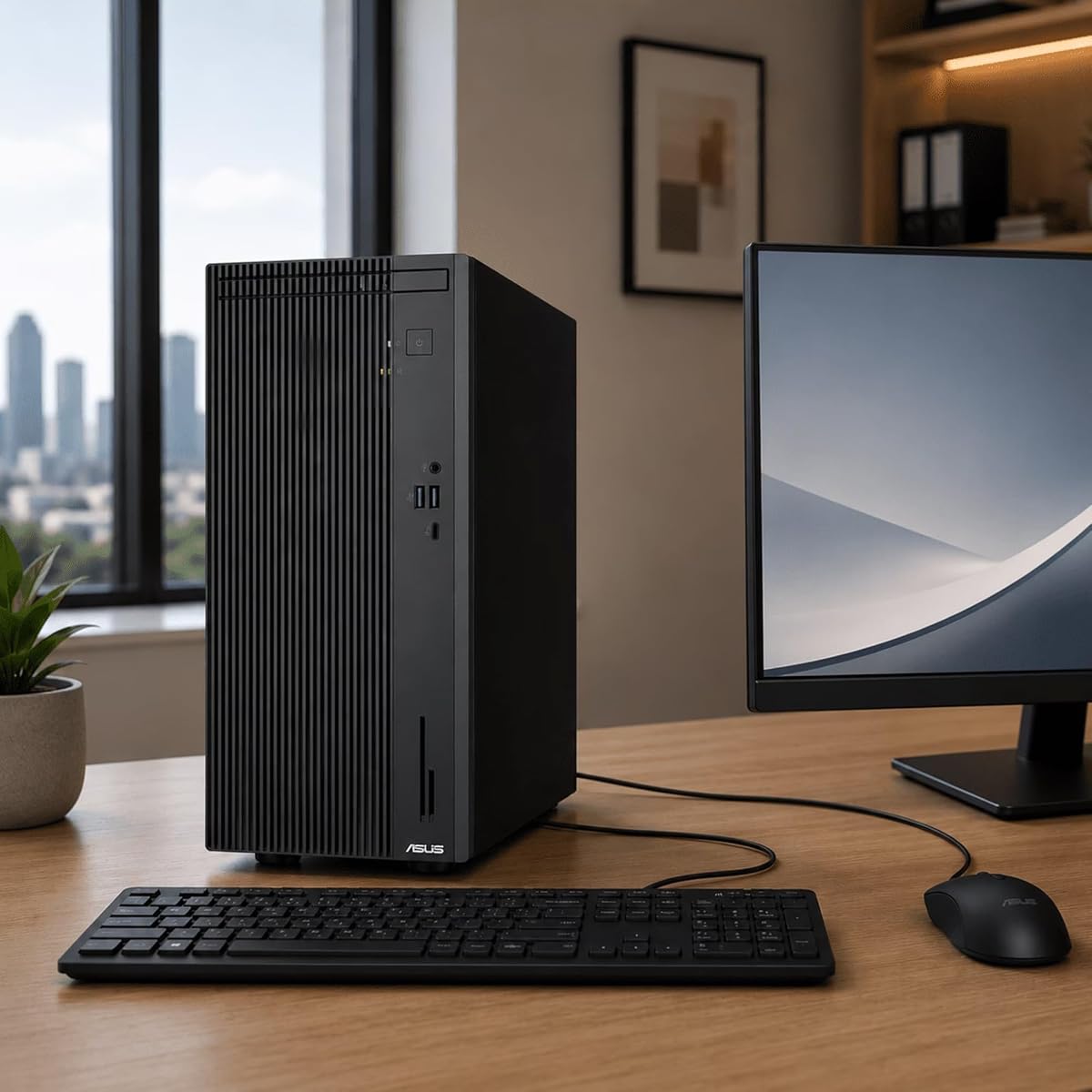
ASUS V500 Business Tower
5.0Editor score
Ten-core Intel Core i7
Sixteen gigabytes DDR5 memory
Dual-monitor wired and wireless support
Explore the best ASUS Desktop PC options for work, gaming, and productivity, with key specs, features, connectivity, storage, and upgradeability compared side
An ASUS Desktop PC can serve very different needs, from a compact office tower to a high-end gaming system with dedicated graphics and advanced cooling. A worthwhile choice balances processor power, memory, storage, display support, connectivity, expandability, and the operating system rather than focusing on one headline component.
The systems in this guide were compared using their published specifications, included accessories, connectivity, operating systems, and stated design goals. The list covers business and home configurations, Intel and AMD platforms, integrated and discrete graphics, and several tiers of gaming hardware, with the same practical criteria applied throughout.
Each review explains who the configuration is best suited for, where it stands out, and where compromises may exist. Product configurations and prices can change, so readers should verify the current listing, included components, warranty terms, and exact specifications before making a purchase.
5.0Editor score

4.7Editor score

4.2Editor score
The comparison table highlights the major processor, memory, graphics, and storage differences across all ten ASUS desktop PCs, making it easier to identify the right balance for office work, entertainment, or gaming.


The ASUS V500 Business Tower is a compelling general-purpose desktop for home offices, schools, small businesses, and everyday users. It carries a 5.0 customer rating and pairs an Intel Core i7-13620H processor with 16GB of DDR5 memory. Its most attractive feature is the balance of useful connectivity, dual-monitor support, included accessories, and a straightforward business-oriented design.
We may earn a commission when you buy through this link, at no additional cost to you.
The processor provides 10 cores and 16 threads, 24MB of Intel Smart Cache, a 2.4GHz base clock, and turbo boost up to 4.9GHz. That specification is strong enough for document-heavy work, web browsing with many tabs, video calls, spreadsheets, light photo editing, and routine content creation. Display output through both HDMI and DisplayPort allows a user to connect two screens without immediately adding a graphics card.
Storage is divided between a 512GB SSD and a 512GB external drive, creating 1TB of total capacity. The listing also states that memory is configurable up to 64GB and storage can reach 4TB with appropriate PCIe M.2 components. The seven USB ports, RJ-45 Ethernet, Wi-Fi 6, and Bluetooth 5.4 cover most desktop needs, although integrated graphics limit the system’s appeal for demanding 3D work.
This is the best-balanced choice for someone who needs a capable ASUS desktop without paying for a dedicated gaming GPU. It is particularly suitable for a home office, reception desk, shared household computer, or productivity setup with two displays. Buyers who routinely edit large media files or play demanding games should consider a dedicated-graphics alternative instead.
HDMI and DisplayPort make the V500 particularly useful for a dual-screen office. One display can hold communication tools and documents while another supports research, monitoring, or spreadsheet work.
Seven USB ports, Ethernet, Wi-Fi 6, and Bluetooth reduce dependence on adapters. A wired ASUS keyboard and mouse are also included, making the package more immediately usable.
We may earn a commission when you buy through this link, at no additional cost to you.
The ASUS ROG G700 gaming desktop stands out as a balanced all-round enthusiast system. Its 4.7 rating reflects a configuration that combines an Intel Core Ultra 7 265F processor, 32GB of DDR5 memory, an NVIDIA GeForce RTX 5060 with 8GB of GDDR7 video memory, and a 1TB NVMe SSD. It is built for high-frame-rate 1080p and 1440p gaming as well as streaming and multitasking.
We may earn a commission when you buy through this link, at no additional cost to you.
The RTX 5060 adds hardware ray tracing and AI-powered DLSS support to a processor capable of boosting up to 5.3GHz. Thirty-two gigabytes of DDR5 gives the system enough memory for games, browser sessions, voice chat, and streaming software. A 1TB NVMe drive provides quick boot and load times, while the air-cooled thermal design and 600W Gold power supply address sustained gaming loads.
The bundle includes an RGB keyboard and mouse, Windows 11 Pro, and a 12-month CPS protection plan that the listing says covers mechanical and electrical failures beyond the standard manufacturer warranty. Those extras improve convenience, although the protection terms should be reviewed directly. The desktop also supports Wi-Fi 6 and carries the expected visual styling of the ROG product line.
This G700 is a strong choice for a gamer who wants modern graphics, generous memory, and a complete package without moving into the highest-end desktop category. It also makes sense for streamers and creators who need more graphics capability than integrated graphics can provide. Prospective buyers should consider future-proofing needs and confirm the exact protection and component details before ordering.
The RTX 5060 and 32GB of system memory create a flexible platform for gaming, broadcasting, and heavy multitasking. Dedicated 8GB GDDR7 memory also gives 3D applications a meaningful advantage over integrated graphics.
Windows 11 Pro, an RGB keyboard, an RGB mouse, Wi-Fi 6, and a one-terabyte NVMe drive reduce the number of separate purchases required for a new gaming installation.
We may earn a commission when you buy through this link, at no additional cost to you.
The ASUS S501MER is a conventional office tower with unusually clear specification detail and a useful selection of front and rear ports. Its 4.2 rating pairs with an Intel Core i7-14700 processor, 16GB of DDR5 RAM, and a 1TB M.2 NVMe PCIe 4.0 solid-state drive. It is designed for offices and home environments where practical connectivity matters.
We may earn a commission when you buy through this link, at no additional cost to you.
The 14th-generation processor offers a 33M cache and speeds up to 5.3GHz, making it capable of handling office applications, research, financial work, communication platforms, and light creative tasks. The memory is listed as expandable to 64GB. Storage expansion includes two M.2 connectors, while a full PCIe 4.0 x16 slot offers more possibilities for add-in cards as needs develop.
Connectivity is a major strength. The front includes a USB 3.2 Gen 2 Type-C port, three USB 3.2 Gen 1 Type-A ports, and a 3.5mm combo audio jack. At the rear are Gigabit Ethernet, HDMI 2.1b, DisplayPort 1.4, VGA, multiple USB ports, and three audio jacks. Dual-band Wi-Fi 6E and Bluetooth 5.3 add modern wireless flexibility.
The S501MER is best for a small business, home office, or technical workstation that does not need dedicated graphics. Its compact 6.30-by-12.56-by-14.48-inch chassis and included wired keyboard and mouse make deployment straightforward. Users with intensive 3D workloads should choose a system with a discrete GPU, while others gain flexibility from the numerous ports and expansion options.
Front USB-C and USB-A connections make it easier to attach everyday peripherals without reaching around the tower. The rear selection supports multiple displays, wired networking, legacy accessories, and external audio.
Two M.2 connectors, a PCIe 4.0 x16 slot, and additional PCIe slots provide useful paths for extra storage, capture cards, networking equipment, or other upgrades.
We may earn a commission when you buy through this link, at no additional cost to you.
The ASUS V500 32GB Desktop is a strong productivity choice for users who want more memory than a typical office configuration. It has a 5.0 rating and combines the ten-core Intel Core i7-13620H processor with 32GB of RAM, a 1TB PCIe SSD, Wi-Fi 6, Windows 11 Home, and support for two 4K monitors. The included keyboard and mouse make it a practical complete package.
We may earn a commission when you buy through this link, at no additional cost to you.
The processor supplies 10 cores, 16 threads, 24MB of cache, and boost speeds up to 4.9GHz. That is well suited to heavy browser use, simultaneous communication and office applications, spreadsheet analysis, and media playback. The generous memory allocation makes it more comfortable when many applications remain open simultaneously, reducing the likelihood of memory pressure during routine multitasking.
DisplayPort and HDMI enable a two-monitor arrangement, while the listing also identifies USB 3.2, USB-C, and other connectivity for external devices. Integrated Intel UHD Graphics are sufficient for general productivity and 4K streaming, but they are not a substitute for a discrete graphics card in graphically demanding games or professional 3D applications.
This configuration is best for power users, students, hybrid workers, and small offices that want an expandable memory allocation without moving to a high-end gaming tower. The product data contains some inconsistencies between the title and bullet points regarding memory and storage, so buyers should check the final configuration carefully. Its stated 32GB RAM and 1TB SSD make it appealing when those details are confirmed.
Thirty-two gigabytes of RAM provides useful headroom for many open applications, large working sets, and productivity software. It is a meaningful advantage over a basic 16GB office configuration.
DisplayPort and HDMI support make it practical to use two 4K displays for separate documents, research windows, or communication applications without requiring a dedicated graphics card.
We may earn a commission when you buy through this link, at no additional cost to you.
The ASUS ROG G700 RTX 5070 is a performance-focused 2026 gaming desktop built around an Intel Core Ultra 7 265KF processor and NVIDIA GeForce RTX 5070 graphics. It also includes 16GB of DDR5 memory, a 1TB M.2 NVMe PCIe 4.0 SSD, and Windows 11 Home. No customer rating is available, so the published specifications and design details are the main basis for evaluation.
We may earn a commission when you buy through this link, at no additional cost to you.
The major attraction is the combination of current-generation processing and dedicated graphics. The chassis supports triple-slot GPUs, making it more flexible for future graphics upgrades than a compact system with limited clearance. A quad-fan thermal system, 240mm liquid cooler, dust filters, and an emphasis on efficient airflow are particularly useful for sustained workloads and long gaming sessions.
Connectivity is also strong, with 2.5Gbps Ethernet, Wi-Fi 6, versatile ports, Dolby Atmos audio, and AI noise cancellation. Tool-less access simplifies replacing components, while the 58-liter enclosure offers room for expansion. The included RGB keyboard and mouse complete the gaming package, and ROG Slash design with Aura Sync lighting adds a deliberate visual identity.
This G700 is best for an enthusiast who prioritizes graphics capability, cooling, and future upgradeability over having the highest memory allocation out of the box. Sixteen gigabytes of RAM can work well for gaming, but heavy streaming or content creation may justify an immediate memory upgrade. Buyers should check current component availability and the exact motherboard and power-supply details before purchase.
A 58-liter chassis and support for triple-slot graphics create more upgrade flexibility. Tool-less access also reduces the friction associated with routine component maintenance.
Quad-fan airflow, a 240mm liquid cooler, and dust filters work together to manage heat. These details are especially relevant for users who expect long gaming or creative sessions.
We may earn a commission when you buy through this link, at no additional cost to you.
The ASUS ROG GM700 is the most premium-focused configuration in this guide, pairing the AMD Ryzen 7 9800X3D with Radeon RX 9070 XT PRIME OC graphics. Its 4.2 rating is supported by 32GB of DDR5 memory, a spacious 2TB PCIe Gen 4.0 SSD, and Windows 11 Home. It is aimed at gamers, streamers, and creators who want a high-end AMD platform.
We may earn a commission when you buy through this link, at no additional cost to you.
The Ryzen 7 9800X3D is designed around gaming performance and efficient multitasking. The Radeon RX 9070 XT PRIME OC adds advanced ray-tracing features and AV1 encoding, which can benefit modern games and video workflows. With 32GB of memory, the system is well prepared for a game, streaming software, communication tools, and creative applications operating at the same time.
The two-terabyte SSD provides ample room for a large game library, applications, media, and active projects. Its PCIe Gen 4.0 interface supports rapid file access and loading. The AMD platform may also appeal to users who prefer an alternative to an Intel-based build, particularly when their software and peripherals are optimized for it.
This is the appropriate choice for a high-end gaming installation that benefits from the 9800X3D and a powerful Radeon card. It is less compelling for general office tasks, light browsing, or users who do not need dedicated high-end graphics. The total cost of ownership should be considered alongside the desired performance, and current component and operating-system support should be confirmed at purchase.
The Ryzen 7 9800X3D and Radeon RX 9070 XT PRIME OC create a specialized enthusiast platform. It is best suited to demanding games and workflows that can take advantage of dedicated graphics.
A two-terabyte PCIe Gen 4.0 SSD and 32GB of DDR5 create a generous foundation for large libraries, streaming tools, and active creative projects.
We may earn a commission when you buy through this link, at no additional cost to you.
The ASUS V500 Pro Bundle is a business-oriented tower with Windows 11 Pro, a ten-core Intel Core i7-13620H processor, 16GB of DDR5 memory, and a 1TB SSD. Its 3.0 rating is the lowest among the rated systems in this list, but the core configuration remains appropriate for ordinary office work. The included ADATA 64GB USB flash drive and wired keyboard and mouse add convenience.
We may earn a commission when you buy through this link, at no additional cost to you.
The processor includes 10 cores, 16 threads, 24MB of cache, a 2.4GHz base frequency, and turbo boost up to 4.9GHz. That provides ample performance for business applications, email, web browsing, spreadsheets, document processing, and video calls. The 1TB SSD supports quick startup and adequate local storage for common workplace files and applications.
HDMI and DisplayPort support flexible multi-display workspaces, while Wi-Fi 6 provides convenient wireless networking. Windows 11 Pro adds management and security features useful in professional environments. The listing also states that the original seal was opened for upgrading, with a one-year warranty on the upgraded RAM and SSD from PCOnline US and the remaining components retaining a one-year manufacturer warranty.
The sealed-opening detail deserves careful attention because some buyers prefer an entirely unopened retail configuration. Warranty responsibility is also divided between two providers, which may require additional care when seeking service. Subject to those considerations, the bundle is useful for small offices and home businesses that value Windows 11 Pro, a flash drive, and the ready-to-use peripherals.
Windows 11 Pro provides the security and management capabilities that many home users do not need but organizations appreciate. It is a sensible reason to select this V500 bundle over a Home-based model.
The upgraded memory and SSD have separate protection from the remaining components. Buyers should preserve documentation and understand which provider handles each part before an issue occurs.
We may earn a commission when you buy through this link, at no additional cost to you.
The ASUS ROG Strix G700 is the storage-and-memory specialist of this group. It combines an Intel Core Ultra 9 285K processor, 128GB of DDR5 memory, 11TB total storage, Windows 11 Pro, and an NVIDIA GeForce RTX 4060 Ti with 8GB of GDDR6. Its 5.0 rating reflects an ambitious configuration aimed at users who want substantial capacity for games and media.
We may earn a commission when you buy through this link, at no additional cost to you.
The Core Ultra 9 processor boosts up to 6.00GHz, providing strong performance for gaming, streaming, video editing, and multitasking. Storage is divided between a 1TB SSD and a 10TB hard drive, allowing fast access for applications and active files alongside inexpensive capacity for a large library. The 128GB of system memory is far beyond ordinary office requirements and can support intensive professional workflows.
Connectivity is extensive. The rear includes Gigabit Ethernet, HDMI, three DisplayPort 1.4 connections, PS/2, audio jacks, and multiple USB-A ports. At the front are headphone and microphone connections, USB-C, and USB-A. Triple-band Wi-Fi 6E and Bluetooth 5.3 provide high-speed wireless networking and peripheral support.
This configuration makes sense for a gaming library, media server, video archive, or workstation that benefits from enormous local storage. However, the RTX 4060 Ti is an older graphics generation than several competing systems in the guide, so buyers focused strictly on the newest gaming features may prefer a newer GPU. The total capacity must also justify the large storage and memory investment.
Combining a 1TB SSD with a 10TB hard drive separates frequently accessed files from high-capacity storage. It is a practical arrangement for large game and media collections.
With 128GB of DDR5 memory, the G700 is suited to memory-heavy creative applications, large project files, and numerous simultaneous programs. Most everyday users would not use all of it.
We may earn a commission when you buy through this link, at no additional cost to you.
The ASUS V500 64GB Desktop is aimed at productivity users who prioritize memory capacity over dedicated graphics. Its title identifies the Intel Core i7-13620H processor, 64GB RAM, a 1TB PCIe SSD, Wi-Fi 6, DisplayPort, HDMI, Windows 11, and support for two 4K monitors. No customer rating is currently published for this listing.
We may earn a commission when you buy through this link, at no additional cost to you.
The ten-core processor provides 16 threads, 24MB of cache, and boost speeds up to 4.9GHz. In combination with 64GB of memory, it is well suited to large datasets, extensive browser workloads, multiple office applications, virtual desktops, and memory-intensive professional software. The 1TB PCIe SSD provides fast startup and file access for working files and frequently used applications.
The display configuration remains suitable for productivity. DisplayPort and HDMI allow two 4K monitors to be connected, and the listing identifies USB 3.2, USB-C, and other ports for external devices. Integrated Intel UHD Graphics handle everyday visuals and media playback, but they limit performance in demanding games, 3D rendering, and GPU-accelerated workloads.
This model is best for a specialist office, analyst, developer, or content professional who can genuinely benefit from 64GB of memory. It would be excessive for browsing, email, and standard document work. Because the rating is unavailable and the product data shows some conflicting memory and storage details, the final listing should be checked to confirm the promised configuration.
Sixty-four gigabytes of memory gives demanding workflows more room to operate. It is valuable for data analysis, development environments, and extensive multitasking.
DisplayPort and HDMI enable two 4K screens for a larger, organized workspace. This is especially useful in offices where spreadsheets, communication, and reference material remain open.
We may earn a commission when you buy through this link, at no additional cost to you.
The ASUS Business Desktop PC combines a ten-core Intel Core i7-13620H processor with 16GB of DDR5 5600 memory, a 1TB PCIe NVMe M.2 SSD, Wi-Fi 6, and Windows 11 Pro. Its 5.0 rating and compact tower dimensions make it a practical option for modern offices, reception areas, shared workspaces, and home offices with limited room.
We may earn a commission when you buy through this link, at no additional cost to you.
The processor offers 10 cores, 16 threads, 24MB of Intel Smart Cache, and turbo boost up to 4.9GHz. It handles business applications, communication platforms, spreadsheets, browsing, and routine multimedia tasks smoothly. The memory is listed as expandable to 64GB, while the solid-state drive can be expanded to 2TB, providing sensible long-term flexibility.
Integrated Intel UHD Graphics support DisplayPort 1.4 and HDMI 1.4 for multi-display setups. Connectivity includes USB-C, several USB-A ports, RJ-45 Ethernet, Wi-Fi 6, and Bluetooth support. The enclosure measures 13.66 by 6.10 by 11.65 inches, balancing usable performance with a footprint that is smaller than many full-size tower systems.
This desktop is best for ordinary business productivity, remote work, and shared computing. Windows 11 Pro adds valuable security and management features, while the wired keyboard and mouse reduce setup time. It is not aimed at serious gaming or 3D rendering, but for everyday office requirements, it is one of the most straightforward and complete choices in the guide.
The compact 13.66-by-6.10-by-11.65-inch chassis fits more easily on crowded desks and in small workspaces while still accommodating a full desktop processor and solid-state drive.
Memory can expand to 64GB and storage to 2TB according to the product data. Those limits allow a business to grow the system as its software and workload requirements change.
We may earn a commission when you buy through this link, at no additional cost to you.
The right ASUS Desktop PC depends on the software you run, the displays you use, and how much room you have for future upgrades. Processor, memory, graphics, storage, connectivity, and operating-system choices should be considered together rather than in isolation.
The processor is the core of the system, but its value depends on the workload. Intel Core i7-13620H configurations provide 10 cores and 16 threads, while the Core Ultra 7 and Core Ultra 9 options serve more demanding gaming, streaming, and creative workloads. AMD Ryzen 7 9800X3D emphasizes gaming performance, and the Core i7-14700 is a versatile office-oriented choice. Look beyond the model name and consider core count, cache, clock speed, cooling, and the graphics bundled with the processor.
Memory determines how comfortably a system can hold active applications and working data. The list ranges from 16GB configurations to 64GB and 128GB options. Sixteen gigabytes is generally sufficient for ordinary office work and many games, 32GB gives comfortable room for heavier multitasking, and 64GB or more benefits data analysis, large creative projects, development, and other memory-intensive uses. Always confirm the installed amount, memory type, speed, and maximum supported capacity.
Integrated Intel or Radeon graphics are appropriate for documents, web work, video playback, and general productivity. Dedicated graphics become important for modern games, 3D rendering, video editing, and GPU-accelerated applications. The RTX 5060, RTX 5070, Radeon RX 9070 XT, and RTX 4060 Ti configurations in this guide provide materially more graphical capability. Compare the GPU model, dedicated video memory, chassis clearance, cooling, and power-supply requirements rather than assuming a higher-tier card is always necessary.
A 1TB SSD is a sensible starting point for a current desktop, while 2TB is preferable for large game libraries, high-resolution media, and active creative projects. SSDs provide much faster boot and application loading than hard drives, which is why the configurations with 1TB or 2TB NVMe storage are particularly versatile. The Strix G700 also includes a 10TB hard drive for bulk storage. Consider how much data you actually keep and whether mixing fast and high-capacity drives suits your workflow.
The number and type of display outputs determine how many monitors you can connect and at what resolution. DisplayPort and HDMI are the two most relevant interfaces in this category, and several V500 systems support dual-monitor arrangements. USB-C is useful for modern peripherals, while USB-A remains necessary for keyboards, mice, drives, and legacy devices. Compare the full front and rear port list, including audio connections and the number of available USB ports, before choosing a system for a fixed workspace.
Windows 11 Home covers general personal and business use, while Windows 11 Pro adds features such as advanced security, device management, and business-oriented administration. Some organizations require Pro for security policies, domain access, or particular management software. Conversely, Home may be sufficient for a household that only needs browsing, communication, entertainment, and document work. Confirm that your required applications support the included edition before completing an order.
Sustained performance depends on adequate cooling and a power supply suited to the installed components. The ROG systems emphasize multi-fan airflow, liquid cooling, dust filters, and power-supply efficiency, while office towers prioritize a smaller and simpler enclosure. Check case dimensions against your desk, the weight if the computer must move, GPU clearance, cooling equipment, and available power connectors. A high-end processor and graphics card should not be placed in a chassis designed only for basic office components.
An upgradeable desktop can extend its useful life as software and workloads change. Look for M.2 storage connectors, accessible memory slots, PCIe expansion slots, and tool-less access where applicable. Some systems include a keyboard, mouse, flash drive, or protection plan, but accessories should not outweigh core performance. Included peripherals are convenient, while warranty and upgrade details are particularly important for business purchasers who need clear support responsibilities.
Begin by placing the tower on a stable, hard surface with unobstructed ventilation. Connect the monitor using the interface and resolution that best suits the display, then attach the keyboard, mouse, network cable, and speakers as needed. Power on the system, complete the Windows setup, connect to Wi-Fi, and install essential security updates and the software required for your work before transferring important files.
Keep the chassis vents and any dust filters clear, and place the computer where intake and exhaust airflow are not blocked. Schedule regular system updates, maintain free storage space, and use trusted backup software for documents and projects. External drives should be disconnected safely and not used as the only copy of important data. For gaming systems, let the case run with adequate clearance and avoid changing power or cooling settings unless you understand the impact.
For long-term care, dust the exterior and accessible filters with appropriate tools, check cables for damage, and confirm that critical data is backed up. Preserve the original box and documentation until the system is fully in use, especially when warranty terms are divided between component providers. Review Windows security settings, installed applications, and user accounts periodically, and update the operating system and essential drivers through reliable official channels.
The ASUS V500 Business Tower and the ASUS Business Desktop PC are strong office choices because they combine Intel Core i7 performance, 16GB of DDR5 memory, 1TB SSD storage, dual-display support, and wired peripherals. The latter is particularly attractive for its compact dimensions and Windows 11 Pro, while the V500 Business Tower includes more explicitly documented USB and wireless connectivity. The better option depends on the operating system, port layout, and warranty terms required by the workplace.
Most office tasks and mainstream gaming can be handled with 16GB of memory, though 32GB is more comfortable for heavy multitasking, streaming, and creative software. A 64GB configuration makes sense for large datasets, professional development environments, extensive virtual machines, or high-resolution media workflows. Paying for memory that will remain unused is rarely necessary, so buyers should consider their actual workload rather than simply choosing the largest number.
Integrated Intel or Radeon graphics are suitable for general office use, media playback, and some lighter games, but they are not designed for demanding modern titles at high settings. A dedicated configuration such as the ROG G700 with RTX 5060 or RTX 5070, the GM700 with Radeon RX 9070 XT, or the Strix G700 with RTX 4060 Ti provides much stronger gaming and creative performance.
Windows 11 Home is designed for general personal use and standard productivity applications. Windows 11 Pro adds security, administration, networking, and device-management capabilities that are often important in business environments. The ROG G700, V500 Pro Bundle, Strix G700, and ASUS Business Desktop PC include Pro, while several other systems in the guide include Home.
Yes. Multiple V500 configurations include both HDMI and DisplayPort, allowing a dual-monitor setup with integrated Intel graphics. The S501MER also provides HDMI 2.1b and DisplayPort 1.4 alongside VGA. Users should confirm monitor resolution and refresh-rate requirements, and they should check the included documentation for the exact capabilities of each output.
The ROG GM700 is the strongest premium match because it combines the Ryzen 7 9800X3D, Radeon RX 9070 XT PRIME OC with AV1 encoding, 32GB of DDR5 memory, and a 2TB PCIe Gen 4.0 SSD. The ROG G700 with RTX 5060 is a more moderate alternative with 32GB of memory, DLSS support, and a 1TB NVMe drive. The best choice ultimately depends on the applications, codec requirements, and budget.
The ROG G700 and ROG G700 RTX 5070 listings specifically include RGB keyboard and mouse accessories intended for gaming. The office-oriented ASUS towers generally include wired ASUS or optical peripherals designed for productivity. Gaming buyers should check the exact accessory specifications, while office users are more likely to prioritize keyboard comfort, mouse accuracy, and reliable wired connections.
Confirm the exact processor, installed memory and storage, operating-system edition, graphics configuration, ports, dimensions, included accessories, and warranty coverage. Some listings combine a detailed title with abbreviated bullet points that may not agree, particularly on the V500 configurations. Product configurations can also change, so reviewing the current listing is essential before relying on specifications shown in an earlier guide or comparison.
The ASUS V500 Business Tower is the most broadly useful choice, combining a capable Core i7 processor, 16GB of DDR5 memory, 1TB of combined storage, extensive connectivity, and dual-monitor support. The ROG G700 with RTX 5060 stands out for modern gaming, while the ROG GM700 with Radeon RX 9070 XT provides the most premium gaming and creative platform among the listed systems.
Prioritize the components your work actually needs. Office users should focus on memory, storage, display outputs, operating system, and compact dimensions. Gamers should examine the graphics card, processor, cooling, power supply, and upgrade path. Creative professionals should account for memory capacity, fast storage, codec support, and the ability to handle demanding applications alongside a primary workload.
Finally, verify the current listing, component configuration, accessory package, protection terms, and return policy before purchasing. Prices and configurations can change, and the same model family may appear with different memory, storage, graphics, and operating-system options. A careful final check ensures that the selected ASUS Desktop PC meets your needs rather than merely matching a similar product name.