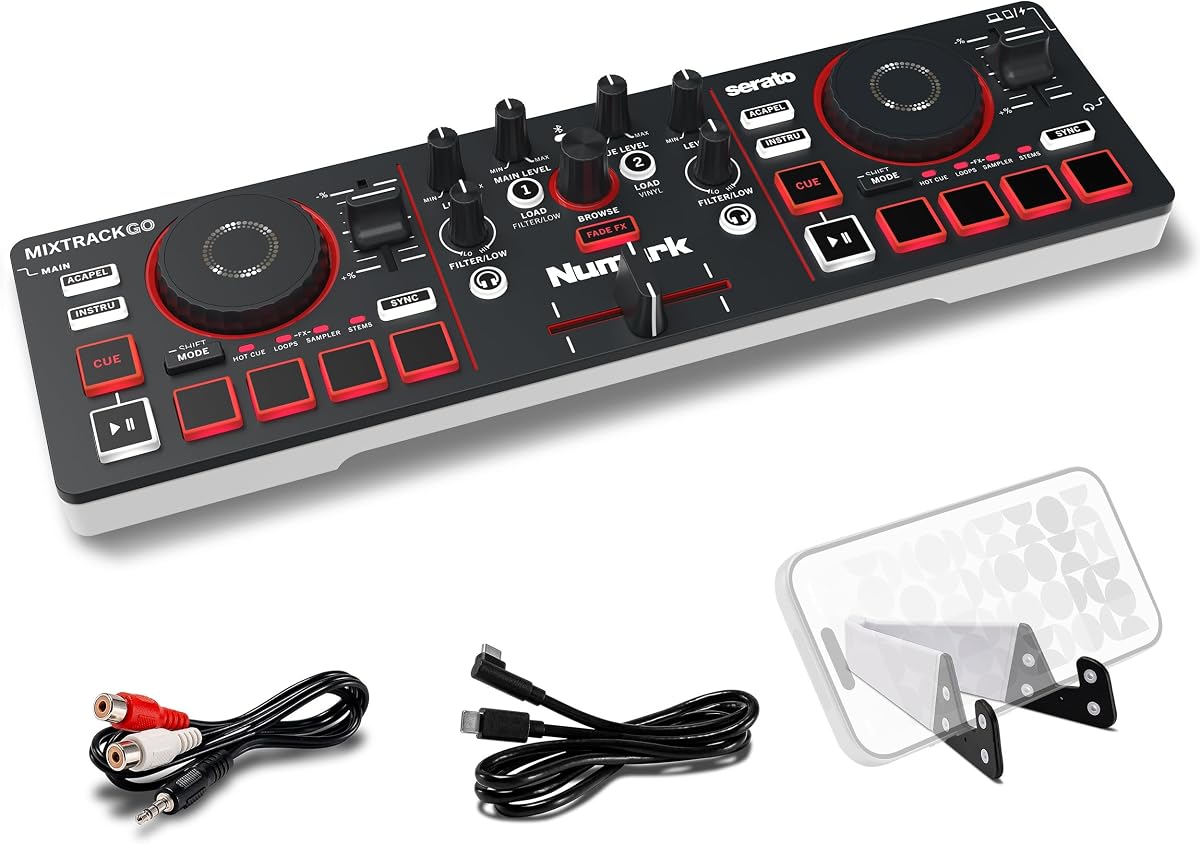
Numark MixTrack Go
4.4Editor score
Compact USB-C powered design
Real-time stems control
Eight pads per deck
Our Bluetooth Dj Mixer guide compares 10 leading controllers and sound boards for portability, connectivity, mixing features, audio performance, and ease of
A Bluetooth DJ mixer can turn a phone, tablet, laptop, or live audio setup into a flexible music system for parties, practice sessions, karaoke, streaming, and small events. The best model balances useful controls, reliable audio connections, portable construction, and features that simplify the transition from learning to performing.
This guide compares ten Bluetooth-equipped DJ controllers and audio mixers based on their supplied control layouts, channel configurations, input options, effects, software compatibility, portability, and intended uses. It covers both dedicated deck controllers and general-purpose sound boards, because a Bluetooth DJ mixer does not have to perform only one kind of mixing job.
Each review highlights the strongest reasons to consider a particular model, along with its practical limitations. The ranking shows how the products differ for beginners, mobile performers, live musicians, podcasters, and karaoke users. Product availability and pricing can change, so confirm current specifications and deal terms before purchasing.
4.4Editor score

4.4Editor score

4.7Editor score
The table below compares all ten controllers and sound boards by format, connectivity, input flexibility, and headline performance features, making it easier to identify the model that matches your intended setup.




The Numark Party Mix III combines a genuine two-deck DJ controller with wireless MIDI control and a built-in light show. Its 4.4 rating reflects a strong balance of approachable controls, useful performance features, and party-oriented visual appeal. Rather than presenting a plain mixer, it gives casual performers an immediate way to create movement, transitions, and a more engaging atmosphere.
We may earn a commission when you buy through this link, at no additional cost to you.
Its strongest feature is the beat-synchronized LED system, which adds visual energy without requiring separate lighting equipment. Each deck also has eight backlit performance pads for hot cues, loops, samples, and effects. Real-time stems controls can isolate or remove vocals, drums, and instruments, while touch-capacitive jog wheels, three-band EQ, filters, and a crossfader provide enough control for basic beatmatching and sound shaping.
The controller supports Bluetooth MIDI through the Algoriddim djay app and includes access to Serato DJ Lite for Mac and Windows. USB-C power makes it compatible with a laptop, tablet, smartphone, or power bank. The trade-off is that it remains centered on the learning and casual-performance market, with a compact layout that may feel restrictive for an experienced DJ accustomed to larger, more modular equipment.
Choose the Party Mix III when you want a visually lively controller that can move quickly from unpacking to a party. It is especially attractive for beginners, home entertainers, and anyone who wants stems, performance pads, and wireless control without assembling a complex setup. For serious live-club use, the DDJ-FLX4 offers a more advanced layout, but this model delivers the strongest combination of accessibility and party impact.
The integrated LEDs move with the music, turning an ordinary room into a more visually engaging party space. This makes the controller particularly useful for gatherings where the sound system is present but dedicated lighting is not.
Bluetooth MIDI removes the need for a physical connection to a compatible mobile device, while included software access gives users several ways to begin. USB-C power also simplifies mobile use through a laptop or standard power bank.
We may earn a commission when you buy through this link, at no additional cost to you.
The Numark MixTrack Go is built for DJs who want a capable controller without a permanently assigned studio. It weighs little, fits into a backpack, and can operate through USB-C from a laptop, tablet, smartphone, or power bank. Its 4.4 rating indicates a well-rounded portable package, especially when wireless MIDI and real-time stems control are included.
We may earn a commission when you buy through this link, at no additional cost to you.
The controller retains two capacitive touch jog wheels, a crossfader, channel gain, master volume, and filter knobs. Eight backlit pads on each deck control hot cues, loops, samples, and stems. Crossfader-activated Fade FX add polished transitions without requiring deep manual effect manipulation. It also supports Serato DJ Lite, Algoriddim djay, Serato DJ Pro, and VirtualDJ, giving users several paths for library and software setup.
Its main limitation is that it requires compatible software, media, and an external output system. The 1/8-inch main output and headphone connection are useful for smaller speaker arrangements and cueing, but they do not provide the extensive analog routing of a live sound mixer. Users who need microphones, instruments, or multiple physical input channels should look toward one of the six- or eight-channel boards later in the guide.
The MixTrack Go is a strong recommendation for coffee shops, outdoor gatherings, practice sessions, and anyone who values portability. It offers more performance control than a phone screen while remaining substantially easier to transport than a full-size DJ system. Compared with the Party Mix III, it leaves out the built-in lighting but gains a particularly compact form and broad software support.
The lightweight chassis and backpack-friendly footprint make this controller suitable for spontaneous performances. Universal USB-C power means users can carry the controller, a compatible device, and a power source without searching for a dedicated power supply.
Stems controls, performance pads, jog wheels, and automatic fade effects pack substantial creative options into a compact unit. These features make the MixTrack Go useful for learning structure as well as preparing short mobile sets.
We may earn a commission when you buy through this link, at no additional cost to you.
The Pioneer DJ DDJ-FLX4 stands apart as the most traditionally engineered DJ controller in this group, and its 4.7 rating is the highest listed. It uses a two-channel, two-deck layout with 16 Performance Pads and a layout derived from Pioneer DJ's professional equipment. That combination makes it appealing to beginners who want room to develop beyond a simple phone-connected controller.
We may earn a commission when you buy through this link, at no additional cost to you.
Smart Fader is the standout learning aid. According to the supplied product information, it automatically adjusts volume, bass, and BPM so users can blend genres by moving one fader. The controller connects by USB or Bluetooth to PC, Mac, iPhone, iPad, or Android devices, while its built-in sound card handles connection to speakers. It also supports mixing from Apple Music, Tidal, and Beatport and can be used for streaming or MCing.
The trade-off is that the FLX4 expects the user to work within a software-based DJ workflow. Its 16 pads support Hot Cues, Pad FX, Beat Jump, and Sampler functions, but those features require compatible software and some learning. Users seeking a standalone live sound console with several XLR inputs, phantom power, and conventional channel routing may find a general audio mixer more appropriate.
This is the strongest recommendation for someone who wants to learn on a capable layout without starting with a full modular system. It balances assisted blending with manual performance controls, making it suitable for home practice, streaming, social events, and increasingly ambitious live sets. The MixTrack Go is more travel-oriented, while the Party Mix III adds lighting, but the DDJ-FLX4 offers the most refined control environment here.
The automated blending system reduces the difficulty of matching unfamiliar tempos and tonal differences. It acts as a learning aid while leaving room for manual mix development as the user gains confidence.
Connection to computers, mobile devices, streaming services, and Beatport gives the controller a broad range of music sources. The built-in sound card also simplifies a direct connection between the controller and a speaker system.
We may earn a commission when you buy through this link, at no additional cost to you.
The Pyle PMXU63BT is a conventional six-channel sound mixer rather than a software-driven DJ controller. Its 4.3 rating reflects a versatile set of physical connections, including XLR and unbalanced quarter-inch inputs, USB computer input, flash-drive playback, and Bluetooth audio. That makes it useful when a DJ, band, or host needs to combine phones, computers, microphones, and instruments.
We may earn a commission when you buy through this link, at no additional cost to you.
All channels have three-band EQ, while the console includes an LED peak-level indicator and 48V phantom power for compatible condenser microphones. Bluetooth wireless streaming allows music to be sent into the console from an iPad, iPhone, or Android device. The built-in media controls support play, pause, track skipping, and source switching without requiring a separate player.
As a live mixer, it differs from dedicated controllers because it does not provide jog wheels, decks, performance pads, or automatic beatmatching. Bluetooth here is also an audio-input function rather than wireless MIDI control for DJ software. Those distinctions matter because users must still handle source playback and level management manually.
Choose the PMXU63BT for karaoke, band rehearsals, stage work, presentations, or a small event where multiple analog sources need to meet in one mixer. Its sealed rotary controls and steel chassis suit repeated setup and transport better than a decorative desktop toy. It is less appropriate for someone wanting to perform directly from a phone through dedicated deck controls.
XLR and quarter-inch connections give performers a practical way to combine microphones, instruments, and line-level sources. The 48V option expands support for condenser microphones used in speeches and karaoke.
USB computer input, flash-drive playback, and Bluetooth streaming cover several common playback methods. Built-in media controls reduce the need to reach for a separate device whenever the source changes.
We may earn a commission when you buy through this link, at no additional cost to you.
The FULUODE CT-80S combines an eight-channel mixer with a 1.57-inch-thin body, making it visually distinct from the larger live boards in this guide. Its 4.4 rating reflects a broad set of functions for family karaoke, bands, campus events, conferences, and other group settings. Bluetooth 5.0, USB, and MP3 playback give users several ways to introduce music.
We may earn a commission when you buy through this link, at no additional cost to you.
Each channel has a three-band equalizer, while the board includes 48V phantom power and a large LED display with a song-name readout. It supports wired and wireless microphones as well as instrument connections, and its digital-effect peripheral connection adds further sound-shaping options. The included multi-voltage power specification and compact profile make it easier to transport than a deep console mixer.
The listed product information specifies 110V operation with an American plug, so buyers outside the United States should verify electrical compatibility before ordering. The display also arrives with a protective film that can be removed. As with any conventional analog mixer, incorrect input selection, routing, or gain settings can produce silence or unexpected results, and the supplied information does not indicate a dedicated learning mode.
The CT-80S is best for users who need many input channels in a slim package. It offers enough routing for a small group, a singer, presentations, karaoke, and live music, but it does not replicate the beatmatching tools of a dedicated DJ controller. Select it when input flexibility and portability matter more than software decks and performance pads.
The thin enclosure preserves a large working surface without the bulk of a deep console. That makes the CT-80S easier to carry between rehearsal spaces, family gatherings, and small events.
The large LED display and song-name readout help users identify the active source and keep track of playback. A removable protective film is included for the display.
We may earn a commission when you buy through this link, at no additional cost to you.
The Hercules DJControl Mix brings physical DJ-style controls to a smartphone or tablet through Bluetooth. Its 4.3 rating reflects a straightforward design centered on two decks, jog wheels, faders, knobs, and pads. For travelers, casual users, and anyone who does not want to carry a laptop, it offers a notably compact alternative to a conventional controller.
We may earn a commission when you buy through this link, at no additional cost to you.
The controller is designed for the Algoriddim djay app, which is included according to the supplied information. A foldable smartphone stand is also included, allowing the mobile device to remain visible while the user manipulates the physical controls. Bluetooth removes the need for a cable between the controller and phone, helping keep the setup simple and portable.
The main limitation is its dependence on a compatible iOS or Android device and the capabilities of the djay software. It does not offer a built-in audio interface with extensive analog routing, dedicated outputs, multiple XLR inputs, or hardware stems controls. Users who want a full two-deck system with more physical performance controls may prefer the Numark MixTrack Go.
Choose the Hercules DJControl Mix for spontaneous mobile sets, practice with a phone, travel, and gatherings where minimizing equipment is essential. It provides a meaningful upgrade over touchscreen mixing because the jog wheels, faders, knobs, and pads respond to physical gestures. It is best viewed as a focused mobile tool rather than a replacement for a full live sound console.
Physical jog wheels, faders, knobs, and pads make common mixing actions easier to learn and repeat. They also provide useful feedback without asking the user to make every adjustment on a small screen.
Bluetooth wireless control and the included folding stand support a compact phone-first setup. Users can bring the controller, a phone, headphones, and a portable speaker without assembling a larger system.
We may earn a commission when you buy through this link, at no additional cost to you.
The 4-Channel DJ Audio Mixer is a compact option for podcasting, karaoke, live streaming, and small creative sessions. Its 4.0 rating indicates a functional package with useful USB and Bluetooth features, although the narrower channel count and limited output behavior keep it focused on simpler applications. The supplied dimensions make it small enough to fit into a backpack.
We may earn a commission when you buy through this link, at no additional cost to you.
Its USB audio interface supports plug-and-play computer recording and live streaming without extra drivers or complicated software. USB flash-drive MP3 playback and recording are also supported, while the built-in controls manage play, pause, skipping, and mode selection. XLR and 6.35 mm connections accept microphones and instruments, and 48V phantom power supports compatible condenser microphones.
A crucial limitation is that Bluetooth functions as input only. Music can be streamed to the mixer from a phone, tablet, or laptop, but the mixer cannot transmit its mixed output through Bluetooth to a speaker. A wired connection is therefore required for the final audio route, which may reduce the convenience for users expecting completely wireless operation.
This mixer is a good fit for a creator who needs a compact interface for recording, online broadcasts, conference audio, or home karaoke. It is less suitable for a live DJ because it lacks jog wheels, decks, and performance pads, and its four channels may be insufficient for a band. Users prioritizing broad input capacity should consider the Pyle or FULUODE alternatives.
The built-in interface is designed for direct computer recording and live streaming. Its simple plug-and-play approach suits podcasters and online creators who want physical level control without a complicated setup.
Bluetooth brings source audio into the mixer, while the final mixed output still needs a wired route. Checking this signal path before purchasing prevents disappointment over speaker compatibility.
We may earn a commission when you buy through this link, at no additional cost to you.
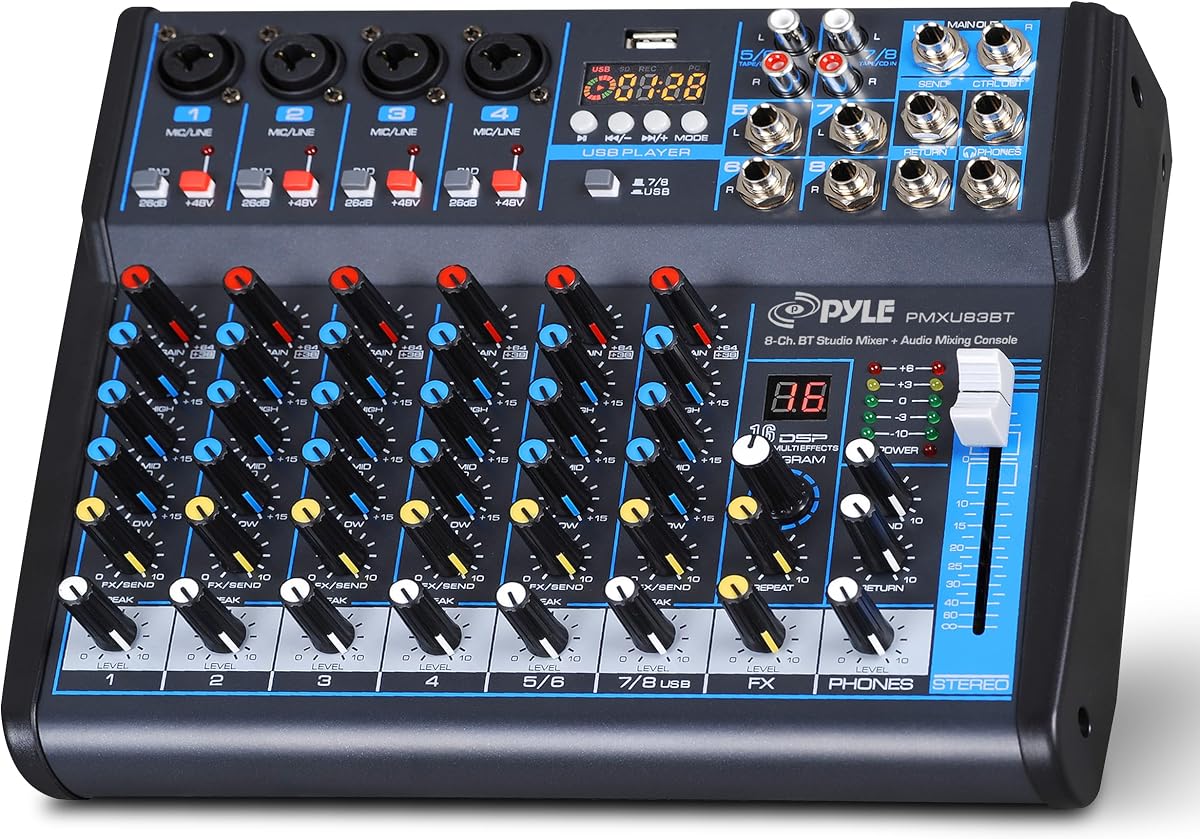
The Pyle 8-Channel DJ Mixer is built for situations in which several microphones, instruments, and playback devices need to share one control surface. Its 4.4 rating reflects a versatile package with Bluetooth streaming, USB connectivity, DSP effects, and physical inputs. It is best viewed as a live sound and karaoke mixer rather than a two-deck DJ controller.
We may earn a commission when you buy through this link, at no additional cost to you.
XLR and unbalanced quarter-inch connections support microphones and stereo line sources, and every channel has a three-band EQ. The 48V phantom-power control allows compatible condenser microphones to operate, while an LED peak-level indicator helps users watch signal levels. Bluetooth streams music from a smartphone, and the included multi-voltage power supply offers flexibility for international use.
Its lack of jog wheels, deck controls, and performance pads means a software DJ will not receive tactile control over beatmatching, loops, or samples. Bluetooth also provides source audio rather than a complete wireless replacement for a wired speaker connection. As with other analog mixers, source routing, channel assignment, and output levels must be managed by the operator.
Choose this model for karaoke nights, live bands, rehearsals, speaking events, and parties where the priority is channel flexibility rather than club-style DJing. The sealed controls and steel chassis are useful for regular transport and operation. It is a strong all-purpose mixer, but a dedicated controller like the Party Mix III is a better match for learning beat-based mixing.
Eight channels create room for vocal microphones, instruments, and line-level playback devices. Three-band EQ on each channel provides practical tonal adjustment for different source types.
Sealed rotary controls resist dust and grime, while the steel chassis suits regular use. The multi-voltage power supply also makes the mixer more adaptable to different locations.
We may earn a commission when you buy through this link, at no additional cost to you.
The 6-Channel Audio Interface Mixer combines a conventional sound console with Bluetooth music streaming, USB connectivity, and built-in DSP effects. Its 4.3 rating makes it a credible option for home karaoke, small studios, live performances, and recording sessions where both analog and computer-based sources are needed.
We may earn a commission when you buy through this link, at no additional cost to you.
Four XLR inputs provide support for microphones, and quarter-inch inputs accommodate wireless microphones, electric guitars, direct boxes, and other instruments. Channels five and six are stereo quarter-inch connections. The XLR channels support 48V phantom power, while onboard three-band EQ and gain controls allow each source to be shaped independently. A total output fader and effect control complete the main mixing workflow.
The Bluetooth function streams from an iPad or smartphone, while the USB interface can be used with a flash drive or computer for playback and recording. Sixteen DSP effects provide options such as delay and reverb. As the product information cautions, incorrect operation can result in no sound, so users should follow the supplied manual and confirm source selection before a performance.
This mixer is most appropriate for someone who wants a traditional hybrid setup rather than a dedicated touchscreen DJ controller. It works well for a singer-guitarist, karaoke session, compact studio experiment, or rehearsal. Those seeking a ready-to-learn deck layout should consider the Numark models, while users needing more channels can examine the eight-channel Pyle and FULUODE mixers.
The USB interface supports recording and digital playback while XLR and quarter-inch connections handle microphones and instruments. This makes the mixer useful when a session moves between spoken content, music, and live performance.
Sixteen built-in effects provide practical options for delay, reverb, and other tonal additions. They can enrich karaoke and live-music performances without requiring a separate effects processor.
We may earn a commission when you buy through this link, at no additional cost to you.
The Pyle PMX466 combines a six-channel mixer layout with Bluetooth, a USB interface, four XLR microphone or line inputs, AUX, an MP3 player, a headphone jack, and an effects processor. Its 4.1 rating places it near the lower end of this group, but the feature set remains relevant for small-stage, karaoke, and live-music applications.
We may earn a commission when you buy through this link, at no additional cost to you.
Sixteen digital effects can be applied across the mix, and the board also provides six sound-effect styles covering Normal, Rock, Pop, Classical, Jazz, and Country. A dedicated SUB output and MP3-player EQ add further control. The inclusion of both an effects processor and genre presets gives users fast starting points for different kinds of material.
The metal chassis and panel construction provide a more substantial feel than many lightweight portable mixers. However, the product is still a conventional sound board rather than a modern DJ deck controller. It does not provide jog wheels, automatic beatmatching, stems controls, or performance pads, and Bluetooth is used for source connectivity rather than control of a full DJ application.
Choose the PMX466 when you need a six-channel mixer with XLR inputs and several built-in effects in a rugged enclosure. It is suited to karaoke, rehearsals, and small live sound duties. For software-based DJing, stems, or beatmatching assistance, one of the Numark or Pioneer controllers will provide a more relevant toolset.
The XLR section provides practical connections for microphones and compatible line sources. This makes the mixer useful where vocals and instruments need independent level and equalizer control.
Six built-in genre styles make it easier to begin with a recognizable tonal starting point. The sixteen digital effects and SUB output then provide additional ways to shape the final sound.
We may earn a commission when you buy through this link, at no additional cost to you.
The right Bluetooth DJ mixer depends on whether you want tactile deck control, a phone-centered mobile setup, or a multi-input live sound console. Review connectivity, input routing, software needs, portability, and output connections before choosing.
Choose a dedicated controller for DJ performance and a channel-based mixer for karaoke, bands, streams, or events. Do not buy solely based on the word Bluetooth.
Wireless MIDI is useful for DJ controllers, while Bluetooth audio input suits live mixers. Check whether Bluetooth output to a speaker is supported.
Verify the required app, operating system, streaming services, and device connections. Choose a standalone sound board if software independence is the priority.
Count every simultaneous source before choosing a mixer. Include microphones, instruments, computers, and phones rather than considering only music channels.
Compare dimensions, power requirements, and the complete connection kit. Verify voltage compatibility when traveling internationally.
Choose assisted tools for learning and manual performance controls for faster development. Match the feature set to your current experience and planned genre.
Match the main, auxiliary, sub, and headphone outputs to your equipment. Bring suitable adapters when standard speaker cables do not fit.
Prioritize rugged construction for regular live use and minimal weight for constant travel. Avoid placing any mixer where moisture or excessive heat could affect electronics.
Begin by identifying the intended workflow. For a DJ controller, install the required software, connect the audio output to speakers, and place the phone, tablet, or computer in the included stand. For a live sound mixer, connect microphones and instruments to the appropriate XLR or quarter-inch inputs, set source levels low, and confirm the output route before powering the full speaker system.
Pair Bluetooth carefully and confirm the direction of the wireless connection. On a Bluetooth MIDI controller, open the compatible app before pairing and verify that moving a control changes the on-screen parameter. On a sound mixer with Bluetooth audio input, start playback on the phone, select the appropriate source, and use the channel fader to bring the music into the mix. Do not assume that Bluetooth can carry the final output to a speaker.
Set gain and EQ controls conservatively, bring faders to a low level, and raise the master output gradually while watching peak indicators. Use the headphone connection for cueing or monitoring. After use, lower all output levels, disconnect speakers and cables carefully, remove the device from the app, and store the mixer in a dry, protected area with its controls and connectors free of pressure or debris.
A Bluetooth DJ controller is designed around decks, jog wheels, pads, and software-based mixing. A Bluetooth sound mixer focuses on microphones, instruments, channel levels, equalization, and live output routing. Choose a controller for beatmatching and remixing, while a sound mixer is usually better for karaoke, bands, speeches, podcasts, and live events.
No. Some controllers use Bluetooth for wireless MIDI control, while some sound boards accept Bluetooth audio only as an input. The 4-Channel DJ Audio Mixer specifically notes that Bluetooth does not output to a speaker. Always check the main output, headphone, USB, RCA, and auxiliary connections before choosing a wireless setup.
The Numark Party Mix III offers visual beat alignment, automatic fade effects, and a two-deck layout, making it approachable for casual learners. The Pioneer DJ DDJ-FLX4 also suits beginners through Smart Fader and a layout derived from professional equipment. Beginners who want the most visual party features will find the Party Mix III particularly easy to engage with.
Yes. The Hercules DJControl Mix is explicitly designed for smartphones and tablets, includes a folding stand, and uses Bluetooth wireless control. It is well suited to practicing and performing without carrying a laptop. Keep a charged device, compatible app, suitable headphones, and a backup connection method available for important performances.
A four-channel mixer may be adequate for one vocal and a small number of sources, while six channels provide more room for a singer, guitar, and playback device. Eight channels suit fuller band or event setups with several microphones and instruments. Count all simultaneous inputs, including the Bluetooth or USB music source, before deciding.
Dedicated software controllers generally focus on computer and mobile audio and may not provide microphone or instrument inputs. The channel-based mixers in this guide include XLR and quarter-inch connections, and several support 48V phantom power for compatible condenser microphones. Check the input specification carefully if live performers need to connect through the mixer.
Stems controls separate a track into layers such as vocals, drums, and instruments so they can be isolated or removed. The Numark Party Mix III and MixTrack Go provide real-time stems functionality. This is valuable for remixing and live mashups, although supported tracks and software behavior can affect the result.
Lower outputs before disconnecting cables, avoid pulling on attached wires, and keep the device away from moisture, dust, and excessive heat. Store it in a padded case or stable surface so buttons, knobs, and jog wheels are not put under pressure. Periodically check connections and clean the exterior with a soft, dry cloth.
The Numark Party Mix III is the strongest all-around choice for parties and beginner-friendly performance, combining wireless MIDI, stems, performance pads, and synchronized lighting. The MixTrack Go is a highly portable alternative for mobile DJs, while the Pioneer DJ DDJ-FLX4 offers the most advanced learning layout and the highest rating in the comparison.
Prioritize the type of mixing you intend to do. Choose a dedicated controller for beatmatching and digital music, a phone-oriented controller for minimal travel gear, or a multi-channel sound mixer for microphones and instruments. Within that format, confirm Bluetooth direction, software requirements, output connections, power needs, and physical inputs before purchasing.
Product specifications, availability, and pricing can change, so review the current listing before buying. Comparing the included accessories, compatible applications, and complete connection path will help you choose a Bluetooth DJ mixer that fits your setup rather than one that merely includes the word Bluetooth on the box.

