
CORSAIR RM850e
4.6Editor score
850-watt capacity
ATX 3.1 transient protection
Fully modular cable layout
Our guide compares the best PSU for Rtx 5070 and 5070 Ti options, covering wattage, ATX 3.1 support, 12V-2x6 power, efficiency, and build fit.
A power supply for an RTX 5070 or RTX 5070 Ti should do more than provide enough nominal wattage. It should also support the graphics card’s high transient loads, use the correct 12V-2×6 connection, operate efficiently, and fit comfortably inside the chosen case. The right choice depends on the processor, other components, and whether the system needs extra headroom.
This guide compares all ten products supplied for the RTX 5070 and RTX 5070 Ti ecosystem. It examines power capacity, ATX 3.1 and PCIe 5.1 support, native graphics connectors, efficiency certifications, modular cabling, acoustic features, and physical compatibility. Because the list also includes several RTX 5070 and RTX 5070 Ti graphics cards, their published power requirements are used to help evaluate suitable power-supply choices.
The selections range from a compact 650-watt model to a 1000-watt unit intended to leave additional upgrade headroom. The guide explains where each product fits, while also noting that prices and availability change. Always verify the exact graphics-card power guidance and your complete system’s estimated consumption before making a final purchase.
4.6Editor score

4.7Editor score

4.5Editor score
The comparison below includes seven power supplies and three RTX 5070-series graphics cards, making it possible to connect the listed hardware with the appropriate ATX 3.1 wattage and connector recommendations.




The Seasonic Focus GX-750 earns the highest listed rating in this group at 4.8 stars, and its defining strength is a careful balance of modern power delivery, efficiency, and a 750-watt capacity that aligns with the minimum recommendation for the ASUS Prime RTX 5070 Ti. It is ATX 3.1 and PCIe 5.1 ready, with a native 12V-2×6 connector that avoids the need for a multi-8-pin adapter on compatible graphics cards.
We may earn a commission when you buy through this link, at no additional cost to you.
Efficiency is one of this model’s strongest selling points. The listed specifications identify both 80 PLUS Gold and Cybenetics Platinum certification, indicating that it is designed to reduce energy waste, heat, and fan noise. Its OptiSink thermal design and hybrid fan control with a 135mm fluid-dynamic-bearing fan reinforce the focus on operating quietly. The product data also specifically identifies NVIDIA RTX 5070 Ti and AMD RX 9000 readiness.
The main limitation is capacity. A 750-watt unit can be appropriate for a focused RTX 5070 or RTX 5070 Ti system, but it leaves less room for a power-hungry processor, additional drives, elaborate cooling, or substantial future expansion. It may be particularly suitable for a compact build where physical space is restricted and every unnecessary watt is difficult to accommodate. Buyers should calculate the complete system load instead of considering only the graphics card.
This is an excellent choice for a well-balanced build centered on one of the listed graphics cards, especially when the manufacturer’s power recommendation can be met without a large upgrade margin. It is a particularly strong fit for users who value efficiency, a native connector, quiet cooling, and established brand support. For a high-power processor or an aggressively upgraded system, move up to an 850- or 1000-watt model.
Dual efficiency certification is particularly useful because a gaming PC rarely maintains one fixed load. The Focus GX-750 is positioned to convert power efficiently across changing conditions, which can reduce waste heat and help the cooling fan remain quiet during lighter workloads.
The native 12V-2×6 connection simplifies installation and avoids the loose adapter arrangements that can complicate cable routing. It also makes this unit a natural match for the RTX 5070 and RTX 5070 Ti cards included in the comparison.
We may earn a commission when you buy through this link, at no additional cost to you.
The Seasonic CORE GX-750 is a value-focused 750-watt unit with a 4.6-star listed rating. Like the Focus GX-750, it supports ATX 3.1 and PCIe 5.1 platforms and includes a native 12V-2×6 connection. Its specification also states that it is ready for the NVIDIA RTX 5070 Ti and AMD RX 9000, making it a sensible match for the GPU requirements documented in this guide.
We may earn a commission when you buy through this link, at no additional cost to you.
The product combines 80 PLUS Gold efficiency with Cybenetics Platinum certification and Seasonic’s OptiSink design. Those details suggest that the CORE GX-750 prioritizes efficient power conversion and thermal management while remaining a more economical choice than premium alternatives. A 12V-2×6-to-dual-8-pin PCIe cable is also included, giving the installer additional flexibility when working with older or unusual connector arrangements.
As with any 750-watt unit, the trade-off is headroom. This can work well with an RTX 5070 or RTX 5070 Ti when the rest of the system is efficient and the graphics card’s published guidance is respected. However, a high-end desktop processor, multiple expansion cards, extra cooling, and future GPU upgrades can quickly reduce the available margin. The included adapter should also be used only where necessary and routed with care.
The CORE GX-750 is best for budget-conscious builders who want current ATX 3.1 features without moving to a larger premium power supply. It offers an attractive balance of efficiency, modern connectivity, and practical value. If your build needs more than the GPU’s base requirement or you want greater future flexibility, an 850- or 1000-watt unit may be the wiser investment.
ATX 3.1 support makes this unit more relevant for RTX 50-series systems than older designs that rely entirely on legacy adapters. Native 12V-2×6 provision also simplifies the primary graphics-cable connection.
The included 12V-2×6-to-dual-8-pin cable provides a fallback for compatible hardware, though modern RTX 5070-series cards are best served by the native connection whenever the PSU provides one.
We may earn a commission when you buy through this link, at no additional cost to you.
The CORSAIR RM850x combines an 850-watt rating with modern ATX 3.1 support, giving it more flexibility than a 750-watt design. Its 4.7-star customer rating and fully modular construction make it one of the most broadly useful options for a system built around an RTX 5070 or RTX 5070 Ti. A native 12V-2×6 connector allows the graphics card to connect directly without an adapter.
We may earn a commission when you buy through this link, at no additional cost to you.
Its Cybenetics Gold certification is listed at up to 91% efficiency, which supports lower power consumption, reduced heat, and quieter operation compared with less efficient designs. The fully modular cable system lets builders omit unused leads, improving airflow and making the interior of the case easier to manage. Embossed cables and low-profile combs add flexibility and a cleaner appearance without changing the core electrical design.
The trade-off is that some builders may not need 850 watts. If the system contains a power-efficient processor and the card is a standard RTX 5070, a smaller unit could be sufficient. The RM850x is more relevant when the build includes an RTX 5070 Ti, a powerful CPU, extensive cooling, multiple storage devices, or plans for future upgrades. It is not designed to compensate for a fundamentally undersized system or to override the graphics-card manufacturer’s guidance.
For most enthusiast builds, this is the most versatile standalone power supply in the list. The extra capacity is meaningful without becoming excessive, while full modularity and native 12V-2×6 support simplify installation. It is an especially good match for the ASUS Prime RTX 5070 Ti, whose supplied specifications call for a minimum 750-watt PSU with a 16-pin connector, while providing additional margin for the rest of the system.
An 850-watt rating occupies a useful middle ground: it offers more breathing room than 750 watts while avoiding the bulk and cost of a 1000-watt unit in many balanced builds.
Full modularity means unused cables can remain in the box. This reduces clutter, improves the appearance of the build, and makes it easier to route the required 12V-2×6 cable without excessive bending.
We may earn a commission when you buy through this link, at no additional cost to you.
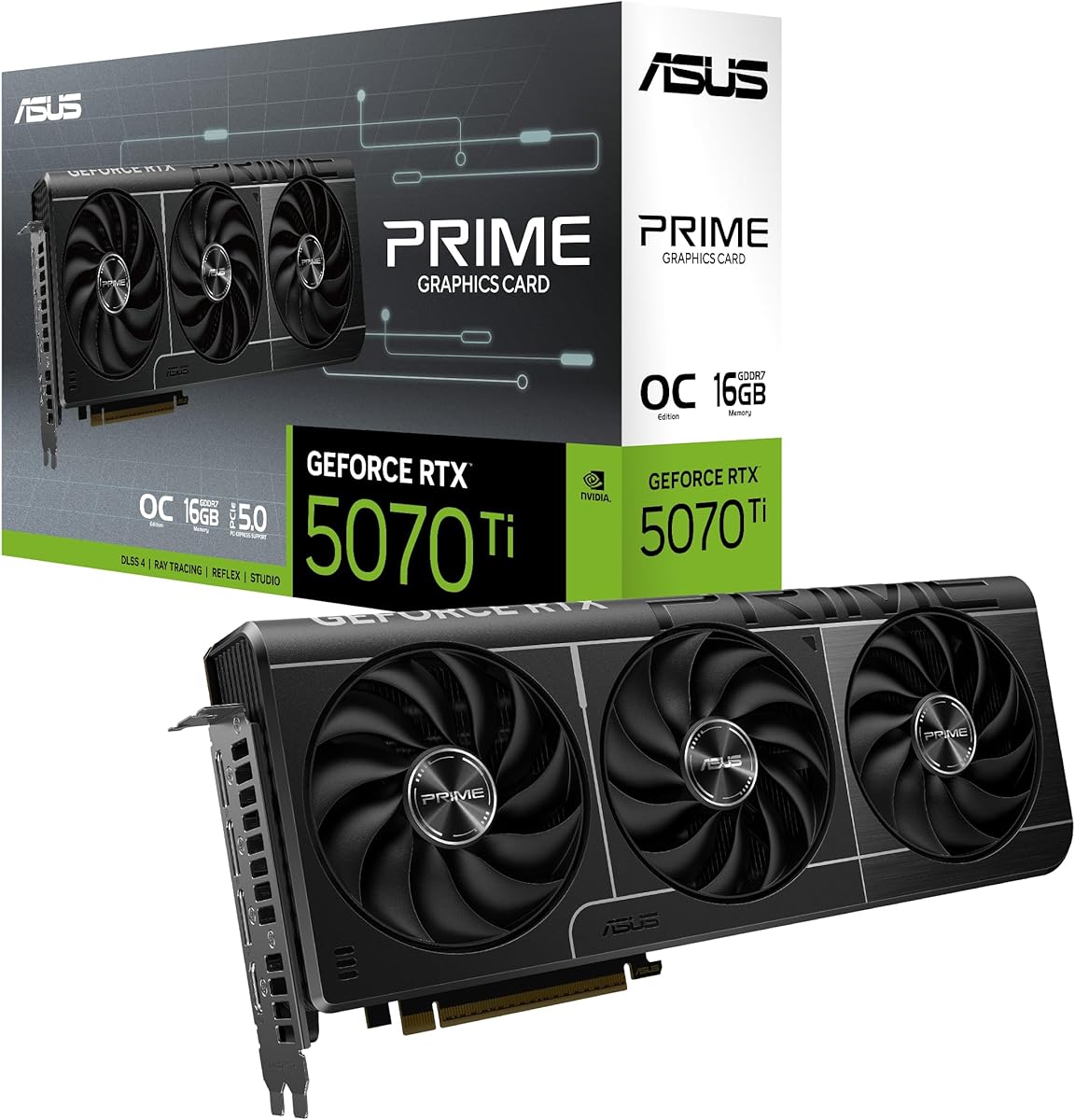
The ASUS Prime RTX 5070 Ti is a graphics card rather than a power supply, but it is important in this comparison because its published system requirements clarify what a suitable 750-watt PSU must provide. It has a 4.6-star listed rating and supports the NVIDIA Blackwell architecture and DLSS 4. Its specifications call for a minimum 750W PSU with a 16-pin 12V-2×6, also identified as 12VHPWR, connector.
We may earn a commission when you buy through this link, at no additional cost to you.
The card is designed for small-form-factor systems. Its stated dimensions are 306 millimeters, or 12 inches, long, with a 2.5-slot thickness and a weight of four pounds. These figures are useful when selecting both the graphics card and its power supply, because a compact case may also require a short or modular PSU. The included bracket and SFF-Ready positioning should still be checked against the case manufacturer’s compatibility list.
Thermal and acoustic features include Axial-tech fans, a phase-change GPU thermal pad, and a zero-decibel mode for light workloads. A dual BIOS switch provides Quiet and Performance profiles, giving the owner a practical choice between lower noise and more aggressive behavior. One trade-off is that the Prime card’s physical design emphasizes compactness, so buyers with very large cases may prefer a larger, more powerful cooling implementation.
For power-supply selection, this card points toward the Seasonic 750-watt units when the system is otherwise modest, or toward the CORSAIR RM850x and RM1000x when more headroom is desired. The 12V-2×6 requirement should be treated as non-negotiable. A suitable ATX 3.1 PSU with a native cable is the cleanest option and avoids introducing adapter-related routing concerns.
The published 750-watt minimum and 16-pin connector requirement give buyers a concrete starting point. Add the power needs of the CPU, motherboard, memory, storage, and fans to determine whether a modest 750-watt model is sufficient.
The 2.5-slot, 306mm design can help a compact RTX 5070 Ti build fit inside a smaller enclosure. Pairing it with a modular or semi-modular PSU also reduces the cable clutter created by an otherwise large graphics card.
We may earn a commission when you buy through this link, at no additional cost to you.
The CORSAIR RM850e combines 850 watts of capacity with ATX 3.1 and PCIe 5.1 readiness, making it a compelling value for a system using an RTX 5070 or RTX 5070 Ti. It carries a 4.6-star listed rating and a fully modular design. Unlike the RM850x, however, the supplied product information does not explicitly confirm a native 12V-2×6 output, so buyers should verify the included cable configuration before ordering.
We may earn a commission when you buy through this link, at no additional cost to you.
Its most valuable technical feature is support for two transient power excursions from the GPU. That behavior is directly relevant to modern high-performance graphics cards, which can draw sharp bursts of power during rapid load changes. The PSU also uses 105°C-rated capacitors, a 120mm rifle-bearing fan, and a calculated fan curve intended to maintain low noise even under load.
The main installation consideration is connector availability. An ATX 3.1 label and PCIe 5.1 readiness do not necessarily mean every retail package includes the exact native cable required by the graphics card. The included 12V-2×6-to-dual-8-pin arrangement, if provided, is less tidy than a native lead and calls for careful routing. It should be connected as directed and never bent sharply immediately after the connector.
The RM850e is best for builders who want 850-watt capacity and current transient protection without necessarily paying for every premium feature of the RM850x or RM1000x. It is a strong fit for an RTX 5070 Ti system with a moderately powerful processor, especially if you confirm the cable set before purchase. Its combination of modularity, modern standards, and generous capacity makes it a practical centerpiece for a current gaming build.
Supporting two GPU transient excursions is the important detail for RTX 50-series owners. It helps the PSU respond to sudden power demands that may not appear clearly in a simple average-wattage calculation.
A fully modular layout offers practical benefits at relatively little cost: unused leads do not need to be routed through the case, which can improve airflow and shorten the build process.
We may earn a commission when you buy through this link, at no additional cost to you.
The CORSAIR RM1000x is the highest-capacity standalone PSU in the list, offering 1000 watts for an RTX 5070 or RTX 5070 Ti system. Its 4.5-star rating is the lowest among the listed power supplies, but ratings alone do not determine suitability. The model is aimed at builders who want comfortable headroom for a powerful processor, extensive cooling, multiple add-in cards, or future upgrades.
We may earn a commission when you buy through this link, at no additional cost to you.
It is ATX 3.1 and PCIe 5.1 compliant, supports transient power spikes, and includes a native 12V-2×6 connector for direct GPU connection. Cybenetics Gold certification is listed at up to 91% efficiency. Fully modular cabling and low-profile combs keep the installation orderly, while the substantial power rating gives users room to operate without remaining close to the minimum capacity suggested by the graphics card.
The trade-off is straightforward: a 1000-watt unit may be unnecessary for a modest RTX 5070 build. Extra capacity alone does not create a better gaming experience, and large PSUs can require more physical space than a smaller model. Buyers should also consider case dimensions, cable bend radius, and the amount of headroom they actually need. A premium or larger unit also consumes more space for potential future hardware that may never be installed.
The RM1000x makes the most sense for a high-end, expandable workstation-style gaming PC or a build that will evolve over time. It pairs particularly well with the ASUS TUF or ROG Strix RTX 5070 Ti and with a power-hungry processor. For a single RTX 5070 or a restrained RTX 5070 Ti system, the RM850x generally represents a more balanced capacity choice.
A 1000-watt rating reduces the chance that the PSU will limit a later CPU, graphics card, storage, or cooling upgrade. It is insurance through capacity rather than a requirement for the RTX 5070 Ti.
The native 12V-2×6 connection and 91% listed efficiency make the unit well matched to a modern, high-load system. The modular layout preserves the practical benefits of extra capacity without sacrificing cable management.
We may earn a commission when you buy through this link, at no additional cost to you.
The CORSAIR CX650M is the smallest-capacity PSU in the comparison, but it also brings modern features to compact builds. Its 4.7-star rating, ATX 3.1 and PCIe 5.1 support, native 12V-2×6 cable, and 650-watt capacity make it interesting for a standard RTX 5070 configuration. The supplied information states that it can deliver up to 450 watts of GPU power through a single cable and notes that this is enough for the RTX 5070 and RTX 5070 Ti.
We may earn a commission when you buy through this link, at no additional cost to you.
Its semi-modular design keeps the main power cables attached while allowing the remaining cables to be selected as needed. This provides some of the organization benefit of full modularity without requiring the most flexible cable configuration. A 120mm low-noise fan is designed to remain quiet at low and medium loads, and the unit uses 105°C-rated capacitors and an LLC topology.
Capacity is the significant trade-off. Although the product data considers the GPU power available sufficient, the graphics card is only one part of the system. A power-hungry CPU, additional fans, multiple drives, and high transient loads can consume the margin. The included guidance specifically recommends using Corsair’s PSU calculator and matching the selection to the exact build, which is sensible advice for a model at this capacity.
This PSU is best for compact, carefully specified RTX 5070 systems that use an efficient processor and do not need substantial future expansion. It is less appropriate for the ASUS Prime RTX 5070 Ti, whose published requirements specify a minimum 750-watt unit. For that card—or for a build with a high-power CPU—move to the 750-, 850-, or 1000-watt options instead of relying solely on the stated GPU wattage.
ATX 3.1 support and a native 12V-2×6 cable are meaningful advantages in a 650-watt unit. They allow a compact power supply to serve modern graphics hardware without relying on a legacy multi-connector adapter.
The CX650M can serve the RTX 5070 family according to its product data, but the entire system must be considered. Efficient CPU and accessory choices can preserve the headroom needed for reliable transient response.
We may earn a commission when you buy through this link, at no additional cost to you.
The ASUS ROG Strix RTX 5070 Ti is a high-end graphics card that should be paired with a power supply that has ample headroom. It carries a 4.7-star listed rating, 16GB of GDDR7 memory, and an OC boost clock of 2625MHz, compared with a 2602MHz default mode. The card supports the PCIe 5.0 interface and provides HDMI and DisplayPort 2.1 connectivity.
We may earn a commission when you buy through this link, at no additional cost to you.
Its thermal design is substantial. The 3.2-slot cooler uses a large fin array and three scaled-up Axial-tech fans, while MaxContact construction and a phase-change GPU thermal pad are intended to improve heat transfer. The card also supports 0dB operation during light gaming, allowing the fans to remain stopped when workload levels permit.
The physical trade-off is size. A 3.2-slot design and large cooling assembly may limit compatibility with compact cases, tightly packed motherboards, or systems using large CPU coolers. It is also not a power supply, so it should not be evaluated as one. Its likely high load makes the 850-watt and 1000-watt options more sensible than a smaller unit, especially when combined with a powerful processor.
For a high-end gaming build, the ROG Strix card brings considerable memory capacity and a robust cooling package, making the CORSAIR RM1000x a fitting companion for maximum headroom. The RM850x can also be appropriate if the rest of the system is controlled. Buyers should verify case clearance, the graphics card’s exact PSU recommendation, and the required power connector before assembling the final configuration.
Three Axial-tech fans, a large fin array, MaxContact surfaces, and a phase-change thermal pad indicate a design intended for sustained high-performance operation. This makes an adequately sized PSU more important because the card can remain under heavy load for long stretches.
The 16GB configuration aligns with the high-end position of the card and can be useful for demanding games and graphics workloads. Power-supply selection should still be based on the complete system rather than memory capacity alone.
We may earn a commission when you buy through this link, at no additional cost to you.
The ASUS TUF Gaming RTX 5070 Ti combines 16GB of GDDR7 memory with a 2610MHz factory clock, earning a 4.7-star listed rating. It offers a balanced enthusiast feature set, including military-grade component claims, a protective PCB coating, Axial-tech fans, a vented exoskeleton, a phase-change thermal pad, dual BIOS profiles, and GPU Tweak III software.
We may earn a commission when you buy through this link, at no additional cost to you.
Its 3.125-slot cooler and vented exoskeleton prioritize airflow, while the listed Axial-tech design provides up to 31% more air than standard fans. The dual BIOS allows a Quiet or Performance mode, making it easy to favor lower noise or stronger performance depending on the workload. The card also includes two HDMI and three DisplayPort outputs according to the supplied title.
As a full-size, overclocked graphics card, it is best treated as a significant system load. A high-end processor could push an 850-watt PSU closer to its limits, making the RM1000x a safer choice for a heavily equipped build. Case fit should be checked carefully because the card is substantially wider than the 2.5-slot ASUS Prime model. The product data identifies TUF Gaming 850W and 1000W units as companion options.
This card suits a gaming system intended for high settings, strong frame rates, and future-facing memory capacity. Pair it with the RM850x for a controlled high-end build or the RM1000x when maximizing expansion headroom. The TUF product’s combination of cooling, durability features, and profile flexibility makes it a logical centerpiece for a builder who wants performance without necessarily choosing the largest ROG model.
The combination of a factory overclock, large cooler, 16GB memory, and dual BIOS profiles gives users useful control over performance and noise. It is well suited to a system with a strong but not excessively power-hungry CPU.
The protective PCB coating, military-grade component positioning, and phase-change thermal pad reflect an emphasis on durability and heat management. A stable modern power supply is a sensible companion to that design.
We may earn a commission when you buy through this link, at no additional cost to you.
The ASUS Prime RTX 5070 is a compact 12GB GDDR7 graphics card designed around the NVIDIA Blackwell architecture and DLSS 4. It has a 4.7-star listed rating and follows the Prime series’ emphasis on a relatively manageable 2.5-slot footprint. That makes it a notable option for a smaller RTX 5070 system where a very large graphics card would be inconvenient.
We may earn a commission when you buy through this link, at no additional cost to you.
The cooler uses Axial-tech fans with a smaller hub and a barrier ring intended to increase downward air pressure. A phase-change GPU thermal pad supports heat transfer, while the card’s two-slot-plus design preserves compatibility with more cases than the 3.125-slot TUF and 3.2-slot ROG Strix models. The supplied information also identifies dual BIOS functionality, although the detailed bullet list does not explicitly describe the available profiles.
The 12GB memory capacity and 2.5-slot dimensions are the main trade-offs for buyers comparing it with larger cards. Some modern games and creative applications may benefit from the 16GB configurations offered by the RTX 5070 Ti models. Buyers should also recognize that the supplied data does not give a specific minimum PSU rating for this Prime RTX 5070, so the power supply should be selected from the complete system requirements and current manufacturer guidance.
This card is well matched to the CORSAIR CX650M when an efficient processor and modest accessories preserve sufficient headroom. The Seasonic 750-watt options provide a more conservative alternative, while the RM850x is appropriate for a larger CPU or additional components. The Prime RTX 5070 is best for builders prioritizing a compact graphics-card footprint, modern features, and a straightforward high-performance gaming role.
The 2.5-slot format can make the RTX 5070 easier to accommodate than the TUF and ROG Strix alternatives. It also reduces the need for a large power supply when the rest of the system is efficient.
Axial-tech fans and a phase-change thermal pad provide the core cooling elements. This design balances airflow and physical size, which is valuable in a compact case with limited room for wide graphics cards.
We may earn a commission when you buy through this link, at no additional cost to you.
The correct power supply depends on the graphics card, processor, case, and likely upgrade path. Capacity, connector support, transient handling, efficiency, acoustics, and physical design must be considered together rather than separately.
Begin by adding the estimated consumption of the processor, graphics card, motherboard, memory, storage devices, fans, and any other powered accessories. Apply a reasonable allowance for sustained peak behavior rather than relying only on a low average figure. The ASUS Prime RTX 5070 Ti lists a minimum 750W PSU, while the ASUS TUF data specifically identifies 850W and 1000W TUF Gaming options as companions. These references illustrate why the GPU recommendation should be treated as a baseline for the entire build.
Choose enough capacity to cover current and anticipated loads with practical headroom. More watts do not automatically improve performance, but a PSU that is consistently overloaded is not a good match for modern transient-intensive graphics hardware.
ATX 3.1 is the relevant standard for current RTX 50-series builds because it was designed around newer power-delivery behavior and transient-load demands. Every standalone PSU in this comparison is described as ATX 3.1 and PCIe 5.1 ready. That support is particularly important when a powerful GPU changes load rapidly during gameplay, rendering, or compute tasks.
Select an ATX 3.1 unit rather than treating a conventional ATX 2.x PSU as equivalent. A modern standard does not remove the need to check wattage and connector compatibility, but it places the unit in the intended electrical category for this generation of hardware.
The RTX 5070 and RTX 5070 Ti use a 16-pin 12V-2×6 connection, also called 12VHPWR in some system requirements. A native cable is generally the simplest and cleanest solution because it reduces the number of connectors near the graphics card and avoids unnecessary adapter routing. The Focus GX-750, CORE GX-750, RM850x, RM1000x, and CX650M are explicitly described as providing a native 12V-2×6 connection.
If a selected PSU lacks the native cable, confirm that the included adapter is compatible and follow the manufacturer’s instructions for routing and connection. Do not sharply bend the cable right at the plug, and do not assume that every legacy-looking adapter arrangement has the same electrical or mechanical characteristics.
A modern GPU may demand substantially more power for brief periods than its long-term average would suggest. This makes ATX 3.1 transient handling and a suitable amount of power-supply headroom more important than a rating alone. The RM850e is specifically described as able to withstand two GPU transient excursions, while the other listed ATX 3.1 models also emphasize support for PCIe 5.1 platforms and transient power spikes.
Avoid choosing the smallest possible unit solely because the card’s typical gaming consumption appears manageable. A conservative margin gives the PSU more room to respond to sharp changes and reduces stress on the system when the graphics card, processor, and cooling system all become active.
Efficiency ratings describe how effectively a power supply converts AC power into usable DC power. The Seasonic Focus GX-750 and CORE GX-750 list both 80 PLUS Gold and Cybenetics Platinum certification. The CORSAIR RM850x and RM1000x list Cybenetics Gold at up to 91%, while the CX650M lists Cybenetics Bronze. Higher efficiency can reduce waste heat, helping the PSU remain cooler and potentially quieter.
Treat efficiency as part of the overall fit rather than the sole selection criterion. A highly efficient unit still needs adequate wattage, correct connectors, compatible dimensions, and a reliable transient response.
The RM850x, RM850e, and RM1000x are fully modular, the CX650M is semi-modular, and the supplied information does not characterize the two Seasonic models’ modularity. Fully modular supplies permit unused cables to be left out of the build, which can simplify airflow and appearance. Semi-modular designs keep the principal motherboard cables attached while allowing the rest to be omitted.
For a compact case, cable flexibility can matter as much as wattage. Check the case dimensions against the PSU length, inspect the space reserved for modular cables, and ensure the 12V-2×6 lead can bend without being forced against a tight side panel.
The Focus GX-750 uses a 135mm FDB fan with hybrid control, the RM850e uses a 120mm rifle-bearing fan with a calculated fan curve, and the CX650M uses a 120mm low-noise fan. These features are designed to keep noise controlled during ordinary gaming and other moderate workloads. They are particularly valuable in a quiet desktop build where PSU airflow noise is noticeable.
No fan specification can guarantee a completely silent system, because noise also depends on case airflow, temperature, coil whine, and the rest of the hardware. Still, efficient conversion and a sensible fan curve can reduce the chance that the power supply becomes a prominent source of sound.
An 850-watt unit is a flexible middle ground for an RTX 5070 Ti build, while a 1000-watt model offers greater protection against a future upgrade becoming the limiting factor. A 650- or 750-watt unit may be sufficient today, but the processor and power-hungry accessories must be considered. Future-proofing does not require maximum capacity; it requires a realistic view of what the system is likely to become.
Also account for physical case constraints and connector standards. A larger reserve is valuable only if the PSU fits, the wiring remains manageable, and the graphics card of a future upgrade uses a compatible connection.
Install the power supply in a clean, dust-free environment with its fan oriented toward an unobstructed intake. Connect the motherboard power and CPU power leads before adding the graphics card, but leave each connector fully seated rather than forcing it. Use the native 12V-2×6 cable whenever the selected RTX 5070 or RTX 5070 Ti supports it, and confirm that the connector corresponds to the correct port on the power supply.
Route the graphics-card cable with a gentle bend and enough slack to avoid pulling the plug sideways. If an adapter is necessary, follow the adapter and power-supply instructions exactly, keep the connection away from hot exhaust air, and never allow the cable to fold sharply at the socket. Fully modular units should remain fully disconnected until needed, while semi-modular units have some permanently attached leads.
After the first installation, monitor system stability and temperatures under sustained gaming or compute loads. Dust can gradually obstruct intake airflow, so periodic cleaning with compressed air is sensible. Keep the system shut down and disconnected from mains power before opening the case, avoid attaching the fan to a hot system, and never modify the power supply or its internal cables.
A 650-watt model may be sufficient for a standard RTX 5070 when the processor and other components are efficient, although the exact graphics-card guidance should be checked. An 850-watt unit provides a more comfortable margin for a powerful processor, additional accessories, and possible future upgrades. Calculate the full system load rather than choosing from the GPU name alone.
The ASUS Prime RTX 5070 Ti supplied in this guide lists a minimum 750W PSU with a 16-pin 12V-2×6 connector, so 750 watts is the stated baseline for that card. An 850-watt PSU is generally a more flexible match for a complete enthusiast system, while 1000 watts suits high-end CPUs and expansion plans. Always verify the requirements of the exact GPU model being purchased.
Yes, whenever the power supply includes the correct native cable and the graphics card accepts that connection. A native lead simplifies cable management and is the intended way to support modern RTX 50-series power requirements. If an adapter is needed, follow all manufacturer instructions and route the cable carefully.
ATX 3.1 is strongly recommended because it is designed for current graphics hardware and transient power behavior. It can provide a more appropriate foundation for the RTX 5070 and RTX 5070 Ti than an older ATX 2.x unit. Capacity and connector compatibility still need to be evaluated separately.
Not by itself. A larger PSU can improve stability, reduce stress during peak loads, and leave more room for upgrades, but it does not make the GPU render faster when the original unit already has adequate capacity and headroom. Efficiency, thermals, acoustics, and build quality can influence the overall experience more directly than unused wattage.
The CORSAIR CX650M is the smallest standalone capacity in the list and includes a native 12V-2×6 cable, making it a candidate for a carefully specified compact RTX 5070 build. The 750-watt Seasonic models offer more capacity, while the ASUS Prime RTX 5070 itself has a 2.5-slot SFF-oriented design. Case dimensions and the CPU’s consumption remain critical.
The supplied ASUS Prime RTX 5070 Ti information calls for a 16-pin 12V-2×6 connector and also identifies it as 12VHPWR. These names are often used interchangeably in product requirements, but the physical connector and the power-supply’s compatible native cable must match. Check the markings and the manufacturer’s instructions rather than relying on terminology alone.
Choose 850 watts for a controlled high-end build with a power-efficient processor and likely GPU upgrades within the same power class. Choose 1000 watts when pairing the GPU with a high-end CPU, multiple expansion devices, or when you want maximum flexibility. Whichever capacity you select should be matched to a PSU that fits the case and provides the required native connector.
The CORSAIR RM850x stands out as the most versatile all-around choice in this guide because it combines 850 watts, ATX 3.1 support, a native 12V-2×6 connector, full modularity, and strong efficiency. The RM850e delivers similar practical capacity at a value-focused position, while the RM1000x provides the greatest upgrade headroom for power-hungry processors and expandable enthusiast systems.
For smaller builds, the Seasonic Focus GX-750 and CORE GX-750 provide modern standards and native graphics connectivity at 750 watts. The CX650M can suit a carefully specified RTX 5070 system, but it offers the least room for expansion. Always prioritize the exact graphics-card requirements, the processor’s consumption, native connector support, transient handling, and case dimensions rather than wattage alone.
Product prices and availability change, so confirm current specifications, cable contents, warranty details, and compatibility at the time of purchase. Using Corsair’s PSU calculator or another reliable estimator can help validate the final choice, while the graphics-card manufacturer’s published PSU guidance should remain the foundation of the decision.