
BENFEI 4-in-1 USB-C Reader
4.5Editor score
Four card formats supported
USB-C and USB-A
Four simultaneous transfers
Compact Flash Card Reader guide compares ten adapters for speed, card support, device compatibility, portability, and dependable workflows across setups.
A Compact Flash Card Reader provides a practical way to move photos, videos, and other files from legacy and modern camera cards into a computer, tablet, or phone. The right adapter depends on connector type, supported formats, transfer speed, and whether several cards must remain connected during one work session.
This guide compares ten readers based on their stated card formats, USB interfaces, device support, simultaneous-read capabilities, construction, and intended photography or archiving workflows. It includes dedicated Compact Flash readers alongside multi-card hubs, USB-C adapters, and options designed for Apple and Android devices.
The selections show which products stand out for different needs, from budget-conscious everyday transfers to aluminum-bodied professional tools and specialized CFast workflows. Product ratings and feature details reflect the supplied listings, while availability and commercial terms can change, so readers should confirm current device and card compatibility before buying.
4.5Editor score

4.7Editor score

4.3Editor score
The table below compares all ten readers by format coverage, connection style, card-handling capacity, and the strongest feature for each product. It highlights which options focus on broad compatibility, high-speed transfer, multi-card workflows, legacy-camera support, or mobile connectivity.


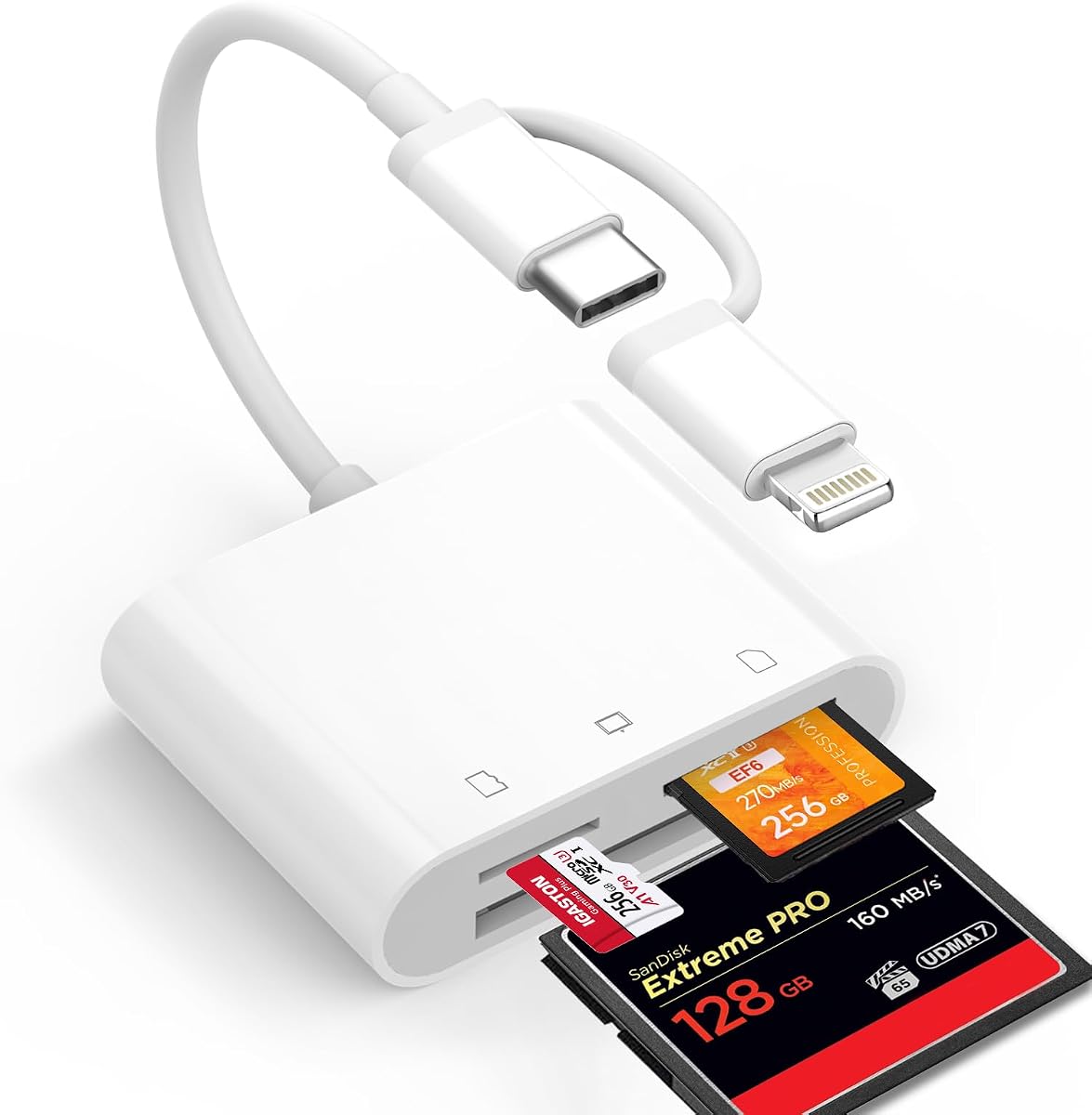

The BENFEI 4-in-1 reader combines Compact Flash, SD, microSD, and Memory Stick support with a practical USB-C and USB 3.0 connection design. Its 4.5 rating reflects a well-rounded option for photographers and casual users, particularly those who want to transfer files without repeatedly changing adapters.
We may earn a commission when you buy through this link, at no additional cost to you.
Its strongest quality is versatility. The integrated USB-C and USB-A connection can be used with modern laptops, desktops, and compatible mobile devices, while four card slots allow multiple media types to remain connected. The listing states that UHS-I transfers can reach 160MB/s when the card and host connection support that rate, making it useful for moving large photo and video collections.
There are important limitations to understand. Standard Memory Stick and Memory Stick Micro M2 cards are not supported, and older Windows or Mac operating systems may not recognize exFAT-formatted SDXC cards. Actual transfer speed also depends on the inserted card, source device, host controller, and cable path, so the stated maximum should be treated as a conditional capability rather than a guaranteed result.
This is an attractive recommendation for anyone seeking a compact, multi-purpose reader at a modest cost. It is especially suitable for a photographer who regularly alternates between Compact Flash and SD-family media, while its dual connectors reduce the need to carry separate adapters. For users with M2 Memory Sticks or specialized CFast cards, one of the more specialized alternatives will be a better fit.
Keeping separate slots for Compact Flash, full-size SD, microSD, and compatible Memory Stick media makes this reader useful across generations of camera equipment. That variety is valuable when a workflow involves both older and newer cameras.
The integrated two-in-one connector design helps the same reader work with USB-C laptops, tablets, and phones as well as traditional USB-A computers. That flexibility is especially helpful for users who alternate between a desktop and mobile editing setup.
We may earn a commission when you buy through this link, at no additional cost to you.
The UGREEN 5Gbps card hub is a four-slot reader built around broad format support and simultaneous access. It handles SD, SDXC, SDHC, microSD, UHS-I, Compact Flash, and Memory Stick media, earning a 4.6 rating that makes it one of the strongest general-purpose choices in this guide.
We may earn a commission when you buy through this link, at no additional cost to you.
The most useful feature is the ability to read and write four different cards at the same time. That can dramatically reduce the interruption involved in sorting a shoot or comparing footage from multiple cameras. Its USB 3.0 connection is listed at up to 5Gbps, while support for cards up to 2TB adds reassurance for users working with higher-capacity media.
The main constraint is its USB-A-oriented design. It will work with many laptops and desktops, but a USB-C-only modern computer may require an appropriate adapter. It also lacks a dedicated CFast slot, so photographers who regularly handle CFast media should look to a specialist reader instead of assuming that standard Compact Flash support covers every professional card format.
This reader suits travelers, office workers, and home photo organizers who want broad compatibility without installing software. It is particularly valuable for users who regularly need several cards visible at once. Those wanting a native USB-C connection, specialized CFast performance, or a fixed mobile-device adapter can compare the BENFEI, Lexar, and six-slot aluminum models.
Reading and writing four cards at once allows photographers to ingest, copy, or organize files from several sources without constantly unplugging media. It also makes the hub convenient for studios and offices that regularly handle mixed card types.
The stated Windows, macOS, Linux, and Chrome OS support makes this a broadly usable hub. Its compact size and short cable also reduce clutter in a laptop bag or a space-limited workstation.
We may earn a commission when you buy through this link, at no additional cost to you.
The Lexar Multi-Card 3-in-1 reader is designed for photographers who place speed ahead of broad format coverage. With a 4.7 rating, it is the highest-rated product in this selection, and its listed transfer rates make it a compelling option for moving large files from SD, microSD, or Compact Flash media.
We may earn a commission when you buy through this link, at no additional cost to you.
The standout specification is transfer speed of up to 312MB/s for SD and microSD, with Compact Flash transfers listed at up to 160MB/s. Backward compatibility with UHS-I cards at up to 170MB/s gives users some flexibility with older media, while USB 3.1 and 2.0 compatibility helps it work across a wider range of computers.
Its simpler three-format design is the main trade-off. Users who depend on CFast, XD-Picture, Memory Stick Pro Duo, or multiple simultaneous cards will find broader alternatives more suitable. Also, the fastest possible result depends on the source card, computer interface, storage drive, and file workload; a USB 2.0 host will not reproduce the maximum USB 3.1 performance.
This is the strongest recommendation for a photographer who wants rapid imports from the three most common media types without carrying several separate readers. Its two-year limited warranty adds useful support, and its focused design keeps the workflow simple. For legacy archiving or high-card-count production, compare it with the five- and six-format readers in the guide.
The listed 312MB/s maximum for SD and microSD is a meaningful advantage for users transferring large RAW photo collections or high-resolution video. A fast source card and a capable USB 3.1 host are still necessary to realize the advertised ceiling.
Concentrating on SD, microSD, and Compact Flash makes setup straightforward for many photographers. It avoids the added bulk of a six-format hub while preserving the formats most commonly found in established camera workflows.
We may earn a commission when you buy through this link, at no additional cost to you.
This six-in-one reader is the broadest multi-format product in the guide, supporting CFast, Compact Flash, SD, microSD, Memory Stick, and XD-Picture cards. Its 4.3 rating is lower than those of several alternatives, but the extensive slot coverage and aluminum construction make it a distinctive option for professional or archival workflows.
We may earn a commission when you buy through this link, at no additional cost to you.
Six simultaneously readable cards offer an efficient way to manage footage from multiple cameras without repeated swapping. The dedicated CFast 2.0 capability is particularly relevant to videographers, while the older Compact Flash, Memory Stick Pro Duo, and XD-Picture slots help preserve access to legacy media. USB 3.0 is listed at up to 5Gbps and remains backward compatible with older USB connections.
The premium hardware comes with trade-offs. A six-slot body is naturally larger and more complex than a three-card reader, and its 4.3 rating indicates that it has not accumulated the same level of user feedback as the leading products. The stated transfer example involving a 10GB file should also be understood as dependent on the source card, host, storage, and file arrangement.
This is the most suitable choice for a studio, archive, or traveling professional who wants one adapter for both current and obsolete card formats. It is less compelling for someone who only handles SD and Compact Flash and values a small footprint. For that user, the Lexar or BENFEI reader offers a simpler design with stronger ratings.
CFast 2.0 and six-format support allow the reader to handle demanding video media alongside classic camera cards. This makes it particularly valuable for producers who move between professional and legacy equipment.
The aluminum alloy body is designed to improve durability and dissipate heat during extended transfers. That construction suits repeated studio use better than a lightweight temporary adapter.
We may earn a commission when you buy through this link, at no additional cost to you.
The ZIYUETEK 5-Slot reader balances card capacity, portability, and a 4.5 rating. It supports Compact Flash, SDXC, SDHC, SD, microSDXC, microSD, microSDHC, M2, MS, and UHS-I media, making it a versatile option for photographers who still encounter several generations of memory cards.
We may earn a commission when you buy through this link, at no additional cost to you.
Its five slots allow multiple cards to be connected at once, while hot-swapping means media can be changed without restarting the entire workflow. The USB 3.0 interface is listed at up to 5Gbps, and the aluminum cover is described as helping with durability and heat dispersion. Driver-free operation across Windows, macOS, Linux, and Chrome OS further simplifies everyday use.
This model does not include a dedicated CFast slot, which limits its usefulness for modern high-end video workflows compared with the four- and eight-position professional options. Actual transfer speed depends on the host and inserted card. Its five-slot configuration also requires more desk space than a focused three-card reader, although the listing still describes the housing as slim and compact.
Choose it when format variety and hot-swapping matter more than CFast performance or a native USB-C form. It is a good everyday reader for mixed camera bags and archiving sessions. Users working exclusively with modern SD media may find it unnecessarily complex, while CFast professionals should examine a dedicated multi-slot alternative.
Hot-swapping lets photographers exchange media while the reader remains connected. This is convenient during a long import or backup session and reduces the need to repeat connection steps for each card.
The aluminum cover gives the reader a more durable feel while helping release heat during transfers. Its relatively small body remains practical for carrying between home, office, and travel locations.
We may earn a commission when you buy through this link, at no additional cost to you.
The UGREEN USB-C 4-in-1 is tailored to modern devices that rely on USB-C rather than traditional USB-A. It supports SD, microSD, Compact Flash, and Memory Stick cards, and its 4.5 rating indicates a well-received option for users who want to import media directly into compatible phones, tablets, or laptops.
We may earn a commission when you buy through this link, at no additional cost to you.
The USB-C design is the defining feature. The listing names support for recent iPhone models, MacBooks, iPads, and numerous Android devices, while its 5Gbps transfer rate is intended to reduce waiting during large imports. Four cards can also be accessed at once, which is useful when reviewing footage from several camera cards before choosing what to copy.
A USB-C-only connection presents an obvious limitation for desktop systems and older laptops without the correct port. The reader also lacks the dedicated CFast support found in specialized professional adapters, and actual performance will depend on the card and device. Users should also check the precise card format and operating-system requirements for their particular equipment.
This reader is ideal for a mobile-first creator who regularly moves files from a camera to a USB-C phone, tablet, or laptop. It is also a sensible compact choice for modern computer users who do not need legacy connectors. A USB-A-oriented model may be more universal, while a CFast-equipped reader is better for professional video.
A native USB-C connection makes this model convenient for compatible phones and tablets. Users can browse, download, and store files without relying on a computer as the first destination.
Simultaneous access across SD, microSD, Compact Flash, and Memory Stick media makes it possible to review several card groups together. This is especially handy for selecting highlights before transferring a larger set of files.
We may earn a commission when you buy through this link, at no additional cost to you.
The SmartQ C368 is a portable four-format reader for SD, microSD, Memory Stick, and Compact Flash cards. Its 4.6 rating places it among the best-reviewed products here, while independent card access and simple plug-and-play operation make it approachable for everyday photography and travel.
We may earn a commission when you buy through this link, at no additional cost to you.
Independent reading means each supported card can function as its own storage location, reducing the need to remove one card before inserting another. The USB 3.0 connection is listed at up to 5GB/s and is backward compatible with USB 2.0. A blue LED clearly indicates when the reader is powered, which is a small but useful status feature in dim workspaces or travel bags.
The reader lacks a native USB-C connector, so newer USB-C-only computers may need an adapter. It also does not provide dedicated CFast 2.0 or XD-Picture support, making it less versatile than the aluminum professional hubs. As with every product in the guide, the stated interface rate does not guarantee equivalent real-world transfer speed from every card.
This is a good choice for users who want a simple, portable reader with the most common camera formats. The high rating, driver-free setup, and independent access make it particularly attractive for travel kits and mixed-device offices. If a modern USB-C connection or legacy archival formats are priorities, choose one of the more specialized readers instead.
Each card can be handled independently, which makes the reader convenient for comparing files or moving between small and full-size media. The design reduces the awkwardness of managing a single-slot adapter.
The portable form, included cable organizer, and simple status light fit comfortably into a camera bag. No driver installation is required, making setup straightforward after arriving at a new location.
We may earn a commission when you buy through this link, at no additional cost to you.
The CFast 2.0 5-in-1 reader is a specialized option for photographers and videographers who need professional CFast performance together with several common card formats. It supports CFast 2.0, Compact Flash, SD, microSD, and XD-Picture media and carries a 4.4 rating.
We may earn a commission when you buy through this link, at no additional cost to you.
Its dedicated CFast slot is the key distinction from general-purpose Compact Flash readers. The USB 3.0 interface is listed at up to 5Gbps, and up to five cards can be read simultaneously, which helps when a production involves multiple camera bodies or card types. A durable aluminum housing is included to dissipate heat during larger transfers.
The format range still has limits: there is no stated Memory Stick Pro Duo slot, and compatibility with a particular CFast card can depend on its capacity, generation, and the host system. The five-position format also makes the reader bulkier than a simple CF or SD adapter. Buyers should also verify that their computer supplies the necessary bandwidth rather than relying on a USB 2.0 connection.
This reader is most appropriate for professional video workflows involving CFast 2.0, especially where offloading high-resolution footage quickly matters. Its simultaneous access, modern connector cable, and two-year warranty make it a strong production-oriented choice. For ordinary SD and Compact Flash transfers, the less complex Lexar model may offer better value.
A dedicated CFast 2.0 slot is important for cameras that rely on this media for demanding video recording. It separates this model from readers that only accommodate conventional Compact Flash cards.
The aluminum body is designed to dissipate heat during sustained high-volume transfers. That makes the reader more suitable for a full production import than a lightweight temporary connector.
We may earn a commission when you buy through this link, at no additional cost to you.
The Denlane reader is built for moving camera files to mobile devices, with a fixed Lightning connector and USB-C connector. It supports Compact Flash, SD, and microSD media and has a 4.3 rating. Its strongest appeal is the ability to use one small reader across older and newer mobile ecosystems.
We may earn a commission when you buy through this link, at no additional cost to you.
The two fixed connectors let the reader work with compatible iPhones, iPads, Macs, Android phones, tablets, and laptops. The listing emphasizes that no application, network connection, driver, or external power is required, so importing images is direct. It also supports bi-directional transfers, allowing users to move files between a device and a supported card when needed.
The connectors cannot be used simultaneously, and the short fixed cable is less adaptable in a desktop setup than a detachable USB reader. The product does not offer CFast 2.0, XD-Picture, or Memory Stick Pro Duo support. Users should also confirm that a specific phone or tablet has the required port and sufficient power, since mobile host behavior can vary.
This is a compelling choice for travel photographers who want to review or share pictures immediately after a shoot. It is also useful for users moving between an Apple device with Lightning and a newer USB-C phone, tablet, or computer. Computer-only users with several modern devices may prefer the ChiaoPio reader's simpler built-in USB-C arrangement.
The built-in connectors make it easy to attach camera media directly to compatible mobile devices. This supports faster decision-making and sharing when a full computer workflow is unavailable.
Having both Lightning and USB-C connections reduces the need to carry separate adapters for different devices. The short cable also keeps the setup tidy during travel.
We may earn a commission when you buy through this link, at no additional cost to you.
The ChiaoPio USB-C reader is a straightforward three-slot adapter for Compact Flash, SD, and microSD cards. Its 4.5 rating and built-in USB-C cable make it a convenient choice for modern Apple devices, Android hardware, and computers that use the same connector.
We may earn a commission when you buy through this link, at no additional cost to you.
The design is intentionally uncomplicated. The attached cable connects directly to a USB-C port, and no drivers or external power are required. The listing names support for several iPhone 15 variants, numerous iPad generations, MacBook families, and popular Samsung devices, giving it broad relevance for users who want to import photos and videos directly.
The built-in cable cannot be replaced, which may be less convenient when reaching a rear port or using a desktop. It has only three slots, so it does not support CFast, XD-Picture, or Memory Stick formats. The product is also not compatible with Lightning ports, meaning owners of an iPhone without USB-C will need the dual-connector Denlane option instead.
This is a good recommendation for someone who primarily uses USB-C devices and wants a small, uncomplicated way to read CF, SD, and microSD media. It works well for quick reviews and direct mobile imports. Professionals who need more formats, simultaneous access, or a metal housing should consider a more specialized multi-card hub.
The fixed USB-C cable removes the need to carry a separate host cable or driver. The reader can be connected directly to a compatible laptop, tablet, or phone and used without a complicated setup.
Compact Flash, full-size SD, and microSD cover the core formats found in many DSLR and mirrorless workflows. The three-slot arrangement keeps the adapter simple while remaining broadly useful.
We may earn a commission when you buy through this link, at no additional cost to you.
The most useful card reader is the one that matches your card formats, host-device connectors, and transfer volume. Consider compatibility first, then evaluate speed, simultaneous access, construction, portability, and workflow convenience.
Compact Flash is a broad description that can refer to different generations of camera media, while CFast is a separate, faster format. SD, microSD, Memory Stick, Memory Stick Pro Duo, and XD-Picture also use distinct physical designs. A reader may support standard Compact Flash but not CFast, may accept one Memory Stick generation but not another, or may include a slot that does not support the capacity or file system used by a particular card.
A reader cannot communicate with a device unless its connector and protocol are supported. USB-A readers suit many desktop computers and older laptops, while USB-C is common on modern phones, tablets, and notebooks. Some products integrate both connectors, while others include a cable with USB-A and USB-C ends. Lightning is still relevant for some Apple devices, but a Lightning-equipped reader may need a separate USB-C option for newer equipment.
Reader speed is only one part of a transfer chain. The card itself must support the target rate, and the host connection, storage drive, operating system, file size, and number of simultaneous tasks can all limit performance. USB 3.0 or 3.1 interface figures describe theoretical capability, while a stated 312MB/s card rate remains unavailable if the inserted card is slower or the computer uses an older interface.
Simultaneous reading and writing is valuable when importing from several cameras or comparing footage stored on different cards. Four-, five-, and six-slot models can keep multiple media types connected, reducing repeated unplugging. A three-slot reader may be sufficient for a single camera, while a multi-slot design is more useful for studios, archives, and multi-camera shoots.
A card reader used on location must be small, durable, and easy to retrieve from a crowded camera bag. Fixed short cables avoid loose adapters but may be awkward with desktop ports. Longer or detachable cables provide placement flexibility but add items to carry. Compact aluminum bodies are attractive for travel, while multi-slot professional readers naturally occupy more space because of their wider range of formats.
Large video files and sustained multi-card transfers generate more heat than a quick photo import. Aluminum housings are described by several products as helping dissipate that heat, while plastic bodies are lighter and may be sufficient for occasional use. Consider the length and frequency of transfers, the physical protection required for travel, and whether the reader will remain connected during intensive offloading.
Plug-and-play operation is common, but the host still needs to recognize the card's file system and capacity. exFAT support is especially important for large SDXC cards, while older operating systems may lack current drivers or support. Windows, macOS, Linux, and Chrome OS are mentioned across the selections, but specific card formats, USB standards, and mobile devices can impose additional requirements.
Status lights can confirm that a reader is powered, hot-swapping allows quick card changes, and bidirectional transfer can move files both to and from supported media. None of these features matters equally to every user. A mobile traveler may prioritize a direct connector, while a studio operator may value simultaneous card access, fast imports, and broad CFast support more than portability.
Before inserting a card, confirm that the format fits the correct slot and that the reader is compatible with your device. Connect the reader first when its documentation recommends that order, then insert the card gently until it is fully seated. Avoid forcing cards, and never attempt to use an adapter that does not match the card's physical shape and generation.
Once the card appears as a removable drive, copy or move files rather than repeatedly opening and saving them directly from the card. For faster imports, select a small number of large files rather than tens of thousands of tiny ones, and ensure the destination drive has enough free capacity. Safely eject the card or reader before removing media to reduce the chance of data corruption.
Keep the slots clean and dry, and do not leave a card inserted while the reader is unattended or being moved through a bag. Use the protective caps or a case supplied with the reader where available. If transfer speeds fall substantially, test another card or host port, confirm that the connection is using the intended USB standard, and stop using the reader if it becomes unusually hot or behaves inconsistently.
Most multi-card readers in this guide include dedicated SD and microSD slots alongside Compact Flash. The correct slot and file-system support still matter, particularly for high-capacity SDXC media. Always verify the complete format list because a reader that supports Compact Flash does not automatically support every SD capacity, adapter, or related format.
No. Compact Flash and CFast use different standards, and a standard Compact Flash slot generally cannot read CFast media. Readers 4 and 8 in this guide specifically list CFast 2.0 support. If your camera uses CFast, choose one of those models rather than relying on a reader that merely says Compact Flash.
It will work if the computer has a compatible USB-C port and supports the reader's card formats and required operating-system features. Some USB-C devices are designed primarily for data accessories, while others may have limited power or file-system behavior. Check the listed device examples and confirm the connector before purchasing.
Only if your workflow regularly uses more than one card at a time. Photographers with a single camera may find a three-slot reader sufficient, while studios and multi-camera producers can benefit from simultaneous access. More slots add convenience but also make the reader larger and more complex.
The advertised figure may describe the reader interface rather than the real-world file rate. The source card, host port, storage device, file count, simultaneous operations, and operating system can all limit performance. Start with a fast card and a matching USB 3.0 or newer host port, and compare the result with the card's own stated transfer capability.
Compatible phones can import files through suitable USB-C or Lightning readers, but connector support is not guaranteed on every model. Review the device list carefully and follow the setup instructions for the operating system. The Denlane reader specifically includes both Lightning and USB-C connectors, while several other choices are designed primarily for USB-C devices.
Aluminum models are generally better suited to repeated transfers because the material can help dissipate heat and resist physical damage. Plastic readers may still be adequate for occasional use and can be lighter. The best choice depends on how often you transfer large files and how exposed the reader is during travel.
Use the operating system's safe-eject command for the reader or card, wait until the system confirms that the operation is complete, and then remove the media. Pulling out a card during an active transfer can damage files or leave the filesystem incomplete. If a transfer fails, reconnect the reader and repeat the eject process before changing cards.
The BENFEI 4-in-1 stands out as the most balanced budget-oriented option because it combines Compact Flash, SD, microSD, and compatible Memory Stick support with USB-C and USB-A connectivity. The Lexar 3-in-1 is the editor's choice for photographers who prioritize high stated transfer rates, while the aluminum 6-in-1 model leads the premium group through its six-format coverage and simultaneous card access.
Start with compatibility rather than maximum speed. Identify every card type you use, confirm the connector on your primary device, and decide whether a CFast slot, simultaneous access, or mobile import is essential. For occasional transfers, a focused three-slot reader may be easier to manage; for studios and archives, broad format coverage and durable construction can justify a larger design.
Product features, device support, and commercial terms can change, so confirm the latest compatibility details and current product information before purchasing. The most valuable choice is the reader that handles your specific cards, connects cleanly to your equipment, and supports the volume and pace of transfers you actually perform.