
NIIMBOT B2 Label Maker Machine
4.7Editor score
20-50mm label compatibility
One-button offline printing
Mobile and Windows support
A printer for kitchen labels can transform cluttered shelves, opaque containers, and confusing leftovers into a neatly organized system. The right device should produce legible text, fit your storage containers, connect easily to the devices you already use, and handle the label styles that match your routine.
This guide compares ten label printers based on their stated print resolution, supported label dimensions, connectivity, design features, portability, and practical kitchen applications. It includes compact phone-only models, larger printers capable of handling wider media, and one dedicated shipping-label printer to show where each category fits.
Each review explains the strongest reason to choose the model, along with compatibility limits, media restrictions, and other trade-offs worth considering. Product ratings and specifications may change, so check the latest listing details and current prices before making a final purchase.
4.7Editor score

4.6Editor score

4.4Editor score
As an Amazon Associate we earn from qualifying purchases.
The table below compares the ten featured printers by rating, connectivity, supported label format, and kitchen-relevant capabilities. It highlights the important difference between narrow phone-only label makers, wider multipurpose devices, and a shipping-label printer designed for larger paper formats.
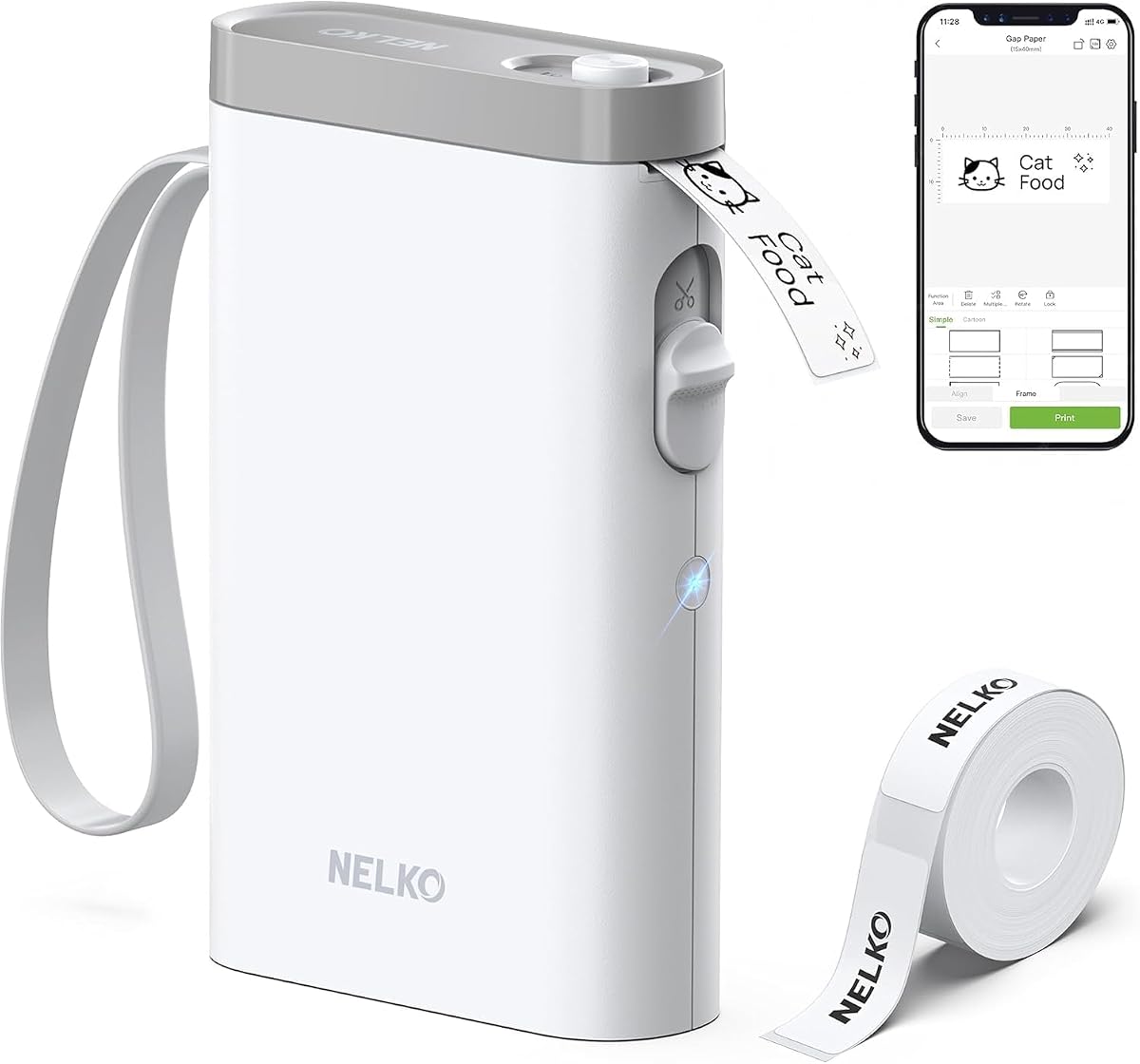
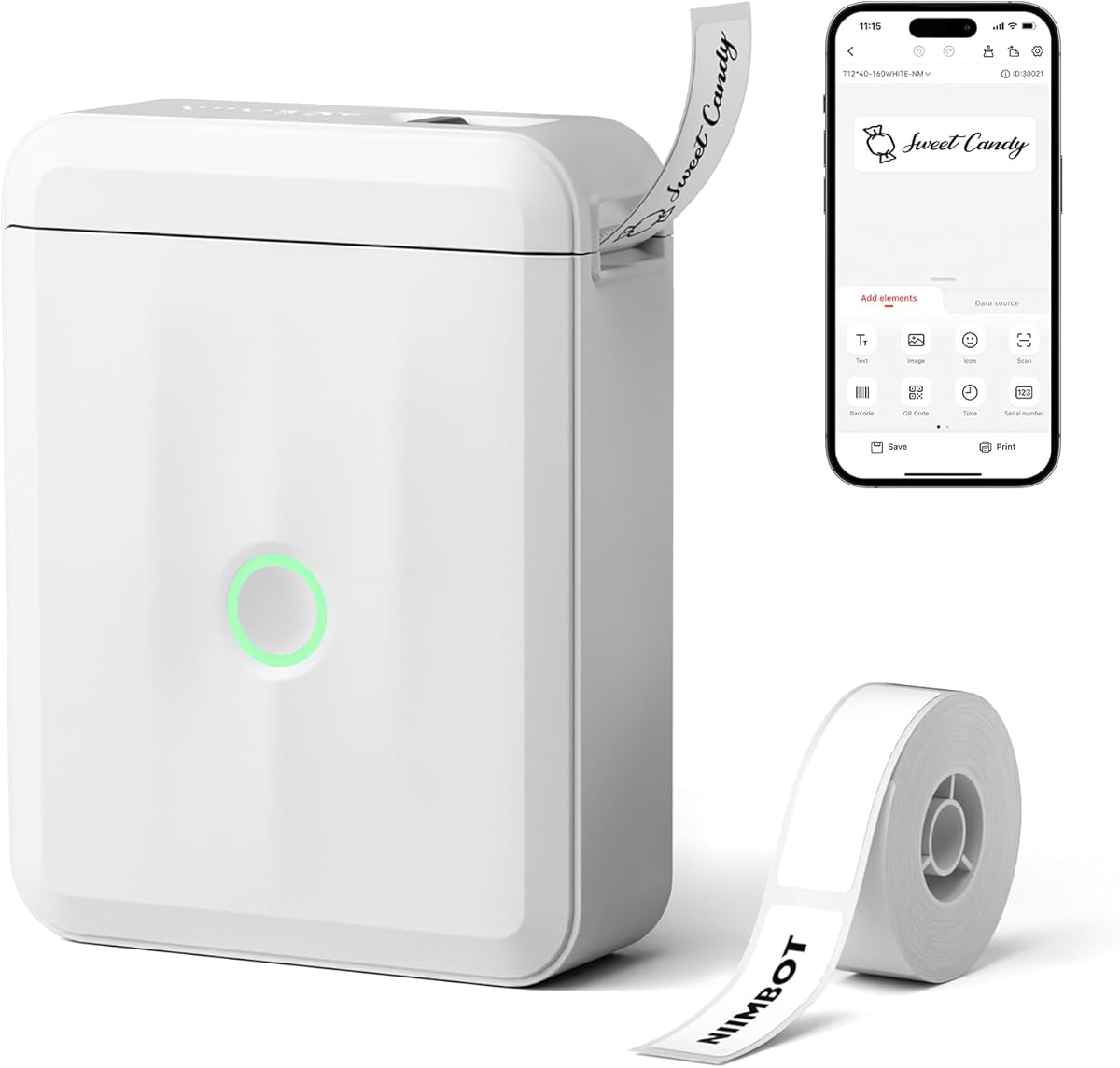




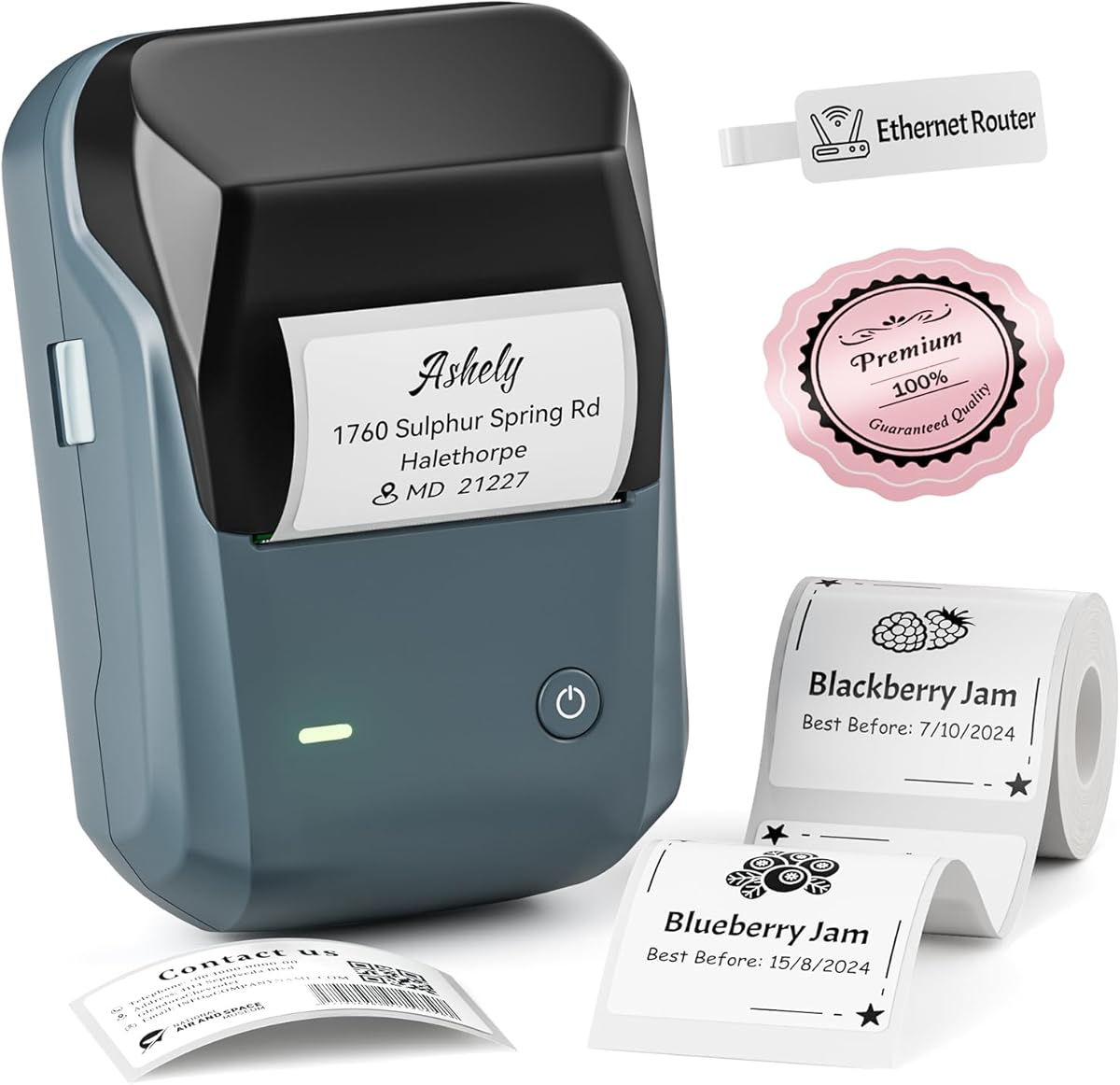
The Nelko P21 is a compact Bluetooth label maker built around a stated 203 DPI direct thermal print head, a rechargeable battery, and a smartphone-based design workflow. It carries a 4.4 customer rating and stands out for a small body intended to fit into a pocket. For kitchen users, that portability makes it convenient to move between the pantry, refrigerator, and work counter without carrying a larger desktop device.
We may earn a commission when you buy through this link, at no additional cost to you.
Its creative app is one of the strongest parts of the package. The listed library includes more than 3,600 icons, 700 borders, 5,500 materials, 750 templates, and 29 languages. Kitchen organizers can add text, timestamps, QR codes, barcodes, borders, and images instead of limiting themselves to plain container names. Supported label lengths include 14 by 40 millimeters, 14 by 50 millimeters, and 14 by 75 millimeters, giving users several options for short ingredients or more descriptive reminders.
There are important limitations. The P21 works with iOS and Android phones but not computers, and it does not support continuous label tape. Google Pixel phones running Android 14 are specifically listed as incompatible, which deserves attention for buyers currently using that combination. The printer also creates monochrome text, and color labels depend on patterned tape rather than full-color thermal printing. A charging adapter is also not included.
The P21 is a strong choice for a household that wants a dedicated pocket label maker and creates most designs on a phone. It is especially attractive for people who need QR codes, barcodes, or image-rich labels beyond basic pantry names. Those who need computer access, continuous rolls, or seamless operation with a recent Google Pixel should consider one of the broader-compatible alternatives in this guide.
The reduced size and weight make the P21 easier to store in a drawer or carry between shelves. Its portability is particularly useful when a batch of jars and pantry containers must be labeled at different points around the kitchen.
Text, images, timestamps, QR codes, and barcodes make the app more versatile than a basic name-only printer. These tools can distinguish ingredients, expiration reminders, and reusable storage containers without requiring separate designs for every label.
We may earn a commission when you buy through this link, at no additional cost to you.
The NIIMBOT D110 is a 149-gram mini Bluetooth label maker with a 4.5 customer rating. It is built for users who want an unobtrusive device that can remain in a kitchen drawer or travel in a pocket. The stated 203 DPI print head, direct thermal operation, and rechargeable 1500mAh battery cover the core needs of pantry, refrigerator, and food-container labeling without requiring ink or toner.
We may earn a commission when you buy through this link, at no additional cost to you.
Automatic label recognition and rewind positioning are meaningful convenience features. When the machine is switched on, it calibrates the position of the first label, reducing the chance of printing an offset first label and wasting media. The app supports text, symbols, icons, borders, and logos, while compatible tape styles include 12 by 40 millimeters, 14 by 30 millimeters, and 15 by 30 millimeters. The claimed battery life is four hours of continuous printing after a full charge.
The trade-offs concern scale and connection method. The D110 connects through Bluetooth to iOS and Android phones using the NIIMBOT app, but it does not offer a computer workflow. Its supported label styles are narrower and shorter than those accepted by several larger models, which may limit its usefulness for wide pantry containers. The sensor chip beside the label roll must remain intact because damaging it can affect printing.
This D110 is ideal for compact kitchens, travel organizers, and labeling short jars or containers. Its automatic setup makes it approachable for new users, while the low weight helps when completing a large batch around the home. Buyers who need wider labels, desktop compatibility, or a broader selection of supported media sizes should look to the B2, B1, or T50M Pro.
The calibrated rewind system helps position the first label correctly when the device starts. That makes the printer attractive for repeated kitchen sessions where misaligned output would otherwise create extra cleanup and unused material.
The supported narrow tape sizes suit short ingredient names, dates, and category labels. App support for fonts, icons, and borders also gives home organizers more visual options than a single-style thermal printer.
We may earn a commission when you buy through this link, at no additional cost to you.
The N12 offers an approachable way to begin a kitchen labeling system. It has a 4.4 customer rating, uses inkless direct thermal technology, and includes a rechargeable lithium battery, avoiding both cartridge expenses and routine battery replacements. Its compact format is intended for quick jobs around the home, office, or school rather than high-volume production.
We may earn a commission when you buy through this link, at no additional cost to you.
Design flexibility is the N12's most notable feature for its category. The free Nada Print app provides more than 1,000 symbols, 270 frames, and 100 fonts. It also supports text, images, and other design elements, making it possible to create consistent spice names, food dates, jar categories, and other identification labels. Bluetooth connectivity works with both iOS and Android devices.
The main limitation is that label lengths are fixed. Listed formats include 12 by 40 millimeters, 14 by 40 millimeters, 14 by 50 millimeters, and 14 by 75 millimeters, so buyers should verify the dimensions of their intended containers before purchasing. The printer also relies on a phone app rather than offering a computer connection or a physical keyboard.
The N12 is a practical choice for first-time buyers who want inexpensive, rechargeable labeling without giving up useful design templates. It is well suited to spice jars, pantry containers, cosmetics, and simple organization labels. Users needing larger text panels, offline controls, or desktop support will find more capable options elsewhere in the comparison.
The rechargeable design and direct thermal process remove the need to keep ink or toner on hand. That makes the N12 suitable for occasional labeling without turning a small organizational project into a recurring consumables expense.
More than 1,000 symbols and 270 frames help create visually consistent labels without designing every graphic from scratch. The available fonts are enough for clear ingredient names, dates, and category labels on compact containers.
We may earn a commission when you buy through this link, at no additional cost to you.
The SUPVAN T50M Pro targets users who need larger text and more visual content than narrow label makers can provide. Its 4.4 rating and ability to print labels from three-quarters of an inch to two inches wide make it well suited to large pantry bins, storage containers, and prominent kitchen identification. The set includes three tapes, giving buyers several starting formats for different label dimensions.
We may earn a commission when you buy through this link, at no additional cost to you.
Its editing workflow is a major strength. The app accepts images from a phone, tablet, or computer, while the supplied library includes more than 30 fonts, 50 frames, and 660 icons at no additional charge. The app can also create QR codes, barcodes, addresses, logos, and product information. Automatic label-size recognition reduces the need to enter dimensions manually for every new roll.
This is not a minimal device, and its flexibility may exceed the needs of someone who only wants to mark one small spice jar. Buyers must also confirm that the chosen square, round, address, cable, jewelry, or file label corresponds to compatible media. The app reportedly requires no registration, but editing from a computer still adds another device and setup step compared with a phone-only model.
The T50M Pro is an excellent choice for a serious home-organization project, shared household supplies, or a kitchen with varied container shapes. Its wider media range gives more room for ingredients, dietary notes, dates, and branded graphics. For occasional small labels, one of the compact models will usually be easier to store, but this printer offers greater labeling versatility when width matters.
A two-inch print width can accommodate larger words and more complete descriptions than a narrow mini printer. This is useful for pantry containers that need ingredients, dates, and storage guidance displayed together.
Phone, tablet, and computer access gives users a larger creative workspace for imported logos and images. The broad icon, font, and frame library also supports a polished result without paid templates.
We may earn a commission when you buy through this link, at no additional cost to you.
The NIIMBOT B2 leads this list with a 4.7 customer rating and adds a feature that separates it from most phone-only label makers: one-button offline printing. Users can prepare real-time dates, recent records, or a specified template without connecting the app, which is valuable when labeling pantry goods in a hurry or when a phone is unavailable.
We may earn a commission when you buy through this link, at no additional cost to you.
The B2 supports label widths from 20 to 50 millimeters and accommodates white, colored, round, and transparent paper. It also offers 203 DPI thermal output, automatic first-label recognition, and rewind positioning. Its 352-gram body is portable, though larger than the 149-gram D110 and other mini models, and its 20-50mm range is far more versatile for kitchen containers.
Connectivity is broad but not universal. Bluetooth connections support iOS, Android, and Windows PCs, while USB can be used with a computer after driver installation. Up to ten phones can connect at once, comprising three iOS and seven Android devices. Tablets are not recommended, which is a notable limitation for users whose household organization system centers on an iPad.
The B2 is a strong all-around choice for users who value flexible media, dependable setup, and fast labeling without constant app interaction. It suits large food containers, bakery containers, pantry jars, and storage systems that need dates. Buyers who only need tiny labels and prioritize pocketability may prefer a smaller model, while those needing macOS or tablet workflows should investigate compatibility before ordering.
The dedicated offline button streamlines recurring tasks such as printing the current date. It removes a common source of friction when several containers need quick, consistent expiration labels.
Support for widths up to 50 millimeters makes the B2 more useful for large jars and bins. Multiple paper types allow the label system to shift between practical pantry stock and more decorative container designs.
We may earn a commission when you buy through this link, at no additional cost to you.
The NIIMBOT D110 Upgrade combines a 4.6 customer rating with a pocket-oriented design and strong app features. Its 203 DPI direct thermal head is intended to produce sharp monochrome text, while a rechargeable battery and two-hour Type-C charging cycle support routine kitchen organization. The machine is designed for iOS and Android smartphones through the NIIMBOT app.
We may earn a commission when you buy through this link, at no additional cost to you.
Intelligent Identification allows the printer to recognize the loaded label and work with a variety of sizes and styles. The listing specifically mentions clear, colorful, gift-pattern, and round labels, with compatible refills described as waterproof and oil-proof. Batch printing is another useful feature for a household labeling multiple food containers, pantry jars, or classroom items at once.
There are two constraints to note. First, the printer does not work with computers, so a phone remains essential. Second, the output itself is monochrome black text. Color can appear only by using preprinted or patterned label tape, and the B2's offline button is unavailable. These limitations do not undermine core food-storage labeling, but they matter for buyers seeking full color or direct control from a desktop.
This D110 Upgrade is a strong recommendation for phone-oriented users who want refined print clarity and automatic media handling without a large footprint. It fits comfortably in a kitchen drawer and handles labels intended for damp or oily surroundings. Those who need computer connectivity, offline templates, or larger tape widths should favor a multipurpose model such as the B2 or B1.
The printer identifies the label format after it is loaded, reducing configuration work when a kitchen project moves between different container types. That convenience is particularly helpful during bulk organizing.
Compatible refill tapes are described as waterproof and oil-proof, which is relevant for spice jars, bottles, and containers near cooking areas. The durability claim still depends on the exact tape selected and the conditions in which it is used.
We may earn a commission when you buy through this link, at no additional cost to you.
The Phomemo D30 is a feature-heavy mini label maker with a 4.3 customer rating. It combines a portable body with support for both continuous label tape and fixed-length labels, giving users more freedom in text length and media format. Its 203 DPI direct thermal print head produces monochrome text, and the rechargeable battery supports cable-free use around the home.
We may earn a commission when you buy through this link, at no additional cost to you.
The Print Master app is the model's main attraction. Its stated library includes more than 4,000 icons, 800 borders, 600 fonts, 6,800 materials, and 1,000 templates. Beyond basic text, it supports image imports, logos, tables, timestamps, barcodes, QR codes, Excel batch data, document scanning, OCR text extraction, and voice input. These features extend well beyond a simple kitchen-name printer.
That depth creates a trade-off. Users interested only in naming jars may find the app more involved than necessary. The D30 is also a phone-connected design, and colorful output depends on patterned label tape because the printer itself produces black text. A reported 25 percent print-quality improvement is based on the product description rather than an independent side-by-side evaluation.
The D30 is well suited to users who already manage labels in spreadsheets or want imported information, scans, and barcodes within one workflow. It is particularly attractive for bulk pantry inventory, expiration tracking, and mixed home organization. Those wanting a simple, compact printer should compare it with the N12 or original D110, while kitchen labeling novices may appreciate the simpler interface of the other options.
Unlike models restricted to fixed label lengths, the D30 accepts continuous media. That makes it easier to print long ingredient lists, storage directions, or variable-length names without trimming the design to a preset panel.
Excel batch import and document scanning can reduce the repeated typing involved in organizing many containers. OCR and voice input add further ways to move information into a label, although the user still needs to check accuracy.
We may earn a commission when you buy through this link, at no additional cost to you.
The KNAON is built primarily for shipping labels, but its unusually broad media range makes it worth considering for large kitchen storage containers. It supports paper widths from 1.5 to 4.2 inches and is presented as a 4 by 6-inch thermal address printer. The 4.4 rating, compact dimensions of 7.17 by 3.9 by 3.43 inches, and claimed speed of up to 180 millimeters per second distinguish it from handheld label makers.
We may earn a commission when you buy through this link, at no additional cost to you.
The FlashLabel Pro app provides more than 3,000 templates, 5,000 icons, and 100 fonts. It can create shipping labels, barcodes, thank-you labels, mailing labels, name tags, price tags, and other thermal labels. Connectivity covers iOS, Android, Windows, macOS, ChromeOS, and Linux, with USB providing a broad wired route. Bluetooth devices must use the app rather than connecting directly, and ChromeOS requires the FlashLabel extension.
Its size and shipping focus make it a less natural fit for a simple spice-rack project. Large rolls and shipping-label layouts can be excessive for small pantry containers, and platform-specific logistics workflows add complexity. Kitchen users would be adopting a device built for a different central task, although they may appreciate the ability to print very large, detailed food-storage or inventory labels.
The KNAON makes sense for a home-based food business, a shared commercial kitchen, or a household that wants one printer for both shipping and oversized storage identification. It offers broader operating-system support than most compact models and can handle marketplace label files imported as PDFs. For ordinary kitchen containers, the NIIMBOT B2, B1, or T50M Pro is generally the more focused choice.
A 4 by 6-inch format can present ingredient lists, inventory records, or branded container panels in a more readable layout. That scale is valuable when a label must communicate substantially more than a short item name.
Compatibility with major selling platforms and operating systems makes the device attractive to home-based food businesses. Kitchen labels and shipping labels can share one hardware platform, provided the label dimensions suit the task.
We may earn a commission when you buy through this link, at no additional cost to you.
The NADAIIN N20 balances compact handling with the ability to print labels as wide as two inches. It has a 4.4 customer rating, weighs 296 grams, and includes a rechargeable 2000mAh battery. A 40 by 30-millimeter white label roll is included, allowing buyers to begin labeling without sourcing media separately.
We may earn a commission when you buy through this link, at no additional cost to you.
The N20 uses 203 DPI direct thermal printing and supports round, transparent, square, and colored thermal labels. Its app can add logos, mailing addresses, barcodes, QR codes, names, and organization labels, with more than 30 fonts, 50 frames, and 660 icons available without charge. The maximum listed printing size is 50 by 80 millimeters, and the supported label range covers 20-50 millimeter widths.
This is a phone-oriented Bluetooth device through the NADA Print app, and it prints in black and white only. Although the product is marketed for small business use, it is explicitly not designed for shipping labels. That restriction does not affect typical kitchen organization, but it prevents the device from replacing the KNAON in a shipping-focused workflow.
The N20 is a strong option for home-based bakers, small food sellers, and kitchens that want generous label panels without a full-size shipping printer. Its app registration-free workflow and included media reduce setup friction. Buyers needing full-color output, computer connectivity, or shipping labels should choose a more specialized model, while compact-label shoppers can find a less expensive mini alternative.
The 20-50 millimeter range offers more room for ingredient names, dates, and brand marks than narrow handheld printers. This is helpful for jars, bottles, and small-business packaging that need a more deliberate presentation.
A starter roll and registration-free app access keep the initial process simple. Compatible tapes are described as waterproof, oil-resistant, tear-resistant, self-adhesive, and BPA-free for regular kitchen use.
We may earn a commission when you buy through this link, at no additional cost to you.
The NIIMBOT B1 is a 293-gram thermal label maker that combines two-inch print width with both Bluetooth and USB options. Its 4.3 customer rating reflects a device aimed at users who want more size flexibility than a mini printer without moving into a shipping-label machine. It supports label widths from 20 to 50 millimeters and comes with a 50 by 30-millimeter roll.
We may earn a commission when you buy through this link, at no additional cost to you.
Kitchen uses include organizing jars and bottles, marking homemade food, and adding addresses, while the wider format also supports product details, QR codes, barcodes, and brand logos. The NIIMBOT app includes more than 10 fonts and languages, 100 borders, 1,500 symbols, templates, tables, images, timestamps, and code functions. A 50 by 30-millimeter starter roll and other supported styles include rectangular, round, cable, file, and double-row labels.
Media restrictions are the most important consideration. The listing says only NIIMBOT thermal label paper is supported and warns that off-brand rolls may not be recognized, which can result in poor output or malfunction. The B1 does not support iPads, and PC use over USB requires a driver from the official website. It also prints black text only.
Despite those limitations, the B1 offers an appealing mix of portability, width, and connection options for a dedicated kitchen or small food business. Its 1500mAh battery is claimed to provide up to 100 days of standby time on one charge. It is a sensible choice for users already committed to NIIMBOT media or willing to verify compatibility carefully before purchasing additional rolls.
The 20-50 millimeter range gives users more space for dates, ingredients, and product details than compact handheld models. It is a practical middle ground between narrow labelers and full shipping printers.
Supported NIIMBOT refills are described as waterproof, oilproof, wipeable, tear-resistant, self-adhesive, abrasion resistant, and BPA-free. These traits suit frequently handled containers, though compatibility should be confirmed before purchasing.
We may earn a commission when you buy through this link, at no additional cost to you.
The best kitchen label printer depends on container size, labeling frequency, device compatibility, and the amount of information each label needs. These factors narrow the field before you compare design libraries, media styles, or convenience features.
Label width determines how much text and graphics can fit on each container. Compact models commonly work with narrow formats around 12 to 15 millimeters, which suit short ingredient names, dates, and category identifiers. Wider models accepting 20 to 50 millimeters are better for larger jars, bottles, pantry bins, and labels that need multiple details. The NIIMBOT B2, NADAIIN N20, and NIIMBOT B1 offer broader widths, while the SUPVAN T50M Pro can reach two inches and accommodate a wide range of media styles.
Most compact label makers require a smartphone and companion app, but operating-system exclusions can be decisive. The Nelko P21 is not compatible with Google Pixel phones running Android 14. The NIIMBOT B1 does not support iPads, and the B2 is not recommended for pads. Computer workflows vary as well: the Phomemo D30 and original NIIMBOT D110 are phone-focused, while the B1, B2, T50M Pro, and KNAON offer broader device support. Check your current devices before selecting a model.
Fixed-length printers use premeasured labels with consistent dimensions, which simplifies alignment but limits the amount of text that can be printed. The Nelko P21, NIIMBOT D110, N12, and other compact options use fixed formats. The Phomemo D30 supports both continuous and fixed-length tape, making it more flexible for variable descriptions. A dedicated shipping printer such as the KNAON handles larger media for business labels. Consider both the physical roll and the amount of information each kitchen label must carry.
A stated 203 DPI resolution is used by most of the mini and mid-size models in this guide, including the Nelko P21, both NIIMBOT D110 listings, the Phomemo D30, and the NADAIIN N20. Direct thermal printing requires no ink or toner and produces black text on the chosen tape. Color-pattern media can create colorful labels, but these are thermal printers rather than full-color inkjet devices. For clean ingredient names, dates, and barcodes, monochrome output is usually sufficient, but font size and tape quality still influence final readability.
Kitchen labels may encounter moisture, oil, fingerprints, heat, and repeated wiping. The NIIMBOT D110 Upgrade lists waterproof and oil-proof compatible tapes, the NIIMBOT B1 describes its refills as waterproof, oilproof, wipeable, tear-resistant, and abrasion resistant, and the NADAIIN N20 offers waterproof, oil-resistant, tear-resistant, and self-adhesive media. The exact performance depends on the chosen roll and storage environment. Keep the printer itself away from moisture and follow the tape manufacturer's cleaning and storage instructions.
Pocket-sized devices are convenient for labeling scattered shelves and carrying a printer to different rooms. The NIIMBOT D110 weighs 149 grams, the N20 weighs 296 grams, the B1 weighs 293 grams, and the B2 weighs 352 grams. Larger desktop-style devices may handle wider media more comfortably but require a permanent spot. If you print only a few labels each month, portability may matter more; if you routinely create dozens of pantry or business labels, stable output, battery endurance, and media handling deserve greater attention.
Kitchen users may need nothing more than a font and text field, but design features can make a system more attractive and informative. The Phomemo D30 supports Excel batch imports, scanning, OCR, voice input, tables, and timestamps. The Nelko P21 and NIIMBOT models offer QR codes, barcodes, borders, icons, and image support. The B2 can batch print identical or different labels and can print a current date offline. Choose advanced features when they solve a recurring task rather than adding unnecessary setup.
The NIIMBOT B1 explicitly supports only NIIMBOT thermal label paper and warns that other rolls may not be recognized. Other manufacturers offer compatible rolls in multiple sizes and styles, but consumers should still verify dimensions, sensing methods, and printer support before bulk purchasing. Tape supplies also determine whether labels are round, waterproof, transparent, patterned, or narrow. Buying the printer and several rolls together can help confirm that the media feeds and prints correctly before committing to a large kitchen campaign.
Begin by charging the printer fully and installing the manufacturer app on a compatible phone, tablet, or computer. Load the label roll according to the device instructions, taking care not to tear the sensor chip or green backing strip where present. Many models automatically recognize the media, while others require a selected size in the app. Print a test label before preparing a large batch so you can check text size, alignment, and contrast.
Create labels with short, specific wording. For example, use an ingredient name plus a date rather than a vague description, and leave enough space around the text for easy reading. Clean the container surface before applying the sticker, and attach the label where it will remain visible but away from direct heat, dampness, and areas that are frequently washed. If using QR codes, barcodes, or imported information, scan the finished label and verify the decoded information before labeling the full set.
Store the printer away from food spills and high heat, and keep the label roll protected from moisture. Clean the exterior with a lightly damp cloth rather than immersing the device or exposing it to harsh cleaners. Replace rolls carefully and avoid pulling the tape sideways against the print mechanism. For consistent results, use fresh compatible tape, keep the print head clean according to the manual, and update the app when the manufacturer provides compatibility improvements.
The best pantry printer depends on container width and how detailed the labels need to be. A compact model is convenient for small jars, while a printer supporting 20 to 50 millimeter labels offers more space for ingredients, dates, and storage instructions. The NIIMBOT B2 is a versatile middle option, and the Nelko P21 is appealing for users who want a pocket-sized phone-connected device with a large creative template library.
Yes, provided the tape is intended for the container and the environment. Several models offer waterproof, oil-resistant, wipeable, or tear-resistant compatible labels, which are useful for bottles, spice jars, and pantry bins. Avoid placing labels near excessive heat, and follow the tape maker's cleaning instructions. The printer itself should remain dry because its electronics and battery are not intended for washing or immersion.
All of the featured mini and mid-size label makers use direct thermal printing, so they do not require ink, toner, or ribbons. The image forms when heat activates the thermal layer on the label. Most produce black text only, although colorful results can be created with patterned thermal tape. This approach reduces consumable clutter, but the label tape itself remains the primary operating supply.
It depends on the model. The Nelko P21, original NIIMBOT D110, NIIMBOT D110 Upgrade, N12, and Phomemo D30 are centered on phone connectivity. The NIIMBOT B1, B2, SUPVAN T50M Pro, and KNAON offer broader computer support, although some require drivers or specific apps. The B1 does not support iPads, the B2 is not recommended for pads, and the KNAON's Bluetooth connection also requires its FlashLabel Pro app.
For a small spice jar, a narrow roll around 12 to 15 millimeters wide is often sufficient for a short name or date. Larger spice bottles and pantry canisters may benefit from 20 to 30 millimeter labels because the text is easier to read and can include ingredients or refill reminders. Measure the usable face of the container before ordering, and confirm that the printer recognizes the exact tape dimensions.
Yes, most of the featured models support QR codes or barcodes through their companion apps. The Nelko P21, NIIMBOT B1, Phomemo D30, SUPVAN T50M Pro, and NADAIIN N20 explicitly include code generation, while the N12 app provides broader creative functions. Always scan generated codes before applying them to a large batch, because formatting or input errors can create a label that looks correct but reads incorrectly.
Fixed-length tape arrives as premeasured labels, which makes sizing predictable and often helps the printer align the first label. Continuous tape allows the user to choose a longer text panel, making it better for variable descriptions or imported information. Most compact models in this guide use fixed formats, while the Phomemo D30 supports both and offers greater flexibility for changing kitchen label lengths.
Start with compatible tape, load it in the correct direction, and avoid damaging the sensor chip or backing strip. Print a test after every roll change and allow the printer to recognize the media size automatically or select the correct size manually. Use a clean, dry label surface, and choose a label large enough that the text is not squeezed against the edges. If output remains inconsistent, check for a damaged roll and follow the manufacturer's print-head cleaning guidance.
The NIIMBOT D110 Upgrade stands out as an editor's choice for phone-based users who value automatic label recognition, clear 203 DPI output, and a portable form factor. The NIIMBOT B2 is the premium all-rounder because it accepts broader label widths, works with several device types, and can print dates offline. For buyers establishing a simple system on a tighter budget, the N12 provides the essentials along with a substantial creative template library.
Prioritize label dimensions, device compatibility, and the amount of information you need before comparing design extras. A compact model is usually easiest for small jars, while a 20 to 50 millimeter printer is more practical for larger containers and detailed information. Check restrictions on proprietary media, confirm that your phone or computer is supported, and consider batch or date-printing features only if they will improve your routine.
Ratings, software compatibility, accessory availability, and prices can change, so consult the current product listing before ordering. Once you have narrowed the field by tape size and device support, compare the latest customer feedback and manufacturer updates. The right printer is the one that fits your containers, works with the devices already in your kitchen, and makes labeling something you will actually continue.
