
WUKUR 2nd Generation Dock
4.4Editor score
Compact second-generation design
Detachable rear USB-C port
Non-slip silicone base
Our Dock for Square Reader guide compares 10 charging stands for stability, compatibility, anti-sleep functions, included accessories, portability, and
A dock for Square Reader does more than hold a payment device in place. The best models keep it stable, organized, and ready for continuous countertop use while adding convenient charging, wake controls, or protective features. They are especially useful for shops, markets, salons, studios, and other businesses that rely on a dedicated Square checkout point.
This guide compares 10 Square Reader docks based on reader compatibility, charging design, anti-sleep controls, stability, construction, included accessories, portability, and ease of daily operation. It covers models designed specifically for the second generation, universal stands for both generations, and a magnetic protective case with a separate display base.
Each review explains where a dock stands out, what limitations shoppers should consider, and which setup it suits best. The list also identifies three leading choices for overall versatility, value, and protection. Marketplace listings and availability can change, so confirm the current product details and reader compatibility before ordering.
4.4Editor score

4.6Editor score
4.5Editor score
The comparison below highlights the most important differences among these ten docks, including supported Square Reader generations, charging arrangements, wake controls, included accessories, portability, and the presence of a protective magnetic case.


The SORFHOUR 2nd Generation Dock receives a 4.6 rating and stands out as the most complete general-purpose charging dock in this guide. It combines a dedicated USB-C connection, a smart anti-sleep button, a weighted base, and a top-loading reader clip. The result is a practical countertop station designed for businesses that keep Square Reader 2nd Generation connected throughout the working day.
We may earn a commission when you buy through this link, at no additional cost to you.
The anti-sleep function is the feature most likely to improve daily workflow. Rather than removing the reader from the dock every time it goes to sleep, the user can press the base button and wait for the reader's green indicator lights to show that the connection is active. The pop-off top clip also makes installation unusually straightforward: the reader slides into the dock, and the clip returns to its retaining position without complicated alignment.
This is a genuine two-in-one design rather than a passive stand. The internal USB-C connector allows payment use and charging simultaneously, while the detachable cable lets the dock operate as a holder after the reader has been fully charged. A silicone bottom and counterweight help prevent movement at a busy register. The included USB charging cable and wall charger also make the package more complete than the cable-only alternatives.
There are two important limitations. The Square Reader is not included, so existing owners need to confirm that they own the second-generation model. It also cannot accommodate first-generation readers, which makes it less flexible than the universal docks in the list. Even so, shoppers who want a stable charging base, one-touch wake control, and simple installation should find this an especially well-rounded choice.
The dock's one-press anti-sleep control removes a recurring interruption from the checkout process. Because the reader can be awakened without being lifted out of its base, staff can resume customer service with less handling and fewer dropped or misplaced devices.
The weighted construction and non-slip silicone base create a more settled checkout point than a lightweight holder. Its charging connection and removable cable also let it adapt from an active workstation to a cleaner, cable-free counter display.
We may earn a commission when you buy through this link, at no additional cost to you.
This white universal dock also holds a 4.6 rating, but its defining advantage is broader compatibility. It supports both the first and second generations of Square Reader, making it a sensible choice for a household, service business, or sales team that may encounter more than one reader version.
We may earn a commission when you buy through this link, at no additional cost to you.
Its 360-degree rotation is particularly useful at a countertop. Instead of locking the reader into one viewing angle, users can turn it toward a customer, cashier, or display position. A weighted iron inside the dock supplies a low center of gravity, while silicone pads underneath help prevent sliding. The sturdy ABS shell gives the structure needed to support regular movement without looking overly industrial.
Practical access details improve the experience further. A rear opening makes the Square Reader power button easier to reach and gives the power cable a more convenient path. The supplied 1.5-meter L-shaped data cable is designed to run snugly against the back of a desktop, reducing clutter compared with a sharply bending conventional cable.
This listing does not describe a wall charger in the package, so buyers who require a complete power setup may need to confirm that they already have suitable charging equipment. Its rotation mechanism can also make the dock occupy slightly more room than a fixed cradle. Even with those qualifications, it is the most flexible model here for shoppers who want one dock to cover both supported reader generations.
Cross-generation support is valuable when a business is replacing devices gradually or shares equipment between locations. It removes the need to identify the reader version before selecting a replacement stand.
The L-shaped cable and rear access opening help route power away from the working area. This makes the dock look tidier while keeping the reader's controls accessible.
We may earn a commission when you buy through this link, at no additional cost to you.
The WUKUR 2nd Generation Dock has a 4.4 rating and offers a focused approach to holding and charging a Square Reader 2nd Generation. Its principal attraction is the detachable USB-C port on the rear, which allows the power cable to be removed without taking the entire dock or reader somewhere else.
We may earn a commission when you buy through this link, at no additional cost to you.
That flexibility is useful in several working situations. A shop can keep the dock connected throughout the day, then detach the cable to create a cleaner counter presentation. A mobile seller can pack the dock and reader together without routing a cable through the storage compartment. The included 1.8-meter USB-C power cable also provides enough reach for many countertop arrangements.
The dock also works as a charging holder rather than restricting the reader to storage-only use. That means a customer-facing checkout can remain ready while the device is connected to power. Below, non-slip silicone pads improve stability and make the dock more appropriate for active service than a decorative stand with no grip.
This model is limited to second-generation readers, and the reader itself is not part of the package. The listing mentions a charging cable but not a wall charger, which is worth considering for buyers who need a completely self-contained power kit. Those limitations are offset by the compact footprint, clean detachable design, and practical focus on everyday second-generation use.
Pulling the rear USB-C cable free leaves the dock standing on its own. That makes it easy to move the station or present the reader without a cable dragging across the counter.
The small holder and included 1.8-meter cable suit pop-up shops, market stalls, and appointments where every bit of packing space matters. A non-slip base also reduces the chance of movement during use.
We may earn a commission when you buy through this link, at no additional cost to you.
The VASTHOME 2nd Generation Dock carries a 4.3 rating and places unusual emphasis on electrical safety and customer support. It is designed as a replacement-style holder for a second-generation Square POS system, with a detachable USB-C port on the back and a 5.91-foot power cable included.
We may earn a commission when you buy through this link, at no additional cost to you.
Its strongest documented feature is ETL certification. The manufacturer states that the dock has been tested and includes over-voltage, over-current, short-circuit, circuit, and over-temperature protections. Those details make the product especially relevant to a permanent checkout station that will remain connected to power throughout the business day.
The rear detachable port offers the same practical flexibility found in other modern docks. Users can disconnect the cable for tidier placement or transport, while the sufficiently long cable gives flexibility around a counter or service desk. A Square Reader 2nd Generation is supported, and the product listing is direct about the reader not being included.
The dock does not advertise an anti-sleep button, so it is less attractive for shoppers who want one-touch waking. It also cannot be assumed to fit the first-generation reader. The included warranty and 24/7 customer service offer reassurance, but buyers primarily seeking a wake control, a wall charger, or universal reader support will need to look elsewhere.
The listed voltage, current, short-circuit, and temperature protections make this a reassuring choice for a permanently connected checkout point. ETL certification provides a more concrete purchasing signal than unsupported durability claims.
An 18-month warranty and stated 24/7 customer service make the dock more reassuring for long-term use. Shoppers should retain the listing details and packaging in case support is needed.
We may earn a commission when you buy through this link, at no additional cost to you.
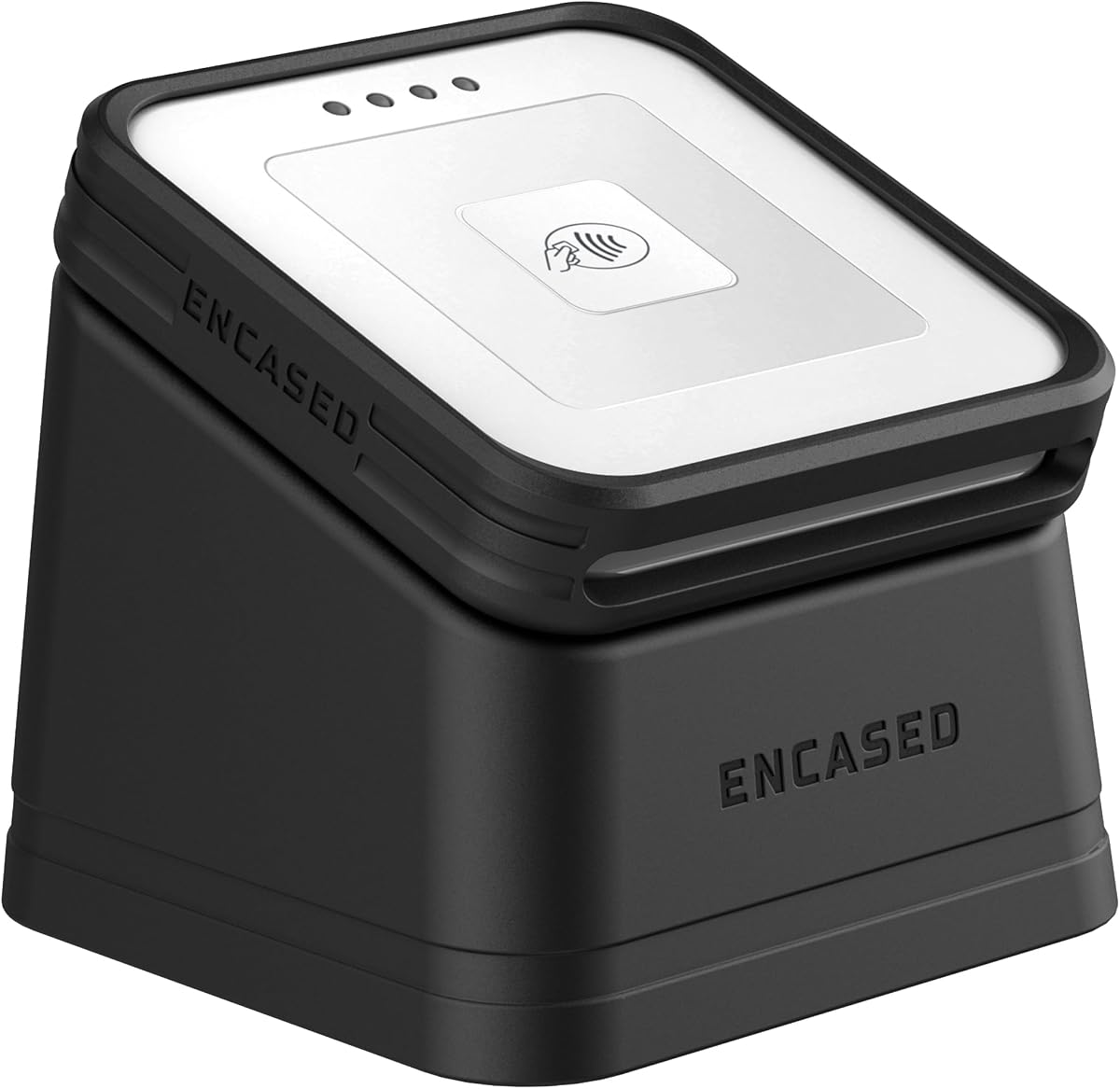
The Encased Magnetic Reader Dock earns a 4.5 rating by addressing a problem that most basic stands ignore: protection. Instead of simply supporting the Square Card Reader 2nd Generation, it includes a removable magnetic case and a matching display stand. Together, they create a protected, organized home for the device.
We may earn a commission when you buy through this link, at no additional cost to you.
The case uses TPU construction with a silicone grip and a raised lip around the tap surface. That arrangement is intended to absorb shocks and reduce the chance of damage when the reader is set down or handled. Precise cutouts preserve access to the charging port, card slot, and battery indicator button, so protection does not come at the expense of normal operation.
Magnets make the system convenient. The case remains on the reader and snaps onto or off the stand in seconds, allowing a cashier to move from a stable countertop position to handheld use without separately removing a loose insert. The stand includes built-in magnets and a rubber base to keep the reader stable. It is also compatible with MagSafe for a phone-mounting option.
This is the most complete protective option in the guide, but it is designed specifically for the second-generation USB-C reader. The removable case adds another element to carry, and buyers should consider whether their workflow needs full-time impact protection. For a busy counter, mobile vendor, or retailer concerned about drops, however, the added security and quick magnetic transition are compelling benefits.
The removable TPU case adds a protective layer around the reader's body and tap area. A raised lip and silicone grip are especially relevant at busy counters where devices are repeatedly picked up and set down.
The magnetic case stays attached to the reader while the display base attaches or releases quickly. This lets a seller move between customer-facing presentation and handheld transactions with minimal fumbling.
We may earn a commission when you buy through this link, at no additional cost to you.
The Compact Multi-Generation Dock has a 4.5 rating and combines cross-generation support, a one-click anti-sleep control, and a complete charging bundle. It is compatible with both first- and second-generation Square Readers, giving it broad appeal despite the Square brand name appearing in the title.
We may earn a commission when you buy through this link, at no additional cost to you.
Its anti-sleep button is placed on the base so the reader can be awakened without being removed. This is a meaningful convenience for a checkout where the device may go to sleep between customers. The dock uses a non-slip silicone pad underneath, helping it remain stable during transactions and reducing the likelihood that a connected reader will be moved accidentally.
The package includes the dock, a USB charging cable with micro-USB and USB-C connections, and a wall charger. That makes it a more complete starting point than products that include only a cable. The ABS construction is described as wear-resistant and resistant to scratching and squeezing, while the stated dimensions of 78.5 by 78.5 by 41.5 millimeters keep the footprint manageable.
The main compromise is weight. At 549 grams, it is not as light as a typical plastic insert, even though it can fit into a pocket, backpack, or suitcase. A fixed counter may not notice the difference, but frequent travelers should account for it. Buyers also need to remember that the Square Reader itself is not included.
The included cable and wall charger reduce the need to assemble a separate charging setup. Compatibility with both USB-C and micro-USB adds flexibility for different device connections.
The broad base and silicone pad help control movement, while the stated 549-gram weight gives the dock a substantial feel. It remains packable, although buyers focused on minimum packed weight may prefer a lighter option.
We may earn a commission when you buy through this link, at no additional cost to you.
The SORFHOUR Anti-Sleep Dock carries a perfect 5.0 rating, making it the highest-rated option in this comparison. It closely resembles the first SORFHOUR dock, with a USB-C charging connector, smart activation button, removable cable, weighted base, and non-slip silicone pad. Its appeal lies in bringing these convenience features together in a straightforward package.
We may earn a commission when you buy through this link, at no additional cost to you.
The smart button is designed to wake a sleeping Square Reader without pulling it from the cradle. After one press, the user can look for the reader's four green flashing lights to confirm connection. The installation design is also unusually accessible: the top clip pops off, the reader slides into position, and the clip snaps back into place.
Its two-in-one construction lets the device be used for payment while it charges. Once the battery is full, the cable can be detached while the dock remains on the counter as a stand. This is useful for retailers, market vendors, boutiques, pop-up events, and other environments where a stable, always-visible payment point is important.
The product is for the second-generation reader and does not include that device. Its package does include a USB charging cable and wall charger, which is helpful for buyers establishing a new checkout station. Compared with docks lacking a wake control or charging accessories, it offers a more convenient daily setup, although its overall design closely follows other SORFHOUR options in the list.
A single press can wake and reconnect the reader while it remains supported by the dock. The green flashing indicator provides a visible signal that the payment device is ready.
Readers can remain connected during use, then the cable can be removed for a cleaner display after charging. The weighted, non-slip base keeps the transition from active station to passive stand secure.
We may earn a commission when you buy through this link, at no additional cost to you.
The SORFHOUR Weighted Dock has a 4.5 rating and is designed around stable countertop placement. It supports the Square Reader 2nd Generation with a charging connection, an anti-sleep button, a detachable cable, and a counterweighted base reinforced by a non-slip silicone pad.
We may earn a commission when you buy through this link, at no additional cost to you.
Stability is the most useful theme in this design. A payment reader that shifts during a tap can interrupt service or encourage staff to hold the device unnecessarily. The internal counterweight gives the dock a more planted feel, while the silicone base helps it resist sliding on a smooth service counter. That makes the product a practical choice for busy retail and food-service environments.
The smart activation control allows the user to wake the reader without removing it from the holder. The pop-off top clip simplifies installation, allowing the reader to slide into the slot before the retaining piece clicks back into place. Internally, the dock functions as both charger and holder, allowing transactions to continue while the reader remains connected.
As with the other SORFHOUR second-generation docks, the reader must be purchased separately, and first-generation compatibility is not offered. It also shares several features with the rank-one and rank-seven models, so the deciding factor may be the specific product listing and customer feedback. Its documented stability, complete accessory bundle, and straightforward wake control nevertheless make it a strong countertop choice.
A counterweight and silicone underside work together to keep the reader more stable on a counter. This is especially helpful when customers tap cards or phones with some force.
The removable top clip opens the slot, allowing the reader to slide in with one hand. Once inserted, the clip snaps over the device and holds it in position.
We may earn a commission when you buy through this link, at no additional cost to you.
The SORFHOUR ABS Countertop Dock has a 4.4 rating and targets mobile sellers as well as fixed stores. Its solid ABS body, counterweighted base, and non-slip silicone pad give it a practical combination of durability and stability, while the listing specifically notes suitability for shops, taxis, travel, appointments, and suitcase packing.
We may earn a commission when you buy through this link, at no additional cost to you.
The anti-sleep control follows the same convenient pattern as the other SORFHOUR second-generation docks. One press wakes the reader, and four green flashing lights indicate that the connection is active. The top clip can be popped off and replaced by one hand, making the reader easy to install or remove during a busy mobile checkout.
Material quality is another focal point. The dock is described as scratch-resistant and resistant to squeezing, which should appeal to buyers who transport equipment regularly. A precisely shaped slot accommodates the Square Reader's EMV card slot, while the weighted base and silicone bottom help prevent the reader from being moved or misplaced on a desk.
The package includes the dock, a USB charging cable, and a wall charger, but not the reader itself. Compatibility is limited to the second generation, so a business with mixed devices may need to confirm its inventory before purchasing. For a seller who wants one compact charging station to move between a shop, vehicle, or appointment, the combination of wake control, stable base, and packing-friendly ABS construction is compelling.
The dock is described as suitable for a suitcase, which makes it relevant to mobile professionals. Its charging cable and wall charger complete the setup for use away from a permanent counter.
Solid ABS offers a practical housing for repeated transport, while the counterweight and non-slip pad help it remain steady. A shaped opening around the card slot supports the reader without obstructing card access.
We may earn a commission when you buy through this link, at no additional cost to you.
The White USB Reader Dock has a 4.4 rating and offers a relatively simple way to charge and stage a Square Reader 2nd Generation. Its anti-sleep button can activate the reader without removing it from the base, while a USB interface powers the dock over a standard connection.
We may earn a commission when you buy through this link, at no additional cost to you.
The product listing specifically says it is compatible with the contactless and chip second-generation reader. That distinction matters for shoppers who need to verify the exact type of device they own. A conventional USB input may also appeal to users who already have a familiar power arrangement or prefer not to manage a dedicated wall charger.
Stability comes from a non-slip silicone bottom and a carefully chosen counterweight. The manufacturer states that engineers tested different weights over approximately six months before settling on the final balance. The goal is a dock that remains stable without adding unnecessary bulk, making it appropriate for shop counters, service desks, and mobile checkout kits.
The package contains the dock and a 1.5-meter charger cable, but not a wall charger or the Square Reader. Its feature list is also more focused than those of several competitors: there is no advertised detachable port, protective case, or first-generation support. It remains a straightforward choice for owners who specifically want second-generation compatibility, an anti-sleep control, and a stable white holder.
The base-mounted anti-sleep control allows staff to reactivate the device while it remains in the dock. This reduces unnecessary handling at the checkout.
A tested counterweight and silicone underside provide stability without the larger footprint of a protective case-and-stand system. The result is a straightforward display and charging point for the supported reader.
We may earn a commission when you buy through this link, at no additional cost to you.
The right Square Reader dock depends on the reader generation, charging habits, portability needs, and how frequently the device is handled. Compatibility should come first, followed by the features that will matter at your specific checkout or selling location.
Start by identifying whether you own a first-generation or second-generation Square Reader. Docks explicitly limited to the second generation may use a specific USB-C connection and an internal retaining shape that does not fit the earlier reader. Products advertising support for both generations are more adaptable, especially for businesses replacing devices gradually or maintaining several locations.
Choose the dock that explicitly matches your device and connector. Do not assume that the words Square Reader are enough to guarantee physical and electrical compatibility.
Consider whether the dock needs to charge the reader during the workday or simply hold it after a full charge. Docks with a direct USB-C reader connection and a detachable power cable offer flexibility: connect them for active service, then remove the cable for a cleaner display. Products with a fixed cable may work just as well at a stationary counter.
Look for the included cable, power connection, and whether the cable is long enough for your setup. A wall charger is useful when you are building the station from scratch.
An anti-sleep button can reduce friction when the reader enters sleep mode during service. Pressing the base control wakes the reader without requiring staff to remove it from the dock. This is particularly useful at busy counters, during demonstrations, or when a device has been idle between customers.
If uninterrupted, one-touch reconnection matters to your operation, prioritize a dock that clearly documents the button and its indicator-light response. A passive holder will not provide the same convenience.
A checkout dock should remain still while a customer taps a card or phone. Non-slip silicone pads, a broad footprint, and internal counterweight help prevent sliding or tipping. These features are particularly valuable on smooth counters, in crowded retail environments, and during active service.
Prioritize a stable base over unnecessary bulk. A weighted dock can remain planted without taking up a large amount of counter space, and the included rubber or silicone underside is a strong sign of attention to everyday use.
A standard dock secures the reader but may not protect it from drops, scratches, or impact. A magnetic protective case adds a removable layer and usually pairs with a separate display stand. This format is especially attractive for mobile vendors, busy counters, and businesses that regularly put the reader into a bag or pocket.
Choose a protective system only if impact protection matters to you. Otherwise, a lighter, simpler charging cradle may better suit a stationary checkout.
Ease of installation matters during setup and whenever a device is exchanged. A pop-off top clip that allows one-handed insertion is convenient, while a fixed cradle may be sufficient for a permanent station. Check whether the power button, card slot, charging port, and reader indicator remain accessible after installation.
A dock that leaves controls and card access unobstructed will be easier for staff to use correctly. Rear access and an L-shaped cable can also make cable routing less disruptive.
Mobile sellers need to consider packed size and weight, while fixed retailers may prioritize base stability and cable length. Some compact models weigh enough to remain stable but are still described as suitable for bags and luggage. Review the stated dimensions and weight before packing a kit for frequent travel.
Check the box contents carefully. Some docks include a cable and wall charger, while others provide only a cable or no charging accessories, and nearly all of the products in this guide exclude the Square Reader itself.
For a permanently connected station, documented electrical protections and certification can be meaningful buying criteria. Look for information about over-voltage, over-current, short-circuit, and temperature safeguards. A stated warranty and accessible customer support can also make ownership less uncertain.
Review the listing's specific safety and support claims rather than assuming they apply to every dock. Save the product information and packaging in case questions arise after delivery.
Before installation, confirm that the dock is designed for your Square Reader generation and inspect the connector, cable, and base for damage. Place the dock on a level, clean surface where it will not be exposed to moisture, excessive heat, or a narrow edge. If the model uses a pop-off top clip, release it carefully and avoid pulling on the reader itself.
Slide the reader into the dock until it sits securely, then attach or close the retaining mechanism. Connect the supplied cable to the dock and use a compatible power source. For a detachable-port model, align the connector before pressing it into place. Once the reader is installed, confirm that the charging connection is seated and that the reader's indicator behaves normally.
If the dock has an anti-sleep button, press it once when the reader is sleeping and wait for the documented green flashing indicators. Clean the dock periodically with a dry or lightly damp soft cloth, disconnecting power first. Avoid flooding openings, scraping the contacts with metal, and leaving the reader or dock exposed to liquids. Check the fit and charging performance periodically, especially if the device is moved frequently.
No. Every product in this guide is a dock, holder, or stand, and the listing descriptions explicitly state that the reader is not included. You must already own a compatible Square Reader or purchase one separately. This distinction is especially important because some dock packages include a cable and wall charger, which can make the contents look more complete than they are.
Only if the listing explicitly states compatibility with both generations. The white universal dock and Compact Multi-Generation Dock list support for first and second generations, while most other products are designed only for the second generation. Always confirm the physical connector and supported model before ordering.
The anti-sleep button is designed to wake or reactivate a sleeping Square Reader without removing it from the dock. On models that document the behavior, pressing it once should produce a connection response, often shown by four green flashing indicator lights. The exact behavior can depend on the reader and dock, so the manufacturer's instructions should take priority.
Yes, several models in this guide function as both charging dock and holder, allowing payment and charging simultaneously. This is especially useful during a long shift or a busy event. You can also detach the cable from models with a removable rear port and use the dock as a passive stand after the reader has been charged.
No. The package contents differ across the list. Some products include a dock, charging cable, and wall charger; others include only a 1.5-meter or 1.8-meter cable. The VASTHOME model includes a 5.91-foot USB-C power cable, while the white universal dock lists an L-shaped data cable. Review the package details before buying so you know what additional equipment may be needed.
It depends on how the reader is used. A magnetic case is preferable when drops, scratches, and frequent handheld-to-counter transitions are concerns. A standard stand is often simpler, lighter, and directly focused on charging. The Encased Magnetic Reader Dock is the clearest protective option here, while several traditional docks are better suited to a permanent counter.
Choose a length that reaches the available outlet without leaving excess cord across a customer-facing or walking area. Most products in this guide include cables between 1.5 meters and 1.8 meters, while the VASTHOME model lists 5.91 feet. Measure the distance from the dock position to the power source and plan a tidy route before installation.
Disconnect the power cable first, remove the reader if the design allows it, and wipe the dock with a soft dry cloth or a cloth made only lightly damp with suitable cleaner. Keep liquid away from the USB-C connector, electrical contacts, and any internal openings. Do not use metal tools or abrasive pads, and allow the dock to dry fully before reconnecting it.
The SORFHOUR 2nd Generation Dock is the strongest all-around choice because it combines charging, an anti-sleep button, easy one-handed installation, stable construction, and included accessories. The White Universal Reader Dock is ideal when first- and second-generation support matters, while the Encased Magnetic Reader Dock provides the strongest protection and a quick switch between countertop and handheld use.
Prioritize exact reader compatibility first, followed by the features required at your checkout. Continuous counters may benefit most from a weighted base and wake control, mobile sellers may prefer a detachable cable and compact dimensions, and frequent handlers may want a magnetic protective case. Complete cable and wall charger bundles can simplify setup for new stations.
Finally, check the current product listing and package contents before ordering, particularly the supported reader model, connector, included accessories, and warranty details. Marketplace details can change, and the same general product name may appear in several variations. Confirming those details helps ensure the dock you select matches your reader and daily workflow.