
WALI Adjustable Laptop Desk Mount
4.5Editor score
Offers sixteen-inch height adjustment
Supports laptops up to 17 inches
Accepts 75×75 and 100×100 VESA
Includes ventilated cooling tray
A laptop tray desk mount can transform a crowded workstation by lifting your screen, freeing useful surface area, and making it easier to maintain a comfortable viewing position. The right model should fit your device, match your desk, move smoothly, and support your preferred working style.
This guide compares ten laptop tray desk mounts using their stated compatibility, mounting options, adjustment ranges, weight capacities, ventilation features, and cable organization. It includes conventional over-desk arms, compact clamp-on trays, convertible laptop-and-monitor mounts, and one VESA-compatible accessory.
Each pick highlights a different practical advantage, from budget-friendly adjustment to broad monitor compatibility and premium construction. Product details and ratings reflect the supplied listings, while prices and availability can change, so readers should confirm current information before purchasing.
4.5Editor score

4.6Editor score

4.5Editor score
As an Amazon Associate we earn from qualifying purchases.
The comparison covers each mount's device compatibility, mounting method, articulation, and workspace features, making it easier to identify the model that best fits your desk and equipment.
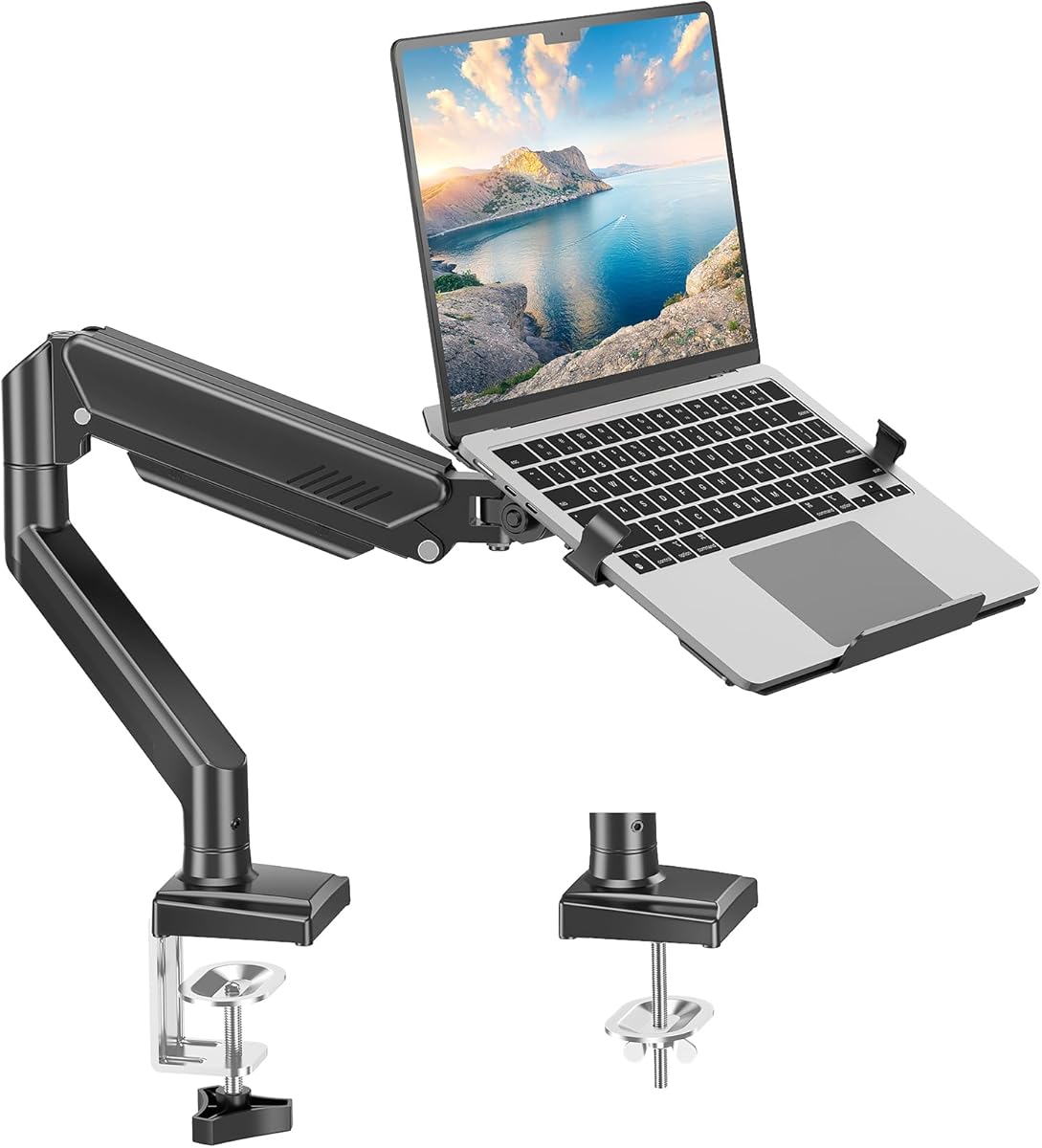


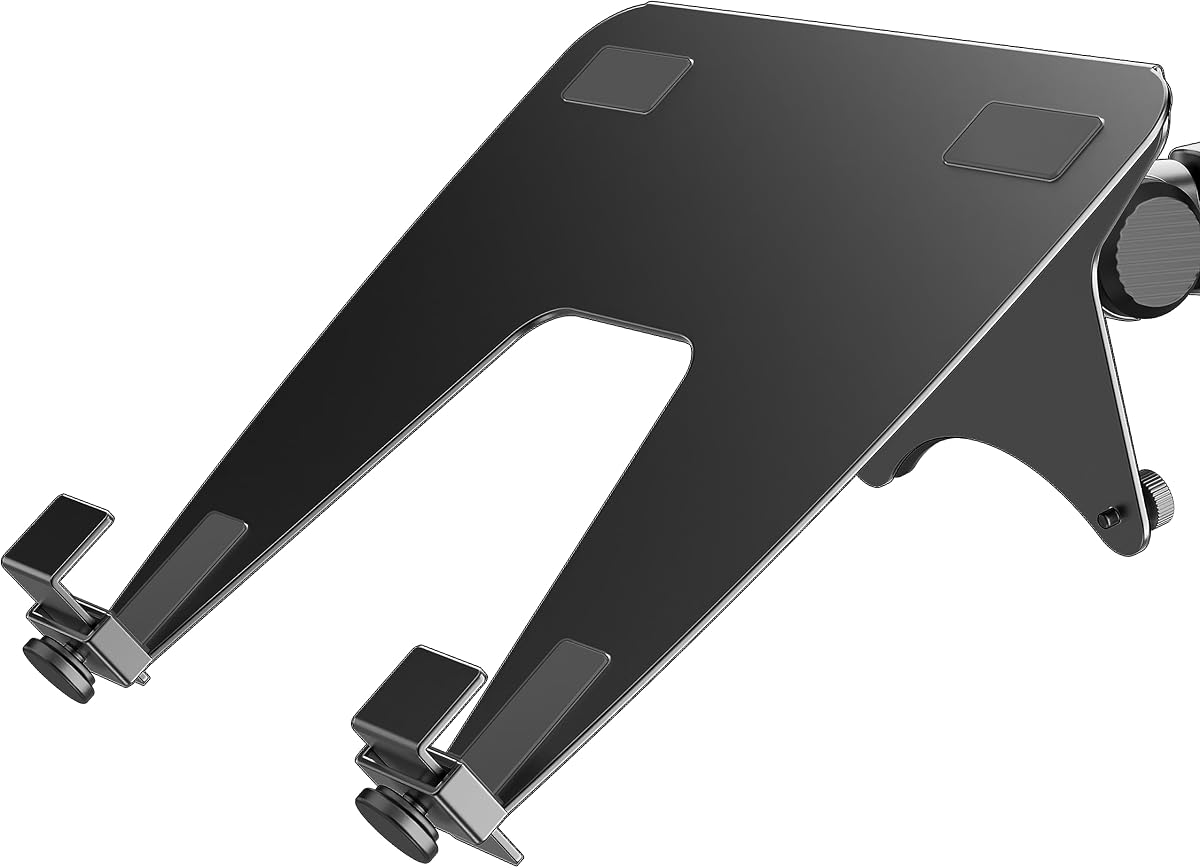
The WALI Adjustable Laptop Desk Mount is a versatile option for people who want one arm to handle both a notebook and a compatible monitor. It carries a 4.5 rating and combines an adjustable laptop tray with 75x75mm and 100x100mm VESA support, making it suitable for users who may change devices or build a multi-screen workstation.
We may earn a commission when you buy through this link, at no additional cost to you.
The articulated arm is one of the mount's most useful features. It extends, retracts, and provides 16 inches of height adjustment, while the head offers plus or minus 15 degrees of tilt, plus or minus 90 degrees of swivel, and 360-degree rotation. This range makes it possible to bring a screen closer for focused work, move it aside for writing, and return it to a comfortable line of sight.
There are two installation paths. The C-clamp accommodates desks between 0.4 and 4 inches thick, while the grommet base handles desks between 0.4 and 2.2 inches thick. The 14 by 11-inch tray supports laptops up to 17 inches and devices weighing as much as 22 pounds, although its dimensions are less generous than the larger trays in this guide.
This is a strong recommendation for budget-conscious buyers who want meaningful adjustment, detachable laptop support, and monitor compatibility without adding a permanently fixed riser to the desk. Buyers should first verify the desk thickness and mounting style, and those who need a larger platform should compare the tray dimensions with their notebook before ordering.
The detachable mounting plate lets the same arm serve a notebook or a VESA-compatible monitor. That makes the product particularly useful for hot-desking, compact offices, and users who alternate between a primary computer and a larger display.
Extensive height, swivel, tilt, and rotation adjustments make it easier to place the display near eye level. The elevated position can also recover desk space beneath the screen for a keyboard, mouse, documents, or other accessories.
We may earn a commission when you buy through this link, at no additional cost to you.
The MOUNT PRO Laptop Arm Mount is a two-in-one desk arm with a 4.4 rating. It supports notebooks as large as 17 inches and compatible monitors from 13 to 32 inches, allowing the tray to be removed when the arm is used in monitor mode. Its stated capacity ranges from 4.4 to 22 pounds depending on the configuration.
We may earn a commission when you buy through this link, at no additional cost to you.
Adjustment is a central selling point. The arm can reach up to 17.3 inches, with tilt from negative 45 degrees to positive 90 degrees, 180-degree swivel, and 360-degree rotation. The listing specifically recommends against rotating the laptop tray into a vertical position, which helps users understand the safe operating range rather than leaving that guidance ambiguous.
The ventilated tray includes six anti-slip pads and latches intended to keep the notebook in place. It also incorporates cable-management guides along the arms. Installation can use the included clamp or grommet base, with the clamp intended for desks from 0.39 to 2.76 inches thick and the grommet hole spanning 0.39 to 2.36 inches.
This mount is well suited to users who value device security and want an arm that can transition between laptop and monitor configurations. The main compromise is that certain movements are restricted for safety, particularly vertical tray rotation. Prospective buyers should also ensure their monitor meets the VESA and weight requirements before removing the laptop tray.
Anti-slip pads and dedicated latches add stability compared with a simple open platform. These details are useful during typing, video calls, and other tasks where a shifting notebook could be inconvenient.
Guides along the arm help route charging and display cables away from the working area. The result is a cleaner desktop without requiring separate adhesive clips, although users may still need to secure loose cable sections beyond the arm.
We may earn a commission when you buy through this link, at no additional cost to you.
The VIVO Single Laptop Notebook Desk Mount Stand earns a 4.6 rating, matching the highest listed score among the adjustable arms here. It combines a ventilated 14 by 11.8-inch tray, support for laptops up to 17 inches, a 22-pound capacity, and an adjustable pole that makes it well suited to creating a more organized workstation.
We may earn a commission when you buy through this link, at no additional cost to you.
Its articulation is extensive. The arm can extend up to 16.5 inches, the center pole offers 17 inches of height adjustment, and the tray supports plus or minus 90 degrees of tilt, 180-degree swivel, and full 360-degree rotation. This makes it possible to move the computer between a typing position, a centered viewing position, and a side-by-side arrangement with another screen.
Installation is flexible. A heavy-duty C-clamp attaches to surfaces up to 3.4 inches thick, while the grommet base supports surfaces up to 3 inches thick. Detachable cable clips on the arm and center pole help organize power and AV cords. The product can also function as a monitor mount for displays up to 32 inches, including ultrawide screens up to 38 inches, when the appropriate attachment is used.
This is our Editor's Choice because it balances screen support, adjustment range, mounting flexibility, cable organization, and strong customer feedback without emphasizing a single specialty. It is a particularly convincing choice for hybrid workers, students, programmers, and anyone using a large or ultrawide display alongside a notebook.
The 14 by 11.8-inch platform provides useful room for larger notebooks, while its ventilation holes help preserve airflow. A substantial capacity of 22 pounds also gives the setup room for demanding portable computers.
Beyond laptop use, the mount can support compatible monitors up to 32 inches and ultrawide displays up to 38 inches. That broader capability makes it useful for buyers who want a single arm to evolve with changing display needs.
We may earn a commission when you buy through this link, at no additional cost to you.
The HUANUO Adjustable Monitor Arm with Laptop Tray is a polished convertible mount for users who want a generous laptop platform and a capable monitor arm. It has a 4.5 rating, supports compatible monitors from 13 to 32 inches, and includes a 14 by 12-inch ventilated laptop tray with a 0.8-inch bottom lip.
We may earn a commission when you buy through this link, at no additional cost to you.
The arm can extend up to 16 inches and adjust vertically through a range of up to 17 inches. Movement includes plus or minus 45 degrees of tilt, plus or minus 90 degrees of swivel, and 360-degree rotation. The laptop tray can be removed for monitor use, creating a flexible system for office work, gaming, design, and multitasking.
Both a C-clamp and grommet base are included. The clamp fits wooden desks from 0.39 to 3.07 inches thick, and the grommet base accommodates 0.39 to 2.36-inch thickness. The listing recommends following the included instructions carefully and tightening adjustment screws to maintain the selected angle.
This is our Best Premium pick for its balanced feature set, broad movement, roomy tray, and integrated cable management. It is particularly compelling for users who already own a large VESA-compatible monitor but still want the option to place a notebook on the same arm. Wooden desks are the stated target, so those with other surfaces should verify compatibility before purchase.
The 14 by 12-inch tray and raised bottom edge create a stable-looking platform for notebooks up to 17 inches. Ventilation openings help maintain airflow during extended sessions.
Removing the tray reveals the monitor-mounting configuration, which supports 13 to 32-inch screens using standard 75x75mm or 100x100mm VESA patterns. This reduces the need to maintain separate arms.
We may earn a commission when you buy through this link, at no additional cost to you.
The HUANUO Laptop Desk Mount is a convertible 2-in-1 arm with a 4.5 rating. Its 13.8 by 11.8-inch ventilated tray supports laptops up to 17 inches, while removing the tray allows the arm to hold compatible monitors from 15 to 32 inches. The stated weight capacity is 22 pounds.
We may earn a commission when you buy through this link, at no additional cost to you.
Its standout physical feature is the tray's 240 ventilation holes, designed to improve airflow around the underside of a notebook. The arm also provides plus or minus 45-degree tilt and swivel, 360-degree rotation, and vertical adjustment through a 15-inch pole. These controls are enough to reposition the screen for different users or tasks.
The included C-clamp works with wooden desks from 0.39 to 3.07 inches thick. A grommet base is also provided for desks from 0.39 to 2.36 inches thick. Cable-management clips route wires along the arm and pole, helping recover a cleaner working surface beneath the elevated display.
This mount is a strong choice for users who prioritize cooling and flexibility between notebook and monitor modes. Its pole is shorter than the 17-inch adjustment offered by some competing models, so buyers with unusually high viewing preferences should check whether the available travel satisfies their setup. It is also explicitly positioned for wood desks.
The dense pattern of 240 holes is a meaningful distinction in this category. It gives the notebook additional exposed surface for incoming air and suits users who run demanding applications for extended periods.
Swivel and rotation make it easier to turn the display toward another person or move it out of the way. The arm is therefore not only for saving desk space but also for adapting the workstation to changing tasks.
We may earn a commission when you buy through this link, at no additional cost to you.
The HUANUO 2 in 1 Function Laptop Mount is a flexible arm designed to serve notebooks and monitors. It has a 4.4 rating, supports laptops up to 17 inches, and accommodates compatible monitors from 13 to 34 inches. That 34-inch upper limit is the broadest monitor range among the convertible models in this guide.
We may earn a commission when you buy through this link, at no additional cost to you.
The arm offers a notable 18.1-inch extension and reaches a maximum height of 17.5 inches. It supports plus or minus 45-degree tilt, plus or minus 90-degree swivel, and 360-degree rotation. These ranges make it practical for moving a display between a central working position and a side position, particularly on deeper desks.
The 11.8 by 10.4-inch tray includes ventilation holes, six anti-slip pads, a widened bottom guard, and Velcro straps to reduce laptop movement. The VESA plate and arm arrive preassembled, while either a C-clamp or grommet mount can be selected. The clamp fits desks from 0.39 to 2.56 inches thick, and the grommet works with desks up to 2.95 inches thick.
This is a good recommendation for users who need especially broad monitor compatibility or want a long-reaching arm for a large work surface. The trade-off is a stated monitor capacity of 19.8 pounds, below the 22-pound figure offered by several alternatives, and a tray that is smaller than many of the other platforms here.
Support for 13 to 34-inch screens is useful for buyers considering large productivity monitors. Buyers should still confirm the display's VESA pattern, weight, and any curved-screen requirements before installation.
Anti-slip pads, a bottom guard, and Velcro straps work together to limit movement. This layered approach is useful when the laptop is touched frequently or the user types firmly.
We may earn a commission when you buy through this link, at no additional cost to you.
The VIVO Black Clamp-on Rotating Laptop Tray offers a different approach from over-desk articulated arms. With a 4.3 rating, it attaches to the underside of a desk and places the notebook below the work surface, creating a lower viewing and typing position while reclaiming the area beneath the monitor.
We may earn a commission when you buy through this link, at no additional cost to you.
The tray is approximately 12.3 by 8.8 inches and supports laptops up to 17 inches, provided their depth does not exceed 11.5 inches. Its stated capacity is 11 pounds. The clamp attaches to a desk up to 2 inches thick, and the platform can pivot through a full 360 degrees to reach different positions.
Installation is straightforward because the product uses one adjustable C-clamp and includes the necessary hardware and instructions. When not needed, the tray can rotate under the desk for discreet storage. It is designed to place the tray surface between 3.5 and 4.5 inches below the desk top, with an overall attachment depth of 5.75 inches.
This tray makes the most sense for a desk with a keyboard drawer, a recessed work area, or enough clear space beneath the front edge. It is not appropriate for lipped or beveled desks, and users need approximately 31 inches of clearance for the full rotation circle. The lack of a locking position may also be undesirable for users who want a fixed angle.
Rather than placing a laptop above the desk, this product moves it underneath. That arrangement can leave the upper surface completely clear and may be especially useful when a separate external monitor is the primary screen.
The 360-degree pivot is designed to remain fluid so the user can reposition the notebook without reaching for a separate adjustment mechanism. The trade-off is that the tray does not lock at a selected angle.
We may earn a commission when you buy through this link, at no additional cost to you.
The monTEK 2-in-1 Laptop and Monitor Desk Mount pairs a 4.6 rating with broad device compatibility. It supports laptops from 12 to 18 inches and monitors from 17 to 32 inches, including curved screens, with a maximum stated load of 19.8 pounds. Standard 75x75mm and 100x100mm VESA patterns are supported.
We may earn a commission when you buy through this link, at no additional cost to you.
Its construction combines steel and aluminum, while the hollow metal laptop tray is designed to dissipate heat. Extendable scratch-free clamps and a reversible support plate help accommodate different notebook dimensions. Built-in cable management keeps wiring consolidated along the mounting structure.
Movement is extensive, with tilt from positive 80 to negative 45 degrees, swivel from plus 90 to minus 90 degrees, rotation from plus 180 to negative 180 degrees, and adjustable height. Together, those controls allow the arm to follow different seating positions, viewing preferences, and multitasking arrangements.
The clamp and grommet options offer different installation paths. The clamp fits desktops from 0.39 to 3.1 inches thick, while the grommet base is listed for desktops from 0.39 to 1.8 inches thick. This mount is an attractive option for users who want a refined 2-in-1 arm, large notebook support, and a long list of adjustments in one package.
The stated 18-inch laptop limit distinguishes this model from the many mounts that stop at 17 inches. Users should still measure the notebook and verify that its base, ports, and weight fit the tray arrangement.
The hollow construction provides open space beneath the notebook for heat dissipation. Metal components also lend the setup a more substantial appearance, while the reversible plate supports varied laptop geometries.
We may earn a commission when you buy through this link, at no additional cost to you.
The Suptek Single Laptop Notebook Desk Mount is a compact two-in-one arm with a 4.4 rating. It supports most flat and curved monitors from 13 to 27 inches through standard 75x75mm or 100x100mm VESA mounts. Its detachable laptop tray accommodates notebooks up to 15.6 inches, with a stated maximum arm load of 10 kilograms.
We may earn a commission when you buy through this link, at no additional cost to you.
The arm provides 180-degree swivel at its joints, 360-degree monitor rotation, plus or minus 90-degree tilt, and 400 millimeters of height adjustment. These movements cover the basic positions needed for a seated workstation, while the detachable tray allows a user to switch between notebook and monitor functions.
The 400 by 300-millimeter tray includes venting holes and a raised bottom edge intended to discourage overheating and slipping. Cable and slot management help reduce desk clutter. Both C-clamp and grommet mounting are included, each listed for desk thickness between 10 and 80 millimeters.
This mount is a practical choice for a smaller laptop and a monitor no larger than 27 inches. It may be less suitable for buyers with a 17-inch notebook because the listing's stated laptop limit is 15.6 inches, even though the product title refers to notebooks up to 17 inches. Checking the exact fit before ordering is especially important here.
The compact tray and support for screens up to 27 inches make this a sensible option for modest desks. It can provide elevated viewing and useful storage space without the footprint of a larger dual-screen system.
Users can choose the C-clamp for a no-drill installation or the grommet base where the desktop has a suitable opening. Having both options adds flexibility when a desk's shape or construction changes.
We may earn a commission when you buy through this link, at no additional cost to you.
The ergounion VESA Laptop Tray is an accessory rather than a complete monitor arm, and it fills a specialized niche. With a 4.4 rating, it attaches to mounts using a 100x100mm VESA pattern and supports laptops up to 17.3 inches with a stated capacity of 28.6 pounds.
We may earn a commission when you buy through this link, at no additional cost to you.
When detached from a monitor arm, the tray forms a fixed 30-degree inclined platform for the desktop. The listing recommends using a desk mat for surface protection and improved handling. Its hollow U-shaped center is intended to help release heat, while integrated padding and bottom-retaining clips protect the notebook from scratches and unwanted movement.
A defining benefit is the absence of side clamps. Bottom-edge retention leaves USB, HDMI, power, and other side ports accessible, which is helpful when the laptop remains connected to several peripherals. Heavy-duty alloy steel is used for the structure to maintain stability and reduce visible vibration.
This is not the right choice for someone who needs a complete adjustable desk mount from scratch. Instead, it is most attractive to users who already own a compatible 100x100mm VESA arm and want to convert that arm into a laptop support. It also works as a standalone inclined tray, making it unusually versatile for an accessory.
The 100x100mm interface allows a compatible existing monitor arm to accept a notebook tray. That is a practical way to reuse current equipment instead of purchasing a second complete mounting system.
Bottom-edge clips avoid blocking the notebook's sides. Chargers and peripheral cables can remain connected without forcing the user to disconnect them every time the laptop is repositioned.
We may earn a commission when you buy through this link, at no additional cost to you.
Choosing a laptop tray desk mount requires matching the arm to your notebook, display, desk construction, and preferred range of movement. These factors determine whether the product is merely functional or genuinely improves your daily workspace.
Start with the stated laptop size limit and compare it with the dimensions of your notebook rather than relying only on the advertised screen size. Most trays in this guide accommodate devices up to 17 inches, while the monTEK model extends to 18 inches and the ergounion tray reaches 17.3 inches. The Suptek listing specifically states support for notebooks up to 15.6 inches, so buyers with larger devices should verify the fit carefully. Weight capacity matters as well, particularly for large gaming notebooks or workstation computers.
C-clamp and grommet mounting offer different installation paths. A C-clamp usually grips the underside of the desktop and avoids drilling, but it must be wide enough for the arm and deep enough to clear the desk edge. A grommet base generally provides a cleaner permanent connection, yet it requires a compatible hole in the work surface. Compare the listed desk-thickness ranges carefully, as they vary considerably between models.
A useful mount should move the display close to eye level and allow the screen to come toward the user for focused tasks. Height adjustment, extension, tilt, swivel, and rotation each serve a different purpose. Height establishes the viewing level, extension controls distance, swivel moves the screen laterally, and rotation changes its orientation. Check whether restrictions apply, because some trays cannot safely rotate into a vertical position.
If the mount may carry a monitor, check its maximum screen size, supported weight, and VESA pattern. Most products accept the common 75x75mm and 100x100mm patterns, but the ergounion tray is designed specifically for 100x100mm mounts. Monitor ranges also differ: some products start at 13 inches, while the HUANUO Laptop Desk Mount starts at 15 inches. The monTEK model supports 17- to 32-inch displays, making it a better fit for larger screens than for compact monitors.
A ventilated platform helps preserve airflow beneath the notebook, while anti-slip pads, retaining lips, latches, straps, and bottom clips reduce movement. MOUNT PRO combines six anti-slip pads with latches, HUANUO adds a widened guard and Velcro straps, and the ergounion tray uses protective padding and bottom retention. The strongest options address both heat and stability rather than treating them as separate concerns.
Elevating a computer can free room for a keyboard, mouse, writing materials, or a second display, but the mount itself should not create new clutter. Integrated cable clips or guides appear on many of the full arms, and the monTEK model includes built-in cable management. If your setup uses several external devices, check whether the supplied routing features are sufficient or whether separate cable sleeves will be required.
Consider how and where the mount will be used. The VIVO under-desk tray rotates a full 360 degrees but requires about 31 inches of clearance and does not lock in place. The ergounion product is a heavy-duty accessory that also functions as a fixed 30-degree desktop stand, but it needs a separate compatible arm for elevated use. The aluminum and steel construction in the monTEK model may appeal to buyers who prioritize a substantial feel and broad laptop support.
Begin by checking the desk thickness, the available underside clearance, and the mount's stated compatibility limits. Assemble the base while the components are loose, then secure the clamp or grommet firmly. Attach the arm and tray, place the notebook or monitor, and adjust the height and angles gradually before tightening every joint and screw.
Operate the arm within its documented movement range. Avoid placing excessive force on the tray, do not rotate a laptop platform into a position the manufacturer discourages, and keep the device centered on the supporting surface. Route charging and display cables through the supplied clips, but leave enough slack near the joints so movement does not pull against connectors.
For routine care, wipe the tray and arm with a soft, dry or lightly damp cloth and keep dust away from the ventilation holes. Inspect the clamp and fasteners periodically, especially after moving the desk. Avoid leaving the notebook on the tray while the mount is loose, and consult the manual if the arm develops unexpected looseness or resistance.
Many models in this guide are convertible: the laptop tray can be removed and the arm used with a VESA-compatible monitor. Check the supported screen size, weight limit, and VESA pattern before switching modes. A tray-only accessory such as the ergounion product is different because it requires a compatible monitor arm for elevated use.
A C-clamp grips the desk edge and is generally chosen when drilling is undesirable. A grommet base passes through an existing or newly cut hole and often provides a neater permanent appearance. Desk-thickness limits differ among products, so check both the stated maximum and minimum requirements before installation.
They can raise a screen closer to eye level and make it easier to alter viewing distance and angle. That may reduce the need to hunch toward a low laptop screen. Ergonomic results also depend on chair height, keyboard position, sustained habits, and whether the user adjusts the display as needed.
They can help maintain airflow around the underside of a computer, particularly during demanding work. Ventilation is only one part of thermal management, and users should still follow the notebook manufacturer's guidance. The MOUNT PRO, HUANUO, VIVO, and monTEK mounts all describe ventilated or heat-dissipating tray designs.
It depends on the mount's reach and intended angle. Standard arms may work on many conventional desks, but the VIVO rotating under-desk tray specifically requires about 31 inches of clearance for its full 360-degree movement. Measure depth, width, and nearby obstacles before choosing a model with wide articulation.
Several options list substantial capacities, including 22 pounds for several full arms and 28.6 pounds for the ergounion accessory. A stated capacity does not guarantee a secure fit, so buyers should also check the laptop dimensions, tray lip, support pads, and whether the device's weight is distributed safely.
It depends on the mount and the desktop's construction and thickness. Some listings specifically limit their bases to wooden desks, while others describe general surfaces without making the same restriction. The C-clamp or grommet requirements should be compared with the material, thickness, edge shape, and drilling rules of the desk.
A dedicated arm can be simpler when a notebook is the only device you plan to support. A convertible model is more valuable if you may add a large monitor, use different computers, or want one arm to serve several workspaces. Confirm that convertible models allow the monitor mode without sacrificing important laptop-tray features.
The VIVO Single Laptop Notebook Desk Mount Stand is the most well-rounded selection because it combines a 4.6 rating, a generously sized ventilated tray, extensive articulation, two installation methods, and monitor support. The WALI mount stands out as the budget pick, while the HUANUO Adjustable Monitor Arm with Laptop Tray earns the premium designation for its roomy tray, broad display compatibility, and integrated organization features.
The most important priorities are the fit of your actual laptop, your desk thickness, the intended screen position, and whether you expect to switch to a monitor later. Buyers who value heat dissipation and stable retention should examine the tray construction closely, while those sharing a desk should look for useful swivel, rotation, and cable-routing features. Clearances matter too, particularly for the rotating under-desk tray.
Ratings and specifications can change as manufacturers update listings, and prices are especially prone to fluctuation. Review the current product page, installation manual, and device dimensions before ordering. Confirming compatibility at the time of purchase will help ensure that the selected laptop tray desk mount delivers the intended comfort, flexibility, and workspace organization.