
Creative Sound Blaster AE-X
4.4Editor score
ESS ES9039Q2M DAC
32-bit/384kHz playback support
DSD256 and ASIO 2.3
350mW headphone amplification
Explore the best PC sound cards for audio recording, comparing inputs, resolution, latency, connectivity, compatibility, and creator features for every setup.
A PC sound card for audio recording can transform a basic computer setup into a more capable production workstation. The right device determines microphone quality, instrument connectivity, monitoring clarity, latency, and the ease of recording vocals, podcasts, games, streams, or surround audio.
We compared all ten products by examining recording inputs, signal-to-noise performance, resolution, monitoring options, software support, installation requirements, portability, and intended creator workflow. The list includes internal PCIe cards, USB interfaces, compact adapters, mobile recording devices, and all-in-one creator mixers.
Each review identifies the strongest feature, practical limitations, and best-fit recording scenario. Product availability, promotions, and pricing can change, so readers should confirm the current listing and verify that their operating system, microphone, instruments, and software are compatible before purchasing.
4.4Editor score

4.6Editor score

4.3Editor score
The following comparison shows how each option differs in recording format, input flexibility, monitoring, portability, and creator-focused features. It includes dedicated music interfaces, PCIe audiophile cards, USB adapters, mobile interfaces, and soundboard mixers rather than treating every audio adapter as a studio tool.



The Creative Sound Blaster Audigy Fx Pro combines high-resolution PC playback, flexible analog connections, and discrete surround output in a compact internal card. Its 4.2 rating reflects a capable option for users who want more than basic headphone and microphone sockets without moving to a full music-production interface.
We may earn a commission when you buy through this link, at no additional cost to you.
Its standout specifications include 32-bit/384kHz playback, a signal-to-noise ratio of up to 120dB, and support for 7.1-channel analog audio. The connection set includes multi-channel speaker support, SPDIF output, headset connections, microphone input, and line input, allowing a recording setup to grow beyond a single microphone.
The Creative Nexus app adds AutoEQ customization, including headphone response simulations for more tailored listening. Its 10.5-centimeter length and included half-height bracket improve compatibility with compact cases, although the card still requires an open PCIe slot, internal installation, and some system configuration work.
This is a strong fit for desktop builders who record vocals, produce music, play games, or watch surround content and want a single internal card to handle several audio roles. It is less convenient for laptop users or anyone avoiding internal hardware installation, but its connectivity and compact construction make it unusually versatile within the PC sound card category.
Microphone, line, headset, and digital connections provide useful options for voice recording, instrument capture, and external equipment. That variety is particularly valuable when a creator wants more than the headphone and microphone ports found on a simple USB adapter.
The 32-bit/384kHz playback capability supports high-resolution listening, while AutoEQ can help shape output for different headphones. Together, these features improve the experience for both monitoring and everyday entertainment.
We may earn a commission when you buy through this link, at no additional cost to you.
The PUPGSIS Gaming Audio Mixer is built primarily for streamers, podcasters, and gamers who want direct control over a live voice signal. It earns a 4.4 rating through a feature set that includes XLR microphone input, noise reduction, programmable sound pads, reverb, and a voice changer.
We may earn a commission when you buy through this link, at no additional cost to you.
The mixer functions as a central hub for streaming. Four sound-effect buttons can trigger custom clips, while the voice changer supports altered pitches for entertainment. A dedicated reverb control allows users to add subtle ambience or a more dramatic vocal effect without relying on a separate effects application.
Compatibility details are important. The device accepts dynamic XLR microphones but not 48V condenser microphones or USB microphones, and the required quarter-inch TRS-to-XLR cable may need to be added separately. Bluetooth carries background audio into the mixer rather than sending audio to wireless headphones or microphones, so wired monitoring remains necessary.
This mixer is best suited to creators who value immediate, hardware-based control over a live broadcast mix. It is less appropriate for musicians seeking pristine instrument recording, and the XLR-only microphone limitation narrows its appeal further. Within its streaming niche, however, it offers a remarkably accessible collection of performance features.
Programmable pads, voice effects, noise reduction, and reverb are accessible directly from the mixer. This makes it easier to react during a live stream without navigating through software menus at an inconvenient moment.
The mixer is designed around dynamic XLR microphones, not USB models or powered condensers. Checking microphone output type first prevents incompatible connections and unnecessary accessory purchases.
We may earn a commission when you buy through this link, at no additional cost to you.
The Optimal Shop 6 Channel External Sound Card provides a low-cost way to add analog and optical audio to a compatible PC or laptop. Its 3.7 rating makes it a more specialized choice than the highly rated USB adapters in this list, but the combination of 5.1 playback and S/PDIF recording remains useful for specific tasks.
We may earn a commission when you buy through this link, at no additional cost to you.
Digital recording can accept 32kHz, 44.1kHz, and 48kHz signals, while analog recording is fixed at 48kHz. The optical input can send audio to the computer through USB, and the analog section supports six-channel playback. These capabilities suit users working with legacy optical sources or multichannel speaker systems.
Important limitations apply to the optical output. Only the right and left PCM channels can pass through digitally, even though the card supports six-channel analog output. Full 5.1 optical playback also requires a compatible multichannel source, suitable passthrough settings, and an amplifier or receiver with AC3 or DTS decoding.
The card is best for budget-conscious users restoring multichannel audio, capturing simple optical sources, or adding external playback to an older PC. It is not the strongest choice for high-fidelity music production, modern surround workflows without additional decoding equipment, or users expecting current professional recording specifications.
The optical input provides a route for recording compatible digital sources, while the analog inputs support simpler capture at 48kHz. This makes the adapter useful when a computer lacks a suitable legacy audio port.
Multichannel playback depends on the source, player passthrough configuration, and external decoder. The card can pass signals, but it does not independently turn ordinary stereo files into a full surround experience.
We may earn a commission when you buy through this link, at no additional cost to you.
The Guitar Audio Pocket Interface is a compact recording solution for electric guitars, basses, and other line-level instruments. Its 4.1 rating reflects a simple 24-bit/48kHz capture path designed for quick recording, live streaming, and synchronized video work across computers and mobile devices.
We may earn a commission when you buy through this link, at no additional cost to you.
The interface connects through Type-C, with a Lightning-to-Type-C adapter included for compatible iPhone and iPad use. A quarter-inch instrument jack accepts a guitar or bass, while a 3.5mm headphone connection provides monitoring. Low-latency digital processing can keep performance aligned with mobile video.
It deliberately focuses on capture rather than control. There is no editing, mixing, or multi-effect processing, and the device is intended for direct instrument recording rather than a complete podcast production chain. Monitor volume buttons and a status light help prevent excessive levels, with green indicating a normal range and red warning of potential distortion.
This pocket-sized option fits mobile musicians, travel-oriented streamers, and beginners who want a straightforward way to record an instrument without a full-size desktop interface. It is less suitable for producers requiring multiple inputs, professional microphone preamps, advanced routing, or onboard mixing controls.
Type-C connectivity and the included Lightning adapter make the same compact interface useful with compatible laptops, Android devices, iPhones, and iPads. That flexibility is the main reason to choose it over a fixed desktop adapter.
Plug-and-play operation keeps setup minimal for quick performances or synchronized recordings. The interface handles the signal path, while editing and creative processing remain the responsibility of the connected device.
We may earn a commission when you buy through this link, at no additional cost to you.
The SABRENT USB External Stereo Sound Card Adapter is a straightforward solution for computers that lack working audio jacks or need a dedicated USB headphone-and-microphone connection. Its 4.3 rating and simple design make it one of the most approachable options for calls, voice chat, and basic voice recording.
We may earn a commission when you buy through this link, at no additional cost to you.
The adapter uses a USB Type-A connector, a green 3.5mm stereo output, and a pink 3.5mm mono microphone input. It is recognized as a standard USB audio device without special drivers, software, or external power, allowing setup to be completed almost immediately.
The limits are important for anyone interpreting it as a studio interface. It adds no surround processing, does not power passive speakers, and does not support a four-pole headset through one combination jack. It also lacks the preamp controls, multi-input routing, and conversion specifications associated with dedicated recording interfaces.
This is a strong budget choice for a laptop, desktop, or mini PC with missing or unreliable onboard audio. It suits users who need dependable headphone playback and a basic mono microphone input without navigating installation complexity. For musicians and serious podcasters, however, a model with proper XLR or instrument inputs will offer a more useful recording path.
The adapter immediately provides familiar green and pink 3.5mm connections. That simplicity makes it useful for replacing a failed port or adding basic audio to a compact or managed computer.
Class-compliant USB audio operation reduces installation steps. It works across a broad selection of Windows, Linux, and Mac systems, although organizational device policies can still block new USB audio hardware.
We may earn a commission when you buy through this link, at no additional cost to you.
The Biaze USB Audio Adapter combines a high 4.6 rating with broad platform support and a simple USB connection. It is designed for PC and laptop users who need a replacement headphone port, a microphone connection, or CTIA headset support without installing internal hardware.
We may earn a commission when you buy through this link, at no additional cost to you.
Its built-in DAC supports audio output up to 16-bit/48kHz and includes noise-reduction claims for improved signal handling. Separate headphone or speaker output and mono microphone input allow simultaneous listening and speaking, making the adapter suitable for gaming, remote meetings, classes, streaming, and basic recordings.
Installation is driver-free and does not require external power. Compatibility includes several generations of Windows, Mac OS X, Linux, Chromebook, Raspberry Pi, and PlayStation systems. Users troubleshooting missing audio are directed to select the USB Audio device in sound settings and update the relevant driver if an older system needs additional support.
The adapter is a good general-purpose choice for everyday communication and light recording. It is not a substitute for a professional preamp or multi-input interface, and its basic 16-bit/48kHz path is less useful for high-resolution production. For users restoring audio while retaining a wide device footprint, it offers convenient functionality.
Support for PCs, laptops, consoles, Chromebooks, and Raspberry Pi broadens the adapter's usefulness. Users can move the same basic audio connection between systems without carrying a separate dongle for each platform.
The adapter supports CTIA standards and dual-plug headsets, allowing headphone output and microphone input to remain available. It works particularly well for voice chat and online collaboration where simplicity matters more than studio-level controls.
We may earn a commission when you buy through this link, at no additional cost to you.
The Creative Sound Blaster AE-X is an audiophile-oriented internal card for PC builders who care about high-resolution playback, low-latency operation, and better headphone amplification. Its 4.4 rating reflects a specification set aimed at music, gaming, and serious desktop listening.
We may earn a commission when you buy through this link, at no additional cost to you.
The ESS ES9039Q2M DAC supports playback up to 32-bit/384kHz and a signal-to-noise ratio of up to 130dB. A built-in headphone amplifier delivers up to 350mW at 32 ohms, giving it more authority with demanding headphones than a typical basic onboard or USB adapter.
Low-latency workflows are strengthened by DSD256 playback and ASIO 2.3 support. A 10-band parametric EQ and AutoEQ in Creative Nexus provide meaningful control over tonal balance. Coaxial output and optical input round out a flexible desktop connection set.
This card is a compelling choice for audiophiles, gamers, and desktop music enthusiasts who want internal installation and premium playback hardware. It is excessive for basic voice calls, and it does not replace a dedicated multi-input recording interface for microphone and instrument capture. For high-end monitoring, however, its DAC and headphone section stand apart from the simpler alternatives.
The 350mW output at 32 ohms provides more power for demanding studio-grade headphones. That can make a meaningful difference when a conventional onboard amplifier lacks sufficient control or output.
ASIO 2.3 and DSD256 support appeal to users who want responsive monitoring and high-resolution formats. The feature set is particularly relevant to latency-sensitive desktop and gaming setups.
We may earn a commission when you buy through this link, at no additional cost to you.
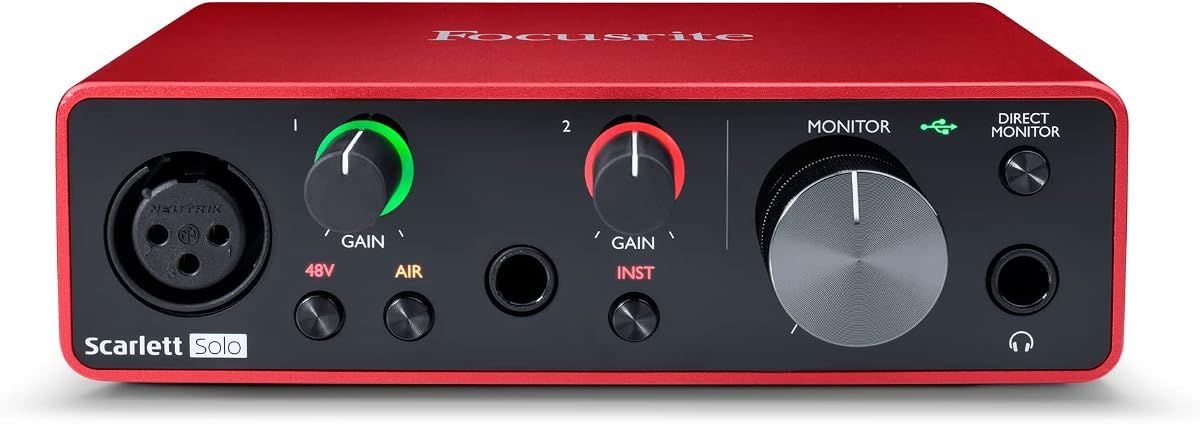
The Focusrite Scarlett Solo 3rd Gen is a focused USB-C interface for recording one singer, one instrument, or a basic voice-and-guitar combination. Its 4.6 rating reflects a mature approach to compact home recording, with high-performance preamps, flexible gain controls, and clean monitoring.
We may earn a commission when you buy through this link, at no additional cost to you.
Recording is supported at up to 24-bit/192kHz, preserving detail for music and podcast production. Two high-headroom instrument inputs allow a guitar or bass to be captured alongside the vocal input, while Gain Halos help users recognize clipping and maintain suitable levels. The switchable Air mode adds brightness for acoustic instruments.
Two low-noise balanced outputs provide clean playback through studio monitors, and the design also supports private headphone listening. The supplied software bundle includes Pro Tools Intro+, Ableton Live Lite, Cubase LE, Hitmaker Expansion, effects, instruments, and mastering tools, giving new users a practical starting point.
The Solo is ideal for a singer-songwriter, podcast host recording solo, or beginner building a first home studio. Its main limitation is input count: projects requiring two microphones, a microphone plus multiple instruments, or a larger ensemble will need a larger interface. Within the single-creator category, it remains an exceptionally focused and approachable choice.
High-performance mic preamps, 24-bit/192kHz converters, and intuitive gain controls make the Solo suitable for polished home recordings. Users can capture vocals and instruments without navigating a large control surface.
The included applications cover recording, editing, instruments, effects, and mastering. New creators can begin working on a track without treating software acquisition as the first obstacle to recording.
We may earn a commission when you buy through this link, at no additional cost to you.
The UGREEN USB Sound Card Adapter is a dependable compact dongle for improving everyday audio and adding basic microphone connectivity to a computer. Its 4.4 rating makes it a strong general-purpose choice for listeners who want a simple upgrade without a complex installation.
We may earn a commission when you buy through this link, at no additional cost to you.
A built-in DAC supports high-resolution output and noise reduction up to 16-bit/48kHz. The adapter uses 3.5mm TRS connections for compatible headphones and microphones, while its USB design removes the need for internal installation, separate power, or additional drivers.
Compatibility spans current and older Windows versions, Linux, Mac OS X, PlayStation 4 and 5, Chromebook, Surface Pro 3, and Raspberry Pi. It is explicitly not compatible with PlayStation 3, a useful limitation to check when the adapter may be moved between different systems.
This UGREEN model suits headphone listening, voice chat, online meetings, and straightforward microphone capture. It lacks balanced outputs, multiple analog inputs, gain controls, and professional preamps, so it should not be mistaken for a full music interface. Its portability, clean setup, and broad system support remain convincing for everyday use.
The compact ABS housing and USB connection make the adapter easy to carry between a desktop, laptop, or compatible console. It adds familiar 3.5mm access without altering the computer's internal hardware.
The integrated DAC and noise reduction can improve the listening path compared with a weak onboard implementation. The 16-bit/48kHz ceiling remains modest, but it is practical for communication and general media.
We may earn a commission when you buy through this link, at no additional cost to you.
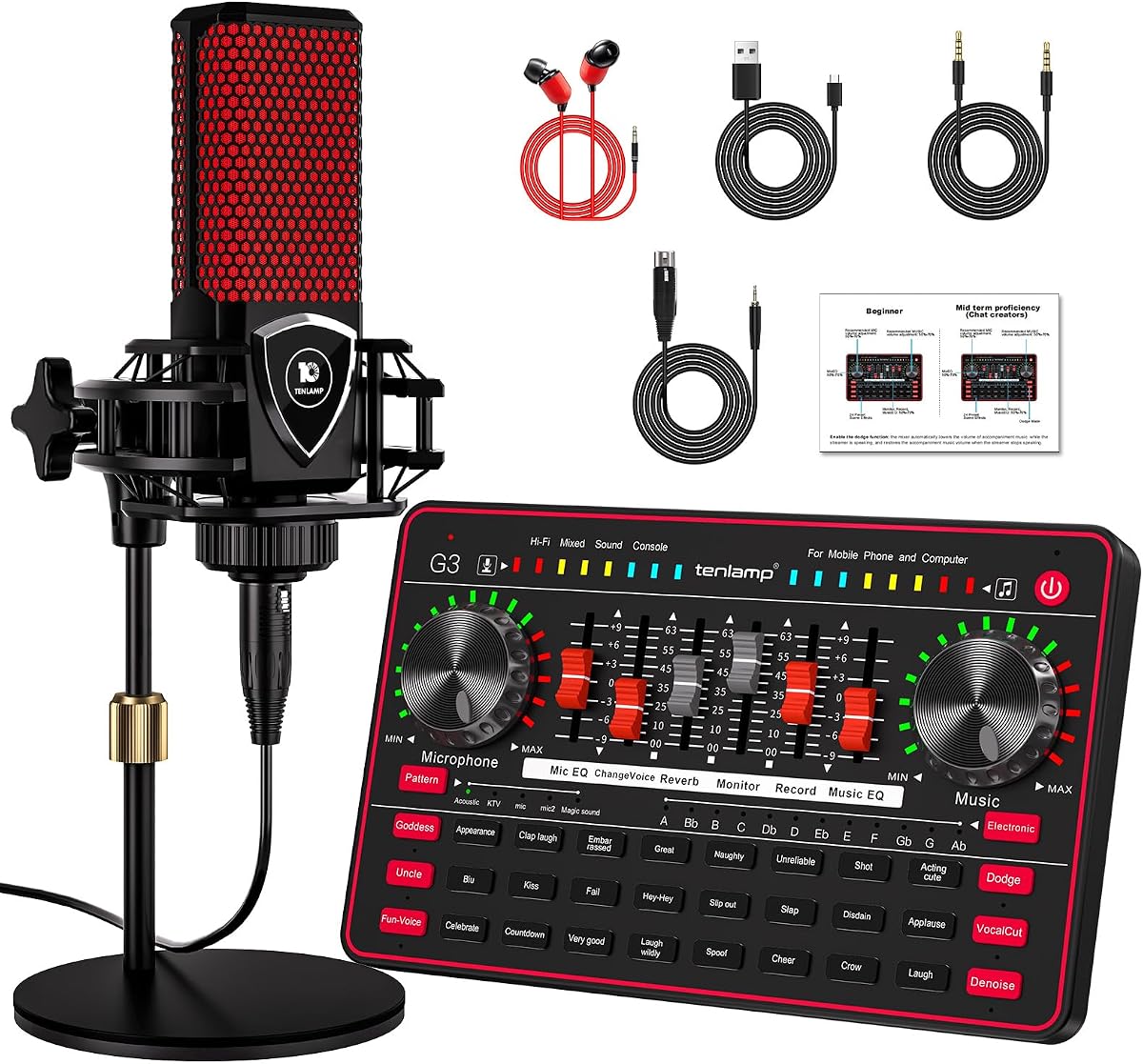
The TENLAMP G3 Creator Audio Mixer Bundle combines a soundboard, a 3.5mm condenser microphone, and a round base stand. Its 4.1 rating reflects an approachable package for streamers and podcasters who want a complete visual and audio setup with minimal assembly.
We may earn a commission when you buy through this link, at no additional cost to you.
The soundboard offers 24 built-in effects, including applause and laughter, along with controls for bass, treble, reverb, and pitch. Five selectable reverb modes and several voice-changing options help differentiate a live broadcast or add character to commentary.
Noise reduction is included to reduce distracting environmental sound, and the 1000mAh battery allows the mixer to operate without a continuous external power source. The bundled microphone can be positioned with its stand, helping users create a more organized recording setup than a loose desktop microphone would provide.
The bundle is well suited to beginner streamers, mobile creators, podcasters, and casual entertainers. It is less appropriate for a musician seeking high-resolution capture, pristine preamps, balanced connections, or extensive input routing. Its greatest value is the combination of microphone, effects, portability, and ready-made streaming functions in one package.
The included microphone and base stand remove the need to source basic components separately. Once connected, creators have an identifiable audio source and a mixer ready for live effects.
The built-in battery supports use away from a fixed power outlet, while the sound library and voice controls support entertainment. Reverb and pitch settings can be adjusted directly to shape a live presentation.
We may earn a commission when you buy through this link, at no additional cost to you.
The right PC sound card depends on what you record, how many sources you need, and whether your setup is a desktop, laptop, or mobile device. Input quality, monitoring, conversion specifications, latency, compatibility, and physical installation should be considered together rather than separately.
Begin by listing every source that must connect to the interface. XLR inputs suit many dynamic microphones, quarter-inch instrument inputs accept guitars and basses, 3.5mm sockets support compact microphone arrangements, and line inputs are useful for external preamps or studio equipment. A single-creator setup may work with one microphone input, while a podcast or band recording normally requires more.
Match the connector to the source rather than relying on an included adapter. Confirm whether a microphone needs XLR, a quarter-inch plug, or 3.5mm connectivity and whether the interface supplies the required power.
A recording interface converts a weak microphone signal into a usable digital level. Good preamps provide clean gain without excessive noise, maintain useful headroom, and make it easier to avoid clipping. Gain controls, indicator lights, and switchable modes can help users set a safe level, while high-headroom preamps are particularly valuable for loud vocals, acoustic instruments, and bass guitar.
Choose a preamp with enough range for your source and an easy way to monitor levels. A device that offers only basic volume control may work for calls but provide little help when making deliberate recording decisions.
Resolution determines how much dynamic detail is represented, while sample rate defines how many audio samples are captured each second. The Focusrite Solo supports recording up to 24-bit/192kHz, the Guitar Audio Pocket Interface operates at 24-bit/48kHz, and the compact USB adapters commonly reach 16-bit/48kHz. Higher specifications are useful, but the microphone, preamp, and recording environment often have a greater effect on real-world quality.
Do not select an interface only by its maximum sample rate. Confirm that your software supports the desired format, that the device can actually record at that setting, and that your workflow benefits from the additional data.
Latency is the delay between an input signal and the sound you hear while recording. It matters when a vocalist needs to perform in time with a backing track or when a guitarist wants to monitor an instrument naturally. Dedicated interfaces with class-compatible drivers and ASIO support can offer lower-latency monitoring, while portable devices emphasize simple direct capture.
For live performance, use wired headphones and test the complete signal chain. A convenient feature cannot compensate for a routing setup that introduces excessive delay or feedback.
Recording and monitoring requirements differ. Some creators need only a headphone output and microphone input, while others require balanced outputs, separate speaker connections, digital inputs, or multichannel playback. The Audigy Fx Pro supports discrete 7.1-channel analog output and several analog and digital connections, whereas basic USB adapters concentrate on stereo output and one microphone input.
Choose outputs that match your room and workflow. Balanced studio-monitor connections are useful in a fixed production space, while headphone outputs are more important for mobile recording, live performance, and private monitoring.
Check operating-system support, connector type, and required drivers before buying. Some adapters work as standard class-compliant USB audio devices, while internal cards may require installation and device configuration. The UGREEN adapter supports a wide range of systems, the Optimal Shop card focuses on older Windows environments, and the PUPGSIS mixer accepts a specific dynamic XLR microphone type.
Also consider the audio application. A simple adapter may work immediately with a browser or conferencing program, while a recording interface should be validated against the digital audio workstation, streaming platform, or mobile application you intend to use.
An internal PCIe card gives a desktop a permanent, direct connection to the motherboard and can be useful for advanced gaming, music, and home-theater setups. It requires an available expansion slot, compatible case dimensions, physical installation, and operating-system support. USB and mobile interfaces avoid those constraints and can move between computers more easily.
Choose internal when your desktop has the space and you value a permanent high-end audio path. Choose external when portability, easier setup, laptop compatibility, or a simpler system is more important.
A soundboard or mixer can add value beyond basic capture. Programmable pads, voice changing, noise reduction, and adjustable reverb are useful for streams and podcasts, while battery-powered designs support mobile use. These features should complement, rather than replace, a suitable microphone, appropriate monitoring, and a controlled recording environment.
Decide which creator tools you will actually use. A portable streamer may value sound effects and wireless background audio more than balanced outputs, whereas a musician may prefer direct instrument inputs and low-latency monitoring over a large preset library.
Begin by identifying the recording source, selecting the correct input in your operating system, and using the supplied or required connection cable. Install any necessary drivers or creative software, then set the sample rate and buffer size in the recording application. For USB devices, start with the manufacturer’s default settings and avoid changing multiple options before confirming that basic audio works.
Set recording levels conservatively, leave some headroom, and watch the application’s meters during a short test take. Connect headphones for direct monitoring, keep microphones away from computer fans and noisy electronics, and speak or play at the volume expected for the final recording. A brief test capture reveals clipping, noise, routing errors, and latency before a complete session begins.
Protect the hardware by avoiding force when connecting quarter-inch or XLR plugs, keeping the device away from moisture and excessive heat, and securing internal cards properly. Use supported cables and clean ports without introducing liquid or abrasive material. Update software when needed, record backups of finished audio, and periodically recheck the input, output, and monitoring routing before an important project.
Not always. A basic PC sound card or USB adapter mainly adds basic playback and microphone connections, while a recording-focused audio interface usually provides better preamps, multiple inputs, lower-latency monitoring, and professional output options. The terms are sometimes used interchangeably, so the individual connectors and specifications matter more than the label.
The Focusrite Scarlett Solo 3rd Gen is the strongest dedicated choice in this list for a solo vocalist because it offers a microphone preamp, high-resolution recording, and clean monitoring. The PUPGSIS mixer can also handle dynamic XLR microphones while adding streaming effects, while the basic USB adapters are better suited to uncomplicated voice chat than polished vocal production.
Only if your desktop setup benefits from a permanent internal audio card and you are comfortable installing hardware. PCIe cards can provide advanced playback, surround output, and direct motherboard integration, but USB interfaces are easier to move, require no internal installation, and work with both desktops and laptops.
No. The Guitar Audio Pocket Interface has a dedicated quarter-inch instrument input designed for guitar and bass, while the Focusrite Solo provides two instrument inputs and microphone recording capability. Basic USB adapters and soundboard mixers generally focus on 3.5mm microphones, accessories, or live effects rather than instrument-level recording.
24-bit/48kHz is a practical modern starting point for many creators, while 24-bit/192kHz is available on the Focusrite Solo for higher-resolution projects. The most important factor is that the interface, software, storage workflow, and project settings all support the selected format. Better microphones and acoustic treatment can matter more than choosing the highest available number.
First, select the USB audio device as the output in the operating system's sound settings. Confirm that the headphone or speaker connection is seated, raise the hardware and software volume, and check whether the correct application input is selected. On older systems, updating the audio driver and operating system may also resolve recognition or compatibility issues.
External USB models generally offer the greatest portability because they can move between compatible computers. The Saberent, Biaze, UGREEN, and Optimal Shop adapters use USB connections, while the Guitar Audio Pocket Interface also supports compatible mobile devices. Internal PCIe cards remain tied to the desktop in which they are installed.
The PUPGSIS Gaming Audio Mixer is the most focused choice because it includes programmable sound pads, a voice changer, noise reduction, and adjustable reverb. The TENLAMP G3 bundle offers an even larger built-in effects library and includes a microphone, making it attractive to beginners who want a ready-made mobile creator kit.
The Focusrite Scarlett Solo 3rd Gen stands out for focused, high-quality home recording, while the Creative Sound Blaster AE-X serves audiophile desktop users who prioritize advanced conversion, headphone power, and low latency. The SABRENT USB Stereo Adapter provides the most approachable route to restoring basic headphone and microphone access.
Your priority should match the source you intend to record. Choose a dedicated interface for clean vocals and instruments, an internal high-resolution card for advanced desktop listening, a mobile capture device for travel, and a soundboard mixer for live effects. Investing in a suitable microphone, controlled placement, and dependable monitoring will improve results at least as much as adding more device features.
Before ordering, verify the connectors, operating system, software support, physical space, and required accessories. Current listing details and promotions can change, so check the latest product page and confirm that the product remains appropriate for your exact recording setup.
