
miadore Two-Pack USB Controller
4.4Editor score
Two controllers included
Broad PC and Mac support
No drivers or software required
Concave face-button design
A replacement SNES controller can restore a favorite console or improve the feel of emulator-based gaming, but the right choice depends on where and how you play. Important differences include console compatibility, wired or wireless connections, button layout, battery life, repair needs, and the software required for configuration.
This guide compares ten replacement options across full controllers and conductive repair pads. We examined their stated compatibility, connection methods, control features, package contents, and important limitations, covering original SNES hardware, Windows and Mac systems, Linux, Raspberry Pi, and common emulator platforms without suggesting that every controller works with every setup.
Each review explains the product's strongest use case and trade-offs, while the comparison table and buying guide help narrow the field quickly. The list includes three highlighted picks, but ratings, included accessories, and compatibility can change, and retailer prices fluctuate, so shoppers should confirm the latest listing before ordering.
4.4Editor score

4.6Editor score

4.4Editor score
As an Amazon Associate we earn from qualifying purchases.
The comparison covers complete replacement controllers and two repair-focused conductive pad sets, highlighting connection type, platform support, bundled accessories, and the most important compatibility limitation for each option.


The KIWITATA two-pack is a practical wired controller option for people who play SNES ROMs through emulators on a computer rather than using an original console. It carries a 4.3 rating and stands out because two complete USB controllers are included, allowing local multiplayer without buying another compatible gamepad. The familiar SNES-style shell and control layout also make it approachable for retro-game fans.
We may earn a commission when you buy through this link, at no additional cost to you.
Its listed platform support is broad: Windows systems from the supplied Windows 98 line through Windows 11, Mac OS X 10.0 or later, Linux, and Raspberry Pi are included. The controller uses a standard USB 2.0 plug and a 1.5-meter, or five-foot, cable. No driver installation is needed, which simplifies setup for users who want to move directly from connecting the controller to configuring their emulator.
The main caveat is that this is not a console controller. It cannot connect directly to an original SNES or Super Nintendo, and it does not support Switch. Users must first install an emulator such as VirtuaNES or OpenEmu and manually assign the directional pad and buttons inside that software. That configuration requirement is normal for generic USB gamepads but can be inconvenient for people who want immediate console-style input.
This controller is a strong choice for two-player emulator sessions, Raspberry Pi retro-gaming projects, and anyone who values a straightforward wired connection over wireless freedom. It is particularly suitable for living-room desktop setups where a five-foot cable provides enough reach without leaving the sofa. For original-console owners, however, the Hyperkin Scout offers a more direct and polished solution.
Including two controllers makes this pack useful for cooperative games, competitive sessions, and friends playing side by side. The wired design also removes charging interruptions and potential radio interference, although each player's emulator may still require separate button mapping.
Windows, Mac, Linux, and Raspberry Pi support make the pack adaptable across common retro-computing environments. Compatibility still depends on the individual emulator recognizing a standard USB controller and accepting manual input assignments.
We may earn a commission when you buy through this link, at no additional cost to you.
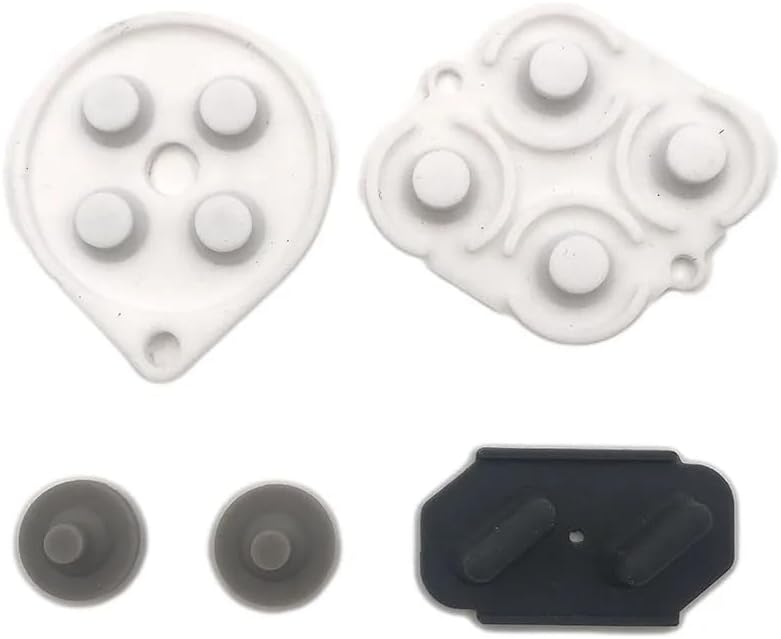
The conductive silicone button pad is a specialized repair component rather than a complete replacement controller. With a 3.7 rating, it serves a narrower purpose: restoring conductive contact beneath the buttons of a Nintendo SNES or SFC controller whose original membrane has become unresponsive. The package includes one silicone rubber button-pad set designed for that controller family.
We may earn a commission when you buy through this link, at no additional cost to you.
Its advantage is preservation. If the shell, directional pad, buttons, cable, and circuit board remain intact, replacing the internal conductive pad may solve a common issue without discarding the entire controller. Soft silicone contacts can restore signal transfer between the button membranes and the board when they are properly seated and aligned.
This is not a plug-and-play product for the average console user. It involves opening the controller, comparing the pad shape with the original component, and fitting it in the correct position. Buyers should also consider that conductive silicone pads can vary in feel or response, and incorrect positioning may not resolve the original problem.
Choose this option only if the symptoms point to worn internal button contacts and you are comfortable with controller repair. It is ideal for a technically inclined SNES owner restoring a favorite controller. If multiple buttons, the cable, or the main control board have failed, replacing the full controller may be simpler and more dependable.
A conductive pad set can extend the useful life of a structurally sound controller. It is most relevant when only one or a few buttons have become intermittent or unresponsive.
The part is specific to SNES and SFC-style controllers, so buyers should compare photographs and controller shape before opening the housing. A close match helps prevent incorrect placement.
We may earn a commission when you buy through this link, at no additional cost to you.
The KIWITATA wireless pair is the most feature-focused option for owners of an original SNES who want to replace restrictive controller cables. It has a 4.4 rating and includes two 2.4GHz controllers plus pairing adapters for original SNES hardware. The familiar layout, concave cross key, and responsive face buttons preserve the character expected from a classic console controller.
We may earn a commission when you buy through this link, at no additional cost to you.
The supplied information highlights a 3.7-volt, 500mAh rechargeable lithium-ion battery capable of more than 10 hours of continuous use. Its stated wireless range reaches 30 feet, giving players more freedom to move around a television than a conventional wired pad. Pairing involves plugging the SNES adapter into the controller and pressing the start button, making the process less technical than configuring computer input.
There are important console limitations. The package does not support simultaneous use of two controllers on Super Famicom hardware and supports only one-player games. It also excludes SNES Mini, SNES Classic Edition, and NES Classic Edition compatibility. Moreover, the listed package does not include a wireless USB dongle for PC, Raspberry Pi, or Switch use.
This is a compelling upgrade for a single-player owner of an original SNES who values range, rechargeable operation, and freedom from a fixed cord. The two-controller pack is useful for keeping a spare on hand, but multiplayer restrictions reduce its appeal for cooperative console gaming. Verify that your console is the original-style hardware before buying.
A 30-foot stated range removes the practical constraint of sitting close to the console. The wireless connection is particularly helpful in larger rooms or when a player prefers a more open seating position.
The built-in rechargeable battery is listed for more than 10 hours of continuous work. This makes the controller convenient for extended sessions without relying on disposable batteries.
We may earn a commission when you buy through this link, at no additional cost to you.
The ZAMPAM two-pack targets wireless retro gaming across computers and common emulator systems. Its 4.0 rating reflects a balanced set of features, with two controllers, USB receivers, and a familiar SNES-inspired layout. It is a versatile option for people who move between desktop gaming, RetroPie, Recalbox, and other emulator environments.
We may earn a commission when you buy through this link, at no additional cost to you.
The controllers use 2.4GHz wireless technology with a stated range of up to 10 meters, or 32 feet. Setup is presented as a simple process: plug the USB receiver into the device and begin using a program or emulator that accepts standard USB gamepads. No driver or software installation is required for compatible systems, although individual emulators may still need button assignments.
Its platform list includes Windows PC, Mac OS, Linux, Raspberry Pi, RetroPie, and Recalbox. The product is also described as compatible with Nintendo Switch models through Switch 1, but explicitly not Switch 2. The advertised emulation targets include NES, SNES, Genesis, GBA, RetroArch, BSNES, and OpenEmu, giving users a broad range of retro titles to explore.
Battery life is the main tradeoff. The built-in 240mAh rechargeable battery is listed for up to three hours of continuous play and about one hour to recharge. A battery indicator helps prevent an unexpected cutoff. This pair is well suited to cross-platform users and two-player arrangements, while people needing all-day wireless operation may prefer a controller with a longer stated runtime.
Support for Windows, Mac, Linux, Raspberry Pi, and major retro-gaming distributions makes this a flexible controller for mixed setups. The standard USB receiver reduces dependence on platform-specific drivers.
The built-in battery indicator helps players check remaining charge before a session. Rechargeable batteries also remove the recurring expense and inconvenience of replacing standard cells.
We may earn a commission when you buy through this link, at no additional cost to you.
The Hyperkin Scout is the strongest all-around choice for a player replacing a controller on original SNES hardware. Its 4.6 rating is the highest among the products in this guide, and its defining feature is simple, dependable console compatibility. It works with all Super NES models, so buyers do not need to determine whether a particular regional console or controller connector is supported.
We may earn a commission when you buy through this link, at no additional cost to you.
Premium build quality and an ergonomic design are the main reasons to choose it over a basic third-party controller. The wired design follows the original console's operating model, eliminating batteries, wireless pairing, receiver management, and possible input delay associated with radio controllers. The 10-foot cable provides ample room to use the controller from a normal seated position.
The trade-off is that the product description does not state compatibility with computers, USB receivers, Raspberry Pi devices, or emulators. It is therefore a focused console accessory rather than a universal retro-gaming controller. Wired operation also means players remain within the cable's reach, although the generous length reduces the chance of it becoming restrictive.
For an original-SNES owner seeking the most polished and straightforward replacement, the Scout is the recommendation. It suits collectors, families reviving an existing console, and anyone who values a familiar control layout over wireless convenience. Emulator-focused users should choose a USB controller instead.
Compatibility with all Super NES models gives this controller a clear advantage over products tied to one original-console configuration. It is designed to provide the most seamless replacement experience.
The 10-foot cable allows a relaxed connection to the console. Because power comes directly through the wired connection, there is no battery routine or wireless pairing process to manage.
We may earn a commission when you buy through this link, at no additional cost to you.
The ZAMPAM wireless USB controller is designed for computer and Android-device gaming, with an included receiver for 2.4GHz communication. Its 4.2 rating and unusually long stated battery life make it appealing to players who prefer not to recharge frequently. It is explicitly not compatible with Mini SNES or Super Nintendo consoles.
We may earn a commission when you buy through this link, at no additional cost to you.
The built-in rechargeable lithium-ion battery is said to last around 100 hours on one charge, creating a clear advantage over controllers with shorter three- or ten-hour estimates. The stated wireless range reaches 24 feet, allowing comfortable movement around a desktop or larger display. A standard USB adapter handles the connection to compatible PCs and Android devices.
A useful special feature is programmable turbo behavior. Holding Select while pressing A, B, X, or Y turns the corresponding function on or off in USB mode. Setup can still require software such as Joystick Mapper, especially when the operating system or emulator does not recognize the layout automatically. The product description specifically points users toward checking configuration guidance for PC use.
This controller is best for PC gaming, emulators, and compatible Android devices where users value long battery life and wireless freedom. It is not a console replacement despite its retro-inspired design, and the potential need for remapping adds a small amount of setup. Users seeking original-SNES hardware support should look to the Hyperkin Scout or a dedicated 2.4GHz console adapter.
A stated 100 hours of operation means charging can become infrequent. That convenience is especially valuable for long emulator sessions or a controller used regularly in a desktop setup.
The Select-plus-face-button shortcut lets users toggle turbo functions directly in USB mode. This adds flexibility for supported games and retro software that can benefit from rapid repeated input.
We may earn a commission when you buy through this link, at no additional cost to you.
The miadore two-pack is a budget-focused choice for emulator gaming on computers and Raspberry Pi systems. Its 4.4 rating is among the strongest in the collection, and the inclusion of two controllers gives it an advantage for multiplayer retro titles. The familiar gamepad design provides a more comfortable alternative to keyboard-and-mouse play in many classic games.
We may earn a commission when you buy through this link, at no additional cost to you.
Compatibility covers Windows 98, ME, Vista, 2000, 2003, XP, 7, 8, 8.1, and 10, as well as Mac OS X and later. It is also listed for Raspberry Pi, Raspberry Pi 2 Model B, RetroPie OS, and RetroPie systems. The controller uses a simple USB plug and requires no drivers or setup software, although the connected controller must be started before launching an emulator.
The controls include an eight-way directional pad, six digital buttons, concave X and Y buttons, convex A and B buttons, and separate Start and Select buttons. Its roughly five-foot cable provides a reasonable amount of freedom while maintaining a traditional wired experience. Some emulators may still require users to map buttons manually after startup.
This is an excellent budget selection for friends, families, and Raspberry Pi hobbyists who want two controllers without moving to a wireless setup. It is also versatile for multiple supported console styles, including NES, SNES, PSX, Atari, and Genesis games when suitable emulators and software are available. It is not a replacement for an original SNES controller.
The second controller is the key advantage over single-controller alternatives. It makes the pack practical for cooperative classics, versus matches, and family sessions at a shared computer.
Concave X and Y buttons, convex A and B buttons, and an eight-way directional pad closely approximate the feel of classic controllers. The five-foot cord balances reach with a familiar desktop footprint.
We may earn a commission when you buy through this link, at no additional cost to you.
The two-pack of wireless USB SNES controllers balances range, battery life, and broad desktop compatibility. It carries a 4.2 rating and is intended for retro emulators on Windows, macOS, Linux, and Raspberry Pi. Two controllers and their USB receivers are included, along with charging cables and a user manual.
We may earn a commission when you buy through this link, at no additional cost to you.
The 2.4GHz connection has a stated range of 10 meters, or 33 feet, and is described as stable with zero lag. A built-in rechargeable battery is listed for 10 hours of runtime. The standard USB receiver provides a familiar connection method, and compatible systems need no additional drivers, although software compatibility still depends on the emulator or game.
The product is not a universal wireless controller. Android TV boxes, Fire TV, Chromebook, SteamOS, Tesla, C64, and Switch are explicitly listed as incompatible. The Switch exclusion is attributed to the absence of the required button configuration, so PC gamers should not assume that a similar-looking layout will work with every platform.
This pack is a good middle ground for people who want wireless freedom, a long-enough operating range, and two-player capability without switching among console adapters. It suits a Windows or macOS gaming desk particularly well. Owners of unsupported smart-TV platforms should choose a controller explicitly designed for that environment.
The stated 33-foot range is ample for a desktop or living-room media setup. A wireless layout also reduces cable clutter around the television or computer.
Separate receivers and included charging cables make it convenient to prepare two-player sessions. The common USB receiver approach is straightforward for compatible desktop systems.
We may earn a commission when you buy through this link, at no additional cost to you.
The KIWITATA multi-mode controller is unusual because it includes both a 2.4GHz SNES adapter and a USB dongle, allowing one controller to serve original-console and computer-oriented retro-gaming needs. The supplied listing does not provide a customer rating, so buyers should treat its evaluation more cautiously than established products with substantial visible feedback.
We may earn a commission when you buy through this link, at no additional cost to you.
Its console mode is designed for the original SNES Entertainment System and includes a wireless pairing seven-pin connector adapter. The USB mode supports listed versions of Windows from 98 through 11 and Mac OS X 10.0 or later. Raspberry Pi support is also specified for several Model A, Model B, Model B+, Pi 2, Pi 3, Pi Zero W, and Pi 4 variants.
The built-in 3.7-volt, 500mAh lithium-ion battery is stated to work continuously for more than 10 hours. Its 2.4GHz signal offers a listed range of 30 feet. Pairing is described as plugging in the appropriate adapter and pressing Start, which keeps the process approachable even when moving between console and computer modes.
This controller makes sense for a collector who owns original SNES hardware and also wants to use the same familiar control layout for emulator play. It is less appropriate for buyers who want two-player use, since only one controller is included. The absent rating means checking recent customer feedback is especially important before purchase.
The included console adapter and USB donglet allow users to move between original SNES hardware and supported computer platforms. This reduces the need to maintain separate controllers for each environment.
The listing names numerous Raspberry Pi generations, including Pi 3 Model B, Pi Zero W, and Pi 4. This broad hardware range supports collectors who build retro-gaming systems around several Pi models.
We may earn a commission when you buy through this link, at no additional cost to you.
The GUANKE conductive rubber pad is another repair-focused alternative to buying a complete controller. Its package includes one set of conductive button pads for an SNES controller. The product listing does not show a customer rating, so the strongest practical consideration is whether the symptom matches a worn membrane rather than a failed circuit board, cable, or physical button.
We may earn a commission when you buy through this link, at no additional cost to you.
The component is positioned as a gasket or membrane that restores conductive contact beneath the controller buttons. If the original controller's shell and visible controls remain intact, installing a correctly matched pad can bring unresponsive buttons back to life. It is therefore a sustainable way to preserve a functioning controller rather than discarding it because one input method has worn out.
The primary challenge is installation. The listing advises comparing photographs, descriptions, and controller model before buying, which is important because the pad must align with the board's contact points. Without proper placement, the new membrane may not register input. Users without controller-repair experience should consider the risk of opening and reassembling the housing.
This pad set is best for an SNES owner facing a specific conductive-contact failure in an otherwise sound controller. It is not suitable as a primary controller or a wireless upgrade. For widespread button damage, a full replacement such as the Hyperkin Scout will usually be easier to rely on.
Replacing the conductive layer can solve an isolated internal fault while retaining the original case, buttons, and cable. That makes the repair useful for preserving a favorite or collectible controller.
Accurate alignment is essential because each conductive section must meet its corresponding contact point. Comparing the replacement with the installed membrane before disassembly reduces installation risk.
We may earn a commission when you buy through this link, at no additional cost to you.
The right replacement depends primarily on the platform, connection method, and whether you need a complete controller or an internal repair component. These factors also determine setup effort, multiplayer flexibility, and long-term convenience.
Begin by identifying where the controller will actually be used. Original SNES owners need a wired controller with the correct console plug or a wireless model specifically bundled with an original-SNES adapter. Emulator users should instead look for a USB controller with support for their operating system and emulator. A retro-style appearance does not guarantee compatibility, and products built for computers often cannot connect directly to an original console.
Choose console compatibility for authentic hardware use, and choose USB connectivity for emulators, computers, or Raspberry Pi projects. Verify both the console generation and the software platform before buying.
Wired controllers generally offer the simplest setup because they need no pairing or charging routine. They are a natural choice for original console play and can work reliably across emulator software. Wireless controllers provide more freedom from the television or computer, but they require receiver management, battery charging, and confirmation that the target platform supports the included receiver.
Choose wired for simplicity and consistency. Choose wireless when movement range, a cleaner setup, or shared console-and-computer use matters more than the extra setup requirements.
Compatibility should be evaluated beyond the broad statement that a controller works with PC or Mac. Check the listed operating-system versions, the emulator platforms, and whether the software recognizes standard USB gamepads. Some products work automatically, while others require button remapping or a utility such as Joystick Mapper. Raspberry Pi buyers should also verify the exact Pi model and retro distribution being used.
Match the controller to the precise platform list and be prepared to configure inputs. A broad compatibility claim is less useful than explicit support for the system actually in front of you.
The number of players supported can depend on both the product and the console. Some two-controller packs use separate receivers for desktop use, while certain wireless original-SNES adapters support only one player. Even when two controllers are included, the package may not support Super Famicom systems or cooperative console games. For computer emulators, check whether the emulator supports multiple standard gamepads and how receivers are paired.
For two-player gaming, confirm simultaneous support rather than relying on pack size alone. A multipack is valuable only when both the software and connection system allow the intended multiplayer mode.
Wireless controller runtime varies sharply across this product group, with stated figures extending from roughly three hours to around 100 hours. Consider how long you typically play and whether charging between sessions is convenient. Built-in battery indicators, included charging cables, and rechargeable cells can improve usability, but adapters and charging standards should be checked before assuming every system uses the same cable.
Prioritize adequate runtime for your typical session. Longer stated battery life means less charging interruption, while a visible indicator helps prevent unexpected disconnections.
A replacement should feel natural during extended play. Many options use an eight-way directional pad, concave X and Y buttons, convex A and B buttons, and separate Start and Select buttons, all of which echo the classic SNES arrangement. Ergonomic shaping, accurate directional input, and sensitive face buttons can matter more to experienced players than decorative authenticity. Programmable turbo functions may also be useful in certain retro games.
Choose a layout that feels familiar and responsive. For long sessions, prioritize comfortable shape, a well-defined directional pad, and buttons that suit your preferred retro-control style.
Physical reach should match the room. Wired controllers in this group include approximately five-foot and ten-foot cables, while stated wireless ranges range from about 24 feet to 33 feet. A longer cable is useful with a console positioned away from the sofa, while wireless range offers more layout flexibility but adds radio and charging considerations. Consider furniture, screen placement, and whether other wireless devices could interfere.
Choose enough reach for a comfortable playing position without unnecessary clutter. For wireless systems, confirm the stated range and keep the receiver within a clear line to the controller.
A conductive pad is not a substitute for a complete gamepad; it is an internal membrane component intended to restore button contacts. Complete controllers are the right choice for missing hardware, failed cables, damaged shells, or multiple malfunctioning inputs. Repair pads make sense when the visible buttons and shell are intact but one or more buttons no longer register reliably. Installation also requires care and confidence working inside the controller.
Choose a repair pad only after diagnosing a conductive-contact problem. For broad failures or users wanting immediate use, select a complete compatible controller instead.
For an original-console controller, compare the plug and adapter with the console before connecting anything. A wired controller should fit directly when its specifications support the model; a wireless controller requires the correct original-SNES adapter, pairing, and a start-button press. Do not force a connector that does not match, and keep the adapter seated fully before attempting to pair.
For a USB controller, connect it to the computer before opening the emulator or game. Use the operating system's input settings and the emulator's controller configuration to assign the directional pad and each face button. If inputs appear reversed or remain unresponsive, restart the software after reconnecting the controller and map the controls again. Wireless models should also be charged through their stated charging method before the first extended session.
Store wired controllers with the cable relaxed rather than tightly coiled, and keep connectors clear of dust. For wireless models, recharge periodically and clean the receiver and controls with a dry, soft cloth. Avoid liquid cleaners, pulling on the cable, or opening a controller unless you understand the repair process. If a conductive pad is installed, confirm proper alignment before fully closing the housing.
Only certain options in this guide support original SNES hardware. The Hyperkin Scout states compatibility with all Super NES models, while the KIWITATA wireless options use original-SNES pairing adapters and have their own limitations. The USB controller packs are intended for computers and emulators, not direct console connections. Always check the individual product description for the exact console generation it supports.
A USB controller will generally work with software that supports standard gamepads, but it may not configure automatically. Most products in this guide require users to assign the directional axes and buttons inside the emulator or an operating-system utility. Connect the controller before starting the emulator, then consult that software's input configuration screen if a button behaves incorrectly.
The ZAMPAM two-pack for PC lists compatibility with Nintendo Switch 1 but explicitly excludes Switch 2. The Wireless USB SNES Controller Pair is also marked incompatible with Switch because it lacks the required button configuration. Most other products in the guide are limited to original SNES hardware or computer platforms, so a Switch user should search for a controller explicitly designed for that console.
No. The conductive silicone and rubber pads are internal repair components designed to restore electrical contact beneath SNES controller buttons. They are appropriate when the original shell, cable, and most controls remain intact but one or more buttons have become unresponsive. Installing a pad requires opening the controller and carefully aligning each conductive section.
The KIWITATA and miadore wired packs include two controllers for desktop emulator play, while the ZAMPAM and Wireless USB SNES packs also include two controllers and receivers. For original consoles, multiplayer support can be much more restrictive. The KIWITATA original-SNES wireless pair explicitly supports only one-player games, so the pack size alone does not guarantee cooperative console play.
Stated battery life varies considerably by model. The ZAMPAM PC wireless pair lists up to three hours, the Wireless USB SNES Controller Pair lists 10 hours, and the original-SNES KIWITATA models list more than 10 hours. The separate ZAMPAM PC controller claims approximately 100 hours. Charging time, battery condition, and use can affect actual performance.
Wired controllers are simpler because they require no pairing or charging and are natural choices for original SNES systems. Wireless controllers offer more freedom from the console and can be convenient for large living rooms or shared computer use. Wireless models are best when platform support, battery runtime, and receiver compatibility are clearly listed and match your setup.
Check whether the product explicitly supports Raspberry Pi and whether it requires a USB receiver or a direct wired connection. Emulator software must also recognize the controller, and input mapping may be required. Some listings specify several Pi generations while others focus only on general compatibility, so confirm the exact model and retro-gaming distribution you intend to use.
The Hyperkin Scout is the strongest overall choice for original SNES owners because it combines a 4.6 rating, premium construction, broad console compatibility, and a generous wired cable. For desktop emulator users, the miadore two-pack and KIWITATA USB pack deliver practical two-player value, while the KIWITATA original-console wireless pair provides cable-free play with rechargeable controllers.
Prioritize platform compatibility before any secondary feature. A wireless receiver, console adapter, or repair component is useful only when it matches the intended hardware. Consider multiplayer restrictions, emulator mapping requirements, battery life, cable reach, and whether a complete controller or a targeted membrane repair is actually needed.
Retailer prices and product availability change over time, so confirm the current listing, warranty information, and included accessories before buying. Comparing the final specifications with your exact console, operating system, and emulator will reduce setup surprises and lead to the most satisfying replacement.

