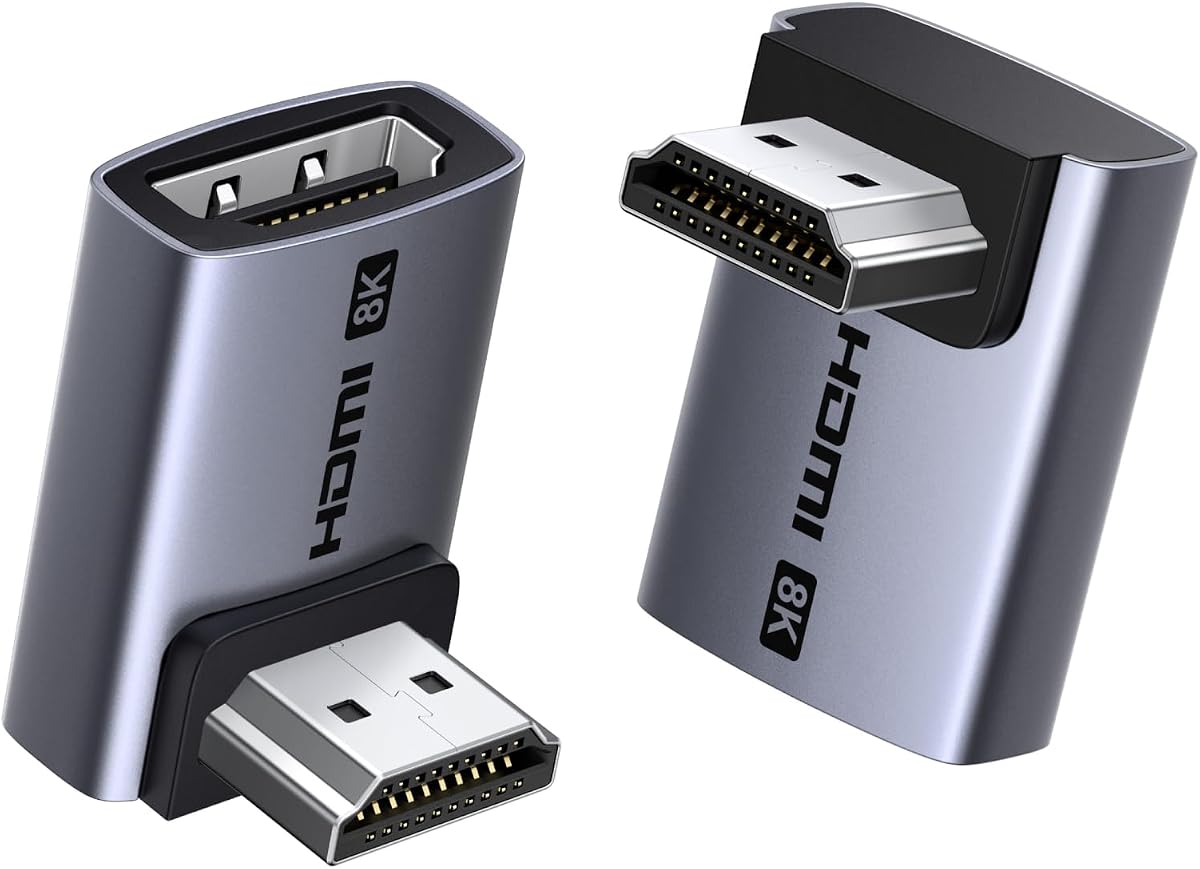
UGREEN 10K 8K@60Hz HDMI 2.1 Right Angle Male to Female Adapter 2 Pack
4.5Editor score
48Gbps HDMI 2.1 bandwidth
Supports 4K at 240Hz
Aluminum alloy construction
Our 90 Degree HDMI Adapter guide compares ten space-saving options for tight TV, monitor, and console setups across HDMI 2.1 support, angle choices, build, and
A 90 degree HDMI adapter redirects a cable away from a crowded wall, media cabinet, desk, or entertainment center. The right-angle connection can reduce sharp cable bends, improve access to recessed ports, and create a cleaner setup, but capability depends on the adapter’s HDMI version, construction, and compatibility with your devices.
We compared all ten products by examining their supported resolutions, bandwidth, directional designs, connector materials, housing, feature support, package contents, and stated device compatibility. The list includes HDMI 2.0 and HDMI 2.1 options, two-piece combinations, and a four-direction set for different installation needs.
Each review explains where that adapter stands out and where compromises may apply. Ratings reflect the supplied customer feedback rather than personal testing, and specifications depend on the connected source, display, cable, and port. Product availability and pricing can change, so confirm the current listing before buying.
4.5Editor score

4.9Editor score

4.7Editor score
The comparison below organizes all ten adapters by angle configuration, HDMI capability, maximum stated resolution, and construction. It is designed to show which options suit modern 8K systems, high-refresh gaming displays, or simpler 4K installations.


The Togconn 8K 90 Degree HDMI 2.1 Adapter 2 Pack has a 4.6 customer rating and is built for users who want more than a simple physical cable redirect. Its two adapters provide upward and downward routing, while the male-to-female format works with standard HDMI cables. The advertised HDMI 2.1 support makes it a more future-oriented choice than adapters limited to older HDMI specifications.
We may earn a commission when you buy through this link, at no additional cost to you.
Its standout feature is the breadth of supported functions. The listing states support for 8K at 60Hz, 4K at 120Hz, 4K at 60Hz and 30Hz, 2K, 1080p, 3D, ARC, eARC, ALLM, VRR, HDR, Dynamic HDR, Dolby Vision, Dolby Atmos, and HDCP 2.3. Gold-plated contacts and an aluminum alloy shell are also listed, while the claimed 15,000 insertion cycles suggest attention to connector durability.
The main limitation is that an adapter cannot add capabilities to a source device, cable, or display. Reaching 8K at 60Hz or using high-refresh gaming features still requires every part of the connection chain to support those modes. The package also provides only the up and down configurations, so users who need left or right routing must choose a different product.
This is a strong all-around recommendation for wall-mounted televisions, gaming systems, computers, and media devices where both modern bandwidth and flexible routing matter. Choose it when you want a full HDMI 2.1 feature set and two useful directions without moving to the more specialized four-way set.
The listed support for 8K, 4K high refresh, VRR, ALLM, HDR, eARC, Dolby Vision, and Dolby Atmos makes this adapter appropriate for current home theater and gaming ecosystems. Each feature still depends on compatible source equipment, a suitable cable, and a display that can render it.
Including upward and downward adapters covers many common installation problems, particularly recessed television ports and clearance behind wall mounts. The elbow design keeps the cable from projecting straight out and approaching a sharp bend at the connector.
We may earn a commission when you buy through this link, at no additional cost to you.
The PANPEO 8K HDMI Adapter 4-Pack carries a 4.6 rating and centers on giving buyers multiple right-angle connections for a multi-device entertainment setup. Although the product title describes a four-pack, the supplied feature information specifically discusses selectable 90- and 270-degree adapters. It is aimed at users who want several connections available rather than a single specialized elbow.
We may earn a commission when you buy through this link, at no additional cost to you.
Resolution support is extensive. The listing includes 8K at 60Hz, 4K at 120Hz, 4K at 144Hz, 2K at 240Hz, 6K at 60Hz, 5K at 60Hz, and 1080p at 60Hz, plus 3D. Its 24K gold-plated connectors, aluminum alloy construction, thin profile, and claimed durability of more than 9,999 plug cycles are designed for frequent setup changes and compact installations.
Compatibility is broad, with named support for PCs, laptops, monitors, HDTVs, Fire TV Sticks, Nintendo Switch, PlayStation models, DVD players, TV boxes, and televisions. As with every high-bandwidth adapter in this list, the advertised maximum resolution is a system-level specification. Older source equipment or cables may limit the result even when the adapter itself meets HDMI 2.1 requirements.
This pack is especially appealing to gamers and media enthusiasts with several devices behind one television or entertainment unit. It may be less compelling for one permanently installed connection because some of the included adapters will not be needed, but for flexible routing across multiple HDMI ports, the four-piece format is convenient.
Having four adapters on hand makes it easier to configure several streaming devices, consoles, and displays without searching for another compatible elbow. The option to position a cable upward or downward adds practical flexibility around stands and furniture.
Support for 4K at 120Hz and 144Hz, along with 8K at 60Hz, is useful for compatible modern displays. The source console or graphics card and the cable also need to support the selected resolution and refresh rate.
We may earn a commission when you buy through this link, at no additional cost to you.
The VCELINK 8K HDMI 2.1 Right Angle Adapter has a 4.7 rating and is a particularly complete option for wall-mounted televisions and entertainment centers. Its two-piece set includes 90- and 270-degree male-to-female adapters, allowing the cable to leave upward or downward instead of projecting directly toward the viewer.
We may earn a commission when you buy through this link, at no additional cost to you.
The stated HDMI 2.1 capabilities cover 8K at 60Hz, 4K at 120Hz, and 2K at 240Hz with bandwidth up to 48Gbps. The feature list also includes Dolby Atmos, Dolby Vision, Dynamic HDR, 3D, DSC, VRR, QMS, QFT, ALLM, HDCP 2.3, eARC, DTS:X, and display modes. That broad list makes the adapter appropriate for modern gaming, home theater, and high-end display configurations.
Construction is a major strength. VCELINK describes an outer nickel-plated metal shell for interference reduction, an inner gold-plated connector for signal transmission, a protective PVC casing around the female port, and a chip intended to limit overheating during prolonged use. The claim of at least 70% reduced cable bending stress also supports its stated port-protection purpose.
The product is a strong candidate for users who want more than a simple angled block. It suits PS5, Xbox Series systems, projectors, AVR receivers, and other HDMI-enabled devices, and the 18-month warranty adds some reassurance. The limitation is that its package does not cover every possible direction, so left- or right-oriented installations will require a broader kit.
The nested shell, protected female socket, and gold-plated contacts are intended to preserve signal quality and withstand repeated installation. These physical protections complement the right-angle shape, which reduces stress on both the cable and the device connector.
VRR, ALLM, DSC, Dynamic HDR, eARC, and advanced audio support make this suitable for modern displays and source components. These modes remain contingent on the capabilities of the connected television, console, graphics card, receiver, and cable.
We may earn a commission when you buy through this link, at no additional cost to you.
The VCE HDMI 90 and 270 Degree Adapter 2-Pack has a 4.7 rating and offers a straightforward solution for standard 4K home theater and gaming arrangements. Its HDMI 2.0 specification provides 18Gbps bandwidth, supports resolutions through 4K at 60Hz, and includes 2K, 1080p, and 3D support.
We may earn a commission when you buy through this link, at no additional cost to you.
This is the most approachable pick in the group when the goal is dependable cable redirection rather than next-generation bandwidth. It includes one upward and one downward adapter, which should cover most recessed television, monitor, entertainment-center, and media-console installations. Compatibility extends to streaming devices such as Roku, Chromecast, and Fire TV, along with PCs, laptops, projectors, and gaming consoles.
The gold-plated connectors, durable housing, and stated ability to withstand thousands of insertion cycles provide sensible physical construction for a frequently repositioned adapter. The product is also uncomplicated to operate: it uses standard HDMI connections and requires no extra drivers or software.
The main trade-off is that it is an HDMI 2.0 adapter rather than a full 48Gbps HDMI 2.1 option. It cannot deliver 8K, 4K at 120Hz, or other bandwidth-dependent HDMI 2.1 features. For users with 4K televisions, conventional consoles, and standard home theater equipment, that limitation may not matter, making this a sensible budget-oriented choice.
An 18Gbps link is sufficient for 4K at 60Hz in the product’s stated specification. It also fits standard 1080p and 2K arrangements, so it remains relevant for mixed-generation home and gaming setups.
The up-and-down pair changes the direction of the attached cable and helps it fit behind wall-mounted screens or inside entertainment furniture. This also reduces the harsh bend that can form when a standard connector is forced into a narrow gap.
We may earn a commission when you buy through this link, at no additional cost to you.
The UGREEN 10K 8K@60Hz HDMI 2.1 Right Angle Male to Female Adapter 2 Pack has a 4.5 rating, the lowest among these picks, but it offers the most ambitious stated performance envelope. It supports HDMI 2.1 at 48Gbps, 8K at 60Hz, and 4K at 240Hz, making it aimed at advanced displays, high-end graphics hardware, and future-oriented installations.
We may earn a commission when you buy through this link, at no additional cost to you.
Its feature set includes 3D, HDCP 2.3, HDR10+, VRR, ALLM, eARC, Dolby Vision, HD Dolby 5.1 and 7.1, and Dolby Atmos. Dynamic HDR processing is also listed. The two adapters provide 90- and 270-degree directions, while the aluminum alloy housing is intended to improve heat dissipation and reduce signal interference.
The product is unusually strong on backward compatibility. It is listed for HDMI 2.0, 1.4, 1.3, 1.2, and 1.1 devices, as well as Xbox 360, Roku, Chromecast, Switch 2, Switch, several PlayStation generations, Blu-ray players, PCs, laptops, HDTVs, monitors, and projectors. That makes it a credible single adapter for a varied household, provided the source and cable meet the requirements of the desired mode.
There are two qualifications. First, 4K at 240Hz explicitly requires devices with DSC compression, so the headline rate is not universal. Second, the adapter cannot correct source, display, or cable limitations. Subject to those caveats, this is the premium option for users who deliberately want advanced bandwidth and high-refresh capability rather than a basic 4K adapter.
The stated support for 4K at 240Hz and 8K at 60Hz provides meaningful headroom for demanding gaming and display setups. Verify that the graphics card, display, cable, and operating system all support the target mode before expecting maximum performance.
The aluminum alloy construction is designed to dissipate heat and limit interference during sustained use. Coupled with gold-plated contacts, it presents a reassuring physical design for high-bandwidth entertainment and gaming installations.
We may earn a commission when you buy through this link, at no additional cost to you.
The Cyberguys! 2Pack HDMI 90 Degree Adapter has the highest supplied customer rating in the group at 4.9. It combines a compact two-adapter format with HDMI 2.1 capabilities, making it an appealing balance of modern specifications, physical protection, and straightforward installation.
We may earn a commission when you buy through this link, at no additional cost to you.
The product supports 8K at 60Hz, 4K at 120Hz, HDR10, VRR, eARC, and bandwidth up to 48Gbps. Its 90- and 270-degree adapters can redirect a cable around the edges of wall-mounted televisions, desks, and media cabinets. The listing also identifies 4K/8K televisions, gaming monitors, PS5, Xbox Series X, and high-end GPUs as suitable applications.
Gold-plated connectors are described as improving conductivity, resisting corrosion, and supporting stable transmission with fewer interruptions. The physical adapter itself also helps reduce strain on television, monitor, graphics card, console, and audiovisual equipment ports. This combination of connector treatment and directional housing addresses both electrical contact and cable-force concerns.
The two-piece set is easy to recommend for a main display or gaming system, though it does not include left- or right-facing pieces. As with every adapter here, 8K, 4K high refresh, VRR, and eARC depend on the complete connection chain. With that understood, the combination of its 4.9 rating, compact form, and feature set makes it a leading all-around choice.
The adapter is designed to solve limited-clearance problems without abandoning high-bandwidth HDMI 2.1 operation. That balance makes it useful for users who want a tidy installation without stepping down from current display standards.
Changing the cable’s exit direction spreads force along the adapter rather than concentrating it at a sharp bend immediately beside the port. Gold-plated contacts add corrosion resistance, while the compact form helps keep frequently connected equipment organized.
We may earn a commission when you buy through this link, at no additional cost to you.
The Four-Way HDMI 2.1 Adapter Set has a 4.7 rating and solves a problem that most two-piece competitors cannot: it offers up, down, left, and right directions. That makes it the most versatile option in the list for unusual furniture layouts, side-facing ports, and installations where no single elbow orientation provides enough clearance.
We may earn a commission when you buy through this link, at no additional cost to you.
Its stated HDMI 2.1 performance reaches 48Gbps and supports 8K at 60Hz, 4K at 120Hz, 4K at 144Hz, 2K at 240Hz, 6K at 60Hz, 5K at 60Hz, and 1080p at 60Hz. Dynamic HDR, AMD FreeSync, NVIDIA G-SYNC, eARC, Dolby Vision, Dolby Atmos, ALLM, VRR, HFR, QMS, QFT, DSC 1.2a, and HDCP 2.3 are included in the advertised feature set.
The product emphasizes internal construction as much as external capability. It uses a precisely internally soldered PCB, a rigid aluminum shell, and 24K gold-plated interfaces. Its four-direction format is especially helpful for users who may relocate equipment, switch between wall-mounted and stand-mounted arrangements, or work with ports located along the side of a device.
The tradeoff is simply that most installations need only one or two directions. A four-piece set may be less minimalist than a focused up-and-down adapter, but it eliminates the common problem of discovering that the available angle does not match the layout. For maximum routing freedom at modern HDMI specifications, it is the clear specialty pick.
Up, down, left, and right elbows provide exceptional installation flexibility. This is especially valuable for equipment with side-facing ports, where a conventional two-piece set cannot redirect the cable in the most useful direction.
The soldered PCB, rigid aluminum shell, and gold-plated interface are intended to support stable 48Gbps transmission. As always, the source, cable, and display must support the chosen resolution, refresh rate, and advanced HDMI feature.
We may earn a commission when you buy through this link, at no additional cost to you.
The Cable Matters Combo-Pack 8K Right Angle HDMI 2.1 Adapter has a 4.7 rating and presents a familiar right-angle shape for both entertainment-center and equipment-rack installations. The two-piece set includes 90- and 270-degree male-to-female connectors, giving users practical choices without carrying four unused orientations.
We may earn a commission when you buy through this link, at no additional cost to you.
The adapter supports HDMI 2.1 with 48Gbps bandwidth when paired with compatible cables and devices. Listed resolutions include 8K at 60Hz and 4K at 240Hz, while ALLM, VRR, HDR, 5.1 and 7.1 surround sound, Dolby TrueHD, and Dolby Atmos support broaden its appeal for both gaming and home theater systems.
Its primary strength is straightforward installation. The 90-degree form frees space behind wall-mounted televisions and entertainment units, while the 270-degree version can redirect the cable in the opposite direction. The product is framed as a pass-through adapter, so it adds a physical connection without changing the intended source-to-display signal path.
As with the other HDMI 2.1 options, maximum performance is not self-contained. Compatible source equipment, an 8K-capable cable, and a capable display are necessary for the highest modes. Even so, this is a focused, practical choice for users who know they need up-and-down routing and value the listed combination of 8K, gaming, and immersive-audio support.
The matched 90- and 270-degree pieces cover the most common ways to redirect a cable around a wall mount or media cabinet. Their standard right-angle format is easy to visualize before installation and generally suits typical television and equipment-rack geometry.
VRR and ALLM suit compatible gaming displays, while surround formats and Dolby Atmos support fit common living-room audio setups. The adapter cannot create those formats on its own, so the source and receiver or display must handle them.
We may earn a commission when you buy through this link, at no additional cost to you.
The Cable Matters Combo-Pack 8K Flat Right Angle HDMI 2.1 Adapter has a 4.6 rating and is differentiated by its flat construction. Where a standard elbow may still occupy visible space, the low-profile shape is intended to fit more discreetly behind televisions, entertainment centers, and equipment racks.
We may earn a commission when you buy through this link, at no additional cost to you.
The package contains flat 90- and 270-degree adapters, each using a male-to-female HDMI connection. Despite its slim physical design, the listed specification supports HDMI 2.1 at 48Gbps, resolutions up to 8K at 60Hz or 4K at 240Hz, ALLM, VRR, HDR, 5.1 and 7.1 surround sound, Dolby TrueHD, and Dolby Atmos.
Its strongest use case is aesthetic cable management. A flatter bend can keep a television closer to the wall, reduce the depth occupied in a media cabinet, and make the attached cable follow a less conspicuous path. It also helps protect the source port by changing the direction in which cable tension is applied.
The product is best suited to installations where every millimeter counts and modern HDMI features are desired. It shares the usual system-level limitation: 8K and 4K at 240Hz require compatible equipment, and the package only includes up and down orientations. For especially tight or visually demanding locations, its flat profile makes it a distinctive option.
The flat adapter body is designed to reduce the depth taken up by a standard right-angle connection. It can help a wall-mounted television sit closer to the wall or keep a cable route less noticeable inside furniture.
The stated 48Gbps capability and 8K support show that the slimmer profile does not require an older HDMI specification. VRR, ALLM, HDR, and advanced audio support remain useful when the connected source and display are compatible.
We may earn a commission when you buy through this link, at no additional cost to you.
The RIIEYOCA 8K Down-Angle HDMI Adapter has a 4.7 rating and is a focused alternative for installations that specifically require a downward cable exit. Its two adapters use a 90-degree male-to-female design intended to fit a small or limited space behind an HDTV or device rack.
We may earn a commission when you buy through this link, at no additional cost to you.
The listed HDMI 2.1 specification provides up to 48Gbps transmission and supports 8K at 60Hz and 4K at 60Hz, along with Dynamic HDR. Compatibility is broad, covering TV boxes, Xbox 360 and One, PlayStation 5, 4, 3, and 2, Blu-ray players, PCs, laptops, HDTVs, monitors, and projectors. It is also listed as backward compatible with HDMI 2.0 and several earlier versions.
The adapter has a distinctive purple aluminum alloy shell with an LED indicator and gold-plated contacts. It is also described as small and light for portability. Another useful feature is the possibility of joining two HDMI cables through the adapter to create a continuous longer connection, although the actual reach and signal result still depend on the cables used.
This is primarily a specialized choice for a setup where the cable must run downward and the visible indicator is desirable. It does not provide the up, left, and right alternatives offered by broader sets, and its 8K claim requires matching source hardware, a suitable cable, and a compatible display. Within that focused use, it offers modern bandwidth and thoughtful physical design.
The down angle is useful when clearance below the device is available but space directly behind it is limited. Redirecting the cable downward can make a mounted television easier to position and reduce pressure on the port.
The LED indicator makes it easier to tell when the adapter appears active, while the 48Gbps specification supports modern high-resolution systems when every connected component is compatible. The gold-plated contacts and aluminum shell add physical refinement.
We may earn a commission when you buy through this link, at no additional cost to you.
The right adapter depends on your available clearance, the direction the cable needs to travel, the resolution and refresh rate of your equipment, and the features you expect to use. Comparing these factors before ordering prevents an attractive low-profile shape from becoming a bandwidth bottleneck or awkward fit.
A 90-degree adapter redirects a cable by a quarter turn, while a 270-degree adapter provides the complementary orientation in a common male-to-female format. The correct choice depends on where the female port faces and where open space exists around the device. Wall-mounted televisions often need an upward or downward exit, while a side-facing console or media device may require a left or right adapter. Measure the available clearance before ordering and imagine the attached cable’s path rather than looking only at the connector itself.
HDMI 2.0 adapters in this guide provide 18Gbps bandwidth and are specified for standard 4K at 60Hz use. HDMI 2.1 adapters provide up to 48Gbps and can support 8K at 60Hz, 4K at 120Hz, and in some cases 4K at 240Hz. Advanced features such as VRR, ALLM, eARC, Dynamic HDR, DSC, and high-resolution audio also require suitable HDMI 2.1 hardware. Choose the newer specification if you own an 8K television, a high-refresh gaming display, a modern graphics card, or plan to upgrade the rest of your system soon.
An adapter cannot improve the weakest device in the connection path. The source, adapter, HDMI cable, receiver, and display must all support the intended resolution, refresh rate, color format, and audio format. This matters especially for 8K, 4K at 120Hz or 240Hz, DSC, HDR, and eARC. The product may advertise these capabilities correctly while the installed setup still operates at a lower level because of an older cable or television. Check the specifications of every component before purchasing to avoid disappointment.
Gold-plated contacts are common in the listed adapters and are intended to resist corrosion while maintaining consistent contact. Aluminum alloy housings can improve heat dissipation, which is helpful around high-bandwidth equipment, while protective PVC or nested metal shells may add physical protection around the female socket. Material specifications do not guarantee flawless performance, but they are useful indicators of construction. Also consider connector fit, housing thickness, and whether the adapter can physically clear the surrounding furniture or wall bracket.
Two-piece sets commonly include 90- and 270-degree versions, which cover many television and entertainment-center arrangements. A four-piece set adds left and right orientations and offers greater installation flexibility, especially for side-facing ports. Larger packs are useful in multi-device homes, equipment racks, or when the layout may change, but they can include angles that are never needed. A specialized one-direction adapter can be sufficient when the physical layout is known and clearance below or above the port is the only workable route.
Right-angle adapters are useful because they redirect the cable, but the housing still occupies space. Standard elbows and flat versions can differ noticeably when a television must sit close to a wall or equipment must slide into a cabinet. Consider the adapter’s full depth, not just the opening, and leave room for the plug housing on the attached cable. If the device has side ventilation, avoid blocking it, and ensure the cable can leave the adapter without forming another sharp bend immediately afterward.
A high-bandwidth rating alone does not tell the whole story. Modern gaming setups may benefit from VRR and ALLM, while home theater users may prioritize eARC, Dolby Atmos, Dolby TrueHD, DTS:X, and multichannel surround support. The listed adapters vary in their advertised feature sets, with the most comprehensive HDMI 2.1 options including numerous gaming, HDR, and audio functions. Use these distinctions as a tiebreaker when two adapters appear to offer the same resolution and bandwidth.
A warranty can add useful confidence when an adapter is responsible for a permanent connection to expensive equipment. VCELINK lists an 18-month warranty, while Togconn lists a 12-month warranty; other products in the guide do not provide equivalent coverage in the supplied information. Warranty length is not a substitute for checking device compatibility, but it can help distinguish otherwise similar options. Also review the manufacturer’s return policy and support information before making a final selection.
Before connecting the adapter, inspect both HDMI openings and confirm that the device is powered off before changing a live connection if the manufacturer advises it. Identify whether the port should face upward, downward, left, or right, and position the adapter so the cable will leave at a relaxed angle. Do not force the connector; it should enter evenly without requiring excessive pressure.
Attach one HDMI cable to the adapter’s female port and the other to the source or display as required. Check that each plug is fully seated, then power on the equipment and select the intended HDMI input. If resolution, refresh rate, HDR, VRR, or audio options appear missing, check the source, cable, television, receiver, and adapter specifications because no single adapter can create unsupported modes.
For routine care, keep the adapter away from moisture, excessive heat, and heavy impact. Do not pull the adapter out by the attached cable. When moving a television, console, or computer, disconnect the adapter first and avoid twisting the elbow while it is inserted. Periodically check for looseness, discoloration, or damage, and replace the adapter if the connector no longer seats firmly or the cable requires a sharper bend to remain connected.
A 90 degree HDMI adapter changes the direction in which an HDMI cable leaves a device. It is commonly placed behind a wall-mounted television, inside an entertainment center, or beside a monitor to create clearance and reduce sharp cable bends. It can also make a recessed port easier to access without moving the entire device.
The two designs provide different cable directions from the same general right-angle form. A 90-degree adapter typically redirects the cable in one quarter-turn direction, while a 270-degree adapter routes it in the complementary orientation. Because device ports and available space vary, the two-piece sets in this guide offer more flexibility than choosing only one angle.
A properly constructed adapter that meets the required HDMI specification should pass the selected signal without an inherent quality reduction. Actual performance depends on the adapter, cable, source, display, and receiver. Cheap or incompatible adapters may fail to negotiate higher modes, so check the stated bandwidth and required device support.
You can generally use the adapter with an 8K television, but the connection will only operate at a mode supported by every component. An HDMI 2.0 adapter is limited to 18Gbps and cannot provide 8K at 60Hz. For the full 8K mode, use an HDMI 2.1 adapter, an appropriate 8K cable, and an 8K-capable source device.
Yes, standard male-to-female right-angle HDMI adapters are compatible with many PlayStation, Xbox, and Nintendo systems. The console, television, adapter, and cable must share a supported HDMI mode. Console-specific features such as 4K at 120Hz, VRR, or ALLM still require compatible hardware and a high-speed cable.
Some HDMI male-to-female adapters can accept an HDMI cable on each side and act as an inline coupler. The RIIEYOCA adapter listing specifically describes this arrangement. Cable length and total signal quality still depend on the cables used, and extending a connection can introduce issues that an ordinary short right-angle link would not have.
The best direction depends on where the television’s ports face and where surrounding objects are located. A downward adapter may work when there is open space below the screen, while an upward option can suit a low cabinet or table. If the layout is uncertain, a two-piece up-and-down set is more forgiving than a single-direction adapter.
For basic 1080p or 4K at 60Hz use, many standard HDMI cables may work, but the requirements increase for 8K, 4K at 120Hz, and 4K at 240Hz. Use a cable rated for the bandwidth and features you intend to use. Even an ideal adapter cannot compensate for a cable that lacks the required specification.
The Cyberguys! 2Pack is the strongest all-around choice for buyers who value its 4.9 rating, compact construction, HDMI 2.1 bandwidth, and matching 90- and 270-degree adapters. VCELINK stands out for layered physical protection, extensive modern feature support, and an 18-month warranty, while UGREEN offers the most ambitious high-refresh headroom with stated 4K at 240Hz capability.
For a more modest 4K system, the VCE two-pack provides a direct and affordable solution with HDMI 2.0 bandwidth. The four-way set is ideal when maximum directional freedom matters, while PANPEO is useful for stocking several connections. Cable Matters stands out for focused 90/270 coverage, with the flat version being especially helpful where every millimeter behind a display counts.
Prioritize physical fit, correct cable direction, and complete system compatibility before considering advanced features. The stated maximum resolution is only achievable when the source, cable, adapter, display, and any receiver support the same mode. Check the current product listing, availability, and price before ordering, since commercial details can change over time.