
Focusrite Scarlett Solo 4th Gen
4.6Editor score
120 dB dynamic range
Improved Air processing
Recording software bundle
Guide compares Audio Interfaces with Built in Dsp, covering sound quality, effects, connectivity, monitoring, and creator workflows for music production.
Audio interfaces with built-in DSP can place essential recording tools directly into the hardware, reducing reliance on computer-based effects while keeping signal flow simple. They appeal to musicians, producers, podcasters, streamers, and live performers who want dependable monitoring, flexible routing, and repeatable sounds from a compact desktop or portable setup.
This guide compares ten interfaces based on their supplied specifications, features, ratings, and intended use. We examine microphone preamps, converters, onboard effects, monitoring, I/O, clocking, control options, bundled software, and platform support. The list ranges from a simple solo recording interface to advanced Thunderbolt systems with extensive plug-in ecosystems.
Each selection highlights a different route into hardware processing, from vocal and guitar shaping to monitor mixing, loopback capture, and high-end studio emulation. Built-in DSP is especially useful when low latency, portability, or dependable standalone control matters. Product listings and configurations can change, so confirm current specifications, software terms, and pricing before purchasing.
4.6Editor score
4.7Editor score

4.0Editor score
The table below compares all ten interfaces across their most important characteristics: real-time processing, microphone preamps, converter or dynamic-range claims, and physical connectivity. It is designed to clarify which model best fits a compact creator setup, a multi-input session, a streaming workflow, or a professional monitoring environment.




The Focusrite Scarlett Solo 4th Gen is a compact USB-C interface built around the needs of songwriters who want to record vocals and instruments without a large control surface. Its 4.6 rating reflects a favorable balance of sound quality, ease of use, and creative features. The standout claim is a 120 dB dynamic range, supported by converter technology also used in Focusrite's flagship interfaces.
We may earn a commission when you buy through this link, at no additional cost to you.
Its most approachable hardware processing is the improved Air mode. Rather than requiring the user to build a parallel processing chain in the host, this feature can add presence and harmonic richness to vocals and guitars while recording. The interface also includes Pro Tools Intro+, Ableton Live Lite, Cubase LE, and the Hitmaker Expansion, providing a usable path from initial tracking through mixing and mastering.
The trade-off is specialization. A Solo interface naturally suits one person recording one part at a time, with a microphone and a guitar or instrument connection, rather than a stereo pair of live inputs or a large multi-instrument session. It also does not offer the elaborate routing and physical control found in interfaces such as the Zen Quadro or MOTU UltraLite-mk5. Those omissions are understandable for a simpler and more portable format.
This is a persuasive choice for a bedroom producer, singer-songwriter, or beginner who values a familiar signal chain and substantial bundled software. It provides enough built-in character to make tracking more engaging without turning the interface into a complex centerpiece. For a first interface or a compact writing setup, the Scarlett Solo 4th Gen remains one of the most balanced recommendations in this list.
The Solo format keeps the recording workflow direct: connect a microphone, add an instrument when needed, and monitor through headphones or speakers. Its bundled recording and production software reduces the number of separate purchases required for a new project.
Air mode gives the hardware a role beyond conversion and input control. Its presence- and harmonic-focused processing is particularly relevant to vocals and guitars, giving new recordings a more finished character while keeping the interface simple to operate.
We may earn a commission when you buy through this link, at no additional cost to you.
The Elgato Wave XLR MK.2 is presented as a USB audio interface and DSP mixer, with its strongest identity centered on voice content, streaming, and accessible live control. It carries a 4.3 rating and uses an 80 dB gain range for XLR microphones, alongside a built-in headphone amplifier. These traits make it relevant to creators who want consistent microphone gain and a quick path to a more controlled broadcast sound.
We may earn a commission when you buy through this link, at no additional cost to you.
Onboard processing includes a voice enhancer, compressor, equalizer, and other effects. The Wave FX Processor is also designed to unite DSP effects and VST plug-ins within one signal chain, offering a coherent way to process a stream or recording. A touch control with customizable LED feedback provides immediate visual confirmation of levels, mute status, and other settings without requiring the user to navigate a menu.
Wave Link support expands the hardware's role through software-based routing, effects, and monitoring control. That makes it more than a basic input box, although the focus remains narrower than that of a full studio hub. The listed 24-bit, 48 kHz operation is straightforward and broadly practical, but creators who routinely require 192 kHz recording should look to the Yamaha, SSL, or Antelope options instead.
The Wave XLR MK.2 is best suited to streamers, podcasters, online presenters, and musicians who prioritize an intelligible vocal signal, tactile control, and a dedicated mixer-style experience. Its limitations make it less compelling for a large tracking room, but within its intended creator niche it combines useful DSP with unusually clear physical feedback.
The built-in voice enhancer, compressor, and equalizer address common problems in speech-oriented workflows. Placing them in the hardware chain can make stream preparation more consistent and reduce dependence on several separate plug-ins.
Customizable LEDs and touch-based control are especially useful when the creator needs immediate confirmation of a mute or level change. The interface can therefore function as a central live-control surface rather than merely a way to get audio into a computer.
We may earn a commission when you buy through this link, at no additional cost to you.
The Universal Audio Apollo Twin X QUAD Gen 2 is a Thunderbolt 3 interface aimed at producers who want serious recording, monitoring, and processing capabilities in one advanced system. Its 4.0 rating is joined by a feature set centered on UAD DSP, Unison preamp technology, and Apollo Monitor Correction. The Quad format also implies a broader preamp and input proposition than the Duo model lower in this list.
We may earn a commission when you buy through this link, at no additional cost to you.
The defining benefit is access to more than 200 UAD DSP and Native plug-ins, including processors modeled on notable studio equipment. Unison preamps let a compatible microphone pass through emulations of Neve, API, Avalon, Manley, Fender, and other hardware while recording. This approach makes the interface valuable to users who want a specific analog character without maintaining a large collection of physical preamps.
Apollo Monitor Correction powered by Sonarworks is intended to improve confidence in unfamiliar rooms or through headphones. Auto-Gain can set levels across multiple inputs quickly, while bass management is available for adding a subwoofer to a monitor system. These are meaningful professional workflow features, but they also create a more complex setup than a straightforward desktop recorder. The stated 4.0 rating may reflect the value and learning curve for a more involved professional platform.
This interface makes the most sense for a serious home or project studio with a Thunderbolt-compatible computer and a producer ready to engage with the UAD ecosystem. It is less compelling for a first-time creator who only needs one microphone and a reliable recording path. For users seeking deep emulations, real-time recording tools, and monitor management, however, it delivers a notably advanced proposition.
Unison preamps are the key reason to consider this model when the desired sound depends on a particular preamp or instrument-circuit character. The available emulations can be selected while tracking, helping shape the source before later mixing decisions are made.
The 200-plus UAD DSP and Native library gives users far more choices than a typical onboard effects set. It is a substantial advantage for producers who regularly mix, master, or work in genres where hardware-style compression, equalization, and coloration are important.
We may earn a commission when you buy through this link, at no additional cost to you.
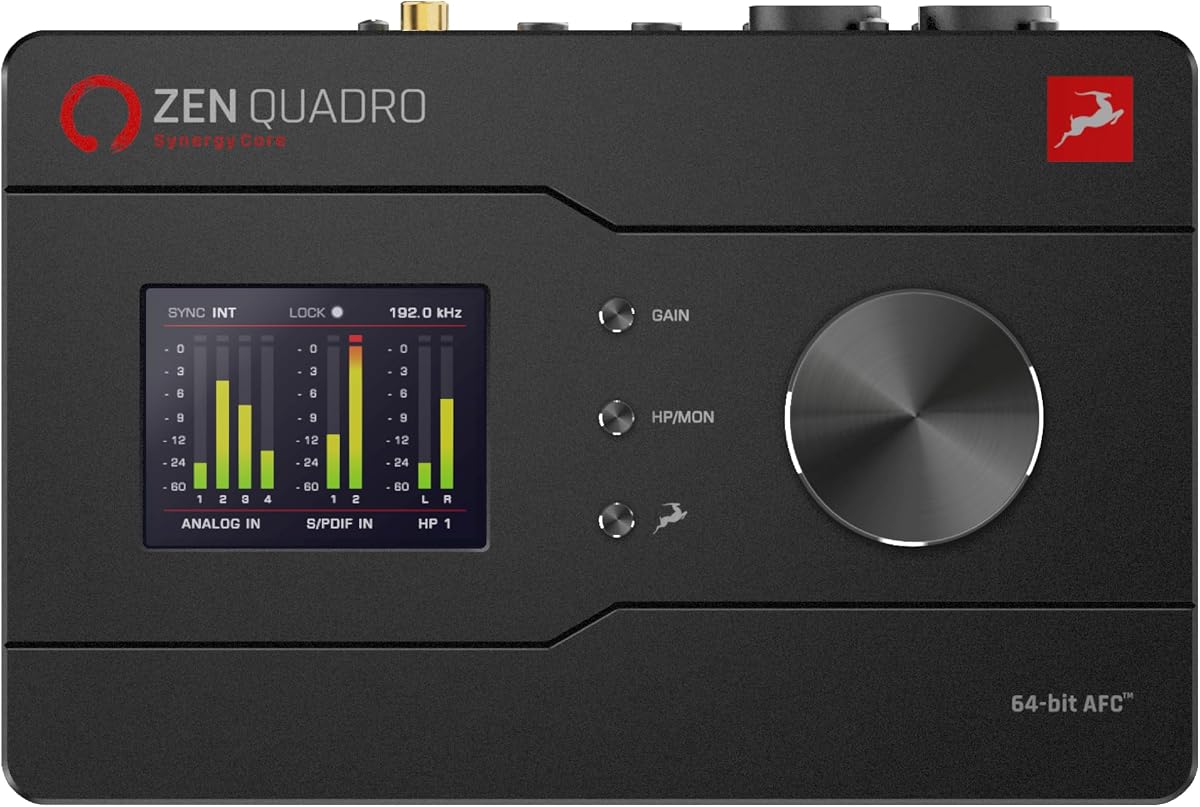
The Antelope Audio Zen Quadro combines four discrete microphone preamps, real-time Synergy Core effects, and extensive routing in a portable bus-powered enclosure. Its 4.7 rating is among the strongest in the group. It is particularly attractive to producers and mobile recordists who need more than a single-mic interface but still want the flexibility of a compact unit.
We may earn a commission when you buy through this link, at no additional cost to you.
The supplied effects are substantial: 37 are included, with more than 90 available. Analog-modeled compressors, equalizers, preamps, amplifiers, and cabinet simulations run on dedicated DSP and FPGA hardware. The stated goal is near-zero-latency recording and live processing without placing the processing load on the host CPU, making the interface practical for tracking through effects and for live workflows.
Antelope's conversion and clocking claims add to the appeal, including up to 130 dB of AD/DA dynamic range and 64-bit AFC clocking. The interface offers two Hi-Z inputs for direct guitar and bass capture, dual USB-C connections, loopback, and expandable I/O through ADAT and S/PDIF. Two independent headphone outputs and standalone presets add further value for studio, stage, and mobile use.
The Zen Quadro is the most flexible balanced choice in this roundup for a creator who wants real-time effects, multiple preamps, modern connectivity, and room to expand. Its many controls require more deliberate setup than a two-input model, but that complexity is justified when a single performer may record vocals, guitar, keys, or a small ensemble. It earns the Editor's Choice designation for successfully combining portable form with extensive real-time functionality.
Dedicated DSP and FPGA processing allow compressors, equalizers, preamps, amplifiers, and cabinets to operate in the signal path with near-zero latency. The result is useful for performers who want to hear a finished sound while tracking rather than relying on an unprocessed source.
Two USB-C ports support arrangements such as a computer plus mobile device or two computers. ADAT and S/PDIF expansion, loopback, multiple outputs, and two headphone feeds make the Zen Quadro capable of growing beyond a simple solo-project role.
We may earn a commission when you buy through this link, at no additional cost to you.
The Apollo Twin X DUO Gen 2 offers a focused version of the UAD-powered Apollo experience, combining Thunderbolt 3 connectivity with Unison preamps and access to more than 200 UAD DSP and Native plug-ins. Its 4.5 rating makes it one of the stronger-rated professional options. It is intended for producers who value a disciplined studio workflow more than an unusually large hardware input count.
We may earn a commission when you buy through this link, at no additional cost to you.
Unison technology places supported microphones through real-time emulations of preamps associated with Neve, API, Avalon, Manley, Fender, and other names. The included plug-in library broadens that palette with processors such as Capitol Chambers, Sound City Studios, and EL8 Distressor. For a producer who records consistently, the ability to capture a particular preamp character can be more valuable than a collection of basic onboard presets.
Apollo Monitor Correction powered by Sonarworks helps make headphone or unfamiliar-room monitoring more dependable. Auto-Gain rapidly establishes levels across several inputs, reducing the likelihood of a compromised take. Bass management can add a subwoofer to the monitor arrangement, helping low-end translation when a conventional stereo pair cannot deliver the desired frequency response.
The Duo is a strong recommendation for a project studio whose owner is already invested in or willing to learn the UAD platform. It offers fewer preamps than the Quad version, so it is less suitable for simultaneously recording a large band. In exchange, it provides a more focused professional package centered on high-quality conversion, analog-inspired processing, and reliable monitor control.
Rather than merely simulating a processor later in the mix, Unison can shape a supported microphone during recording. This is useful when the performance and the microphone's response to a particular preamp are part of the desired sound.
Monitor Correction, bass management, and Auto-Gain address practical studio issues that can undermine otherwise good recordings. Together they help standardize level decisions and make the interface more useful across different listening environments.
We may earn a commission when you buy through this link, at no additional cost to you.
The Solid State Logic 2 MKII Plus is a bus-powered 2×4 USB-C interface designed for producers, podcasters, and live musicians working with Mac or Windows. Its 4.7 rating places it among the highest-rated products here. Two XLR preamps, two quarter-inch line or Hi-Z inputs, and 32-bit/192 kHz converters give it a capable desktop foundation.
We may earn a commission when you buy through this link, at no additional cost to you.
The 2×4 format supports two microphone or instrument channels and four output channels, making it more flexible than a conventional solo interface without becoming a sprawling console. Legacy 4K Analog Enhancement provides an onboard SSL-style processing option, while zero-latency monitoring helps performers hear the input path without obvious delay. High-pass filters and stereo loopback add practical recording and streaming tools.
MIDI I/O through five-pin DIN connections is a notable inclusion for a compact interface. It allows compatible controllers and hardware to be integrated without requiring a separate MIDI box, making the SSL 2 MKII Plus convenient for keyboard-based production. The SSL Production Pack software bundle adds further value to the package and provides tools for getting started beyond basic tracking.
This interface is a strong match for a singer-songwriter, small recording project, streamer with a hardware controller, or musician who wants high-resolution recording in a compact unit. It does not provide the multiple independent headphone outputs, extensive onboard effect library, or deep routing found in larger DSP systems. Even so, it delivers an appealing combination of SSL identity, practical I/O, MIDI, and high-resolution conversion in a simple package.
Support for 32-bit, 192 kHz recording makes the interface suitable for producers who want flexibility in file format and playback workflow. The converter specification is paired with a straightforward two-microphone front end for focused home and project-studio use.
Legacy 4K Analog Enhancement adds a recognizable SSL flavor to the hardware feature set. It gives users an onboard option for adding character without making a full host-based processing chain the only route to a finished input sound.
We may earn a commission when you buy through this link, at no additional cost to you.
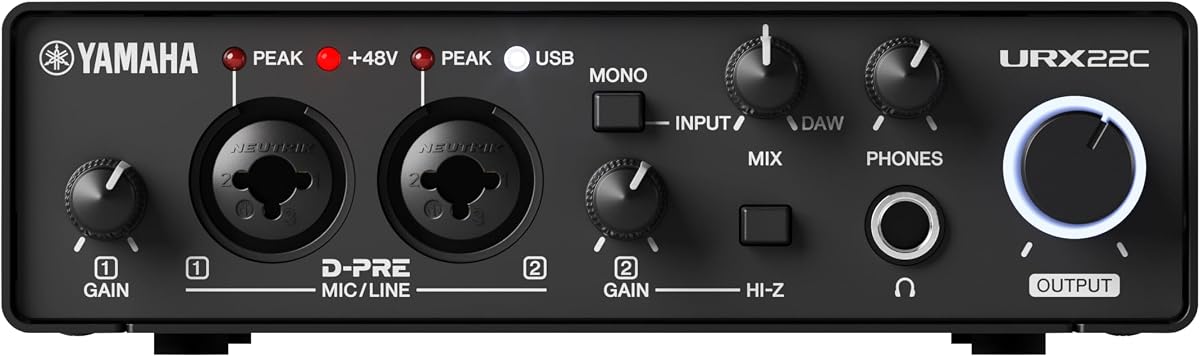
The Yamaha URX22C combines a two-input, two-output design with 32-bit/192 kHz support, USB 3.0, MIDI, and a substantial set of DSP-powered effects. Its 4.5 rating reflects a well-rounded device for musicians working across Windows, macOS, and iOS. The two XLR/TRS combo inputs use Class-A D-PRE preamps with 48-volt phantom power, and one input supports Hi-Z sources.
We may earn a commission when you buy through this link, at no additional cost to you.
Its processing options are among the most appealing in this category. Latency-free DSP monitoring includes REV-X reverb, a Channel Strip, and Guitar Amp Classics. Corresponding VST 3 and AU plug-in versions are also included, allowing the same tools to appear in compatible software workflows. This hybrid approach gives users immediate hardware control while still supporting deeper editing or arrangement in the host.
The full-metal housing gives the interface a more durable feel than many compact desktop devices, which is useful for repeated mobile use. Main outputs are provided through TRS connections, and MIDI I/O broadens the range of compatible equipment. The supplied software includes Cubase AI, Steinberg Plus, and dspMixFx, offering a complete starting environment for recording and mixing.
The Yamaha URX22C is ideal for a singer-songwriter, guitarist, mobile producer, or small project that wants recognizable effects alongside high-resolution conversion. Its two-input limit makes it less suitable for recording a stereo live duo or several musicians at once, but that constraint also helps keep the signal flow understandable. It is a particularly convincing portable option for users who value Yamaha processing and a broad software bundle.
REV-X, Channel Strip, and Guitar Amp Classics are available in the low-latency monitoring path and also as VST 3 or AU plug-ins. That continuity makes it easier to move from live tracking to a fuller production session without abandoning familiar sounds.
Windows, macOS, and iOS support makes the URX22C relevant to creators who move between a desktop studio and a mobile recording setup. The metal housing and USB 3.0 design complement that portability with a durable, high-resolution workflow.
We may earn a commission when you buy through this link, at no additional cost to you.
The MOTU UltraLite-mk5 is a comprehensive USB interface with 18 inputs and 22 outputs, support for as many as 40 simultaneous audio channels, and an onboard DSP-driven monitor mixer. Its 4.3 rating reflects a feature-rich device that serves recording, live monitoring, and production tasks. Two combo XLR/TRS inputs sit alongside six additional analog inputs, ten analog outputs, headphones, S/PDIF, and eight-channel optical I/O.
We may earn a commission when you buy through this link, at no additional cost to you.
Its standout feature is the ability to mix live inputs to any analog output pair and create a separate mix for each of six output pairs. Computer channels can be included in those mixes, making the device useful when performers need different monitor balances. The CueMix 5 app provides control from a Mac, PC, or iOS device, while the OLED display presents detailed metering for all analog I/O.
Onboard effects include reverb, four-channel parametric equalization, and dynamics processing for inputs and bus mixes. This is a more monitor-management-focused implementation of DSP than a catalog of guitar or vocal emulations. It therefore works particularly well for a small project studio, rehearsal room, or mobile production system where independent monitoring is the priority.
The MOTU UltraLite-mk5 is best for users who need many connections and dependable control over several monitor destinations. Its analog outputs offer a 125 dB dynamic range, and its class-compliant USB 2.0 connection supports Mac, Windows, and iOS. The larger footprint and deeper configuration process may be excessive for a single singer, but for a multi-output studio it provides uncommon flexibility.
Six separate mix busses let different output pairs carry different combinations of live and computer audio. This is valuable when musicians, presenters, or collaborators need different balances without repeatedly changing the main mix.
Reverb, parametric EQ, and dynamics processing can be applied to inputs and bus mixes. Rather than competing with software instruments or amp simulations, these tools help refine the monitoring environment and the character of signals before they reach the mix.
We may earn a commission when you buy through this link, at no additional cost to you.
The Yamaha URX22 is a 4-in/2-out USB-C interface distinguished by a 4.3-inch touchscreen, five control knobs, and a built-in DSP processor. No numerical customer rating is provided in the supplied product data, so the evaluation must focus on its stated capabilities rather than a score. It is aimed at users who want more direct control over their interface than a conventional knob-only desktop model provides.
We may earn a commission when you buy through this link, at no additional cost to you.
The touchscreen can present routing, monitoring, and effect-related information in a visual format, while the adjacent knobs provide physical adjustment for frequently used parameters. Its four inputs make it more accommodating than a typical two-channel creator interface, and the 78 dB microphone preamp range provides useful headroom for a variety of recording situations with 48-volt phantom power.
Dual MAIN and SUB USB ports and Multi-Stream Audio Driver support are important for flexible computer connectivity. The interface can work at 32-bit and 192 kHz, while the built-in DSP is specified to provide professional sound and latency-free monitoring. The supplied bundle includes Cubase AI, WaveLab Cast, a Basic FX Suite, and Steinberg Plus, covering recording, editing, effects, and production needs.
The URX22 is a compelling option for a producer who values visual control and wants a modest step up from a basic two-channel interface. Its touchscreen may be less useful to someone who prefers entirely tactile workflows, and the sparse published information leaves its full effect list and routing details less clearly defined than some competitors. Even so, the hardware format, four inputs, and dual-computer architecture create a distinctive modern package.
The 4.3-inch display and five knobs combine detailed visual feedback with quick physical adjustment. This arrangement is useful for monitoring important parameters without opening a separate control application for every routine change.
Separate MAIN and SUB USB ports and Multi-Stream Audio Driver support provide a modern foundation for connected workflows. The interface is designed to handle more demanding routing than a simple single-host desktop recorder.
We may earn a commission when you buy through this link, at no additional cost to you.
The Antelope Audio Zenith 2 is a USB-C interface built for streaming, podcasting, virtual instruments, and mobile recording. Its 4.8 rating is the highest listed in this roundup, although ratings should be treated as one indicator rather than a substitute for checking fit. The interface supports PC, Mac, iOS, and Android through a bus-powered, class-compliant connection.
We may earn a commission when you buy through this link, at no additional cost to you.
Its DSP feature set is unusually broad. A virtual guitar chain includes a noise gate, compression, distortion, and amplifier and cabinet simulations, allowing a Hi-Z instrument to be processed through a complete modeled signal path. For voice-oriented work, a Smart Vocal Chain and Studio Mode provide compression, EQ, de-essing, and Air adjustment. These functions can be used with onboard control, while optional software adds remote access, routing, presets, and deeper editing.
The recording specifications include 123 dB conversion at 32-bit/192 kHz, two discrete console-grade preamps, and 75 dB of gain. Integrated loopback captures system audio for streams, interviews, and gaming, while dual independent headphone outputs allow two users to receive separate mixes. A color display, peak meters, sliders, theme options, and a Studio Wizard make the hardware unusually presentable and creator-oriented.
Zenith 2 is an excellent match for a streamer, podcaster, guitarist, or mobile creator who wants polished sound shaping without assembling a chain of software plug-ins. It also includes Bitwig Studio Essentials, the Lifeline Lite Bundle, and a three-month Antelope Cosmos membership, along with access to more than 75 effects. The breadth may be unnecessary for basic recording, but it makes this one of the most complete choices for creator-focused DSP.
The integrated chain covers noise gating, compression, distortion, and amplifier and cabinet simulation. It gives guitarists a structured hardware path for shaping an instrument signal and reduces the need to recreate a basic pedalboard in software.
Two fully independent headphone outputs allow a host and guest to hear different balances. That feature is particularly useful for interviews, collaborative streams, and recording sessions where a shared mix would be inconvenient.
We may earn a commission when you buy through this link, at no additional cost to you.
The best audio interface with built-in DSP is the one that matches the number of sources, processing requirements, monitoring arrangements, and portability demands of your work. Compare hardware effects with your usual recording and content workflow rather than selecting on effect count alone.
Begin with every source that must be recorded simultaneously. A solo singer who records one microphone and guitar can work with a compact two-channel model, while a duo, live performance, or multi-instrument session will need separate preamps and line inputs. The Zen Quadro and MOTU UltraLite-mk5 are stronger choices for several simultaneous sources, and the Yamaha URX22 provides four inputs in a touchscreen format.
Count not only microphones but also instruments requiring direct Hi-Z connections, line sources, and hardware that may join the session. More inputs provide flexibility, but unnecessary connectivity can make setup and routing more complicated. Choose the smallest layout that comfortably covers your normal workflow without limiting planned projects.
Onboard DSP varies considerably by model. Antelope interfaces emphasize real-time emulated preamps, compressors, equalizers, amplifiers, and cabinets. Yamaha includes REV-X, Channel Strip, and Guitar Amp Classics, while the SSL offers Legacy 4K Analog Enhancement. The Elgato focuses on voice tools, and the MOTU uses DSP chiefly for flexible monitor mixing and general input or bus processing.
Consider whether you need vocal processing, guitar tones, general mix utilities, emulated preamps, or monitor management. A large effect count is not automatically better if the most important processors are missing or difficult to recall. Favor an interface whose onboard tools support the instruments and sources you use regularly.
The interface determines the quality of the signal before it reaches your recording software. Pay attention to converter specifications, dynamic range claims, microphone preamp gain, noise performance, and the availability of phantom power. The supplied data highlights 120 dB dynamic range for the Scarlett Solo, up to 130 dB for the Zen Quadro, 123 dB for the Zenith 2, and 125 dB for the MOTU's analog outputs.
These figures are useful comparisons, but they are not interchangeable because some describe analog output performance and others describe combined conversion performance. Your microphone, source level, monitoring environment, and actual mix decisions also influence the final sound. Match the preamp range to the microphone in use and pay attention to clean gain rather than headline specifications alone.
Built-in DSP only helps if the interface routes the processed signal to the right output. Look for zero-latency or low-latency monitoring, independent headphone feeds, selectable output pairs, and loopback for capturing computer audio. The MOTU supports six separate monitor mix busses, the Zenith 2 provides two independent headphone mixes, and the Elgato combines touch controls with LED status feedback.
Think about how you will monitor during recording, editing, streaming, and rehearsal. A producer working alone may need only a dependable headphone output, while a podcast host and guest require separate mixes. Streaming creators should also verify that loopback behavior and system-audio capture fit the computer software they intend to use.
The interface must work smoothly with the computer, operating system, and applications in your workflow. Some options support Mac, Windows, and iOS, while others require a Thunderbolt 3 host. The MOTU and Antelope Zenith 2 emphasize broad USB compatibility, while the Apollo Twin X models use a more specialized high-bandwidth connection.
Bundled software also affects the value of the package. The Scarlett includes Pro Tools Intro+, Ableton Live Lite, Cubase LE, and Hitmaker Expansion. The Yamaha URX22C includes Cubase AI, Steinberg Plus, dspMixFx, and plug-in versions of its effects, while the Zenith 2 includes Bitwig Studio Essentials and Antelope resources. Check whether the supplied programs fit your intended DAW and whether host-based processing requires additional licensing.
A fixed studio can prioritize maximum I/O, while a mobile creator may value a compact bus-powered body, USB-C connectivity, and standalone controls. The Scarlett Solo, Zenith 2, and Zen Quadro are all relatively compact concepts, but they serve different levels of recording complexity. The Yamaha URX22C adds a metal housing for durability, whereas the MOTU prioritizes a larger, more comprehensive I/O layout.
Travel also affects workflow. Interfaces with onboard displays, touch controls, and hardware-accessible effects can be easier to configure away from a desk. Make sure the controls are readable and the unit has the connections required for mobile use. Portability is not merely physical: a creator who cannot conveniently recall a setting may end up abandoning the onboard DSP.
The Apollo models center on a large UAD ecosystem, while Antelope uses Synergy Core and includes varying numbers of effects. MOTU provides onboard reverb, equalization, and dynamics, and Yamaha combines hardware DSP with host plug-ins. Bundles may include DAWs, instruments, loops, mastering tools, and temporary access to plug-in services, so the complete package should be compared rather than just the number of onboard presets.
Consider how you prefer to work. A host-based system may be better for editing and recall, while hardware DSP is valuable for consistent low-latency performance. Some bundles are especially useful for immediate recording, and others lean toward production or mastering. Check the operating requirements and expiration terms of any included services before making a decision.
The needs of a singer-songwriter, podcast host, streamer, guitarist, and mix engineer are not identical. A solo artist may prioritize the Scarlett's Air processing and bundled production tools. A streamer may favor the Zenith 2's loopback, vocal chain, virtual guitar rig, and independent headphone mixes. A professional producer may prefer Apollo's Unison preamps, UAD library, and monitor correction.
Avoid buying a complex interface simply because it offers more controls. A simpler device that fits the source count, processing style, and monitoring arrangement can be more productive than an advanced system loaded with features that remain unused. The most appropriate choice is the one whose strongest capabilities overlap most with your daily work.
Begin by connecting the interface to the correct host ports, installing any required drivers, and setting the sample rate and buffer size in the operating system and recording application. Choose a modest buffer size for tracking when low latency matters, but increase it during mixing if the system cannot maintain stable performance. Confirm the input source and output destination before recording so signals are not sent to the wrong bus.
Set microphone gain conservatively and watch the interface's own meters. Built-in DSP can make a quiet source easier to hear, but it should not be used to compensate for an incorrect recording level. For guitar and other Hi-Z sources, keep the instrument volume practical, avoid excessive gain, and listen for clipping before committing to a take. Save useful effect presets when the hardware supports them.
Treat the interface as an electronic component with sensitive converters and preamps. Keep it away from moisture, excessive heat, and unstable power sources, and use a stable connection rather than repeatedly unplugging it under load. Clean the enclosure and connectors with appropriate care, update its control software when needed, and back up custom presets or project files separately. Periodic checks of input noise, headphone output, and metering can reveal connection or configuration issues early.
Built-in DSP means the interface performs processing tasks with dedicated internal hardware instead of relying entirely on the computer's audio software. It may provide effects such as compression, equalization, reverb, guitar simulations, or preamp emulations. Dedicated processing can support low-latency monitoring and continue working without placing the same load on the host CPU.
Neither approach is universally better. Hardware DSP can be more consistent, portable, and responsive during live tracking, while plug-ins usually provide greater editing flexibility and deeper parameter control. The best choice depends on the effects involved, the computer system, and whether the creator values recall, repeatability, or the ability to revise settings later.
It can be useful, particularly if the podcast includes multiple voices, live musical elements, or a desire for onboard vocal processing. The Zenith 2 and Elgato Wave XLR MK.2 are especially relevant because they emphasize voice tools, loopback, and creator-oriented control. A simpler interface can still be appropriate for a single speaker who mainly needs clean capture.
Most models in this guide provide at least one Hi-Z input, while the Zen Quadro includes two. The Yamaha URX22C and Zenith 2 also include onboard guitar-oriented processing, including amp and cabinet simulations. Check the input format and ensure the guitar is connected to the Hi-Z input rather than a microphone-level XLR socket.
Monitoring control, loopback support, and reliable level indication are especially important. The Zenith 2 offers integrated system-audio capture and two independent headphone mixes, while the Elgato focuses on touch controls and LED feedback. The MOTU is attractive when several output mixes or extensive input and output routing are required.
Dynamic range is an important technical measure, but it does not tell the entire story of sound. Preamp topology, converter implementation, clocking, gain structure, signal path design, and the software chain all influence the result. It is best to treat dynamic range as one selection criterion alongside monitoring, features, usability, and I/O.
No. A DAW or recording application is still needed for arranging, editing, multi-track recording, and saving a session in most workflows. Hardware DSP adds processing and monitoring controls to that system. Some interfaces also include DAWs, instruments, or effects bundles, so check the software included with the specific model.
Choose the connection that matches your computer and workflow. Thunderbolt 3 is appropriate for the high-bandwidth Apollo models and demanding professional sessions, while bus-powered USB-C designs are convenient for mobile and simpler creator setups. The MOTU uses class-compliant high-speed USB, and the dual USB-C design in the Zen Quadro supports flexible computer and mobile routing.
The Focusrite Scarlett Solo 4th Gen is the most approachable choice for a singer-songwriter who wants a compact recording path, strong conversion specifications, Air processing, and a broad software bundle. The Antelope Zen Quadro stands out for four preamps, dedicated real-time Synergy Core effects, modern dual USB-C connectivity, and considerable routing flexibility. For premium processing, the Apollo Twin X QUAD Gen 2 offers the deepest UAD-focused feature set.
Prioritize the needs that affect every session rather than the longest effect list. Count simultaneous sources, verify low-latency monitoring, examine independent output and headphone options, and confirm host compatibility. Voice processing matters for streamers and podcasters, guitar simulations matter for instrumentalists, and monitor management matters for engineers working across multiple outputs.
Finally, review the current product listing before buying because hardware revisions, bundled software, and accessory contents can change. Check the included DSP tools, operating-system requirements, and any software-service terms directly on the listing. With those details confirmed, the right interface becomes a dependable centerpiece for recording, monitoring, and creative control.