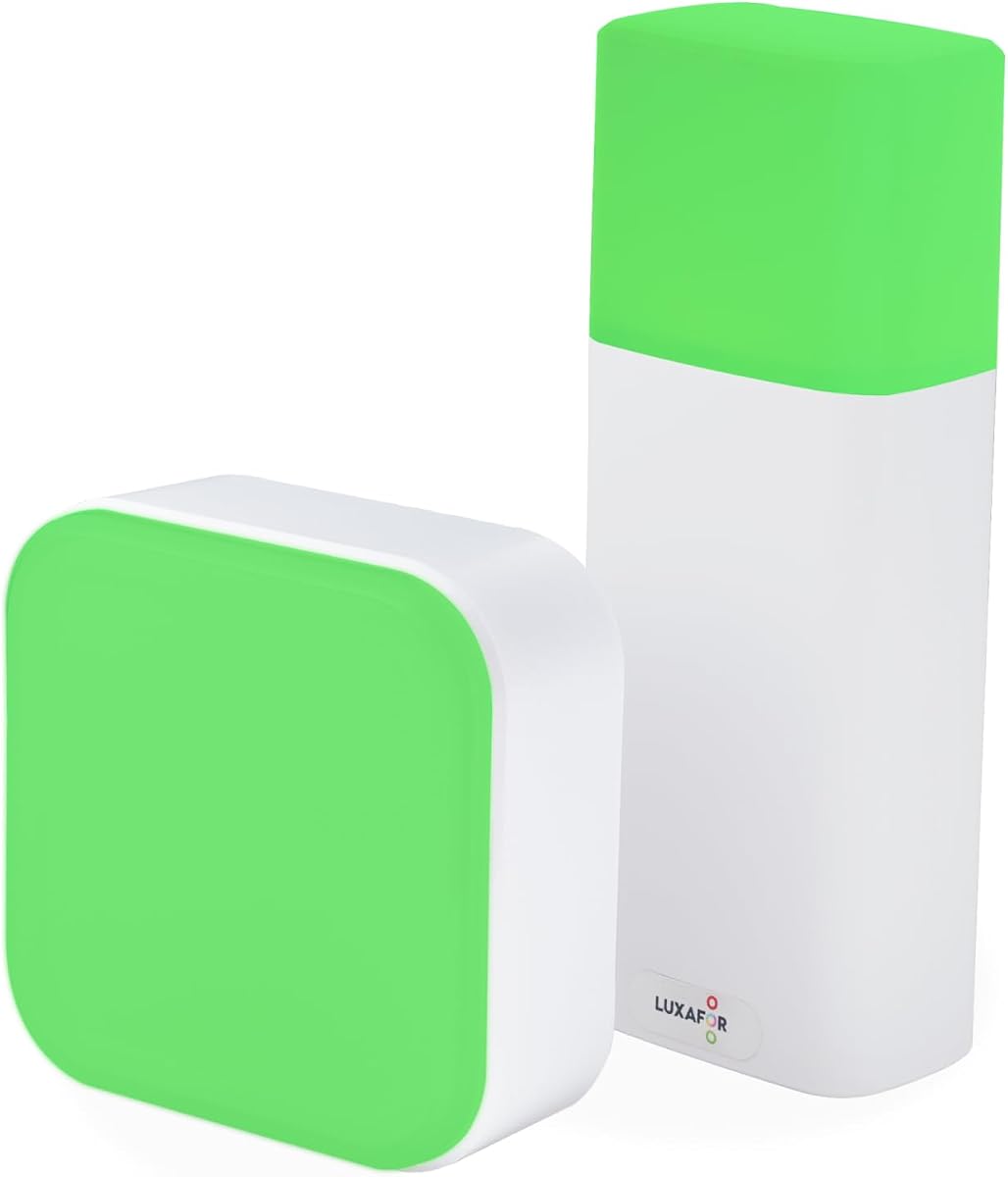
Switch Pro 2 Wireless Office Busy Light
4.2Editor score
Indoor and outdoor indicators
Bluetooth room signaling
No software installation required
Our Busy Light for Office guide compares 10 status indicators for visibility, integrations, alerts, placement, and ease of use, helping you choose the right
A busy light gives colleagues an immediate visual cue about your availability, helping reduce avoidable interruptions while you focus, attend meetings, or handle incoming calls. The most useful models combine a highly visible status display with dependable controls, straightforward placement, and integrations that suit your communication platform.
We compared all ten products by examining their stated status colors, platform compatibility, alerting functions, mounting options, dimensions, and operating requirements. The list covers manual lights, app-free wireless models, USB-connected indicators, and devices that automatically sync with popular unified communications and softphone services.
Each review explains the strongest benefits, practical limitations, and ideal environment for the product, while the comparison table makes the differences easier to scan. Ratings and availability can change, and current prices should be checked on each listing before making a purchase decision.
4.2Editor score

5.0Editor score

4.6Editor score
This side-by-side overview compares the ten busy lights by control method, visibility, connectivity, alerts, and placement, making it easier to match a device to your office workflow.


The Clip Busy Light Standard is a straightforward presence indicator designed to communicate availability through red and green lights. Its 4.4 rating reflects a simple approach that works well for desks, doors, and shared workspaces. Rather than relying on a complex application, the device uses a tall illuminated tube that colleagues can interpret at a glance.
We may earn a commission when you buy through this link, at no additional cost to you.
Its 59-inch USB cable gives you considerable freedom when choosing a location. The included metal clip can grip a monitor or another border less than 30 millimeters thick, while the product description also suggests attaching it to walls, doors, or tables. Red indicates that work is in progress, and green communicates that the user is available, making the light useful for signaling focus time and brief periods of availability.
The main limitation is that the status changes are manual. It does not automatically follow a meeting calendar or detect when you join a call, so someone must remember to update the light. It also does not provide incoming-call alerts, extra status colors, or software-based brightness controls. These omissions make it less suitable for communication-heavy workflows.
This model is a sensible choice for an individual desk, a small team that already has clear color conventions, or an office where installing new software is inconvenient. Choose it when simplicity, visibility, and flexible mounting matter more than automated synchronization.
The two-color design makes the purpose immediately understandable: red means work is underway, while green signals availability. This is valuable in shared offices where a physical cue can prevent a colleague from approaching your desk at the wrong moment.
The long cable and compact clip allow the light to sit near your monitor, stick to a door, or be positioned where approaching coworkers can see it. The clip specifically suits borders under 30 millimeters, so checking your intended mounting edge is worthwhile.
We may earn a commission when you buy through this link, at no additional cost to you.
The Kuando Busylight UC Omega combines three functions in a compact device: a presence indicator, an incoming-call and chat ringer, and a software-managed status controller. It carries a 4.3 rating and is aimed at offices where automatic status updates are more useful than a purely manual light. Green represents availability and red represents busy status.
We may earn a commission when you buy through this link, at no additional cost to you.
The supplied compatibility list includes Microsoft Teams, Skype for Business, Cisco Jabber, Webex, RingCentral, Zoom, Avaya One-X Communicator, and Avaya IX Workplace. KuandoHUB software can control multiple platforms, set the light manually, and connect with Microsoft Outlook to reflect meeting status. The built-in ringer provides eight tones for incoming calls and chats when the selected platform permits it.
The requirement for Busylight software adds setup complexity compared with app-free and manual models. Compatibility is not identical across every feature: alerts depend on the unified communications platform, and users should verify whether their specific account and operating system support the desired status and ringer functions. The light also requires a suitable USB connection, although the exact included lead is not specified.
This is a strong option for hybrid workers and communication-heavy desks that want both visual status and audible alerts. It is especially useful when a headset is not worn continuously, since the ringer can draw attention to an incoming call.
Combining the presence light and ringer reduces the need to watch every chat or call notification. The colored status handles passive awareness, while selectable tones provide a more active alert when a call arrives.
KuandoHUB provides one place to manage status across several communication systems and integrate Microsoft Outlook meeting information. This makes the device more relevant to organizations with a mixed application environment.
We may earn a commission when you buy through this link, at no additional cost to you.
This version of the Clip Busy Light Standard offers a straightforward way to mark a desk as busy or available. It shares the same 4.4 rating and long-tube design as the first listing, and its primary strength is an uncomplicated physical signal for colleagues who work nearby. The indicator can also identify whether a meeting room is free or occupied.
We may earn a commission when you buy through this link, at no additional cost to you.
The included metal clip grabs a monitor or another border measuring less than 30 millimeters, while the 59-inch USB cable expands the available placement options. The device can be positioned on a desk, near a computer, or attached to a door. Manual controls let the user select red for active work and green for an available or idle state.
Its simplicity comes with clear boundaries. The light will not automatically change during a Teams meeting, and it cannot distinguish among focusing, being away, or receiving a call. Users may also need to manage the wire carefully to keep it from becoming a snag hazard or an untidy addition to the workstation.
It is best suited to offices seeking a low-complexity presence marker with generous mounting flexibility. It may also suit temporary focus blocks, reception areas, or shared rooms where a consistent red-and-green visual code is enough.
Setting the light to red before a deadline task creates a clear boundary around concentrated work. Switching it to green provides an equally visible invitation for colleagues who want to ask a quick question.
The metal clip offers a fast alternative to drilling or complicated mounting hardware. Confirm that the target edge is less than 30 millimeters and position the illuminated tube where approaching coworkers can clearly see it.
We may earn a commission when you buy through this link, at no additional cost to you.
The USB Status Busylight offers one of the broadest color systems in this guide, with green, red, yellow, blue, and purple states. Its 4.6 rating indicates strong customer satisfaction, and the device can operate in either automatic or manual mode. Automatic updates require the supplied free Busylight software, while tapping the top controls the color without software.
We may earn a commission when you buy through this link, at no additional cost to you.
It is listed as compatible with Microsoft Teams, Zoom, and Cisco Jabber or Webex. In automatic operation, the light flashes blue for an incoming call and turns red after the user answers or joins a meeting. The manual color meanings cover available, busy, away, incoming call, and do-not-disturb states, giving teams a richer vocabulary than a simple red-and-green unit.
The model measures 2.76 inches in diameter and 2.83 inches high, with a 6.56-foot cable and a Type-C interface plus USB-C-to-A adapter. Automatic Cisco Jabber and Webex operation is restricted to Windows, so users on other systems should confirm compatibility. Setup support is available through the seller, but the software requirement remains relevant.
This model suits users who want automation but also want an easy fallback when software is unavailable or the light needs to represent a status the platform cannot detect. It is a particularly flexible option for hybrid desks that regularly work across meetings, focus time, and brief absences.
Yellow for away and purple for do-not-disturb let coworkers distinguish temporary absence from active work. That added nuance can reduce both unnecessary conversations and the need to post a separate away message.
Tapping the top changes colors without software, so the light remains useful during setup problems or when a personal status differs from your calendar. This dual-mode approach provides redundancy without giving up automation.
We may earn a commission when you buy through this link, at no additional cost to you.
Switch Pro 2 is designed around a specialized use case: showing meeting-room status to people outside the room. Its 4.2 rating reflects a more premium feature set than ordinary desktop indicators. A remote control cube inside the meeting room communicates wirelessly with an exterior indicator that can be mounted beside the door.
We may earn a commission when you buy through this link, at no additional cost to you.
Rotating the internal cube changes the external status through Bluetooth 5.2, with a stated range of up to 80 meters without obstacles. Red means busy, green means available, blue indicates a call, and yellow means away. The cube also supports custom colors, allowing a team to define messages such as a presentation in progress or an interview underway.
No desktop application, mobile application, Microsoft Teams configuration, Zoom configuration, or administrator approval is required. A magnet and anti-slip pads allow the exterior unit to sit on a door, wall, or frame without drilling, while the internal cube rests on a conference table. This makes the system appealing in restricted or IT-locked offices.
The trade-off is complexity relative to a single desk light. A complete room installation uses two coordinated units and requires both pieces to remain within reliable wireless range. The product is best for organizations that want professional meeting-room signage rather than only personal status signaling.
An external indicator tells people whether a room is occupied before they knock or open the door. That can be especially useful for meetings that involve confidential conversations, interviews, or uninterrupted presentations.
The system avoids adding software to employee computers and does not require Teams or Zoom configuration. It is therefore well suited to security-conscious organizations where desktop installation or permission requests are unwelcome.
We may earn a commission when you buy through this link, at no additional cost to you.
The Embrava Blynclight Standard is an established office presence indicator designed to display availability and alert the user about incoming communications. Its 4.2 rating reflects a practical feature set, including automatic status, flashing notifications, and adjustable color and brightness. It supports Microsoft Teams, Skype for Business, Cisco Jabber, RingCentral, Cisco Finesse, CounterPath Bria, and Skype Home edition.
We may earn a commission when you buy through this link, at no additional cost to you.
One of its distinguishing features is Software Development Kit support, allowing organizations to connect the indicator with their own business applications. That makes it more adaptable than a simple manual light. Flashing behavior can notify the user of incoming calls and instant messages, while adjustable light settings allow it to blend better with a particular office environment.
Platform limitations deserve careful attention. Cisco Jabber incoming-call alerts are supported for the Windows soft phone but not the Cisco desk phone. Genesys PureCloud and Cisco Finesse require the relevant feature licenses, and incoming alerts are not supported on Mac or attendant versions. Cisco Jabber also does not support incoming-message alerts.
This is a good choice for businesses with supported communication tools and a need for custom integrations. It is less ideal for a mixed user base where operating systems and platforms vary widely, since the available alert functions may not be consistent across every desk.
The light handles both passive presence and active notifications. Its display can prevent interruptions, while flashing alerts provide a more noticeable cue when a call or message arrives.
SDK support extends the potential beyond supported communication platforms. Teams with internal tools can use that route to create a more tailored status workflow, subject to their own implementation requirements.
We may earn a commission when you buy through this link, at no additional cost to you.
The LED Busy Light Status Indicator is a compact, budget-minded choice for individual desks. It earns a 4.6 rating and centers on a simple proposition: use red and green to communicate availability, with touch controls that make status changes and brightness adjustments quick.
We may earn a commission when you buy through this link, at no additional cost to you.
A brief tap changes the status color, while a press-and-hold adjusts brightness. Green can indicate availability and red can indicate that you are occupied. The smooth, compact housing is intended to sit on a desk without looking like technical equipment, making it suitable for home offices as well as professional workspaces.
It does not connect to a calendar or communication platform, so users must update it manually. Only two status colors are offered, which limits nuance but also keeps the convention easy to learn. The product supports its original adapter and Type-C phone charging cables, although status cannot be switched while it is charging.
This model is an excellent choice for a small office, study area, or home workstation where the goal is inexpensive, visible focus signaling. Its limitation is integration: anyone who needs automatic meeting status or audible alerts should consider a connected model instead.
A red lamp gives colleagues an immediate reason to wait, while green signals that a brief conversation is welcome. The convention is familiar enough that new coworkers can understand it without lengthy instruction.
Adjusting brightness through a long press lets you tune the indicator for a bright open office or a more subdued home setting. The compact housing also reduces visual clutter on a crowded desk.
We may earn a commission when you buy through this link, at no additional cost to you.
The Kuando Busylight UC Alpha is a tall, rounded presence light designed to combine status indication with incoming-call and chat alerts. It has a 4.2 rating and stands approximately 4.5 inches tall with a diameter of half an inch. Its upright form is intended to remain conspicuous on a desk or near a workstation.
We may earn a commission when you buy through this link, at no additional cost to you.
Green signals availability and red signals busy status, with additional colors determined by the connected platform. The required free Busylight software supports Microsoft Teams, Skype for Business, Cisco Jabber, Webex, RingCentral, Zoom, Avaya One-X Communicator, and Avaya IX Workplace. KuandoHUB can manage multiple platforms, manual control, and Microsoft Outlook meeting integration.
The built-in ringer offers eight tones and adds useful volume and mute controls in the software. As with other platform-dependent products, call and chat alerts depend on the selected unified communications service. The required installation also makes it less convenient than manual or app-free devices, particularly for temporary use or shared computers.
This is a solid choice for employees who spend much of the day in calls or chats and want a conspicuous combined light and ringer. Its taller profile may also help it stand out better than a compact puck on a busy desk.
The tall format keeps the colored status visible from different angles around a workstation. This is useful in open-plan spaces where a small, low-profile light could easily be overlooked.
The ringer can notify you of a call even when you are not wearing a headset. At the same time, the colored light handles the need to tell colleagues that you are unavailable.
We may earn a commission when you buy through this link, at no additional cost to you.
The Kuando Busylight Omega Plus is a compact connected light aimed at users who want automated presence status without a large desktop device. Its 4.0 rating is the lowest among the ten products, but the underlying feature set remains useful. The housing is approximately 1.5 inches in diameter and described as similar in size to a table-tennis ball.
We may earn a commission when you buy through this link, at no additional cost to you.
It combines a status indicator with a ringer for incoming calls and chats, with eight available tones. Free Busylight software is required and supports major services including Microsoft Teams, Zoom, Skype for Business, Cisco Jabber, Webex, RingCentral, and Avaya products. KuandoHUB can control multiple platforms, set the light manually, and integrate Microsoft Outlook meeting information.
A magnetic mounting kit is included, which helps the light stay secure on suitable vertical surfaces and makes repositioning easier. Software and platform dependencies remain the main considerations. Alert functionality varies by platform, and a user who only wants a basic manual indicator may find the setup unnecessary.
This model suits compact home-office setups and hybrid employees who value a small footprint alongside Teams and Zoom support. It is particularly attractive for users who want a ringer and magnet kit without moving up to the taller Kuando Alpha.
The compact sphere preserves desk space while retaining a clearly visible LED. It can fit comfortably beside a monitor or keyboard without competing with other productivity tools.
The included magnet kit allows the device to move between compatible surfaces with less effort. Positioning it near the edge of a workstation makes the status easier for visitors to notice.
We may earn a commission when you buy through this link, at no additional cost to you.
The Cube 2 Wireless App-Free is the most straightforward option in the guide for offices that want visible status without adding another background application. Its 5.0 rating is the highest among the selected products. Rotating the cube cycles through red, green, yellow, blue, and other color-coded messages, making operation almost immediate.
We may earn a commission when you buy through this link, at no additional cost to you.
The cube uses a 1200mAh rechargeable battery and offers approximately 46 to 90 hours of runtime depending on the color and eco mode. USB-C charging is convenient, and the wireless design means the light can be moved without searching for a nearby outlet or managing a permanently attached cable.
A magnetic mount and anti-slip pads are included. It can sit on a desk, inside a meeting room, outside a room, or in a focus pod, while the app-free design suits security-restricted organizations, hot-deskers, and teams that do not want to install desktop software or obtain administrator permission.
Its main limitation is that status changes remain manual. It cannot automatically follow a Teams or Zoom meeting, and there is no audible ringer for incoming calls. Even so, its ease of use, portability, and battery life make it an excellent general-purpose office indicator for teams that value simplicity.
Physical rotation gives the Cube 2 an intuitive control method. A user can change the message with one deliberate motion, without opening software, navigating menus, or checking a mobile device.
The rechargeable design makes it easy to carry the light from a personal desk to a meeting room or focus pod. Magnets and anti-slip pads support different surfaces, making temporary status changes more convenient.
We may earn a commission when you buy through this link, at no additional cost to you.
The right busy light depends on your workplace, communication tools, and need for automation. Consider visibility, platform support, alerts, mounting, and daily operation before choosing.
Automatic busy lights update from your communication platform or calendar, reducing the chance that a red light will remain on after a meeting ends. They are convenient for hybrid workers but generally require compatible software, a USB connection, and sometimes permission from an administrator. Manual lights are more universally useful because the user controls the status directly. They are ideal for focus blocks, reception counters, and shared offices where calendar accuracy is less important.
Start with the applications your employees actually use. Microsoft Teams, Zoom, Skype for Business, Cisco Jabber, Webex, RingCentral, and Avaya products appear across several models, but feature support varies. A light may show meeting status while failing to provide audible chat alerts, or it may require a particular operating system or a licensed feature. Review the complete compatibility notes rather than relying on a platform name alone.
A busy light must be visible to the people it is intended to inform. Consider whether it will sit at eye level, behind a monitor, or on the other side of a meeting-room door. Tall tube designs can stand out on a desk, while cubes and compact spheres may be better for portable or unobtrusive placement. Colored states should remain recognizable in the lighting conditions of your workplace.
A visual status light helps nearby people, but an audible ringer can also notify the user about an incoming call or chat. Models such as the Kuando Omega, Kuando Alpha, and Blynclight Standard include this function, generally with platform-dependent support. If you remove your headset regularly, work in a private office, or frequently miss notifications, an integrated ringer may be worth the additional setup.
Desk lights simply rest on the work surface, while clip-on models attach to monitors or narrow edges. Meeting-room systems may use an exterior indicator, an indoor controller, magnets, and anti-slip pads. Check dimensions, cable length, edge thickness, and the surface where the device will be mounted. Battery-powered models are more portable, while wired units avoid uncertainty about battery life but require a reachable outlet or USB port.
The most effective system is one that everyone understands. Green for available and red for busy is widespread and easy to adopt. Some products add yellow for away, blue for an incoming call, and purple for do not disturb, but those meanings should be explained to the team. For meeting rooms, red and green are particularly effective, while custom cube colors can support specialized workflows if they are documented.
Connected busy lights can require software installation, permissions, updates, or platform-specific configuration. That is manageable in a conventional IT environment but difficult in security-restricted organizations. App-free devices such as the Cube 2 and Switch Pro 2 avoid desktop installations and may be more appropriate where employees cannot install new tools. A manual light requires the least technical support but transfers more responsibility to users.
Wired indicators provide continuous operation as long as they remain connected, while rechargeable devices are easier to move. The Cube 2 offers stated battery runtimes ranging from 46 to 90 hours depending on color and eco mode. Several other products use USB connections, but their precise power details vary, so check the listing and included accessories. Consider who will charge the device and how it will be stored when not in use.
Begin by defining the color system with your team. A simple arrangement of green for available, red for busy, and yellow for away works well, while additional colors should be introduced only when their meaning is clear. Position the device where colleagues can see it before they reach your desk, and make sure the light is not blocked by a monitor, partition, or other equipment.
For an automatic model, install the specified Busylight software, connect the light, and grant the requested permissions. Test incoming calls, joining meetings, calendar status, and any ringer functions before relying on the device. Manual and app-free models need much less configuration: place the unit securely, choose the appropriate color, and update it whenever your working state changes.
To care for the device, handle the cable gently and avoid pulling it to reposition a clip-on indicator. Keep desktop lights away from liquids and clean them with a soft, dry cloth. Rechargeable products should be charged according to the manufacturer's instructions, and no status change should be attempted while charging if the manual model explicitly prohibits it. Periodically verify that the displayed status still matches reality.
A busy light gives colleagues an immediate visual indication of whether a person is available, occupied, away, or in a meeting. It can reduce unnecessary interruptions during focused work and prevent people from entering a meeting room when it is occupied. Some models also synchronize with communication platforms or provide audible alerts for incoming calls and chats.
An integrated model is useful if your availability should update automatically around meetings and calls. Verify that the listed software supports your exact platform, account type, and operating system. If you only need a visual reminder during deep work, a manual or app-free light can be simpler and more reliable.
App-free models can be preferable when employees cannot install desktop software or obtain administrator approval. They rely on manual status changes, however, so someone must remember to update the light. Their portability also makes them useful for hot-desking, focus pods, and meeting rooms.
Green usually means available, red means busy, and yellow commonly means away. Blue may indicate an incoming call, while purple may represent do not disturb. Because color meanings can differ by model, teams should establish a shared convention and communicate any less common colors.
A standard desk light can mark the room occupied or available, but a dedicated room system can place one indicator outside and a controller inside. Switch Pro 2 uses two coordinated wireless units, while the Cube 2 can be moved to the door or room without a separate indoor controller.
A wired light is convenient for a permanent desk position because it avoids battery-management concerns. A rechargeable light is easier to relocate between rooms and desks, but it must be charged periodically and its runtime can vary with brightness, color, and operating mode.
Many models are suitable for remote and hybrid work because the same visual status principle helps family members or housemates avoid interrupting a call. Connected versions can automatically reflect online meetings, while manual versions are useful when you want to control focus status without installing communication software.
Place it where approaching colleagues can see it clearly, ideally near the front edge of a desk or beside a meeting-room door. For clip models, verify that the target edge is narrower than the clip's stated limit. Keep the light unobstructed and route any power cable so it does not create a snag hazard.
The Cube 2 Wireless App-Free stands out for simple rotation controls, portable placement, long battery runtime, and the highest customer rating in the group. Switch Pro 2 is the premium choice for dedicated meeting-room signaling, while the LED Busy Light Status Indicator offers an economical and attractive solution for straightforward red-and-green desk communication.
Prioritize the operating model that matches your team: automatic synchronization for frequent meetings, audible alerts for communication-heavy work, app-free rotation for restricted IT environments, or simple manual control for focused individual work. Platform compatibility, mounting security, color conventions, and whether the light must be portable are equally important before the final choice.
Ratings, feature support, and availability can change over time, and current prices should be verified on the product listing. Review the detailed setup requirements carefully, test any software integration before deploying it across an office, and choose a status system your coworkers will understand and use consistently.