
GIGABYTE Radeon RX 9070 XT Gaming OC 16G
4.7Editor score
16GB GDDR6 memory
WINDFORCE cooling system
Hawk fan design
Our flagship graphics cards guide compares ten high-end NVIDIA GeForce and AMD Radeon models for gaming, cooling, memory, features, performance, and build fit.
Flagship graphics cards deliver the strongest combination of gaming performance, high-resolution visuals, ray tracing, AI-assisted upscaling, and demanding creative workloads. The right model depends on your monitor, processor, case clearance, cooling setup, and whether you favor NVIDIA or AMD. A capable card also needs adequate system power and a case designed to handle its size.
This guide compares ten flagship-class graphics cards across both major ecosystems, using supplied specifications, customer ratings, memory configurations, cooling designs, firmware features, display capabilities, and physical dimensions. The list spans NVIDIA GeForce RTX 5080, RTX 5070 Ti, RTX 4090, RTX 5090, RTX 5060 Ti, and RTX 5070 models alongside AMD Radeon RX 9070 XT options.
Each review explains the strongest reasons to consider a particular card, along with practical limitations such as size, power requirements, memory capacity, or premium construction. Ratings indicate the supplied customer feedback but do not replace independent testing. Product listings and prices change frequently, so confirm specifications, compatibility, and current availability before purchasing.
4.7Editor score

4.8Editor score

4.4Editor score
The comparison below places all ten flagship graphics cards side by side, emphasizing graphics memory, architecture or generation, cooling approach, and practical hardware details. It is designed to make the major differences easier to assess before choosing a model for a new gaming or enthusiast system.





The GIGABYTE GeForce RTX 5080 Gaming OC 16G is a compelling high-end card for buyers who want current NVIDIA technology without moving to the very top of the range. Its supplied rating is 4.6, and the specification sheet centers on NVIDIA Blackwell architecture, DLSS 4, 16GB of GDDR7 memory, a 256-bit interface, and PCIe 5.0 support. Together, these details position it as a modern option for demanding games, high-resolution displays, and graphics-heavy applications.
We may earn a commission when you buy through this link, at no additional cost to you.
The most important strength is its combination of current architecture and a substantial memory configuration. Sixteen gigabytes of GDDR7 gives modern games and creative applications more room to work than cards carrying less memory, while the 256-bit interface provides a broad data pathway. The WINDFORCE cooling system gives this otherwise straightforward specification set a clear thermal focus, helping the card remain cool under sustained graphics workloads when it is installed in a case with adequate airflow.
As a factory-overclocked model, it also brings a higher level of enthusiast intent than a basic reference design. The trade-off is that flagship coolers tend to occupy more space and produce more airflow noise than compact alternatives. The card is also a demanding addition to a system, making a capable processor, modern motherboard, and suitable power supply more important. The supplied information does not list dimensions or a minimum wattage, so those details should be verified before ordering.
This model is best suited to a gamer who wants NVIDIA's latest software ecosystem, DLSS 4, and enough graphics memory for future titles, but who does not need the absolute top model in the lineup. It is also a sensible starting point for a high-end build around a modern gaming monitor. Confirm case clearance, connector requirements, and the exact board power specification, then compare current listings with the ASUS TUF alternative if cooler construction and more detailed thermal features are priorities.
Blackwell architecture and DLSS 4 provide the central software-focused reason to consider this card. These features position the RTX 5080 for modern games that benefit from AI-assisted rendering and upscaling, particularly at higher display resolutions.
The 16GB GDDR7 allocation and 256-bit memory interface are important for a high-end card that may remain in a system for several years. They also make the model more relevant to creative applications as well as gaming.
The dedicated WINDFORCE cooling system is the most useful physical feature for long rendering sessions or repeated high-intensity gaming. It should still be paired with a case that supplies adequate intake and exhaust airflow.
We may earn a commission when you buy through this link, at no additional cost to you.
The ASUS TUF Gaming GeForce RTX 5070 Ti 16GB GDDR7 OC Edition combines a 4.8 supplied rating with a balanced set of gaming and enthusiast features. It is powered by NVIDIA Blackwell architecture and supports DLSS 4, while its 16GB GDDR7 memory makes it suitable for demanding modern titles. The detailed 3.125-slot cooler, three Axial-tech fans, military-grade components, and protective PCB coating give it a more deliberate construction than a basic add-in card.
We may earn a commission when you buy through this link, at no additional cost to you.
Thermal management is a major strength. The oversized fin array is designed to support airflow from three Axial-tech fans, and a phase-change GPU thermal pad is intended to maintain effective heat transfer over extended heavy loads. ASUS also provides GPU Tweak III for performance adjustments, thermal controls, and system monitoring. For buyers who want to tune a card, monitor operating behavior, or create quieter profiles, these utilities add meaningful value beyond raw specifications.
The main compromises are physical and electrical. A 3.125-slot design may conflict with large CPU coolers or tightly arranged expansion cards, and the supplied system requirements call for a minimum 850W power supply with a 16-pin 12V-2×6 connector. The listed OC mode is 2610MHz and the default boost clock is 2588MHz. Verification before purchasing is therefore essential, especially in a compact or already crowded system.
This is an excellent recommendation for a high-end gaming PC built around NVIDIA's latest generation, particularly for someone who values the RTX 5070 Ti tier, 16GB of memory, and robust cooling. It may be less convenient for small-form-factor builds or systems with limited power headroom. Confirm the case's slot spacing and the power supply's supported connector configuration, but for a large, well-ventilated enthusiast case, the thermal and reliability features make this a particularly well-rounded option.
Three Axial-tech fans, a large fin array, and a phase-change thermal pad form a cooling package intended for sustained graphics workloads. The result is especially relevant for gamers who expect long sessions or creators who render demanding projects.
Military-grade components and a protective PCB coating support durability and help guard against short circuits caused by moisture, dust, or debris. These are practical advantages in a system that may operate for extended periods.
GPU Tweak III gives users access to performance controls, thermal settings, and monitoring tools. The OC and default clock modes provide useful starting points, although users should change any tuning gradually and monitor stability.
We may earn a commission when you buy through this link, at no additional cost to you.
The ASUS TUF Gaming GeForce RTX 5090 32GB GDDR7 OC Edition is the most memory-rich card in this guide. Its supplied rating of 4.4 is the lowest among the ten products, but rating alone does not capture the model's primary appeal: 32GB of GDDR7 memory in an SFF-ready enthusiast design. It uses NVIDIA Blackwell architecture, supports DLSS 4, and advertises 772 AI TOPS, making it aimed at users who need substantial graphics memory rather than simply another gaming upgrade.
We may earn a commission when you buy through this link, at no additional cost to you.
Physical compatibility is a notable strength. The 2.5-slot design seeks to preserve cooling performance while fitting more readily into compact builds than a much larger flagship. Axial-tech fans use a smaller hub and barrier ring to move air downward, while dual-ball bearings are listed as lasting up to twice as long as standard sleeve-bearing designs. A dual BIOS switch offers Quiet and Performance profiles, while 0dB technology is designed to keep light workloads relatively silent.
The 4.4 rating suggests that some buyers may have encountered drawbacks that are not fully visible in the specifications. Buyers should not automatically equate rating with performance, but they should also investigate user feedback, current warranty terms, and exact dimensions before committing. The premium nature of this card also means that power, cooling, and case requirements deserve extra attention. Because no minimum power rating is included in the supplied data, the manufacturer and seller's current requirements should be checked directly.
The RTX 5090 makes the most sense for high-end creators, advanced 3D workloads, enthusiasts who want a large memory buffer, or gamers planning to use demanding content at very high settings. Its SFF-ready positioning is unusually valuable because flagship cards often become difficult to install in smaller cases. For ordinary gaming, the additional memory may exceed current needs, but for future-proofing and specialized workloads it offers the greatest headroom in this list.
The 32GB memory allocation is the defining feature. It can be valuable for complex 3D scenes, high-resolution textures, workstation-like tasks, and future game assets that exceed the practical comfort of more conventional memory configurations.
SFF-ready positioning makes this model unusually practical for a flagship card. The 2.5-slot design preserves the stated cooling benefits while reducing the physical conflict created by a three- or four-slot cooler.
The dual BIOS switch provides an easy way to move between Quiet and Performance profiles. That flexibility helps users adjust the card for different workloads without navigating a more complicated setup every time.
We may earn a commission when you buy through this link, at no additional cost to you.
The ASUS TUF Gaming GeForce RTX 5080 16GB GDDR7 OC Edition brings top-tier NVIDIA specifications to a large, heavily equipped TUF cooler. It carries a 4.6 supplied rating, uses Blackwell architecture with DLSS 4, and includes 16GB of GDDR7 memory. Its 2730MHz OC mode and 2700MHz default boost clock place it firmly among the enthusiast cards in this comparison.
We may earn a commission when you buy through this link, at no additional cost to you.
The card's physical design is both a strength and a warning. Its 348mm length, 3.6-slot thickness, and 4.3-pound weight make it a substantial installation. A massive fin array and three Axial-tech fans provide the stated cooling foundation, while a phase-change GPU thermal pad supports stable heat transfer. A protective PCB coating helps guard against short circuits caused by moisture, dust, or debris, adding an element of long-term resilience.
ASUS also emphasizes manufacturing reliability through its Auto-Extreme process and provides GPU Tweak III for tuning, thermal controls, and monitoring. The main concern is not the feature set but whether the case can physically and thermally support the card. The supplied instructions call for a minimum 850W power supply with a 16-pin 12V-2×6 connector, and buyers should verify both clearance and the selected power cable before ordering.
This is a compelling pick for a large enthusiast PC where durability, monitoring, and a serious cooling system matter. It may be less suitable for compact cases or for builders who prefer a smaller footprint. For a spacious case with a quality power supply, the TUF treatment adds useful confidence, while the RTX 5080's 16GB memory and DLSS 4 support keep the underlying platform well suited to modern high-resolution gaming.
At 348mm long, 3.6 slots wide, and 4.3 pounds, this card needs a case with generous clearance. Measuring the chassis and checking the graphics-card bracket is essential before ordering.
Three Axial-tech fans and a massive fin array make thermal performance a defining feature. The phase-change pad adds another layer of cooling consistency for long, demanding sessions.
Protective PCB coating, military-grade components, and precision manufacturing support durability. These features can be especially valuable in a high-end system intended to remain in service for an extended period.
We may earn a commission when you buy through this link, at no additional cost to you.
The GIGABYTE Radeon RX 9070 XT Gaming OC 16G gives buyers an AMD route into high-end graphics. It has a 4.7 supplied rating and combines the Radeon RX 9070 XT with 16GB of GDDR6 memory, PCIe 5.0 connectivity, a WINDFORCE cooling system, Hawk fans, server-grade thermal conductive gel, and RGB lighting. That combination makes it particularly interesting for an enthusiast who does not want an NVIDIA-specific ecosystem.
We may earn a commission when you buy through this link, at no additional cost to you.
Its most useful feature is the balance between memory capacity and core hardware. Sixteen gigabytes provides meaningful headroom for modern games, while the dedicated WINDFORCE cooler and thermal conductive gel address the sustained heat generated by a high-performance Radeon card. The gaming OC designation also indicates that this is intended as an enthusiast product rather than a basic office or secondary display card.
The main limitation visible in the supplied specifications is the use of GDDR6 rather than GDDR7, which separates it from the newest NVIDIA alternatives in the list. The specification set also provides fewer details about monitoring software, fan modes, dimensions, and power requirements. AMD buyers should therefore check current software support and their preferred applications carefully, particularly if they use features that are closely integrated with one graphics ecosystem.
This card is a strong recommendation for gamers who want a high-end AMD Radeon build, enjoy RGB-equipped components, or want an alternative to the many RTX models covered here. It also makes sense for creators who benefit from 16GB of graphics memory. As with every enthusiast card, pair it with a case capable of handling its cooler and confirm the current power requirements directly with the manufacturer before installation.
The Radeon RX 9070 XT provides an AMD-focused alternative in a guide dominated by GeForce cards. It appeals to builders who already prefer Radeon software or want to avoid an all-NVIDIA configuration.
A 16GB allocation gives the card room for current high-detail games and graphics-heavy applications. It remains an important specification for buyers who want to avoid the lower memory totals found on more affordable models.
Server-grade thermal conductive gel supports heat transfer, while the WINDFORCE system and Hawk fans form the main cooling package. RGB lighting adds visual customization for systems with a visible side panel.
We may earn a commission when you buy through this link, at no additional cost to you.
The ASUS Dual GeForce RTX 5060 Ti 16GB GDDR7 OC Edition is the most compact-looking option in this guide, with a supplied rating of 4.7 and a 2.5-slot design. It uses Blackwell architecture, supports DLSS 4, includes 16GB of GDDR7 memory, and advertises 767 AI TOPS. Those specifications make it a compelling option for builders who want modern memory and features without a massive flagship cooler.
We may earn a commission when you buy through this link, at no additional cost to you.
The cooler design explicitly prioritizes compatibility. Axial-tech fans use a smaller hub and barrier ring to increase downward air pressure, while the 2.5-slot format is intended to improve fit in smaller chassis. Dual-ball fan bearings are stated to last up to twice as long as sleeve-bearing designs, and 0dB technology keeps the fans inactive during light gaming when conditions allow.
A dual BIOS is another useful feature, allowing users to select Quiet or Performance profiles without repeatedly opening software. The listed clock is 2632MHz in OC mode and 2602MHz in default mode. As with the other NVIDIA cards, however, the compact cooler needs adequate case airflow to perform consistently, and the supplied data does not provide exact dimensions or a minimum power supply wattage, both of which should be confirmed.
This card is a good fit for a modern gaming build with limited physical space, a 16GB memory requirement, and a preference for a quieter profile during ordinary use. It may not satisfy buyers seeking the highest possible raster or ray-tracing performance in a top-end tower, but it delivers the newest architecture and memory generation in a notably restrained package. Verify fit, power, and connector details before finalizing the purchase.
The 2.5-slot cooler gives this card a smaller footprint than most large premium models. It is a useful choice for compact cases, though the exact card length and required clearance still need confirmation.
Zero-speed fan technology can keep the card quiet when workload and temperature conditions permit. The Quiet BIOS profile adds another layer of control for users who place acoustics ahead of maximum output.
Blackwell architecture, DLSS 4, and 767 AI TOPS make the card appropriately current for an enthusiast system. The 16GB GDDR7 allocation also helps distinguish it from lower-memory alternatives.
We may earn a commission when you buy through this link, at no additional cost to you.
This ASUS TUF GeForce RTX 5090 32GB is a high-end enthusiast card built for buyers who want both high-end gaming performance and substantial graphics memory. It combines Blackwell architecture, DLSS 4, 772 AI TOPS, and 32GB of GDDR7. Its 4.4 supplied rating is the lowest in the list, but the hardware targets an exceptionally demanding niche, including advanced creation, simulation, and high-fidelity gaming.
We may earn a commission when you buy through this link, at no additional cost to you.
The SFF-ready design is unusual at this performance level. Rather than relying on a bulky four-slot cooler, the card uses a 2.5-slot design intended to maintain cooling performance while improving fit. Axial-tech fans, dual-ball bearings, 0dB operation, and a Quiet or Performance BIOS switch provide a flexible foundation for both compact and conventional cases.
Potential drawbacks center on cost, power, and the meaning of the lower rating. Buyers should review recent customer feedback for details not captured here, verify the exact warranty, and confirm that their power supply and case can handle the hardware. Although this particular card appears in the list twice because the supplied ranking includes both TUF and SFF-oriented versions, the underlying product data confirms the same 32GB configuration, AI performance, clock range, cooling layout, and firmware features.
The model is most appropriate for someone who can exploit 32GB of memory across gaming and creative workloads. It may be excessive for a system that only runs ordinary games at a single high-resolution display, but it offers future-facing capacity for demanding assets. Treat the rating as a prompt to investigate, not a reason to ignore the specification set, and validate every physical and electrical requirement before ordering.
A 32GB pool is particularly relevant to large 3D scenes, advanced textures, AI experimentation, and other workflows that can exceed 16GB. It provides room for a system to grow without immediately changing graphics hardware.
The SFF-ready 2.5-slot design is meaningful for compact builds because flagship cards often create clearance problems. Buyers should still verify exact dimensions and the space required for power cables and adjacent components.
A dedicated Quiet BIOS profile and 0dB fan behavior make the card adaptable to different environments. The Performance profile can be used when maximum activity is preferable to minimum noise.
We may earn a commission when you buy through this link, at no additional cost to you.
The ASUS Prime Radeon RX 9070 XT 16GB GDDR6 OC Edition combines a high-end Radeon GPU with a relatively restrained 2.5-slot design. Its supplied rating is 4.6, and the specifications include 16GB of GDDR6 memory, a maximum boost clock of up to 3030MHz in GPU Tweak III, Axial-tech fans, a phase-change thermal pad, and a dual BIOS switch.
We may earn a commission when you buy through this link, at no additional cost to you.
Cooling and build compatibility are the card's most distinctive strengths. Axial-tech fans increase downward air pressure, while the phase-change pad supports heat transfer and can help lower GPU temperatures. The 2.5-slot format reduces the chance of interference with other expansion cards. Dual-ball bearings and ASUS's Auto-Extreme manufacturing process are also highlighted for reliability.
Users can select between Quiet and Performance profiles through the dual BIOS, and GPU Tweak III provides performance tweaking, thermal controls, and system monitoring. The listed default clocks reach up to 3010MHz for boost and 2460MHz for game clock, while the OC profile can reach 3030MHz and 2480MHz respectively. As always, changing clocks should be approached gradually and checked for stability.
This is a strong recommendation for a gamer who wants a capable AMD Radeon card, 16GB of memory, and useful tuning software without moving to a much larger cooler. It also suits builders who value a 2.5-slot layout. The main reasons to hesitate are the use of GDDR6 rather than newer memory and the absence of exact dimensions or power requirements in the supplied data, both of which warrant verification.
The high factory boost and game clocks make this an enthusiast Radeon card rather than a standard configuration. GPU Tweak III gives users a way to monitor and modify performance while retaining clear default and OC profiles.
The 2.5-slot design is useful in systems where a three-slot or larger cooler would interfere with adjacent hardware. The Axial-tech fans and phase-change pad provide cooling features despite the relatively restrained footprint.
The dual BIOS allows a quick transition between Quiet and Performance behavior. It is a simple feature for users who alternate between desktop work, casual gaming, and sustained high-intensity sessions.
We may earn a commission when you buy through this link, at no additional cost to you.
The ASUS TUF Gaming GeForce RTX 5070 12GB GDDR7 OC Edition offers current NVIDIA architecture in a durable enthusiast design. It has a 4.7 supplied rating, uses Blackwell architecture with DLSS 4, and includes 12GB of GDDR7 memory. Its OC mode is listed at 2640MHz, with a 2610MHz default boost clock, placing it in the upper-middle portion of the range represented here.
We may earn a commission when you buy through this link, at no additional cost to you.
TUF's construction is the card's primary attraction. Military-grade components, protective PCB coating, a phase-change GPU thermal pad, and a 3.125-slot cooler with three Axial-tech fans create a robust platform. ASUS GPU Guard and the included bracket are designed to reduce the risk of mounting damage, which is particularly relevant for a substantial card in a system with limited clearance.
The 12GB memory total is the key limitation. It can be adequate for many modern games, particularly when paired with DLSS 4, but it offers less headroom than the 16GB and 32GB alternatives in this guide. The triple-fan 3.125-slot cooler also makes case planning necessary. Exact dimensions and minimum PSU requirements were not supplied, so both must be checked before purchase.
This model is most appropriate for a gamer who wants a rugged NVIDIA card and strong thermal hardware without stepping into the memory capacity offered by higher tiers. It may also make sense for creators whose workloads remain within a 12GB memory budget. The recommendation is strongest in a spacious case with reliable power delivery, where the TUF cooling and mounting design can operate without physical compromises.
Blackwell architecture and DLSS 4 keep the card aligned with NVIDIA's latest feature set. The listed clocks are suitable for a performance-focused gaming build, subject to the rest of the system's capability.
GPU Guard, the included bracket, and the protective PCB coating focus on installation and component protection. These details can be more meaningful than a small factory clock increase for a long-term enthusiast build.
Three Axial-tech fans, a large cooling array, and a phase-change pad form a robust cooling solution. The 3.125-slot body should be considered carefully when planning clearance around the CPU cooler.
We may earn a commission when you buy through this link, at no additional cost to you.
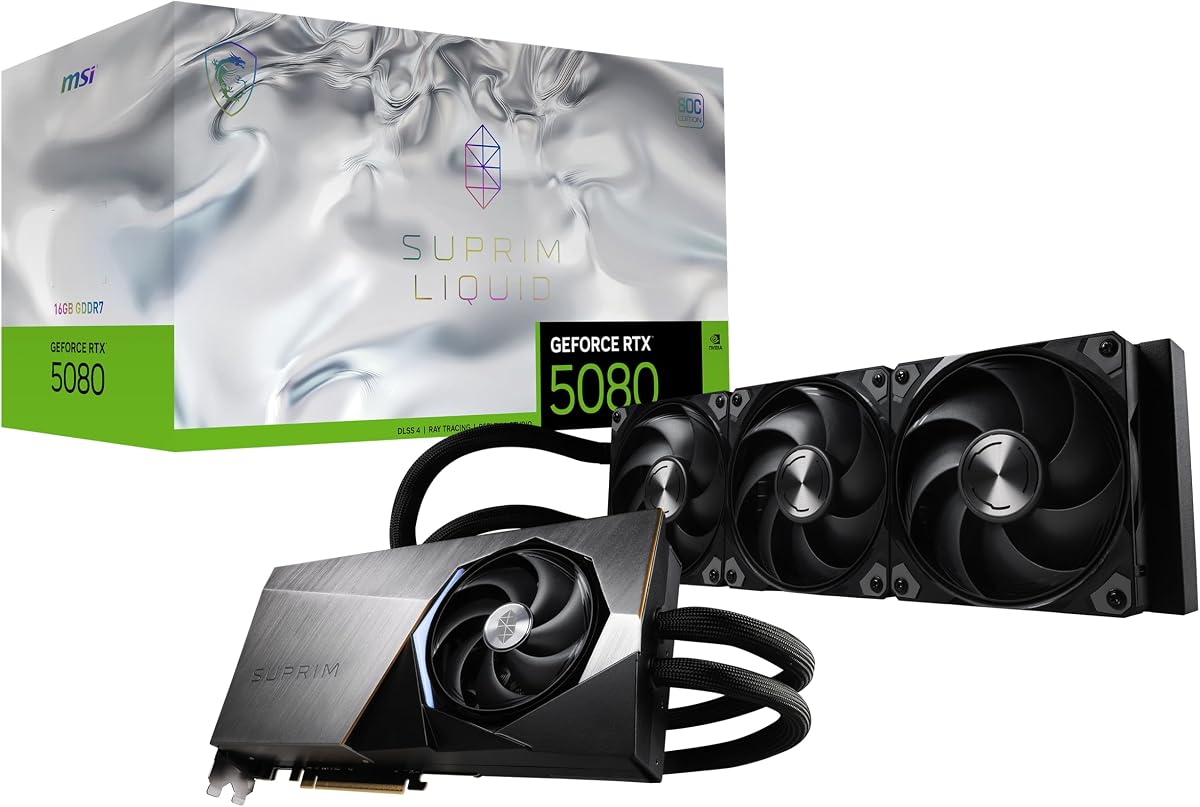
The MSI Gaming RTX 5080 16G SUPRIM Liquid SOC is a specialized flagship option built around the GeForce RTX 5080, 16GB of GDDR7 memory, a 256-bit interface, and an extreme performance clock of 2760MHz. It has a 4.7 supplied rating. Unlike conventional air-cooled cards, its liquid cooling system is intended to manage the substantial heat produced by a high-end GPU while preserving its substantial memory and display capabilities.
We may earn a commission when you buy through this link, at no additional cost to you.
The display configuration is unusually useful for enthusiasts. It includes three DisplayPort 2.1a outputs and one HDMI 2.1b output, with a maximum digital resolution of 7680 by 4320. That makes it suitable for high-end, multi-monitor setups and large displays. The combination of Blackwell architecture, GDDR7 memory, and a 256-bit bus also gives it the core specifications expected from an RTX 5080-class card.
Liquid cooling is the feature that demands the most planning. A liquid-cooled GPU introduces a pump, tubing, and radiator or an external cooling arrangement, each of which affects installation, maintenance, and case compatibility. The supplied data does not state the radiator size, cooler dimensions, or required mounting hardware, so those details must be confirmed. The extreme clock should not be treated as a guarantee of extra real-world performance beyond what the rest of the system can support.
This card makes the most sense for a builder who specifically wants liquid cooling, multiple modern display outputs, and a high clock within an RTX 5080 platform. It is less attractive for a simple installation where a straightforward air-cooled card would reduce complexity. Confirm radiator clearance, pump connections, power requirements, and the supplied hardware before choosing it over the other RTX 5080 models.
The liquid cooling system is intended to help a powerful GPU maintain performance under sustained load. It can be attractive in carefully planned builds, but radiator space and loop reliability deserve attention before installation.
Three DisplayPort 2.1a ports and one HDMI 2.1b port support a flexible high-end display arrangement. The stated maximum resolution of 7680 by 4320 also makes the card relevant to 8K workflows.
The 2760MHz extreme clock, 16GB GDDR7 memory, and 256-bit interface create an ambitious factory specification. CPU, cooling, game, and application behavior will still determine the performance realized in practice.
We may earn a commission when you buy through this link, at no additional cost to you.
A flagship graphics card purchase should be treated as a system decision rather than an isolated component choice. Memory capacity, graphics architecture, cooler size, power requirements, display needs, software preferences, and case clearance all influence whether a card will work well in a particular system.
Graphics memory is one of the first specifications to check because it determines how much data a card can hold for textures, geometry, ray-tracing data, AI workloads, and other GPU-accelerated tasks. The list includes 12GB, 16GB, and 32GB configurations. The 12GB ASUS TUF RTX 5070 may be sufficient for a gaming build that relies on DLSS, while the numerous 16GB cards offer additional comfort for high-detail games and creative work. The 32GB ASUS TUF RTX 5090 stands apart for complex 3D scenes, high-resolution assets, simulation, and future-facing workloads. Memory type also matters: GDDR7 appears on the newer NVIDIA models, while the Radeon RX 9070 XT options use GDDR6.
Choose enough memory for your intended workload rather than assuming the largest allocation is always necessary. If you play at high resolutions, use high-resolution textures, edit video, or run 3D software, 16GB is a more comfortable baseline for a high-end card. Move toward 32GB when memory-heavy applications or long-term headroom are genuine requirements.
Architecture determines the hardware and software features available to a graphics card. The NVIDIA models in this guide use Blackwell and support DLSS 4, while the VIPERA RTX 4090 Founders Edition is based on an earlier generation and supports DLSS 3. The AMD Radeon RX 9070 XT cards provide an alternative ecosystem for buyers whose games, applications, or hardware preferences favor Radeon. DLSS can improve the relationship between rendered resolution and display resolution, but its usefulness depends on the game, the monitor, and the user's sensitivity to upscaling artifacts. The right architecture should support the applications you actually use rather than simply the newest generation available.
Match the platform to your software before buying. NVIDIA-focused users may prefer DLSS, Reflex, and the broader GeForce feature set, while AMD users may already have an established Radeon workflow. Verify current application support and the features available in the specific card and driver configuration.
Flagship graphics cards generate significant heat, and their coolers can occupy two to four or more expansion slots. The ASUS TUF RTX 5080 uses a 3.6-slot, three-fan design, while the TUF RTX 5070 Ti and RTX 5070 use 3.125-slot configurations. The ASUS Dual RTX 5060 Ti, ASUS Prime RX 9070 XT, and SFF-ready TUF RTX 5090 use 2.5-slot layouts, which can ease case compatibility. Liquid cooling introduces another approach with the MSI SUPRIM Liquid SOC. Fans, thermal pads, conductive gel, 0dB behavior, and Quiet BIOS profiles can all influence real-world noise and thermals.
Prioritize a cooler that fits your case and leaves room for adjacent components. Then consider acoustic features, case airflow, and the temperatures expected during sustained workloads. More fans do not automatically mean a better card, but a well-ventilated multi-fan design is often easier to accommodate than a bulky liquid-cooling assembly.
A powerful card may be too long, too thick, or too heavy for the enclosure. The ASUS TUF RTX 5080 is specifically listed at 348mm long, 3.6 slots, and 4.3 pounds, making precise measurement essential. Some cards also extend beyond the nominal slot thickness because of their cooler, heat pipes, or power connector. A large CPU air cooler can reduce clearance for the graphics card, while a thick card can interfere with motherboard components or neighboring expansion cards. The liquid-cooled MSI model adds radiator and loop-placement considerations beyond the standard expansion-card footprint.
Measure the available GPU length, the space below the CPU cooler, and the distance to the rear expansion slots. Check the product's mounting bracket and required screws as well. A card that does not fit should be removed from consideration regardless of its performance features.
A flagship card can place a heavy load on a system power supply, especially during sustained gaming, rendering, or compute tasks. ASUS explicitly specifies a minimum 850W power supply and a 16-pin 12V-2×6 connector for the TUF RTX 5080 and TUF RTX 5070 Ti. Other cards in the list also require modern power delivery, even though their exact wattage is not included in the supplied data. The PSU should have suitable capacity, modular-cable routing, and connector support without forcing awkward adapters. A high-quality power supply and a clean, fully seated connection are especially important for cards that draw substantial power.
Check the current manufacturer guidance for both the graphics card and power supply. Avoid relying on an adapter when the correct native cable is available, route cables without severe bends, and leave the power connectors accessible for inspection. If the system uses an older or lower-capacity PSU, the case for a flagship upgrade may include replacing the power supply too.
The intended monitor setup can narrow the field quickly. The MSI RTX 5080 SUPRIM Liquid SOC provides three DisplayPort 2.1a outputs and one HDMI 2.1b output, with a listed maximum digital resolution of 7680 by 4320. The VIPERA RTX 4090 Founders Edition supports 4K 120Hz HDR, 8K 60Hz HDR, and variable refresh rate as specified by HDMI 2.1a. Other cards may also satisfy high-end displays, but their supplied specifications do not list the same level of output detail. A card's headline performance will not be fully used if the display, adapter, or cable limits its supported mode.
Identify the resolution and refresh rate you want before choosing a card, then confirm the required ports. For multiple displays, count connectors and check whether additional cables or adapters are needed. HDR and high-refresh support should also be verified against both the monitor and the graphics card.
Flagship cards are not only for conventional gaming. The RTX 5090's 32GB memory and 772 AI TOPS make it relevant to demanding AI and creative workflows, while the MSI card's multiple modern outputs may serve an 8K or multi-screen workstation. The ASUS TUF models add GPU Tweak III for tuning, monitoring, and thermal control, and the Radeon cards provide a different software ecosystem. The VIPERA RTX 4090 includes features for livestreaming through the NVIDIA Encoder and latency reduction through NVIDIA Reflex. Actual application performance depends on the workload, driver, software, and hardware acceleration support.
List the applications you expect to use and check their current hardware requirements. Gaming-focused buyers should prioritize the target resolution, refresh rate, and desired visual features. Creators and compute users should also examine memory capacity, supported software, display needs, and thermal behavior.
Premium cards often differentiate themselves through component selection, manufacturing processes, fan bearings, protective coatings, thermal materials, and firmware controls. ASUS's Auto-Extreme manufacturing process appears across several models, while TUF cards emphasize military-grade components and protective PCB coatings. The ASUS Prime RX 9070 XT uses a phase-change GPU thermal pad, and several cards offer dual BIOS profiles. GPU Tweak III provides performance tweaking and system monitoring, but additional features do not replace correct installation. A strong graphics card still needs a suitable PSU, properly seated power cables, adequate case airflow, updated software, and a stable operating system.
Look for features that solve a real problem for you. Quiet modes help in shared rooms, monitoring software helps during tuning, and protective mounting features help during installation. Confirm warranty coverage and current software support, and avoid making changes beyond your comfort level unless the tools and documentation are clear.
Before installation, read the card-specific manual and verify the graphics-card length, slot thickness, bracket, and power requirements against your case and power supply. Install the appropriate drivers after confirming that the operating system recognizes the card. Do not assume that every display mode or connector arrangement is supported without checking the motherboard, monitor, and card documentation.
When opening a new graphics card package, ground yourself by touching an unpainted metal part of the system, avoid touching exposed contacts, and use the supplied mounting hardware where possible. Connect the required power cable fully without forcing the connector. For liquid-cooled models, inspect the pump, fittings, tubing, and radiator before closing the case, and confirm that the cooling loop is properly secured.
During the first intensive use, monitor GPU temperature, fan behavior, frame rates, and system stability. If using tuning software, change one setting at a time and keep the original profile available. Maintain case airflow, keep the card away from restricted spaces, and clean dust from filters and fans periodically. Update drivers and supporting software periodically, but follow the vendor's installation guidance.
A flagship card is most relevant for 4K gaming at high refresh rates, maximum settings, heavy ray tracing, and features such as DLSS. It can also make high-end creative workloads much more practical. If the target resolution or refresh rate is lower, a midrange card may provide a more balanced system. The best choice depends on the display, the games, and the desired graphics settings rather than resolution alone.
Sixteen gigabytes is a comfortable starting point for modern high-end gaming, high-resolution textures, and many creative workflows. Twelve gigabytes can still be useful, especially with upscaling features, but it provides less headroom. Thirty-two gigabytes is most compelling for complex 3D assets, simulation, large textures, and advanced compute tasks. Choose capacity based on your software and the features you expect to use.
The decision depends on your games, applications, driver preferences, and existing hardware. The GeForce models in this guide provide Blackwell, DLSS 4, and features such as Reflex and the NVIDIA Encoder, while the Radeon RX 9070 XT cards offer a strong alternative with 16GB of memory. Check current application support and the features you value rather than choosing solely by brand.
You need a power supply with adequate continuous capacity, the correct native connectors, and sufficient case space for the cables. ASUS specifies a minimum 850W PSU and a 16-pin 12V-2×6 connector for the TUF RTX 5080 and TUF RTX 5070 Ti. For every other card, follow the current manufacturer guidance because the supplied data does not list all minimum wattages.
A 2.5-slot card is easier to accommodate than a 3.5- or 4-slot model, but it still needs to be measured against the available space. CPU coolers, motherboard components, drive cages, power connectors, and neighboring cards can reduce clearance. The nominal slot thickness also does not capture the card's full length or the space needed to route its power cable, so check all three dimensions.
Liquid cooling can help manage heat from a powerful GPU and may be attractive in carefully planned enthusiast builds. It also adds a pump, tubing, fittings, and radiator requirements that can complicate installation and maintenance. An adequately cooled air-cooled card may be simpler and more reliable for many systems. The MSI SUPRIM Liquid SOC is best considered only after confirming radiator space and the complete mounting plan.
A factory-overclocked card is already configured by the manufacturer and may not require manual changes. Utilities such as GPU Tweak III can help with monitoring and controlled tuning, but additional overclocking can increase heat, noise, and instability. Keep the default profile as a fallback, alter one setting at a time, and test stability before relying on a modified configuration.
Start with a case that supports the card's size and provides front intake and rear exhaust airflow. Keep the GPU's power cable fully seated, use the correct native connector, and avoid blocking the card with a poorly positioned drive cage or CPU cooler. For sustained workloads, monitor temperatures and fan behavior, clean dusty filters and fans periodically, and verify that the card's cooling components are unobstructed.
The GIGABYTE RTX 5080 Gaming OC 16G provides a balanced NVIDIA foundation, while the ASUS TUF RTX 5070 Ti 16GB stands out for its 4.8 supplied rating, detailed cooling system, protective construction, and tuning tools. The ASUS TUF RTX 5090 32GB is the premium choice for buyers who need maximum memory and value the unusually compact SFF-ready design. For an AMD-focused build, the GIGABYTE and ASUS Radeon RX 9070 XT options both provide 16GB of graphics memory with distinct cooler and feature sets.
Prioritize the requirements that affect your experience most. Start with the monitor resolution and refresh rate, then choose enough memory for your games or creative applications. After that, confirm physical fit, power supply capacity, connector type, case airflow, and any software ecosystem preference. Those checks are more likely to produce a satisfying long-term system than a small difference in factory clock or cooler style.
Finally, recheck the current listing, manufacturer specifications, customer feedback, warranty, and compatibility information before buying. Graphics cards, driver support, bundle contents, and market availability can change, and the supplied customer ratings offer useful context but are not a substitute for current research. Taking the time to verify the final details will help ensure that your chosen flagship graphics card is well matched to the rest of your PC.