
MONTECH AIR 903 MAX
4.8Editor score
Four 140mm fans included
Up to 360mm radiator support
E-ATX and 400mm GPU clearance
Our expert guide compares the 10 best high airflow PC cases, covering fan support, radiator clearance, motherboard fit, cable management, and build ease.
A high airflow PC case gives cool air a clear path into the chassis and warm air an unobstructed route out. That matters most with powerful processors and graphics cards, but good ventilation also improves flexibility, lets you add fans, and can accommodate large air coolers or radiators without forcing a compact layout.
This guide compares ten cases using the specifications and features supplied for each model. We looked at front-panel openness, included fans, radiator support, motherboard compatibility, graphics-card clearance, component capacity, cable-management features, and the practical details that affect installation and future upgrades.
Each review explains where a particular case stands out and where buyers may need to make compromises. The CORSAIR 4000D RS ARGB leads the group for balanced airflow and versatility, while models such as the NZXT H5 Flow emphasize a more compact format. Market availability and listing details can change, so confirm compatibility before ordering.
4.8Editor score

4.7Editor score

4.8Editor score
The comparison below highlights the airflow hardware, cooling capacity, expansion room, and practical features of each case, making it easier to match a chassis with your motherboard, graphics card, cooling plan, and preferred build style.




The CORSAIR 4000D RS ARGB is an ATX mid-tower built around unrestricted airflow and a high degree of cooling flexibility. It carries a 4.7 rating and stands out for its low-obstruction steel front, three pre-installed RS ARGB PWM fans, and InfiniRail mounting system. Those elements make it a convincing all-rounder for gaming systems, workstations, and builds that may change over time.
We may earn a commission when you buy through this link, at no additional cost to you.
The front panel uses a three-dimensional Y-pattern perforation that provides cool air with minimal restriction. Three RS ARGB PWM fans are installed at the front, while the InfiniRail system allows front fans up to 200mm and roof fans up to 140mm. The rails can be repositioned to place cooling where a particular build needs it, which is especially helpful when combining large air coolers with a rear or top exhaust configuration.
A particularly useful feature is the removable internal side panel. It can remain in place as a cable cover or be removed to create a side fan position, increasing the number of airflow paths when required. The modular FRAME system also supports future changes such as replacing the motherboard tray or front I/O, although those optional upgrades are separate from the standard configuration.
This is the strongest general recommendation because it balances meaningful airflow, generous mounting options, and a useful selection of pre-installed fans. It is particularly suitable for buyers who want a straightforward intake-and-exhaust layout but value the freedom to move fans later. The main consideration is that it does not offer the dual-chamber cable routing or exceptionally broad drive organization found with some larger alternatives.
The InfiniRail system can accept large front fans and adjustable roof positions, allowing builders to adapt the cooling path without replacing the case. The removable side panel adds another optional airflow route when additional intake becomes worthwhile.
The perforated Y-pattern steel front minimizes obstruction compared with a fully solid facade. Combined with the installed RS ARGB PWM fans, it provides a practical foundation for air-cooled and radiator-based configurations.
We may earn a commission when you buy through this link, at no additional cost to you.
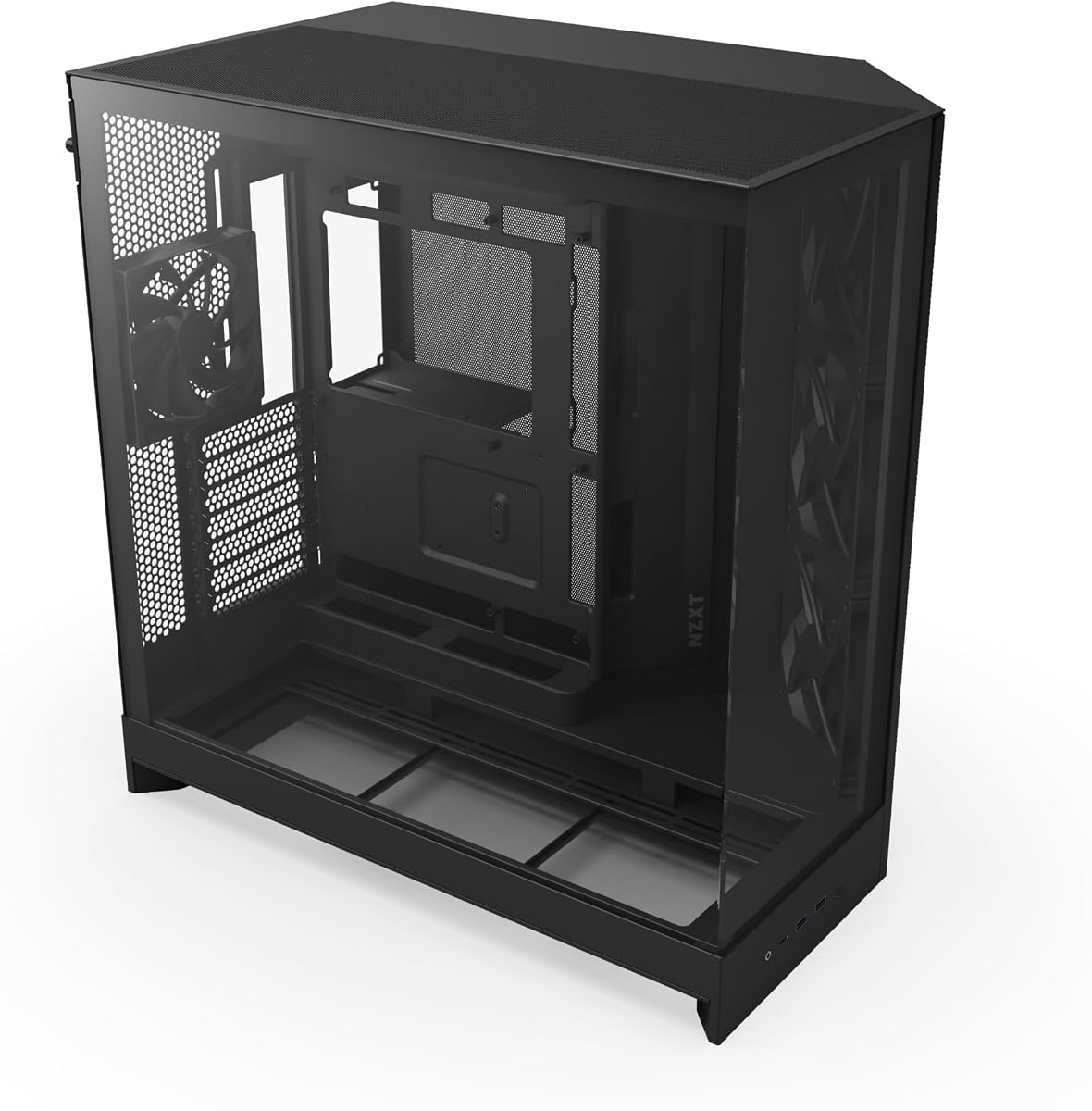
The NZXT H5 Flow is a compact ATX mid-tower designed for buyers who want substantial ventilation without beginning with an oversized chassis. It has a 4.7 rating, with ultra-fine mesh on the top, front, and side panels serving as the foundation of its high-airflow design. Two 120mm Quiet Airflow fans arrive installed at the front and rear.
We may earn a commission when you buy through this link, at no additional cost to you.
Cooling options extend beyond the included fans. The case supports a 360mm radiator in front and a 240mm radiator at the top, making it suitable for both air and liquid-cooling strategies. Its perforated power-supply shroud can draw air from the side and bottom using two 120mm fans, although those fans are not included.
Cable management is handled through wide channels, hooks, and straps. This clean interior approach reduces visible clutter and can make component installation easier, although the airflow-focused design leaves less emphasis on a separate chamber for power-supply wiring and storage than the larger dual-chamber cases in this list.
The H5 Flow makes the most sense for builders who value a smaller footprint, a simple visual design, and enough radiator space for a substantial cooling upgrade. Compared with the CORSAIR 4000D RS ARGB, it starts with fewer fans and offers less elaborate mounting hardware, but it remains a capable, well-rounded option for standard ATX builds.
Despite its smaller mid-tower format, the H5 Flow accepts a 360mm front radiator and 240mm top radiator. That gives builders a meaningful liquid-cooling path without requiring a full-tower enclosure.
Ultra-fine mesh on the top, front, and side panels supports airflow while filtering dust. The two pre-installed Quiet Airflow fans provide an immediately usable front-to-rear cooling path.
We may earn a commission when you buy through this link, at no additional cost to you.
The MONTECH AIR 903 MAX combines a 4.8 rating with a generous cooling package, making it an exceptional value-focused recommendation. Its ventilated mesh front, four included 140mm fans, and roomy 478 x 230 x 493mm chassis provide the fundamentals of a strong high-airflow system without requiring additional fans as the first step.
We may earn a commission when you buy through this link, at no additional cost to you.
Three HP140 ARGB PWM fans occupy the front, and a fourth 140mm PWM fan sits at the rear. This creates a direct path from the open front intake to the rear exhaust. Buyers can also install radiators up to 360mm at both the front and top, giving them flexibility to move from a high-airflow air-cooled configuration to a larger liquid-cooling setup.
The interior accommodates E-ATX, ATX, Micro-ATX, and Mini-ITX motherboards, as well as graphics cards up to 400mm long. Its cable-routing space and front I/O panel—with USB Type-C, two USB 3.0 ports, microphone and audio jacks, and power, reset, and LED controls—help it serve as a functional everyday build platform.
The AIR 903 MAX is the most compelling choice for buyers who want a complete fan package and large radiator support in a conventional mid-tower. Its primary trade-off is visual restraint rather than function: the design prioritizes ventilation and component space, while the more elaborate front-panel and cable-management systems of premium models are not present.
The three front HP140 ARGB PWM fans and rear 140mm PWM fan form a ready-made cooling path. Their 140mm size also provides a useful balance between airflow capacity and case depth.
Support for E-ATX boards, graphics cards up to 400mm, and 360mm radiators at two positions reduces the likelihood that major components will dictate the case choice.
We may earn a commission when you buy through this link, at no additional cost to you.
The LIAN LI LANCOOL 216 RGB is a 4.7-rated mid-tower that combines strong front-to-back airflow with refined cable management and room for substantial hardware. Its 480.9 x 235 x 491.7mm dimensions create a generous interior, while the heavy-duty steel frame and tempered glass panels give it a more premium visual and structural character.
We may earn a commission when you buy through this link, at no additional cost to you.
Two 160mm ARGB front fans and one 140mm rear fan are pre-installed. Fine mesh covers the front, top, and side of the power-supply shroud, creating several connected routes for air. The modular motherboard I/O can also be repositioned higher or lower, which helps builders tailor the layout for either air-cooled or water-cooled systems.
Installation features include a removable top radiator bracket, fan-cable pass-through grooves, a rear PCIe fan bracket, Velcro straps, and small cable clips. The case supports graphics cards up to 392mm long, CPU coolers up to 180mm high in air-cooling mode, and both E-ATX and smaller motherboard formats.
This is a particularly balanced recommendation for builders who want large front fans, strong mesh ventilation, and an organized interior without moving to a full tower. The trade-off is its larger footprint compared with compact ATX models, but the added space supports long graphics cards, multiple storage drives, and a flexible cooling arrangement.
The included 160mm ARGB intake fans move a substantial volume of air through the front mesh. A 140mm rear fan provides the corresponding exhaust side of the thermal path.
The repositionable motherboard I/O and removable top bracket give builders useful control over component placement. Cable pass-throughs, straps, and clips support a tidy result even in a performance-focused system.
We may earn a commission when you buy through this link, at no additional cost to you.
The Antec Flux Pro is a full-tower E-ATX case for builders who prioritize cooling expansion over a compact footprint. Its 4.7 rating reflects a feature-rich approach: six PWM fans are included, the chassis can support up to 12 fans simultaneously, and separate radiator positions are available across the top, front, and power-supply shroud areas.
We may earn a commission when you buy through this link, at no additional cost to you.
The included cooling arrangement consists of three Tranquil 140 PWM fans at the front, one Tranquil 140 PWM fan at the rear, and two P12R PWM reverse fans on the power-supply shroud. The reverse orientation helps direct air into the case from the shroud area, while removable cooling brackets make it easier to reconfigure the layout.
A useful innovation is the iShift power-supply mounting option, which allows a 90-degree orientation. The case also provides a CPU and GPU dual-temperature display, giving users an at-a-glance view without needing to open a software utility. It can hold a 420mm radiator and a 360mm radiator at the same time.
The Flux Pro is ideal for elaborate systems, extensive fan configurations, and builders who expect to change cooling hardware over time. Its full-tower dimensions may be inconvenient for smaller desks, and the combination of metal, glass, and wood may not match every aesthetic. Even so, its cooling capacity makes it one of the strongest choices for expansive builds.
Six included PWM fans provide a strong starting configuration, while support for 12 positions allows the airflow plan to grow. Removable brackets simplify changes to the front, roof, and shroud mounting areas.
The E-ATX full-tower format and simultaneous 420mm and 360mm radiator support accommodate large systems. The 90-degree power-supply option can also improve the floor clearance and appearance of the finished build.
We may earn a commission when you buy through this link, at no additional cost to you.
The CORSAIR 3500X RS ARGB is a panoramic mid-tower that combines visible-component appeal with a high cooling ceiling. It has a 4.6 rating and includes three RS120-R ARGB fans. Front and side tempered-glass panels create a wraparound view, while removable panels make the interior easier to access during assembly and later maintenance.
We may earn a commission when you buy through this link, at no additional cost to you.
Cooling capacity reaches up to 10 120mm fans across the side, roof, and power-supply mounting points. This is a more specialized layout than the larger-fan approaches used by the MONTECH AIR 903 MAX, LANCOOL 216, or HAF II 500, but it gives builders plenty of room to create a balanced intake and exhaust arrangement.
The chassis supports motherboard formats from Mini-ITX through E-ATX. That range makes it useful for both compact and full-sized boards, although buyers should still check the dimensions of their chosen graphics card and CPU cooler against the available clearance.
The 3500X RS ARGB is most attractive to builders who want a clean, display-oriented system without abandoning fan flexibility. Its glass panels add weight and need careful handling during installation, and several components shown in promotional material are explicitly not included. The included three-fan configuration remains a solid starting point for a standard cooling plan.
Wraparound tempered glass exposes the internal components from multiple angles. Removable front and side panels help balance the visual design with practical access during the build process.
Side, roof, and power-supply mounting locations support as many as 10 120mm fans. This provides ample scope for a tuned intake and exhaust arrangement over time.
We may earn a commission when you buy through this link, at no additional cost to you.
The Lian Li V100-ATX offers one of the most complete standard configurations in the group. Its 4.8 rating is supported by four pre-installed 120mm PWM-controlled ARGB fans, an integrated 26-LED ARGB strip, and tool-less access on both side panels. The included lighting and cooling hardware give the case a finished appearance immediately.
We may earn a commission when you buy through this link, at no additional cost to you.
Despite its mid-tower dimensions, it supports graphics cards up to 420mm long and CPU coolers up to 178mm high. A radiator up to 360mm can be mounted at the top, while ATX, Micro-ATX, Mini-ITX, and back-connect versions of ATX or Micro-ATX motherboards are supported.
The included fans use daisy-chain connectivity for easier setup, and their listed specifications range from 1800 RPM maximum speed to 61.47-60.4 CFM maximum airflow. They also specify hydraulic bearings, 26.5-30.8 dBA noise levels, and air pressure figures of 2.54-2.17 mm-H2O.
This case is a strong fit for builders who want substantial hardware clearance, an established four-fan foundation, and simple panel removal. Its main limitation is that the side panel design does not separate cables and drives into a dedicated chamber as distinctly as the NZXT H9 Flow. It remains a versatile mid-tower for standard ATX systems.
Four 120mm ARGB PWM fans provide immediate front-to-rear cooling capability. Daisy-chain connectivity reduces the number of separate fan connections and simplifies the initial setup.
Tool-less mounting mechanisms on each side panel speed up access to internal components. This is useful during first-time assembly and when adding storage, cables, or cooling hardware later.
We may earn a commission when you buy through this link, at no additional cost to you.
The Cooler Master HAF II 500 delivers a distinctive approach to high airflow by using very large case fans. With a 4.8 rating, it includes two 220 x 40mm front intake fans and one 180 x 40mm rear exhaust fan, creating a powerful front-to-back path with fewer fans than conventional 120mm or 140mm layouts.
We may earn a commission when you buy through this link, at no additional cost to you.
The low-airflow-resistance design uses large front and rear ventilation openings to improve throughput. Its MasterRail system supports multiple fan and radiator sizes at the front and top, while split-level cable management creates space for the oversized rear exhaust arrangement without making the internal layout unnecessarily restrictive.
A dual-mode graphics-card holder can secure a single card or support two GPUs up to 3.6 slots, or 72mm, thick each. The flexible storage cage accepts 3.5-inch and 2.5-inch drives in different orientations depending on the power-supply length, adding practical component flexibility.
The HAF II 500 is the premium choice for builders who prioritize maximum front-to-back air volume and do not mind a large enclosure. Its specialized 220mm and 180mm fan sizes may narrow future replacement options compared with standard sizes, but the supplied cooling hardware delivers a remarkable amount of airflow from the outset.
Two 220mm front fans and a 180mm rear fan move large volumes of air through the chassis. The approach reduces the number of fans required for a major intake and exhaust path.
The front and top mounting rail supports several fan and radiator sizes, allowing the cooling plan to evolve. Split-level cable management preserves usable space around the oversized rear fan.
We may earn a commission when you buy through this link, at no additional cost to you.
The NZXT H9 Flow is a 4.7-rated ATX case whose dual-chamber design separates the main components from the power supply and drives. That separation supports both thermal performance and cable management, while perforated steel panels and angled front-right fans create an efficient path through the chassis.
We may earn a commission when you buy through this link, at no additional cost to you.
The package includes three F140Q CV fans in the front-right and one F120Q CV fan at the rear. The stated CV designation means the case version uses three-pin DC connections. Total fan capacity reaches nine 140mm positions across the top, front-right, and bottom, plus one 120mm position at the rear.
Large cooling hardware is supported, including radiators up to 420mm at both the top and front-right. The wraparound tempered-glass design provides a panoramic view, while extra-wide routing channels, built-in Velcro straps, and tie-down points organize cables without dominating the main chamber.
The H9 Flow is ideal for builders who want a clean, modern layout with a clearly separated cable and storage area. It also supports rear-connecting motherboards such as ASUS BTF and MSI Project Zero. The main practical consideration is the use of 3-pin DC case fans in the included configuration, so compatibility with the chosen controller or motherboard headers should be checked.
The power supply and drives are isolated from the main component chamber. This creates a cleaner central area and provides a dedicated location for cables and storage hardware.
Radiators up to 420mm fit at the top and front-right. Angled fans and perforated panels work together to create a direct cooling route through both positions.
We may earn a commission when you buy through this link, at no additional cost to you.
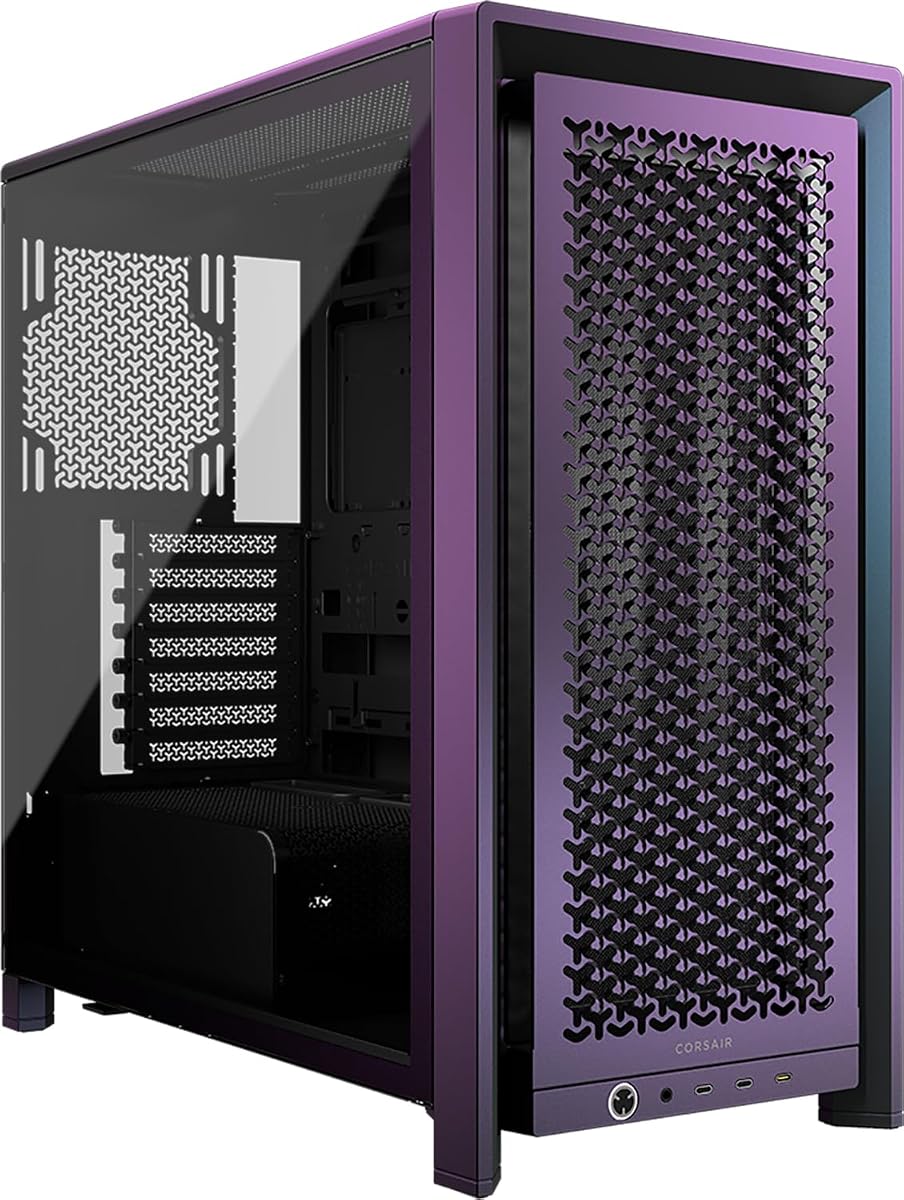
The CORSAIR FRAME 4000D Vault Series distinguishes itself with a limited-edition Galaxy finish and a modular architecture. The release is individually numbered and limited to 1,337 units for each Vault colorway, giving it collector appeal beyond its standard cooling and customization capabilities. It carries a 4.4 rating, the lowest in this comparison.
We may earn a commission when you buy through this link, at no additional cost to you.
Its core performance features closely follow the standard FRAME 4000D concept. The three-dimensional Y-pattern steel front is optimized for low-obstruction airflow, while InfiniRail mounting supports front fans up to 200mm and roof fans up to 140mm. These options allow the cooling layout to be adjusted to suit large processors, graphics cards, and different airflow preferences.
The Vault version is especially notable for its cooling headroom. It offers three separate 360mm radiator mounting positions at the front, roof, and side, along with capacity for as many as 12 120mm fans. That is an unusually ambitious configuration for a mid-tower and gives advanced builders considerable freedom in designing a custom cooling path.
This case is best suited to enthusiasts who want a collectible finish and the FRAME system's potential for future changes, such as replacing the motherboard tray or front I/O. The limited run may be difficult to find, and its rating trails the more broadly recommended alternatives. Even so, its airflow architecture and radiator capacity are impressive.
The individually numbered Galaxy release is limited to 1,337 units. That scarcity gives the case a distinctive identity for builders who want a showpiece system.
Front, roof, and side positions can each accept a 360mm radiator, with capacity for up to 12 120mm fans. This supports one of the most ambitious mid-tower cooling layouts in the group.
We may earn a commission when you buy through this link, at no additional cost to you.
The right airflow case is not simply the one with the most fan mounts. Consider front-panel openness, the direction and size of included fans, radiator positions, component clearances, and how much expansion or reorganization you expect to perform.
The front panel is the first point at which outside air enters the chassis, so its design can determine whether installed fans operate efficiently. Fully perforated steel, open mesh, and fine mesh are more suitable for unrestricted airflow than solid or heavily filtered panels. The CORSAIR 4000D RS ARGB and FRAME 4000D Vault use a Y-pattern steel front, while the NZXT H5 Flow relies on ultra-fine mesh across several panels.
Choose a genuinely open front when the processor and graphics card generate substantial heat. If appearance is important, a fine mesh can still support strong airflow, but pay attention to the fan positions and the size of the available intake area.
Larger fans can move more air with fewer units, but they may be harder to source and can reduce clearance for radiators or other hardware. The included configurations range from 120mm fans in the NZXT H5 Flow and Lian Li V100-ATX to 220mm front fans in the Cooler Master HAF II 500. The MONTECH AIR 903 MAX uses four 140mm fans, providing a middle ground.
Confirm that every installed fan blows in the intended direction. A front-to-rear arrangement is the basic pattern, but bottom intake and top exhaust can improve cooling for high-mounted processors and graphics cards.
Radiator support matters even for builders who begin with air cooling because it preserves the option to upgrade later. The NZXT H5 Flow accepts a 360mm front radiator and 240mm top radiator, while the MONTECH AIR 903 MAX supports 360mm units at both the front and top. Larger systems may require even more room.
Prioritize cases that provide a front or side position for a 360mm radiator if water cooling is likely. Also check CPU-cooler clearance, card position, and cable routing so the radiator can be installed without restricting other components.
A case that supports the motherboard you already own prevents an unnecessary rebuild. Most models in this guide accept ATX and smaller formats, but the MONTECH AIR 903 MAX, LIAN LI LANCOOL 216 RGB, and Antec Flux Pro also support E-ATX. The Antec is a full tower, while the others remain conventional mid-towers.
Check the board format, socket position, rear I/O arrangement, and available mounting points. Builders interested in hidden cables should also look for back-connect motherboard support, which appears in the CORSAIR 4000D RS ARGB, Lian Li V100-ATX, and NZXT H9 Flow.
Long graphics cards need enough room to install without forcing the card against the front fans or side panel. The Lian Li V100-ATX supports cards up to 420mm, the MONTECH AIR 903 MAX up to 400mm, and the LIAN LI LANCOOL 216 RGB up to 392mm. The Cooler Master HAF II 500 adds a holder designed to stabilize one card or two cards up to 3.6 slots thick.
Compare the card length with the case specification, then consider extra clearance for power connectors and tubing. A graphics-card holder is also valuable in large systems where heavy cards can stress the motherboard slot.
Good cable management improves airflow by keeping wires away from intake paths and makes maintenance easier. The NZXT H9 Flow has a full dual-chamber arrangement, while the CORSAIR 4000D RS ARGB offers a removable internal side panel that can become a cover or an additional fan position. The LIAN LI LANCOOL 216 RGB includes Velcro straps, clips, pass-through grooves, and a cable grommet bar.
Prioritize dedicated routing space when your system includes many cables, numerous storage drives, or a liquid-cooling pump. A simple open layout is useful during assembly, but finished cable paths should still be secured to avoid blocking fans.
Case size does not automatically guarantee enough room for every component. Check motherboard format, drive bays, power-supply length, CPU-cooler height, and the number of expansion slots. The LIAN LI LANCOOL 216 RGB supports two 3.5-inch hard drives and six 2.5-inch solid-state drives, while the HAF II 500 uses a flexible cage that adapts to the power-supply length.
Avoid planning a high-end system around maximum specifications. Leave practical space for cable bends, connectors, airflow, and routine service, especially around hard drives and power cables.
Features that make installation easier can save considerable time, particularly in a densely packed high-performance build. The Lian Li V100-ATX uses tool-less mechanisms on both side panels, and the CORSAIR 3500X RS ARGB provides removable front and side glass panels. Removable radiator and fan brackets, found in cases such as the LIAN LI LANCOOL 216 RGB and Antec Flux Pro, also improve access.
Consider how often you will add storage or change cooling hardware. Easy panel removal and adjustable brackets are useful for beginners, while experienced builders may prioritize the internal layout and unobstructed access to cable points.
Plan the airflow path before installing components. Mount intake fans at the front, side, or bottom where fresh air is needed, and position exhaust fans at the rear and roof so warm air can leave the chassis. Connect every fan to the appropriate PWM or DC header, and confirm that the direction arrows on the fan frames match the intended airflow.
Secure cables behind the motherboard tray or within dedicated routing channels, but do not bend power leads sharply or block any fan with tight cable bundles. If the case includes ARGB lighting, connect it through a compatible 5V addressable header and verify that the motherboard software or controller supports synchronization.
After the build is complete, monitor component temperatures under realistic workloads and listen for unusual fan noise. Keep the front, top, side, and power-supply intake areas free of dust, and make sure every installed fan spins freely. Periodically check that cable ties remain secure and that the removable panels or brackets have not shifted during maintenance.
No. A high airflow case provides better opportunities for cool air to enter and warm air to exit, but temperatures also depend on the processor, graphics card, cooler, fan curve, room temperature, and airflow direction. A properly planned case still needs suitable fans and a balanced intake-and-exhaust arrangement.
Not necessarily. Fan count matters less than placement, size, speed, and whether the configuration creates balanced airflow. More fans can also add noise, cable clutter, and power demand, so builders should create a clear path through the chassis and add fans only where they serve a purpose.
That is the most common starting point for a high airflow case. Front or bottom fans pull cool air into the chassis, while rear and top fans push warm air outside. Strong CPU heat may also benefit from a dedicated top or rear exhaust fan.
It is useful to have it, even if you are not ready for liquid cooling. Radiator support preserves the option to upgrade a large CPU cooler later and helps buyers choose a chassis that will not constrain a future build. Confirm the radiator position and any interference with the graphics card or CPU cooler.
Check whether the case supports your exact board format, such as ATX, Micro-ATX, Mini-ITX, or E-ATX. Also consider connector placement, rear I/O clearance, and whether you want back-connect support. The case can support a board format and still require attention to processor-cooler or card clearance.
The case specification should exceed the graphics card's length with additional room for power connectors and tubing. Clearance around the card's width and height also matters, especially for models with large coolers or side-mounted liquid-cooling hardware.
Yes, as long as the case provides effective front, rear, and optional side or bottom ventilation. A glass panel affects appearance rather than internal airflow directly, while the perforated or mesh panels and fan arrangement determine how effectively air enters and exits the chassis.
Inspection frequency depends on the environment and amount of visible dust. Review the intake areas periodically, clean removable filters where applicable, and use compressed air carefully to avoid loosening or damaging fan components. Cleaning helps maintain consistent airflow and reduces unwanted noise.
The CORSAIR 4000D RS ARGB is the most balanced overall choice because it combines a low-obstruction front, three ARGB fans, and flexible InfiniRail positioning. The MONTECH AIR 903 MAX stands out with four 140mm fans, generous component room, and dual 360mm radiator support, while the Cooler Master HAF II 500 offers the most specialized high-volume cooling arrangement.
Your priority should determine the winner. Choose a compact ATX layout for a smaller footprint, a dual-chamber design for tidy cable management, extra large fans for maximum throughput, or a modular case for future expansion. Always check the graphics card, CPU cooler, motherboard, radiator position, and drive layout against the case specifications before committing.
Availability, configurations, and listing details can change, so confirm that the package includes the fans and accessories you expect. Check the current product listing and manufacturer specifications before ordering, especially when a particular chassis is a limited edition or offered in multiple variants.