HDMI KVM Switch for 4 Computers
4.8Editor score
4K at 60Hz
Four shared USB ports
Front buttons and remote
This KVM Switch for 4 Computers guide compares video support, USB sharing, display modes, switching options, and setup requirements.
A KVM switch for 4 computers consolidates several desktop systems onto one display, keyboard, and mouse while reducing the need to reconnect cables manually. A useful model should match your computers, monitor connections, desired resolution, peripheral needs, and preferred switching method rather than simply offering the largest number of ports.
We compared all 10 products using their supplied specifications, focusing on the number of connected computers, monitor configuration, maximum video resolution, refresh rates, USB sharing, EDID behavior, control options, compatibility notes, and included accessories. The list covers single-monitor, dual-monitor, triple-monitor, and four-monitor designs for home offices, workstations, testing, and professional multi-screen setups.
Each review explains who the model suits, where it offers a clear advantage, and which setup requirements could limit its usefulness. The first three products are our top selections, while the remaining entries highlight strong alternatives for particular workflows. Product availability, bundled accessories, technical details, and prices can change, so verify the current listing before purchasing.
4.8Editor score
4.7Editor score

4.7Editor score
The table below compares the ten switches by their intended display arrangement, supported video performance, USB connectivity, and main control method. It is designed to make the most important setup differences easier to identify before choosing a model.


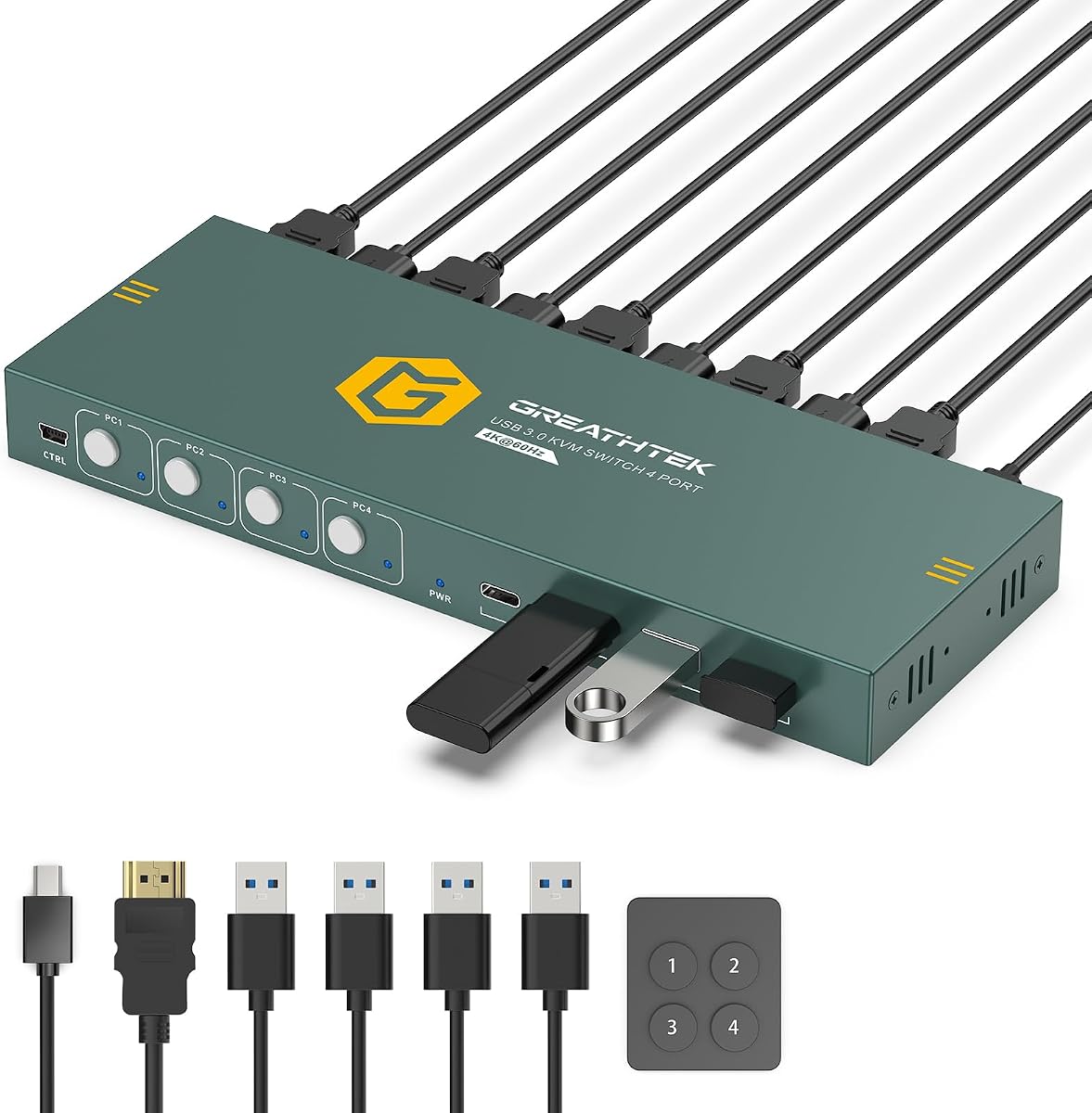
This four-port HDMI KVM switch is a strong all-around choice for a desk that alternates among four computers while using one monitor. Its 4.8 rating is the highest among the listed products, and its combination of 4K at 60Hz, adaptive EDID, four shared USB data ports, and two direct switching methods covers the essential needs of most single-screen workspaces.
We may earn a commission when you buy through this link, at no additional cost to you.
The switch uses HDMI 2.0 and can deliver 3840 by 2160 at 60Hz, as well as 4K at 30Hz, 1080p, and lower resolutions. Its adaptive EDID feature is designed to help connected systems recognize the display and apply suitable settings when the selected computer changes. For shared peripherals, it provides three USB-A 3.0 ports and one USB-C data port with transfer rates up to 5Gbps.
Operation is straightforward: numbered front-panel buttons select a computer directly, while the included wired desktop remote offers the same one-touch control when the unit is mounted out of reach. LED indicators identify the active computer. One meaningful limitation is the lack of hotkey switching. There is also some ambiguity in the package description about included HDMI and USB cables, so buyers should confirm the current box contents rather than assume every required cable is present.
This is the most straightforward recommendation for a home office, IT bench, or test setup using four HDMI computers and one display. It suits users who want useful 4K performance and convenient remote switching without moving into the complexity of a multi-monitor system. The supplied mounting hardware also makes it a practical choice for a permanently organized workstation.
Direct numbered buttons and the wired remote remove the need to hunt for an on-screen hotkey command. That makes this model especially convenient when the switch is mounted beneath a desk or placed away from the keyboard.
The combination of 4K at 60Hz and four shared USB 3.0 data connections covers common productivity peripherals, including keyboards, mice, webcams, printers, and removable storage.
We may earn a commission when you buy through this link, at no additional cost to you.
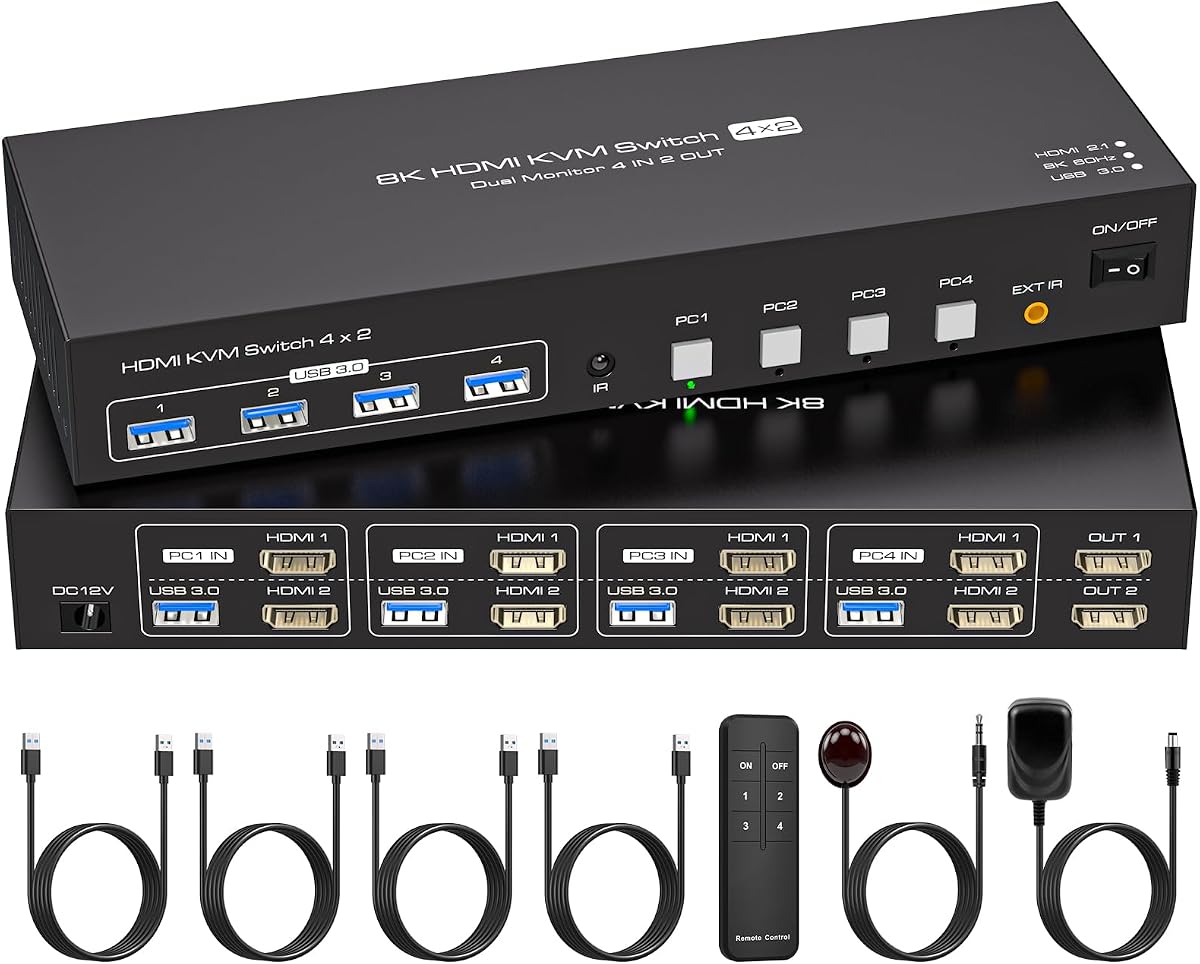
This dual-monitor HDMI KVM switch is an excellent fit for professionals who need four computers to control two displays without constantly moving cables. It earns the Editor's Choice distinction because it combines broad resolution support, EDID emulation, copy and extend modes, four USB 3.0 connections, and panel or infrared remote switching in a focused four-PC design.
We may earn a commission when you buy through this link, at no additional cost to you.
The listed maximum is 8K at 60Hz, with support for 4K at 120Hz and backward compatibility with 2K, 1080p, 720p, 480p, and 240p. Both the computer hardware and cables must support the target resolution. The display arrangement is flexible: duplicate mode shows the same image on both monitors, while extended mode allows different content on each screen.
Its built-in EDID emulation is especially valuable for a dual-monitor setup. It is intended to retain monitor parameters and prevent window positions from being rearranged every time the active computer changes. The four USB 3.0 ports operate at up to 5Gbps and can support keyboards, mice, printers, webcams, and flash drives. Front buttons and an infrared remote provide direct selection of the active computer.
This is the recommendation for users whose four PCs each have two HDMI outputs and whose two monitors each use HDMI. It suits editing, monitoring, office productivity, and other workflows that benefit from a larger visual workspace. The external 12V 1A power supply should be connected for stable operation, and a computer must support its intended display configuration.
EDID emulation helps retain resolution, refresh rate, and display identification. In a daily multi-PC workflow, that can reduce the repeated window rearrangement associated with basic video switching.
Copy mode is useful for showing the same information on both displays, while extend mode supports separate tasks. This flexibility makes the switch useful for monitoring, design, and general productivity.
We may earn a commission when you buy through this link, at no additional cost to you.
UGREEN's single-monitor model stands out for its six shared USB ports, including four USB 3.0 and two USB 2.0 connections. It gives four computers access to a keyboard, mouse, storage devices, webcams, and other peripherals while maintaining 4K at 60Hz video and a 4.7 rating.
We may earn a commission when you buy through this link, at no additional cost to you.
The switch supports 4K at 60Hz, 4K at 30Hz, 1080p at 240Hz, and lower resolutions. HDMI 2.0, HDCP 2.2 and 1.4, 3D, and HDR are listed as supported display features, although the input and output devices must use consistent compatible settings. EDID emulation can be enabled by holding button one for approximately five seconds until the indicators flash three times.
Two control methods are available: a front-panel button and an included wired desktop controller. Windows, macOS, and Linux are supported without installing drivers. The switch does not support docking station use, and each computer needs both an HDMI connection and a USB-A-to-C data cable for normal operation. The power supply, HDMI cable, and USB host cables are not included.
This is a strong option for a four-PC office or test bench where numerous shared USB devices matter more than multiple monitors. Buyers should budget for the appropriate host cables and external power, and should not expect the product to operate as a conventional docking station. Its generous port selection and accessible EDID process distinguish it from simpler four-port switches.
Six ports make this model practical when a keyboard, mouse, webcam, printer, and one or more storage devices must remain connected at the same time.
The EDID activation sequence is straightforward, and the wired controller makes direct source selection possible even when the main unit is away from the main work area.
We may earn a commission when you buy through this link, at no additional cost to you.
The KCEVE KVM is the premium option in this roundup because it supports an unusually elaborate four-computer, four-monitor arrangement. It combines DisplayPort and HDMI connectivity, USB 3.0 sharing, physical and wired controls, copy and extend behavior, and a dedicated 3.5mm audio connection for a broad professional feature set.
We may earn a commission when you buy through this link, at no additional cost to you.
Each computer must provide three DisplayPort outputs and one HDMI output to use all four displays. That means every source needs a substantial collection of video cables and suitable graphics hardware. The description references 8K at 60Hz, while the product title also advertises 8K at 30Hz and 4K at 144Hz, so users should verify the exact mode supported by their displays, adapters, computers, and cables.
The switch can copy a main screen to a second output or allow a window to be dragged between outputs in extended mode. Four USB 3.0 ports share a keyboard, mouse, printer, scanner, or storage device at up to 5Gbps, and the 3.5mm jack adds a convenient audio route for streaming, meetings, and online education. Physical buttons and a larger wired controller provide source selection.
This model makes the most sense for a specialized workstation where four large displays are central to the job. It may be excessive for general office use, but for multi-screen trading, production, engineering, or monitoring setups, consolidating four complete systems through one hardware unit can be highly valuable. Verify every source and display connection before buying.
Few conventional desktop KVM switches can manage four displays for each of four computers. This model fills that niche for users whose daily workflow depends on extensive visual real estate.
The combination of extended display layouts, fast USB sharing, and analog audio is particularly relevant to production, monitoring, live streaming, and education environments.
We may earn a commission when you buy through this link, at no additional cost to you.
This switch targets users who want a single high-refresh display connected to four HDMI computers. Its headline capability is support for 4K at 120Hz and 8K at 60Hz, while four USB 3.0 ports handle a keyboard, mouse, printer, and removable storage. Its 4.2 rating reflects a more specialized proposition than the leading general-purpose models.
We may earn a commission when you buy through this link, at no additional cost to you.
Video support depends on the entire chain. The computer, monitor, and cables must all support 8K or 4K at 120Hz, and conversion cables are not supported. The switch includes an EDID function, a controller, an IR extension receiver, a 12V 1A power supply, four USB 3.0 cables, a manual, and an after-sales card.
The IR extension receiver is useful when the main unit needs to sit away from the monitor or keyboard. It allows the controller to switch computers from a wider range of positions. Installation is driver-free and intended to work with Windows, Mac, and Linux. A keyboard, mouse, printer, and hard disk can share the four USB 3.0 connections.
The primary audience is a single-monitor user working with demanding visual tasks, fast-refresh displays, or high-resolution source hardware. It is less suitable for a desk needing two displays because it does not offer a second video output. Check that every connected computer has native HDMI output and that the intended monitor and cables support the desired refresh rate.
Supporting 4K at 120Hz can benefit motion-heavy applications when the source computer, display, and cables also support that mode.
The included IR extension receiver extends the practical range of the controller, making the switch easier to operate when it is not beside the keyboard.
We may earn a commission when you buy through this link, at no additional cost to you.
UGREEN's aluminum 8K model offers one monitor, four computers, and four shared USB 3.0 data ports in a more refined enclosure. It is particularly relevant to users with demanding graphics hardware because the listed video modes include 8K at 60Hz, 4K at 240Hz, 4K at 60Hz, 4K at 30Hz, 1440p at 120Hz, and 1080p at 240Hz.
We may earn a commission when you buy through this link, at no additional cost to you.
The video connections are HDMI rather than DisplayPort, and the listing explicitly identifies the product as not being a DisplayPort KVM switch. HDCP, 3D, and HDR support are listed. Users can select a source with the front button or the included desktop controller, and the switch works with Windows, macOS, and Linux without additional drivers.
Its 4.0 rating should be considered alongside the fact that EDID emulation is not supported. Without that feature, display recognition or window layout may depend more heavily on the source systems and operating systems. The product also cannot be used with a docking station, and each PC must be connected with an HDMI cable and a USB-A-to-C data cable. A power connection is recommended for stable use.
This is a good fit for a high-performance single-screen workstation where the computer, monitor, and cables support advanced resolutions. It can also serve game consoles and other HDMI sources. It is less attractive for users who depend on consistent EDID behavior across several systems, making the EDID-equipped UGREEN model a better choice for that specific need.
The wide range of advertised refresh rates provides headroom for modern high-end monitors. Actual results remain dependent on graphics hardware, operating systems, and display support.
The aluminum enclosure gives the unit a more permanent-workstation appearance, while front-panel and desktop-controller options provide practical source selection.
We may earn a commission when you buy through this link, at no additional cost to you.
This four-port HDMI KVM is a simple option for sharing one monitor, keyboard, and mouse among four computers. Its 4.2 rating, 4K at 60Hz support, adaptive EDID, and familiar front-panel and wired-remote controls cover the fundamental needs of a compact multi-computer desk.
We may earn a commission when you buy through this link, at no additional cost to you.
Video output reaches 3840 by 2160 at 60Hz and also supports 4K at 30Hz, 1080p, and lower resolutions. Adaptive EDID is intended to identify connected displays. Peripherals connect through three USB 3.0 ports and one USB-C port, allowing keyboards, mice, cameras, flash drives, and similar devices to be shared.
Source selection is handled by white numbered buttons on the front panel or the included wired remote keypad. LED indicators reveal the active computer. The product does not support hotkey switching, which means users who prefer keyboard commands should choose a different model. The package description includes an HDMI cable, four USB 3.0 cables, a power cable, a controller cable, and the desktop controller.
This switch is best for a home office, small IT station, or test bench where four basic PCs are already equipped with HDMI. It avoids the complexity of multi-display matrices and offers a clear package with several host cables included. Its single-monitor format and modest rating mean it is less compelling for advanced workflows, but it remains a functional choice for routine management tasks.
Numbered buttons and a matching numbered remote make the active source obvious. That simplicity is useful in shared offices and quick-access technical environments.
The stated bundle includes an HDMI lead and four USB 3.0 host cables, reducing the number of separate accessories needed for a basic installation.
We may earn a commission when you buy through this link, at no additional cost to you.
The Hearvo S7415H is a one-monitor, four-computer KVM built around HDMI connectivity, shared USB devices, and simple direct switching. It supports 4K at 60Hz, 4K at 30Hz, 2K, 3D, and 1080p, while HDCP 2.2 is included for compatible protected content.
We may earn a commission when you buy through this link, at no additional cost to you.
The switch provides four USB 3.0 data ports, described as three USB-A and one USB-C, with transfer rates up to 5Gbps. That allows a keyboard, mouse, scanner, printer, flash drive, headset, or webcam to be shared between the four connected systems. Adaptive EDID is intended to stabilize the display connection and optimize the image.
Users can switch with the on-device button or the included wired remote. Windows versions from XP through Windows 11, Linux, and Mac are listed as compatible, and no driver installation is required. The package includes an HDMI cable, four USB 3.0 host cables, the remote, a manual, a protection plan card, and four anti-slip rubber pads.
This model is most appropriate for a general-purpose four-PC desk where 4K, common operating systems, and a tidy one-monitor layout matter. Some product copy is inconsistent about how many computers the peripherals serve and whether two HDMI ports are involved, so carefully reviewing the current listing and port diagram is advisable. The 4.0 rating also places it behind several higher-rated alternatives.
Support for major desktop operating systems and driver-free operation makes the switch relevant to mixed-company IT environments where source machines may not share the same software.
Shared peripherals and a remote control reduce the number of cables attached directly to the desk while keeping four source computers ready to use.
We may earn a commission when you buy through this link, at no additional cost to you.
The AOOCOO triple-monitor switch is a middle ground between basic one-screen models and elaborate four-screen matrices. It allows four desktops to share three monitors, four USB 3.0 ports, and one keyboard-and-mouse setup, making it well suited to professional desks that need more room than a single display.
We may earn a commission when you buy through this link, at no additional cost to you.
Each computer connects through two DisplayPort inputs and one HDMI input. The HDMI portion supports 8K at 60Hz, 4K at 120Hz, and 4K at 60Hz, while the DisplayPort portion supports 8K at 30Hz and 4K at 144Hz. The source computer must support multi-display output, and suitable HDMI 2.1 and DisplayPort 1.4 cables are needed for the highest modes.
Copy and extend modes allow the displays to show matching or independent content. The switch provides four USB 3.0 ports for a keyboard, mouse, printer, scanner, and other peripherals. Users can select a computer with the panel button or the included wired remote. A 12V power adapter, four USB 3.0 cables, the remote, and a manual are included.
This is a compelling choice for designers, analysts, and advanced office users who routinely run three screens across several machines. Systems using both integrated and discrete graphics require careful port planning, because the listed setup expects the required connections to be available from the chosen graphics output arrangement.
The three-display format offers a practical middle ground for demanding desks and can be easier to cable than a four-monitor system.
Separate HDMI and DisplayPort capabilities allow each display to work within its supported resolution and refresh-rate range, provided the entire connection chain is compatible.
We may earn a commission when you buy through this link, at no additional cost to you.
This dual-monitor KVM is built around four computers, two HDMI displays, and four shared USB 3.0 peripherals. Its most important feature is EDID emulation, which stores the monitor's resolution and refresh rate so screen order and window placement can remain consistent when the selected computer changes.
We may earn a commission when you buy through this link, at no additional cost to you.
The listed video ceiling is 8K at 60Hz, with 4K at 144Hz and backward compatibility including 4K at 60Hz, 1080p at 60Hz, and 720p at 60Hz. Reaching the highest resolution requires a compatible source, monitor, and HDMI cable. Every computer must have two HDMI outputs, or an active adapter may be necessary when suitable ports are unavailable.
Copy mode can present the same image on both screens, while extend mode provides separate workspaces. The four USB 3.0 ports support wired or wireless keyboard and mouse devices, printers, scanners, and similar accessories at up to 5Gbps. Control is available through panel keys, an infrared remote, and an included IR cable receiver that can be placed away from the main unit.
The switch is best for users who depend on a consistent two-monitor layout across four systems, such as analysts, editors, and administrative teams. Compared with a model lacking EDID emulation, it may reduce repeated desktop rearrangement. Its 4.4 rating places it among the stronger dual-screen options, although the ranked dual-monitor alternative offers broader explicit refresh-rate support.
EDID emulation stores display information and helps preserve window order when switching among four sources, which is a meaningful advantage on a frequently changing desk.
Panel keys, an infrared remote, and a separate IR receiver provide several ways to operate the switch while allowing the enclosure to remain out of sight.
We may earn a commission when you buy through this link, at no additional cost to you.
The best KVM switch for 4 computers is determined less by the port count alone and more by whether its display architecture, resolution, peripherals, and controls match the user's actual equipment. Start with the number and type of monitors, then verify every source connection and operating requirement before purchasing.
A single-monitor switch routes one video stream to one display and is the least complicated option for a basic four-PC desk. Dual-monitor models support two displays per computer, while the triple- and four-monitor products in this guide serve demanding professional workstations. More screens create a larger bandwidth and cabling burden, and every source computer must have enough compatible outputs to support the selected arrangement.
Most of the included switches use HDMI, but the premium four-monitor model and triple-monitor model also use DisplayPort. The connection standard affects supported resolution, refresh rate, cable requirements, and compatibility with laptops, graphics cards, and monitors. Do not assume that a product advertising 8K can deliver 8K to every display or computer; the source, switch, cable, and monitor must all support the intended mode.
For general productivity, 4K at 60Hz offers a practical balance of detail and bandwidth. Specialized users may want 4K at 120Hz or 144Hz, 1080p at 240Hz, or 8K output. These higher rates often demand specific HDMI or DisplayPort versions, short or appropriately rated cables, compatible graphics hardware, and monitor support. Claims about maximum resolution do not guarantee that every connected source or display can reach that mode.
EDID emulation helps a connected system identify the display and retain settings such as resolution, refresh rate, and arrangement. This is especially useful in multi-monitor offices because it can reduce repeated window rearrangement and display reconnection. Some switches instead use adaptive EDID, while the UGREEN 8K aluminum model explicitly does not support EDID emulation. Confirm what behavior the device actually provides rather than treating all EDID-related descriptions as equivalent.
The shared USB ports determine how many peripherals can remain connected at once. Most models provide four USB 3.0 data ports, although the UGREEN single-monitor switch adds two USB 2.0 connections for a total of six. Pay attention to the mix of USB-A and USB-C, and whether the USB-C port is a data connection or only for power. Every source computer also needs its own host cable, typically USB-A-to-C, even when it uses a traditional USB keyboard and mouse.
Most models provide numbered front-panel buttons, while many add a wired remote or infrared controller. Wired remotes are straightforward and useful when the switch is mounted under a desk. Infrared receivers can add placement flexibility but may depend on line of sight. Hotkey switching is explicitly unsupported by several products, so users who want a keyboard command should not assume it is available. LEDs are valuable for confirming the active source in every arrangement.
A complete four-PC installation can require several HDMI or DisplayPort cables, four USB host cables, a power connection, and a remote. Some products include much of that kit, while others explicitly exclude the HDMI cable, host cables, or power adapter. Several models recommend or require an external 12V power supply for stable operation. The package descriptions for some products are also unusually detailed or inconsistent, so the current box contents should be checked before ordering.
Most switches are driver-free and support major desktop operating systems, but details still matter. Some products list Windows, macOS, and Linux, while others add older Windows releases, Unix, or specific console compatibility. Laptops should be fully awake rather than asleep when a source is selected. Docking station use is expressly unsupported on two UGREEN models, and systems with discrete and integrated graphics may require the switch's display connections to be arranged on the same graphics controller.
Begin by identifying the video and USB connections required for each source. Connect every computer to the switch before attaching the monitor, keyboard, mouse, and shared peripherals. For a multi-monitor model, connect the specified number of HDMI or DisplayPort leads to each computer, then connect the corresponding outputs to the displays. Plug in the power supply where required, and wait for the source indicators to stabilize.
To switch computers, use the numbered front-panel buttons, wired remote, infrared controller, or supported hotkey command. Give the new source time to complete display handshaking, especially at high resolutions. If a screen appears blank or uses an unexpected arrangement, confirm that the monitor input matches the selected output, the host cables are seated, and the source is awake. Avoid pressing the switch or controller during initial cable connection.
For routine care, keep the enclosure dry and away from dust, strong heat, and liquids. Route video and power cables separately from frequently pulled USB leads to reduce strain. Periodically inspect connectors for looseness, clean the vents if the unit develops them, and avoid placing heavy objects on the housing. Update computer graphics and display settings when the hardware changes, and verify cable and resolution compatibility before adding a new operating system or source device.
Yes, that is the core function of a four-port KVM switch. Each connected computer receives video and USB data connections, while a keyboard, mouse, monitor, and selected peripherals connect to the switch. The user then changes the active source using the available control method. Additional cables for the four computers may be required even when the switch itself includes some accessories.
No. Most switches are driver-free and are designed to work across major desktop systems, including Windows, macOS, and Linux. Compatibility still depends on the source device's video output, sleep state, graphics configuration, and the switch's stated limitations. Check the listing and test with a representative computer before deploying the switch across an entire office.
Copy mode sends the same displayed content to both screens. Extend mode treats the displays as a larger desktop so applications and windows can occupy different areas. Copy mode is useful for presentations and synchronized monitoring, while extend mode is better for general productivity, creative work, and detailed multitasking. Not every switch in the roundup supports both modes.
Generally, a switch can output a lower resolution when the connected source, monitor, and cables support it, but compatibility should be confirmed in the product specifications. Actual performance also depends on the graphics hardware, operating system, EDID behavior, and available input connections. Maximum resolution is a device capability rather than a guarantee for every attached screen.
Windows and macOS may apply different display settings when they connect to a new source. A switch with EDID emulation or adaptive EDID can reduce this issue by helping preserve display identification, resolution, and layout. Switches without effective EDID handling, along with incompatible graphics settings, may cause more frequent rearrangement. Keeping resolution and scale settings consistent across all four computers also helps.
Yes, provided those devices are connected to the switch's shared USB ports and the active computer has the required host cable. USB 3.0 ports provide faster data transfer, while USB 2.0 devices can usually operate on them when compatible. High-power storage, hubs, and unusual adapters may require separate power or may behave differently, so check device requirements before connecting them.
A wired remote is predictable and works without a clear line of sight to the switch. An infrared controller offers more placement flexibility, but its receiver generally needs to see the remote signal. Some products include an IR extension receiver, which can solve placement issues. Select the method that best fits where the switch is mounted and how you prefer to control it.
No. Inclusion varies considerably across the products reviewed. Some packages include an HDMI cable and four USB host cables, while others explicitly exclude HDMI cables or the power adapter. Because four computers can require numerous video cables, count the existing leads and verify the package contents before ordering. Suitable high-speed or high-resolution cables may also be needed for the advertised modes.
The four-port single-monitor HDMI switch is the strongest general choice for a straightforward four-computer desk, offering 4K at 60Hz, adaptive EDID, USB 3.0 sharing, and a convenient wired remote. The dual-monitor model is the better fit for a larger professional workspace, while the KCEVE four-monitor unit serves specialized users who need the greatest display capacity and a broader mix of connectivity.
Prioritize compatibility over headline specifications. Confirm the number and type of monitor connections on every source computer, the intended resolution and refresh rate, the number of shared peripherals, and whether EDID behavior matters in your workflow. A simpler switch that meets those requirements is usually preferable to a more advanced model that introduces incompatible ports or unnecessary setup constraints.
Finally, check the current product listing, included accessories, power requirements, and prices before buying, as technical details and bundles can change over time. The review information in this guide is intended to narrow the field, while the latest manufacturer and retailer details should confirm that the selected KVM switch is ready to work with your exact four-computer setup.