
Kayoubi 14.5 Inch LCD Writing Tablet for Kids
4.5Editor score
Roomy 14.5-inch screen
One-click erase control
Lock preserves artwork
Our LCD Writing Tablet for Kids Doodle Board guide compares 10 colorful, erasable screens, sizes, portability, battery designs, and learning uses for families.
An LCD writing tablet gives children a portable place to draw, practice letters, work through early math, or leave messages without creating piles of paper and ink-stained cleanup. A good doodle board feels responsive, provides enough room for creative expression, and is simple for small hands to operate independently.
We compared ten LCD writing tablets using the information available for each model, focusing on screen size, pressure sensitivity, erase and lock controls, stylus storage, power design, portability, and suitability for children. The list includes compact travel boards, roomy creative surfaces, multipacks, and rechargeable models.
Each review explains what makes the tablet distinctive while also identifying limitations in the available information. The top choices represent strong combinations of screen area, portability, and everyday usefulness, while the remaining models show how size, power, and bundled accessories can change the best fit for a particular child.
4.5Editor score

4.5Editor score

4.5Editor score
The table below compares all ten boards by their most meaningful practical features: drawing area, power approach, portability, and everyday creative or learning functions.
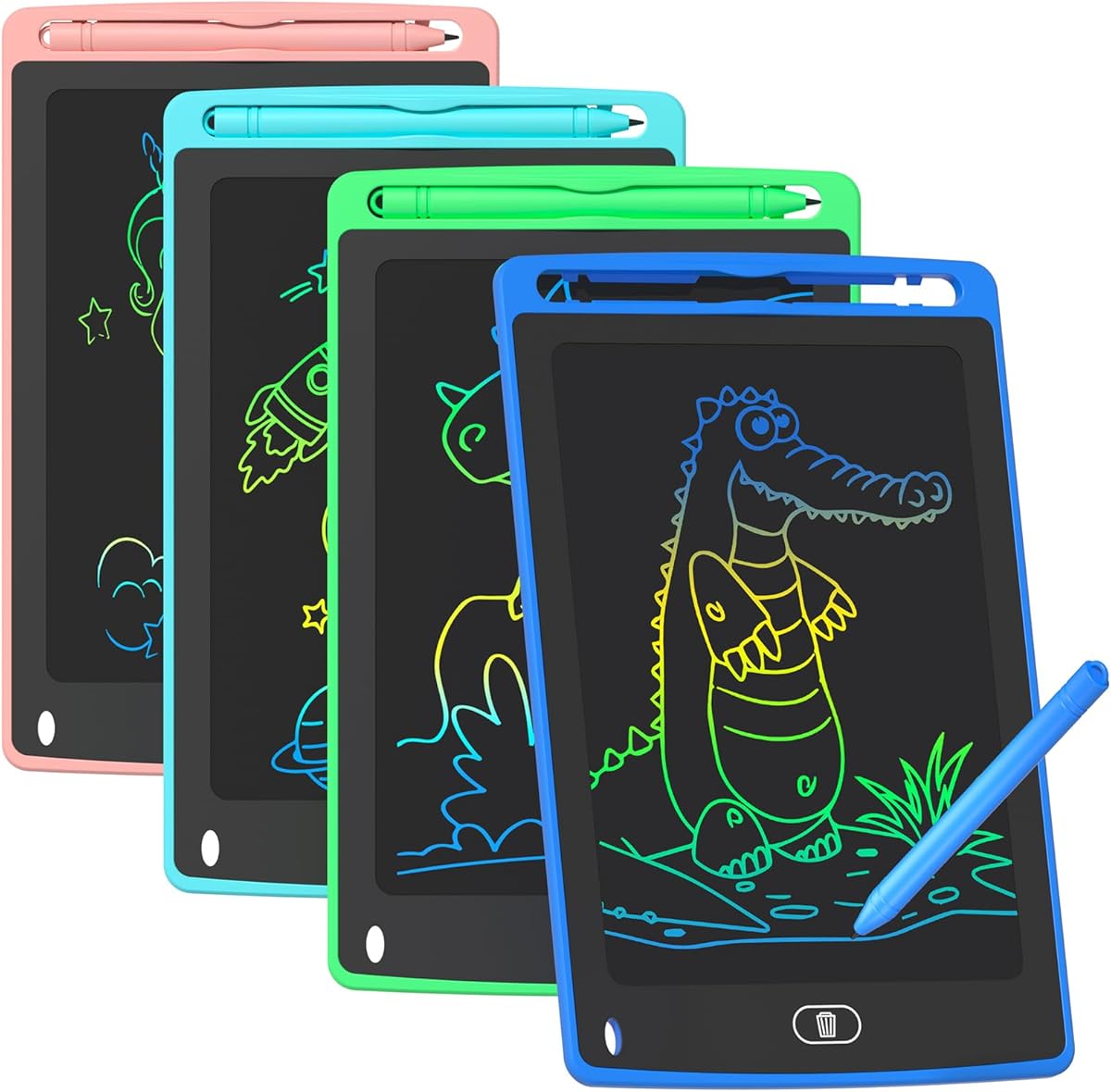


The TQU 4 Pack LCD Writing Tablet is a colorful four-board set designed for children ages 3 through 8, with a 4.5 rating among the strongest groups in this comparison. Its defining advantage is not one oversized canvas but the inclusion of four separate 8.5-inch boards in blue, light blue, green, and pink. That arrangement makes it especially practical for siblings, classrooms, playdates, or families who want a spare board available in another location.
We may earn a commission when you buy through this link, at no additional cost to you.
Each board uses flexible liquid crystal technology and pressure-sensitive input, so children can vary line thickness by changing how firmly they press the stylus. The front erase button clears the surface quickly, while the lock switch protects a drawing from accidental erasure. The stylus fits into a built-in storage position on the tablet, which reduces the chance that it will disappear inside a school bag or travel case. The replaceable button battery also avoids requiring a charging cable during short outings.
The trade-off is screen area. At 8.5 inches, these boards are smaller than the 12-, 14.5-, 16-, and 20-inch alternatives, so a child working on a detailed landscape, large alphabet chart, or multiple math problems may need more erasing or use several boards. Four separate units also take up more storage than one larger tablet, and the supplied information does not mention a rechargeable battery, lock positioning on every edge, or any advanced digital features. It is a straightforward writing and drawing set rather than a connected device.
This is the strongest option for households that value variety, sharing, and low-fuss portability more than a maximum drawing surface. It is also a sensible choice for a parent seeking several inexpensive birthday or holiday gifts, although the provided data does not indicate that the four boards share a single charging system. For one child working alone at a desk, a single larger tablet may offer more continuous space; for multiple children or shared settings, the TQU set is especially adaptable.
Four individual tablets let children draw simultaneously without sharing a single surface. They also work well for separate rooms, classroom stations, travel bags, and activity rotations, giving the set more flexibility than a conventional one-board gift.
A front erase button and dedicated lock switch create a straightforward workflow: draw, erase, or lock the image. The stored stylus helps children begin quickly, while the compact screen makes the boards easier to carry than larger alternatives.
We may earn a commission when you buy through this link, at no additional cost to you.
The Kayoubi 14.5 Inch LCD Writing Tablet combines a large canvas with the simplicity expected from a children’s doodle board. Its 4.5 rating places it among the most consistently rated options here, and its 14.5-inch screen offers substantially more room than the compact 8.5-, 10-, and 10.5-inch models. That makes it a compelling middle ground for children who want to draw broadly without moving up to one of the largest tablets.
We may earn a commission when you buy through this link, at no additional cost to you.
The board supports doodling, sketching, and writing, while its one-click erase control allows a child to reset the surface quickly. A separate lock function preserves a completed drawing during a creative burst and protects it from accidental deletion. The display is described as non-illuminated and free from harsh blue light or glare, making it visually similar to working on paper rather than looking at a conventional self-lit screen. The reusable format also removes the recurring need for paper, markers, and other coloring materials.
The available listing information is concise and does not clarify the exact battery type, charging method, body weight, or whether the stylus is attached. Those omissions matter because portability and power convenience are central considerations for travel toys. However, the core drawing experience is clearly presented: a large colorful surface, instant clearing, and a lock. It is also positioned for children ages 3 to 8, teens, and adults, so the simple interface has broad potential.
The Kayoubi board is a strong selection for families seeking a large but uncomplicated doodle board at an accessible tier. It suits floor play, tabletop creativity, letter practice, storytelling, and sessions where a child may want more room than a compact travel model offers. Buyers who require a known rechargeable runtime or a tethered stylus should review the current listing carefully, but for core screen area and controls, this is one of the most balanced choices in the guide.
The 14.5-inch display provides ample room for free drawing and learning exercises while remaining smaller than the 16- and 20-inch boards. That middle position can help families avoid choosing a tablet that feels oversized for a young child or travel bag.
The screen is described as non-illuminated, with no harsh blue light or glare. For children using the board for drawing, writing, and storytelling, this paperlike visual approach is a meaningful advantage over many bright digital displays.
We may earn a commission when you buy through this link, at no additional cost to you.
The Kinayue 16 Inch LCD Writing Tablet is one of the most fully described products in this roundup, with a 4.5 rating and a feature set aimed at children ages 3 to 8. Its 16-inch backlit LCD screen gives young artists a generous canvas for graffiti, shapes, letters, and early learning activities. The listing also emphasizes a smooth drawing sensation that resembles writing on paper and pressure-sensitive lines that vary in thickness.
We may earn a commission when you buy through this link, at no additional cost to you.
Power comes from a built-in lithium polymer battery charged through a supplied Micro-USB cable. The stated operating period is as long as six to nine months on a full charge, which is notably convenient compared with replacing a coin cell. A second front-facing control locks the display so a child can preserve a picture, while the power or erase control clears the unlocked screen. The compact, rounded stylus is stored in a slot and connected to the tablet by a stretch cord, reducing the likelihood of it being misplaced.
Durability is another priority. The product combines a flexible LCD screen with an impact-resistant ABS shell, while the battery is concealed inside the case. The listing states that the 200mAh battery supports more than 100,000 writing cycles. These details should make the Kinayue appealing for frequent use, although the 16-inch footprint is naturally bulkier than the 8.5- through 12-inch alternatives and may require a dedicated carrying space.
This is a well-rounded recommendation for a child who wants a large creative surface, a rechargeable power system, and a stylus that is difficult to lose. It is especially useful for travel, drawing sessions, and learning activities that require enough space for a full illustration or several lines of practice. Families who prefer the smallest possible travel board may prefer a 10-inch model, but those willing to carry a larger tablet gain a more expansive and feature-focused experience.
The built-in lithium polymer battery and Micro-USB charging system remove the need for routine coin-cell replacement. A long advertised charge life can also make the board convenient for everyday creativity rather than a toy reserved for rare occasions.
Keeping the stylus connected to the board while also providing a dedicated storage slot makes it less likely that the drawing tool will vanish. Young children can therefore begin using the tablet with less adult assistance.
We may earn a commission when you buy through this link, at no additional cost to you.
The KOKODI 16 Inch LCD Writing Tablet delivers a generous canvas with a 4.5 rating and enough flexibility to serve children, teenagers, and adults. The listing describes it as an electronic drawing pad for ages 3 through 8, but it also suggests uses such as school drafting and meeting notes. That flexibility makes it more than a narrowly focused preschool toy, particularly for households with children at different developmental stages.
We may earn a commission when you buy through this link, at no additional cost to you.
The display creates colorful lines at different depths according to pressure, giving children more expressive results than a completely uniform mark. A one-click erase function clears the screen, and a separate lock protects the artwork from accidental deletion. Power comes from a replaceable battery secured with screws and positioned where young children are unlikely to access it. The product is described as reusable and capable of replacing approximately 1,000 sheets of paper over its useful life.
The main compromise is power management. Unlike a built-in rechargeable tablet, this model depends on a replaceable battery, and the stated three-to-six-month use period will vary according to how actively it is used. Its 16-inch screen also makes it larger than models intended to disappear into a small handbag. The supplied information does not describe the battery type, charging method, exact weight, or a tethered stylus, so adults may want to confirm those details before making a portability-focused purchase.
The KOKODI is a good general-purpose pick for drawing, letter practice, math work, note-taking, and family brainstorming. Its large screen reduces the need for constant erasing, while the lock function helps preserve a finished creation. It is especially useful for a child ready for more substantial drawing than a compact travel board can accommodate. Families prioritizing the simplest possible power routine may favor the rechargeable Kinayue model instead.
The same tablet can move from doodling and preschool practice to homework drafting and adult notes. That broadens its usefulness and makes it easier for siblings of different ages to share.
Screw-fixed battery access helps keep the power source out of young children’s reach. When the battery eventually needs replacing, the tablet can continue serving as a reusable drawing and writing surface.
We may earn a commission when you buy through this link, at no additional cost to you.
The Rechargeable 16 Inch Blue LCD Writing Tablet is designed for children ages 3 through 8 and carries a 4.5 rating. Its main feature is the combination of a large 16-inch flexible LCD screen and a built-in rechargeable battery. It is also notable for including two styluses, which lets a child and adult draw together or gives siblings equal access without having to share one tool.
We may earn a commission when you buy through this link, at no additional cost to you.
The board is positioned for a broad range of activities: doodling, spelling practice, mathematics, notes, and brainstorming. A front erase button clears the screen in one press, and a lock switch on the back preserves an image. The charging system is advertised as delivering up to nine months of playtime from one charge, while the sealed ABS body keeps the battery inaccessible to small hands. The display is described as non-luminous, with bright lines produced through flexible LCD technology rather than a glowing screen.
Its main drawback is size. A 16-inch drawing surface is excellent for a broad drawing or group activity, but it is not as easy to carry as a 10-inch board. The rechargeable design also means the tablet must be connected to power for charging, and the supplied listing information does not identify the charging connector or exact charging time. These are practical details to verify, but the built-in battery avoids recurring coin-cell replacement and supports frequent use.
This is a particularly strong choice for families who want screen area and easy charging in one tablet, particularly if an adult will frequently draw or practice alongside a child. It suits road trips, long restaurant waits, camp activities, and shared bedtime storytelling. A smaller family may prefer one of the lightweight 10-inch options, but for a child who creates expansive pictures, the 16-inch surface provides useful room to develop ideas without erasing.
Including two styluses makes shared drawing more comfortable and gives a parent an easy way to demonstrate letters, shapes, or simple illustrations. It also reduces competition when two siblings use the board together.
A sealed rechargeable battery removes the need for routine disposable-battery changes. The advertised long charge duration is especially appealing for a frequently used family activity or travel essential.
We may earn a commission when you buy through this link, at no additional cost to you.
The BUKEBU 10.5 Inch LCD Writing Tablet earns a 4.6 rating, matching the highest rating in this guide, and combines a compact body with a screen large enough for everyday drawing and preschool practice. Its non-self-illuminating display is described as free from glare, radiation, dust, and ink, offering a more paperlike appearance while children draw, count numbers, or spell words.
We may earn a commission when you buy through this link, at no additional cost to you.
Portability is a central strength. The ABS shell has rounded corners and shock- and drop-resistant features, while the entire board weighs only 200 grams. At that weight, it can fit more readily into a school bag, handbag, or small travel pouch than the 14.5- to 20-inch alternatives. A side lock prevents accidental erasure, and the front erase button clears the entire screen in about one second. The board is reusable and described as capable of supporting approximately 100,000 uses.
Power comes from a replaceable button battery, which keeps charging cables out of the travel routine but does require eventual replacement. The listing also mentions an 18-month replacement service for its LCD tablets, although that should not be confused with a battery warranty or a guarantee of product lifespan. As with other mid-sized boards in this category, children working on a full-page illustration or a complex diagram may find 10.5 inches less expansive than they want.
The BUKEBU is an excellent fit for children who doodle during short waits, travel in a school bag, or use a board at the dinner table. It is light enough for small hands to manage and straightforward enough for independent use. The combination of high ratings, a paperlike display, and a manageable 200-gram weight also makes it one of the most balanced compact choices, though a family wanting the widest surface should consider a 16-inch model.
Because the screen is not self-illuminated and is described as glare-free, it offers a different viewing experience from a glowing tablet. The colorful lines remain visible while preserving a familiar paper-and-pen appearance.
At 200 grams with rounded corners, the board is practical for children carrying it between home, school, or activities. Its modest size also makes it easier for a young child to hold and position on a table.
We may earn a commission when you buy through this link, at no additional cost to you.
The FLUESTON 10 Inch LCD Writing Tablet is the most travel-focused board in this guide, with a 4.5 rating, a 10-inch screen, a thickness of just 0.26 inches, and a weight of six ounces. Those dimensions make it easy to tuck into a small bag for flights, road trips, restaurant visits, school, or time at church. It offers enough area for doodling and writing practice without becoming unwieldy for a young child.
We may earn a commission when you buy through this link, at no additional cost to you.
The flexible LCD display uses pressure-sensitive technology to create colorful lines with different depths based on how hard the stylus presses. Because the screen is not self-illuminating and is described as having the same optical characteristics as paper, it offers a familiar writing appearance. The board supports drawing, spelling, counting, messages, and general communication, and the included stylus allows a child to begin immediately. A single-button erase and a screen lock provide basic artwork management.
The replaceable CR2025 button battery is advertised as lasting up to 12 months depending on use. This keeps the device ready for spontaneous travel entertainment without requiring a charger, though parents should keep a suitable replacement battery in mind. The supplied information does not specify a stylus tether or anti-lost arrangement, so the child’s ability to retain the tool depends partly on the storage solution included with the board. It also does not mention a charging cable or rechargeable cell.
FLUESTON is the editor’s choice for families who prioritize portability above nearly everything else. Its slim, lightweight profile allows a child to bring creative entertainment without adding much bulk, and its simple interface suits preschool use. The ten-inch area is less suitable for large illustrations than the Kinayue, KOKODI, or Kayoubi options, but for drawing on a lap during a journey, it is a particularly convincing balance of size, weight, and function.
The combination of a 0.26-inch profile and six-ounce weight is particularly useful for travel. Children can carry the board in a school bag or small activity pouch with little bulk or strain.
The non-illuminating flexible LCD creates colorful marks without the bright, glowing appearance of many digital displays. That familiar visual quality can make writing practice feel more like using paper.
We may earn a commission when you buy through this link, at no additional cost to you.
The KOKODI 20 Inch Blue LCD Writing Tablet is the premium choice in this roundup because its 20-inch screen is the largest included among the ten products. It carries a 4.5 rating and is positioned as a colorful, erasable, reusable electronic drawing pad for children ages 3 through 6. The extra-wide canvas gives young artists substantially more room to explore than a standard portable doodle board.
We may earn a commission when you buy through this link, at no additional cost to you.
A large surface changes the way a child uses a drawing tablet. Instead of treating each sketch as a small isolated mark, a child can build a scene, combine several drawings, write longer words, or draw with another person. It is also easier to use for group activities because several children can gather around one board. The erasable and reusable format preserves that mess-free advantage without requiring paper, crayons, or conventional pigment-based art supplies.
The supplied listing information is considerably more limited than for most of the other products. It does not state the power type, battery life, charging method, exact weight, stylus storage arrangement, lock function, or pressure-sensitivity details. As a result, this model’s 20-inch format should be understood primarily as a size advantage, not as a guarantee of advanced technical features. Its substantial canvas will also naturally be less convenient for small travel bags than the FLUESTON, ORSEN, or BUKEBU models.
The KOKODI 20 Inch is best suited to children with large-scale creative ambitions, families that draw together, and households willing to dedicate more room to the activity. It can function as a shared learning surface for early writing and drawing while keeping the floor and furniture free of traditional art materials. For a child whose pictures fit comfortably on a smaller screen, the premium footprint may offer little practical benefit, so buyers should think carefully about available storage.
A 20-inch canvas gives children room for elaborate drawings, longer writing lines, and multiple connected ideas. It reduces the need to erase early and start over merely because the surface has filled.
Several children can gather around the large board for collaborative stories or family drawing sessions. The reusable electronic format keeps the activity free from paper scraps, marker stains, and pigment cleanup.
We may earn a commission when you buy through this link, at no additional cost to you.
The ORSEN 10 Inch LCD Writing Tablet has a 4.6 rating, placing it alongside the BUKEBU among the highest-rated products in this guide. Its 10-inch colorful screen uses pressure-sensitive technology to vary line thickness, while the eye-protection design is described as having no radiation or glare. It is a straightforward option for children ages 3 through 8 who want to draw, write, count, and doodle without traditional art materials.
We may earn a commission when you buy through this link, at no additional cost to you.
The board weighs only 150 grams, making it the lightest weight explicitly stated among the selected products. Its durable plastic case is described as anti-shock and anti-fall, while the rounded, compact format is easy to place in a travel bag. The stylus is attached by a lanyard so it remains close to the tablet, and the front erase control clears the entire surface. A lock prevents accidental deletion of a completed picture.
Power uses a replaceable built-in battery advertised as lasting up to six months and supporting approximately 100,000 uses. That makes the tablet convenient for spontaneous outings, though eventual battery replacement will be necessary. The 10-inch area is modest beside the 14.5-, 16-, and 20-inch models, and it may require more frequent clearing during elaborate illustrations. The listing also does not mention a screen lock that might preserve one image while allowing a fresh drawing on a separate layer.
ORSEN is a good pick for parents who prioritize low weight, a simple erase function, and a stylus that will not easily disappear. Its pink design and compact dimensions may particularly appeal to children who like a personal, bright accessory. It works well in a school bag, during travel, or for quick tabletop sessions. Those needing a broad collaborative canvas should look toward the 16- or 20-inch KOKODI models instead.
The 150-gram body is easy for a child to carry and small enough for a travel bag. It is a practical option for short drawing sessions rather than a device that occupies a full backpack.
Pressure sensitivity lets children create lines of different thicknesses simply by changing their stylus pressure. The lock control then preserves a finished drawing when it is not ready to be erased.
We may earn a commission when you buy through this link, at no additional cost to you.
The KOKODI 12 Inch Blue LCD Writing Tablet combines a moderately large canvas with a 4.6 rating, matching the highest rating in the guide. The 12-inch screen offers more room than compact 8.5- through 10.5-inch models without reaching the bulk of a 16- or 20-inch board. At 240 grams, it is positioned as a practical choice for school, car travel, restaurants, waiting rooms, and family learning activities.
We may earn a commission when you buy through this link, at no additional cost to you.
The anti-lost stylus lanyard is one of the model’s most useful practical details. The stylus remains attached to the board, reducing the chance of a child losing the only drawing tool. The case is made from durable plastic with rounded corners and is described as waterproof, anti-drop, and anti-shock, giving it a reassuring construction for everyday handling. The board supports drawing, writing, spelling, counting, tic-tac-toe, messages, and group discussion notes.
The reusable design is advertised as replacing approximately 1,000 sheets of paper, and the replaceable battery is secured with screws where young children are unlikely to access it. The stated battery life is three to six months. Like other replaceable-battery options, it avoids charging cables but does require the owner to keep a suitable cell on hand. The board is also not a multi-layer digital device, so saved artwork relies on the lock function rather than separate digital pages.
This model works well for a child who needs more screen area than the smallest travel tablets but does not need the expansive canvas of a 16- or 20-inch model. Its tied stylus and moderate weight make it especially practical for children still developing independent organization. It is also usable by teens or adults for simple notes. For a balanced all-purpose recommendation, the 12-inch KOKODI stands out as a middle-sized board with thoughtful portability features.
The 12-inch screen provides more usable space than a compact travel model while remaining manageable for school bags and activity bags. It is a sensible size for children who often draw detailed pictures.
A lanyard keeps the stylus connected to the board, which is valuable in homes, classrooms, and travel situations where small drawing tools are easily misplaced. It also makes setup quicker for younger users.
We may earn a commission when you buy through this link, at no additional cost to you.
The best LCD doodle board depends on where it will be used, how creative the child is, and how much attention the power system requires. Screen area, weight, controls, and stylus storage should be weighed together rather than judged by one specification alone.
Screen size is the first consideration because it determines how much a child can draw before clearing the surface. Compact 8.5- to 10.5-inch boards are easier to carry and may be more manageable for younger children. A 12- or 14.5-inch board offers a useful middle ground, while 16- and 20-inch models suit expansive illustrations, longer writing practice, shared family activities, and children who frequently create detailed scenes.
In short, prioritize a smaller board for portability or a larger board for serious creative work.
Replaceable button batteries keep the tablet simple and avoid charging interruptions during a trip, but they eventually need replacement. Rechargeable models are more convenient for frequent use and reduce recurring battery purchases. The stated operating period should be treated as a guide rather than a guarantee because brightness, erasing, and drawing frequency can affect actual performance. Buyers should also verify the connector and charging method where those details are not listed.
Choose replaceable power for low-maintenance portability or rechargeable power when the board will be used every day.
A board is easier to use on the move when it is light, thin, and sized to fit an existing activity bag. The FLUESTON weighs six ounces, the ORSEN 150 grams, the BUKEBU 200 grams, and the 12-inch KOKODI 240 grams. Larger 14.5-, 16-, and 20-inch models may still fit many travel routines, but they require more storage and may be less comfortable for a small child to hold.
In short, test the board against the bag and child who will use it, not just against its screen size.
A one-click erase control is essential for independent use by children. The screen lock is equally useful because it preserves a drawing during handling, transport, or a creative burst. Most of the selected tablets place erase near the front for easy access, while some put the lock on the side or back. Buttons should be distinct enough that a young child can understand the difference between clearing the screen and protecting it.
In short, look for an obvious erase button and a separate lock that prevents accidental deletion.
A drawing tablet is difficult to use if its stylus disappears, so stylus storage deserves close attention. The Kinayue combines a dedicated slot with a stretch cord, while the ORSEN and KOKODI 12-inch use lanyards. The TQU stores its stylus on the tablet, and the FLUESTON includes a writing stylus, although its supplied information does not specify a tether. A built-in slot or attached lanyard is especially helpful for children who move between rooms or travel frequently.
In short, choose a board with a slot, tether, or lanyard to keep the essential drawing tool close.
Many of the selected boards use non-self-illuminating flexible LCD screens, which provide a paperlike appearance without the bright glow of a typical display. The BUKEBU and FLUESTON specifically describe glare-free or eye-protection features, while the Kinayue uses a backlit LCD and describes its screen as bright and comfortable. No LCD tablet should be treated as a substitute for varied real-world play, but screen comfort is worth considering for children who will use the board for extended drawing or writing.
In short, favor a non-illuminating or low-glare surface when your child is sensitive to bright digital screens.
Preschool children generally benefit from a simple surface, a responsive stylus, and easy erase controls. Older children can use the same boards for spelling, arithmetic, tic-tac-toe, detailed drawing, or note-taking. Several products also serve teens and adults for drafts, messages, and meetings. Matching the activity to the child is more important than treating a doodle board as a toy with a fixed age limit.
In short, prioritize simple controls for younger users and sufficient canvas for school-age creativity.
LCD tablets reduce dependence on paper, markers, chalk, and pigment-based coloring, which makes cleanup simpler. A four-board set can be especially useful when several children need separate surfaces, but one large model may be more space-efficient for a single child. Consider how the tablet will be stored between uses and whether the family needs one board or several. Secure battery access and a robust case add value where children are likely to drop or carry the device.
In short, favor one large board for focused solo work or multiple compact boards for sharing and different locations.
Begin by removing any protective film from the screen, installing the correct battery or fully charging the tablet, and finding a stable, well-lit surface. A child can use the supplied stylus to write, draw, trace shapes, practice letters, or work through simple arithmetic. Pressure-sensitive models respond to different levels of pressure, so the stylus should be held like a pen rather than pressed forcefully.
Use the erase control when a child wants a clean surface, and activate the lock whenever a finished drawing needs to remain visible. Do not hold the lock engaged while trying to erase, because that setting is intended to prevent deletion. For travel, place the tablet in a protective sleeve and keep the stylus secured in its slot or connected by its lanyard. Allow children to use the board on a table or floor without applying excessive force to the screen.
Care for the device by keeping the LCD surface free of fingerprints, sticky residue, and abrasive materials. Clean it with a soft, dry or lightly damp cloth as appropriate for the casing, and avoid pushing hard on the display or using sharp objects. Replace the battery when performance declines, following the manufacturer’s polarity instructions, and recharge models only with the intended charging setup. A protective case and careful storage help extend the useful life of the board.
Yes, when the device is age-appropriate and used with supervision. The selected products are generally positioned for children around ages 3 through 8, with simple styluses, pressure-sensitive screens, erase buttons, and artwork locks. The most suitable model for a toddler will depend on portability, screen size, durability, and how independently the child can handle the stylus.
They eliminate the need for most paper, markers, and conventional coloring supplies during ordinary use. Because the surface is erased and reused, repeated drawing does not create stacks of used pages or ink-stained work areas. Accessories for transferring saved images are not mentioned in the supplied product information, so the boards are best understood as directly reusable drawing surfaces rather than digital art tools.
A 10-inch tablet is smaller, lighter, and easier to carry, while a 20-inch tablet provides much more continuous drawing space. The larger format is better for elaborate illustrations, longer messages, and group activities, but it needs more storage and may be less convenient for travel. Compact boards work well for quick doodling, while large boards encourage broader, more detailed projects.
Yes. The listed uses include writing, spelling practice, counting, math work, shape recognition, drawing practice, and simple games such as tic-tac-toe. The usefulness depends on the child’s developmental stage and whether the screen provides enough room for the activity. Parents can turn ordinary doodles into lessons by asking the child to copy letters, draw geometric shapes, or work through number problems.
Rechargeable models are generally more convenient for frequent use because they eliminate routine battery replacement. Replaceable-battery boards are simpler for travel and do not require a charging cable. The available product descriptions advertise varying operating periods, so actual runtime will depend on use. Whichever system you select, check that the correct battery or charging equipment is available.
Most of the selected products include a lock switch or lock control. Engaging it prevents accidental erasing and is useful while an adult handles the board, while the child is still working, or during transport. Disengaging the lock restores normal erasing. The illustrations generally remain on the screen until the erase control is pressed rather than being stored as multiple digital pages.
Several products use a non-self-illuminating LCD that resembles paper more closely than a glowing display. The BUKEBU and FLUESTON specifically emphasize low-glare, eye-protection characteristics, while the Kayoubi describes a screen without harsh blue light or glare. These features may appeal to families seeking a less conventional digital experience, although regular outdoor activity and varied forms of play remain important.
Choose a tablet with a built-in storage slot, tether, or lanyard when the child frequently travels with it. The Kinayue has both a slot and a stretch cord, the ORSEN uses a lanyard, and the KOKODI 12-inch includes an anti-lost lanyard. Even with these features, teaching a child to return the stylus to its storage point helps maintain an orderly routine.
The Kayoubi 14.5 Inch offers the strongest balance of a roomy canvas, simple controls, and an accessible product tier. The FLUESTON 10 Inch stands out for families who need an exceptionally thin and light travel board, while the KOKODI 20 Inch provides the largest creative surface for detailed art and shared activities. Together, they represent the three most distinct ways to prioritize screen area, portability, and group use.
For the remaining choices, look first at the way your child actually uses a drawing area. A compact board works well for trips and quick sessions; a 12- to 16-inch model is better for detailed drawings and learning; a four-pack is useful when several children need separate tablets. Rechargeable power favors frequent use, while replaceable batteries keep travel simple. Stylus storage, a secure battery compartment, and a clear lock control can matter as much as the headline size.
Before making a final choice, check the current Amazon listing for the most recent specifications, included accessories, and product details. Ratings and features can change over time, and manufacturer information may be updated. Comparing those current details with the child’s age, available space, and typical activities will lead to the most practical LCD writing tablet choice.


