
Deco 7 Pro Tri-Band BE14000 Wi-Fi 7 Mesh System, 10Gbps Internet, 3 Pack
4.0Editor score
Up to 14 Gbps aggregate speed
10 Gbps wired backhaul
Coverage up to 8,100 square feet
Our expert guide compares 10 mesh WiFi systems for thick walls, covering wireless standards, tri-band backhaul, coverage, ports, and real-world fit.
Thick concrete, brick, stone, foil-backed insulation, and reinforced metal can make a conventional router struggle to deliver dependable Wi-Fi beyond one or two rooms. Mesh systems improve coverage by distributing multiple access points throughout a home, but the best results depend on radio design, backhaul, node placement, and the construction of your walls.
We compared 10 mesh Wi-Fi options based on their published specifications, supported wireless generations, available bands, coverage claims, Ethernet capabilities, roaming features, device capacity, and suitability for difficult layouts. The list includes Wi-Fi 6, Wi-Fi 6E, and Wi-Fi 7 systems, plus one Orbi satellite that requires an existing Orbi router.
Each review identifies the system’s most useful characteristics for thick-wall homes, while noting practical limitations. The top picks emphasize multi-band backhaul, generous multi-gig connectivity, broad device support, and manageable installation. Product availability and prices change frequently, so check the current listing and retailer information before purchasing.
4.0Editor score

4.2Editor score

4.3Editor score
The comparison highlights the standards, radio configurations, coverage targets, device capacities, and wired connectivity that matter most when thick walls separate clients from the main router. It also identifies which products are complete systems and which require compatible hardware.


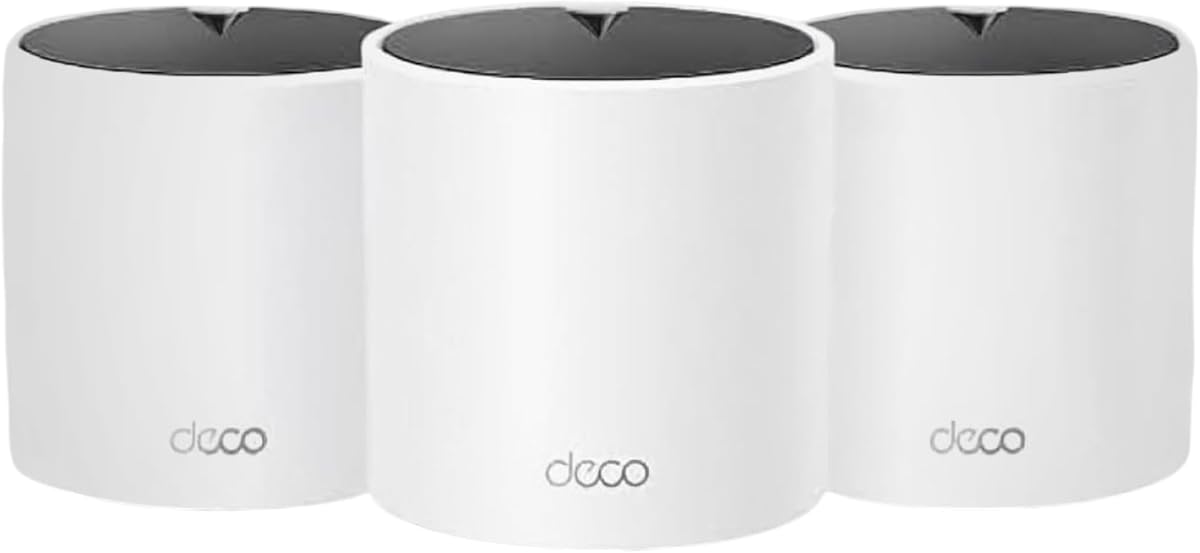


The Deco 7 Pro BE10000 is a tri-band Wi-Fi 7 mesh system built for homes where radio range and wired capacity both matter. It carries a 4.2 rating and is the strongest all-around choice in this guide because it combines a dedicated high-capacity band with four 2.5 Gbps WAN/LAN ports on every node. Its published coverage reaches up to 7,600 square feet for more than 200 devices.
We may earn a commission when you buy through this link, at no additional cost to you.
The important advantage for thick-wall homes is not merely a larger advertised speed total. This system distributes traffic across 6 GHz, 5 GHz, and 2.4 GHz, with published maximum rates of 5,188 Mbps, 4,324 Mbps, and 574 Mbps respectively. Using one band for wireless backhaul leaves more capacity for client traffic, while AI-driven roaming helps devices move between access points as they travel through the property.
Its four 2.5G ports are especially useful when a wall blocks the ideal wireless link. A homeowner can connect two nodes with a cable through an existing wall pathway and preserve a robust backhaul, allowing the remaining radios to focus on client access. The USB 3.0 port adds another connection point, although the principal benefit remains the combination of tri-band Wi-Fi and flexible multi-gig Ethernet.
This is the most balanced recommendation for a demanding house with concrete, masonry, or multiple floors. It is not the least expensive system, and its full potential is easiest to achieve when node placement and Ethernet pathways are planned carefully. Even without a cable, its tri-band layout gives it more room to recover from difficult walls than many dual-band alternatives.
The tri-band configuration can reserve the 6 GHz radio for backhaul, which helps preserve client performance between widely separated nodes. Even when walls force a lower-quality link, separating backhaul from user traffic is a sensible response to a difficult environment.
Four 2.5G WAN/LAN ports on each unit make it easier to create high-capacity wired links without adding a switch. This is particularly valuable where a wireless node-to-node route would be weakened by masonry or reinforced construction.
We may earn a commission when you buy through this link, at no additional cost to you.
The Deco 7 Pro BE14000 is the premium option for buyers who want the strongest combination of wireless reach, multi-gig connectivity, and future-facing capacity. Its 4.0 rating is the lowest among the listed products, but the underlying specifications are exceptionally ambitious: tri-band Wi-Fi 7, a three-pack covering up to 8,100 square feet, and support for more than 200 devices.
We may earn a commission when you buy through this link, at no additional cost to you.
Published band speeds reach 8,647 Mbps on 6 GHz, 4,324 Mbps on 5 GHz, and 688 Mbps on 2.4 GHz. The system supports Multi-Link Operation, Multi-RUs, and 4K-QAM, making it appropriate for newer Wi-Fi 7 phones, laptops, televisions, and consoles that can take advantage of the additional spectrum and link aggregation.
The standout feature is 10 Gbps backhaul. Every unit offers 10 Gbps, 2.5 Gbps, and 1 Gbps WAN/LAN ports plus a USB 3.0 connection. A properly installed Ethernet link can therefore carry far more traffic than a typical wireless inter-node link, allowing the tri-band radios to focus on serving phones, TVs, gaming systems, and smart-home equipment.
Choose this system when the property is large, the internet service is multi-gig, and the home contains demanding connected clients. The disadvantages are its premium specification tier and the fact that its 4.0 rating does not lead the field. In a challenging building, however, 10 Gbps wired backhaul can make placement and performance far more predictable than relying entirely on radio links.
A 10 Gbps connection between appropriate nodes gives the system an exceptionally strong backhaul. When in-wall wiring, conduit, or a short cable run is possible, this can overcome the same difficult wall that would heavily constrain a conventional access point.
Multi-Link Operation can combine multiple links to improve resilience and throughput for compatible clients. Its practical benefit grows as the home includes more recent Wi-Fi 7 hardware capable of taking advantage of these capabilities.
We may earn a commission when you buy through this link, at no additional cost to you.
The Deco XE75 is a Wi-Fi 6E tri-band system that remains a compelling option for thick-wall homes, especially those with modern clients that can use the 6 GHz band. It has a 4.4 rating, covers up to 7,200 square feet, and supports up to 200 devices. Its three-node package is designed to distribute coverage through larger homes with several difficult partitions.
We may earn a commission when you buy through this link, at no additional cost to you.
The 6 GHz band can function as the default wireless backhaul, separating the traffic that links Deco nodes from traffic sent to clients. That architecture reduces the contention found in dual-band systems, where the same radio can be used for both purposes. The total published rate is up to 5,400 Mbps, split among 2,402 Mbps on 6 GHz, 2,402 Mbps on 5 GHz, and 574 Mbps on 2.4 GHz.
The system can also expose 6 GHz to compatible clients in a Wi-Fi network mode, which is useful for capable phones, laptops, and other recent hardware. AI-driven mesh roaming learns the network environment and helps maintain a consistent connection while devices move among rooms. This combination of a clean 6 GHz backhaul and broad three-node coverage makes the XE75 effective across masonry-heavy layouts.
It is best for a buyer who values a proven tri-band design over the newest Wi-Fi 7 features. The principal limitation is age: newer systems offer higher potential throughput and faster multi-gig options, while Wi-Fi 6E client availability remains less broad than standard Wi-Fi 6. Even so, for a home with thick walls and a need for a dedicated wireless backhaul, the XE75 remains a balanced, high-rated choice.
Using 6 GHz for backhaul leaves the 5 GHz and 2.4 GHz radios to serve clients. In a home where every extra transmission across a thick wall matters, that separation can be more useful than a higher headline rate that depends on the same band.
The three included units can serve distinct floors or major living zones without forcing one radio to cover an entire property. The claimed 7,200-square-foot target still depends on layout, construction, and appropriate placement.
We may earn a commission when you buy through this link, at no additional cost to you.
The Deco S4 AC1900 is a straightforward dual-band Wi-Fi 5 mesh package with a strong 4.5 rating. Its three nodes work together to cover up to 5,500 square feet and support as many as 100 devices. It is a practical choice for a home that needs broader, more consistent coverage but does not require Wi-Fi 6 or newer multi-gig features.
We may earn a commission when you buy through this link, at no additional cost to you.
Instead of forcing users to manage several network names, the Deco S4 creates one network with automatic roaming between units. Each node includes two Gigabit Ethernet ports, giving the three-pack six ports in total and allowing a wired backhaul wherever cabling can be installed. That Ethernet option is particularly important when thick walls make the wireless route between nodes unreliable.
App-based setup, guest-network controls, Alexa support, and basic parental controls make the system approachable for nontechnical users. It also works with major internet service providers, although most require a separate modem. The design is less about maximum throughput and more about removing dead zones while preserving a single, uncomplicated network throughout the home.
Choose the S4 when the goal is dependable whole-home coverage on a moderate budget. Its older Wi-Fi 5 standard limits speed, and the 100-device target is lower than that of most Wi-Fi 6 alternatives. Those limitations are acceptable for ordinary browsing, streaming, and typical smart-home use, particularly when the units can be connected with Ethernet.
The S4 focuses on the core mesh benefit: several coordinated access points sharing one network. That simplicity can be more valuable than advanced radio features in a home where the main challenge is simply reaching every floor.
Two Ethernet ports on each node provide more ways to create a wired link than many basic mesh kits. Using those ports for a backhaul connection can produce steadier results through masonry walls.
We may earn a commission when you buy through this link, at no additional cost to you.
The Deco X55 is a dual-band Wi-Fi 6 mesh system that balances modern wireless efficiency with an accessible approach to whole-home coverage. It has a 4.3 rating, supports up to 150 devices, and has a published coverage target of 4,500 square feet. The two-pack is a sensible starting point for apartments, smaller houses, and properties with one especially obstructive wall.
We may earn a commission when you buy through this link, at no additional cost to you.
Its aggregate class is AX3000, with up to 2,402 Mbps on 5 GHz and 574 Mbps on 2.4 GHz. Wi-Fi 6 features improve efficiency and capacity in crowded radio environments, while AI-driven mesh helps the system adapt to client quality and network conditions. Each unit has three Gigabit Ethernet ports, and any unit can serve as the router.
The crucial placement decision is whether to connect the nodes by cable. Wired Ethernet backhaul is supported, so if the wall is physically difficult but a network cable can cross it, the system can avoid spending radio capacity on the link between nodes. If no cable is possible, the dual-band design shares traffic between client connections and backhaul, which makes placement more sensitive.
This is the best budget-oriented pick for buyers who want Wi-Fi 6 and flexible Ethernet without moving to a tri-band system. Two nodes may be insufficient for a very large or highly compartmentalized house, but they can be complemented with compatible Deco equipment. It offers the most convincing balance of capability, simplicity, and value for many thick-wall households.
Wi-Fi 6 helps the two radios serve many clients more efficiently, which is useful when phones, televisions, work devices, and smart-home products are active together. It does not eliminate the limits of a dual-band backhaul.
Three Gigabit ports on each unit make it easy to add a wired backhaul or connect nearby wired devices. A cable that passes cleanly through an existing pathway is often more reliable than forcing a weak wireless signal through masonry.
We may earn a commission when you buy through this link, at no additional cost to you.
The Deco X15 AX1500 is a three-node Wi-Fi 6 mesh system designed to place coverage in several areas of a home. It has a 4.4 rating, covers up to 5,600 square feet, and supports up to 120 devices. The package is particularly useful when a property has two or three separate zones that a single router cannot serve well.
We may earn a commission when you buy through this link, at no additional cost to you.
The system uses dual-band Wi-Fi 6, with published rates of 1,201 Mbps on 5 GHz and 300 Mbps on 2.4 GHz. Its dynamic backhaul capability helps the mesh select an efficient path between nodes, while AI roaming lets clients move among units under one network name. That combination is more important than the modest aggregate speed when the goal is eliminating isolated dead zones.
Each node includes two Gigabit Ethernet ports, providing six ports across the three-pack and supporting wired backhaul. The Deco app handles setup and remote management, while Alexa and Google Assistant support offer hands-free control of features such as the guest network. HomeShield features include network scanning, IoT device identification, parental controls, and Quality of Service.
The X15 is well suited to buyers who need more physical nodes than a two-pack offers and value straightforward coverage over peak speed. It is less appropriate for demanding Wi-Fi 7 clients, very high device counts, or users who require multi-gig Ethernet. Even so, its three-node layout makes it a practical option for a medium home with thick dividing walls.
A three-node package can put an access point in each major zone instead of asking one radio to penetrate several walls. This often matters more in masonry homes than the difference between two available bands.
Dynamic backhaul and AI roaming help the system select paths and access points according to network conditions. They cannot remove attenuation, but they can reduce avoidable performance loss within the limits of the hardware.
We may earn a commission when you buy through this link, at no additional cost to you.
The Deco M5 has the highest customer rating in the guide at 4.6 and remains a credible coverage solution for thick-wall homes. Its three-pack covers up to 5,500 square feet, and adaptive routing helps choose efficient paths for connected devices. For users who mainly need reliable whole-home roaming, its mature feature set is easy to appreciate.
We may earn a commission when you buy through this link, at no additional cost to you.
A single network name and password allow devices to move between the three units without manually reconnecting. Each node has two Gigabit Ethernet ports, and wired backhaul support lets owners use cables where available. Adaptive routing is especially relevant when traffic must cross more than one thick wall, although no software can fully compensate for severe physical attenuation.
The mesh includes network security, parental controls, and Quality of Service tools through TP-Link HomeCare. The Deco app guides setup, and the system can be managed remotely. Any unit can function as the main router, which gives users some flexibility if the original placement needs to change after the home is mapped.
The M5 is best for straightforward coverage, reliable roaming, and a mature installation experience rather than maximum speed. It lacks Wi-Fi 6 and cannot offer the 6 GHz, multi-gig, or Wi-Fi 7 options found in newer systems. That makes it most appropriate for modest internet service, ordinary streaming, and homes where a practical mesh solution is more important than leading-edge performance.
The single network name removes the need to select separate extender networks. As clients move through the home, the system can guide them toward a better access point without manual reconnection.
Adaptive routing selects a path for each device based on current network conditions. In a home divided by multiple heavy walls, that routing can make better use of available node-to-node links.
We may earn a commission when you buy through this link, at no additional cost to you.
The Deco X55 Pro is a three-node Wi-Fi 6 mesh system that stands out for its 2.5 Gbps Ethernet ports. It has a 4.4 rating, covers up to 6,500 square feet, and supports more than 150 devices. Those characteristics make it particularly relevant to homes with fast internet service, a network-attached storage device, or several wired workstations.
We may earn a commission when you buy through this link, at no additional cost to you.
Its wireless capabilities are conventional but capable: up to 2,402 Mbps on 5 GHz and 574 Mbps on 2.4 GHz. The more consequential upgrade over many Wi-Fi 6 systems is connectivity, with two 2.5G ports on every unit. Those ports can create a superior wired backhaul, link a NAS, or support a wired device without requiring the main router to share a single gigabit port.
The system includes AI-driven mesh, security scanning, IoT device identification, parental controls, Quality of Service, and app-based management. Any node can serve as the router, and the three-pack can be distributed among several floors or difficult wall-separated zones. A wired backhaul is particularly valuable because the dual-band wireless design does not provide the extra radio path offered by tri-band systems.
Choose the X55 Pro for buyers who want multi-gig wired options and plenty of nodes without moving to Wi-Fi 7. It is a strong fit for a three-level house where a cable can be routed between at least some access points. If every connection must be wireless, a tri-band model may offer more separation and greater resilience.
Two multi-gig ports per unit make the mesh useful for more than basic coverage. They can support a high-capacity wired backhaul, a NAS, or local connections that would exceed gigabit limits on ordinary ports.
The three-node package and 6,500-square-foot target suit homes with several distinct coverage zones. Actual results still depend on whether nodes are positioned in open areas and linked by dependable paths.
We may earn a commission when you buy through this link, at no additional cost to you.
The BE14000 version of the Deco 7 Pro is built for buyers seeking the highest-capacity configuration among the products listed. It combines tri-band Wi-Fi 7, coverage of up to 8,100 square feet, support for more than 200 devices, and 10 Gbps wired backhaul. Its 4.0 rating is respectable, although it does not match the stronger customer ratings of several simpler systems.
We may earn a commission when you buy through this link, at no additional cost to you.
The published 6 GHz, 5 GHz, and 2.4 GHz rates of 8,647 Mbps, 4,324 Mbps, and 688 Mbps create substantial theoretical headroom. Multi-Link Operation can combine multiple links for compatible clients, while Multi-RUs and 4K-QAM support newer Wi-Fi 7 capabilities. The practical value of these features depends on the phones, laptops, televisions, and consoles used throughout the home.
Each unit has a 10 Gbps port, a 2.5 Gbps port, and a 1 Gbps port, plus USB 3.0. This makes it a natural choice for a property with multi-gig internet, a network-attached storage device, or a plan to add demanding local services. The 10 Gbps connection also provides an excellent wired path between nodes when thick walls would undermine wireless backhaul.
The system makes most sense in a large, technology-heavy house where the homeowner is prepared to plan node placement and cabling. It is not necessary merely to receive basic Wi-Fi in a modest apartment, and older clients will not realize all advertised benefits. For a demanding multi-gig installation, however, it offers exceptional expansion capacity and the strongest wired path in the guide.
The 10 Gbps and 2.5 Gbps ports leave substantial room for faster internet plans and local network traffic. This makes the system easier to use for several years than a mesh built around gigabit-only wired connections.
The combination of 200-plus device support and high-speed backhaul suits households with many active clients. High-end specifications are most useful when those clients and the local network can generate enough traffic to fill the available links.
We may earn a commission when you buy through this link, at no additional cost to you.
The NETGEAR Orbi RBW30 is a wall-plug satellite designed to add up to 1,500 square feet of coverage to an existing Orbi whole-home mesh router. It has a 4.4 rating and is not a complete standalone system. Its main advantage is the ability to expand coverage one room at a time without managing a separate extender network.
We may earn a commission when you buy through this link, at no additional cost to you.
The slim form factor makes it easy to place near an outlet in a bedroom, office, or other area with weak reception. It works with the Orbi ecosystem, shares a single network name, and uses patented tri-band technology to help maintain speed as more clients connect. Its published maximum speed is 2.2 Gbps, although actual performance depends on the primary Orbi model and link quality.
This approach is useful when a home has a few troublesome rooms rather than a uniform coverage problem. Each satellite can be placed beyond a thick wall or on a separate floor, reducing the need for long Ethernet cables. Because it plugs directly into an outlet, it also avoids finding an open shelf position for another box.
The RBW30 is best for an existing Orbi owner who wants to extend a compatible network. It is a poor choice for someone starting from scratch, because it cannot operate as a complete mesh system without a supported Orbi router. The same ecosystem restriction means it should not be mixed indiscriminately with Deco or other mesh brands.
Adding satellites in only the rooms that need help can be more efficient than installing a full multi-node kit everywhere. Each unit contributes up to 1,500 square feet of claimed coverage and plugs directly into an outlet.
A single network name makes it easier for phones and laptops to move between the router and satellite. The result is less manual switching than is common with conventional range extenders.
We may earn a commission when you buy through this link, at no additional cost to you.
Mesh performance in a difficult building depends on radio architecture, node placement, and the available connection path between access points. Use the following factors to compare systems beyond headline speed and published coverage area.
Dual-band mesh systems use 2.4 GHz and 5 GHz for both client access and communication between nodes. That arrangement is efficient for moderate homes, but a thick wall can reduce the inter-node link until it becomes the bottleneck for everyone. Tri-band systems add a third radio, commonly 6 GHz, which can be reserved for wireless backhaul. This separation is especially valuable in homes with several masonry partitions because the dedicated path does not have to share the same radio with client traffic.
Choose a tri-band model when the distance between nodes, number of floors, or wall construction makes wireless backhaul difficult. A dual-band system can still work well when nodes are close together or connected by Ethernet. Confirm whether the third band is reserved by default or can be made available to compatible clients, because that choice affects both range and client speed.
Wired backhaul uses Ethernet between mesh nodes instead of relying on a radio link. It is generally the most dependable way to retain throughput through thick walls because the data follows the physical cable rather than passing through radio-sensitive construction. Even Gigabit Ethernet can be enough to prevent a wireless backhaul from becoming the weakest link in many ordinary internet connections.
Prioritize mesh systems with multiple Ethernet ports on every node, particularly if your internet plan exceeds one gigabit or you operate a local network-attached storage device. Look for cable pathways through walls, conduit, closets, and floors. If a cable run is impossible, place nodes in open locations and favor a tri-band design with a dedicated backhaul radio.
Published square-foot coverage is a general planning aid, not a guarantee. The same system can behave very differently in an open apartment and a divided house with concrete, brick, stone, mirrors, foil-backed insulation, or reinforced framing. Floor plans, internal obstacles, access-point placement, and the position of the internet connection all influence the result. A target area also says little about whether usable signal reaches the hardest rooms.
Compare coverage claims with the number of nodes and the shape of the home. Large homes and properties with several floors usually benefit from placing one node on each major level rather than concentrating units near one another. Treat the listed maximum as an upper bound and expect the usable zone to depend on the actual materials and furniture between the router and client.
Wi-Fi performance can be constrained by slow wired connections. Gigabit ports are sufficient for many homes, but 2.5 Gbps ports are increasingly useful for fast internet service, modern laptops, network-attached storage, and high-resolution local media. A system with 10 Gbps ports provides additional headroom, although that benefit is meaningful only when the internet plan, devices, internal cabling, and local services support it.
Check the number and speed of ports on every node rather than examining only the primary router. Additional ports make it easier to connect nodes, wired entertainment equipment, and network-attached storage without adding a switch. For a thick-wall home, these ports also provide a way to create high-quality backhaul links between strategically placed access points.
Device-capacity figures indicate how many connections a manufacturer expects the system to support under stated conditions. They are not guarantees that every device will receive full speed at the same time. A household with many phones, televisions, work laptops, cameras, and smart-home products needs sufficient aggregate capacity and efficient scheduling. Newer Wi-Fi generations generally improve efficiency, while tri-band designs can spread traffic among more radios.
Count the devices that connect regularly rather than adding every temporary guest or sensor. Pay attention to the types of traffic involved, such as 4K or 8K video, cloud backups, gaming, and large file transfers. For older homes, a moderate-capacity system with excellent placement may produce better everyday results than an expensive unit placed incorrectly.
The best mesh system can still underperform if every node is grouped together or hidden inside cabinets. Nodes should be exposed, elevated where appropriate, and positioned to overlap in the areas where roaming occurs. Expansion support matters in apartments and single-floor homes because the initial package may later need an additional node for a basement, bedroom wing, or other isolated zone.
Verify that additional units can join the same mesh and share a single network name. Also check whether the system supports voice assistants, app-based management, and remote administration. Plan at least one node near the internet source, then place additional nodes in the rooms where signal measurements show the greatest weakness.
A home mesh manages the gateway for many connected products, making basic security and parental controls important. Look for a clear app, firmware updates, network scanning, guest-network isolation, and quality-of-service controls. Features such as VPN support, IoT identification, and detailed usage reports can be helpful, but they should complement rather than replace sensible account security and timely software updates.
Choose a system whose interface you find understandable and whose support ecosystem fits your household. Confirm that parental controls can be applied to individual family members, and review the current feature set in TP-Link HomeShield or HomeCare as applicable. Avoid paying for advanced controls that you will not use, but do prioritize a clear security dashboard and reliable update process.
Begin by mapping the property before installing the nodes. Identify the modem or optical network terminal, note where the primary connection enters the home, and list rooms with poor reception. Connect one Deco or Orbi unit near the internet source using Ethernet, then activate the system and create the administrative credentials before adding additional nodes. Keep the default administrator password private and change it if the setup process does not prompt you to do so.
Place each additional node where it can communicate with the rest of the mesh without being hidden in a cabinet or positioned directly beside another unit. For thick-wall homes, first try a central hallway or open interior wall rather than a location on the exterior perimeter. After adding each node, test important rooms for signal strength, latency, and throughput. If a link is weak, move the node, add another node between the weak area and the rest of the system, or use Ethernet for backhaul when a suitable cable path exists.
For the first several days, watch the app for client counts, band use, backhaul quality, and devices repeatedly switching between nodes. Update the firmware, create a separate guest network for visitors, and review parental-control profiles for children. Avoid placing nodes next to microwaves or other unnecessary interference sources, and keep ventilation openings clear. Periodically retest after adding smart-home products, changing furniture, or rearranging the network so that coverage problems are addressed before they become persistent.
No mesh system can guarantee reliable penetration through every concrete, brick, stone, or reinforced wall. Mesh networking improves coverage by adding access points, but the signal still loses strength as it passes through dense materials and reflective surfaces. A node placed on the other side of the wall, a dedicated Ethernet connection, or a strategically positioned relay usually produces better results than expecting one router to reach through it.
Tri-band systems are often better because one radio can be dedicated to backhaul, leaving more capacity for client traffic. The 6 GHz band used by some Wi-Fi 6E and Wi-Fi 7 systems also tends to have shorter reach because of its propagation characteristics, so it works best over shorter node-to-node distances. A wired backhaul remains the most dependable option when a cable can be installed.
Wired backhaul is preferable whenever a practical Ethernet path exists because it avoids radio attenuation between nodes. The route does not have to be perfectly direct; an existing cable through a wall, crawlspace, conduit, or floor cavity can work. Wireless backhaul is more convenient, but node placement becomes much more important when the walls are thick and highly reflective.
The required count depends more on floor plan and construction than on the advertised coverage area. A common starting point is one node near the internet connection and another in each major area that needs coverage, but three nodes in one cluster is rarely better than spreading them across separate zones. Start with the included package, test real rooms, and add nodes only where the network shows a persistent gap.
Mesh can improve speed in poorly covered areas by providing a stronger local connection and a more efficient path back to the router. It cannot guarantee full internet-plan speed in every room because the final wireless link, wall attenuation, distance, and interference remain limiting factors. A gigabit internet plan with Ethernet near the same wall may also deliver more consistent results than a very fast mesh in the same challenging layout.
Mesh interoperability is limited, and compatibility is best within a single product family. The NETGEAR Orbi RBW30 in this guide specifically requires an Orbi router. Deco units are designed to work with compatible Deco hardware, so check the supported product list before mixing generations or attempting to combine them with another brand.
Place it just beyond the obstruction in a room where clients need service, rather than directly in front of the wall. Keep it elevated, uncovered, and away from metal objects or enclosed cabinets. If the node still has a weak link to the rest of the mesh, add an intermediate node or use Ethernet to give it a dependable path.
Most of the listed mesh systems replace a conventional Wi-Fi router but still require a compatible modem or internet gateway. Some internet providers supply or combine that equipment with the service. Confirm what you already own before installation so you know whether another device or connection change is necessary.
The Deco 7 Pro BE10000 is the strongest overall recommendation because it combines tri-band Wi-Fi 7, a large device capacity, and four 2.5 Gbps ports on every node. The Deco 7 Pro BE14000 is the premium choice for homes that can use 10 Gbps backhaul, while the Deco X55 offers the most practical budget-oriented route to modern Wi-Fi 6 coverage.
Prioritize the path between nodes rather than focusing only on the speed printed on the box. A tri-band system, a 6 GHz backhaul radio, or a 2.5 Gbps wired connection can make a major difference when masonry divides the home. Conversely, a higher-end system placed in a closet or behind several walls will not deliver the result its specifications suggest.
Before ordering, confirm the node quantity, supported backhaul methods, Ethernet port speeds, and current product availability. Retail listings and prices change, so compare the live product page and current manufacturer specifications. The right mesh system is the one that can be placed intelligently and maintain a dependable path through your particular walls.