
Bmax B1 Plus
4.2Editor score
Compact palm-sized enclosure
Dual 4K HDMI outputs
Two M.2 storage slots
Quiet everyday operation
Our Mini Pcs for Media Centers guide compares 10 PCs for 4K streaming, dual-display support, storage, connectivity, quiet operation, and everyday use.
A mini PC can turn a television, monitor, or digital-signage screen into a versatile media hub without occupying an entire desk. The best models combine compact construction, 4K display support, quiet cooling, convenient connectivity, and enough memory or storage for streaming applications, downloaded media, and light background tasks.
This guide compares ten mini PCs using their supplied processor, memory, storage, display, networking, port, and operating-system specifications. It covers options suited to living rooms, home offices, digital signage, personal servers, and multi-screen entertainment while distinguishing basic media computers from more capable all-round systems.
Each recommendation highlights a particular balance of features rather than declaring every model ideal for every setup. The numbered reviews explain the strongest reasons to consider each mini PC, along with practical limitations. Product availability, configurations, and prices can change, so confirm current specifications and costs before purchasing.
4.2Editor score

4.9Editor score

4.5Editor score
The table below compares all ten systems by processor class, memory, storage, display capability, and major connectivity features, making it easier to identify the right mini PC for your media setup.


The KAMRUI AK1PLUS is a well-rounded mini PC for media centers that need more memory and flexibility than a basic streaming appliance. Its supplied rating is 4.4, and its standout combination of 16GB LPDDR4X memory, a 256GB M.2 SSD, and two 4K-capable HDMI outputs makes it a practical choice for a television, monitor, or signage installation.
We may earn a commission when you buy through this link, at no additional cost to you.
Storage is a major advantage because the system can accept M.2 SATA or NVMe expansion up to 2TB and an additional 2.5-inch SATA SSD or hard drive up to 2TB. That makes room for larger local media collections, backups, and applications without relying entirely on cloud streaming. Four USB 3.2 ports, Gigabit Ethernet, WiFi, Bluetooth, and a 3.5mm audio jack also simplify peripheral connections.
The Intel Celeron N5095 is better suited to media playback, browsing, office applications, and general background work than demanding editing or heavy gaming. A single 256GB drive may require an upgrade for a substantial local library. However, the generous memory, low-power design, dual-display capability, and remote-management features offset those limitations in a dedicated media-center role.
This is a strong recommendation for anyone who wants a traditional small PC with more flexibility than a streaming stick or locked-down digital-signage player. It suits users who may switch between streaming, browsing, remote access, and light productivity. Buyers seeking modern maximum gaming performance or demanding 4K transcoding should look farther up the processor range.
The dual-storage expansion path gives the AK1PLUS more practical longevity than a system limited to a small internal drive. It can begin with the supplied SSD and expand as local libraries, installers, and backup files accumulate.
Two 4K HDMI outputs, wired Ethernet, wireless networking, and automatic power options allow the mini PC to operate as both an entertainment computer and a remotely managed information display.
We may earn a commission when you buy through this link, at no additional cost to you.
This Windows 11 Pro mini PC distinguishes itself with a generous 1TB SSD, 16GB of memory, and a supplied 5.0 rating. Those specifications are particularly appealing for a media center that will keep local files, applications, and downloads on the system instead of relying exclusively on streaming services.
We may earn a commission when you buy through this link, at no additional cost to you.
Its Intel Core i3-6006U and Intel HD Graphics 520 are designed for everyday work, browsing, video conferencing, light content creation, and media playback. The supplied information supports 4K output at 60Hz and dual-display setups, allowing a television to show media while another display handles controls, dashboards, or reference material.
Although 1TB of storage solves a common configuration concern, the processor belongs to an older generation. It is not a natural choice for intensive creative work, modern high-end games, or demanding local transcoding. Users who prioritize storage and simplicity over maximum processing power will find the allocation more persuasive.
The recommendation is strongest for a family media computer, classroom display, or digital-signage installation where Windows 11 Pro, ample local storage, and 4K output matter. It also suits buyers who want a conventional desktop experience in a compact enclosure. Check the current operating-system and application requirements before deploying it in a specialized workflow.
The 1TB SSD provides considerably more room for media than the typical compact configuration. It reduces the need to add storage immediately for family videos, downloaded applications, and a basic local music or film collection.
Windows 11 Pro makes this mini PC a conventional PC rather than a limited appliance. That makes it easier to use familiar browsers, media applications, remote-access tools, and productivity software.
We may earn a commission when you buy through this link, at no additional cost to you.
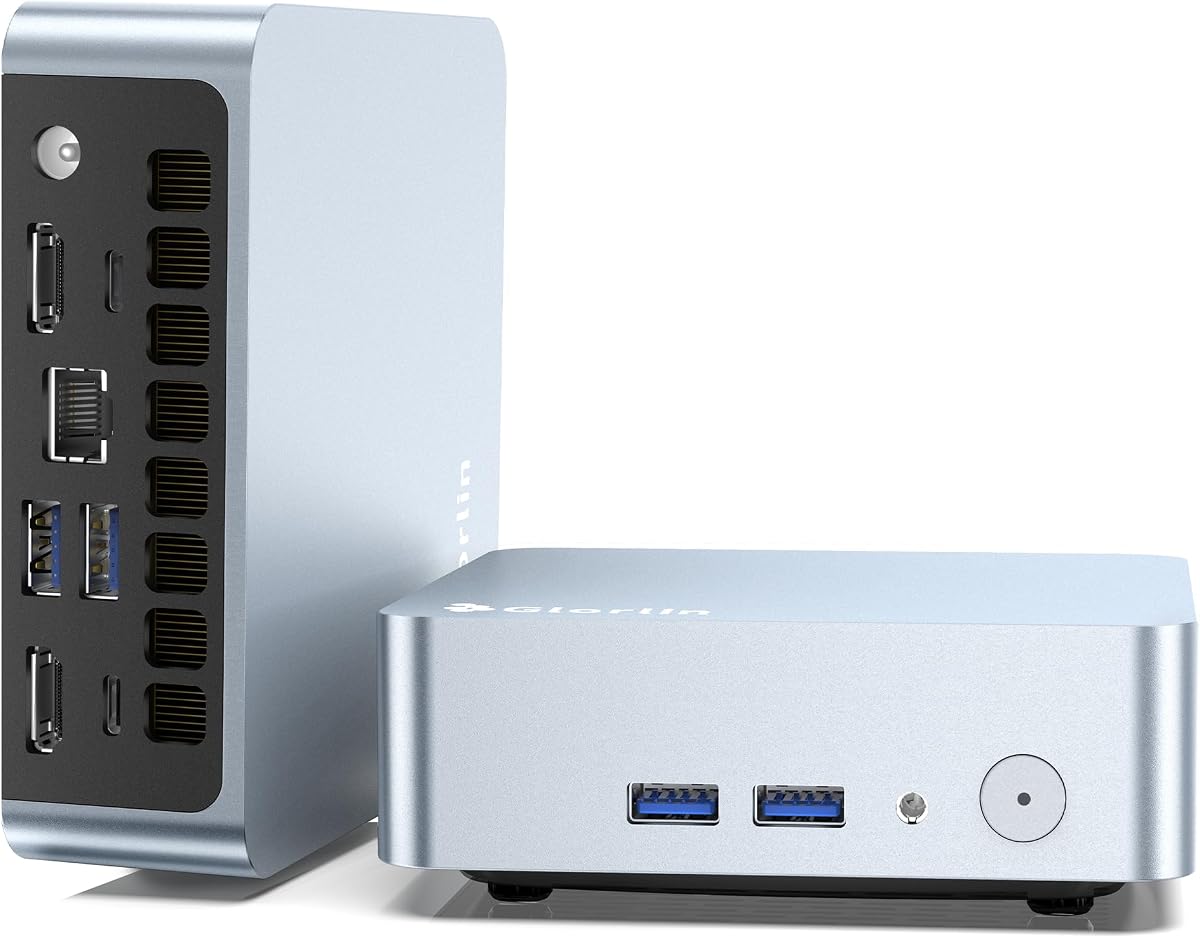
The Glorlin Ryzen 5 3500U 16GB is one of the more capable media-center candidates in the group, combining a four-core, eight-thread processor with 16GB of DDR4 memory and a 512GB NVMe SSD. Its ability to drive three 4K displays makes it particularly interesting for installations that need a central media screen plus two auxiliary displays.
We may earn a commission when you buy through this link, at no additional cost to you.
The processor operates from 2.1GHz to 3.7GHz and uses a low 15W design that can rise to 25W. Compared with entry-level Celeron systems, it offers a more convincing foundation for multitasking, browsing, media playback, remote desktop sessions, and light content work. NVMe storage also supports quick startup and application loading.
WiFi 6, Bluetooth 5.3, Gigabit Ethernet, two USB 3.2 ports, and two USB 2.0 ports provide a modern connectivity mix. The full-function USB Type-C port adds another display route and power-related functionality. The limitation is that 16GB is described as expandable to 32GB, while the supplied details do not advertise a second internal storage bay.
The lack of a supplied customer rating means there is no rating evidence to weigh alongside the specifications, so buyers should consider warranty and support details carefully. Even so, this is a compelling pick for a multi-display media center where processing power and memory matter more than the lowest possible cost.
Sixteen gigabytes of memory gives the system room to run a media application, a remote-control interface, browser windows, and background utilities at the same time. This is more flexible than the smallest office-focused alternatives.
Two HDMI outputs and a DisplayPort-capable USB Type-C port allow the mini PC to serve a main entertainment display while also presenting information or controls on secondary screens.
We may earn a commission when you buy through this link, at no additional cost to you.
The Bmax B6Plus is explicitly positioned as a home-theater PC and combines Windows 11 Pro, 12GB of LPDDR4 memory, and a 512GB NVMe SSD. Its dual HDMI and Type-C arrangement supports three 4K displays at 60Hz, while the supplied 4.2 rating reflects a generally positive customer reception.
We may earn a commission when you buy through this link, at no additional cost to you.
Unlike many inexpensive mini PCs, it arrives with a sizable NVMe drive and does not require an immediate storage upgrade. That makes it convenient for installing media applications, keeping a moderate local collection, and storing downloaded content. The 15W Intel processor is designed for efficient everyday operation rather than high-intensity workloads.
Its quiet cooling is particularly relevant beside a television or in a bedroom, where louder fans can undermine the experience. The supplied specifications state that the smart speed-adjusting fan can keep noise under 30dB during daily use. A VESA mount also helps conceal the system behind a compatible television or monitor.
Bluetooth 4.2 is dated next to the WiFi 6 and Bluetooth 5.3 models in this comparison, and 12GB of memory is less generous than the best configurations. Nevertheless, the combination of NVMe storage, triple 4K support, quiet cooling, and HTPC positioning makes the B6Plus a balanced recommendation for living-room use.
The adjustable cooling system is especially helpful in a living room where constant fan noise would be distracting. Its compact design and VESA support also reduce the visual footprint of the installation.
A 512GB NVMe drive provides a useful starting point for media applications and local files. Fast storage also helps the system feel more responsive when switching among interfaces and services.
We may earn a commission when you buy through this link, at no additional cost to you.
The Bmax B1 Plus is a compact, entry-level choice for a straightforward media center, digital display, or lightweight home-office computer. Its supplied 4.2 rating accompanies a configuration built around an Intel Celeron J3355, 6GB of LPDDR3 memory, 128GB of eMMC storage, and Windows 11 Home.
We may earn a commission when you buy through this link, at no additional cost to you.
Its standout media-center feature is the pair of M.2 storage slots, which accept SATA and NVMe drives up to the stated expansion limit. This makes it possible to add fast local storage without replacing the original eMMC storage. Dual HDMI outputs can drive two 4K displays at 60Hz through Intel HD Graphics 500.
The processor is best treated as an everyday-computing solution. Web browsing, documents, streaming interfaces, and light applications are the sensible targets, while demanding games and heavy transcoding fall outside its intended envelope. The 6GB memory configuration is also modest for extensive multitasking.
What compensates is physical efficiency. Measuring 4.2 by 4.1 by 1.4 inches and weighing 0.49 pounds, it can sit behind a display or in a tight entertainment cabinet. The included VESA bracket, smart fan, and heat-sink system make it a sensible budget pick when basic media functions and compactness matter most.
Two M.2 slots make this model unusually flexible for an entry-level unit. Buyers can add an NVMe drive for speed or SATA storage for capacity while retaining the included eMMC storage.
Its tiny footprint and VESA compatibility are ideal when the mini PC should be hidden behind a television. A smart fan and heat-sink design also support the goal of a discreet, quiet installation.
We may earn a commission when you buy through this link, at no additional cost to you.
The Beelink SER3 combines a 4.5 supplied rating with an AMD Ryzen 3 3200U processor, 8GB of DDR4 memory, and a 256GB PCIe 3.0 NVMe SSD. It is a familiar compact-PC design that offers dual 4K display support, useful port selection, and considerable room for future upgrades.
We may earn a commission when you buy through this link, at no additional cost to you.
Four USB 3.2 Gen2 ports provide faster data transfer than basic USB implementations, while two HDMI ports can run two 4K displays at 60Hz through Radeon Vega 3 graphics. Gigabit Ethernet, audio, and the compact enclosure complete a practical package for a living room, office, or shared display.
The biggest opportunity is upgradability. RAM can be expanded to the stated 16GB maximum, NVMe storage to 2TB, and a 2.5-inch SATA drive from 500GB to 2TB. That means a buyer can start with a modest configuration and add capacity as the media library grows.
The included 8GB memory is the principal constraint for advanced multitasking, and the older processor is not aimed at demanding games. For ordinary streaming, browsing, sign displays, and light office work, however, the SER3 combines efficient performance with an unusually useful port and storage roadmap.
The SER3 is more future-proof than systems with fixed memory and minimal storage options. Users can add RAM, a faster NVMe drive, or a larger secondary drive without replacing the entire mini PC.
Four 10Gbps USB 3.2 Gen2 ports benefit external drives and other high-speed accessories. Gigabit Ethernet also offers a dependable option for large local media transfers and uninterrupted streaming.
We may earn a commission when you buy through this link, at no additional cost to you.
The BMAX B6 stands out with a supplied 4.9 rating, Intel Core i3-8109U processor, 12GB of memory, and Windows 11 Pro. It offers the strongest overall balance for a media center that needs responsive everyday performance, dual 4K screens, modern connectivity, and expandable local storage.
We may earn a commission when you buy through this link, at no additional cost to you.
The processor has two cores and four threads, with a 3.0GHz base frequency that reaches 3.6GHz in burst mode. Intel Iris Plus Graphics 655 supports the supplied 4K output capability through HDMI and DisplayPort. The machine is positioned for streaming, browsing, office applications, study, and light multitasking rather than intensive gaming.
Storage is unusually flexible because dual M.2 2280 slots support SATA and NVMe SSDs with expansion up to 4TB. Other useful details include Gigabit Ethernet, WiFi 5, Bluetooth 5.0, two USB 3.2 ports, two USB 2.0 ports, and a 3.5mm CTIA audio connection. VESA mounting helps keep the enclosure out of sight.
The main compromise is that 12GB of onboard memory is less than the 16GB offered by several alternatives, and the included 256GB SSD is modest for a large media library. Even with those caveats, the strong rating, capable Core i3 platform, flexible storage, and compact installation make the B6 our most versatile recommendation.
The Core i3-8109U provides more conventional desktop responsiveness than the lowest-power Celeron alternatives. It is a sensible match for users who want media playback, several open applications, and remote-control utilities without moving to a costly workstation.
Two M.2 slots and support for large SATA or NVMe capacities reduce dependence on cloud services. The system can serve as a local media hub while retaining space for applications, system files, and backups.
We may earn a commission when you buy through this link, at no additional cost to you.
The C3 is a compact Core i3 mini PC designed with everyday productivity and continuous-operation use cases in mind. Its supplied 4.2 rating accompanies 8GB of DDR memory, a 512GB M.2 2280 SSD, and Intel HD Graphics 5500. It is especially relevant to digital signage, thin-client roles, and home media-server use.
We may earn a commission when you buy through this link, at no additional cost to you.
The 512GB drive provides a good starting balance for applications and local media, while the system supports RAM expansion to the stated 32GB limit. It also accepts an M.2 SATA or NVMe drive up to 2TB and a separate 2.5-inch SATA SSD or hard drive up to 2TB, creating a broad expansion path.
Its two HDMI outputs support displays up to 2560 by 1600 at 60Hz. That is useful for many media and signage tasks, but buyers with 4K television requirements should pay close attention because the stated resolution ceiling is below the 4K outputs advertised by several competitors.
The 15W architecture, optimized cooling fan, Gigabit Ethernet, WiFi 5, Bluetooth 5.0, and under-one-kilogram design support discreet, always-available placement. The C3 is best for basic media services and local files rather than demanding applications. Its warranty and support period are also among the stronger claims in the group.
The system is specifically described as optimized for 7-by-24 operation in commercial and home media-server scenarios. Quiet cooling and a low-power processor suit an always-on role near a display or network cabinet.
A 512GB SSD provides immediate room for a meaningful media library. Additional M.2 and 2.5-inch drive support makes it easy to scale capacity without changing the entire system.
We may earn a commission when you buy through this link, at no additional cost to you.
The Getorli Ryzen 5 3501U is a premium-oriented media-center choice with 16GB DDR4 memory, a 512GB PCIe 3.0 NVMe SSD, and a four-core, eight-thread Ryzen 5 processor. Its supplied 4.5 rating supports its reputation as a capable general-purpose mini PC with considerable multitasking headroom.
We may earn a commission when you buy through this link, at no additional cost to you.
The 16GB memory configuration is especially helpful when a media application, browser, remote desktop, smart-home dashboard, and background services need to coexist. Fast NVMe storage supports responsive startup and file access, while a full-function USB Type-C port and two HDMI outputs allow up to three displays.
Modern wireless capabilities include WiFi 6 and Bluetooth 5.3, and Gigabit Ethernet provides a stable alternative for high-volume local transfers. The system can also accept more memory, an expanded NVMe drive, and a 2.5-inch hard drive according to the supplied specifications, extending its usefulness as a personal server or entertainment hub.
Its most notable limitation is that the listed 8GB base memory differs from the supplied 16GB configuration, so buyers should confirm the exact package. The enclosure also occupies slightly more space than the smallest models. Even so, the memory, processor threads, triple-display support, and modern connectivity create the strongest premium package here.
Sixteen gigabytes of RAM is the key advantage for users who expect to run more than a single streaming interface. It leaves room for background applications and a browser without forcing frequent restarts.
WiFi 6, Bluetooth 5.3, Gigabit Ethernet, two HDMI outputs, and a full-function USB Type-C port cover current media-center connectivity needs. Triple-display support expands the role beyond a single-screen living-room appliance.
We may earn a commission when you buy through this link, at no additional cost to you.
The second Glorlin Ryzen 5 3500U model offers four cores, eight threads, three 4K display outputs, and modern wireless connectivity at a lower starting specification than the 16GB version. It is a strong option for a home media center that needs more processing capability than a basic Celeron but can work with 8GB of memory and 256GB of storage.
We may earn a commission when you buy through this link, at no additional cost to you.
The processor runs from 2.1GHz to 3.7GHz, with a listed TDP of 15W that can rise to 25W. It is intended for web browsing, daily computing, home-office work, and smooth media streaming. The NVMe drive should make application launches and file access noticeably more immediate than a conventional hard drive.
Two HDMI outputs and a DisplayPort-capable USB Type-C interface support three sharp 4K screens. WiFi 6, Bluetooth 5.3, Gigabit Ethernet, two USB 3.2 ports, and two USB 2.0 ports create a well-rounded connection set. Windows 11 Pro is preinstalled, reducing the initial setup required for a standard PC experience.
No customer rating is supplied, so there is no user-feedback score to support the configuration. The 8GB memory is also likely to become the first upgrade priority for intensive multitasking. Nevertheless, the processor, triple-4K support, NVMe storage, and modern networking make this a capable and approachable media-center option.
Four cores and eight threads provide a more useful foundation for several simultaneous applications than the smallest Celeron configurations. The processor remains focused on efficient daily computing rather than high-end gaming.
The combination of dual HDMI and a DisplayPort-capable USB Type-C port supports a three-screen arrangement. That is valuable for a central media display accompanied by status panels or secondary information screens.
We may earn a commission when you buy through this link, at no additional cost to you.
The right mini PC depends on what the system will display, where it will be installed, how much media must be stored locally, and whether the computer will run continuously. Processor class, memory, storage flexibility, display support, networking, cooling, and mounting options deserve close attention.
A media center should be able to run its operating system, media applications, remote controls, and occasional browser or productivity tools without feeling sluggish. Entry-level Intel Celeron J-series and N-series chips can handle straightforward streaming interfaces, but a Core i3 or Ryzen 5 gives more headroom for multitasking and heavier applications. Processor performance also matters when the mini PC is used for file conversion, remote access, light content creation, or other tasks that extend beyond passive playback.
Memory determines how comfortably several applications can remain open at once. Six gigabytes may be sufficient for a dedicated display that runs one media interface, while 8GB is a more practical baseline in 2026. A 12GB or 16GB configuration is preferable when the computer will run a browser, remote-management software, smart-home tools, background services, and media applications together. Pay attention to whether memory is onboard or upgradeable, because fixed configurations cannot usually be expanded later.
Streaming-focused users may need relatively little internal storage, but locally stored movies, music, photographs, installers, and backups can consume substantial space. NVMe storage offers the best balance of speed and capacity for general use. Look for multiple M.2 slots or a secondary 2.5-inch bay, and confirm whether the original drive remains usable after expansion. A system with 256GB of storage is reasonable for applications and a modest library, while 512GB provides a more comfortable starting point.
For a television-based media center, 4K output at 60Hz is the key target. The output count matters when the system must drive a main screen plus a control display, information panel, or secondary monitor. HDMI is the most common television connection, while DisplayPort or a full-function USB Type-C port adds flexibility for smaller monitors and mixed display arrangements. Avoid assuming that a processor supports a particular resolution or refresh rate; verify the complete system specification and the display adapter used by the manufacturer.
Media streaming depends on a stable network, and large local libraries benefit from faster wired transfers. Gigabit Ethernet is worth prioritizing when the mini PC will sit near a router or network cabinet. WiFi 6 and Bluetooth 5.3 offer convenient wireless control, peripherals, and streaming, although an Ethernet connection remains a dependable option for sustained transfers. Check the available port arrangement as well, especially if the system must connect a television, network cable, external storage, keyboard, and game controller simultaneously.
A media center near a television or in a bedroom should run quietly. Systems with a smart speed-adjusting fan, effective heat pipes, and a stated noise level are preferable to units that must maintain high fan speeds under load. Continuous-operation designs are particularly relevant to digital signage, personal servers, and unattended playback. Proper ventilation is also important: leave clearance around the vents and avoid placing the mini PC inside a fully enclosed cabinet unless its manufacturer explicitly permits it.
Modern media centers still need physical connectivity. Look for sufficient USB-A ports, at least one USB-C port, an audio jack, and Gigabit Ethernet. USB 3.2 or faster is useful for external storage, although port speed alone does not guarantee that every connected device will perform optimally. Pay particular attention to the placement and type of ports, especially if a wired controller, streaming adapter, keyboard, or external drive must remain attached permanently.
A smaller computer is easier to conceal behind a television or place within a media cabinet. VESA support is particularly useful because it allows the mini PC to hang behind a compatible television or monitor, keeping the entertainment area uncluttered. At the same time, consider serviceability: dual storage slots, accessible upgrade options, restore features, and a supplied warranty can make long-term ownership easier. A slightly larger chassis may also provide better cooling and more flexible ports.
Begin by placing the mini PC in a ventilated location near the television or monitor. Connect the display with the appropriate HDMI, DisplayPort, or USB Type-C cable, attach power and networking, and install the required media applications. For an always-on system, use the operating system's power and display settings to control automatic startup, sleep, and screen activation, and consider enabling Wake-on-LAN or the manufacturer's remote-power features when appropriate.
Keep the system clear of dust and obstructions, particularly around its vents. When the mini PC has accumulated enough use to become warm, shut it down safely and clean the exterior with a soft, dry cloth. Avoid opening the chassis while powered. If the system includes storage expansion, follow the manufacturer's guidance for compatible drive formats and installation procedures, and maintain regular backups of important media libraries and configuration files.
For the smoothest experience, use Ethernet when possible, update the operating system and media applications periodically, and avoid leaving the display and computer running at unnecessarily high brightness or volume. If the mini PC is mounted behind a television, check that the location does not trap heat. A surge protector or other appropriate power-protection device can also reduce disruption during electrical fluctuations, while restarting on a regular schedule may help maintain responsiveness in long-running installations.
An 8GB configuration is generally sufficient for one streaming application, a few browser windows, and light background services. A 12GB or 16GB model is better if you expect to run remote-desktop software, smart-home dashboards, file transfers, and media applications simultaneously. Extra memory also provides more room for future operating-system and application updates.
A 4K-capable model is advisable if you want 4K HDR streaming, high-resolution desktop interfaces, or compatibility with current 4K television standards. Check that the complete system supports 4K at 60Hz, not merely that the processor can theoretically handle 4K. Also confirm that the application, display cable, television, and network source all support the desired format.
A mini PC can replace a streaming stick while providing a full desktop, local file access, broader application support, and easier peripheral connectivity. It is larger, requires more configuration, and may use more power. A stick remains simpler for a single-purpose streaming room, while a mini PC is usually better when you also need browsing, applications, storage, or a general-purpose computer.
WiFi 6 can support 4K streaming when the signal is strong, the router is well positioned, and the internet connection is fast enough for the selected service. Wired Gigabit Ethernet offers more consistency and better performance for large local files or crowded wireless environments. WiFi 6 also simplifies installation when running a cable to the television area is inconvenient.
Storage needs depend on whether your media is streamed or stored locally. Streaming-oriented systems can operate comfortably with 256GB or 512GB, while families maintaining local films, music, photographs, and applications may prefer 1TB or more. A system with multiple M.2 slots or a 2.5-inch drive bay offers the easiest way to expand without replacing the mini PC.
Several models support two or three displays through combinations of HDMI, DisplayPort, and DisplayPort-capable USB Type-C. Output count depends on the exact configuration, so check the product specifications and supported resolution for every port. A separate HDMI switch or distribution system may still be needed when the desired display arrangement exceeds the mini PC's native outputs.
Some systems are specifically described for 7-by-24 operation, while others are better suited to intermittent use. Look for efficient processors, effective cooling, stable networking, automatic power-on features, and an appropriate warranty. For unattended deployments, also configure automatic app startup, recovery behavior, and software or hardware updates.
Mounting behind a television is a good way to reduce visible clutter, provided the mini PC has VESA-compatible mounting hardware and the television can support its weight. Leave ventilation space and avoid blocking intake or exhaust openings. If the location traps heat, use a shelf, wall bracket, or ventilated cabinet instead.
The BMAX B6 is the strongest all-round recommendation because it combines a well-regarded 4.9 supplied rating, Core i3 performance, Windows 11 Pro, dual 4K output, and flexible M.2 storage expansion. The Bmax B1 Plus serves budget-conscious users who prioritize compactness, quiet operation, and expandable storage, while the Getorli Ryzen 5 3501U stands out for 16GB of memory, modern networking, and triple-display flexibility.
Prioritize the capabilities your installation genuinely needs. Basic streaming and sign-display users can focus on a reliable system with 4K HDMI and manageable noise, while users running several applications or maintaining a local library should seek at least 8GB of memory, 512GB of storage, and room for expansion. Processor class becomes more important when the mini PC will also handle remote access, light creative work, or a broader collection of desktop applications.
Before buying, confirm the exact display resolution, port layout, operating system, memory configuration, storage options, and included mounting hardware. Prices, promotions, and product configurations may change over time, so review the current listing and compare the final cost with the hardware and expansion options that matter most to your media center.