
Canon MegaTank G3270
4.1Editor score
Refillable ink tank system
Wireless print, copy, scan
High included page capacity
A photo printer with cheap ink should do more than lower the cost of each print. It should produce accurate colors, handle the photo sizes you actually use, connect conveniently, and avoid wasting ink on routine maintenance. The right balance depends on whether you print occasional snapshots, scrapbook-sized images, school projects, or full-page photos.
We compared all ten products by examining their stated printing technology, output size, wireless capabilities, included supplies, paper support, app functions, scanning features, and ink or cartridge systems. The list includes dedicated portable photo printers, compact all-in-ones, wireless inkjets, and refillable tank models, so you can compare several distinct approaches.
Each pick highlights a different reason to buy, including broad home versatility, portable convenience, refillable ink economy, or creative app tools. Product ratings and specifications can change over time, and ink costs, promotions, printer bundles, and availability also vary, so readers should confirm the current details before purchasing.
4.1Editor score

4.4Editor score
4.6Editor score
As an Amazon Associate we earn from qualifying purchases.
This side-by-side comparison shows the differences in print format, connectivity, included resources, and intended use. It includes dedicated portable photo printers, cartridge-based models, wireless multifunction printers, and refillable tank systems so shoppers can identify the most practical option for their own printing habits.



The Liene M100 4×6 is a dedicated photo printer built around thermal dye sublimation, a process designed to create vivid color images on 4×6-inch paper. Its 4.4 rating reflects a generally favorable balance of portability, output quality, software features, and included accessories. Rather than trying to handle every office task, it focuses on the photographs people usually want from a phone: colorful keepsakes, personal prints, and small creative projects.
We may earn a commission when you buy through this link, at no additional cost to you.
The supplied package is especially useful for new owners. It includes 100 sheets of 4×6 photo paper, three color cartridges, and a sealed cassette intended to help protect the machine from dust. The printer's own hotspot allows iPhone, Android, and PC users to connect without relying on an existing Wi-Fi network. Up to five simultaneous connections are supported, making the model useful for family gatherings, parties, classrooms, and other shared-printing situations.
The app adds meaningful value beyond basic photo transfer. Users can add square borders, filters, contrast adjustments, and brightness changes while also checking printing status. ID and visa photo printing are additional practical functions, although the device remains specialized rather than being a general-purpose office printer. Its 4×6 output size and reliance on replaceable color cartridges are the main limitations for people who also need letter-size documents or larger photographs.
This is the strongest all-around recommendation for a shopper seeking the keyword category without committing to a full-size inkjet. The combination of thermal dye sublimation, a substantial paper bundle, app-based editing, and a self-contained hotspot gives it more flexibility than a basic mini printer. Choose the M100 when your main goal is frequent 4×6 photo printing from a phone and you value a ready-to-use collection of paper and cartridges.
The built-in hotspot removes the need to place the printer and every phone on the same external network. That makes setup more predictable at parties, in classrooms, and in homes where the main router may be occupied by other connected devices.
Three cartridges and 100 sheets of paper reduce the number of immediate accessories a new owner needs. The included supply also makes it easier to judge output quality and durability before establishing a regular replenishment routine.
We may earn a commission when you buy through this link, at no additional cost to you.
The Canon MegaTank G3270 is the most sensible budget choice for households that want inexpensive ink over a large number of pages. Its 4.1 rating reflects a practical package centered on refillable ink, wireless printing, scanning, and copying. Rather than relying entirely on small replaceable cartridges, the MegaTank system is intended to reduce the long-term cost of routine color and monochrome output.
We may earn a commission when you buy through this link, at no additional cost to you.
The supplied information highlights up to two years of included ink, with stated maximum yields of 6,000 black-and-white pages and 7,700 color pages from one set of inks. Those figures are most relevant to document-heavy households that print regularly. A 1.35-inch square LCD provides basic status information, while wireless connectivity allows flexible placement around the home. The same unit also handles scanning and copying, giving it substantially broader utility than a dedicated photo-only device.
There are important trade-offs. The listed specification identifies single-sided printing, so it does not offer the automatic duplex capability highlighted on several Canon PIXMA models in this guide. It is also a larger, stationary printer rather than a pocket-sized instant-photo device. Most importantly, its page-yield claims are far more relevant to documents and high-volume general printing than to a limited number of glossy photographs, where ink consumption varies with image coverage and print settings.
Despite those limitations, the G3270 is a strong recommendation for anyone who wants a home office printer with inexpensive refillable ink and occasional photo capability. It suits students, families, and home workers who will print forms, assignments, web pages, and images. If dedicated 4×6 or adhesive snapshots are the overwhelming priority, however, a purpose-built photo printer will be easier to use and more specialized.
The refillable tank approach is the defining advantage for high-volume users. Filling the tanks from bottles can be more economical than repeatedly buying small cartridge sets, particularly when documents account for much of the workload.
Wireless printing, copying, and scanning make the MegaTank suitable for everyday household administration. It can handle forms and everyday images while still providing a basic pathway to color photographs.
We may earn a commission when you buy through this link, at no additional cost to you.
The HP Envy Photo 7975 is a wireless color inkjet built for homes that need more than small snapshots. Its 4.0 rating is supported by a broad feature set covering photo printing, document printing, copying, scanning, automatic two-sided output, and an automatic document feeder. It is especially attractive to people who want letter-size or borderless photographs while retaining a conventional printer for homework, office papers, and creative projects.
We may earn a commission when you buy through this link, at no additional cost to you.
A separate photo tray is a useful detail because it lets users switch between ordinary media and photo stock more conveniently. The printer supports borderless, true-to-screen images and provides advanced photo features. For everyday productivity, it can print up to 10 color pages per minute and 15 black-and-white pages per minute, while the document feeder reduces the need to handle multi-page paper manually.
The included Instant Ink trial deserves careful consideration because the economics of a printer can change after promotional periods. The hardware is versatile, but buyers should evaluate ongoing ink availability and their expected monthly volume before assuming it will be the least expensive option. Its touchscreen and AI-assisted formatting features also make it more substantial than basic budget models, and the larger home footprint may not suit a cramped desk.
The Envy Photo 7975 is a good match for a family room or home office that needs polished photo output alongside ordinary documents. Choose it when format flexibility, borderless photos, scanning, copying, and duplex printing matter more than portability or a dedicated ink-tank refill system. For a user printing only tiny adhesive snapshots, its broader functionality may be unnecessary.
The separate photo tray, borderless output, and automatic document feeder allow the unit to serve different projects without abandoning photo-focused hardware. This makes it easier to justify as a single household printer.
The listed AI-assisted formatting function targets awkward web pages and emails. Automatic two-sided printing also reduces paper consumption during longer documents, although it does not eliminate the need to select the correct settings.
We may earn a commission when you buy through this link, at no additional cost to you.
The Canon PIXMA TS6520 combines a compact footprint with the conveniences expected from a modern home multifunction printer. Its 4.2 rating and supplied feature list emphasize an approachable balance between documents and photos. Print, copy, scan, automatic duplex printing, and mobile connection are all included, while support for media up to 8.5 by 11 inches makes it more versatile than a compact instant-photo printer.
We may earn a commission when you buy through this link, at no additional cost to you.
Its two-cartridge hybrid ink system is described as producing sharp text and vivid colors. That is a sensible arrangement for people who want recognizable document output and colorful images without moving to a large professional photo printer. The 1.42-inch monochrome OLED display allows users to monitor ink levels, status, and settings without navigating a conventional control panel. Dual-band Wi-Fi can also offer a more stable connection than a single-band setup in a busy household.
Automatic two-sided printing is one of its most practical advantages because it reduces paper use during multi-page school and work projects. Canon PRINT, Apple AirPrint, and Mopria support give users several mobile paths, although the best workflow will depend on the devices and services already in use. The main limitation is its two-cartridge ink arrangement, which offers less flexibility than a multi-ink or tank-based system and may require more attention to ink-heavy photo projects.
The TS6520 is a strong recommendation for a compact apartment, dorm, or home office where one device must handle printing, scanning, copying, and photos. It is also a better fit than a mini printer for students who alternate between assignments and images. It may not satisfy a dedicated photography enthusiast seeking specialized color control, but it provides a well-rounded, practical feature set for general users.
Despite its small styling, the printer includes an integrated scanner, copier, duplex capability, and mobile services. That makes it a stronger choice when limited space must be balanced with multifunction convenience.
The OLED display puts ink information and printer status close at hand. This can make routine maintenance easier than navigating a printer without a dedicated screen, particularly for users who are not familiar with inkjet models.
We may earn a commission when you buy through this link, at no additional cost to you.
The Canon PIXMA TS4320 is a straightforward all-in-one for homes and hybrid workers who need printing, copying, scanning, and occasional photos. Its 3.9 rating is the second-lowest among the printers in this guide, but the feature set remains practical. It supports letter-size media, automatic two-sided printing, mobile services, and dual-band Wi-Fi, making it easier to manage mixed daily workloads than a photo-only device.
We may earn a commission when you buy through this link, at no additional cost to you.
The same 2-cartridge hybrid ink system used for color and text appears in the product information, offering sharp documents and vivid colors. Canon PRINT, Apple AirPrint, and Mopria provide flexible ways to send jobs from a phone or tablet. Its integrated scanner and copier make it useful for preserving paper records, while automatic duplex output reduces the number of pages needed for longer assignments.
Compact styling and a relatively modest feature footprint can make this model attractive to users who do not want a large office machine. It is also described as EPEAT Silver and ENERGY STAR certified, which provides useful context for buyers interested in efficiency certifications. However, the cartridge-based ink arrangement is less economical for extremely high-volume printing than the MegaTank models, and there is no separate photo tray or advanced touchscreen listed.
The TS4320 makes sense for students, renters, and home workers who want a dependable wireless multifunction printer with useful photo capability. It is less compelling for large families already producing heavy color volumes, but it can be an economical general-purpose choice when duplex printing and mobile access are the priorities. Consider it a balanced entry point rather than a specialist photo machine.
Dual-band Wi-Fi and support for major mobile printing services simplify sending images and documents from compatible devices. This is helpful for students and hybrid workers who regularly print from more than one location.
Automatic duplex output limits wasted paper, while the stated certifications provide additional information for shoppers who value efficiency. The compact design also helps preserve workspace in smaller home offices.
We may earn a commission when you buy through this link, at no additional cost to you.
The Nelko 520 Color Ink Cartridges are not a printer by themselves, but they are directly relevant to the search for a photo printer with cheap ink. This product supplies dye ink for the Nelko PP01 and PP03 portable photo printers. Its 4.6 rating is tied to a stated capacity of up to 80 full-color photos per cartridge and a straightforward installation process.
We may earn a commission when you buy through this link, at no additional cost to you.
The cartridge uses dye ink intended to deliver saturated colors and sharp resolution. Once dry, the resulting photos are described as water-resistant and smudge-resistant, useful qualities for albums, travel journals, scrapbooks, party favors, and event giveaways. The cartridge also includes a built-in waste ink container, and the manufacturer states that this container should be replaced along with the cartridge.
Compatibility is the main point of caution. Buyers without a PP01 or PP03 should not treat this listing as a complete printing solution. Users also need to remove packaging and protective tape before installation, and the transparent protective film must be peeled off carefully. If a cartridge has gone unused for a long period, the instructions advise wiping the print head vertically with a lint-free cloth or cotton pad.
For owners of a compatible Nelko printer, this is a convenient way to keep the system supplied, especially for users who value photo volume and portability. It is less suitable as a starting purchase for someone comparing complete printers, because the hardware is still required. The stated 80-photo capacity makes the cartridge attractive for regular scrapbookers, bloggers, small businesses, and event photographers using the compatible device.
A stated yield of up to 80 photos helps make the cartridge relevant to regular users. The exact result will depend on the images, printer, and operating conditions, but the advertised figure provides a useful planning baseline.
Water-resistant, smudge-resistant output suits journals, planners, labels, and keepsakes. These are practical advantages when a photo serves as part of a larger paper craft rather than only a framed image.
We may earn a commission when you buy through this link, at no additional cost to you.
The Nelko PP01 is a compact inkjet photo printer made for people who want to print small, adhesive-backed images almost anywhere. Its 4.3 rating reflects a combination of portability, 600 DPI output, Bluetooth phone connectivity, and a capable editing app. At 2×3 inches and 308 grams, it is small enough for school, travel, field trips, events, and craft projects where a full-size printer would be impractical.
We may earn a commission when you buy through this link, at no additional cost to you.
The printer produces vivid full-color images on sticky-backed photo paper described as smudge-proof, water-resistant, and tear-resistant. Its advanced inkjet technology is stated to deliver precise colors and fine detail at 600 DPI. Bluetooth connectivity supports iOS and Android phones through the Nelko app, and the listed workflow involves loading paper, installing the ink cartridge, pairing the device, and printing directly from the app.
The app is one of the PP01's strongest features. It includes frames, filters, collages, borders, stickers, text, graffiti, and AI image editing. The manufacturer states that edited photos can be sent to the printer in under 90 seconds. One limitation is that a USB charging cable is included but a power adapter is not, so owners may need an existing compatible adapter or another charging solution.
The PP01 is an excellent choice for scrapbookers, students, travelers, party hosts, and crafters who value small physical keepsakes over traditional photographs. Its sticky backing makes output particularly useful in planners and journals. It is less appropriate for full-page pictures, formal documents, or users who want a multifunction scanner and copier. Within the dedicated mini-printer category, its creative app and portable paper format stand out.
The adhesive backing turns each print into a ready-to-use scrapbook or planner element. Tear-resistant and water-resistant properties help the images remain useful during travel, handling, and display.
Frames, collages, filters, text, stickers, and AI editing give users more than a basic print button. These options are particularly useful for personalizing gifts, journals, party materials, and event giveaways.
We may earn a commission when you buy through this link, at no additional cost to you.
The HP DeskJet 2955 is a basic wireless color inkjet and all-in-one aimed at straightforward home use. Its 3.7 rating is the lowest in the group, and the supplied product information is limited, listing wireless capability, all-in-one functionality, a UPC, and a weight of 10.45 pounds. That means buyers will need to verify current specifications, ink details, and paper capabilities on the live listing.
We may earn a commission when you buy through this link, at no additional cost to you.
Despite the sparse details, the product format is clear: a printer that can print, copy, and scan without requiring separate devices for each task. Wireless connectivity is a useful inclusion because it allows flexible placement and reduces the need for a direct cable between the computer and printer. Its color inkjet format also makes it a more general-purpose option than the dedicated portable photo models in this guide.
The chief limitation is the lack of detailed information in the supplied source. There is no stated capacity for automatic duplex printing, a separate photo tray, high-resolution photo output, or a particular refill system. That makes the DeskJet 2955 difficult to position as a strong choice specifically for economical photo printing. The most relevant cost question is therefore not just the hardware but the cost and availability of compatible ink over time.
This model is most reasonable for a basic home user who wants a familiar color printer with wireless printing and the convenience of copying and scanning. It may work for occasional school projects, forms, and simple images, but those seeking large page yields or advanced photo features have better-documented options here. Anyone considering it should compare cartridge supply, page yields, and current ink costs before finalizing the purchase.
Print, copy, and scan functions cover the core needs of many home users. Adding wireless connectivity makes the unit more convenient than a strictly wired printer while keeping the controls appropriately general-purpose.
The limited supplied information makes direct feature checks important. Buyers should confirm paper sizes, duplex capability, ink configuration, and ongoing ink availability against their own printing needs.
We may earn a commission when you buy through this link, at no additional cost to you.
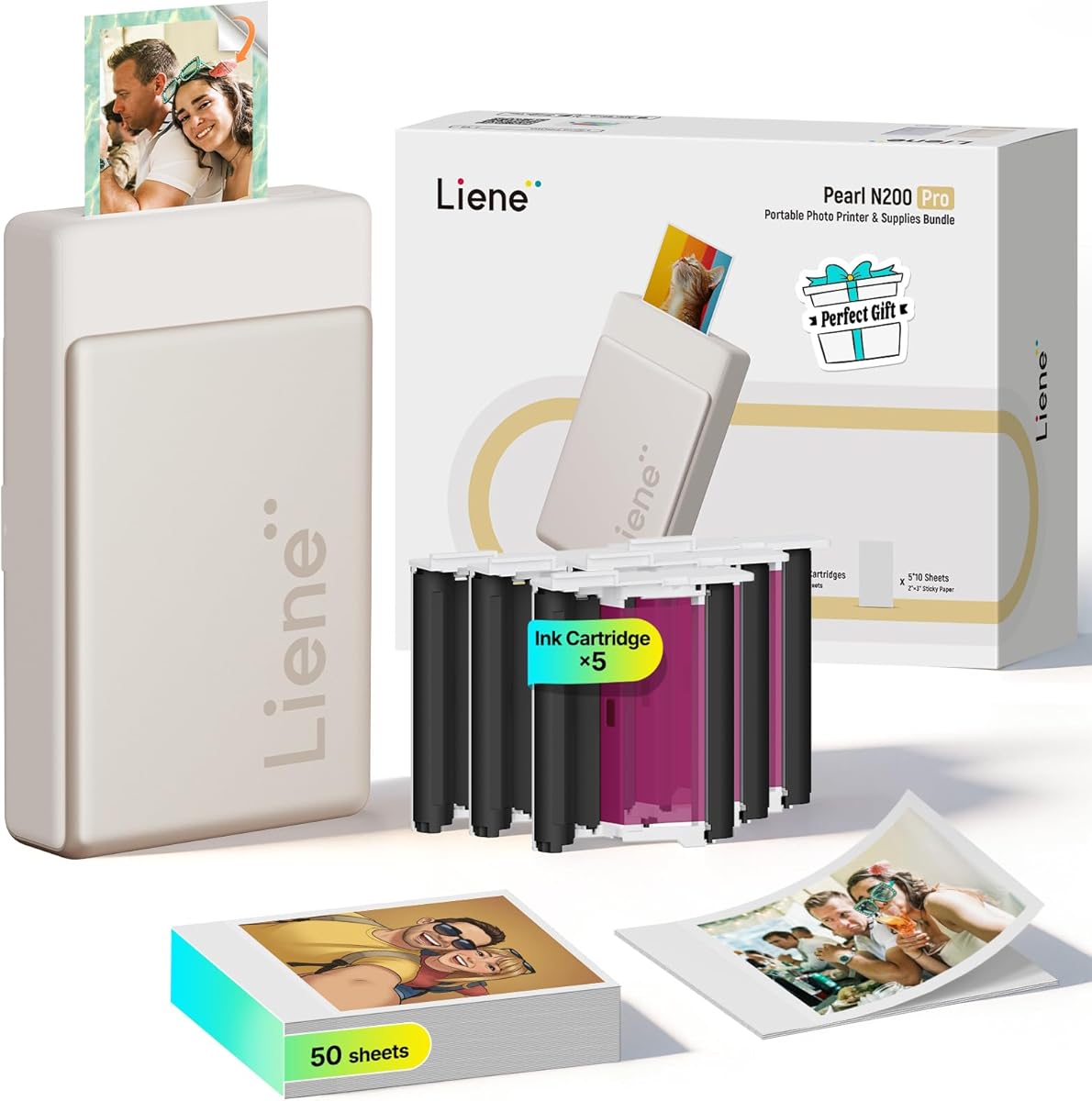
The Liene Pearl N200 Pro is a premium portable photo printer built around dye-sublimation technology, app-based creativity, and group-friendly Bluetooth printing. Its 4.6 rating is among the highest in the guide, while the listed bundle of 50 adhesive sheets and five cartridges gives new owners a sizable starting supply. The compact three-inch design is intended to make the printer useful at parties, outings, and other settings away from a desk.
We may earn a commission when you buy through this link, at no additional cost to you.
The Liene Photo App expands well beyond basic cropping. Its artistic-style feature can reimagine portraits with varied backgrounds, while AI background removal, frames, watermarks, timestamps, stickers, and other editing tools support more elaborate designs. InstaPic Print mode adds a built-in camera with filters, enabling a one-touch shoot-and-print process without first selecting an image from the phone album.
Bluetooth quick-connect and multi-device pairing let several guests print in the same session, which is useful for celebrations, gatherings, and shared creative activities. A full charge is stated to support up to 27 sticker prints. The 2×3-inch adhesive format is ideal for small keepsakes, but it cannot produce letter-size photographs or standard documents. As with many portable dye-sublimation devices, the ongoing cartridge system is another point to evaluate carefully.
The N200 Pro is the premium pick for users who prioritize creativity and portability over conventional document printing. It is well suited to scrapbooking, event guests, personalized gifts, and social occasions where a group can create prints together. For formal photos, larger images, or office paperwork, an all-in-one inkjet or dedicated 4×6 model is more practical. Within portable photo printers, its app and group-printing features give it a clear identity.
InstaPic mode simplifies spontaneous printing by combining capture, filters, and output in one flow. This reduces the number of steps when a shared event is unfolding in real time.
Multi-device pairing and quick Bluetooth connection make it easier for several people to participate. The included cartridges and adhesive paper also make it suitable for parties, giveaways, and collaborative memory projects.
We may earn a commission when you buy through this link, at no additional cost to you.
The HP Smart Tank 5003 is built for buyers who expect to print frequently and want to reduce the recurring cost of consumables. Its 3.9 rating is modest, but the product's refillable tank design and stated inclusion of up to three years of ink make it a compelling option for high-volume users. It combines printing, copying, and scanning with wireless and mobile functionality rather than limiting itself to photographs.
We may earn a commission when you buy through this link, at no additional cost to you.
The cartridge-free system is the main attraction. Users replenish ink by plugging compatible ink bottles into the tanks and allowing them to drain, avoiding the squeezing and potential mess associated with some refill methods. The stated allowance of up to 6,000 color or black pages out of the box provides a useful starting capacity, while borderless printing expands its relevance to photo projects.
The main compromise is that this is a larger, stationary printer rather than a portable instant device. Users who value small adhesive photos, phone-first workflows, and creative app tools may find a dedicated model more satisfying. The supplied information also emphasizes the general low-cost, high-volume proposition rather than advanced photographic color controls, so photo enthusiasts should review output samples and specifications for their preferred media.
The Smart Tank 5003 is a practical recommendation for families, students, and home offices with steady printing needs. It is particularly attractive when minimizing ink replacement frequency is a priority. Choose it for document-heavy use, occasional borderless photos, and the convenience of bottle refilling. A dedicated photo printer remains better for portable snapshots and playful projects.
The mess-free refill method is designed to make replenishment more comfortable than handling squeeze bottles. It also removes the need to replace small conventional cartridges during high-volume use.
Printing, copying, scanning, borderless images, and mobile access make this more versatile than a photo-only machine. The included ink capacity is particularly useful for homes that regularly combine documents, schoolwork, and photographs.
We may earn a commission when you buy through this link, at no additional cost to you.
The cheapest printer is not necessarily the cheapest way to print. Compare cartridge and refill systems, realistic page yields, compatible media, connection methods, and the kinds of images you want to produce before choosing a model.
The most important cost question is how the printer obtains ink and how much it consumes. Small replaceable cartridges may be convenient but can become costly for high-volume users. Refillable tank systems, such as the Canon MegaTank G3270 and HP Smart Tank 5003, are generally better suited to frequent document printing. Dedicated photo printers use smaller cartridges or dye-sublimation supplies tailored to their own paper formats, so compare yields for the specific photo size and coverage you intend to print.
Choose the ink system that matches your volume, not simply the printer with the most included media. For occasional photos, cartridge convenience may matter more. For regular documents and color pages, prioritize a refillable tank and consider the stated page yields.
A 4×6 printer produces standard-sized keepsakes, while 2×3 mini printers create smaller adhesive images suited to journals, planners, party favors, and crafts. Full-size inkjets can support letter-size media and borderless photographs, making them more useful when family albums, wall displays, or documents are involved. Verify whether the model supports bordered or borderless output and what paper dimensions it can physically handle.
Match the output format to the intended use. Choose 2×3 for portability and scrapbooks, 4×6 for conventional snapshots, or letter size for framed photos and mixed office work. Verify media support before ordering.
Thermal dye sublimation uses heat to transfer dye into the paper and is featured in the Liene M100 and Pearl N200 Pro. Inkjet systems spray liquid ink and are common in multifunction models. The supplied information emphasizes vibrant dye-sublimation color, sharp inkjet text, 600 DPI output on the Nelko PP01, and borderless photo support on larger HP models. Review the stated resolution and media features, and consider whether document quality, photo sharpness, or portability matters most.
Do not equate a higher resolution figure with every aspect of photographic quality. Consider color behavior, paper compatibility, and the intended image size. Select the technology that best matches the kinds of output you will actually make.
The best connection is the one every device in your home can use easily. The Liene M100 creates its own hotspot, the Nelko PP01 uses Bluetooth, and several Canon and HP models support conventional wireless or dual-band Wi-Fi. Mobile services such as AirPrint, Mopria, Canon PRINT, and manufacturer apps can improve convenience. Multi-device pairing and simultaneous connections may be valuable at parties or in shared workspaces.
Check your existing phone, tablet, and computer ecosystem before choosing. Bluetooth and built-in hotspots can simplify standalone use, while Wi-Fi is more convenient for regular household printing from multiple devices.
Low ink cost is less useful if prints smudge or deteriorate quickly. The Liene M100 describes its laminated output as resistant to water, scratches, fingerprints, and fading. The Nelko PP01 and 520 cartridges are described as producing water-resistant and smudge-resistant photos once dry. These properties matter for albums, travel journals, school projects, party favors, and images that will be handled regularly.
For keepsakes and crafts, prioritize durability after drying as well as color. For formal photographs stored away from light and moisture, verify compatible paper and recommended handling before printing.
A dedicated photo printer usually provides more relevant creative tools for snapshots, filters, borders, collages, and adhesive output. An all-in-one adds scanning and copying, while some models also provide automatic duplex printing and document feeders. The HP Envy Photo 7975, Canon PIXMA TS6520, Canon PIXMA TS4320, Canon MegaTank G3270, and HP Smart Tank 5003 are better fits for mixed school and office work. The Liene and Nelko models are better suited to photo-centered tasks.
Choose an all-in-one when documents, records, and copies are regular requirements. Choose a dedicated model when portability, creative formatting, and small physical photos matter more than scanning.
A large starter bundle can make a portable printer immediately useful and reduce the need for a separate accessory order. The Liene M100 includes 100 sheets of 4×6 paper and three cartridges, while the Liene Pearl N200 Pro includes 50 adhesive sheets and five cartridges. The Nelko PP01 uses cartridges rated for up to 80 photos each, and the 520 cartridge listing provides similar stated capacity. Bundle quantities should not be confused with a permanent cost advantage, since later supplies still need replenishment.
Count the included paper, cartridge compatibility, and estimated photo yield before purchasing. A generous bundle is valuable for new owners, but ongoing supply cost determines the long-term value.
Portable photo printers offer the greatest flexibility for travel, school, and events, but they require compatible paper, careful cartridge handling, and attention to charging. Stationary tank printers are larger but provide more paper capacity and broader document functions. Cartridge-based systems require replacement when consumed, while refillable tanks need care to avoid spills. Portable inkjet cartridges can also dry during long periods of inactivity, making proper storage and regular use important.
Match the footprint to your space and intended mobility. Choose a portable model for events and travel, or a stationary all-in-one for a permanent home-office position. Consider maintenance before deciding.
Begin by unboxing the printer in a clean, dry area and reviewing the included paper, cartridges, cables, and setup instructions. For tank or bottle-refill models, add ink carefully and follow the manufacturer's fill guidance. For cartridge models, remove all packaging, protective tape, and transparent film before installation. Load the correct paper, align the rollers, and confirm that each cartridge is fully seated before attempting the first print.
Connect through the method the printer supports. Join its built-in hotspot or Bluetooth link for portable models, or place a wireless all-in-one on the same home network. Install the relevant app, grant requested permissions, and perform a test image or alignment page. Review crop, color, border, resolution, and paper settings before a large job, and allow fresh inkjet or inkjet-style prints to dry fully before handling or stacking them.
For ongoing care, keep the printer away from dust, moisture, direct heat, and unstable surfaces. Store cartridge-based machines in their protective packaging when they will not be used for an extended period, and keep print heads clean according to the manual. Do not leave an installed cartridge exposed unnecessarily if drying may occur. Refillable systems should be checked for leaks, while scanners and print heads should be wiped with an appropriate soft, dry material.
Refillable ink-tank printers are generally the strongest choice for inexpensive high-volume documents and color pages. Dedicated photo printers may use cartridge or dye-sublimation systems that are convenient for small photos but can cost more when every image requires a new supply. The best option depends on whether you print documents, snapshots, adhesive photos, or a mixture of all three.
Not necessarily. Their per-image cost depends on the cartridge yield, image coverage, paper cost, and how many photos you print. The Nelko 520 cartridge is stated to produce up to 80 full-color photos, but actual results vary. Compare cartridge and media costs, especially if you make large batches, rather than assuming the smaller format automatically means lower cost.
Thermal dye sublimation can produce vibrant 4×6 or small adhesive photos with good handling characteristics. The Liene M100 and Pearl N200 Pro use this approach, and the M100 describes its surface as resistant to water, scratches, fingerprints, and fading. The right choice still depends on print size, portability, app features, and whether you also need documents, scanning, or copying.
Models such as the Canon PIXMA TS6520, Canon PIXMA TS4320, Canon MegaTank G3270, HP Envy Photo 7975, HP DeskJet 2955, and HP Smart Tank 5003 combine photo capability with printing, copying, and scanning functions. Dedicated models such as the Liene M100, Liene Pearl N200 Pro, and Nelko PP01 are optimized for photographs and creative projects rather than office paperwork.
It depends on the model. The Liene M100 creates its own hotspot, and the Liene Pearl N200 Pro uses Bluetooth. The Nelko PP01 also uses Bluetooth for phone printing. Several full-size wireless models instead join an existing Wi-Fi network and offer mobile printing through services such as AirPrint, Mopria, or their manufacturer apps.
Use the printer regularly and keep unused cartridges in their original packaging with protective surfaces intact. The Nelko cartridge instructions specifically advise wiping the print head with a lint-free cloth or cotton pad if a cartridge has not been used for a long time. Also follow the printer's storage instructions, and do not leave removable cartridges exposed when the machine will remain idle for weeks.
A separate photo tray makes frequent switching between standard paper and photo media more convenient. It is especially useful for a family printer that also produces homework, reports, and household documents. Dedicated portable models do not need that compromise because they are designed around one small photo format from the beginning.
Check the compatible paper sizes, actual photo dimensions, cartridge or refill configuration, estimated yields, and mobile compatibility. For a portable model, also consider paper durability, charging requirements, app quality, and whether the printer supports one device or group connections. Finally, compare the ongoing supply cost rather than focusing only on the initial hardware and included bundle.
The Liene M100 4×6 is the strongest all-around pick for shoppers who want dedicated photo printing, a generous paper bundle, app editing, and a built-in hotspot. The Canon MegaTank G3270 is the best budget option for frequent document and color output, while the Liene Pearl N200 Pro stands out as the premium portable choice with sophisticated editing and group-printing features.
Prioritize your most common print job. Choose a refillable tank for high-volume documents, a 4×6 thermal printer for conventional snapshots, a 2×3 adhesive model for crafts and travel, or an all-in-one inkjet when scanning, copying, and duplex printing are equally important. The most economical printer is the one whose consumables match your workload without creating unwanted expense or inconvenience.
Before ordering, verify the current printer specification, compatible ink, paper requirements, app support, and supply costs. Ratings, bundles, promotions, and availability can change, and the cost of replacing ink or media may ultimately influence the value of the printer more than the initial purchase alone.