
Tengchi RCA to HDMI Converter
4.4Editor score
Composite RCA video input
1080p HDMI output
Broad television format support
This PlayStation HDMI Upscaler guide compares 10 converters for compatibility, video quality, latency, resolution, setup ease, and console support.
A PlayStation HDMI upscaler can transform an older console into a practical option for a modern television or monitor, but the right converter depends heavily on the console, original signal type, and display. The useful choices range from dedicated PS1 and PS2 adapters to broader AV, component, and 1080p-to-4K converters.
The products in this guide were compared using their stated signal support, supported PlayStation generations, maximum output resolution, aspect-ratio controls, latency claims, power requirements, and setup considerations. Particular attention is given to compatibility limitations because an upscaler cannot create a usable signal from an unsupported input, and display requirements can matter as much as headline resolution.
The rankings show which adapters suit original PlayStation hardware, which products can handle component or composite sources, and which options are better suited to a console that already outputs 1080p HDMI. Ratings reflect the supplied customer feedback, while prices and availability can change, so readers should confirm the current listing and accessory requirements before purchasing.
4.4Editor score

4.4Editor score

This side-by-side comparison highlights each converter's intended source signal, PlayStation compatibility, output capabilities, and key setup considerations. Because dedicated adapters and universal video processors solve different problems, the table is best used as a guide to matching hardware rather than as a ranking of identical functions.


The LEVELHIKE HDMI Cable is a purpose-built adapter for original PlayStation and PlayStation 2 consoles. It receives the consoles' analog RGB output, converts it to digital HDMI, and sends the result to a modern television, monitor, or projector. Its supplied rating of 4.4 reflects generally favorable customer feedback, while its strongest selling point is the combination of true RGB conversion, low-latency operation, and a physical aspect-ratio switch.
We may earn a commission when you buy through this link, at no additional cost to you.
True RGB matters because it offers a more useful starting point than standard composite video. The product description states that the analog RGB signal is converted and upscaled to HDMI for contemporary displays, allowing classic PS1, PS One, Fat PS2, and Slim PS2 systems to remain connected to modern equipment. The detachable arrangement is also practical: owners can use a longer or higher-quality HDMI cable between the converter and television rather than being tied to a short fixed lead.
The 4:3 and 16:9 switch is valuable for original hardware because many older games were designed around a television shape that no longer matches widescreen panels. Choosing 4:3 can preserve the intended composition with side borders, while 16:9 may fill more of a modern display. The stated low-latency performance also makes this converter more attractive for play than a generic capture-oriented converter, although users should still account for normal display and game processing latency.
This is the strongest general recommendation for someone whose goal is specifically to connect a PS1 or PS2 to an HDMI television. It concentrates on the signal path and aspect ratio that those systems need instead of presenting a collection of largely irrelevant modes. The main limitation is intentional specialization: it is not intended to upscale a modern PlayStation's HDMI output, and the console must be able to provide the compatible analog signal.
For classic PlayStation owners, the LEVELHIKE adapter offers a focused and understandable feature set. It is particularly attractive when RGB picture quality, flexible display sizing, and low-lag play matter more than support for unrelated legacy devices. The included one-year replacement warranty adds further reassurance, although successful setup still depends on configuring the console correctly and using a suitable HDMI display.
True RGB separates the original PlayStation picture into red, green, and blue components, providing a cleaner foundation than composite video. The converter then processes and upscales that analog RGB signal before presenting it through HDMI.
The physical 4:3 and 16:9 toggle gives owners a direct way to control how classic games appear on a modern screen. This is more focused than the broader aspect and zoom options found on general-purpose converters.
We may earn a commission when you buy through this link, at no additional cost to you.
The 4K Gaming Upscaler & Enhancer is designed to accept a 1080p HDMI signal and produce a sharpened, color-tuned 4K 60Hz image. It is the premium-oriented selection because it combines high-resolution conversion with a wide list of compatible game systems, including the original Xbox, multiple PlayStation generations, GameCube, Wii, Dreamcast, PS3, Xbox 360, and Wii U, provided the source is configured to output compatible 1080p HDMI.
We may earn a commission when you buy through this link, at no additional cost to you.
The processing claims include image sharpening, delicate color tuning, enhanced depth of field, and conversion without stated frame drops or added lag. These features are intended to make a 1080p feed appear more detailed on a 4K television. It is important, however, to understand that the process is an upconversion rather than the addition of native detail available from a game rendered at a higher internal resolution.
Setup is where this product demands the most attention. The source must output 1080p, the connected cable must meet the stated HDMI 2.0a-or-better requirement, and the display must accept 4K at 60Hz. The product is not compatible with an original HDMI 1.4 cable, and its guidance specifically warns that 1440p monitors and 4K 30Hz displays may produce a black screen or otherwise fail to work correctly.
Those restrictions do not erase its value, but they place it in a more specialized role than a straightforward PS2 adapter. A current console that already sends 1080p HDMI can benefit from the upscaling and enhancement, while older systems need an appropriate first-stage adapter before they can feed this unit. In other words, PS2 and early PlayStation models may require two separate conversions rather than connecting directly.
This is the pick for an owner with a properly equipped 4K 60Hz television who wants one processing box to handle several 1080p sources. The trade-offs are strict display and cable requirements, the need to verify that every source actually outputs 1080p, and the absence of a supplied rating for customer feedback. Within those boundaries, it offers the most ambitious output specification in the group.
A 1080p-to-4K converter rebuilds and processes the incoming image, which can improve apparent clarity on a larger 4K panel. It does not transform the source into native 4K game rendering, so larger displays can still make lower-resolution limitations visible.
The long console list is useful for planning a multi-system setup, but compatibility depends on the source producing 1080p HDMI. Older consoles may need a separate RGB, component, or composite adapter before their picture reaches this converter.
We may earn a commission when you buy through this link, at no additional cost to you.
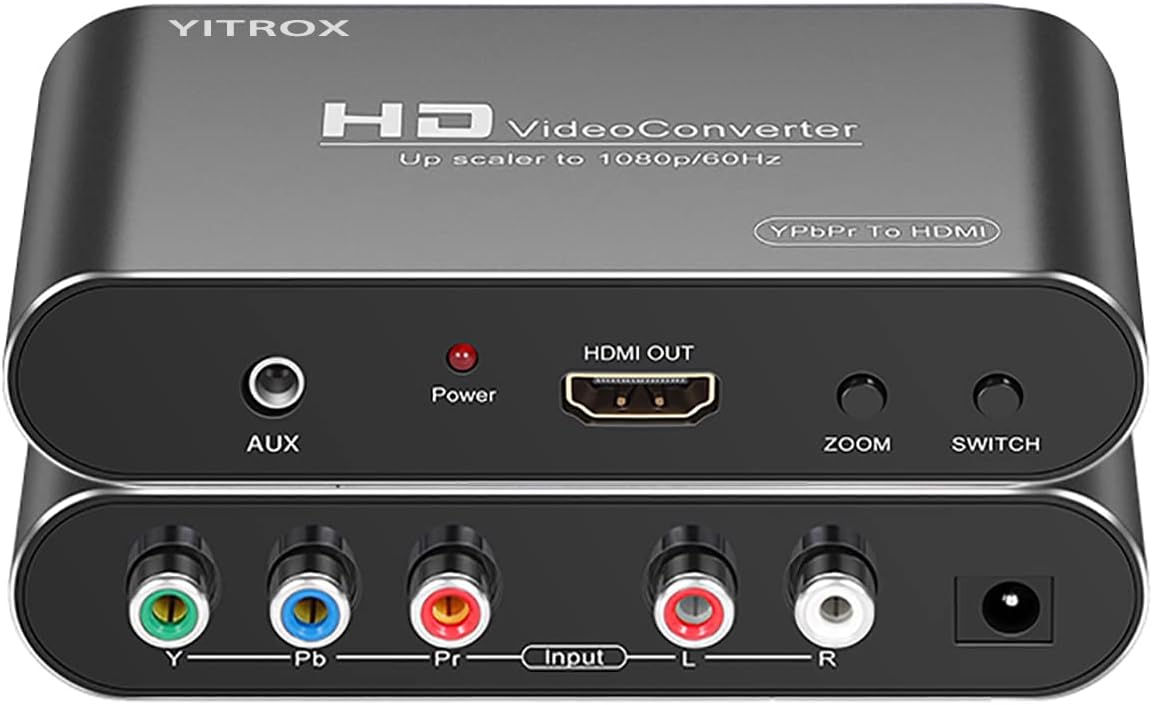
The Component to HDMI Converter is a general scaler designed to turn analog YPbPr component video and right-left audio into an HDMI signal. It supports the PS2 and PS3 as well as the Wii, Xbox 360, older set-top boxes, and legacy disc players, making it a more flexible option for anyone with several analog component sources rather than a single-console installation.
We may earn a commission when you buy through this link, at no additional cost to you.
Its most useful feature is the range of output controls. The converter can switch among 800×600, 1024×768, 1280×720, 1280×1024, and 1920×1080 resolutions. It also offers seven zoom options, including gradual enlargement, gradual reduction, and automatic adaptation. For a PlayStation owner, that flexibility can make it easier to fit an older console's picture neatly into a modern panel without relying on the television's own picture menu.
The product description also outlines signal processing intended to reduce jitter and trailing, optimize motion and color, improve contrast, and apply digital noise reduction. These are valuable goals for older console footage, although the actual degree of improvement depends on the incoming component signal, the selected console settings, the television, and the display's own processing. The converter cannot recover information that was never present in the source.
The primary inconvenience is that a separate component cable is needed, and the unit cannot be operated in reverse to turn HDMI into component video. The PS2 also requires the console's AV output setting to be changed to YPbPr; otherwise, users may see no picture. The supplied rating of 4.1 indicates generally positive but not exceptional customer feedback.
This converter is a good fit for owners who want one device to serve several classic systems and value detailed scaling control. It is less convenient for a plug-and-play PS2 installation because the setup involves both the console menu and an external component cable. For a broad legacy-media setup, though, its resolution and zoom menus offer more control than a simple dedicated adapter.
Five selectable resolutions and seven zoom modes make it possible to tune the converted image for different television sizes. This reduces reliance on inconsistent television-side scaling and gives the user more direct control over framing.
The PS2 must use its YPbPr output setting, and a proper component cable is required. Once configured, the converter handles analog video and audio and supplies synchronized HDMI output.
We may earn a commission when you buy through this link, at no additional cost to you.
The PSP2000/3000 HDMI Converter provides a modern HDMI connection for the specified versions of the original PlayStation Portable. It converts and upscales YPbPr video while carrying audio and video together, allowing compatible PSP2000 and PSP3000 systems to play on an HD television, monitor, or projector. Its supplied rating of 3.9 is lower than several other products in the guide, making careful model verification especially important.
We may earn a commission when you buy through this link, at no additional cost to you.
The converter supports switching between 1080p and 720p output, which gives owners some flexibility when matching the picture to a display. Four screen-ratio magnification modes are also offered, a useful feature because the handheld's widescreen presentation can look different from a standard console output on a large television. The stated processing focuses on amplified signal accuracy, color, resolution, and detail.
Installation is presented as uncomplicated: no drivers are required, and games can run without added delay according to the product information. The simultaneous audio-video output removes the need to juggle separate analog connections when the goal is simply to get the handheld's picture and sound onto one modern display.
The critical limitation is model scope. The unit is stated to support PSP2000 and PSP3000 models, and it should not be assumed to work with every PSP variation. It is not a general PlayStation converter, nor does it turn into a solution for a PSP Go or other handheld. Buyers should confirm the exact hardware revision and the presence of a compatible output connection before ordering.
For the right owner, this product fills a specific gap: getting a supported PSP into the HDMI ecosystem while retaining simple operation and adjustable scaling. Its lower rating and narrower model coverage keep it from the top tier, but the dedicated format can be more satisfying than forcing an older portable through a generic composite adapter.
Switching between 720p and 1080p gives the user a way to balance output detail against television compatibility. The four magnification modes add further control over how the handheld's widescreen image fills the display.
The listed support covers PSP2000 and PSP3000 models rather than every member of the portable family. Checking the exact console and connector is essential because similar hardware revisions can have different connection methods.
We may earn a commission when you buy through this link, at no additional cost to you.
The Hyperkin HDTV Cable is an established-style adapter for connecting PS1 and PS2 systems to modern HD televisions. It is advertised as delivering crisp 720p output, carrying clear stereo audio and video, and requiring neither software nor complicated setup. The supplied 4.3 rating places it among the stronger customer-feedback results in this collection.
We may earn a commission when you buy through this link, at no additional cost to you.
Compatibility is a central part of its appeal. The product supports both the original PlayStation and the fat and slim PlayStation 2, while its component-video support is specifically identified as a PS2 feature. That distinction matters because component video on the PS2 can provide a cleaner source than composite video when the console is configured appropriately.
The package includes a seven-foot AV-to-HDMI cable and a six-foot Micro USB power cable. Those lengths make it easier to position a console near a television, and the detachable-style approach implied by separate cables gives users some freedom over how the equipment is arranged. The product description emphasizes a straightforward process: connect the console, connect the display, and play.
Compared with the LEVELHIKE and Kaico adapters, the Hyperkin offers fewer explicitly described picture-shape controls. It does not advertise a 4:3/16:9 switch or a broad zoom menu, so users may need to handle sizing through the television. It also places more emphasis on a 720p result than the more technically detailed specifications of some component scalers.
This is a compelling choice for a straightforward retro installation, particularly when the buyer wants a recognizable dedicated cable and convenient included lengths. The absence of elaborate controls is a trade-off rather than a flaw: it suits people who want minimal setup and will adjust the picture on the television themselves. For PS2 component playback, it is a particularly relevant adapter.
The PS2 can use component output to provide a stronger source than composite, and this cable explicitly supports that path. The console must be configured for the corresponding AV output, and the appropriate connection must be used.
The included seven-foot AV-to-HDMI lead and six-foot power lead offer practical placement around a television cabinet. Separate leads also make it easier to reach a wall-mounted display or position the console more conveniently.
We may earn a commission when you buy through this link, at no additional cost to you.
The SoundBeast AV HDMI 2.0 is a composite-video converter with unusually broad secondary uses. It accepts yellow, white, and red RCA input, including video from VCRs, camcorders, Hi8 equipment, and gaming systems, then outputs 720p or 1080p HDMI to a television or monitor. Its supplied 4.4 rating indicates favorable feedback and makes it a compelling option for a mixed retro-media installation.
We may earn a commission when you buy through this link, at no additional cost to you.
The most important PlayStation-related point is that this is a composite-to-HDMI converter, not a component or RGB adapter. It can work with consoles that have compatible composite output, but its picture starts with a lower-quality signal than the dedicated RGB and component products elsewhere in the guide. The benefit comes from its flexibility: the same device can handle tapes, discs, camcorders, and games.
A notable upgrade over earlier versions is 4:3 aspect-ratio control. Rather than stretching composite footage across a widescreen television, the converter can preserve the original shape and add black bars on the sides. A standard 16:9 option remains available for users who prefer to fill the screen. It also includes USB video-capture functionality for recording to a PC or Mac at 640×480 without separate drivers.
The capture feature is a genuine advantage for users who want to preserve or share footage, though 640×480 is modest by current standards. The converter cannot work in reverse, and PAL and NTSC input support helps with international media collections. It also includes a one-year warranty and stated technical support, with the manual describing an optional extension to two years.
This product is best for someone whose PlayStation needs are part of a broader collection of analog video sources. It provides more functionality than a bare converter, but a PS2 or PS3 owner seeking the best possible source should use component video with a more appropriate scaler. As a versatile capture-and-conversion box, however, it has a clear role.
The USB capture function is designed to record directly to a PC or Mac with included software and no driver installation. Its 640×480 recording ceiling makes it a convenient archival and sharing tool rather than a high-resolution capture system.
Original tapes and early console games were often composed for a 4:3 screen. Preserving that ratio with side bars can look more natural than stretching the entire picture across a modern widescreen panel.
We may earn a commission when you buy through this link, at no additional cost to you.
The Tengchi RCA to HDMI Converter is the budget selection in this guide. It accepts analog composite video and right-left audio through a female RCA connection, then provides a 1080p HDMI output. The supplied rating of 4.4 shows that buyers have generally been satisfied, while the simple design makes it a practical first step for connecting a compatible PlayStation to a modern television.
We may earn a commission when you buy through this link, at no additional cost to you.
The converter supports PAL, NTSC 3.58, NTSC 4.43, SECAM, PAL/M, and PAL/N input standards. That broad television-format support can be useful for owners of older imported consoles and discs. The product information specifically lists the PS2 and PS3 among compatible devices with standard composite AV input, along with the N64, Xbox, set-top boxes, VCRs, and DVD players.
Operation is straightforward once the required USB power is connected. The package includes the converter, an HDMI cable, a USB power cable, and a user manual, but the external five-volt USB power source is not included. Users may already have a suitable adapter, yet should not assume that every USB port can power the unit consistently. The one-year warranty provides a basic level of support.
The important limitation is source quality. Composite video combines color information into a relatively limited analog signal, so a 1080p output label does not mean the converter creates 1080p detail. It upscales the available composite picture. Neither 4K nor 3D is supported, and HDMI-to-AV reverse conversion is also unavailable.
This is the best budget choice for a straightforward composite PlayStation connection, especially when a simple RCA-to-HDMI solution is all that is needed. The trade-off is lower source fidelity than RGB or component adapters, along with the need to arrange external USB power. For older PS2, PS3, or N64 use, it can still be an economical and effective solution when the console does not offer a better signal path.
A 1080p output describes the converted signal delivered to the television, not the amount of native detail present in a composite source. Dedicated RGB or component adapters remain the better choice when maximizing picture quality is the priority.
The unit must be connected to an external five-volt, one-amp USB source during use. Including the USB lead simplifies the connection, but having a dependable power adapter is still part of the installation.
We may earn a commission when you buy through this link, at no additional cost to you.
The Kaico PS1 HDMI / PS2 AV Cable is a dedicated console adapter designed to connect classic Sony PlayStation systems to contemporary HD televisions. Its distinguishing feature is a built-in switch between RGB and component modes. That choice gives owners a way to select the appropriate source treatment for different PlayStation generations and configurations while retaining a straightforward HDMI connection.
We may earn a commission when you buy through this link, at no additional cost to you.
The product states support for all PlayStation output resolutions and is compatible with Sony PlayStation and PS2 models. The switch is not merely a marketing label; it corresponds to different signal paths available across the original hardware. Users must select the mode that matches the console and its output configuration, then connect the cable to the television.
Its 4.2 supplied rating reflects generally positive customer feedback. The dedicated form factor is easier to understand than a general AV converter with menus and mode buttons, and the plug-and-play approach avoids software, drivers, and complicated setup. A twelve-month support, repair, or replacement warranty provides manufacturer support for defects or setup-related concerns.
Compared with products that advertise higher output resolutions, the Kaico does not make a 4K claim. Its purpose is more focused: providing HDMI access to classic PlayStation hardware and letting the user choose RGB or component. The mode must be changed when the source or desired picture path changes, and the cable cannot help a PS4 or newer console that already uses HDMI.
This is a strong recommendation for a PS1 or PS2 collection where owners care about the source quality available from those systems and want a cable without a large external box. It is less versatile for mixed analog equipment, yet that focus makes it easy to recommend when the console at hand is one of the supported classics.
RGB and component modes represent different ways of carrying the classic console picture. The built-in switch allows the user to match the converter to the console and output configuration without separate adapters.
The cable is built around PS1 and PS2 hardware rather than general-purpose AV equipment. That focus produces a simpler setup, although owners of other consoles need a different converter.
We may earn a commission when you buy through this link, at no additional cost to you.
The PS2/PS3 YPbPr HDMI Converter is a focused component-video adapter for users who want to connect a PS2 or PS3 to an HD television or monitor. It converts YPbPr into HDMI with simultaneous signal processing intended to improve color, resolution, and detail. The supplied 4.3 rating from the product data indicates generally positive customer feedback, although it remains below the strongest-rated options.
We may earn a commission when you buy through this link, at no additional cost to you.
The adapter supports PS2 display modes of 480i, 576i, and 480p. These are progressive or interlaced standard-definition modes, so this is not the choice for a person seeking 720p or 1080p component output. Its appeal lies in a simple path from the console's YPbPr connector to HDMI without installing drivers or configuring complicated software.
The most important setup instruction is that the PS2 must be changed to YPbPr or YCbCr output before connection. If the console remains on composite, CVBS, or another setting, the user may see an out-of-range message. The package contains the converter and a user manual, and the product information states that no separate HDMI cable or driver installation is needed.
Video processing is advertised as providing precision, stronger colors, smoother detail, and no lag. The converter also does not support composite input, so it should not be considered interchangeable with the RCA-based products in this guide. Connecting the wrong source type is the most likely reason for a black or incompatible picture.
This product is a sensible choice for a straightforward PS2 or PS3 component installation, particularly when simplicity is more important than maximum output resolution. It is less suitable for owners seeking widescreen high-definition modes or a broad menu of scaling choices. Users who require those capabilities should examine the more versatile component scaler instead.
The PS2 must be set to output YPbPr or YCbCr before the adapter is used. Composite or other output settings will not match the converter's input and can result in an out-of-range picture.
Although the connector is component video, the listed supported console modes top out at 480p. Owners who want 720p or 1080p should select a converter explicitly designed for those output resolutions.
We may earn a commission when you buy through this link, at no additional cost to you.
The Mcbazel PhotoFast 4K Gamer+ is a compact HDMI processor that accepts a 1080p source and converts it to 4K at 60Hz. It is not designed for the original PlayStation's analog output; instead, it works with sources such as the Nintendo Switch in dock mode, Wii U, PS4, Chromecast, and Apple TV. Its primary relevance to PlayStation owners is upgrading a PS4's 1080p HDMI output for a compatible 4K television.
We may earn a commission when you buy through this link, at no additional cost to you.
A dedicated video graphics processor reconstructs the 1080p feed at 4K 60Hz while applying image sharpening, color processing, and added depth of field. The product description correctly clarifies that this is upconversion rather than native 4K rendering by the source console. The source frame rate is retained, which is important for smooth gameplay, but a 60Hz output does not create 60 frames per second when the source is not already running at that rate.
The requirements are strict. The output display must accept 4K at 60Hz; a 1080p television or monitor will not show a picture, while 4K 30Hz and 1440p screens are outside the supported range. The input must also be sending 1080p. A 4K 60Hz display, an HDMI 2.0a data-capable cable, and external power through the supplied USB-A to Type-C lead are required.
The box includes the processor, a 27-centimeter HDMI extender, and a 150-centimeter power lead, but no full HDMI cable. This omission means buyers should have a suitable cable ready. The Switch in handheld mode sends no HDMI signal, so the device can only be used in dock mode. The PS5 and Xbox Series X already output 4K and do not need this particular conversion.
Its supplied 3.8 rating is the lowest among the products with customer ratings, and the strict compatibility rules make it a less forgiving recommendation. Even so, the small enclosure is easy to position behind a television or pack in a travel setup. It is best for a PS4 owner with a properly equipped 4K 60Hz screen who values sharpening and a consistent 4K output.
This processor does not merely offer an optional 4K mode; a compatible 4K 60Hz display is required for normal operation. Unsupported resolutions may produce no image, so display specifications should be checked before purchase.
The compact unit and included short extender make it practical to leave behind a television or carry with a portable arrangement. The need for external power and a separately purchased suitable HDMI cable should be considered when planning that setup.
We may earn a commission when you buy through this link, at no additional cost to you.
The most important choice depends on the console's available output and the display being used. Signal type, supported resolution, frame rate, power, aspect ratio, and installation convenience determine whether an adapter will work as intended.
Start by determining exactly what the PlayStation can output. Original PS1, PS One, and PS2 systems may provide composite, S-Video, RGB, or component depending on the model and configuration. The PS3 and PS4 use HDMI, while the PS5 outputs HDMI at higher resolutions. A converter cannot accept a signal the console does not provide, and a connector labeled HDMI on the converter does not mean the source is HDMI.
The LEVELHIKE and Kaico options focus on classic PlayStation RGB and component paths, while the Tengchi and SoundBeast devices accept composite RCA. The PS2/PS3 YPbPr adapter requires component input specifically. Match the converter to the strongest practical signal your console can provide rather than choosing solely by the output resolution printed on the box.
Output resolution must be supported by the television or monitor. A device that outputs 1080p can still be rejected by a display that accepts only 60Hz at 4K, and the 4K-oriented products in this guide have explicit display restrictions. The Mcbazel requires a 4K 60Hz screen, while the 4K Gaming Upscaler warns that 4K 30Hz and 1440p monitors may fail to display properly.
Also distinguish between standard-definition component modes and high-definition modes. The PS2/PS3 YPbPr Converter lists 480i, 576i, and 480p, whereas the Component to HDMI Converter supports output up to 1080p. Check both the console's available modes and the converter's selected output before installation.
Upscaling converts the available picture into a larger output grid and may add sharpening, but it cannot restore detail that was never captured. A composite-to-HDMI converter may provide a 1080p output while retaining the softness, color bleed, and lower detail of composite video. RGB and component inputs generally offer a better foundation for classic consoles.
For a PS4 connected through HDMI, a 1080p-to-4K processor can make the image appear more defined on a large 4K panel, but it is not native 4K game rendering. Set expectations according to the source. A higher output number can still look better when the processor is well matched to the display, though it does not create new graphical content.
Gaming converters should minimize added delay because extra latency can make controls feel less responsive. Several products in this guide specifically claim low-lag or zero-delay conversion. Those statements are generally most relevant to dedicated HDMI processors, but no converter can remove all delay inherent in the source console, television processing, display response, and audio path.
For competitive gaming, favor products that explicitly discuss latency and keep the processing chain as short as practical. A complicated converter with multiple scaler stages is less desirable than a direct adapter when both otherwise meet the display and signal requirements. For retro play, even modest delay is often less noticeable, but responsiveness still contributes to the overall experience.
Classic PlayStation games were commonly designed for a 4:3 television, while most current displays are 16:9. The LEVELHIKE adapter includes a direct 4:3 and 16:9 switch, while the SoundBeast can preserve 4:3 framing and add side bars. The broader component scaler offers seven zoom modes, which can be useful when matching different legacy sources to one screen.
A dedicated aspect control is convenient, but a general TV menu can perform a similar function. The difference is precision and convenience: an on-device control affects every source connected through that converter and may save repeated menu adjustments. Consider picture shape alongside resolution because a sharp image can still look wrong if it is stretched or cropped awkwardly.
HDMI carries video and digital audio, but the converter must be able to receive the console's audio correctly. The Component to HDMI Converter accepts analog right-left audio and provides an AUX output. The Tengchi requires external USB power and includes an HDMI cable and USB lead. Dedicated PSP and PlayStation adapters may bundle the necessary connection cable, while the Mcbazel omits an HDMI cable entirely.
Check the package contents before buying rather than assuming that a familiar HDMI cable is included. A converter with a power lead but no power supply can also create a frustrating setup. Ensure that the television can play the converter's audio and that the necessary PlayStation output configuration has been selected before disconnecting the original equipment.
A broad converter can be convenient when the PlayStation is only one part of a collection. The 4K Gaming Upscaler supports numerous consoles, while the Component to HDMI Converter can serve the PS2, PS3, Wii, Xbox 360, and legacy disc equipment. The SoundBeast is especially versatile because it can also handle VCRs, camcorders, Hi8 equipment, and other composite sources.
Versatility has a trade-off. General-purpose devices often require more setup, offer more menus, and impose stricter input conditions than a focused console cable. The best choice is not always the device with the longest compatibility list. It is the device that matches the actual equipment, delivers the desired output, and remains easy for the intended user to operate.
Manufacturer support can be valuable when a console revision, output setting, or cable standard causes a black screen. The LEVELHIKE includes a one-year replacement warranty, Tengchi includes a one-year warranty, SoundBeast states a one-year warranty with an option described in its manual, and Kaico offers twelve months of support, repair, or replacement coverage. The Hyperkin cable includes power and AV leads that reduce the chance of an incomplete setup.
A warranty does not replace compatibility research. Before ordering, identify the console model, confirm the output type, read the display requirements, and check the included accessories. Clear setup information and a responsive support policy are especially valuable for less familiar legacy hardware.
Begin by identifying the console's strongest available output and the converter's required input. For analog systems, compare RGB, component, and composite connections rather than assuming every adapter accepts every PlayStation cable. Connect the selected source to the converter, connect the converter to the television or monitor, and power the unit if the model requires external USB power.
Configure the console's AV output menu to match the chosen signal. A PS2 using YPbPr must be set to that mode, while an RGB adapter should be paired with RGB output. Then choose the converter's output resolution and picture shape. Start with the television's native 1080p setting when available, test several games, and use the 4:3 or zoom controls to correct stretching, cropping, or excessive borders.
Route cables away from sharp edges and tightly coiled power cords, and keep the converter itself ventilated. Do not repeatedly unplug the PlayStation or television connection while power is active. If the picture is black, confirm that the source resolution is supported, the display accepts the selected output, and the required power lead is connected before changing any other settings.
It can convert the console's analog output to HDMI and present it more cleanly on a modern display, but it cannot recreate original game assets that were never present. RGB and component sources usually provide a better starting point than composite video. The result also depends on the television, its scaling settings, and the quality of the conversion process.
Only if the goal is to send a 4K 60Hz signal to a compatible television and enjoy the processor's sharpening or color treatment. A PS4 outputs HDMI, so a standard 1080p connection is simpler and does not require an external upscaler. The 4K options in this guide add processing and hardware rather than making the PS4 render native 4K games.
The most common issue is an incorrect console output setting. A YPbPr converter requires the PS2 to be set to YPbPr or YCbCr, while RGB and composite adapters require their matching modes. Also confirm that the correct cable and input are connected, external power is available if requested, and the television is set to the input carrying the converted signal.
RGB carries separate red, green, and blue picture signals and generally offers the best foundation for original PlayStation hardware. Component video uses YPbPr and can also provide a strong image, especially on the PS2. Composite combines the picture into a yellow RCA signal, making it more widely available but lower in detail and more prone to color artifacts.
No. HDMI processors generally expect an HDMI input, while the PS2's common output types are composite, S-Video, RGB, and component. A PS2 needs a converter designed for the signal it can provide. Some 4K processors can be used with a PS2 only after a separate adapter converts the console's output to compatible 1080p HDMI.
The amount of delay varies by product and installation. Dedicated converters in this guide advertise low latency or no added delay, but the total response also includes television processing and display lag. Connecting a 1080p console directly to a television at the same refresh rate is generally the simplest way to minimize processing steps.
The 4K products in this guide have specific output requirements, including a display that accepts 4K at 60Hz. A 1080p monitor, a 1440p monitor, or a television limited to 4K 30Hz may not work. The source must also be producing the required 1080p input, and the cable must meet the stated HDMI specification.
It is useful if you play many original PS1 or PS2 games designed for a 4:3 screen. A 4:3 mode can preserve the intended composition and add side bars, while 16:9 may fill the display. If the television already offers dependable aspect controls, a simpler converter may be sufficient, but dedicated controls are convenient for multi-user or multi-console setups.
The LEVELHIKE PS1/PS2 HDMI Cable is the strongest all-around choice for classic PlayStation owners because it combines true RGB conversion, low-latency operation, and a useful aspect-ratio switch. The Tengchi is the budget option for a straightforward composite-to-HDMI setup, while the 4K Gaming Upscaler is the premium choice for owners with multiple 1080p sources and a properly equipped 4K 60Hz display.
Prioritize signal compatibility before every other specification. A converter cannot exceed the quality of the source it receives, and a higher output number is not useful if the console cannot produce the required input or the television cannot accept the result. RGB and component solutions generally serve PS1 and PS2 owners better than composite, while modern HDMI PlayStations require a different class of processor.
Before buying, verify the exact console model, required output setting, supported display resolutions, refresh rate, power arrangement, and included cables. Prices and product availability can change, so checking the current listing and accessory package is an essential final step before placing the order.