
TP-Link Dual-Band AX3000
4.4Editor score
Affordable VPN-capable gateway
Dual-band Wi-Fi 6
VPN server and client
EasyMesh expansion support
Discover the best router with VPN built in this October 2026 expert guide, comparing 10 models for speed, portability, coverage, security, and ease of use.
A router with VPN built in can encrypt traffic for every connected device without requiring separate desktop or mobile VPN software. The best models combine useful privacy features with strong wireless performance, manageable setup, flexible ports, and enough processing power for households that stream, game, work, and connect many devices simultaneously.
This guide compares ten routers featuring built-in VPN capabilities, including travel-focused models, high-performance Wi-Fi 6 and Wi-Fi 7 options, and a wired business gateway. We evaluated the supplied specifications, protocol support, network features, coverage claims, device capacity, and practical considerations such as configuration, port availability, and ongoing administration.
The list shows why VPN support is not a single feature but a combination of client functions, server functions, throughput, security controls, and platform capabilities. Each review explains where a model stands out and where it may fall short. Product availability and prices can change, so verify current specifications, subscriptions, and compatibility before purchasing.
4.4Editor score

4.5Editor score

4.2Editor score
This side-by-side comparison highlights the major differences among the ten routers, including wireless generation, VPN roles, Ethernet capability, portability, and intended use. It helps distinguish full-home performance models from travel routers, wired business gateways, and premium multi-gig systems.




The GL.iNet Flint 2 earns a 4.5 rating and stands out as the strongest all-around choice in this guide. It combines Wi-Fi 6 performance, gaming-focused hardware, two 2.5-gigabit Ethernet ports, and flexible VPN functionality in one router. Its advertised OpenVPN and WireGuard rates of up to 880 Mbps and 900 Mbps respectively make it especially compelling for users who want network-wide encryption without installing VPN software on every device.
We may earn a commission when you buy through this link, at no additional cost to you.
Processing power is another important strength. The router includes 1GB of DDR4 memory and 8GB of eMMC storage, providing room for demanding workloads, plugins, and a large number of connected clients. The supplied specifications state that the device is designed to support more than 100 devices, while eight-stream Wi-Fi 6 helps maintain performance across busy homes. Two 2.5G ports also allow a multi-gig internet service to reach connected wired devices without forcing everything onto slower gigabit Ethernet.
There are trade-offs to consider. The Flint 2 is not a simplified appliance, and buyers who are uncomfortable with advanced router settings may find its broader configuration options more demanding than a basic TP-Link interface. The product information also specifically recommends updating the firmware during initial setup to enhance performance. VPN speed remains dependent on the internet service, server location, provider, and local network, so advertised maximums should be treated as laboratory figures rather than guaranteed everyday results.
This is the best fit for a serious home network, a gaming setup, or a user who values both privacy and high-speed wired networking. It also suits anyone comfortable with OpenWrt-style administration and interested in AdGuard Home, additional plugins, or more control over traffic. For those priorities, the Flint 2 offers the most convincing balance in the group and is our top overall recommendation.
With OpenVPN and WireGuard pre-supported, the Flint 2 can protect multiple devices through one connection point. That is particularly useful for televisions, game consoles, smart-home equipment, and other devices that do not consistently run conventional desktop VPN software.
Eight-stream Wi-Fi 6, a powerful processor, and dual 2.5G ports address both wireless gaming and fast wired connections. This makes the router relevant when a broadband package offers upload or download speeds beyond standard gigabit Ethernet.
We may earn a commission when you buy through this link, at no additional cost to you.
The TP-Link AXE5400 has a 4.3 rating and delivers a balanced combination of tri-band Wi-Fi 6E and built-in VPN support. Its total advertised wireless rate reaches 5,400 Mbps, divided among a 2.4 GHz band, a 5 GHz band, and the less congested 6 GHz band. The result is a flexible home router for users who want more capacity than a conventional dual-band model.
We may earn a commission when you buy through this link, at no additional cost to you.
VPN functionality is one of its most practical features. The router supports both a VPN server and a VPN client, with OpenVPN, PPTP, and L2TP listed among the compatible protocols. A client allows compatible home devices to reach a remote VPN server, while the server function can help users access a home network from elsewhere. This makes the AXE5400 a sensible choice for remote-access needs as well as routine privacy protection.
Its 1.0 GHz dual-core processor and 512MB of memory support OFDMA, simultaneous transmissions, and a growing collection of connected devices. EasyMesh compatibility provides an easy route to expand coverage with compatible routers, extenders, or wireless powerline adapters. HomeShield features include a security scan, IoT device identification, basic parental controls, quality of service, and scheduled reports, although more comprehensive services may require additional consideration.
The main limitation is its wired network configuration. With no multi-gigabit port mentioned in the supplied specifications, users with faster broadband may not obtain the full benefit of their connection on wired devices. The protocol list is also less focused on modern VPN choices than the OpenWrt-based GL.iNet models. Nevertheless, the AXE5400 is an excellent general-purpose option for households seeking a polished tri-band router with uncomplicated VPN deployment and easy whole-home expansion.
A dedicated 6 GHz band can provide additional wireless room and low latency for compatible devices. It is especially useful in dense neighborhoods where the more familiar 2.4 GHz and 5 GHz bands are crowded.
EasyMesh compatibility makes the AXE5400 suitable for homes that develop dead zones. Rather than replacing it immediately, users can add compatible networking equipment to create a more unified mesh system.
We may earn a commission when you buy through this link, at no additional cost to you.
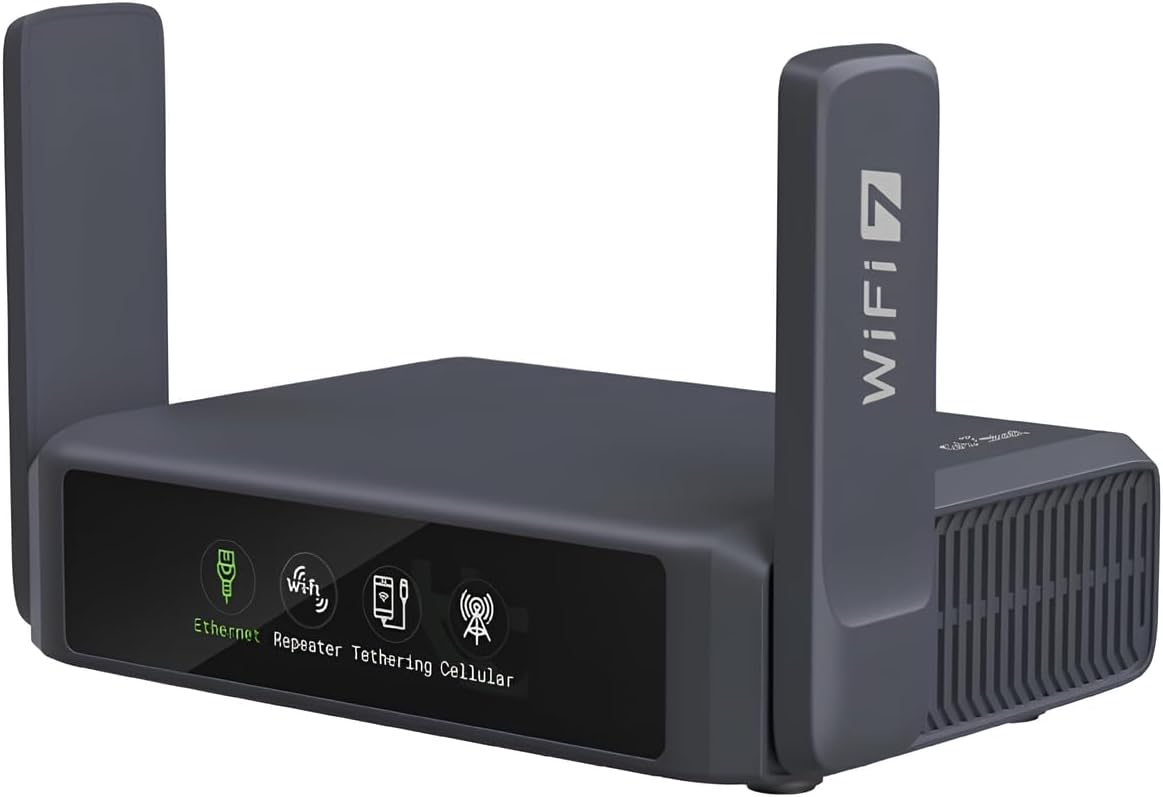
The GL.iNet Slate 7 receives a 4.4 rating and stands out as a sophisticated travel router with a 2.5-gigabit port, Wi-Fi 7, and a built-in touchscreen. Its dual-band wireless specification totals 3,570 Mbps, while one 2.5G port serves as WAN and the other as LAN. A USB 3.0 port adds another option for storage or accessories.
We may earn a commission when you buy through this link, at no additional cost to you.
The touchscreen is unusual among portable routers and particularly useful in unfamiliar settings. It can display QR codes for connecting to Wi-Fi, show real-time speed, toggle a VPN, and switch service providers directly from the screen. Color-coded indicators reveal the current Ethernet, tethering, repeater, or cellular mode, reducing the need to open a web interface while traveling.
OpenVPN and WireGuard are pre-installed and compatible with more than 30 VPN providers, provided the user has an active subscription. The listed local-network rates reach 100 Mbps with OpenVPN and 540 Mbps with WireGuard. It can also operate a VPN server and client simultaneously, enabling access to local network resources while its internet traffic travels through a remote VPN server. Security features include WPA3, DNS over HTTPS, DNS over TLS, and IPv6 authentication.
The Slate 7 is built for travelers and users who need a portable, configurable network rather than a permanently installed home router. Its touchscreen must first be assigned a function through the admin panel, which adds a setup step, and real-world VPN performance will depend on the connection and provider. Even so, it offers an unusually complete travel package with strong privacy, flexible modes, and multi-gigabit wired capability.
The display is most valuable when carrying the router away from a home desk. Quick status checks, QR codes, and direct VPN toggles reduce friction in hotels, airports, temporary offices, and other mobile settings.
Using the router as a repeater can create a private local network on top of public or hotel Wi-Fi. This gives phones, tablets, and laptops a central point for VPN protection and makes the Slate 7 more than a conventional portable hotspot.
We may earn a commission when you buy through this link, at no additional cost to you.
The TP-Link AX3000 carries a 4.4 rating and provides one of the most approachable ways to add VPN capability to a home network. It uses dual-band Wi-Fi 6, with advertised rates of 2,402 Mbps on the 5 GHz band and 574 Mbps on the 2.4 GHz band. These figures are laboratory maximums rather than expected speeds for every device or internet plan.
We may earn a commission when you buy through this link, at no additional cost to you.
Its built-in VPN server and client are the central attraction. Users can route selected devices through a compatible VPN server or create a secure path into a home network. That removes the need to install and maintain VPN applications individually, which is especially useful for smart TVs, streaming boxes, and other appliances with limited software support. OFDMA helps multiple clients share a band more efficiently, while beamforming and four external antennas support wider wireless coverage.
The router is also supported by TP-Link HomeShield, including security scanning, IoT identification, basic parental controls, quality of service, and weekly or monthly reports. Target Wake Time is intended to improve battery efficiency for compatible wireless clients. A redesigned enclosure and larger heat sink are meant to maintain stable operation, while EasyMesh compatibility makes later expansion possible.
This is the best budget-oriented choice for a typical home that wants basic VPN support, dependable Wi-Fi 6, and familiar setup features. Its Gigabit Ethernet ports are sufficient for many internet connections, though there is no listed multi-gig option. It also lacks the deeper customization of OpenWrt-based systems. Even with those limitations, it covers the essentials without the complexity or premium positioning of higher-end models.
The client and server functions are valuable because a single router can protect or expose an entire network. This is simpler than managing separate VPN profiles on every connected device.
OFDMA, beamforming, and a 2.4 GHz band for longer-range connections provide a useful mix of capacity and reach. The design is well suited to ordinary homes where affordability matters more than multi-gig features.
We may earn a commission when you buy through this link, at no additional cost to you.
The GL.iNet Flint 3 has a 4.3 rating and is a high-capacity Wi-Fi 7 router aimed at modern homes, gamers, and users with demanding wired networks. Its headline specification is an aggregate wireless rate of up to 9 Gbps, supported by MLO, enhanced OFDMA, 4K-QAM, and preamble puncturing. The tri-band design offers room for both high-speed clients and broader coverage needs.
We may earn a commission when you buy through this link, at no additional cost to you.
Five 2.5G Ethernet ports provide a major advantage for users with multi-gig internet service, fast network storage, or numerous wired endpoints. That makes the Flint 3 more versatile than many Wi-Fi 7 routers whose fastest wireless capabilities are limited by slower wired ports. The supplied specifications also identify 1GB of DDR4 memory and 8GB of eMMC storage, supporting a substantial collection of connected devices and additional plugins.
OpenVPN and WireGuard are both listed at up to 680 Mbps, while AdGuard Home can block unwanted tracking and provide an interface for advertisement filtering. Bark integration adds website filtering, safe-search controls, and usage limits for families. Coverage is designed for homes up to 2,000 square feet, and Multi-Link Operation is intended to improve responsiveness and reliability in dense wireless environments.
The Flint 3 is best suited to users who can benefit from its stronger hardware and need multiple 2.5G connections. As with the Flint 2, the manufacturer recommends updating the firmware during initial setup. It also demands more attention than a basic mesh router, and the VPN maximums vary according to service conditions. For a high-end home that values both modern wireless standards and flexible privacy tools, it is a compelling choice.
The five 2.5G ports remove a common bottleneck in fast home networks. They are useful for a multi-gig modem, wired workstations, game consoles, and network storage that would otherwise be limited to 1 Gbps.
MLO and enhanced OFDMA are designed to improve service when many compatible clients are active. These technologies can reduce contention compared with relying on a single traditional connection.
We may earn a commission when you buy through this link, at no additional cost to you.
The GL.iNet Beryl AX receives a 4.5 rating and offers a well-balanced combination of portability, VPN support, and multi-gigabit WAN. It provides dual-band Wi-Fi 6 with advertised rates of 574 Mbps at 2.4 GHz and 2,402 Mbps at 5 GHz. The 2.5G WAN is particularly valuable in travel locations where a hotel or campus connection can benefit from a faster wired uplink.
We may earn a commission when you buy through this link, at no additional cost to you.
OpenVPN and WireGuard are pre-installed and compatible with more than 30 VPN services when an active subscription is available. Listed maximum rates reach 150 Mbps for OpenVPN and 300 Mbps for WireGuard under local-network testing. The router can run a VPN server and client simultaneously, allowing remote access to local printers or servers while also sending internet traffic through a VPN provider.
Its OpenWrt 21.02 foundation opens a large catalog of more than 5,000 plug-ins, with a no-code admin interface for package management. A physical toggle can enable or disable a chosen VPN or AdGuard Home function after it has been assigned in the admin panel. WPA3, DNS over HTTPS, DNS over TLS, and authenticated IPv6 add useful network security controls.
The Beryl AX is ideal for frequent travelers, temporary remote workers, and users who want more configuration than a basic travel hotspot. Its limitations are the modest number of wired ports and the lower stated VPN maximums than the largest GL.iNet models. Still, the combination of 2.5G WAN, simultaneous VPN roles, and OpenWrt customization makes it one of the most capable compact routers in the guide.
A VPN client can protect every device connected to the Beryl AX, including equipment that lacks native VPN software. This creates a private local network even when using public Wi-Fi.
Simultaneous client and server operation is useful for travelers who need to reach a printer or local service at home. The connection can remain protected without abandoning access to local resources.
We may earn a commission when you buy through this link, at no additional cost to you.
The GL.iNet Flint 3e has a 4.2 rating and is positioned as a long-range Wi-Fi 7 router for homes and gaming. It supports aggregate wireless speeds of up to 6.5 Gbps and is advertised to cover areas up to 2,500 square feet. Its strongest distinguishing specification is VPN performance, with both WireGuard and OpenVPN listed at up to 1,100 Mbps.
We may earn a commission when you buy through this link, at no additional cost to you.
Modern wireless features include MLO, enhanced OFDMA, 4K-QAM, preamble puncturing, and Multi-RUs. These technologies support higher throughput, lower latency, and better behavior in crowded environments. A 1GB memory configuration provides room for more than 100 connected devices and additional OpenWrt plug-ins, making the router appropriate for a busy smart home or mixed work-and-entertainment network.
AdGuard Home is supported for DNS-level ad and tracker filtering, while Bark integration can enforce safe search, restrict websites, and set usage limits. The stated VPN performance should still be evaluated against the user's internet plan, provider, server distance, and internal network conditions. A high maximum does not guarantee that every remote service or destination will support equivalent throughput.
The Flint 3e is a strong choice for users who prioritize fast VPN operation and broad wireless coverage over the Flint 3's five explicit 2.5G ports. It also suits those who want fine-grained control through OpenWrt. For simpler households, the administration may be excessive, and the more economical TP-Link alternatives could be easier to manage. For advanced users, however, its balance of range, processing memory, and VPN capability is compelling.
The listed 1,100 Mbps VPN rates are among the strongest in this guide. Such performance can be valuable for large file transfers and demanding users, provided the external connection and selected VPN service are not bottlenecks.
A stated range of up to 2,500 square feet gives the Flint 3e an advantage in larger homes. Placement, building materials, interference, and client capabilities still determine actual signal quality.
We may earn a commission when you buy through this link, at no additional cost to you.
The TP-Link Archer BE600 carries a 4.2 rating and is the premium networking choice in this guide. Its tri-band Wi-Fi 7 platform is built around a 10 Gbps WAN/LAN port, one additional 2.5 Gbps WAN/LAN port, and three 2.5 Gbps LAN ports. This is an exceptional wired layout for users with multi-gig internet, fast NAS equipment, or demanding workstations.
We may earn a commission when you buy through this link, at no additional cost to you.
Wireless performance is similarly ambitious. The router advertises 5,765 Mbps on 6 GHz, 2,882 Mbps on 5 GHz, and 1,032 Mbps on 2.4 GHz, with support for MLO, Multi-RUs, 4K-QAM, and 320 MHz channels. The listed maximum coverage is 2,600 square feet for up to 120 devices, and six antennas with beamforming are intended to strengthen signals in difficult areas.
Its VPN client and server functions let home devices reach remote VPN servers without requiring dedicated applications on each one. Simultaneous VPN and ordinary internet connections are supported, preserving normal activity while selected traffic uses the encrypted route. TP-Link HomeShield adds parental controls, home network protection, and real-time IoT security. The router can be managed through the Tether app or a web interface.
The Archer BE600 is best for premium Wi-Fi 7 homes, small offices, and users who intend to take advantage of multi-gig service. Its sophisticated feature set may be unnecessary for a modest connection or simple travel use, and a full set of next-generation ports naturally places it in a higher hardware tier. For those who can use them, however, its networking breadth and VPN flexibility make it the standout premium model.
A dedicated 10 Gbps port allows very fast service to reach wired clients without being limited by the rest of the Ethernet interfaces. The additional 2.5G ports make high-speed expansion practical for several devices.
MLO and 320 MHz channel support are designed for compatible Wi-Fi 7 devices such as recent high-end phones, laptops, and game systems. Older clients can still connect, though they will not receive the full benefits of the newest standard.
We may earn a commission when you buy through this link, at no additional cost to you.
The TP-Link ER605 has a 4.4 rating and is the clear choice for buyers who need a wired VPN gateway rather than a wireless router. It provides one Gigabit WAN port, two Gigabit WAN/LAN ports, and two Gigabit LAN ports. Because three ports can operate as WAN connections, it can support service provider load balancing, primary-and-backup arrangements, or separate network segmentation.
We may earn a commission when you buy through this link, at no additional cost to you.
VPN capacity is one of its strongest features. It supports up to 20 LAN-to-LAN IPsec connections, 16 OpenVPN connections, 16 L2TP connections, and 16 PPTP connections. That makes it relevant to remote workers, branch offices, and technically experienced users who need multiple encrypted tunnels rather than a single household VPN client.
Security tools include advanced firewall policies, denial-of-service defense, IP, MAC, and URL filtering, VPN pass-through, and support for several application-aware protocols. A USB port can accept a compatible 4G or 3G modem for WAN backup, which provides an alternate route when a primary fixed-line service fails. The device supports a range of IEEE networking standards and management features.
The ER605 is the right recommendation for a small office, server room, or existing home network that already uses separate access points. Its lack of built-in Wi-Fi makes it unsuitable for users who want one device to provide both wireless and wired networking. In return, it offers a focused, capable VPN gateway with an unusual degree of port flexibility and connection capacity.
Support for numerous IPsec, OpenVPN, L2TP, and PPTP connections makes the ER605 suitable for simultaneous remote access. The exact protocol and client behavior should be checked against the intended user environment.
Three configurable WAN ports and USB cellular backup offer more resilience than a typical single-WAN home gateway. These features are especially useful for branch offices and distributed teams.
We may earn a commission when you buy through this link, at no additional cost to you.
The GL.iNet Slate AX earns a 4.4 rating and is a capable pocket-sized router for travel, temporary workspaces, and users who want to create a private network over public Wi-Fi. It offers dual-band Wi-Fi 6 with a combined advertised rate of 1,800 Mbps, using 600 Mbps on 2.4 GHz and 1,200 Mbps on 5 GHz. MU-MIMO, OFDMA, and BSS coloring help it serve a reasonably dense group of clients.
We may earn a commission when you buy through this link, at no additional cost to you.
OpenVPN and WireGuard are pre-installed and compatible with more than 30 VPN services when the user has an active subscription. The listed maximum rates are 500 Mbps for OpenVPN and 550 Mbps for WireGuard, while Cloudflare encryption adds another privacy option. The router runs on OpenWrt 21.02, allowing users to install applications and customize behavior according to their preferences.
Its repeater function can turn a public wired or wireless connection into a private local network, and the description notes support for captive portals. A physical toggle makes it easy to enable a selected VPN or AdGuard Home function after assigning it in the admin panel. File-sharing support through SAMBA and WebDAV allows an attached USB hard drive to become private network storage for documents.
The Slate AX is best for travelers who want more capability than a pocket hotspot without carrying a full-size router. It supports up to 120 simultaneous devices according to the supplied information, though real-world capacity depends on the tasks those devices perform. The main trade-offs are a single Gigabit WAN rather than 2.5G and an older OpenWrt release. Even so, it remains an adaptable and privacy-focused travel companion.
Repeater mode places connected devices behind the Slate AX rather than connecting each one directly to a public hotspot. This provides a central place to configure a VPN, DNS controls, and local sharing.
SAMBA and WebDAV support turn an attached USB drive into a private document-sharing resource. This is useful for travelers who need access to files without uploading sensitive material to a public cloud service.
We may earn a commission when you buy through this link, at no additional cost to you.
The most useful router with VPN built is not necessarily the one with the largest headline speed. Consider protocol support, throughput, wireless standard, wired ports, intended setting, security controls, and how much configuration complexity you are comfortable managing.
A VPN client sends traffic from one or more connected devices through a remote VPN server, while a VPN server allows authorized remote users or devices to connect into the local network. Household users often need the client function for privacy and region selection, whereas remote workers and small offices may value the server function for accessing files, printers, or local applications. Some of the products reviewed can run both roles at the same time, which is particularly useful when local access and public internet protection are both required.
Choose both functions if your needs are uncertain, but check client protocols carefully. OpenVPN and WireGuard are modern, widely used choices, while PPTP and L2TP appear among the supported options on the TP-Link routers. Confirm that the router can work with your chosen VPN provider and that the necessary subscription is available separately.
A VPN can reduce throughput because the router must encrypt and decrypt traffic while also handling normal network duties. Maximum advertised rates are generally measured under favorable local conditions, so the speed of the broadband connection, distance to the VPN server, provider load, processor capability, and selected protocol all influence the result. The Flint 2, Flint 3e, and Slate AX list particularly strong OpenVPN or WireGuard figures, while travel-oriented models may prioritize size and convenience over absolute speed.
Match the router's capacity to the fastest service available in your home. A high-speed router cannot create additional ISP bandwidth, and a multi-gig port is only valuable if the modem, service, and client equipment also support multi-gig rates. For most users, a stable connection and a well-chosen VPN server matter more than an extreme laboratory maximum.
Wi-Fi 6, Wi-Fi 6E, and Wi-Fi 7 differ in theoretical peak rates, available spectrum, and the sophistication of their link-management features. Wi-Fi 6E adds the 6 GHz band to reduce congestion, while Wi-Fi 7 introduces features such as Multi-Link Operation, Multi-RUs, and 4K-QAM. These improvements are most useful with compatible clients, so check the Wi-Fi generation and capabilities of your phones, laptops, televisions, and consoles.
For a basic home, a dual-band Wi-Fi 6 model may provide the most practical balance. The AXE5400's tri-band layout and dedicated 6 GHz band can help in crowded areas, while premium Wi-Fi 7 routers make sense when many current-generation devices and a multi-gig internet line are present. Coverage claims should be treated as guidance because walls, floors, placement, and interference affect real results.
Built-in VPN routing becomes much more useful when the router has adequate Ethernet ports. A basic Wi-Fi router may be sufficient for ordinary gigabit service, but families with faster broadband, network storage, or wired gaming systems should look for 2.5G ports. The Flint 2 has two, the Flint 3 has five, and the Archer BE600 adds a 10 Gbps interface alongside four 2.5G ports.
Count the devices that truly need wired connections before paying for extra speed. A single fast port is valuable when the modem or main computer supports multi-gig rates, but unused high-speed ports add little. The ER605 takes a different approach by offering five Gigabit ports, three configurable WAN positions, and no wireless, making port flexibility more important than Wi-Fi speed.
Travel routers need more than a small case. Useful features include a compact design, flexible power options, a fast WAN port, repeater mode, tethering support, and a way to manage the router without a permanent desk setup. The Slate 7 adds a color touchscreen, while the Beryl AX and Slate AX use physical controls and OpenWrt-based interfaces. Some models include interchangeable regional plug options, making them easier to use internationally.
Consider how you will use the router abroad. Public networks may require captive-portal login, weak bandwidth, or restrictive firewalls, so a travel model should be easy to configure in temporary locations. A 2.5G WAN is helpful when the source supports it, while VPN capability creates a private local network for devices that cannot run their own VPN applications.
VPN encryption protects traffic on its route, but a secure router should also provide a strong Wi-Fi password, current firmware, firewall protections, and secure administration. WPA3 support appears in the specifications for the GL.iNet travel models. DNS over HTTPS and DNS over TLS protect DNS queries, while IPv6 authentication can reduce reliance on network address translation in supported networks.
AdGuard Home adds DNS-level filtering, tracker blocking, and advertisement controls, while TP-Link HomeShield includes security scans, IoT identification, parental tools, and usage reports. These systems are useful complements to a VPN rather than complete replacements. A VPN secures supported traffic, whereas parental controls and DNS filtering provide different forms of household network management.
OpenWrt-based routers give technically confident users the ability to install packages, change services, and control advanced network functions. The Beryl AX states support for more than 5,000 plug-ins, the Slate 7 uses OpenWrt 23.05 with 512MB of storage, and the Flint models combine strong hardware with additional storage. This flexibility can be invaluable for homelab users, but it also creates a greater need for updates and careful configuration.
If you want a router that works quickly with minimal intervention, a standard TP-Link interface may be easier. If you value specific packages, simultaneous VPN roles, or detailed control, OpenWrt support may outweigh the learning curve. Check whether the router provides a guided interface for common settings and whether the manufacturer continues to release firmware updates for your model.
Modern homes may contain dozens of active endpoints, from televisions and appliances to phones, computers, cameras, and smart-home controls. Several GL.iNet routers state support for more than 100 devices, and the Archer BE600 lists capacity for up to 120. These figures indicate design intent rather than a guarantee of identical performance for every connected product, especially when many clients perform demanding tasks simultaneously.
Look for management tools that make a busy network easier to understand. The Archer BE600 can be managed through Tether or a web interface, while the Slate 7 provides direct hardware status displays. Automatic band steering, OFDMA, MU-MIMO, beamforming, and quality-of-service features can all help distribute traffic more efficiently across a crowded household.
Begin by placing the router in a central, open location and connecting it to the modem or primary network device. Most models in this guide provide a web admin panel, while TP-Link routers may also offer a mobile app. Update the firmware before making advanced changes, particularly for GL.iNet products whose supplied information specifically recommends an initial firmware update. Create a strong administrative password, use WPA2 or WPA3 where appropriate, and change the default wireless network name if desired.
Configure the VPN only after the basic network is stable. Select the appropriate client or server function, enter the credentials supplied by your VPN provider, and test the connection on one device before applying it to the entire network. Check whether specific devices, categories of traffic, or individual users should be protected. For travel routers, assign the physical toggle or touchscreen function before leaving home so the control is ready when public-network login is required.
For ongoing care, monitor firmware notices, review connected devices, and update the router when corrections or security improvements are released. Keep the unit ventilated, avoid placing it inside closed cabinets, and use a surge protector appropriate to the installation. Periodically test both wired and wireless speeds, confirm that the VPN is active, and review parental controls or DNS filters as household needs change. When troubleshooting, restart the router, check the upstream connection, and separate VPN issues from ordinary Wi-Fi or ISP problems.
Usually, not for devices that connect through the router. The router can send their traffic through the configured VPN server. An app may still be useful for selective connections, alternative VPN servers, or devices that bypass the router. Confirm that the router supports your preferred provider and protocol before relying on it.
No. A built-in VPN can encrypt traffic routed through it, but devices may still reveal information through other channels, and DNS or filtering behavior depends on the configuration. Strong Wi-Fi security, current firmware, a unique administrator password, and sensible device permissions remain necessary.
OpenVPN and WireGuard are widely used modern options, with WireGuard generally designed for simpler configuration and efficient operation. PPTP and L2TP may be offered for compatibility, but protocol availability should not be the only consideration. Choose a protocol and provider that support your devices, account system, operating environment, and intended use.
It can, because encryption, decryption, and remote-server distance add processing and network overhead. The reduction depends on the router's processor, protocol, VPN provider, server load, and underlying connection speed. Models with higher listed VPN throughput are better positioned to handle demanding connections.
It can be, because all devices connected through the router can share one VPN connection, and local traffic can be separated from the public network. The router is not automatically secure, however. Use a strong Wi-Fi password, keep its firmware current, avoid exposing administration pages to the public network, and confirm that the VPN is actually active.
Only if the service, modem, and target client equipment support speeds above one gigabit. A standard Gigabit Ethernet router is sufficient for most connections. Multi-gig ports become useful with faster broadband, network storage, modern workstations, and other high-bandwidth wired devices.
Some can provide strong whole-home coverage on their own, and the TP-Link AXE5400 is specifically compatible with EasyMesh expansion. Other travel-oriented models are better suited to temporary or secondary networks. Consider your home's size, walls, number of clients, and need for seamless roaming before replacing an existing mesh arrangement.
A client mode sends the router's internet traffic through a remote VPN server for privacy. A server mode allows authorized remote users to connect into the home network. Some routers can perform both at once, which supports secure internet access and remote access to local resources simultaneously.
The GL.iNet Flint 2 is the strongest overall recommendation because it combines fast VPN throughput, gaming-oriented Wi-Fi 6, multi-gigabit Ethernet, and extensive OpenWrt capabilities. The TP-Link AXE5400 is a more conventional tri-band choice with easy expansion, while the TP-Link Archer BE600 leads the premium category with a 10 Gbps port, advanced Wi-Fi 7 features, and broad multi-device capacity.
Prioritize the router that matches your actual setting. Travelers may prefer the touchscreen Slate 7, the especially compact Beryl AX, or the pocket-oriented Slate AX. The TP-Link AX3000 offers a practical budget route to network-wide VPN support. Users who need a wired business gateway can focus on the ER605's multiple VPN protocols, configurable WAN ports, and cellular backup rather than wireless performance.
Before purchasing, verify the current protocol support, provider compatibility, port layout, firmware policy, and physical requirements. Product prices and promotions change over time, so check the current listing and compare the complete package rather than focusing only on a headline VPN rate. With the right match between hardware and use case, a built-in VPN router can provide a convenient and effective way to protect an entire network.