
Mcbazel RGB to HDMI Adapter
4.3Editor score
Supports three original consoles
RGB video signal required
On-adapter aspect controls
Our Sega Genesis Saturn HDMI Converter guide compares ten options for RGB quality, aspect ratio, resolution, console compatibility, power needs, and easy setup.
A Sega Genesis Saturn HDMI converter can transform an original analog console into a practical setup for a modern television, projector, or computer monitor. The most important distinction is whether the device reads the console’s RGB video signal or merely converts composite output, because that difference affects color, clarity, and overall compatibility.
This guide compares ten converters and cables based on supported Sega hardware, signal type, output resolution, aspect-ratio controls, power requirements, installation demands, and the completeness of the included connections. It covers dedicated Genesis products, dedicated Saturn products, shared-system adapters, and a broader RCA converter for legacy equipment.
Each recommendation highlights a different use case, from straightforward Genesis connections to native RGB Saturn output and multi-console setups. Product details and ratings reflect the supplied listings, while availability and pricing can change, so readers should verify the current listing and console requirements before ordering.
4.3Editor score

4.4Editor score
3.5Editor score
The comparison below places each converter according to its core signal path, supported Sega systems, output flexibility, and setup requirements, making it easier to identify the right option for a Genesis, Saturn, or combined retro console collection.


The Mcbazel RGB to HDMI Adapter is a focused solution for owners of original Sega Genesis Model 1, Model 2, and compatible NEOGEO hardware. Its 4.3 rating reflects a generally practical approach: read the console’s RGB signal, convert it to HDMI, and offer basic display controls without requiring software or complicated television menus.
We may earn a commission when you buy through this link, at no additional cost to you.
Two included conversion cables allow the package to address differences between the supported consoles. The adapter measures 7.5 by 4 centimeters and sits on a 43-centimeter lead, which should make it manageable near a television. Two physical buttons control aspect ratio and output resolution, letting the user move between 4:3 and 16:9 as well as 720p and 1080p directly from the hardware.
The central limitation is non-negotiable: RGB input must be available. Clone, replica, and heavily modified systems that output only composite may produce sound without a picture. A powered micro USB connection is also required, although the wall plug is not supplied. These are important compatibility conditions rather than minor inconveniences.
This is a strong budget recommendation for someone with original RGB-capable hardware who wants flexible resolution and aspect-ratio options without a complex installation. It should not be selected for Saturn, and it is unsuitable for a composite-only clone. Buyers who already have a suitable five-volt USB source will find the package especially convenient.
The two supplied conversion cables are a meaningful advantage because supported consoles do not all use the same video connection. This reduces the likelihood of buying an adapter that cannot physically connect to the intended original hardware.
Putting the aspect-ratio and resolution controls on the adapter makes experimentation straightforward. You can compare traditional 4:3 and widescreen 16:9 output, along with 720p and 1080p, without navigating a television’s own settings.
We may earn a commission when you buy through this link, at no additional cost to you.
The LEVELHIKE HDMI Cable combines a 4.4 rating with unusually broad stated support for Sega hardware. Its title lists Genesis Models 1, 2, and 3, Sega CD, Sega CDX, 32X, Nomad, and the original Master System, making it particularly interesting for collectors who own more than one Sega format.
We may earn a commission when you buy through this link, at no additional cost to you.
Its core function is analog RGB conversion and upscaling to a digital HDMI signal for contemporary televisions, monitors, and projectors. The detachable arrangement can be useful when a standard cable does not reach the display or when a longer, higher-quality HDMI cable is preferred. A physical toggle supports both 4:3 and 16:9 viewing.
The listing emphasizes precision, color, resolution, detail, and low latency, although it does not provide a specific output resolution. Buyers should therefore distinguish the clearly stated HDMI conversion and aspect-ratio features from any assumed maximum resolution. Saturn is not named among the supported systems, so this should remain a Sega-focused Genesis purchase.
This is the most versatile recommendation for someone building a multi-model Sega setup. The broad compatibility list, detachable construction, and aspect-ratio switching make it more accommodating than a converter dedicated to only one console family. Verify the exact model and region of the equipment before connecting it.
Support for Genesis, Sega CD, CDX, 32X, Nomad, and Master System gives this cable exceptional value for a broad Sega collection. The included converter is described as allowing use across all listed Genesis versions.
The detachable design separates the console-side conversion hardware from the HDMI run. That makes it easier to use a longer or more premium cable when the included length is inconvenient.
We may earn a commission when you buy through this link, at no additional cost to you.
The TNP Sega Genesis HDMI Adapter offers a direct route from compatible Sega hardware to a modern display. It carries a 4.0 rating and is positioned around ease of use, with no software, drivers, or additional television configuration required for basic operation.
We may earn a commission when you buy through this link, at no additional cost to you.
The product description says video and audio transfer in digital HDMI format through a built-in processing chip. It also lists compatibility across Genesis Models 1, 2, and 3, Mega Drive 2, Sega CD, CDX, 32X, Nomad, and the original Master System. The package includes the adapter as well as USB and HDMI cables.
A five-volt, one-amp power source is required, which is a meaningful setup consideration. The listing also discusses vivid output and high-definition presentation but does not provide a precise maximum resolution, so buyers seeking a known 720p or 1080p specification should not assume one from the general description.
This adapter is a good fit for a user who values a simple, portable, all-in-one package and owns one of the listed consoles. The included cables reduce extra purchasing, while the straightforward installation keeps the experience approachable. Confirm the console’s output type and ensure a suitable power source is available.
Carrying both video and audio over HDMI simplifies the connection to a television or projector. A single digital output also avoids the separate analog video and audio leads used by some original consoles.
The lightweight adapter is designed to move easily between rooms. Its plug-and-play approach suits users who want a quick connection rather than a permanent, configurable installation.
We may earn a commission when you buy through this link, at no additional cost to you.
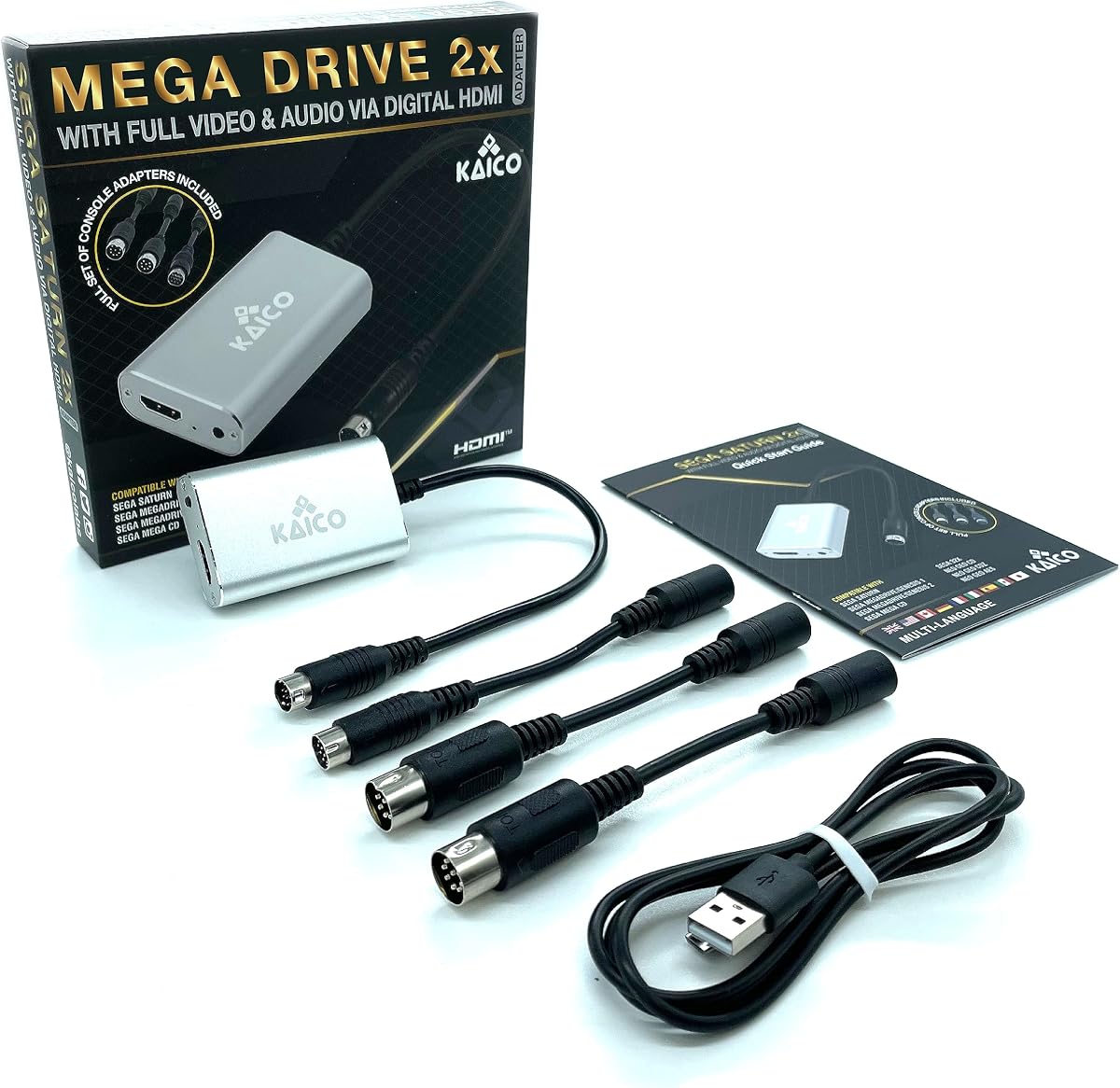
The Kaico Mega Drive HDMI Adapter is unusual in the shortlist because it explicitly serves both Sega Saturn and Sega Genesis owners. Its 3.5 rating is the lowest among the listed products, but the advertised feature set is correspondingly broad, including support for RGBS and composite outputs.
We may earn a commission when you buy through this link, at no additional cost to you.
Compatibility extends to Mega Drive and Genesis Models 1 and 2, Mega CD, 32X, Neo Geo CD, CDZ, AES, and Sega Saturn. The adapter is described as a plug-and-play line-doubling solution requiring neither extra software nor extra hardware installation. It is also stated to work with systems sold in Europe, America, and Japan.
Three additional cables are included for Saturn, Mega Drive 1, Mega Drive 2, and Neo Geo CD and AES connections. That package can be particularly convenient for multi-console owners, although a broad accessory list does not remove the need to identify the correct cable and source signal for each system.
This is the premium pick for collectors who need one product concept to cover several Sega and Neo Geo machines. It is especially relevant to a mixed Genesis-and-Saturn setup, where separate dedicated converters would otherwise be required. The main reservation is its lower rating, so buyers should carefully confirm the attachment and signal format for their exact hardware.
Support for Genesis, Saturn, Mega CD, 32X, and several Neo Geo formats makes this the most inclusive dedicated solution in the guide. It suits users who want one coordinated approach rather than separate adapters for each console.
The ability to accept RGBS or composite gives the adapter more options when connecting different regional hardware. RGB remains the more direct route to a sharp picture, while composite support can make more original configurations accessible.
We may earn a commission when you buy through this link, at no additional cost to you.
The NORMICHIC Converter is a straightforward solution for owners of a Sega Saturn who want HDMI output at up to 1080p. Its 4.1 rating reflects a useful dedicated design, while the listed aspect-ratio switch provides control over how classic Saturn graphics are presented on a modern screen.
We may earn a commission when you buy through this link, at no additional cost to you.
Compatibility is focused on Sega Saturn systems using both PAL and NTSC standards. The product description identifies the input as S-video and the output as HDMI, making the source requirement especially important. A Saturn with a compatible S-video connection is therefore the intended target.
The converter supports both 16:9 and 4:3 modes and is compatible with modern televisions that have HDMI input. That makes it a compact, dedicated answer for users who do not need the broader multi-console coverage of the Kaico system.
This is a sensible recommendation for a Saturn-centered setup where 1080p output and regional video support are priorities. It is not a shared Genesis and Saturn solution, and it is not positioned as a native RGB adapter. Buyers should confirm that their Saturn provides the specified S-video connection before purchasing.
The converter advertises 1080p HDMI output, giving modern display owners a clearly defined format. This makes it easier to compare with the converters that upscale to 720p instead.
Support for PAL and NTSC Saturn systems is useful for international collections. It reduces uncertainty when connecting consoles purchased in different television regions.
We may earn a commission when you buy through this link, at no additional cost to you.
The POUND HDMI HD Link Cable targets Sega Saturn owners who want to preserve the console’s native RGB picture quality. Its 4.3 rating and emphasis on color, contrast, and sharpness make it a compelling dedicated option for displaying games such as NiGHTS, Panzer Dragoon, and Daytona USA on a modern television.
We may earn a commission when you buy through this link, at no additional cost to you.
The converter takes the Saturn’s original 240p output and upscales it to 720p while maintaining the original 4:3 aspect ratio. This approach favors a familiar arcade-style presentation and broad compatibility with current televisions. Native RGB is the key advantage over a standard composite AV connection.
A micro USB cable is included for boosted power, which the listing says supplements the Saturn and reduces stress on the console’s aging internal power supply. The feature does not replace correct console care, but it provides a dedicated way to add power during the converter connection.
This is a strong match for a Saturn owner seeking an uncomplicated RGB-to-HDMI link and a traditional 4:3 image. It may be less attractive for users who require widescreen cropping or a higher listed output resolution. The Saturn compatibility, rather than Genesis support, defines its place in this guide.
Using the Saturn’s native RGB output gives the converter a higher-quality source than composite video. The listing particularly emphasizes improved color reproduction, texture clarity, and readable text.
The included micro USB power cable supplements the original console while the HD Link is in use. That is a notable feature for owners maintaining an older Saturn whose original power supply is already aging.
We may earn a commission when you buy through this link, at no additional cost to you.
The POUND HDMI Converter & Cable is a focused option for connecting Mega Drive and Genesis Models 1, 2, and 3 to an HDMI television. The supplied data does not include a numeric customer rating, so its evaluation must focus on the clearly stated functions rather than a comparative score.
We may earn a commission when you buy through this link, at no additional cost to you.
The converter outputs 720p and uses a 4:3 aspect ratio. The listing specifically notes that the ratio cannot be switched, making this a better fit for users who want the traditional console shape than for those who require a selectable widescreen mode.
Its direct converter-and-cable format removes much of the complexity associated with assembling separate analog video, audio, and HDMI connections. As with any dedicated Genesis link, users should confirm that their console provides the expected video output and that the included hardware fits their setup.
This product suits a buyer who wants a straightforward 720p Genesis connection and values the original 4:3 presentation. Its fixed settings and lack of a numeric rating may make it a less informative choice than the more highly rated alternatives, but the core connection remains easy to understand.
A clearly stated 720p output gives the converter a defined target for modern HD televisions and monitors. It is designed to bring Genesis output into the digital HDMI format without software setup.
Keeping the console’s 4:3 shape can preserve the intended composition of classic games. The inability to switch ratios may be restrictive, however, for users who prefer to experiment with widescreen presentation.
We may earn a commission when you buy through this link, at no additional cost to you.
The MD1 MD2 NG HDMI Cable is built around analog RGB conversion and flexible display controls. Its 3.3 rating is the lowest numeric score in the shortlist, but the stated functions are clear: users can select 720p or 1080p output and switch the screen ratio between 4:3 and 16:9.
We may earn a commission when you buy through this link, at no additional cost to you.
The package includes an MD1/MD2/SNK-to-HDMI converter, a USB power cable, and separate MD1 and SNK adapters. This selection makes it relevant for original Sega Genesis Model 1, Model 2, and Neo Geo systems, with power supplied from an appropriate source.
Installation is described as simple and plug-and-play, with no drivers needed. The listing says games can be played without delay and describes the signal processing as accurate in color and resolution, although no independent test results are provided in the supplied information.
The main attraction is control: it offers more resolution and aspect-ratio flexibility than fixed-output alternatives. Its lower rating suggests some buyers may have found drawbacks not detailed here. Prospective users should confirm the correct attachment for their console and provide the required USB power before expecting a picture.
Supporting both 720p and 1080p gives users a useful range for different displays. The 4:3 and 16:9 switch also allows comparison between classic proportions and a wider presentation.
Separate MD1 and SNK adapters, along with the main converter and USB cable, cover more than one source type. Buyers still need to match the correct attachment to the port on their particular console.
We may earn a commission when you buy through this link, at no additional cost to you.
The Six-Port RCA to HDMI Converter is the most general-purpose option in the guide. Rather than focusing on native Sega RGB, it accepts composite RCA video and analog stereo audio, allowing several older devices to share one HDMI input. The listing names Sega systems alongside PlayStation, Xbox, Nintendo, VHS, VCR, and DVD equipment.
We may earn a commission when you buy through this link, at no additional cost to you.
Its processing samples composite input and converts it to a 1080p, 60-hertz HDMI output. The listing appropriately clarifies that the source material remains standard-definition analog video rather than becoming native high-definition content. The 16:9 and 4:3 aspect ratios can be selected through the box controls.
Up to six RCA devices can be connected, and source selection is available through a front-panel button or the included infrared remote. The package also contains a power adapter, USB cable, HDMI cable, remote control, and user manual, making it a complete general legacy-media setup.
This converter is best for a household that wants to connect multiple older devices through one television input, not for a Genesis or Saturn owner seeking the best possible RGB picture. Its 3.6 rating reflects a middle position, but the wide input count and source switching are meaningful advantages. It cannot convert HDMI back to analog video.
Six input positions reduce the need to reconnect equipment whenever another retro console or legacy source is used. Front-panel and remote controls make changing the active source convenient from the sofa.
The output is advertised at 1080p, but the original signal is still standard-definition composite. The converter changes the connection format and output resolution, not the underlying amount of image detail captured by the source.
We may earn a commission when you buy through this link, at no additional cost to you.
The POUND HD Link Cable is a dedicated Genesis solution with a strong 4.4 rating. It uses the console’s native RGB signal, upscales the original 240p image to 720p, and maintains the Genesis aspect ratio, creating a direct and familiar path to a modern television or monitor.
We may earn a commission when you buy through this link, at no additional cost to you.
The included converter allows use with Genesis Models 1, 2, and 3, which is useful because the product targets the full range of original housing designs. The native RGB connection is expected to provide better color reproduction and sharpness than a standard AV cable.
A micro USB cable is included to boost power while the cable is connected. According to the listing, this supplements the original console and reduces stress on its aging internal power supply, making the package especially considerate for long-standing hardware.
This is the editor’s choice for a user whose priority is the best straightforward Genesis link rather than Saturn support or selectable aspect ratios. Its 4.4 rating is tied for the highest numerical score in the guide. The fixed 4:3 framing and 720p ceiling are the main limitations for display-customizing enthusiasts.
Taking the RGB output directly from an original Genesis provides a stronger source for color and sharpness than composite video. That advantage is central to this cable’s appeal for classic games.
The included converter is designed to cover Genesis Models 1, 2, and 3. This broadens the practical appeal for owners with more than one revision or for those considering which original model to pair with the cable.
We may earn a commission when you buy through this link, at no additional cost to you.
The right converter depends primarily on the exact Sega hardware, its available video output, and the picture controls you want. Signal quality, aspect ratio, resolution, power arrangement, and included cables should be checked before ordering.
A converter designed for Genesis is not automatically suitable for Saturn, and a Saturn adapter is not necessarily intended to accept Genesis output. Review the supported model list carefully, especially for Sega CD, 32X, Nomad, Neo Geo, and regional console variants. The Kaico option stands apart by explicitly supporting both Genesis and Saturn, while dedicated products generally target one family.
Match the product to the exact console model before buying. A listed system name is more useful than a general Sega reference, and the expected video output must also be present on the hardware.
RGB is the preferred source for crisp edges, saturated colors, and clear on-screen text. The Mcbazel, LEVELHIKE, Kaico, MD1/MD2/NG, and POUND RGB products all place RGB conversion near the center of their descriptions. Composite-based alternatives are more appropriate when a console lacks RGB or when one HDMI input must serve many unrelated devices.
Choose RGB for the best representation of original Sega graphics. Use composite only when broad device compatibility matters more than maximum picture fidelity.
The shortlist includes converters that explicitly output 720p and others that advertise 1080p. A higher output resolution can improve compatibility with large modern displays, but it does not create detail that was absent from the original 240p source. Some products omit a specific maximum resolution, so buyers should treat an ambiguous high-definition claim cautiously.
A stated 720p or 1080p target is useful for display compatibility. Do not assume an unspecified converter reaches the highest resolution offered by another model.
Many classic games were composed for 4:3 displays, while modern televisions often favor 16:9. Switchable products let the user compare both presentations, which is helpful for games with different framing requirements. Fixed 4:3 products preserve the traditional composition but cannot adapt to a widescreen display.
Prefer a physical aspect-ratio switch when you want flexibility. Choose fixed 4:3 when traditional proportions and a straightforward, predictable image are the priority.
Many modern HDMI converters require a five-volt USB power source. Some packages include the power cable but not the wall adapter, while others include both. The POUND cables describe their micro USB connection as a power boost, which may also reduce strain on an original console’s aging power supply.
Inventory the available USB ports and chargers before ordering. Treat the power requirement as part of the installation, not an optional accessory.
Console video ports and pinouts differ, and the wrong attachment may not connect physically. The Mcbazel package includes two conversion cables, while the Kaico package states that it includes three add-on cables for Saturn, Mega Drive, and Neo Geo. Single-console designs may include the necessary cable but offer less flexibility for other systems.
Check whether the required console cable and any HDMI cable are included. A complete package can simplify setup, but compatibility still depends on using the correct attachment.
A single multi-console adapter can be convenient for a collection containing Sega and Neo Geo hardware, but a broader device list does not guarantee equal signal quality in every mode. The Kaico adapter accepts RGBS and composite and covers several Sega systems, making it the clearest shared-system option here.
Choose a shared adapter to reduce the number of separate cables and devices. For one console, a dedicated RGB product is often easier to understand.
Most products in the guide operate without drivers, software, or television menus. Physical buttons for aspect ratio and resolution can make testing easier, while detachable cables offer more freedom when the television is distant from the console. The six-port RCA unit adds remote-controlled source selection for setups with several legacy devices.
Favor plug-and-play products with controls you can reach easily. Avoid adding unnecessary complexity when a basic digital connection already meets your needs.
Before connecting anything, identify the console model and its available video output. Check that the converter supports that system and signal type, then attach the correct console-side cable. If the adapter requires USB power, connect the supplied lead to a suitable five-volt source before expecting a stable picture.
Connect the converter’s HDMI output to the television, projector, or monitor using the included HDMI cable or another compatible cable. Turn on the display and select its HDMI input, then power on the console. Use any aspect-ratio or resolution controls according to the product instructions, beginning with the traditional 4:3 setting when authenticity is the priority.
If there is sound but no picture, verify that the console is providing RGB or the exact input named in the listing, that the correct console attachment is firmly connected, and that the power lead is carrying current. With a dedicated RGB adapter, a composite-only clone or modified console may not work. Keep cables away from sharp edges, avoid leaving the console powered without ventilation, and inspect connectors for dirt or corrosion before reconnecting them.
Yes, but only if the product explicitly supports both systems and provides the necessary console attachments. The Kaico Mega Drive HDMI Adapter in this guide lists Genesis, Saturn, Mega CD, 32X, and several Neo Geo systems. Most dedicated adapters cover only one Sega family, so check the full compatibility list before ordering.
Usually not if the clone sends only composite video. The Mcbazel listing specifically says that RGB input is required and warns that clones, replicas, and heavily modified consoles may produce sound without a picture. A composite-to-HDMI converter is the alternative for those systems, although picture quality will not match a native RGB connection.
RGB is generally the better source because it separates color information and preserves sharper edges, richer color, and clearer text. Composite is useful for compatibility with more configurations and inexpensive multi-device converters, but it produces a softer, more compressed image. Use RGB whenever the original console and selected converter support it.
No. The converter can output a digital signal at 1080p, but the original console still supplies a low-resolution 240p image. Upscaling provides a convenient format for modern displays and may improve their handling of the image, but it does not recover detail that was never recorded.
Several do, including the Mcbazel, TNP, MD1/MD2/NG, and six-port RCA products. The package may include a USB cable, power adapter, or both, so inspect the contents carefully. The POUND Genesis and Saturn cables also use an included micro USB connection described as a power boost for the original console.
The 4:3 setting usually preserves the composition and proportions intended for classic Sega games. A 16:9 setting can fill a modern display more completely, but it may alter the visible image or introduce scaling differences. Converters with a physical switch are ideal for comparing both choices directly.
Yes, provided the destination has a compatible HDMI input. The LEVELHIKE and MD1/MD2/NG products explicitly mention modern televisions, monitors, and projectors. Check the converter’s output format, resolution, and aspect-ratio controls against the display’s supported settings before making a final choice.
First confirm that the television is on the correct HDMI input and that the converter is receiving power. Then verify that the console provides the signal type named by the product listing, such as RGB or Saturn S-video. Also check that the correct console attachment is connected and firmly seated.
The Mcbazel RGB to HDMI Adapter stands out as the best budget option for original Genesis, Model 2, and compatible NEOGEO hardware, with included cables and convenient on-adapter controls. The POUND Genesis HD Link Cable is the editor’s choice for a dedicated native RGB connection across Genesis Models 1, 2, and 3, while the Kaico adapter is the premium choice for a broad multi-system Sega and Neo Geo setup.
For Saturn specifically, the POUND Saturn HDMI Link Cable is built around native RGB, 720p output, and power assistance, while the NORMICHIC converter offers a dedicated S-video-to-HDMI path with stated 1080p output. Priority should go to exact console and signal compatibility first, followed by RGB support, desired aspect ratio, resolution, and a power arrangement that suits the room.
Finally, check the current product listing before purchasing. Availability, included accessories, ratings, and prices can change, and the right converter depends on the exact original hardware in your collection. Taking a few minutes to compare port types and power requirements can prevent the most common setup problems.

