
Creative Pebble 2.0
4.6Editor score
Single-cable USB connectivity
Far-field drivers and radiators
Front-facing volume controls
Compact elevated desktop design
Compare the best small speakers for computers, including USB, Bluetooth, stereo, sound bar, and 2.1 models, with features, ratings, and buying advice today.
Small speakers for computers can transform an ordinary workstation into a more enjoyable listening and communication setup. The right pair should deliver clear dialogue, balanced everyday audio, convenient controls, and enough output for music, videos, games, or online meetings without taking over the desk.
This guide compares ten compact computer-speaker options using their supplied specifications, connection methods, power requirements, audio features, dimensions, and customer ratings. The list covers direct USB models, traditional 3.5 mm systems, Bluetooth-capable speakers, a sound bar, and a larger 2.1 setup.
Each review explains who the product suits, which practical strengths stand out, and where compromises may appear. The top selections offer especially strong combinations of affordability, compactness, connectivity, or sound quality, although prices and availability can change over time.
4.6Editor score

4.4Editor score

4.5Editor score
The comparison below highlights each speaker system's core connection options, power approach, audio configuration, and desk-friendly strengths, helping readers match different computers and listening priorities.





The Creative Pebble V3 is a well-rounded compact speaker system for a modern computer desk, carrying a 4.4 rating among buyers. Its defining combination is USB-C-powered audio, Bluetooth 5.0, a 3.5 mm AUX input, and a gain switch. That range allows the same pair to serve as a tidy wired desktop system, a wireless speaker for a nearby phone, or an analog audio solution for another device.
We may earn a commission when you buy through this link, at no additional cost to you.
The supplied specifications highlight larger custom-tuned 2.25-inch full-range drivers, 8 watts RMS per speaker, and a peak output of up to 16 watts. A built-in gain switch can increase amplification when the computer supplies a suitable 10-watt USB-C or USB-A port, giving users more headroom than many similarly compact systems. Clear Dialog processing is another meaningful feature because it emphasizes spoken content in videos, shows, and online media without requiring the overall volume to be raised as aggressively.
The main trade-off is that the Pebble V3 is optimized for modern USB power and includes a USB-C-to-USB-A converter for older computers. The 3.5 mm AUX route requires a separate cable, since none is included. It also remains a conventional two-speaker system rather than a dedicated conference device, so people who regularly lead calls may prefer a model designed specifically for microphone pickup and call-status controls.
This is the strongest all-around choice for readers who want compact dimensions, clean USB-C operation, and optional wireless audio without moving to a large desktop system. It is particularly effective for a home office, study area, or small workstation where dialogue clarity, flexible connections, and reduced cable clutter matter more than deep sub-bass.
A single USB-C cable handles both power and computer audio, keeping the desk visually simpler. The included converter broadens compatibility with USB-A computers, while the 45-degree elevated drivers direct sound toward the seated listener.
Bluetooth 5.0 and 3.5 mm AUX expand the system beyond a fixed workstation. Those alternatives make the speakers useful for phone music, analog sources, and flexible placement around the room.
We may earn a commission when you buy through this link, at no additional cost to you.
The Creative Pebble 2.0 stands out as a straightforward, economical stereo pair for computers and laptops. Its 4.6 rating is the highest among the products in this guide, reflecting a broadly favorable customer response. The setup requires just one USB cable, with no separate power adapter and no need for a conventional 3.5 mm computer-audio lead in the normal USB configuration.
We may earn a commission when you buy through this link, at no additional cost to you.
Audio is produced by custom-tuned far-field drivers and supported by rear-facing passive radiators intended to improve bass reproduction. The 45-degree elevated driver orientation helps project sound toward the listener rather than simply upward into the middle of the desk. A 100 Hz to 17 kHz frequency-response range covers many common spoken-word and music use cases while keeping the system's physical footprint modest.
The important limitation is connectivity. Unlike the Creative Pebble V3, this model does not list Bluetooth or an analog AUX input, so it is best viewed as a dedicated USB desktop solution. Users who regularly move audio between a computer and phone may accept the limitation for a cleaner permanent setup, while users who need flexible source switching should look farther down the list.
The Pebble 2.0 is a compelling pick for students, office workers, and anyone building a simple secondary PC setup. It combines a high rating, modern styling, and uncomplicated operation at a restrained size, making it a dependable budget option without obvious embellishment.
The single USB cable reduces installation to the essentials. Front-facing volume controls provide immediate adjustment without navigating computer menus or reaching for separate accessories.
Rear-facing passive radiators support the far-field drivers and add low-end weight to the compact stereo design. This makes the pair more engaging for music than a basic office-speaker alternative.
We may earn a commission when you buy through this link, at no additional cost to you.
The Amazon Basics Stereo 2.0 is a functional choice for users who want two separate speakers, direct power from a computer, and uncomplicated audio controls. Its 4.4 rating indicates a generally positive reception. The black pair uses an in-line volume control, a 3.5 mm AUX input, and USB power, creating a conventional setup suited to desktop PCs and laptops.
We may earn a commission when you buy through this link, at no additional cost to you.
The system's visual details are designed for regular workstation use. Blue LED lights provide a visible operating cue, while the metal finish and scratch-free padded base help the speakers look appropriate and remain stable on a desk. A bottom radiator is included to produce springier bass, giving the small enclosure more low-frequency support than a bare miniature driver would provide.
There is no listed Bluetooth capability, and the product's core appeal is its simplicity rather than source flexibility. A separate analog cable may be necessary depending on the computer's available connections, while USB power comes from the computer. These limitations are reasonable for a fixed setup but could matter if the buyer expects to alternate quickly between desktop and mobile audio.
This model fits users who prioritize a conventional stereo image, accessible volume control, and a compact footprint over wireless convenience. It is also a logical secondary speaker choice for a dorm room, office, or shared study desk where reliable USB-powered operation is the priority.
Using a left and right speaker gives computer audio more spatial separation than a single built-in or sound-bar design. That can make dialogue, music, and effects easier to distinguish.
The padded base is intended to resist scratches and keep each unit steady. Blue LEDs offer a simple indication that the powered speakers are active.
We may earn a commission when you buy through this link, at no additional cost to you.
The Amazon Basics Compact pair is built around portability and an easy desktop footprint. It has a 4.2 rating and is among the smallest conventional systems in the guide, measuring 2.76 by 3.55 by 5.3 inches per speaker and weighing approximately 1.4 pounds. USB power, a 3.5 mm audio connection, and driver-free plug-and-play operation keep installation uncomplicated.
We may earn a commission when you buy through this link, at no additional cost to you.
A combined front control handles power, standby, and volume. This placement is convenient for frequent adjustments, while a 3.5 mm jack allows a user to connect headphones through the speaker system. The frequency range of 103 Hz to 20 kHz covers common computer-audio content, and total RMS output is 2.2 watts, divided evenly between the two speakers.
The modest amplifier capacity is the central trade-off. It is designed more for clear, convenient near-field listening than for high-volume music or cinematic effects. There is also no wireless option, so the speakers remain tied to a computer or another source with the appropriate wired output.
Buyers with very little desk space, a focus on work calls, or a preference for simple controls will find this model easy to live with. It is a sensible lightweight option for a compact office, a travel-oriented laptop setup, or any workstation where clarity and convenience matter more than forceful output.
Each speaker keeps the primary power and volume control at the front. The short enclosure and low weight make the pair easy to reposition as desk space changes.
The built-in 3.5 mm headphone jack provides a convenient path to private listening. This makes the system more versatile than a model with only a basic audio input.
We may earn a commission when you buy through this link, at no additional cost to you.
The Logitech Z207 is a compact 2.0 system designed to bridge wired and wireless listening. It carries a 4.3 rating and connects through either Bluetooth 4.2 or a 3.5 mm cable. That flexibility makes it useful for computers, televisions, phones, tablets, and music players that support one of the listed connection methods.
We may earn a commission when you buy through this link, at no additional cost to you.
Logitech Easy-Switch technology allows the user to move between devices by pausing audio on one source and pressing play on another. On-speaker controls cover Bluetooth pairing, power, and volume, while an on-speaker headphone jack supports private listening. Each enclosure combines an active full-range driver with a passive radiator intended to extend the bass response.
Bluetooth 4.2 is not the newest wireless standard listed in this guide, but it remains a practical way to avoid a permanent cable between a nearby computer and speaker. The wired option also depends on a device with a 3.5 mm output. It is a 2.0 system, so users seeking deep low-frequency impact will need a larger or dedicated subwoofer solution.
The Z207 is well suited to anyone who wants one pair for both desktop work and casual wireless listening. It is especially attractive for a multi-device workspace where switching to phone music or a tablet should not require moving the speakers or reconnecting a fixed cable.
Bluetooth and analog wired connections make the speakers adaptable beyond a single desktop. Easy-Switch reduces the friction of moving between a work computer and a personal device.
Passive radiators work with the active full-range drivers to add lower-frequency weight. The result remains a conventional two-speaker system rather than a separate subwoofer arrangement.
We may earn a commission when you buy through this link, at no additional cost to you.
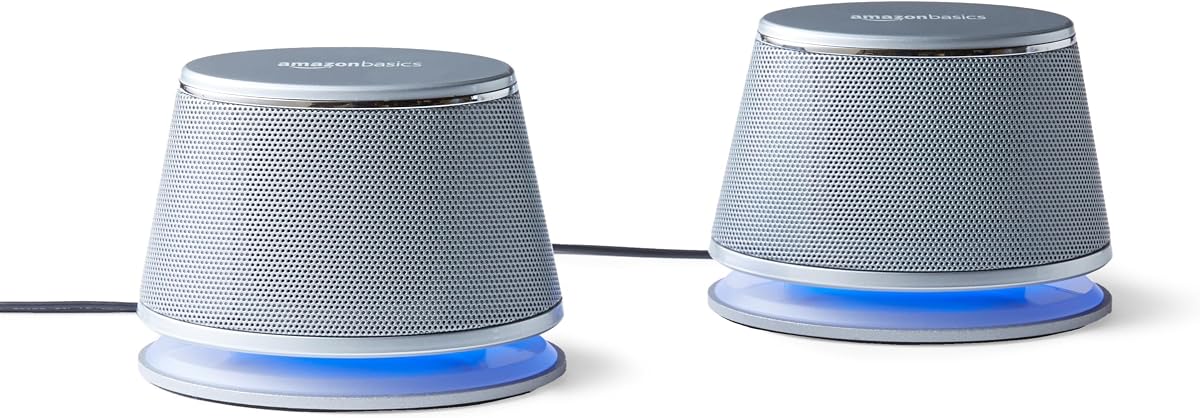
The Amazon Basics LED 2.0 pair offers the same practical feature set as the black version in a more decorative silver finish. Its 4.4 rating and straightforward USB-powered design make it a credible option for a home office or study area where appearance and basic convenience both matter. Each unit receives power from the computer's USB port.
We may earn a commission when you buy through this link, at no additional cost to you.
An in-line control provides quick volume adjustment, and the speakers connect to audio through a 3.5 mm AUX input. Blue LED lights make the operating state visible, while the metal finish, scratch-free padded bases, and bottom radiator give the pair a practical appearance and a degree of low-end support.
As a wired-only model, it offers no Bluetooth flexibility or modern USB-C audio path. The system is also visually similar to many other basic office speakers, so its distinguishing characteristic is primarily the silver styling and LED detail rather than advanced processing. Buyers should confirm that their computer has a convenient 3.5 mm output or adapter.
This pair works for users who want a recognizable two-speaker layout, uncomplicated controls, and a lighter visual finish that blends into a silver or gray workstation. It offers dependable functionality without attempting to compete with the broader connection flexibility of the wireless-capable alternatives.
External speakers can provide more perceived volume and stereo separation than laptop or monitor speakers. Direct USB power keeps the setup independent of wall outlets.
The silver finish, blue illumination, and padded bases give the system a coordinated appearance. An inline controller makes routine level changes straightforward.
We may earn a commission when you buy through this link, at no additional cost to you.
The FUNLOGY 14W Stereo system is a compact, powered pair with an emphasis on output and angled listening. Its 4.2 rating reflects a solid practical proposition, particularly for users who want more sound than a standard office speaker provides. Total output is listed at 14 watts, driven by dual 48 mm full-range drivers and supported by passive radiators.
We may earn a commission when you buy through this link, at no additional cost to you.
The 30-degree tilt directs the drivers toward a seated listener and helps preserve desk space. A dedicated volume dial provides direct level control, while a gold-plated AUX input is intended to support a clear analog connection. Setup requires the included USB and 3.5 mm cables, with no driver installation or Bluetooth pairing involved.
The system's advertised 14-watt output does not make it a substitute for a dedicated subwoofer in every listening situation, and its frequency-extension claims are not accompanied by a published response range. The absence of wireless connectivity also reduces flexibility compared with the Pebble V3, Logitech Z207, and Nylavee sound bar.
This model is well matched to a desktop gaming area, monitor setup, or laptop workstation where a small footprint, stronger amplification, and upward projection are priorities. It also suits users who prefer a simple wired system but want enough headroom for games, music, and video at moderate listening levels.
The listed 14-watt output and dual 48 mm drivers give this model more apparent amplification than several basic desktop-speaker options. Passive radiators add low-end support within the same enclosure.
The 30-degree upward-facing layout is especially useful on a desk. It sends sound toward the ear rather than wasting energy above the monitor line.
We may earn a commission when you buy through this link, at no additional cost to you.
The Nylavee Sound Bar is designed for users who prefer a single compact enclosure over two separate speakers. It has a 4.3 rating and offers Bluetooth 5.0 plus 3.5 mm AUX connectivity, making it suitable for laptops, desktop PCs, phones, tablets, Xbox consoles, and PS5 systems.
We may earn a commission when you buy through this link, at no additional cost to you.
Internally, the sound bar uses four speaker units and two independent bass diaphragms. The manufacturer describes a cavity design intended to increase loudness, while double-layer neodymium magnets and mica-fiber diaphragms are used for the speaker units. A single side knob handles the system's functions, and USB power turns the unit on when connected to a suitable source.
It is important to distinguish power from audio in this design. USB supplies electricity, while sound arrives through Bluetooth or the 3.5 mm connection. The product has no built-in battery according to the supplied information, and it does not offer a dedicated external subwoofer, so bass improvement comes from the internal diaphragms rather than a separate enclosure.
The Nylavee is a good option for a narrow desk, a monitor-centered setup, or a bedroom and office where fewer objects are preferred. It offers a contemporary connection set and stronger internal speaker count than the simplest desktop pairs, though listeners seeking deep sub-bass should consider the 2.1 Klipsch system instead.
A sound-bar format can sit neatly below a monitor or beside a laptop. Consolidating the drivers into one body also simplifies repositioning when the computer changes.
Bluetooth 5.0 permits cable-free playback from compatible devices, while AUX provides a direct analog option. The shared USB power connection keeps the unit ready for use.
We may earn a commission when you buy through this link, at no additional cost to you.
The Dell Speakerphone SP3022 is purpose-built for communication rather than conventional stereo entertainment. It has a 4.2 rating, Microsoft Teams and Zoom certification, and a compact desk form that can sit on a monitor base or beside a laptop or desktop. Its defining function is full-duplex audio with AI noise cancellation, allowing multiple people to speak and remain intelligible.
We may earn a commission when you buy through this link, at no additional cost to you.
LED indicators clearly communicate Microsoft Teams status, call and hang-up actions, volume changes, and microphone mute status. A dedicated Teams button provides quick access to meetings and notifications. Connectivity is simple and modern, with support for both USB-A and USB-C ports on monitors, laptops, and desktops.
Because it is a conference speakerphone, the sound presentation is not positioned as a conventional left-and-right music system. Its microphone also captures voices from around the device, so users in shared or noisy spaces may still notice nearby sounds. Buyers focused on gaming, albums, or cinematic effects should look toward a stereo or 2.1 system.
The SP3022 is the strongest recommendation for remote workers, small business conference rooms, and frequent online presenters. Its certification, noise handling, call controls, and compact footprint address a specific need that ordinary music speakers do not handle as directly.
Full-duplex operation supports natural turn-taking and simultaneous conversation. AI noise cancellation is intended to keep voices clear when meeting participants share a space.
Separate LED indications make mute, call state, volume, and Teams status visible. This reduces uncertainty during meetings where quick control and privacy are important.
We may earn a commission when you buy through this link, at no additional cost to you.
The Klipsch ProMedia 2.1 THX Certified system is the premium and most audio-focused option here. Its 4.5 rating reflects a strong overall response, while the dedicated 6.5-inch subwoofer separates it from compact two-speaker designs. The system is intended for users who want more output, fuller bandwidth, and a more substantial presentation for music, movies, or games.
We may earn a commission when you buy through this link, at no additional cost to you.
Each satellite uses a three-inch midrange driver and Klipsch MicroTractrix horn technology. The horn is designed to control dispersion and improve efficiency by directing sound toward the listener. Behind the satellites, a side-firing ported subwoofer provides bass extension, creating a conventional 2.1 arrangement with genuine low-frequency separation.
The system is powerful, with 200 watts of peak output and a listed maximum of 110 dB in-room. It also has a dedicated control pod for main volume and subwoofer gain. However, it occupies considerably more space than the other choices, and the 3.5 mm input means the computer needs a compatible analog output or adapter. The term small is relative for this model.
The ProMedia 2.1 is worth considering for a dedicated entertainment desk, gaming setup, or media room where the extra subwoofer is acceptable. Buyers seeking a premium model should prioritize full-range impact and separation, while those constrained by desk space or wanting USB-C or Bluetooth connectivity will be better served by the Creative Pebble V3.
The dedicated 6.5-inch ported subwoofer produces bass independently of the satellite speakers. That separation allows the system to deliver more low-end weight than a small 2.0 pair.
MicroTractrix horn technology is intended to control dispersion while improving efficiency. The three-inch midrange drivers handle the main stereo output, with a separate control pod for bass gain.
We may earn a commission when you buy through this link, at no additional cost to you.
The best small speakers for computers depend on connection compatibility, available desk space, audio expectations, and whether the priority is music, video, gaming, or communication. Review these factors before choosing a model.
Start with the ports available on the computer and monitor setup. Some systems take audio and power through one USB-C cable, others use USB power with a separate 3.5 mm audio plug, and wireless models require Bluetooth pairing. Creative's USB-C-only models are especially convenient with recent computers, but the Pebble 2.0 requires USB for its audio connection. Several Amazon Basics pairs combine USB power with 3.5 mm audio, while the Logitech Z207 and Nylavee offer both wired and wireless routes.
A small label does not mean every model occupies the same amount of space. The Amazon Basics Compact units are only 5.3 inches tall, while the Creative Pebble range uses compact angled enclosures. The Nylavee sound bar combines multiple drivers in one housing, which can be convenient below a monitor. By contrast, the Klipsch ProMedia 2.1 includes two satellites and a 9.5 by 9.8 by 10.2-inch subwoofer, making it much more substantial.
USB-powered speakers are convenient because they reduce the number of wall adapters and cables. Their practical output varies, however. The Amazon Basics Compact has 2.2 watts total RMS, the Creative Pebble V3 has 8 watts RMS, and the FUNLOGY system lists 14 watts total output. The Klipsch system reaches 200 watts peak. These figures are not perfectly equivalent, but they indicate how differently the products prioritize amplification and headroom.
Separate left and right speakers generally provide a wider soundstage, while a sound bar concentrates drivers in one enclosure and favors a compact silhouette. Passive radiators can improve bass in a 2.0 system, but they do not create the same separation as a dedicated subwoofer. If movie effects, game soundtracks, or bass-heavy music are central priorities, the Klipsch ProMedia 2.1 offers the most substantial low-frequency architecture in this group.
Ordinary stereo speakers are optimized for playback rather than capturing voices. The Dell SP3022 changes that priority with full-duplex audio, AI noise cancellation, a microphone, call controls, and certification for Microsoft Teams and Zoom. For routine music playback, the added meeting features may be unnecessary. For frequent conferences, they address an important problem that a basic computer-speaker pair cannot.
Daily usability depends on where the controls sit and how often they are needed. Front-facing volume controls are useful on the Creative Pebble 2.0, Amazon Basics Compact, and Logitech Z207, while inline controls suit the Amazon Basics stereo models. The Nylavee consolidates operation into one side knob, and the Dell uses clear LEDs and meeting-focused buttons. Remote software or menu-based control may be less convenient than a direct physical adjustment.
Bluetooth is valuable when the computer is not the only device in the room. The Creative Pebble V3 offers Bluetooth 5.0, the Logitech Z207 uses version 4.2 with Easy-Switch behavior, and the Nylavee sound bar supports Bluetooth 5.0. Wired-only systems are often simpler and avoid pairing, but they are less adaptable when the user wants to play music from a phone or move among entertainment sources.
Match the speaker design to the dominant content. The Pebble V3's Clear Dialog processing is aimed at intelligible speech in video. The Dell SP3022 focuses on meetings. The FUNLOGY model emphasizes power and upward projection for a broad range of desktop media, while the Klipsch system targets music, movies, and gaming with dedicated bass. Basic office speakers are most appropriate for calls, browsing, and background listening.
Begin by identifying the correct power and audio path for the chosen system. For USB-powered models, connect the USB lead to the computer or another suitable powered source, then route audio through 3.5 mm or USB as specified. For USB-C audio models, use the supplied cable and the included USB-C-to-USB-A converter if the computer has the older port. With Bluetooth speakers, put the speaker into pairing mode, select it from the computer's Bluetooth menu, and confirm the connection before playing audio.
Position the speakers according to the design. Separate stereo pairs should sit to the left and right of the computer at roughly ear height, with the angled or elevated drivers facing the listener. A sound bar can be centered below a monitor, while the Dell SP3022 should have open space around it so voices can be picked up clearly. For a 2.1 system, place the satellites beside the display and position the subwoofer where there is some room for bass to develop without obstructing the desk.
Care for the equipment by keeping the volume moderate, avoiding cable strain, and ensuring ventilation openings remain unobstructed. Dust the cabinets gently, and do not push liquids into control knobs, ports, or speaker grilles. Update paired devices only when needed, keep the drivers away from moisture and direct heat, and unplug the system when moving it to prevent accidental damage. Checking the computer's output level and the speaker's own control can also prevent an unpleasant volume jump when switching sources.
The easiest connection depends on the speaker model and the computer's available ports. A USB-C system can often use one cable for power and audio, while USB-powered speakers usually need a separate 3.5 mm audio connection. Bluetooth models require pairing but eliminate the audio cable. Checking both the computer and speaker before unpacking prevents the need for an unexpected adapter.
USB can simplify power delivery and, in some models, carry the digital audio signal directly. A 3.5 mm system can still provide excellent sound and may be more compatible with older computers or separate powered speakers. The better choice is the one that matches the available ports, reduces cable clutter, and supports the required power arrangement.
No, most compact 2.0 systems use passive radiators to add some bass without a separate enclosure. A dedicated subwoofer, as included with the Klipsch ProMedia 2.1 THX system, provides substantially greater low-frequency separation and impact. It also takes more space and may be unnecessary for dialogue, web meetings, or background listening.
Only models with suitable wireless or analog inputs can switch conveniently between them. The Creative Pebble V3, Logitech Z207, and Nylavee sound bar support Bluetooth, while most of the Creative Pebble V3's other functions also accept analog audio. Wired-only pairs are best suited to a computer that is their permanent source.
The Dell Speakerphone SP3022 is specifically designed for conferences, with full-duplex audio, AI noise cancellation, call controls, and Microsoft Teams and Zoom certification. Its microphone and status indicators make it more suitable for group calls than conventional music speakers. For private calls in a quiet room, a simpler stereo pair may also be sufficient.
Office use, spoken content, and quiet listening may be adequately served by a low-output compact system. Gaming, video, and music benefit from greater headroom, especially if the speakers are not placed close to the listener. The listed wattages are not directly comparable, so the cleanest approach is to consider the intended volume, room size, and the source's own output level.
Stereo pairs offer more physical separation between left and right channels and fit naturally on either side of a monitor. A sound bar uses less desk space and keeps the drivers in one enclosure, making it convenient for narrow work areas. The choice depends on whether soundstage width or a compact, consolidated footprint is more important.
Most systems in this guide are designed for plug-and-play use, and the FUNLOGY and Amazon Basics Compact models explicitly require no driver installation. The computer should recognize a standard USB audio device automatically. If playback does not begin, check the selected output device, connection, and source volume before assuming software is required.
The Creative Pebble V3 is the most well-rounded selection because it combines tidy USB-C operation, Bluetooth 5.0, 3.5 mm AUX support, useful dialogue processing, and a compact angled design. The Creative Pebble 2.0 stands out as the budget leader with its high rating, single-cable USB setup, passive radiators, and simple front volume control. For listeners who want the most powerful and bass-focused option, the Klipsch ProMedia 2.1 THX provides dedicated low-end output and separate satellite controls.
Most buyers should prioritize correct port compatibility, enough output for their room, and controls they will actually use. Wired USB models are ideal for fixed desks, Bluetooth systems suit mixed-device entertainment, and the Dell SP3022 addresses the specialized needs of online conferences. Deep bass and room-filling entertainment justify a 2.1 arrangement, while narrow workspaces benefit from the Nylavee sound bar or especially compact Amazon Basics models.
Ratings, promotions, and availability can change, so shoppers should verify the current product details and cost at the time of purchase. Checking the computer's connections, the intended listening distance, and the need for a microphone will narrow the field quickly and help prevent an unnecessary accessory or setup compromise.