
PCIe x4 to Dual SFF-8643 SATA Controller Card
Dual SFF-8643 expansion
SATA 6Gbps drive support
Up to eight SATA devices
Our SAS Card for PC guide compares 10 options for SAS and SATA support, connectors, bandwidth, compatibility, expansion, and cable needs.
A SAS card for PC can add reliable internal storage connectivity for a home lab, NAS, workstation, or virtualized server. The right controller depends on drive type, connector layout, PCIe slot, operating system, expansion goals, and whether you need HBA pass-through rather than hardware RAID.
This guide compares ten supplied products by controller family, firmware mode, interface speed, port count, included cables, and practical storage use cases. It distinguishes native SAS HBA cards from SATA expansion controllers and identifies one Thunderbolt product that is not a SAS expansion card.
Each review explains the strongest use case, relevant specifications, and practical limitations. The top selections favor broad SAS3008 compatibility, 12Gb/s SAS capability, and larger port density, while noting that prices change and system compatibility should be confirmed before purchase.

4.5Editor score

The comparison below highlights controller generation, host interface, drive connectivity, and practical expansion capacity. It also makes clear which options include cables, operate in IT mode, or should be treated as SATA expansion hardware rather than a full SAS HBA.

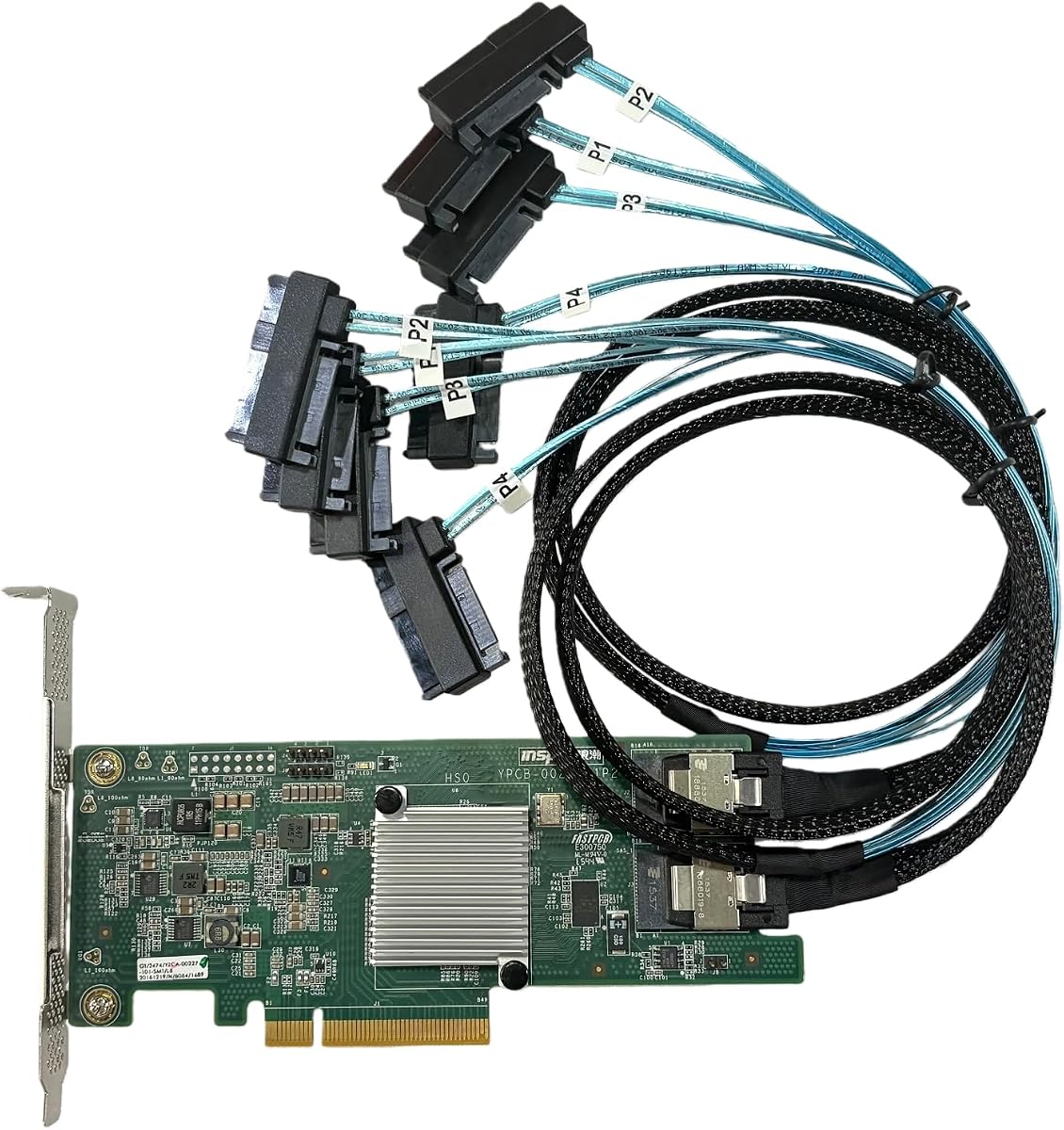


This LSI 9300-8i-compatible SAS HBA is the strongest all-around choice in the guide for a PC that needs flexible internal storage expansion. It carries a 4.5 rating and combines a SAS3008-class controller with HBA IT-mode firmware, a PCIe 3.0 x8 host interface, and two internal Mini-SAS HD connectors.
We may earn a commission when you buy through this link, at no additional cost to you.
The card supports data transfer rates up to 12Gbps for SAS and 6Gbps for SATA. Its two SFF-8643 connectors can directly attach as many as eight drives, and compatibility with an external SAS expander creates a path to larger storage arrays. The package includes two SFF-8643-to-four-SATA cables, each with four SATA ends, making it a convenient starting point for SATA-based NAS and home-lab builds.
The main limitation is that the included cables are intended for SATA drives, not SAS drives. Builders using enterprise SAS disks will need compatible SFF-8643-to-SFF-8482 SAS cables. The card also requires a suitable PCIe slot, appropriate system support, and software that can manage the selected drive topology in IT mode.
It is the most practical recommendation for a user who wants one card to suit ZFS, FreeNAS, TrueNAS, unRAID, Proxmox, or ESXi-oriented storage plans. Confirm connector and operating-system requirements first, but the combination of 12Gb/s SAS support, eight direct positions, and useful included cables makes this a balanced choice.
The eight-drive direct-attach limit suits many compact NAS and laboratory systems, while expander support offers a route to larger configurations. Its IT-mode design also aligns naturally with operating systems and hypervisors that expect individual disks to be managed directly.
The bundled breakout cables simplify SATA installations, but SAS users should not mistake them for native SAS cabling. Match the controller connector, drive connector, and planned array before assembling the system.
We may earn a commission when you buy through this link, at no additional cost to you.
This card offers a useful bridge between 9211-8i and 9300-8i planning, with a 4.2 rating among buyers. It uses a Broadcom or LSI SAS3008 controller in HBA IT mode, giving a PC direct drive control rather than exposing a hardware RAID abstraction.
We may earn a commission when you buy through this link, at no additional cost to you.
Its stated capabilities reach 12Gbps over SAS and 6Gbps over SATA. The PCIe 3.0 x8 host interface and two SFF-8643 internal connectors provide a solid platform for as many as eight directly attached drives. External SAS expander support is also listed, which matters for builders who expect their storage requirements to grow.
Two SFF-8643-to-four-SATA breakout cables are included, providing eight SATA connector ends in total. As with the first-ranked card, those cables are for SATA drives and are unsuitable for SAS drives. A SAS build must use SFF-8643-to-SFF-8482 wiring or a matching controller-and-cable kit.
This option is most attractive when a builder wants 12Gb/s SAS3008 performance and broad NAS compatibility but primarily plans to populate the card with SATA drives. It is less distinctive than the top selection because its core specification set is similar, though its stated 9211-8i compatibility may better match particular system expectations.
Listing both the 9211-8i and 9300-8i makes the card easier to consider for projects centered on either controller family. Buyers should still verify the physical card layout, bracket fit, and expected firmware behavior in their particular system.
HBA IT mode exposes the disks for operating-system and application-level management. That is useful in ZFS, NAS, and virtualized storage environments where flexible pooling and filesystem control are priorities.
We may earn a commission when you buy through this link, at no additional cost to you.
The 9207-8i SAS2308 HBA stands out for its 4.7 rating, included native SAS cables, and complete package. Unlike the first two cards, it comes with two SFF-8087-to-SFF-8482 SAS cables, making it immediately relevant to builders intending to install SAS drives.
We may earn a commission when you buy through this link, at no additional cost to you.
Its controller uses LSI P20 IT-mode firmware and supports a 6Gb/s data transfer rate. The PCIe 3.0 x8 interface makes it appropriate for a modern desktop or server platform with a compatible physical slot. The package includes the HBA, a high and low bracket, and the two SAS cable assemblies.
Its central trade-off is generation. A 6Gb/s SAS2308 controller is older than the SAS3008-based alternatives that support 12Gb/s. The difference may be especially noticeable with arrays of fast enterprise drives, although actual throughput also depends on the host bus, filesystem, workload, and number of active disks.
Choose this card when its included SFF-8087-to-SFF-8482 wiring, both brackets, and 4.7 rating outweigh the desire for newer 12Gb/s capability. It is a particularly coherent package for a ZFS, FreeNAS, or unRAID builder assembling an eight-port SAS HBA setup without sourcing the same cable type separately.
The inclusion of both high and low brackets reduces the need to adapt the card to different chassis layouts. Two matching SAS cables also make the package easier to plan around when the intended drive type is already known.
The SAS2308 architecture remains relevant where 6Gb/s operation is sufficient and IT-mode flexibility matters more than the newest link rate. It can be especially practical for established storage builds centered on older-compatible enterprise hardware.
We may earn a commission when you buy through this link, at no additional cost to you.
This SAS3008-based HBA is positioned for builders who want 12Gb/s SAS capability and proper native SAS wiring in the box. It has no visible customer rating, so the decision should rest on its stated compatibility, IT-mode operation, and included SFF-8643-to-SFF-8482 cables.
We may earn a commission when you buy through this link, at no additional cost to you.
The card is described as compatible with the LSI 9300-8i, 9211-8i, and 9207-8i references, while using a SAS3008 controller and HBA pass-through design. It supports up to 12Gb/s SAS and 6Gb/s SATA through a PCIe 3.0 x8 host interface and two SFF-8643 connectors.
Eight drives can be attached directly, with expansion possible through a compatible SAS expander. The supplied SFF-8643-to-SFF-8482 SAS cables are intended for compatible SAS and SATA drives. This differs from the first two selections, whose bundled breakout leads are specifically for SATA devices.
It is a good fit for a NAS or home lab that already uses native SAS cabling or intends to add enterprise SAS disks. Confirm low-profile bracket availability and exact chassis clearance if the system has limited space, since the supplied information does not explicitly identify the included bracket configuration.
Two native SAS cable assemblies remove the immediate need to find matching SFF-8643-to-SFF-8482 leads. That makes this option easier to deploy when the storage plan already centers on compatible SAS disks.
The stated 9300-8i, 9211-8i, and 9207-8i references give builders several familiar model associations to consider. Physical layout, firmware behavior, and operating-system support should still be validated against the target system.
We may earn a commission when you buy through this link, at no additional cost to you.
This 9300-8i and D3307-compatible HBA combines a 5.0 visible rating with a minimalist card-only package. It is an attractive option for builders who already own the correct breakout or SAS cables and want a SAS3008-class controller with 12Gb/s capability.
We may earn a commission when you buy through this link, at no additional cost to you.
The controller supports IT-mode, non-RAID operation and is listed for both D3307 and LSI 9300-8i compatibility. A PCIe 3.0 x8 host interface, two Mini-SAS HD SFF-8643 connectors, and support for as many as eight directly attached drives form the core platform.
External SAS expander compatibility provides a path beyond the initial eight-drive configuration. The card is positioned for ZFS, FreeNAS, TrueNAS, unRAID, Proxmox or ESXi passthrough, and JBOD NAS construction, where software-managed storage is a central requirement.
Because the package includes only the HBA card, this is not the most convenient starting point for a new build. Its appeal lies in a clean, capable controller paired with the strong visible rating. Experienced builders who need exactly this connector and cabling arrangement may appreciate avoiding unnecessary bundled accessories.
A card-only package can suit a system that already has suitable SFF-8643 breakout leads or native SAS cables. It also gives experienced users clearer control over exactly which accessories enter the chassis.
The listed operating systems and platforms are tightly associated with flexible storage management. IT mode avoids a hardware RAID layer, allowing the chosen filesystem or storage application to coordinate the array.
We may earn a commission when you buy through this link, at no additional cost to you.
This SAS HBA earns a 5.0 visible rating and pairs a 12Gb/s SAS3008-class platform with two native SAS cables. It is a particularly attractive package for a builder who understands SFF-8643 and SFF-8482 connections and wants the required wiring included.
We may earn a commission when you buy through this link, at no additional cost to you.
Compatibility is stated for the LSI 9300-8i, 9211-8i, and 9207-8i references. The controller operates in HBA IT mode, while its PCIe 3.0 x8 interface and two SFF-8643 connectors support up to eight direct drives and expansion through a compatible SAS expander.
The two SFF-8643-to-SFF-8482 SAS cables support compatible SAS and SATA drives. That wording gives the package broad utility, although the exact drive connections and any required additional breakout leads should still be checked against the planned chassis wiring.
Among the products with visible ratings, this is one of the strongest choices. It suits NAS, home-lab, and virtualized-storage projects that value a ready-made cable set, 12Gb/s SAS support, and direct-drive management. It sits alongside the top card rather than displacing it because both use closely related SAS3008 specifications.
The included SFF-8643-to-SFF-8482 leads support the controller-to-SAS-drive path used in many enterprise-oriented storage arrays. This reduces one common source of assembly friction.
Passing individual disks through to the operating system allows software-defined pooling, snapshots, checks, and tiering policies to remain under the control of the selected storage platform.
We may earn a commission when you buy through this link, at no additional cost to you.
The ASUS ThunderboltEX 4 is not a conventional SAS HBA and should not be mistaken for one. It is included in the comparison because it is a PCIe expansion option that can be relevant to some PC storage plans, but it cannot attach drives through SFF-8643 or SFF-8482 connectors.
We may earn a commission when you buy through this link, at no additional cost to you.
Its Intel Thunderbolt 4 JHL 8540 controller provides two USB Type-C ports with USB 4 support and up to 40Gb/s bidirectional bandwidth per port. The card also offers DisplayPort 1.4 support, including compatibility with high-resolution monitors, and a quick-charge solution rated up to 100W.
The primary limitation is categorical. This product does not expose internal SAS connectivity, provide IT-mode disk control, or include SATA breakout cables. External storage selected for Thunderbolt 4 rather than native SAS or SATA is required for it to provide a storage benefit.
A PC builder seeking internal enterprise storage should skip this card and choose an actual HBA. A user interested in compact external Thunderbolt storage, peripheral connectivity, or a daisy-chained desk setup may find it useful, but that is a different category from the SAS cards covered elsewhere in this guide.
Two Thunderbolt 4 ports can serve compatible displays, docks, and storage devices. The listed daisy-chain capability makes the card more relevant to flexible external workflows than to direct internal drive attachment.
A system requiring hot-plug enterprise disks, JBOD passthrough, or a multi-bay SAS backplane needs a proper SAS HBA. Thunderbolt enclosure support does not replace those controller features.
We may earn a commission when you buy through this link, at no additional cost to you.
This 9207-8i-compatible SAS HBA delivers a strong 5.0 visible rating while including two SFF-8643-to-SATA breakout cables. It is a practical choice for a builder assembling a high-capacity SATA-based NAS while preserving the option to use 12Gb/s SAS later.
We may earn a commission when you buy through this link, at no additional cost to you.
The card uses a SAS3008 controller in HBA IT mode, supports SAS up to 12Gbps and SATA up to 6Gbps, and connects through a PCIe 3.0 x8 host interface. Two internal SFF-8643 connectors allow up to eight drives to be attached directly, with further expansion possible through a compatible SAS expander.
The supplied SATA cables are not compatible with SAS drives. A system that mixes drive types needs separate SFF-8643-to-SFF-8482 SAS wiring. This limitation does not reduce the value for a straightforward SATA build, where the included leads make the initial eight-drive topology easier to assemble.
The card is listed for ZFS, FreeNAS, TrueNAS, unRAID, Proxmox, and ESXi home-lab uses, making it a versatile software-storage option. Its 5.0 rating and 12Gb/s controller capabilities make it one of the most compelling products for buyers who will primarily use SATA drives but want a full SAS HBA underneath.
Two included breakouts cover the card's SFF-8643 connectors for ordinary SATA drives. This makes it easier to build an eight-drive storage pool without first determining the exact cable quantity and type.
Although the bundled leads are SATA-only, the controller itself supports SAS and expander-based growth. Adding suitable SAS cables later preserves a path toward enterprise drives and larger arrays.
We may earn a commission when you buy through this link, at no additional cost to you.
The LSI 9305-16i-compatible HBA is the premium selection for builders who need more direct drive positions than an eight-port card can offer. It uses a SAS3224 controller and exposes four Mini-SAS HD SFF-8643 connectors, allowing up to 16 drives to be attached directly.
We may earn a commission when you buy through this link, at no additional cost to you.
The card operates in HBA IT mode and supports data transfer rates up to 12Gb/s for SAS and 6Gbps for SATA. Its PCIe 3.0 x8 host interface provides the system-facing connection, while compatible SAS expander support allows an installation to extend beyond the initial direct-attach count.
The main caveat is that the package contains only the HBA card. A sixteen-drive build will require substantial compatible cabling, and the enclosure must provide the appropriate space, power, cooling, and backplane connections. The absence of a visible customer rating also means less direct buyer feedback than several lower-ranked products have.
Choose this model for a larger NAS, storage server, or home lab where sixteen direct connections justify the additional complexity. It is the strongest choice for drive density in this list, while the eight-port SAS3008 cards remain easier for smaller projects and include more helpful cable packages.
Sixteen direct drive positions reduce the need for an external expander in a suitably designed chassis. That can simplify topology planning and keep more disks attached directly to the host controller.
The 9305-16i and SAS3224 platform targets substantial storage configurations. Matching backplanes, sufficient PCIe lanes, cooling, and appropriate operating-system support are as important as the controller itself.
We may earn a commission when you buy through this link, at no additional cost to you.
The RIITOP dual SFF-8643 SATA controller is the budget-focused way to expand a desktop or server with internal SATA storage. It does not implement native SAS, but it provides a practical bridge between a PCIe slot and two internal SFF-8643 breakout connections.
We may earn a commission when you buy through this link, at no additional cost to you.
Each SFF-8643 port can serve up to four SATA drives through compatible breakout cables, allowing the card to support as many as eight SATA hard drives or SSDs. The stated total capacity reaches 240TB, while the downstream drive interface operates at SATA 6Gbps and the upstream host connection uses PCIe Gen3 x2.
The card includes a low-profile bracket and features a gold-plated PCIe edge connector, an aluminum heatsink, and an activity LED for each SATA port. Compatibility is listed for desktop PCs, servers, NAS systems, NVR or DVR systems, and industrial computers with an available PCIe x4, x8, or x16 slot.
SFF-8643-to-SATA breakout cables are not included, and the operating-system support listed covers Windows 10, Windows 8, Linux, and Mac OS. This is a sensible expansion card for SATA-only storage on a PC that lacks enough motherboard ports, but it is not the right choice for native SAS, IT-mode SAS management, or enterprise SAS cabling.
The dual-port design consolidates storage expansion into a single PCIe card. It is useful when a board has limited SATA connectors but can accommodate a suitable expansion slot and internal breakout wiring.
SFF-8643 is a physical connector name, not proof of native SAS support. This card expands SATA devices and uses breakout cables, while a true SAS HBA adds SAS protocol support, IT-mode passthrough, and native SAS drive connectivity.
We may earn a commission when you buy through this link, at no additional cost to you.
The right SAS card for PC starts with the drives and operating system, not the model number. Confirm protocol support, firmware mode, connector types, physical clearance, PCIe bandwidth, and expansion plans before selecting a controller.
A native SAS HBA can manage compatible SAS and SATA devices through the SAS protocol, while the dual SFF-8643 card in this guide is a SATA expansion controller. The shared connector type can make these categories look deceptively similar. Review the controller description, protocol support, IT-mode behavior, and intended drive types rather than relying on the SFF-8643 label alone.
Choose a true SAS HBA for enterprise SAS drives, mixed drive environments, or software-managed arrays. Choose a SATA expansion card when all planned devices are SATA and the objective is simply to add conventional internal drive connections.
The products cover several controller references, including SAS3008-class cards associated with the 9300-8i, 9211-8i, 9207-8i, and D3307 descriptions, plus a SAS3224-based 9305-16i option. Matching the desired model reference to the card layout, firmware, and connector arrangement can simplify planning, but physical and protocol requirements should take priority over the marketing title alone.
For a new build, prioritize the controller features you will actually use. Existing systems may benefit from a card with a documented compatibility reference, provided the bracket, connector, and operating-system requirements are also satisfied.
HBA IT mode passes individual disks through to the host rather than presenting a hardware RAID array. That model fits ZFS, FreeNAS, TrueNAS, unRAID, Proxmox, and ESXi storage workflows because the operating system or storage application can manage disk pools, redundancy, checks, and resizing. It is different from a RAID controller that combines drives into a virtual logical device.
Select IT mode when software should control the array. Verify that the intended operating system recognizes the HBA and supports the planned device topology.
Most eight-port cards list support for up to eight directly attached drives, while the 9305-16i option raises that figure to sixteen. Both families also mention expansion through a compatible SAS expander, but the final topology still depends on chassis backplanes, power delivery, cooling, and the number of available lanes.
Choose a port count that covers current needs with sensible growth in mind. Do not purchase an eight-port card for a planned sixteen-drive chassis unless an expander and its compatible cabling are part of the design.
SFF-8643-to-SATA breakouts, SFF-8643-to-SFF-8482 SAS leads, and SFF-8087-to-SFF-8482 cables are not interchangeable in every installation. The first two top-ranked cards include SATA breakout cables, the 9207-8I package includes SFF-8087-to-SFF-8482 SAS cables, and the RIITOP card includes no breakout cables at all.
Build a complete cable list before ordering. Match both ends, count the number of drives per connector, and ensure the cable length can reach the intended drive or backplane without creating routing problems.
Most SAS3008-class cards use a PCIe 3.0 x8 host interface, while the budget SATA expansion card uses PCIe Gen3 x2 and a PCIe x4 form factor. Slot width does not always equal the negotiated lane count, and a physical x16 socket can still have fewer usable lanes. A system builder should check board documentation, slot configuration, and available bandwidth.
Also inspect card length, screw placement, and bracket requirements. The 9207-8I package explicitly includes high and low brackets, whereas several other listings do not clearly state what is supplied.
The listed SAS cards are positioned for ZFS, FreeNAS, TrueNAS, unRAID, Proxmox, ESXi, and related home-lab or NAS workloads. Those applications are more relevant to the purchasing decision than a generic desktop benchmark. Drivers, boot behavior, pass-through, and storage-management features should be checked for the precise operating-system release and planned deployment.
The RIITOP card lists Windows 10, Windows 8, Linux, and Mac OS support, but that does not make it equivalent to a full SAS HBA. Match the controller category and software expectations together.
A controller that supports many drives is useful only when the enclosure can accommodate them. Multi-bay systems need suitable drive backplanes, power distribution, airflow, and enough space for the card and its cables. The 9305-16i card's sixteen-drive capacity, for example, makes chassis design a central part of the purchase decision rather than an afterthought.
Prefer cards with a listed heatsink and clear status indication when the system will run sustained storage workloads. Confirm that low-profile mounting is possible if the enclosure requires it.
Before installation, power the computer down, unplug its power cable, discharge residual power, and open the case using appropriate procedures. Identify the intended PCIe slot, remove the relevant rear bracket if necessary, and compare the card's dimensions and mounting holes with the chassis and bracket space.
Seat the card firmly in the correct PCIe slot and secure it with the bracket screw. Attach the planned SFF-8643, SFF-8087, or SFF-8482 cables according to their connector type, observing any backplane orientation guidance. Do not force a connector or route cables through sharp edges. If the operating system is already installed, keep the original boot configuration available and ensure the target storage platform supports the selected HBA.
After assembly, power on the system and enter the appropriate firmware, driver, or operating-system setup screen. Confirm that the controller and attached disks are recognized, check the link and activity status, and configure the drives using the intended ZFS, NAS, unRAID, Proxmox, or ESXi software. Add data gradually, confirm the array health, and keep replacement cables, compatible drives, and recovery instructions available for future maintenance.
Choose a SAS HBA when you plan to use native SAS drives, require IT-mode pass-through, or want the controller to support a larger SAS-oriented storage design. Choose a SATA expansion card when every planned drive uses the SATA protocol and the main goal is adding ordinary internal drive ports. A physical SFF-8643 connector alone does not determine whether a card provides native SAS support.
HBA IT mode exposes individual disks directly to the host operating system rather than combining them behind a hardware RAID controller. The operating system or storage application can then handle pooling, redundancy, scrubbing, and other management tasks. This model is commonly used with ZFS, FreeNAS, TrueNAS, unRAID, and virtualized storage platforms.
No. The first two products and the LSI 9207-8i SATA-cable package specifically include breakout cables for SATA drives, and the product information says they are not compatible with SAS drives. Native SAS drives generally require the appropriate SFF-8643-to-SFF-8482 or SFF-8087-to-SFF-8482 cable, depending on the controller and backplane.
Most of the SAS3008-class and 9305-16i options state that they can expand through a compatible SAS expander. Direct-attach limits still apply, including eight drives for the eight-port cards and sixteen for the 9305-16i. Expansion also requires a compatible expander, suitable cabling, adequate PCIe and SAS link bandwidth, and a chassis designed to support the resulting drive count.
No. A 12Gb/s controller provides the link capability, but actual performance depends on the drive generation, number of active disks, filesystem, workload, host connection, and storage software. SATA drives remain limited by their own SATA 6Gbps interface, and older 6Gb/s SAS cards cannot gain 12Gb/s performance merely by using faster cabling.
No. The ASUS ThunderboltEX 4 is a Thunderbolt 4 PCIe expansion card with two USB Type-C ports, DisplayPort 1.4 support, and high external-device bandwidth. It may be useful for compatible external storage or peripherals, but it cannot connect internal drives through SFF SAS connectors or provide native SAS HBA functionality.
Check the case's available space, the card length, bracket style, PCIe slot position, and whether the operating system supports the controller and intended storage software. If using virtualization, also verify that the host exposes the HBA and attached disks to the guest in the planned passthrough configuration. Finally, prepare the correct drive and backplane cables before starting installation.
The eight-port SAS3008-class options list support for up to eight directly attached drives, with expansion possible through a compatible SAS expander. The LSI 9305-16i option uses four SFF-8643 connectors and lists support for up to sixteen direct drives. The RIITOP SATA card also supports up to eight SATA devices across its two SFF-8643 ports, but it is not a native SAS HBA.
The LSI 9300-8i-compatible card with SATA breakouts is the best-balanced recommendation because it combines 12Gb/s SAS capability, an eight-port direct-attach limit, expander support, and a broadly relevant IT-mode platform. For a budget SATA expansion, the dual SFF-8643 card is useful, while the 9305-16i option stands apart for sixteen-drive density.
Prioritize protocol support, IT-mode behavior, drive count, connector type, and PCIe fit before considering any other feature. Native SAS users should choose native SAS wiring, SATA-only builders can use suitable breakout leads, and larger installations must account for backplanes, power, cooling, and expansion hardware. Software support should be validated for the exact operating-system release and intended platform.
Prices and availability can change, so confirm the current listing and included accessories at the time of purchase. Most importantly, read the cable notes carefully and avoid selecting a card merely because it uses an SFF-8643 connector; the protocol implemented by the controller must match the drives and storage design you actually intend to build.