
CAMWAY 192KHz eARC/ARC Audio Extractor
4.3Editor score
Optical, RCA, and 3.5mm outputs
Dolby and DTS 5.1 support
Simultaneous multi-interface output
Television remote volume control
Earc Audio Extractor buying guide comparing 10 models for output options, audio formats, resolution support, setup ease, and compatibility, with clear picks.
An Earc Audio Extractor connects the audio return channel of a television to speakers, amplifiers, soundbars, or headphones that use a different connection. The right model depends on your TV, desired audio format, available outputs, and whether you need HDMI video pass-through, surround sound, or convenient remote volume control.
We compared all 10 products by examining their supported inputs, output interfaces, audio formats, maximum resolution, sampling rates, CEC behavior, and installation requirements. The list covers dedicated eARC-to-analog devices, optical and coaxial extractors, HDMI video pass-through models, and more versatile converters for advanced home theater setups.
Each review highlights the most useful features, practical limitations, and the type of listener who may benefit from that particular extractor. Ratings and specifications reflect the supplied product information, while current prices and availability can change at any time, so check the latest listing before purchasing.
4.3Editor score
4.5Editor score

4.2Editor score
This side-by-side comparison organizes each extractor by its most important attributes, including output flexibility, surround-sound support, video capabilities, and remote-control behavior. It makes it easier to match a converter with the exact ports and audio formats available in your entertainment system.


The VPFET HDMI eARC Audio Extractor is a focused solution for listeners who want to separate television audio into digital outputs without adding video processing complexity. It receives audio from a television's HDMI ARC or eARC port and provides simultaneous Toslink and coaxial connections. Its 4.1 rating reflects a straightforward design with broad digital-audio utility, particularly for soundbars, amplifiers, DACs, and headphone amplifiers that accept optical or coaxial signals.
We may earn a commission when you buy through this link, at no additional cost to you.
The extractor's standout feature is its combination of outputs. A single television feed can be routed to two digital audio destinations at the same time, reducing the need for additional splitters in suitable installations. It supports sampling rates up to 24-bit/192kHz, uses a DC 5V power connection, and includes a Type-C power cable, 19+1 HDMI cable, optical cable, and manual. The operating-mode indicator provides visible confirmation of the current ARC or eARC status.
There are important limits. The product works only with a television's designated ARC or eARC port rather than an ordinary HDMI input, and it does not support CEC. Consequently, volume generally needs to be adjusted on the connected soundbar, amplifier, DAC, or headphones rather than with the television remote. Some televisions also require their eARC function and HDMI-CEC-related settings to be enabled manually.
This extractor is most appropriate for a compact home theater or secondary listening setup where both optical and coaxial destinations are useful. It is less suitable for someone expecting a full HDMI video pass-through converter or effortless remote-controlled volume. For those requirements, a model with analog outputs or explicit CEC support may be easier to operate. Within its digital-output niche, however, it offers a clear and flexible solution.
Simultaneous Toslink and coaxial outputs make this unit useful when two compatible audio devices need the same television program. The shared digital feed is especially convenient for a soundbar and a headphone DAC or amplifier located in the same room.
The included power and connection cables reduce the number of separate items required for a basic installation. Once the television's eARC or ARC output is enabled, the extractor follows a familiar connect-power-select-input sequence.
We may earn a commission when you buy through this link, at no additional cost to you.
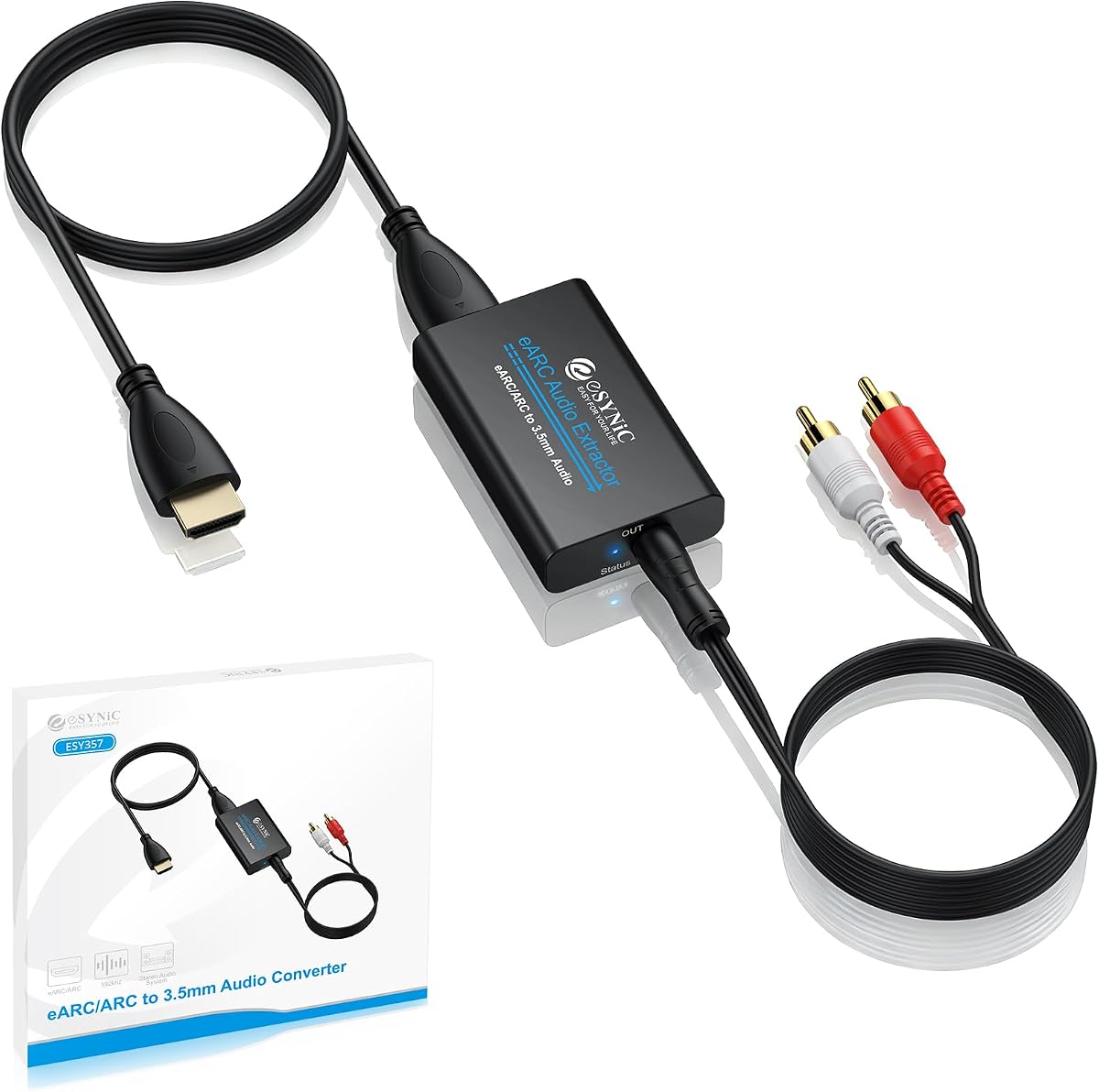
The eSynic Professional 192KHZ eARC and ARC Audio Extractor is designed for people who want television sound in analog stereo form. It converts an ARC or eARC television feed into left-right RCA and 3.5mm headphone outputs, making it especially practical for powered speakers, stereo amplifiers, computer speakers, and wireless headphone transmitters. Its 4.5 rating is the highest among the listed products.
We may earn a commission when you buy through this link, at no additional cost to you.
Both analog outputs provide a convenient bridge from a newer television to older or simpler audio equipment. The extractor supports PCM and PCM 2.0, with a maximum stated sampling rate of 24-bit/192kHz. Audio signal indicators help confirm operation, while USB power eliminates the need for software, drivers, or a separate complex setup. It is a particularly natural choice for private listening because of the 3.5mm connection.
The important restriction is format support. This is not a surround-sound extractor for Dolby or DTS streams, and it has no optical or coaxial output. Users will also need to set the television's audio format to PCM and make sure the connected HDMI port is explicitly marked for ARC or eARC. A normal HDMI port will not work, which is an important distinction when shopping for television adapters.
This is a strong choice for a bedroom, office, or compact living room where stereo sound and headphone access matter more than multichannel audio. It is also a good fit for a legacy amplifier with RCA inputs. Choose it when your equipment accepts analog stereo and you want a simple, well-rated adapter. For a digital soundbar or home theater receiver, one of the optical or multi-output alternatives will offer better compatibility.
The 3.5mm output lets television audio reach ordinary headphones or compatible powered speakers without relying on television speakers. It is a useful option for quieter viewing and dedicated desktop or bedroom audio.
Support for 24-bit/192kHz source signals gives the extractor ample resolution for modern streaming and disc-based content. Actual audible benefit still depends on the source format, television settings, and connected equipment.
We may earn a commission when you buy through this link, at no additional cost to you.
The HDMI Audio Extractor 8K eARC ARC is the most versatile product in this guide, combining eARC extraction, high-resolution HDMI pass-through, digital and analog outputs, and three distinct operating modes. Its 4.2 rating reflects broad compatibility rather than a simple one-purpose design. It suits advanced listeners who need to route audio from several source types or use surround formats with more than one type of output.
We may earn a commission when you buy through this link, at no additional cost to you.
In pass mode, the device mirrors the native television audio and sends multichannel formats through the optical output. R/L mode downmixes PCM, Dolby Digital, Dolby TrueHD, and DTS-HD into synchronized 2.0 PCM across the analog and optical outputs. SPDIF mode is dedicated to premium multichannel bitstreams through the optical port. Video capabilities extend to 8K at 60Hz and 4K at 120Hz, with broad support for HDR formats, VRR, and gaming features.
The flexibility comes with configuration requirements. The DIP switch must be set correctly for the intended source and operating mode, while the unit requires Type-C 5V power. A television should not be connected directly to the HDMI input in the stated eARC arrangement. Analog RCA and 3.5mm outputs require PCM input; attempting to send non-PCM formats to those outputs can produce buzz or hum.
This extractor is best for a modern home theater that combines a television, game console, streaming box, soundbar, amplifier, or headphones. It is particularly compelling for gamers who want 8K or 4K high-refresh-rate video without giving up flexible audio routing. Less demanding systems can use it more simply, but the operating-mode system rewards careful installation. For broad functionality in one enclosure, it is the strongest premium-style choice here.
Pass mode favors the source's native format, R/L mode creates a synchronized stereo downmix, and SPDIF mode prioritizes digital surround. Selecting the correct mode prevents unwanted noise and matches the signal to each connected output.
Support for 8K60Hz, 4K120Hz, VRR, and major HDR formats makes this suitable for current game consoles and capable displays. Every component in the video chain must support the desired resolution and refresh rate.
We may earn a commission when you buy through this link, at no additional cost to you.
The CAMWAY 192KHz eARC/ARC Audio Extractor offers one of the most useful combinations of ports in the guide. It accepts television audio through ARC or eARC and provides optical, RCA, and 3.5mm outputs. With a 4.3 rating, it stands out for users who want surround sound on a digital system while also connecting analog speakers or headphones in the same setup.
We may earn a commission when you buy through this link, at no additional cost to you.
The optical output can carry Dolby Digital 5.1 and DTS 5.1, while the RCA and 3.5mm connections provide 2.0 stereo. All three interfaces can operate simultaneously, making it possible to feed a home theater amplifier and a smaller pair of speakers or headphones at the same time. The stated 192kHz capability supports modern high-resolution signals, and included optical, HDMI, and power cables simplify the initial setup.
Remote-control behavior differs by output. RCA and 3.5mm volume can be controlled with the television remote when CEC and PCM or LPCM are enabled, which is convenient for analog listening. The optical output maintains stable 5.1 audio but requires volume adjustment on the connected amplifier or soundbar. This distinction is normal for digital audio but important to understand before installation.
CAMWAY is a good fit for mixed audio systems where one television needs to serve both surround and stereo destinations. It is also a strong budget-oriented choice because it combines several functions and includes the necessary cables. The main caveat is that it does not extend beyond 5.1-channel audio. For newer object-based or extensive surround systems, a more advanced extractor may be more appropriate.
Simultaneous output lets a home theater amplifier receive surround audio while a nearby pair of speakers or headphones receives stereo. That flexibility makes the device useful in multipurpose living spaces.
RCA and 3.5mm users can adjust volume with the television remote under the required CEC and PCM conditions. Digital-output users should expect to use their amplifier or soundbar controls instead.
We may earn a commission when you buy through this link, at no additional cost to you.
The Tendak 192KHz HDMI eARC/ARC Audio Extractor is a multi-output converter intended to connect modern televisions with soundbars, amplifiers, speakers, and headphones. It offers HDMI, optical, RCA, and 3.5mm connections, along with a stated 192kHz sampling ceiling. Its 4.2 rating reflects a flexible device that can serve both digital home theater and traditional analog audio systems.
We may earn a commission when you buy through this link, at no additional cost to you.
Four output modes provide different paths to the audio. HDMI and optical interfaces carry digital signals to compatible soundbars or receivers, RCA provides separate left and right channels, and the 3.5mm jack serves headphones or smaller speakers. The extractor supports PCM, AC3, DTS, DD+, DTS-HD Master Audio, and Dolby TrueHD. It also accepts optical input, adding a route for connecting another digital source to its conversion and output options.
One limitation is that simultaneous multichannel output is not supported. In addition, CEC is unavailable through the HDMI and optical outputs, so those connections do not provide the same convenient television-remote volume behavior that the RCA and 3.5mm outputs can offer. The unit includes a USB power cable and a one-meter HDMI cable and operates without software or driver installation.
Tendak is appropriate for installers or technically comfortable users who want one box to negotiate several audio standards. It can bridge an older amplifier or headphones while retaining digital options for a soundbar. Buyers who need multiple destinations to receive surround sound simultaneously should choose a converter with explicit simultaneous-output support. For broader format handling and varied source connections, however, this model is unusually capable.
Support for PCM, AC3, DTS, DD+, DTS-HD Master Audio, and Dolby TrueHD makes the converter useful across mixed entertainment sources. Format support remains dependent on the television and source settings.
RCA and 3.5mm outputs let existing amplifiers and headphones receive television sound without replacing them. A new eARC television can therefore be paired with older audio hardware.
We may earn a commission when you buy through this link, at no additional cost to you.
The eSynic Professional 192Khz eARC to Optical Audio Extractor specializes in one common problem: connecting a television's eARC or ARC output to an optical-only soundbar, amplifier, or wireless headphone base. Its 4.3 rating and focused design make it appealing for anyone who wants a clean digital connection without unused analog or coaxial sockets.
We may earn a commission when you buy through this link, at no additional cost to you.
The installation model is uncomplicated. Connect the extractor to the television's port marked eARC or ARC, supply USB power, connect an optical cable to the receiving device, and set the television's audio output to HDMI ARC or eARC. No drivers or software are required. A status LED provides a quick indication that the unit is powered and receiving a signal, while the package includes the extractor, optical cable, eARC or ARC cable, and USB power cable.
The key limitation concerns control. Optical connections do not support CEC volume control, so users must adjust volume on the soundbar, amplifier, or headphone receiver. The television must also provide ARC or eARC functionality; a standard HDMI port will not work. Users may need to enable HDMI-CEC on an ARC television, while CEC is optional but recommended for an eARC television.
This is an excellent choice for someone replacing an old optical soundbar or feeding a wireless headphone transmitter that lacks HDMI. Its single-purpose approach reduces setup confusion and avoids carrying ports that will not be used. It is less suitable for analog speakers or systems that demand television-remote volume control. Within optical-only installations, however, it delivers a streamlined and easy-to-understand connection.
Using only an ARC/eARC input and a Toslink output keeps the installation visually and functionally simple. There is no need to connect unused RCA, coaxial, or analog leads.
The status LED helps distinguish basic power problems from connection or television-setting issues. It is a small feature that can make troubleshooting faster during initial setup.
We may earn a commission when you buy through this link, at no additional cost to you.
The OREI HDMI ARC/eARC to Analog Audio Extractor Converter is a straightforward bridge between a modern television and analog audio equipment. It converts television ARC or eARC digital audio into simultaneous RCA left-right and 3.5mm stereo outputs. With a 4.1 rating, it is a practical option for powered speakers, basic soundbars, and headphones that do not accept HDMI audio.
We may earn a commission when you buy through this link, at no additional cost to you.
The extractor supports PCM and LPCM 2.0-channel audio at up to 192kHz and 24-bit. Installation requires no drivers, and the physical on/off switch plus LED indicator simplify operation. Both analog outputs can operate together, allowing a user to connect both a stereo amplifier and headphones. The older HDMI 1.4 designation reflects the simple role of carrying television return-channel audio rather than modern video.
Its limitations are equally clear. There is no Dolby, DTS, or other multichannel support, so the television must provide a compatible PCM stereo signal. The product is not a full-featured eARC extractor in the modern video-pass-through sense, and it does not provide CEC or remote volume control. RCA, 3.5mm, and HDMI cables are also not included, which means existing cables or separate purchases may be necessary.
OREI suits a listener who prioritizes uncomplicated analog access over surround formats or advanced video features. It can make an older amplifier useful again while the television remains the central source. If a soundbar accepts optical audio, an optical extractor may be more future-proof; if a home theater requires Dolby or DTS, choose a model that explicitly supports those formats. For pure stereo, this converter remains focused and easy to operate.
The RCA and 3.5mm outputs can be used together, allowing permanent speakers and temporary headphones to share the television feed. This is useful in a single-room setup where listeners come and go.
Because the extractor accepts only PCM or LPCM 2.0 audio, the television must output a stereo-compatible format. Users seeking surround sound will need a different converter with digital multichannel support.
We may earn a commission when you buy through this link, at no additional cost to you.
The OREI 8K 48Gbps HDMI eARC Audio Extractor targets advanced home theater installations where video and audio need separate routes. It can extract full audio from an HDMI source, pass high-resolution video to a television, and send audio to an AV receiver through a dedicated HDMI audio output. Its 3.8 rating is lower than those of most alternatives, but its feature set is designed for a specialized role.
We may earn a commission when you buy through this link, at no additional cost to you.
The extractor operates over HDMI 2.1 with 48Gbps bandwidth, HDCP 2.2 compliance, and support for 8K at 60Hz, 4K at 120Hz, 4:4:4 color, and HDR. Its audio output supports Dolby Atmos, Dolby TrueHD, Dolby Digital, DTS Digital, DTS-HD Master, 7.1 and 5.1 channel formats, and several-channel PCM. VRR, ALLM, QMS, QFT, and SBTM features broaden its value for modern displays and game consoles.
The most important compatibility notice is that it will not extract eARC audio to a soundbar. Instead, it is designed to work with an AV receiver that has HDMI input, allowing the receiver to process the extracted audio. It can also extract ARC or eARC return audio from a television to a non-ARC receiver. The included dual-voltage supply supports international use with the supplied adapter.
This model makes sense when a home theater has a capable display and a traditional AV receiver but lacks the desired modern audio connection. It is less appropriate for someone trying to connect a soundbar, and its lower listed rating suggests some compromises relative to simpler products. Buyers should confirm HDMI source, display, cable, and receiver capabilities before relying on its highest-resolution features.
The extractor can keep 8K or HDR video on its main HDMI path while directing audio to a separate receiver. This division of roles can help modernize a theater built around an older audio processor.
The dedicated HDMI audio output gives compatible receivers a path to advanced surround formats. The explicit lack of eARC-soundbar support makes receiver compatibility the central purchasing consideration.
We may earn a commission when you buy through this link, at no additional cost to you.
The OREI eARC/ARC to Digital Audio Converter Extractor is a digital-output option for soundbars, amplifiers, and other equipment that accept Toslink or coaxial digital audio. It receives television audio from an ARC or eARC port and can deliver PCM 5.1, LPCM 2.0, Dolby 5.1, or DTS 5.1. Its 4.1 rating suits users who want surround-capable digital output without a full HDMI video converter.
We may earn a commission when you buy through this link, at no additional cost to you.
The extractor is designed for quick deployment. Connect the television's ARC/eARC port to the unit, connect the desired digital output, power it on, and use the television's ARC setting. A physical power switch and LED indicator provide basic status feedback. The product supports eARC when used with an appropriate HDMI 2.1 cable, and the supplied dual-voltage power supply includes an international adapter.
CEC volume control is unavailable, so volume must be changed on the connected soundbar, amplifier, or other audio device. Another notable restriction is the lack of support for Dolby AC3 or Dolby Digital Plus. The supported Dolby 5.1 and DTS 5.1 formats make this converter practical for many movie and television sources, but it is not a universal solution for every modern streaming format.
OREI is best for a listener with a digital amplifier or soundbar that accepts optical or coaxial surround audio but lacks HDMI. It is also a good bridge for a modern television and older digital receiver. The product is less suitable for Dolby Digital Plus environments or anyone who requires television-remote volume control. Within its defined 5.1 format range, it provides a straightforward and dependable path.
Having both Toslink and coaxial outputs allows the extractor to fit different soundbars, receivers, and amplifiers. Users can select the interface already supported by their existing audio equipment.
The unit focuses on separating television audio rather than passing through 8K video. That narrow purpose keeps the connection model simple for a dedicated audio installation.
We may earn a commission when you buy through this link, at no additional cost to you.
The J-Tech Digital 8K HDMI Audio Extractor combines modern HDMI handling with three kinds of audio output. It can extract audio from an HDMI source, ARC television, or eARC television and send that audio through optical SPDIF, left-right analog, or HDMI audio connections. Its 3.8 rating is shared with the OREI 8K model, but its EDID management and varied outputs make it particularly relevant to flexible installations.
We may earn a commission when you buy through this link, at no additional cost to you.
Video pass-through reaches 8K at 60Hz and 4K at 120Hz, with HDR, HDR10+, Dolby Vision, and HLG support. The optical output handles standard Dolby Digital 5.1, analog left-right is stereo, and the HDMI audio output can carry up to 7.1 channels. A DIP switch provides EDID management, which can help resolve source and display recognition issues in systems with varied HDMI capabilities.
CEC control is supported and can provide remote volume control when the source, television, amplifier, or soundbar are configured appropriately and eARC or ARC is used. However, the supported audio format changes by output. The incoming source must match the expectations of the selected port, so simply having a compatible connector does not guarantee that a particular surround format will be available through it.
J-Tech Digital is a good option for a modern media center containing a game console, media player, Blu-ray player, laptop, or desktop alongside a television and separate audio equipment. It is particularly useful for users comfortable with EDID switches and format routing. A simpler listener may find a dedicated analog, optical, or three-mode extractor easier to configure, but this model offers the broadest mixture of control and output paths.
Optical, analog, and HDMI audio outputs let one source feed different types of equipment. The HDMI path is the most capable for multichannel audio, while analog serves stereo and optical covers standard digital surround.
The EDID management switch can improve recognition between a source, extractor, and display when device capabilities differ. It is most useful for installers comfortable making firmware-style configuration decisions through physical switches.
We may earn a commission when you buy through this link, at no additional cost to you.
Choosing an eARC audio extractor starts with the ports your television and sound system already use. Output type, surround format, video requirements, and remote-control behavior determine which model will work smoothly in the intended installation.
In short, verify an eARC or ARC label before buying any extractor in this guide.
In short, buy for the ports and equipment you have now, not for unused features.
In short, confirm that the output format and the source format are both supported.
In short, choose video pass-through only when one extractor must manage both video and audio.
In short, prioritize CEC if remote volume matters, and read the output-specific notes carefully.
In short, match the complete video chain rather than judging by the extractor's headline resolution alone.
In short, treat 192kHz as a compatibility feature rather than a guarantee of audible improvement.
In short, check included accessories and setup steps before ordering to avoid extra purchases or confusion.
Begin by identifying the television's eARC or ARC port and the required output on your sound system. Connect the extractor to the television with an appropriate HDMI cable, connect the selected audio output to the amplifier, soundbar, speakers, DAC, or headphone receiver, and then attach the supplied power source. Allow a few seconds for the status indicators to illuminate before changing any television settings.
On the television, enable eARC, ARC, or HDMI-CEC as required and choose HDMI ARC/eARC as the audio output. For analog-only or stereo-oriented extractors, set the television's format to PCM or LPCM. Models with DIP switches or operating modes must also be configured to match the source and output. If there is no sound, verify power, the labeled television port, the selected output format, and whether the extractor needs a separate display connected in pass-through mode.
Keep the unit ventilated, avoid placing it under stacked equipment that traps heat, and protect the optical, coaxial, and analog sockets from bending or strain. Digital cables are sensitive to sharp bends, so preserve a comfortable radius near connectors. Do not repeatedly unplug the extractor while settings are changing, and keep the firmware and television configuration stable once the system is working correctly.
An eARC audio extractor separates television audio from a television's ARC or eARC connection and sends it to another type of audio equipment. This is useful when a modern television has HDMI return audio but the desired soundbar, amplifier, DAC, or headphones use optical, coaxial, RCA, 3.5mm, or another connection. The extractor does not create a signal the source or television does not provide.
No. The television must have a functioning port labeled eARC or ARC, and that feature usually needs to be enabled in the television's settings. A normal HDMI port may fit physically but will not return the television's program audio. A good installation also uses a suitable HDMI cable and confirms that the television is set to output audio through ARC or eARC.
It depends on the extractor and the output being used. Some models support CEC volume control through RCA, 3.5mm, or HDMI, while optical and coaxial outputs generally require the connected soundbar or amplifier to control volume. Always check the product's output-specific instructions because HDMI CEC and eARC functionality are not interchangeable in every device.
You need one only if your television's supported return-audio output and your receiving equipment do not share a compatible connection. A digital extractor can pass compatible surround formats, while an analog extractor usually produces 2.0 stereo. Support for Dolby Digital, Dolby Digital Plus, Dolby TrueHD, DTS variants, and Dolby Atmos varies considerably, so verify the exact formats rather than relying on the word eARC alone.
An audio extractor separates audio from an HDMI signal and may send that audio through optical, coaxial, analog, or HDMI audio outputs. An HDMI splitter duplicates a video and audio feed to multiple displays. The products here are intended mainly for television return audio, with some also passing video to a display, so they should not be confused with a typical multi-display splitter.
The most common causes are using the wrong television port, leaving ARC or eARC disabled, selecting an incompatible audio format, or failing to power the extractor. Check that the cable is attached to the port labeled eARC or ARC, enable that function, select PCM for an analog-only model, and confirm the chosen output is appropriate. Models with operating modes or DIP switches also require the correct configuration.
No. A 192kHz rating indicates that the extractor can accept a high sampling rate, but the source and television must provide that rate, and the receiving equipment must process it. Audible improvement also depends on the original mix, connection quality, amplifier, speakers, and room. Match the specification to your equipment rather than treating it as the only measure of audio quality.
Some models can, and the CAMWAY specifically supports simultaneous optical, RCA, and 3.5mm outputs. The VPFET provides simultaneous Toslink and coaxial digital outputs, while the OREI analog model can feed RCA and 3.5mm together. Other products, including the Tendak, do not support simultaneous multichannel output, so check the specifications before connecting multiple destinations.
The eSynic Professional 192KHZ eARC and ARC Audio Extractor is a strong all-around recommendation for stereo listeners because it combines a 3.5mm headphone output, RCA connections, and high-resolution support in a straightforward package. The CAMWAY offers greater output and format flexibility, including optical 5.1 audio and television-remote volume for analog outputs, making it well suited to mixed listening systems.
For advanced installations, the 8K HDMI Audio Extractor provides the strongest combination of operating modes, high-resolution pass-through, gaming features, and simultaneous audio paths. OREI's 8K model is more specialized around traditional AV receivers, while the J-Tech Digital model emphasizes EDID management and a broad mixture of output formats. Prioritize exact port compatibility, supported formats, and remote-control behavior before advanced resolution specifications.
Current prices and product availability can change, so review the latest listing and user feedback before making a final decision. Confirm that your television has the required eARC or ARC port, select the output your audio equipment actually uses, and check the included cables. Those compatibility checks will prevent most common installation disappointments.