
Crucial Pro 32GB DDR5 RAM Kit
4.8Editor score
32GB dual-module capacity
6000MHz rated transfer speed
XMP 3.0 and EXPO
Our DDR5 RAM for Overclocking guide compares 10 expert-recommended kits for speed, latency, stability, compatibility, and build quality.
DDR5 RAM for overclocking must balance raw transfer speed, tight memory timings, stable voltages, and reliable compatibility with the rest of a desktop system. The best kits make it easier to enable a saved performance profile, tune memory manually, and enjoy responsive gaming or highly responsive productivity without hunting for a fragile manual overclock.
We compared the supplied specifications, capacities, platform profiles, latency ratings, voltage information, compatibility details, and design features across 10 kits. The list covers dual-module 32GB sets, a single-module 16GB option, kits designed for AMD EXPO and Intel XMP 3.0, and selections ranging from 6000MHz to 6400MHz.
Each pick highlights a different reason to consider it, from balanced 6000MHz performance and aggressive timings to RGB styling, onboard voltage control, and high-speed 6400MHz operation. Product specifications and prices can change, so confirm the current listing, motherboard support, and memory compatibility before purchasing.
4.8Editor score

4.3Editor score

4.6Editor score
The table below compares all 10 kits by capacity, advertised speed, primary latency, and platform profile, making it easier to identify a suitable memory upgrade before checking detailed reviews and compatibility notes.




The Crucial Pro 32GB DDR5 RAM Kit is a balanced entry for builders who want meaningful memory overclocking without moving to the most demanding speed on the list. It combines two 16GB modules, a 6000MHz operating speed, and a primary CL36 latency rating, while earning a 4.8 customer rating. That combination makes it particularly appealing for a modern gaming system that needs capacity and efficient dual-channel operation.
We may earn a commission when you buy through this link, at no additional cost to you.
Its most useful feature is the inclusion of both Intel XMP 3.0 and AMD EXPO compatibility. Rather than relying exclusively on manual memory tuning, a user with a compatible platform can select the appropriate saved profile and use the advertised 6000MHz speed with extended timings of 36-38-38-80. The product data also identifies support for 13th-generation Intel Core processors or newer AMD Ryzen 9000-series CPUs, giving buyers a useful starting point for platform matching.
The trade-off is that this kit does not lead the list in transfer rate, and the 6000MHz class generally presents a more practical target than a 6400MHz configuration on many systems. Its plain black heat spreader also omits the visual lighting available from several premium alternatives. On the other hand, its 4.8 rating, matched configuration, and clearly stated timings provide a more restrained foundation for first-time overclockers.
This is the pick for a builder who wants 32GB, broad profile support, and a proven 6000MHz target without paying for decorative lighting. It is also a sensible choice for a game-focused PC that will handle gaming, streaming, and background applications simultaneously. For users comfortable with BIOS adjustments and further tuning, the published timings offer a useful starting point for later memory-clock and voltage experiments.
A saved EXPO or XMP profile gives new overclockers a controlled place to start. The listed 36-38-38-80 timings are easier to evaluate than an unqualified speed claim because they show the expected latency relationship behind the 6000MHz target.
Two matched 16GB modules provide 32GB of total capacity while preserving dual-channel operation. That capacity suits gaming, content creation, and multitasking without forcing an immediate move to a larger memory platform.
We may earn a commission when you buy through this link, at no additional cost to you.
The Corsair Vengeance RGB RS DDR5 combines a 32GB matched kit with a 6000MHz-class target, platform-specific performance profiles, onboard voltage regulation, and dynamic RGB lighting. Its 4.3 rating is the lowest in this group, but the underlying feature set is broad and appealing for a modern showcase build. It is especially attractive to users who want overclocking controls and coordinated lighting without choosing between function and appearance.
We may earn a commission when you buy through this link, at no additional cost to you.
Dual profile support is the central advantage. The kit supports AMD EXPO and Intel XMP 3.0, allowing the correct stored configuration to be selected on the appropriate platform. Onboard voltage regulation then provides more control over the power delivered to the modules, which can be useful when moving beyond a standard profile. The product information also associates the design with maximum bandwidth, tight response times, and compatibility with current AMD and Intel DDR5 motherboards.
Corsair explicitly notes that maximum speed requires overclocking or BIOS adjustments and that the result depends on the motherboard and processor. This makes the kit less of an automatic plug-and-play guarantee and more of an invitation to tune the system. The lower customer rating should also prompt buyers to consider recent customer feedback and confirm the exact module specifications before ordering.
Choose this kit when your system includes a transparent-sided or visually prominent case and you value easy profile selection and lighting. It is also a strong option for users who understand that reaching the advertised speed requires cooperation from the CPU, motherboard, BIOS, and memory controller. For a quieter, more understated build, one of the non-RGB kits may be the more logical choice.
The individually addressable RGB treatment turns the memory modules into part of the build rather than hiding them inside the case. The panoramic diffuser creates visible effects from multiple angles while retaining a restrained overall appearance.
Onboard voltage regulation gives the user a more involved path to stable tuning. It can simplify experimentation compared with relying only on motherboard-level controls, although final settings still require platform-specific testing.
We may earn a commission when you buy through this link, at no additional cost to you.
This Crucial Pro kit is the most speed-focused conventional dual-channel set in the list, pairing 32GB capacity with a 6400MHz operating speed and CL32 latency. Its 4.6 rating reflects a strong reception, while the full timing specification of 32-40-40-103 gives experienced users more information than a simple speed label. It is the premium pick for a system whose CPU and motherboard can comfortably support the target.
We may earn a commission when you buy through this link, at no additional cost to you.
The kit supports Intel XMP 3.0 and AMD EXPO, and the supplied information names Intel Core Ultra Series 2, Ryzen 9000-series desktop processors, and newer platforms. That broader platform focus makes the product relevant to current enthusiast builds, but users should still verify the exact motherboard and processor combination. Low latency at the higher rated speed is especially useful in workloads that depend on frequent memory access rather than only large sequential transfers.
The main concern is that a 6400MHz target can be more demanding to sustain than 6000MHz, particularly when paired with a processor whose integrated memory controller is not among the strongest available. The listed timings also increase the need for careful voltage and stability testing. The black heat spreader is less dramatic than an RGB design, but it gives the module a focused, technical appearance.
This kit suits an enthusiast who wants to optimize beyond the common 6000MHz target and understands that a saved profile is a starting point rather than a guarantee. It is also a compelling upgrade for a compatible high-end platform where lower memory latency can complement the processor. Buyers with less tuning experience may find a lower-speed CL30 or CL36 kit easier to use reliably.
The 6400MHz rating is paired with CL32 rather than leaving latency undefined. This gives buyers a clearer view of the kit's performance profile and identifies it as a higher-bandwidth, tighter-latency option.
The value of this kit depends heavily on the processor and motherboard. Its advertised performance is most compelling when the memory controller, board layout, BIOS, and power delivery can all support the selected profile.
We may earn a commission when you buy through this link, at no additional cost to you.
The Crucial Pro Overclocking Edition is a single 16GB DDR5 module rather than a matched two-module kit. Its 4.7 rating, 6000MT/s transfer rate, CL36 rating, and 1.35V specification make it a clean option for a builder who wants to establish or expand a modern DDR5 system. It is especially relevant when adding a second identical module later is practical.
We may earn a commission when you buy through this link, at no additional cost to you.
As a UDIMM in the standard 288-pin unbuffered configuration, it fits the broad desktop-memory category used by contemporary consumer motherboards. The product data states compatibility with systems that support DDR5-6000 memory. This makes platform support the decisive consideration. It does not list an Intel XMP or AMD EXPO profile in the supplied information, so buyers should confirm how their board exposes the stated speed and timings.
Using one module avoids the immediate bandwidth penalty associated with a single DIMM in a dual-channel system, but it also means the system may begin in single-channel mode. Adding a second matched module can restore dual-channel operation, although users should follow the memory manufacturer's guidance about matched kits. Mixed kits can create instability or prevent the intended profile from loading.
Choose this module when you need a single 16GB DDR5 upgrade, want the option to expand capacity later, or prefer to manage your own matched second module carefully. It is less suitable for a finished gaming build where immediate dual-channel bandwidth and a clearly advertised performance profile are the top priorities. Confirming board compatibility before purchase is essential.
Adding a second matching 16GB module later can provide a more complete dual-channel configuration. The exact timing and profile behavior will depend on the motherboard, its BIOS, and whether the modules are supported as a pair.
The 288-pin unbuffered design follows the familiar DDR5 UDIMM format. That makes it straightforward to compare with motherboard memory requirements, although the absence of stated platform profiles deserves extra attention.
We may earn a commission when you buy through this link, at no additional cost to you.
The G.SKILL Flare X5 Series offers a 32GB matched kit rated up to 6000MT/s with CL36-36-36-96 timings at 1.35V. It carries a 4.7 rating and is designed as a conventional non-ECC, unbuffered DDR5 desktop kit. Its detailed platform list and inclusion of both AMD EXPO and Intel XMP 3.0 make it a practical choice for buyers who want fewer ambiguous compatibility questions.
We may earn a commission when you buy through this link, at no additional cost to you.
The supported-platform guidance includes Intel Z890, Z790, Z690, B860, B760, and B660 boards, plus AMD X870, X670, B850, B840, B650, and A620 platforms. G.SKILL also directs buyers to its qualified vendor list and memory configurator for more detailed validation. That is useful because a CPU and chipset combination may boot with a kit even when a particular board has not been directly validated for it.
The kit includes a JEDEC default profile alongside its performance profiles, so it will boot at the default SPD speed with compatible hardware when the BIOS does not load a user profile. G.SKILL warns not to mix memory kits because doing so can cause instability or system failure. That warning is particularly relevant for an overclocking purchase, where a buyer may be tempted to combine modules from separate purchases.
This is a strong option for a new build that needs 32GB and a conventional 6000MT/s memory target without RGB. It is especially suitable for users who value a conservative 1.35V rating and a clearly stated 36-36-36-96 timing set. If your objective is maximum transfer speed, a 6400MHz kit may be more interesting, but the Flare X5 is easier to position as a broadly compatible enthusiast baseline.
The named chipset families and guidance to consult the qualified vendor list make this kit attractive for planning a complete system. Board-level validation remains important because memory behavior can differ across models and BIOS revisions.
The 1.35V specification and complete 36-36-36-96 timing set provide a transparent starting point. These details help users compare the kit with alternatives and understand what a 6000MT/s profile is expected to request.
We may earn a commission when you buy through this link, at no additional cost to you.
The Patriot Viper Venom DDR5 pairs 32GB capacity with a 6000MHz speed and a notably tight CL30 rating. Its complete tested timing set is 30-40-40-76, providing a more aggressive latency profile than several CL36 alternatives in the list. A 4.6 rating indicates favorable customer reception, and the kit supports both XMP 3.0 and EXPO overclocking profiles.
We may earn a commission when you buy through this link, at no additional cost to you.
The CL30 designation is the central draw for latency-sensitive users. Lower primary latency can make the memory more responsive in applications that benefit from quick access to working data, while the 6000MHz target still provides a high transfer rate. Support for both major profile standards means the kit can appeal to AMD and Intel builders without requiring a platform-specific memory family.
Patriot states that the memory has been tested across current DDR5 platforms and includes a limited lifetime warranty. The supplied data does not list individual motherboard models, however, so checking the board's memory support and the manufacturer's current compatibility information remains sensible. As with all high-speed memory, the 6000MHz profile should be treated as a target that depends on the complete platform.
Choose the Viper Venom when 32GB, 6000MHz, and tight primary latency are your priorities and you want both EXPO and XMP options. It is a particularly compelling specification for a high-refresh gaming build or a latency-conscious workstation. Users who need broader model-by-model validation details or more elaborate lighting may favor another kit, but the core memory specification is competitive.
The CL30 rating gives this kit a performance-oriented identity even though its transfer rate remains at the widely used 6000MHz class. This can be attractive when a user values tight latency more than chasing a higher headline frequency.
Supporting XMP 3.0 and EXPO simplifies the initial setup decision for major AMD and Intel platforms. A compatible saved profile remains the safest starting point before any manual changes are attempted.
We may earn a commission when you buy through this link, at no additional cost to you.
The Corsair Vengeance RGB DDR5 combines 32GB of capacity, a 6000MHz target, and a tight CL30-36-36-76 timing profile with ten-zone RGB illumination. Its 4.7 rating places it among the strongest customer-rated products in the guide. The kit is designed for users who want a competitive latency profile and strong visual presentation in a gaming system.
We may earn a commission when you buy through this link, at no additional cost to you.
Corsair highlights dynamic ten-zone RGB lighting with individually addressable, ultra-bright LEDs and a panoramic light bar. Onboard voltage regulation is also included, enabling finer control through CORSAIR iCUE software than previous-generation motherboard control. That combination of software integration, lighting, and voltage management makes the kit a polished option for a build where the memory will be visible and tuned.
The rated voltage of 1.40V is higher than the 1.35V used by several 6000MT/s kits, but the specifications should be considered together rather than in isolation. The CL30 primary timing is aggressive, while the complete secondary timings are clearly identified. Maximum speed still requires overclocking or BIOS adjustments, and the final result depends on the rest of the system.
This kit is best for a gaming PC with a visible case and a preference for coordinated lighting. Its tight timing, 32GB capacity, and onboard regulation give it more substance than a decorative-only memory kit. If you prefer a clean, non-illuminated build or want the lowest stated operating voltage among comparable options, the G.SKILL and Crucial alternatives may align better.
Ten individually addressable zones per module create a detailed lighting pattern rather than a single uniform color. The panoramic light bar is designed to remain visible from different viewing angles in a showcase enclosure.
Onboard voltage regulation integrates with CORSAIR iCUE, giving users a central place to manage supported memory settings. This can make iterative tuning more convenient when the software and motherboard environment support the available controls.
We may earn a commission when you buy through this link, at no additional cost to you.
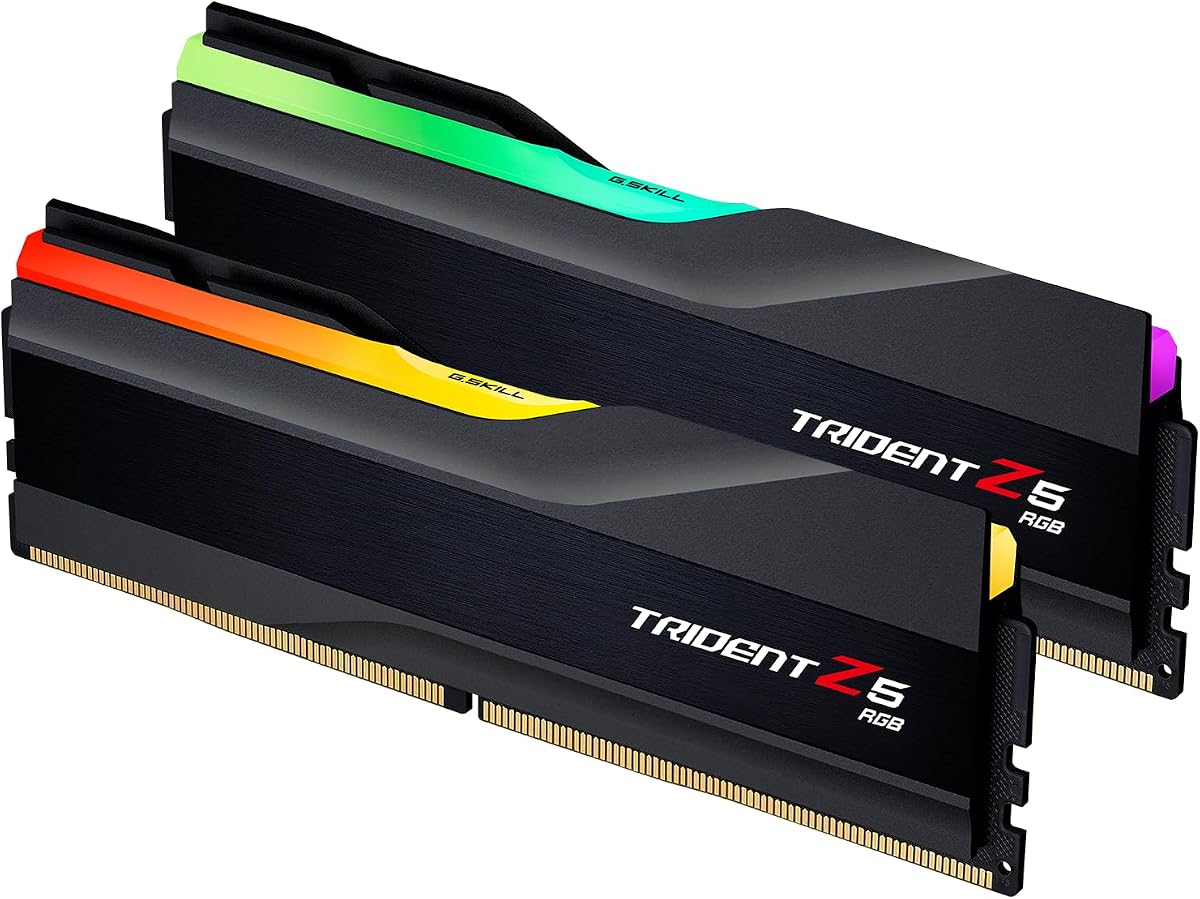
The G.SKILL Trident Z5 RGB Series is a 32GB dual-module kit rated up to 6000MT/s with CL36-36-36-96 timings at 1.35V. It carries a 4.7 rating and combines a recognizable RGB design with the broad platform support expected from an enthusiast memory range. It is a natural fit for a colorful gaming system that still needs a mainstream high-speed memory target.
We may earn a commission when you buy through this link, at no additional cost to you.
Intel XMP 3.0 and AMD EXPO profiles are both included, along with a JEDEC default SPD profile. The supplied compatibility information names Intel Z890, Z790, Z690, B860, B760, and B660 platforms, along with AMD X870, X670, B850, B840, B650, and A620 platforms. G.SKILL recommends checking its qualified vendor list or RAM Configurator for validation of the exact motherboard and hardware combination.
The 6000MT/s target is paired with a less aggressive CL36 primary latency than the Patriot and Corsair CL30 kits. That does not make it slow; it simply positions the kit as a balanced choice built around broad platform relevance, 1.35V operation, and visual design. As with every profile-based kit, the maximum speed requires BIOS adjustment and depends on the CPU and motherboard.
Choose the Trident Z5 RGB when appearance and platform flexibility matter alongside performance. It works well for a new gaming build with a glass-sided enclosure and a desire to avoid selecting separate memory for AMD or Intel. Users focused strictly on the lowest listed primary latency can find tighter CL30 alternatives, while those prioritizing the highest transfer speed can consider the 6400MHz Crucial Pro kit.
The Trident Z5 name is associated with a visible enthusiast aesthetic, making this kit more suitable for showcase cases than a minimalist workstation. Its lighting should complement rather than overwhelm the rest of the build.
Having both EXPO and XMP 3.0 profiles allows one kit to serve widely used AMD and Intel platforms. The extensive board list also makes it easier to begin a compatibility check before building.
We may earn a commission when you buy through this link, at no additional cost to you.
The non-RGB Corsair Vengeance DDR5 offers 32GB in a matched two-module configuration, a 6000MHz-class target, and support for both AMD EXPO and Intel XMP 3.0. Its 4.8 rating is tied for the highest customer rating in this guide. The product's understated styling and emphasis on screened components make it attractive for an enthusiast who cares more about tuning than lighting.
We may earn a commission when you buy through this link, at no additional cost to you.
Onboard voltage regulation is a meaningful feature for memory overclocking. It allows Corsair iCUE to provide more finely tuned and stable control than earlier motherboard-level approaches, according to the supplied data. The kit also carries tightly screened memory chips intended to support extended overclocking potential, alongside specifications for maximum bandwidth and tight response times.
The principal omission in the supplied information is a complete timing set. While the kit is advertised at up to 6000MHz, buyers cannot compare its precise primary and secondary latency from this data as easily as they can for the CL30 or CL36 kits. It also remains important to remember that reaching the maximum speed requires BIOS adjustments and depends on the motherboard and CPU.
This is a compelling pick for a clean-looking enthusiast build where voltage management and strong customer feedback matter. It should appeal to users who want the Corsair ecosystem and plan to tune through iCUE. If exact latency values are central to your decision, compare the current product listing and another kit with fully published timings before buying.
Screened components and onboard regulation are the two features that most directly support tuning. Together, they signal an emphasis on repeatable performance and control rather than decorative complexity.
The 4.8 rating indicates strong customer satisfaction, while the lack of RGB suits cases where internal lighting is minimal. It can also serve as a more understated choice for professional-looking systems.
We may earn a commission when you buy through this link, at no additional cost to you.
The G.SKILL Ripjaws S5 Series delivers 32GB across two matched 16GB modules, with an advertised speed of up to 6000MT/s and CL36-36-36-96 timings at 1.35V. Its 4.6 rating and restrained matte-black design make it a sensible enthusiast option for users who do not need RGB. Its specification is transparent enough to support careful comparison with other 6000MT/s kits.
We may earn a commission when you buy through this link, at no additional cost to you.
The kit includes both Intel XMP 3.0 and AMD EXPO profiles and a JEDEC default profile. Its supplied platform list covers multiple recent Intel and AMD chipset families, while G.SKILL points buyers toward the qualified vendor list and RAM Configurator for more exact motherboard validation. These resources are particularly relevant when the desired processor, board revision, and BIOS version must be considered together.
The timing set is the same 36-36-36-96 configuration used by the Flare X5, but the physical design distinguishes the kits. Ripjaws S5 omits RGB, making it more suitable for a restrained build or a system whose visual focus belongs to the CPU and graphics card. The 1.35V rating is moderate, although actual stability and performance still depend on the platform and chosen settings.
Choose the Ripjaws S5 for a clean 32GB gaming or productivity build that needs dual-platform profile support and a conventional 6000MT/s target. It is a particularly good fit when RGB is not a priority and you prefer a simple, low-key appearance. For the fastest rated transfer speed, the Crucial 6400MHz kit leads the list; for tighter latency, consider a CL30 alternative.
The matte-black styling avoids adding another illuminated element to the chassis. That makes the kit easier to integrate into restrained, office-inspired, or professional-looking builds.
The complete 36-36-36-96 timing set gives users the information needed to compare latency behavior. It also provides a clear reference point when a saved profile is loaded or manual tuning begins.
We may earn a commission when you buy through this link, at no additional cost to you.
Choosing DDR5 RAM for overclocking requires looking beyond the headline speed. Capacity, module matching, platform profiles, latency, voltage, motherboard support, and the intended use of the finished computer all influence whether a kit will perform as advertised.
The memory controller is part of the processor, so the same kit can behave differently across CPU models. The motherboard's board layout, BIOS maturity, and memory topology also influence the highest speed that can be reached reliably. Check the motherboard manufacturer's memory support list before purchasing, and look for the specific board model and revision when possible. A chipset family name alone does not guarantee identical behavior across every board.
Choose the kit only after confirming that the processor, motherboard, and BIOS combination can plausibly support its rated profile. For the highest advertised speeds, recent high-end processors and enthusiast motherboards are usually the more logical starting point.
A 32GB kit made from two 16GB modules gives most modern gaming and productivity systems the capacity they need while supporting dual-channel operation. A single 16GB module can be useful for an initial upgrade, but it may not use the system's full memory bandwidth until a second matching module is installed. Larger capacities can be worthwhile for demanding applications, but they are not automatically better for every use case.
For a finished performance build, favor a matched 32GB dual-module kit unless your workload specifically calls for more memory. If expanding later, follow the manufacturer's guidance and use modules sold together as a set whenever possible.
Transfer speed describes how much data the memory interface moves per second, while latency describes the delay associated with memory access. They work together, so a faster kit with looser timings is not automatically superior to a slightly slower kit with tighter timings. The 6000MHz class in this guide represents a common high-performance target, while the 6400MHz Crucial kit offers a more aggressive ceiling for compatible systems.
Compare the complete timing set, not just CL. Secondary timings, rated voltage, and the stability of the underlying platform all influence real performance. Choose speed when gaming or bandwidth-heavy work is the priority; favor lower latency when responsiveness and CPU-dependent workloads matter more.
Intel XMP and AMD EXPO store tested performance settings that the BIOS can load after confirmation. They simplify the first stage of memory overclocking and reduce the risk of entering every timing and voltage value manually. Most enthusiast kits in this list support both standards, allowing the same product to serve a wide range of AMD and Intel systems. A profile does not guarantee stability on every board, however.
Look for the profile that matches your processor, enable it through the BIOS, and test the system before making further changes. If a kit offers only one platform profile, verify that it matches your CPU before ordering.
The listed voltage is the operating point associated with the advertised performance profile, not a complete description of every possible manual setting. Kits rated at 1.35V are comparatively restrained, while a 1.40V specification may require stronger board power delivery and closer attention to stability. Higher voltage can generate more heat, making airflow and memory placement relevant even when the modules include substantial heat spreaders.
Treat the rated voltage as a baseline for platform compatibility. Avoid changing voltage and timings simultaneously, because doing so makes it harder to identify the source of an instability. Extra case airflow can help preserve performance during extended workloads.
Onboard voltage regulation places power-management circuitry on the memory module itself. It can provide more direct control over memory voltage and make iterative tuning easier, particularly on platforms with limited or less granular BIOS controls. Corsair emphasizes integration with iCUE, while other vendors may expose equivalent functionality through motherboard software or the BIOS.
Prefer a kit with onboard regulation if you intend to experiment beyond the saved profile. The extra control is useful, but it should not replace stability testing or proper thermal precautions.
RGB lighting has no effect on memory speed, but it can be important for a showcase gaming system. Addressable lighting, diffuser design, software support, and synchronization options vary between models. A non-RGB kit is usually easier to coordinate with a restrained build and avoids adding another configurable element to the system. Heat-spreader height can also matter beneath a large CPU cooler.
Choose RGB for visual integration rather than performance, and check clearance before installation. If appearance is secondary, prioritize capacity, timings, and platform support over lighting.
Memory manufacturers generally sell kits as matched sets because the modules are intended to operate together. Mixing kits from separate purchases can change the available profiles, prevent the advertised speed from loading, or create instability. This is particularly relevant when a system is already assembled with one module and the owner later adds another.
For future expansion, retain the original modules and buy a complete matched pair when possible. Check the manufacturer's configurator and compatibility documentation, and plan to retest stability after any memory change.
Before installing the memory, consult the motherboard manual for the correct DIMM slots, supported configurations, and recommended placement for two modules. Power down the system, unplug it, discharge residual power, and install the modules according to the manufacturer's instructions. Fit the retention clips fully, but avoid forcing a module that does not seat easily. A matched dual-channel kit should be placed in the slots indicated for two DIMMs.
After the first boot, enter the BIOS and confirm the installed capacity, speed, and timing profile. The system may initially use the JEDEC default, which is the safe fallback when a performance profile is not enabled. For an AMD system, look for the EXPO option; for an Intel system, look for XMP 3.0. Load only the profile corresponding to the installed processor and then test the computer with a demanding but controlled workload before changing additional settings.
Manual tuning should proceed gradually. Change one variable at a time, save known-good settings, and watch temperatures, crash behavior, and application stability. Avoid mixing memory kits, and do not force a high-frequency profile onto a system that cannot support it. If instability appears, return to the last stable profile, confirm the kit is seated, and review motherboard compatibility documentation before increasing voltage or reducing timings again.
A 6000MHz DDR5 kit is a strong practical target because it offers a substantial increase over default memory speeds while remaining broadly attainable on current platforms. Actual stability depends on the processor's memory controller, motherboard, BIOS, and the specific kit. Start with the saved XMP or EXPO profile before attempting manual tuning.
Intel XMP and AMD EXPO are platform-specific profiles that store performance-oriented frequency, timing, and voltage settings in the memory modules. XMP is used on supported Intel systems, while EXPO is used on supported AMD systems. Many kits support both, allowing the same memory to be configured appropriately on either platform.
No. Performance depends on the workload, processor, graphics card, latency, and whether the game is limited by the graphics processor or memory subsystem. A tight 6000MHz CL30 kit can feel more responsive in some CPU-limited games than a faster kit with looser timings. In GPU-limited games, the difference may be small.
For a dual-channel desktop, buy one matched two-module kit whenever possible. Mixing separately purchased kits can lead to incompatible profiles, lower speeds, or instability because the modules were not tested as a set. If you must expand a single-module system, follow the manufacturer guidance and verify compatibility before purchasing the second module.
Lower CL values indicate tighter primary latency, but the best choice also depends on speed, secondary timings, voltage, and platform stability. The CL30 kits in this guide target aggressive latency at 6000MHz, while the 6400MHz Crucial Pro kit offers CL32 at a higher transfer rate. Choose based on the complete timing specification and your hardware's capabilities.
No. RGB changes appearance, not memory performance, overclocking headroom, or stability. It is worth considering for a visible gaming case, while a non-RGB kit is often easier to coordinate with a professional or minimalist build. Compatibility, capacity, and timings should carry more weight than lighting.
Yes, but manual entry is more involved. The BIOS normally begins with a JEDEC default profile, and you can adjust memory frequency, timings, and voltage manually. Because changing several settings at once can make instability difficult to diagnose, load the manufacturer profile first and then make incremental, tested adjustments.
Common signs include application crashes, games closing unexpectedly, system restarts, boot failures, or errors during memory-intensive work. A brief stress test can expose problems that ordinary use misses, but it should not be the only test. Return to the last known-good profile if errors appear and confirm that the modules are correctly seated.
The Crucial Pro 32GB 6000MHz kit is the most balanced budget-minded recommendation, combining a strong rating, dual-platform profiles, and clear extended timings. Corsair Vengeance RGB RS stands out for its polished lighting and onboard voltage regulation, while the Crucial Pro 6400MHz CL32 kit offers the highest listed transfer speed for a compatible enthusiast platform.
Prioritize platform compatibility, capacity, and complete timing information before chasing the largest headline number. A 6000MHz CL30 kit may be more responsive and easier to tune than a faster kit with looser timings, and a single 16GB module may be sensible only when immediate capacity rather than full dual-channel bandwidth is the priority. Always check the motherboard's qualified memory list and use the appropriate XMP or EXPO profile.
Memory specifications, ratings, availability, and prices can change over time, so confirm the current product listing before purchasing. The links in this guide are affiliate links, and the publisher may earn a commission from qualifying purchases. That does not change the recommendation criteria: choose the kit whose capacity, latency, profile support, and overclocking features fit the complete system you intend to build.