
5.25-Inch USB 3.0 Enclosure
4.4Editor score
Accepts drives up to 171mm
Offers USB-A and USB-C
Supports hot-swapping operation
An external optical drive enclosure can give a new purpose to a compatible internal CD, DVD, or Blu-ray drive. The right model should match the drive’s dimensions, interface, connector, depth, and power requirements while providing a stable USB connection for everyday disc reading, writing, or media playback.
This guide compares ten enclosures spanning slim laptop designs and full-size desktop formats. We considered stated drive compatibility, USB interfaces, transfer speed, power options, enclosure materials, installation method, portability, operating-system support, and the practical features that affect long-term use.
Each review explains who the enclosure suits, where it falls short, and which details deserve attention before purchase. The overall ranking favors clear specifications and fitment information, while prices and availability can change, so readers should confirm the current listing and the dimensions of their own optical drive.
4.4Editor score
4.6Editor score

4.6Editor score
As an Amazon Associate we earn from qualifying purchases.
The table below places all ten enclosures side by side, emphasizing drive form factor, connection type, stated transfer capability, and whether an enclosure is designed for slim laptop drives or full-size desktop optical mechanisms.




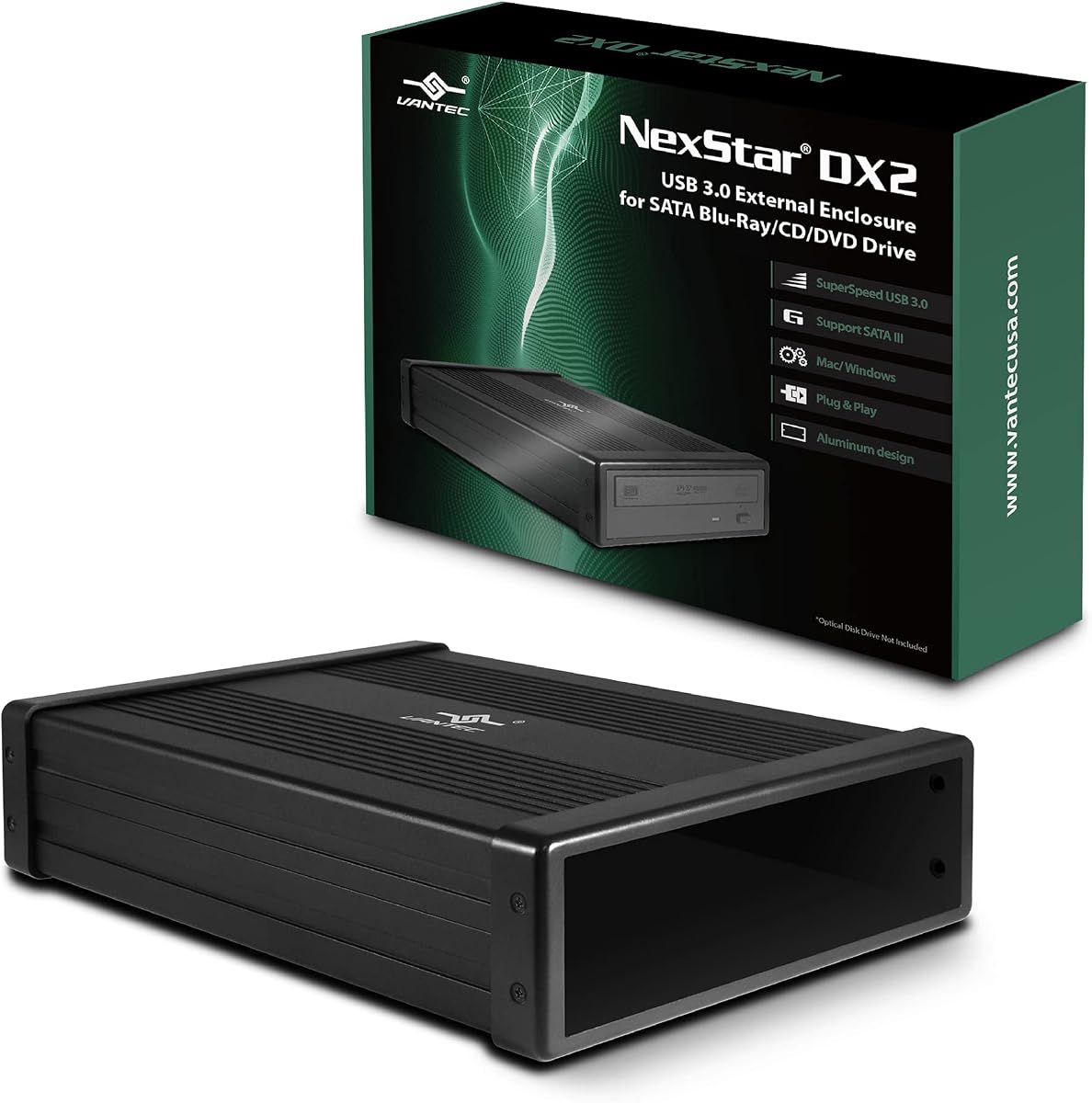
The NexStar DX2 ranks first because it combines unusually broad fitment with a mature set of desktop-drive features. It is designed for 5.25-inch Blu-ray, CD, and DVD SATA drives and accommodates optical mechanisms up to 185mm deep. Its 4.6 rating reflects a favorable customer reception, while the enclosure itself does not include an optical drive.
We may earn a commission when you buy through this link, at no additional cost to you.
Its strongest feature is the flexible internal SATA connection, which allows the installed drive to sit in a position that does not depend on the location of the drive’s SATA interface. The aluminum-alloy housing is intended to limit noise and vibration, and the included 12V, 3A adapter supplies the external power that many desktop optical drives require. USB 3.0 provides a stated 5Gbps interface, while the design is also compatible with hot swapping on systems with an appropriate USB port.
The enclosure offers useful flexibility beyond optical media. With an optional 5.25-inch mounting bracket, it can accommodate SATA 3.5-inch or 2.5-inch hard drives and SSDs, allowing the same housing to function as a general-purpose external storage device. The trade-off is size: this is a desktop-oriented solution and will not suit a slim 9mm or 9.5mm laptop optical drive. Buyers must also provide their own compatible optical mechanism.
This is the most balanced recommendation for someone converting a desktop optical drive, especially when drive depth, stable power, and material quality are priorities. The broad 185mm depth allowance provides useful reassurance during selection, while the optional storage-drive function adds value. It is less appropriate for users seeking a pocketable enclosure for a thin laptop drive, but for full-size SATA optical hardware, the NexStar DX2 has the strongest overall feature set in this group.
Unlike enclosures limited to a single narrow drive depth, the DX2 is designed to fit 5.25-inch SATA optical drives up to 185mm deep. That flexibility is particularly useful for older desktop mechanisms, which vary considerably in length and connector placement.
The included 12V, 3A adapter supports power-hungry desktop drives, while the internal SATA arrangement reduces installation constraints. The optional mounting bracket also lets compatible SATA hard drives and SSDs use the enclosure as a storage solution.
We may earn a commission when you buy through this link, at no additional cost to you.
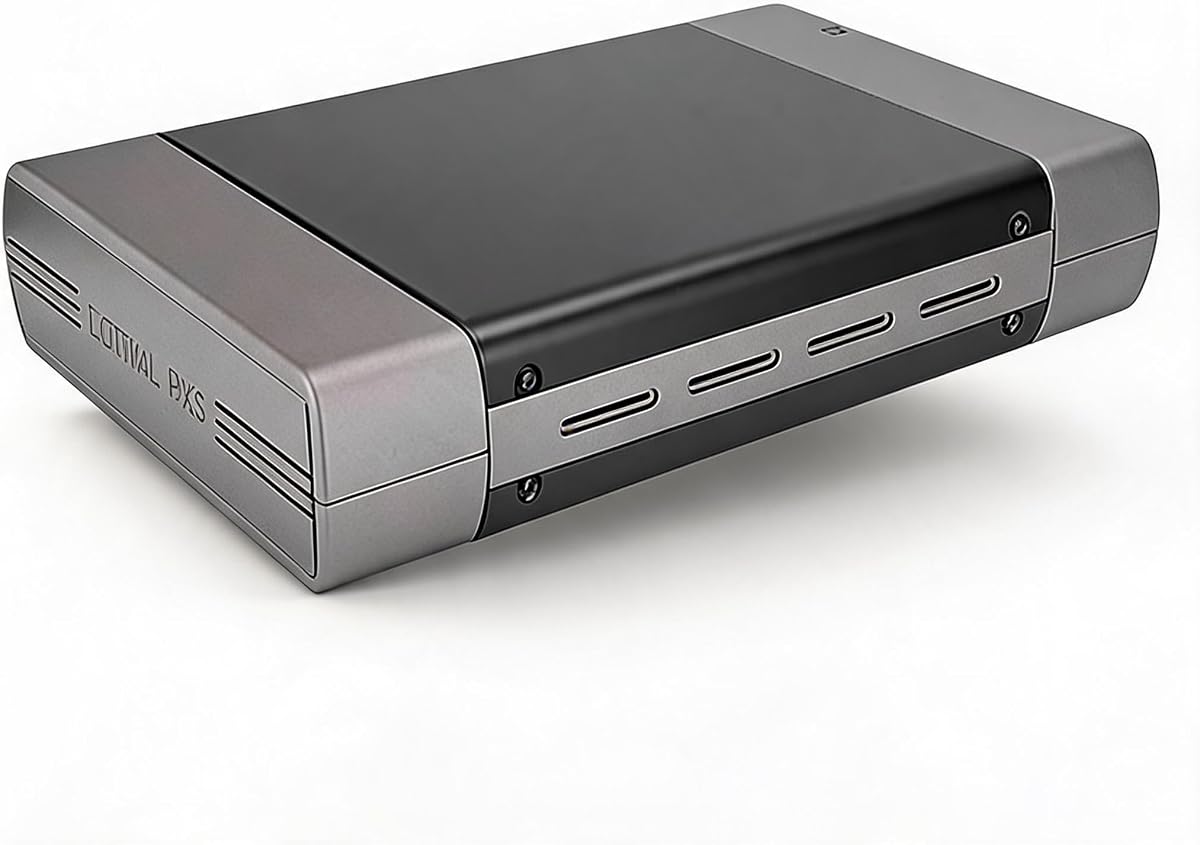
This 5.25-inch enclosure delivers a useful desktop optical-drive conversion with modern USB connectivity and a stated 4.4 rating. It supports Blu-ray, CD, and DVD SATA mechanisms, accepts drives up to 171mm deep, and includes both USB-A and USB-C 3.0 connection options. As with most enclosures in this category, the optical drive itself is not included.
We may earn a commission when you buy through this link, at no additional cost to you.
The enclosure is described as plug and play, so no additional drivers are required. Its aluminum-alloy casing is intended to reduce heat, noise, and vibration, which is useful during sustained disc reading or writing. USB 3.0 is rated at up to 5Gbps, and the product listing specifically notes backward support for USB 2.0, making it easier to use with older computers that lack a USB-C port.
There are two important qualifications. First, optical drives with screw holes only on one side can still be used, according to the installation guidance, but users may need to watch the product-detail video to understand the mounting arrangement. Second, the enclosure supports SATA optical drives and does not support older IDE-interface mechanisms. Its 171mm depth allowance is broad, although the NexStar DX2 extends to 185mm.
This is a strong pick for a user who wants a full-size SATA optical drive in an enclosure with both USB-A and USB-C. It combines straightforward setup, hot-swapping support, and a practical desktop format without the extra storage-device function offered by the NexStar. The main reason to choose it over the first-ranked model is its USB-C connection and more compact stated depth limit; the main reason to choose the NexStar is its greater depth allowance and optional storage flexibility.
Providing both USB-A and USB-C options makes this enclosure convenient for newer laptops and desktops as well as systems with legacy USB ports. The USB 3.0 connection is stated at up to 5Gbps and remains compatible with USB 2.0.
The enclosure supports standard 5.25-inch SATA optical mechanisms up to 171mm deep. Its screw design accommodates drives with holes on one side, although the provided installation guidance is worth reviewing before assembly.
We may earn a commission when you buy through this link, at no additional cost to you.
The Zunate enclosure is built specifically for the 9mm ultra-slim SATA optical drives found in many laptops. It converts a compatible internal mechanism into a portable external disc drive and does so without drivers or an external power supply. The product listing does not provide an aggregate customer rating, so the available specifications and design details are the main basis for this recommendation.
We may earn a commission when you buy through this link, at no additional cost to you.
Its integrated cable includes USB 3.0 and Type-C connections, while the 5Gbps interface is backward compatible with USB 2.0. A front eject control is designed to help prevent discs from becoming stuck. The enclosure also includes a replacement panel that simplifies transferring an internal drive into the external case, which is a practical detail for owners replacing a laptop optical drive.
The brushed finish, compact dimensions, and fold-in cable make this option attractive for travel and limited desk space. A woven data cable is included to minimize interference and signal loss. The main constraint is mechanical: this enclosure is for 9mm SATA drives, not the more common 12.7mm slim format or a 5.25-inch desktop drive. Older IDE mechanisms are also outside the stated scope.
Choose the Zunate when you have a known 9mm SATA optical drive and value a minimal, self-contained design. It offers one of the cleanest ways to reuse a thin laptop mechanism without separate power or loose cables. Measure the drive and verify its SATA interface before ordering, because the tight dimensional requirement makes this enclosure less forgiving than universal full-size alternatives.
The enclosure is specifically shaped for 9mm ultra-slim SATA CD, DVD, and Blu-ray drives. It is a good match for a compatible laptop mechanism, but it will not accept 12.7mm or full-size desktop optical drives.
The integrated USB 3.0 and Type-C cable folds into the enclosure, reducing the need to carry a separate lead. The woven cable design is also intended to limit interference and maintain a stable connection.
We may earn a commission when you buy through this link, at no additional cost to you.
The JOTEC enclosure combines a slim-drive format with an aluminum-alloy body and a generous set of connection options. It is designed for 12.7mm-thick SATA optical drives, not 9mm mechanisms, and supports both SATA-I and SATA-II standards. No customer rating is supplied in the product data, so its performance claims should be assessed from the detailed specifications rather than an aggregate score.
We may earn a commission when you buy through this link, at no additional cost to you.
The housing includes ventilation and non-slip feet, both of which support stable placement during disc operations. An INIC1618 solution provides the stated chip functionality and power-saving sleep mode. Two data cables are supplied: one USB 3.0 and one Type-C, allowing the enclosure to work with a broad range of desktop and laptop systems. A USB-Micro interface and 3.5mm DC power port are also noted.
Media compatibility is broad, with support listed for 80mm and 120mm discs across numerous CD, DVD, VCD, EVD, and dual-layer formats. The listed operating systems include Windows versions from 2K through 11, along with Linux and macOS. The limitation is important: the enclosure is only for 9.5mm or 12.7mm-class SATA optical drives covered by its stated dimensions, and it cannot be assumed to fit a 5.25-inch desktop mechanism.
This JOTEC model is a sensible option for someone with a 12.7mm drive who values metal construction, ventilation, and choice between connector styles. The included external power connection adds another layer of flexibility, although the product data does not state whether a power adapter is included. Confirm the drive thickness, SATA generation, and accessory package before purchase. With the right drive, it offers a durable and feature-rich slim enclosure.
Aluminum alloy contributes rigidity and heat dissipation, while the ventilated layout encourages airflow during reading or burning. Four non-slip feet help keep the enclosure stable on a desk.
The enclosure supports common CD, DVD, dual-layer, VCD, and EVD formats. Its listed operating-system coverage includes multiple Windows releases, Linux, and macOS, subject to the installed drive’s capabilities.
We may earn a commission when you buy through this link, at no additional cost to you.
The Tbest enclosure is notable for accepting both 9.5mm and 12.7mm SATA optical drives, giving it more dimensional flexibility than enclosures dedicated to a single slim format. Its USB-A and USB-C connections operate over USB 3.0 at a stated rate of up to 5Gbps, with backward compatibility for USB 2.0. The 3.4 rating is the lowest published score among the rated products here, so buyers should weigh its specifications against that mixed customer feedback.
We may earn a commission when you buy through this link, at no additional cost to you.
The enclosure uses an INIC3609 chipset solution with an automatic sleep mode. It supports SATA I at 1.5Gbps and SATA II at 3.0Gbps, and its listed operating-system coverage includes Windows 2K, XP, 2003, Vista, 7, and 10, plus Linux and macOS. The ability to handle both 9.5mm and 12.7mm mechanisms is especially useful for buyers who have not yet identified the thickness of their old laptop drive.
Its trade-offs are a narrower form-factor scope and a less encouraging rating than the leading products. The Tbest does not address full-size 5.25-inch desktop optical drives, and its connection details do not include an external power arrangement. Actual disc performance remains closely connected to the drive installed inside, since the enclosure serves as the interface rather than the reading or writing mechanism itself.
This model is best for a user who wants broad fitment across the two most common slim SATA optical-drive thicknesses and appreciates having both USB-A and USB-C. It is less compelling when customer-rating consistency matters more than size flexibility. Measure the drive before buying, confirm that it uses a SATA interface, and compare the listing carefully if sustained use or warranty considerations are especially important.
Supporting both 9.5mm and 12.7mm drives reduces the risk of purchasing the wrong slim enclosure. It remains a laptop-drive solution rather than a full-size desktop enclosure.
The stated INIC3609 solution includes automatic sleep functionality. Compatibility with several Windows releases, Linux, and macOS adds flexibility for mixed-device environments.
We may earn a commission when you buy through this link, at no additional cost to you.
The Vantec CB-ST00U3 is a compact USB-to-SATA adapter with a 4.6 rating and a broader storage focus than most dedicated optical enclosures. It is designed for SATA optical mechanisms, including Blu-ray, DVD-RW, DVD-ROM, CD-RW, and CD-ROM drives, while also supporting SATA hard drives and SSDs. That makes it a flexible choice for reusing multiple kinds of SATA hardware.
We may earn a commission when you buy through this link, at no additional cost to you.
The adapter uses a USB 3.0 connection and supports UASP, while the SATA side is specified at 6Gbps. An anti-slip mat helps dampen noise and protect the connected drive, and the enclosure is designed to be compact and easy to store. It supports plug-and-play operation, requires no drivers for the listed operating systems, and can be hot-swapped without rebooting the computer.
The key caveat concerns power. A 12V, 2A adapter is included, but the product information warns that some optical drives require more power and will need a stronger adapter. The enclosure also uses a SATA-to-USB bridge controller, which can limit the command set available from the attached drive. These are important considerations for advanced users or for older mechanisms that draw substantial current.
For someone who wants more than optical-media reuse, the Vantec is arguably the most versatile premium option in this roundup. It can serve compatible hard drives and SSDs as well as optical mechanisms, and its compact construction simplifies storage. The need to verify power draw and accept possible command limitations keeps it from being a universal answer, but owners of a known SATA drive should find the feature set unusually well rounded.
Unlike an enclosure limited to optical mechanisms, the CB-ST00U3 can also carry compatible SATA hard drives and SSDs. This expands its usefulness for repair, migration, and general external-storage tasks.
Its small footprint makes it easy to keep on a desk or place in a bag. The included anti-slip mat helps control movement and dampen vibration from the connected drive.
We may earn a commission when you buy through this link, at no additional cost to you.
This 5.25-inch USB 2.0 enclosure is a straightforward option for giving a full-size desktop optical drive a permanent external home. It carries a 4.5 rating and is designed for standard Blu-ray, DVD, and CD mechanisms, with additional support for 3.5-inch hard drives. Unlike the slim models in this list, it is not intended for laptop-style slim optical drives.
We may earn a commission when you buy through this link, at no additional cost to you.
The enclosure includes a USB cable, AC adapter, power cable, four screws, and a user manual, creating a relatively complete installation package. Its aluminum housing is intended to protect the installed mechanism from everyday bumps and scratches while also providing a rigid structure for a full-size drive. The included external power is useful because desktop optical drives generally require more consistent power than slim laptop mechanisms.
The central compromise is USB 2.0. It offers broad legacy compatibility and may suit users whose priority is straightforward installation rather than throughput. However, it is considerably slower in principle than the USB 3.0 alternatives, and it lacks the modern USB-C connection found among many competing slim enclosures. The enclosure also does not have the hot-swapping emphasis found in some of the top-ranked products.
This enclosure makes the most sense for a straightforward desktop conversion where the user already owns a 5.25-inch SATA optical drive and values a complete accessory kit. It can also accommodate compatible 3.5-inch hard drives. Users seeking fast transfers, USB-C, or a compact enclosure for a laptop drive will be better served elsewhere, but the 4.5 rating indicates a generally favorable experience for its intended use.
The package includes the enclosure, USB cable, AC adapter, power cable, screws, and manual. Those components reduce the chance of discovering that an additional power lead or mounting hardware is needed.
The aluminum body gives a 5.25-inch optical drive or compatible 3.5-inch hard drive a more secure external housing. It is better suited to permanent desk placement than to portable use.
We may earn a commission when you buy through this link, at no additional cost to you.
The Bewinner enclosure is a portable option for converting a 9.5mm internal SATA optical drive into an external unit. It uses a detachable front-panel design, allowing a drive to be inserted and removed without a visible screw-fastening process. The product data does not include a customer rating, so buyers should base the decision on its stated drive fit, construction, and connector features.
We may earn a commission when you buy through this link, at no additional cost to you.
The enclosure supports USB 3.0 and Type-C connectivity through an integrated woven cable, with transfer speeds stated at up to 5Gbps. It is driver-free and plug and play, which simplifies conversion of an old laptop mechanism. A front eject control is included to help avoid disc jams, and the enclosure requires no external power supply for compatible slim drives.
The brushed ABS construction gives the enclosure a lighter profile than a full-size aluminum desktop case. Its front panel can be removed, the old optical drive can be inserted, and the panel can be replaced to complete installation. The limitation is dimensional: the design is specifically for 9.5mm SATA CD, DVD, and Blu-ray drives and should not be expected to accept 9mm or 12.7mm mechanisms.
Choose the Bewinner when a 9.5mm drive is readily available and a compact, self-contained solution is more important than a full metal housing. It offers a clear installation method and good connector convenience, but the absence of a published rating makes it harder to compare customer satisfaction directly with the higher-ranked products. Confirm the exact drive thickness and interface before ordering.
Removing the front panel allows the compatible optical drive to be fitted directly, after which the panel is replaced. The arrangement minimizes exposed fasteners during routine installation.
The integrated USB 3.0 and Type-C cable keeps the enclosure easy to carry and avoids separate lead storage. Its woven construction is intended to reduce signal interference and loss.
We may earn a commission when you buy through this link, at no additional cost to you.
This detachable enclosure is made for 9mm ultra-slim SATA optical drives, the thinnest common laptop format represented in the roundup. It turns a compatible internal CD, DVD, or Blu-ray mechanism into an external unit with USB 3.0 and USB-C connections. No aggregate customer rating is supplied, making the clearly stated fit and installation requirements especially important for potential buyers.
We may earn a commission when you buy through this link, at no additional cost to you.
A removable front panel makes the conversion process more approachable: the panel comes off, the old drive is placed in the enclosure, and the panel is returned to position. The detachable integrated cable includes USB 3.0 and Type-C connectors and folds into the enclosure for storage. Plug-and-play operation requires no additional drivers or external power supply for a compatible slim drive.
The USB 3.0 interface is stated at up to 5Gbps and remains compatible with USB 2.0 ports. A woven cable is intended to limit interference and signal loss, while an eject control helps prevent discs from becoming jammed. Listed system support includes Windows Vista, 7, 8.1, and 10, along with macOS. As with any optical enclosure, the installed drive still determines the media formats and recording capabilities available.
This model is most appropriate for someone who knows they have a 9mm SATA optical drive and wants a lightweight external solution with both common USB connector types. It is less flexible than the Tbest because it does not cover 9.5mm or 12.7mm drives. Measure the mechanism and check the SATA connector before purchase, and avoid assuming that every ultra-slim drive will fit.
The enclosure’s narrow format is designed around 9mm SATA drives commonly found in slim laptops. Its exact dimensions offer little tolerance for thicker 12.7mm or desktop-sized mechanisms.
The front panel can be detached for installation, while the dual-connector cable folds into the body. These details make the unit more convenient to carry and reuse.
We may earn a commission when you buy through this link, at no additional cost to you.
The 12.7mm detachable enclosure provides a straightforward way to reuse a standard slim SATA optical drive. Its tool-free front panel slides off, allowing the drive to be inserted and then covered, without visible screws in the normal assembly process. The product data contains no published customer rating, so the enclosure’s stated compatibility and included features are the basis for its placement in the ranking.
We may earn a commission when you buy through this link, at no additional cost to you.
The integrated cable offers USB 3.0 Type-A and Type-C connectors, and the stated transfer rate is up to 5Gbps with backward compatibility for USB 2.0. The enclosure needs no external power adapter for a compatible 12.7mm drive. It is designed for laptops and desktops and is described as supporting disc burning, movie playback, and file backup when the installed optical drive and computer software provide those functions.
The brushed ABS finish is intended to resist scratches and fingerprints, while the slim, lightweight profile suits travel and office use. A dedicated eject control is included to support smoother disc release. The package is described as containing the enclosure, an instruction manual, and the necessary mounting accessories, although the optical drive itself is not part of the purchase.
This is a useful choice for owners of a 12.7mm drive who prioritize a removable panel, integrated connectors, and minimal setup. It is less suitable for the 9mm ultra-slim format or full-size 5.25-inch desktop mechanisms. Confirm the drive’s exact thickness, SATA interface, and connector layout, and check the included manual before assembly to ensure the detachable panel aligns correctly.
The front panel removes without visible screws, allowing the optical mechanism to be placed directly into the enclosure. Replacing the panel completes the basic installation.
USB 3.0 Type-A and Type-C connectors are integrated into one fold-away cable. The arrangement reduces desk clutter and avoids carrying a separate adapter for newer computers.
We may earn a commission when you buy through this link, at no additional cost to you.
The correct enclosure depends first on the physical drive you already own, followed by the connector and power needs of your computer. Reviewing dimensions, interface, and intended use prevents the most common installation problems.
Drive dimensions are the most important compatibility check. Full-size desktop mechanisms use the 5.25-inch format and are generally much deeper than laptop drives, while slim laptop mechanisms commonly measure 9mm, 9.5mm, or 12.7mm in thickness. The NexStar DX2 accepts 5.25-inch optical drives up to 185mm deep, while the second-ranked 5.25-inch enclosure supports depths up to 171mm. Slim alternatives specify 9mm or 12.7mm, and the Tbest model accommodates both 9.5mm and 12.7mm drives. Do not estimate from the shape of the enclosure alone; check the drive’s dimensions and compare them with the manufacturer’s stated fitment.
Modern external optical enclosures generally require a SATA interface, and the 5.25-inch models in this guide specifically do not support older IDE mechanisms. Several listings emphasize SATA compatibility because many slim optical drives from different generations can look physically similar while using different interfaces. The Vantec adapter supports SATA optical drives as well as SATA hard drives and SSDs. Before purchasing, inspect the drive’s connector or compare its model specifications with the enclosure requirements. A perfect physical fit is still unusable if the interface protocol is different.
The enclosure’s USB interface must match the ports available on the computer. USB-A is still common and works with many desktop and laptop systems, while USB-C provides a more contemporary option for newer devices. The second-ranked 5.25-inch enclosure, JOTEC, Tbest, and the 12.7mm detachable model provide both Type-A and Type-C. The NexStar and Vantec options use USB 3.0 Type-A, while slim designs such as the Zunate and 9mm detachable model integrate a dual-connector cable. Check whether the computer requires a separate adapter and whether the enclosure’s cable is permanently attached.
Most modern options advertise a 5Gbps USB 3.0 interface, while the Vantec CB-ST00U3 supports UASP and a 6Gbps SATA side. The 5.25-inch USB 2.0 enclosure is the clear speed outlier in this group. A faster interface can improve large file transfers, although real optical-disc performance also depends on the installed drive and the media being read or written. Do not confuse the enclosure’s stated interface rate with the drive’s sustained read or write speed. Use the faster options when transferring data or installing software from discs, and consider the USB 2.0 model only when legacy connectivity is the priority.
Full-size desktop optical drives often require a dedicated 12-volt power source, while many slim laptop mechanisms can be powered through the USB connection. The NexStar DX2 includes a 12V, 3A adapter, the USB 2.0 desktop enclosure includes an AC adapter and power cable, and the Vantec includes a 12V, 2A adapter. The latter warns that some optical drives demand more power and will need a higher-capacity adapter. Slim options such as the Zunate, Bewinner, 9mm detachable enclosure, and 12.7mm detachable enclosure are stated to need no external power. Always check the original drive’s power requirements rather than assuming every optical mechanism has the same demand.
Aluminum enclosures are common because the material is rigid and helps dissipate heat. The NexStar, second-ranked 5.25-inch model, JOTEC, and Vantec all use metal-focused designs, while the Zunate, Bewinner, and detachable slim models use lighter ABS constructions intended for portability. Ventilation and non-slip feet can improve stability during sustained reading or burning. Material alone does not determine performance, but it should be matched to the use environment: a desk-bound desktop enclosure can prioritize rigidity and cooling, whereas a travel-oriented slim case should prioritize low weight and compact dimensions.
Some enclosures use screws, while others provide a removable front panel or tool-free sliding mechanism. The NexStar, second-ranked 5.25-inch model, and Vantec advertise hot-swapping, which allows supported systems to recognize a connected drive without a reboot. That is convenient for switching between optical media and storage. The Zunate, Bewinner, and detachable slim models also simplify drive replacement with accessible panels. Frequent drive swapping is one situation where the removable design matters, while a permanently installed desktop mechanism may benefit more from secure screw-mounted construction.
The enclosure provides access to the drive, but the installed mechanism determines which disc formats and recording tasks are available. JOTEC lists extensive support for common CD, DVD, dual-layer, VCD, and EVD formats, along with several Windows versions, Linux, and macOS. The Tbest and Vantec also list broad operating-system support. Confirm that the computer has the software needed to recognize the disc, and note that an enclosure cannot add writing capability to a read-only drive. Compatibility tables should therefore be checked alongside the type and condition of the optical mechanism being reused.
Before installation, identify the optical drive’s form factor, thickness, depth, interface, and power requirements. Compare those measurements with the enclosure specifications, then connect the enclosure to the computer before inserting the drive when the manufacturer’s instructions call for that sequence. Use the supplied data cable, and connect external power if the drive is a full-size desktop mechanism or the enclosure provides a dedicated power port.
Install the drive according to the enclosure’s method. Screw-mounted designs require the included fasteners and correctly aligned mounting holes, while detachable-panel designs open at the front and allow the drive to be seated directly. Keep the drive’s SATA connectors fully seated, avoid forcing the mechanism into the case, and route any power lead so it does not pull against the enclosure. Once the cover or screws are secured, connect the enclosure to the computer and allow the operating system to detect the optical drive.
For everyday care, handle the enclosure by its housing rather than its connector or cable, and avoid exposing it to moisture, excessive heat, or impact. Do not move a desktop enclosure while it is reading or writing because sudden movement can interrupt an optical operation. If a disc is stuck, use the enclosure’s eject control or the computer’s software eject function rather than pulling the disc out. Disconnect the enclosure before changing the installed drive, and use a protective case when transporting a slim enclosure with a fragile optical mechanism inside.
Usually not. Every enclosure in this guide is sold separately from the CD, DVD, or Blu-ray mechanism unless the listing explicitly states otherwise. You need a compatible internal SATA optical drive and should confirm its dimensions and interface before ordering. Some listings also call the enclosure a case, adapter, or box, but all of those terms describe the external housing rather than the reading mechanism.
Not unless the manufacturer explicitly states that the enclosure supports both thicknesses. A 9mm drive is thinner than a 12.7mm mechanism and may not be held securely even if it appears to fit temporarily. The Tbest model specifically lists support for both 9.5mm and 12.7mm drives, while other slim enclosures are dedicated to one stated thickness. Always match the drive’s exact specification rather than relying on a visual comparison.
Most do, because desktop optical drives can draw more current than a USB port reliably supplies. The NexStar DX2 includes a 12V, 3A adapter, and the USB 2.0 desktop enclosure includes an AC adapter and power cable. Some slim laptop-drive enclosures need no separate power, but you should still verify the installed drive’s requirements. If the enclosure repeatedly disconnects or the drive does not spin, check the power supply before changing the computer.
It can reduce transfer overhead and is beneficial when the connected drive is handling data beyond simple disc playback. However, the optical mechanism remains a major limiting factor because discs often read at lower speeds than the USB interface can theoretically support. The enclosure’s advertised 5Gbps or 6Gbps figure describes an interface capability, not guaranteed real-world disc throughput. For regular use, drive capability and disc format matter as much as the connector.
USB-A uses the familiar rectangular connector found on many older and current computers, while USB-C uses the smaller reversible connector common on newer devices. Enclosures with both options provide more convenience than single-connector models. Your computer still needs a compatible port, and some USB-C connections may require an adapter or cable even when the enclosure includes the correct plug.
It depends on the enclosure. The NexStar DX2 can accept SATA 3.5-inch or 2.5-inch hard drives and SSDs when used with the optional 5.25-inch mounting bracket, and the Vantec CB-ST00U3 supports SATA optical drives, hard drives, and SSDs. Most slim optical enclosures are shaped specifically for 9mm, 9.5mm, or 12.7mm optical mechanisms and should not be assumed to support storage drives. Check the product’s stated device types before repurposing it.
Start by checking the physical connection, drive dimensions, and interface compatibility. A drive that is not seated properly, uses the wrong protocol, or exceeds the enclosure’s stated depth limit may not function correctly. Also confirm that the operating system supports the drive and that the computer has the required disc software. If the product includes a power adapter and the mechanism is a full-size desktop drive, make sure that adapter is connected.
Hot swapping is supported by several products in this guide, but it still requires attention to the connection. Do not unplug a drive while it is reading, writing, or accessing media, and use the operating system’s safe-removal or eject process when changing configurations. The computer must also provide a supported USB connection. For infrequent installations, disconnecting the enclosure before opening it remains the safest routine.
The NexStar DX2 leads the roundup for full-size desktop optical drives because it accepts drives up to 185mm deep, includes external power, and can also carry compatible SATA storage devices. The second-ranked 5.25-inch model stands out for USB-A and USB-C connectivity plus a 171mm depth allowance, while the Vantec CB-ST00U3 offers the broadest multi-device functionality with a compact SATA-to-USB design.
For laptop optical drives, physical thickness should decide the shortlist. The Zunate is dedicated to 9mm drives, the Bewinner to 9.5mm drives, and the 12.7mm detachable model to 12.7mm drives. The Tbest accommodates both 9.5mm and 12.7mm mechanisms, making it the most dimensionally flexible slim option. Prioritize the correct SATA interface, matching connector, adequate power, and a cooling design appropriate for the drive’s size.
Product specifications, customer feedback, and prices can change, so check the current listing before purchasing. Most importantly, confirm the dimensions and interface of the optical drive you intend to reuse rather than assuming that all enclosures are interchangeable. With those details in hand, the right enclosure can extend the useful life of an existing CD, DVD, or Blu-ray mechanism while adding the convenience of external USB access.