
Desktop Diagnostic Card 4-in-1
4.0Editor score
PCI, PCI-E, and LPC support
Multi-function LED diagnostics
Driver-free motherboard testing
Post debug cards are compared for interfaces, displays, LED diagnostics, compatibility, and ease of use to help technicians choose the right motherboard tester.
Post debug cards are compact motherboard diagnostic tools that reveal power-on self-test behavior through numeric error codes, LED indicators, and visual signals. A useful card can help distinguish CPU, memory, graphics, storage, and power faults before more invasive troubleshooting begins, making it valuable for technicians, builders, and experienced computer owners.
This guide compares ten post debug cards based on the interfaces they support, the diagnostic information they provide, their display formats, and the practical details supplied with each model. The list covers PCI, PCI Express, ISA, LPC, mini PCI Express, and combined-interface designs, with options intended for desktop, laptop, and server motherboard work.
Each review explains the strongest feature, useful limitations, and likely buyer for every card in the ranking. Ratings are shown where a numerical score was supplied, while unrated products remain clearly identified rather than being assigned a score. Product availability and pricing can change, so verify the current listing and motherboard requirements before ordering.
4.0Editor score

4.6Editor score

3.8Editor score
The table below compares all ten cards by supported interface, display type, diagnostic method, and primary application, making it easier to identify the model that matches a particular motherboard.


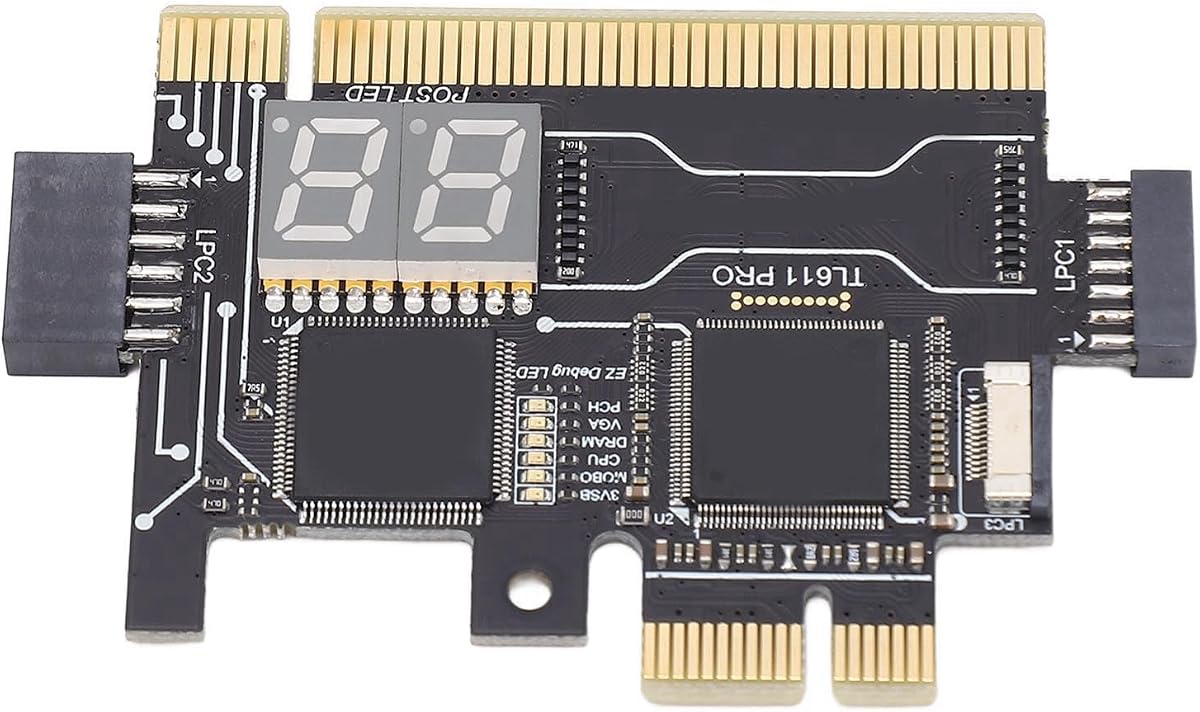
The Fafeicy Motherboard Diagnostic Card is an LPC-oriented tester with support for selected PCI-E motherboards. It combines colored LED indicators, a dedicated error-code display, and visual prompts that can help narrow a startup failure without immediately removing major components. No numerical customer rating was supplied, but its range of visible diagnostic signals makes it a compelling choice for general desktop troubleshooting.
We may earn a commission when you buy through this link, at no additional cost to you.
Its strongest feature is the combination of component-level indicators and a digital tube readout. The listed signals cover CPU, DRAM, VGA, and hard disk faults, while flashing decimal points are intended to visualize clock activity. The card also provides PCIe reset information, standby power indication, and dedicated error-code display, giving a technician several ways to interpret the same failed startup.
The principal limitation is that PCI-E support is not presented as universal. Buyers should confirm that the motherboard and its debugging header arrangement are covered by the stated compatibility. The card is also focused on visual diagnosis rather than software-based logging, so interpreting multiple LED states may require experience or the supplied reference information. Those constraints are reasonable for a technician-oriented hardware tool.
This model is best suited to PC assemblers, hardware engineers, and service professionals who want a visual overview of several subsystems at once. It is especially useful when a system reaches no display and conventional POST messages cannot provide a readable error. For compatible systems, its mixture of code display, clock prompts, power indications, and component lights makes it the leading all-around choice in this ranking.
Rather than relying only on a numeric code, this tester presents component indicators, clock-related flashing points, reset status, and standby power. That variety helps a technician cross-check the observed pattern before deciding which subsystem deserves further investigation.
The card can be installed before power-on and then used to observe whether the board begins its startup sequence. It is especially useful for assembly troubleshooting, where a machine with no screen output must be narrowed down methodically.
We may earn a commission when you buy through this link, at no additional cost to you.
The TL611 Pro Mainboard Debug Card combines a four-digit post display with LED indicators and support for PCI Express, mini PCI Express, and LPC connections. It is designed for both laptop and desktop motherboard testing, with automatic identification of power modules presented as its central convenience. Its 3.5 rating indicates room for improvement, but the breadth of supported interfaces remains appealing.
We may earn a commission when you buy through this link, at no additional cost to you.
Multiple-channel detection is the main advantage. LEDs report the status of the power supply, CPU, memory, and other areas, while the numeric display provides a separate post-code view. Automatic power-module recognition could reduce the need to interpret several raw signals independently, making the card useful for technicians who regularly encounter varied boards and boot failures.
The supplied product information is less precise than the feature list. It states compatibility with PCI slots and describes several detection capabilities, yet it does not provide a detailed motherboard model list or an expanded explanation of every channel. Buyers should confirm the physical connector and firmware behavior before relying on it for a specific repair. The modest rating also makes independent customer feedback worth reviewing.
The TL611 Pro suits a technician who works across mixed hardware and needs one analyzer to cover PCI Express, mini PCI Express, and LPC systems. It is less compelling for someone with only modern consumer desktops, because several older or niche interfaces would go unused. For broad service work, however, its multi-channel approach and four-digit readout make it a strong premium-feature option.
Supporting PCI-E, mini PCI-E, and LPC expands the card's relevance beyond one motherboard generation. That matters for repair benches, refurbishment work, and technicians who encounter both compact and full-size systems.
Automatic identification of power modules can make the initial diagnosis faster. The user can focus on whether the remaining signals progress normally instead of spending the first stage of testing decoding every illuminated channel.
We may earn a commission when you buy through this link, at no additional cost to you.
The Analyzer Diagnostic LPC-DEBUG Card is presented as a motherboard post-test kit with PCI, PCI Express, and LPC support. Its selling point is straightforward interface coverage rather than an elaborate accessory package. Because no numerical customer rating or detailed feature explanation is supplied, the listing should be evaluated primarily from its stated connectivity and intended diagnostic role.
We may earn a commission when you buy through this link, at no additional cost to you.
Supporting PCI, PCI-E, and LPC gives it more flexibility than a single-interface card. That range covers several motherboard debugging arrangements used in desktop and embedded systems, making it a practical candidate for technicians who want a compact tool capable of testing multiple platform generations. Its post-code testing format suggests it is intended for early-stage diagnosis rather than full system certification.
The main drawback is limited transparency. The supplied information does not clarify the display size, whether current and previous codes are retained, which LED channels are present, or whether an error-code reference is included. Compatibility may also depend on the physical headers and firmware behavior of the target board. Those uncertainties make advance verification of the listing especially important.
This card is best for a technician who knows the target motherboard's debug interface and values a small multi-interface analyzer. It may also suit anyone building a collection of basic post-testing tools. However, buyers seeking clearly explained LED functions or comprehensive documentation should favor a model with more detailed specifications. As a straightforward post diagnostic, it remains a viable, compact option.
The combination of PCI, PCI-E, and LPC allows the card to be considered for a broader range of boards. This makes it more adaptable than a tester built exclusively for one connector style.
The product is dedicated to analyzing motherboard startup behavior. Its value lies in helping a technician obtain a visible post-related signal when the system cannot present normal on-screen diagnostics.
We may earn a commission when you buy through this link, at no additional cost to you.
The Multifunction 3-in-1 Debug Card is a compact analyzer designed around mini PCI, PCI Express, and LPC connections. Its stated size of approximately five by three centimeters makes it easy to carry and attractive for laptop repair work. No numerical rating was provided, and the available description does not detail the display, indicator layout, or code-reference materials.
We may earn a commission when you buy through this link, at no additional cost to you.
The card's portability and three-interface design are its primary benefits. A technician can keep it in a small tool bag and use it on systems with more than one common debug connection. Its post-test orientation aligns with the need for quick visual diagnosis when a laptop or compact motherboard fails before producing a usable screen.
Compactness may also be a limitation in a repair environment. Connectors can be delicate, and the listed dimensions do not describe the included adapters, cable arrangement, display visibility, or protective case. Because the description does not enumerate the diagnostic channels, buyers should not assume it provides the same component-level feedback as larger multi-LED cards.
This is a sensible option for mobile repair technicians and owners of older or mixed-interface compact systems who value portability. It is best purchased after confirming that the board's connector and expected code behavior are supported. For detailed desktop fault isolation, a model with a larger display and clearly documented indicators may be easier to use.
At roughly five by three centimeters, the tester should be easy to carry between locations. That portability is valuable for laptop servicing and field diagnostics where carrying a full bench setup is impractical.
Mini PCI, PCI Express, and LPC support reduce the need to purchase separate cards for different platforms. The buyer should still verify connector orientation and board compatibility before use.
We may earn a commission when you buy through this link, at no additional cost to you.
The 4 Digit PCI and ISA PC Computer Motherboard Power Diagnostic Analyzer Post Tester Card offers a familiar four-digit display and support for both PCI and ISA interfaces. Its 3.8 rating indicates generally favorable customer reception, while the current-and-previous-code layout adds useful context. It is a practical choice for legacy desktop and industrial systems that still expose these connectors.
We may earn a commission when you buy through this link, at no additional cost to you.
The display keeps the first two digits for the current error code and the last two for the previous code. That arrangement helps a technician understand whether the board is repeating one fault or advancing through a sequence. A supplied error-code table supports interpretation, while code search and motherboard bus-speed test functions extend the card beyond simply displaying POST information.
The key limitation is the ISA emphasis. Newer desktop motherboards increasingly omit ISA slots and may also lack the PCI connector, so this model cannot be assumed to work with current systems. It offers fewer component-level LED channels than the four-in-one and TL611 Pro options. Those limitations are understandable for an entry-level, interface-specific tool.
This card is ideal for technicians maintaining older desktops, embedded systems, or retro hardware where PCI or ISA debugging is available. It is also a sensible first post card for a budget-conscious workshop focused on legacy machines. For contemporary systems, verify the available expansion slots before purchasing and compare the card with a PCI-E and LPC-capable model.
Keeping the previous code beside the current one can reveal whether the board is stuck at one stage or moving through multiple stages. This saves time when comparing an isolated code with the expected startup sequence.
The included error-code table helps users translate the displayed value into a probable fault area. The search function and bus-speed test add further value for users already working with older motherboard platforms.
We may earn a commission when you buy through this link, at no additional cost to you.
The Analyzer Diagnostic LPC-DEBUG Card offers PCI, PCI-E, and LPC support for motherboard post testing. Like the closely related listing in this guide, it emphasizes connector versatility and a compact diagnostic purpose. Since no numerical customer rating is supplied and the description is brief, its strongest documented advantage is compatibility rather than a fully explained feature set.
We may earn a commission when you buy through this link, at no additional cost to you.
A single card that supports three interface types is useful in a general repair environment. It can be considered for desktop boards that expose PCI or PCI Express and for systems using LPC headers. The product is positioned as an analyzer and post-test kit, providing a hardware-based way to inspect startup behavior when a computer cannot complete POST.
Buyers should be cautious about expectations. The supplied information does not describe the number of digits, code-history behavior, individual LED channels, or included reference guide. It also does not state that every motherboard using one of these interfaces is guaranteed to work. Firmware behavior, header position, and physical connector details still need confirmation.
This model is most appropriate for a technician who understands motherboard debug headers and wants a small multi-interface tool for a varied repair workload. It is less suitable for a first-time buyer who needs detailed instructions and clearly labeled signals. Confirming the complete listing contents and interface dimensions can prevent an otherwise simple purchase from becoming a compatibility headache.
Supporting PCI, PCI-E, and LPC gives the tool broader reach than a single-interface model. It can remain in the same kit for many motherboard jobs, subject to physical and firmware compatibility.
Because the tester operates as a motherboard diagnostic card, it can reveal startup information without relying on an operating system or normal video output. That makes it relevant when software-based troubleshooting is impossible.
We may earn a commission when you buy through this link, at no additional cost to you.
The PC Diagnostic Card 4 Digit Standard PCI ISA Post Code Display Desktop Diagnostic Card Mother Board is the strongest rated numerical product in this selection, with a 4.6 rating. Its four-digit hexadecimal display presents current and previous POST codes, while the remote display function makes the information easier to inspect when the card's position is inconvenient.
We may earn a commission when you buy through this link, at no additional cost to you.
The ability to retain two codes is particularly useful. A technician can see whether a system is repeating one error or moving through different startup stages. Dot-based hexadecimal output provides a readable alternative when the machine does not produce video, and the self-checking remote display adds visibility that many basic diagnostic cards do not advertise.
Its main restriction is interface age. Compatibility is centered on motherboards with PCI and ISA bus slots, meaning many recent PCs will not offer a suitable connection. The listing also provides fewer details about component-level LED monitoring than the four-in-one or TL611 Pro cards. For an older desktop, however, the combination of code history and remote visibility is especially practical.
This is the top pick for technicians who service legacy PCI and ISA desktops and want a clear, highly rated card with useful remote monitoring. It is also a strong introductory post card because the display behavior is easy to understand. Buyers should first confirm that the target motherboard has a compatible slot and then review the code table for their platform.
The remote display function is designed to make post information easier to view. It can reduce the need to leave a partially assembled system open while the technician checks the diagnostic card.
The 4.6 rating and straightforward current-and-previous code format make this card especially attractive for older desktops. It concentrates on the most useful post information without requiring a complicated setup.
We may earn a commission when you buy through this link, at no additional cost to you.
The Desktop Diagnostic Card 4-in-1 is the most comprehensively described premium model in the guide. It supports PCI, PCI Express, and LPC, provides multi-function LEDs for the power supply, motherboard, CPU, memory, graphics card, and hard drive, and requires no drivers or additional software. Its 4.0 rating reflects a generally positive reception.
We may earn a commission when you buy through this link, at no additional cost to you.
The broad LED coverage allows a technician to inspect several major areas at once. Automatic recognition of power modules can speed the initial assessment, while the four-in-one design gives the tool broad relevance across modern and older desktop boards. The stated suitability for desktop and server motherboards also makes it a logical addition to a professional repair bench handling more than consumer PCs.
Some trade-offs remain. The card does not mention mini PCI Express, so it may not serve compact laptop boards as well as the TL611 Pro alternatives. The supplied title uses terms such as 2LPC and 2 Bit Debug without fully explaining their practical differences, and interpreting several indicators still depends on board-specific behavior. A printed or digital code reference is therefore important for efficient use.
This card is the premium choice for desktop-focused technicians and advanced builders who want a broad set of component signals in one package. It is particularly useful for systems that fail before video output, when the memory, graphics, CPU, storage, or power indicators offer a faster direction than swapping parts blindly. Confirm connector compatibility and keep a code guide nearby.
Separate indicators for the power supply, CPU, memory, graphics card, and hard drive give a more complete picture of startup progress. This can help distinguish a core boot problem from a missing peripheral or storage fault.
The card's support for PCI, PCI-E, and LPC and its driver-free operation make it convenient for a mixed repair workload. It can provide immediate visual evidence without altering the host system's software environment.
We may earn a commission when you buy through this link, at no additional cost to you.
The TL611 Pro Motherboard Diagnostic Card & EC Debug Adapter is positioned as a dual-function tool for laptop and desktop boards. It supports PCI Express, mini PCI Express, and LPC, with LEDs for the power supply, motherboard, CPU, memory, video card, and hard drive. Its 1.0 rating is the lowest numerical score supplied, so customer feedback should be checked carefully.
We may earn a commission when you buy through this link, at no additional cost to you.
The EC adapter angle distinguishes it from a conventional card designed only to occupy a desktop expansion slot. In theory, that makes it more useful for compact systems whose debug access may differ from a full-size desktop. Automatic power-module identification and multi-channel LEDs can also shorten the first diagnostic pass.
The very low rating is a meaningful warning, even though the stated functions are attractive. The listing copy contains incomplete sentences and unclear application details, while motherboard and laptop model coverage is not fully defined. Physical adapter compatibility, firmware behavior, and the meaning of each LED should therefore be confirmed before purchase. The rating may also reflect fit or documentation problems rather than the underlying concept.
This model may suit a technician specifically seeking a TL611 Pro-style EC debugging solution for a known compatible laptop board. It is a less confident recommendation for someone purchasing a general-purpose post card without model information. For broad workshop use, the standard TL611 Pro listings or the clearly documented four-in-one desktop card offer more transparent support choices.
The included EC debug-adapter concept can be valuable when working on laptop motherboards that do not present a conventional expansion slot. Compatibility must be confirmed because laptop debug headers and implementations vary considerably.
A 1.0 rating is substantially lower than those of the other numerically rated products. Since the card's capabilities remain promising, buyers should read recent feedback to determine whether dissatisfaction concerns installation, documentation, or the diagnostic results themselves.
We may earn a commission when you buy through this link, at no additional cost to you.
The TL611 Pro Motherboard Diagnostic Card 4 Digit is among the broadest tools in the selection, supporting PCI, ISA, PCI Express, and LPC. It combines a four-digit display with multi-channel LEDs and automatic identification of power modules. No numerical rating was supplied, but the combination of numeric output, component indicators, and connector coverage makes it attractive for varied service work.
We may earn a commission when you buy through this link, at no additional cost to you.
Automatic power-module recognition is designed to simplify diagnosis, while LEDs report the state of the power supply, CPU, memory, graphics card, and hard drive. The numeric display adds a more precise post-code reference, and the stated support for several motherboard interfaces means the card can remain useful across multiple generations of equipment.
The listing contains typographical errors and a less polished description, so key details should be confirmed before purchase. No numerical rating provides no basis for judging long-term customer satisfaction, and support for an interface does not guarantee operation with every board's firmware. The physical header, connector orientation, and code behavior must all be considered.
This model is a good match for a professional who wants one card covering many expansion and debug-header styles. It is particularly appealing when the workload includes legacy PCI or ISA equipment alongside PCI Express and LPC systems. For a buyer who values carefully documented specifications over interface breadth, the four-in-one desktop card may be easier to evaluate.
PCI, ISA, PCI-E, and LPC support provide exceptional flexibility for a repair technician. It can be used across old desktops, newer systems, and boards with LPC debug headers, subject to fit and firmware verification.
The four-digit readout supplies a post-code view while LEDs add component-level context. Using both forms of feedback can make the diagnosis faster and reduce the chance of acting on an isolated signal without understanding the overall sequence.
We may earn a commission when you buy through this link, at no additional cost to you.
Choosing a post debug card means balancing connector compatibility, visible diagnostic detail, portability, and the kinds of systems in your repair workload. The following factors help narrow the field before purchase.
Begin by checking every motherboard you expect to diagnose. Some cards use PCI or ISA expansion slots, others connect through PCI Express or LPC headers, and the most versatile models support several formats. A connector listed on the product box is only the first step: physical orientation, header layout, and motherboard firmware behavior can still determine whether post codes are reported correctly.
Choose a card that matches your actual inventory, not simply the newest standard. A technician maintaining older industrial PCs may need ISA or PCI, while someone focused on modern systems should prioritize PCI Express and LPC. Multi-interface models provide more flexibility but may cost more, require adapters, or produce different signal behavior across connections.
A four-digit display gives a compact and easily interpreted representation of the board's startup state. The most useful models show both the current code and the previous code, allowing the technician to determine whether the board is advancing through startup or repeatedly stopping at the same stage. Dot-based hexadecimal indicators can make individual digits easier to distinguish on a bench.
Look for an understandable code reference as well. A display alone is only a sequence of numbers unless the user can map those values to a probable subsystem. Cards with searchable references or clear documentation are more useful for repeated work than models that require guesswork or external code charts.
LED indicators can identify which power rails or major subsystems are active during startup. Common targets include the power supply, CPU, memory, graphics output, motherboard, and hard drive. Broad coverage helps narrow a no-display problem faster, but the indicators must be interpreted in sequence because not every illuminated light independently proves that a component has failed.
Prioritize models that explain each channel and mention automatic recognition of power modules. Those features can reduce initial setup time. A numeric post card remains useful when precise code history matters, while a strongly LED-focused card can be better for a quick first-pass assessment of where startup stopped.
The target environment should influence the interface and form factor. Desktop boards commonly expose PCI or PCI Express, server boards can use LPC debug headers, and laptop boards may require an EC adapter or a compact multi-connector design. A card labeled for laptops is not necessarily compatible with every laptop, so check the exact debug connection before buying.
For broad service work, a multi-interface card is more convenient than several single-purpose tools. For travel or on-site repair, compactness and simple setup matter more. Choose the design that matches the systems you encounter most often rather than selecting the broadest specification on paper.
A larger, clearly segmented readout is valuable when the card sits inside a cramped chassis. Consider whether digits can be distinguished from a typical viewing distance and whether the display continues showing a useful code after the initial startup sequence. A remote display can help when the card is mounted in an awkward location, although that feature may require setup before it becomes useful.
Also consider the diagnostic sequence. A card with current and previous code retention is often easier to interpret after the fact than a model that only shows a momentary value. The best readability comes from a display that remains stable and a reference that maps each code to a clear next diagnostic step.
A useful manual or error-code table can make the difference between a diagnostic tool and an unexplained set of lights. Look for documentation that explains connector setup, LED meanings, display interpretation, and any differences among supported interfaces. Automatic module recognition may reduce the learning curve, but it should complement clear reference material rather than replace it.
Photograph or record the display before shutting the system down. Retaining both current and previous codes helps when the first code is easy to miss. For infrequent users, a well-organized guide is especially valuable because motherboard POST codes can vary by vendor and platform.
A compact card is easier to carry between a bench and an on-site visit. The PCB should fit the target connector without forcing it into an unstable position, and any display should remain readable when the system is open. Compactness should not come at the expense of fragile pins, poorly aligned sockets, or an adapter that is easy to lose.
Durable construction matters because diagnostic cards are repeatedly inserted and removed. Consider the stated material, included adapters, and storage arrangement. A simple protective case or a labeled compartment in a tool bag can prevent connector damage and make the tester easier to find when needed.
Numerical customer ratings can offer a basic signal, especially when the listing contains little technical detail. However, a low score may relate to one incompatible board or confusing instructions rather than the overall diagnostic concept. Read feedback to understand the nature of complaints and whether they involve installation, interpretation, hardware quality, or actual code accuracy.
Balance feedback with documented features. A highly rated card with the wrong interface will be less useful than a newer model designed for your boards. Since availability and pricing can change, confirm the current listing, package contents, return terms, and manufacturer information at the time of purchase.
Before installation, disconnect the computer's power and discharge the system safely according to its service procedures. Compare the card's connector with the available motherboard slot or debug header, confirm the correct orientation, and consult the manual for any required adapters. With the system still disconnected, attach the card and check that it sits firmly without contacting nearby components.
Connect the display or remote module if the card includes one, then apply power while observing the LEDs and code display. Record the current and previous codes before restarting. Use the supplied reference to identify the likely subsystem, then perform a focused check of the relevant power, memory, graphics, storage, or CPU condition rather than changing several components at once.
To preserve the tester, remove it whenever the computer is moved and avoid forcing it out of a slot. Store adapters and documentation together, protect the PCB from impact and moisture, and clean the contacts with an appropriate electronics-safe method if they become dirty. Periodically verify the display and reference card are still present, especially if the tool is kept in a shared workshop.
A post debug card observes motherboard startup behavior when a computer cannot complete its power-on self-test or show a normal screen. Depending on the model, it may display numeric post codes or illuminate LEDs associated with power, the CPU, memory, graphics, storage, and other subsystems. It narrows the fault area but does not repair the failed component by itself.
Yes, especially for older desktops, industrial computers, and systems that still have legacy expansion slots. Many newer motherboards no longer include PCI or ISA connectors, so those cards will not be appropriate for every PC. Check the target system's physical slots before buying and keep a PCI Express or LPC-capable option if your work includes modern boards.
A post code is a numeric sequence reported by the motherboard to indicate a point in startup or a detected fault. An LED indicator shows whether a particular power rail, channel, or component area appears active. A useful diagnostic card may provide both, allowing the numeric sequence to be interpreted alongside the behavior of the LEDs.
No. It is a diagnostic aid rather than a repair method. Its signals can direct a technician toward memory, graphics, power, CPU, or storage, but the suspected component still needs appropriate testing, reseating, replacement, or further inspection. Using the card can make that process more methodical and less wasteful.
Check the connectors physically available on the board, such as PCI, PCI Express, ISA, mini PCI Express, or an LPC header. Then compare those connectors with the card's supported interfaces and verify that the card's adapter and pin orientation are appropriate. Motherboard documentation may also identify the intended debug header and explain whether a particular diagnostic card is recommended.
The current and previous code positions may change because the board is progressing through startup rather than remaining at one failure point. A repeated identical code is often more significant than a changing sequence, though the meaning depends on the board vendor and platform. Record every startup result and compare it with the card's reference documentation.
Most hardware post cards are designed to work during the earliest startup stage, before an operating system loads. That is their main advantage when video output is unavailable. The card still needs the motherboard to supply the relevant diagnostic signals through a compatible connector, and some boards may require particular firmware settings or debug-header configurations.
A four-digit card is preferable when you want a recorded sequence and direct access to previous and current post codes. An LED-focused model can be faster for a quick visual overview of component activity. The best choice depends on the motherboard interfaces, the depth of information you need, and whether you already have a reliable code reference.
The PC Diagnostic Card 4 Digit stands out for its 4.6 rating, current-and-previous code display, and remote viewing function, making it the leading choice for compatible legacy desktops. The Desktop Diagnostic Card 4-in-1 offers the broadest premium feature set with PCI, PCI Express, LPC, and multi-function LEDs, while the 4 Digit PCI ISA Analyzer delivers the most budget-focused package.
Prioritize motherboard interface compatibility above every other feature. A card that supports the wrong connector cannot provide useful diagnostic information. After confirming fit, choose between numeric code history, component-level LEDs, automatic power-module recognition, remote visibility, and portability according to the systems you service most often.
Before ordering, review the current listing, package contents, code reference, and customer feedback, especially for models without a numerical rating or with limited documentation. Product availability and pricing change over time, so checking the live Amazon listing helps ensure that the selected card still matches your motherboard and repair workflow.
