
Hisense Google Smart TV Voice Remote
4.2Editor score
Dedicated voice command button
Extensive newer series coverage
Six streaming shortcut keys
Hisense TV Replacement Remote guide comparing compatibility, voice control, shortcut buttons, range, setup, and features across ten leading options.
Finding a replacement remote for a Hisense television can be confusing because Hisense TVs use several remote-control platforms, including traditional infrared, Android TV, Google TV, VIDAA, and Roku TV. A good replacement must match the platform, provide the buttons you use, and function reliably without unnecessary pairing steps.
We compared all ten remotes using the information supplied with each product, focusing on supported television and remote models, signal technology, voice-control availability, shortcut keys, operating range, setup requirements, construction, and warranty coverage. The list includes general-purpose replacements, platform-specific remotes, two-packs, and models designed for newer Google TV sets.
Each review explains the strongest reasons to consider the remote, along with its compatibility limits and other trade-offs. Ratings and specifications may change over time, and current prices fluctuate, so compare the physical features and television support carefully before ordering.
4.2Editor score

4.5Editor score

4.3Editor score
The table below compares all ten remotes by their intended Hisense television platform, major functional features, and practical buying considerations. Compatibility is the most important factor, while voice control, shortcut keys, range, setup, and pack quantity help distinguish the strongest choices for different users.


This universal replacement carries a 4.5 rating and stands out as a practical option for many traditional Hisense smart televisions. It supports a substantial list of remote models, including EN2A27, EN2A127H, EN2A27HT, EN2AN27H, EN2AS27H, EN2B27, EN2C27, EN2D27, EN2G27, and several EN339-series controls.
We may earn a commission when you buy through this link, at no additional cost to you.
Its main convenience is the absence of programming. After inserting batteries, the remote is ready to use with a compatible television. Four quick-launch buttons provide direct access to favorite channels, while infrared transmission and a stated range of more than 35 feet make it suitable for a typical living-room viewing position.
The important limitation is platform support. This remote does not work with Hisense Fire televisions or Hisense Roku televisions, and its broad compatibility list is aimed at conventional Hisense 4K, LED, HD, UHD, ULED, and Android smart TV models rather than every newer Google TV remote.
It is a strong recommendation for someone whose television uses one of the listed EN2-series controls and who values simple infrared operation over voice commands. Confirm the original remote model and television platform before buying, since choosing the wrong category will make an otherwise capable replacement useless.
The remote operates without programming, removing the need to enter codes or complete a synchronization routine. This makes it particularly attractive when the replacement is needed urgently after the original control has been lost or damaged.
Four quick-launch buttons reduce the number of steps needed to reach frequently used channels. Their presence adds convenience without turning the remote into a complex universal controller.
We may earn a commission when you buy through this link, at no additional cost to you.
This 4.4-rated replacement is aimed at Hisense smart televisions running Google TV, including listed A6, A65H, A6H, A7, U6, U6H, U7H, U8H, U7, U6K, and U8 series sets. It uses infrared signaling and is intended to replace the physical television remote rather than a streaming device controller.
We may earn a commission when you buy through this link, at no additional cost to you.
Six shortcut keys are among its most useful features. Direct buttons for Netflix, Video, YouTube, Disney, tubi, and Peacock let viewers move from the television interface into popular services with fewer navigation steps. Setup is also straightforward: install two AAA batteries, and no programming or setup routine is required.
The remote also receives design-focused attention. Its narrow top and wider base allow it to stand on a desktop, which can make it easier to locate after use. The ABS shell is described as scratch resistant, while the controls are positioned for comfortable operation.
This is a good option for a compatible Hisense Google TV owner who wants quick application access and simple setup. It is not designed for a Google Chromecast remote, Google TV remote control, or Google TV streaming device, so verify the type of remote originally supplied with your television.
The shortcut row covers six popular streaming destinations. For viewers who watch the same services regularly, those dedicated keys can eliminate several interface steps every day.
The tapered design is more than a cosmetic detail. Its wider lower section helps the remote remain visible and accessible when it is placed on a table or entertainment center.
We may earn a commission when you buy through this link, at no additional cost to you.
This 4.4-rated EN2A27 replacement supports many Hisense LCD, LED, HDTV, and smart television models. Its list includes the 40-inch, 43-inch, 50-inch, 55-inch, and 65-inch families shown in the supplied information, along with numerous EN2-series original remote part numbers.
We may earn a commission when you buy through this link, at no additional cost to you.
Netflix, YouTube, and Google Play shortcut buttons make it easier to launch frequently used services. Like many direct infrared replacements, it requires no programming and begins working after two AAA batteries are installed, making it convenient for viewers who do not want to navigate a setup process.
The remote is strictly for the television. It is not compatible with Hisense Roku televisions, Blu-ray disc players, DVD players, home theater systems, sound bars, AV receivers, or subwoofers. Buyers who expect one controller to operate an entire entertainment system should look elsewhere.
Its one-year warranty provides additional confidence, while the seller's support offer is another point in its favor. This is a sensible recommendation for owners of older compatible Hisense sets who prioritize a long model list, easy operation, and service coverage over newer voice features.
Because several remote models can resemble one another visually, check the part number printed inside the original remote's battery compartment. Matching that number to the compatibility list is more reliable than judging compatibility by appearance.
The included one-year warranty helps reduce the risk of an early replacement purchase. The stated support path through the order page also provides a route for compatibility questions after ordering.
We may earn a commission when you buy through this link, at no additional cost to you.
This Hisense Roku TV infrared remote has the highest customer rating in the selection at 4.7. It is specifically designed for Roku televisions without voice control and fully supports the Hisense H4030F1 and R6ER8F series, with additional compatibility for other Hisense Roku televisions.
We may earn a commission when you buy through this link, at no additional cost to you.
Its focused platform support can make it a cleaner choice than a broad universal model when you already know the television runs Roku. The familiar directional pad, playback controls, and home-oriented layout are designed for navigating Roku television interfaces without adding unnecessary device codes or complicated programming.
The product information includes an important warning: some buttons may not be compatible with the remote. That means buyers should not assume every function on every supported television will behave identically. It also lacks voice control, which may disappoint owners accustomed to speaking commands into a newer smart remote.
This remote is recommended for users whose Hisense set is a compatible Roku television and whose original remote lacked voice control. Check the television model and platform before ordering, particularly if voice search or specialized shortcut buttons are important to your routine.
A platform-specific remote can reduce uncertainty compared with a general universal replacement. This option keeps the control focused on Hisense Roku televisions rather than trying to serve every television ecosystem.
Because the listing warns that some buttons may not be compatible, owners should compare the pictured layout with their original remote. Particular buttons or functions may differ among television generations.
We may earn a commission when you buy through this link, at no additional cost to you.
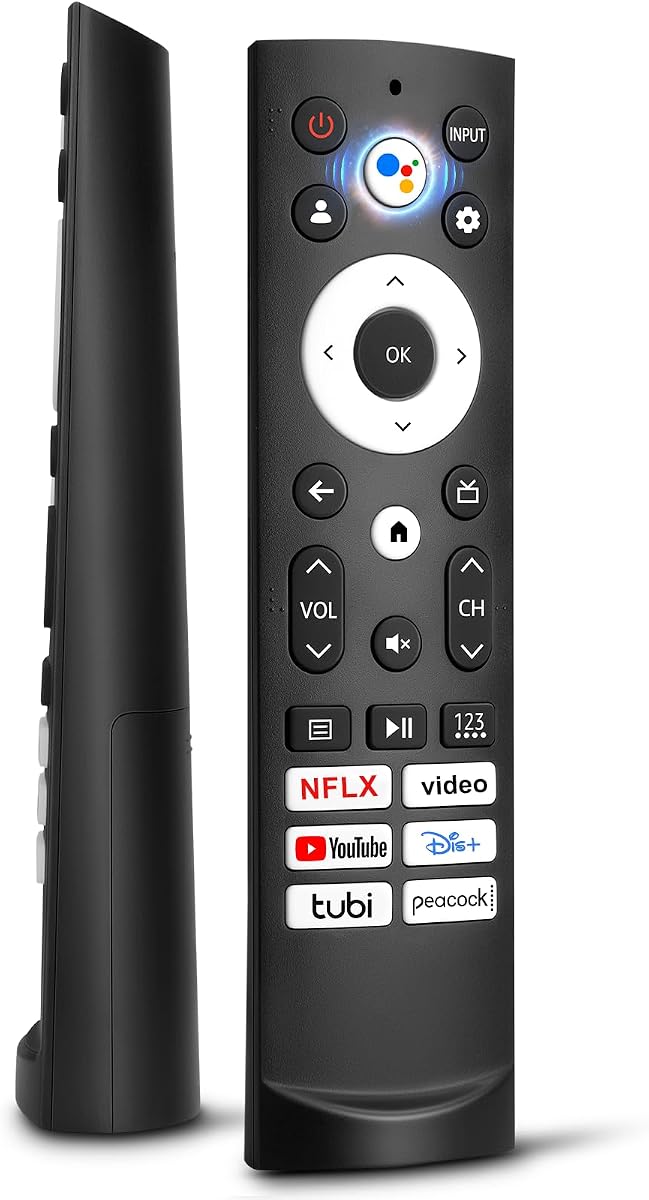
This voice-enabled replacement earns the premium recommendation for compatible newer Hisense Google TV models. It has a 4.2 rating and supports the ERF3M90H family across an extensive list of A6H, A65K, U6K, U7K, U75K, U8K, UX, L5H, L9, and other television series.
We may earn a commission when you buy through this link, at no additional cost to you.
Its dedicated microphone button is the clearest premium feature. Voice commands can be used to search for content, check information, or move through menus, subject to the television's built-in voice assistant being available and configured. Six shortcut keys provide another convenient route to popular entertainment platforms.
The stated operating range reaches 50 feet, and the manufacturer describes 0.2-second command activation. ABS construction is intended to withstand daily use. A one-year warranty and a stated service response within 12 hours on working days add support for buyers who want some reassurance after purchase.
It is best suited to owners of a listed Hisense Google TV who actively want voice control and a modern shortcut layout. The 4.2 rating is lower than several alternatives, and the remote does not suit Fire, Roku, Chromecast, or streaming-device controls, so compatibility should be confirmed before purchase.
The microphone button can reduce text entry and speed up content searches. Voice features still depend on the television's own assistant, so the remote alone does not guarantee every supported voice function.
The extensive model list covers many QLED, ULED, Mini-LED, Quantum ULED, and Laser television families. That makes this a potentially good match for owners of newer Hisense sets that use the listed ERF3M90H remote.
We may earn a commission when you buy through this link, at no additional cost to you.
This 4.3-rated two-pack combines convenience with broad Roku television compatibility. A single purchase provides two remotes, making it useful for households with more than one compatible television, for keeping a spare nearby, or for separating remotes between rooms.
We may earn a commission when you buy through this link, at no additional cost to you.
Unlike a standard Hisense remote, it supports Hisense Roku televisions as well as TCL, Sharp, Onn, Philips, Westinghouse, Element, Insignia, JVC, RCA, and Sanyo Roku television models. Netflix, Disney, Hulu, and VUDU shortcut buttons are included, and the stated operating range exceeds 35 feet.
Setup requires only two AAA batteries, with no programming or additional configuration. The buttons are stated to have been tested for more than 120,000 clicks, while the listed response time of 0.3 seconds suggests that the manufacturer has focused on everyday responsiveness.
The important boundary is that this remote does not control standalone Roku streaming players, including Express, Express+, Streaming Stick, Stick+, Premiere, Premiere+, Ultra, and Box devices. It also is not a general replacement for non-Roku Hisense televisions. Choose it when your set runs the Roku television platform.
The second remote can remain in another room, serve as a backup, or control a second compatible Roku television. That practical flexibility is the central advantage of the bundle.
Supporting numerous established television brands makes the two-pack useful for mixed households. It remains a television remote, however, rather than a controller for standalone streaming hardware.
We may earn a commission when you buy through this link, at no additional cost to you.
This 4.4-rated universal replacement covers an unusually broad mixture of Hisense platforms. It supports the ERF3A90, ERF3J80H, and ERF3M90H remote families across Android TV, Google TV, Laser TV, ULED, Mini-LED, and VIDAA television series listed in the product information.
We may earn a commission when you buy through this link, at no additional cost to you.
Because it covers three original remote models, it can be a useful single option for someone comparing several compatible Hisense television generations. It works out of the box after two AAA batteries are installed, and its shortcut row includes Netflix, Video, YouTube, Disney+, tubi, and Peacock.
The stated transmission distance is six to eight meters, or roughly 19 to 26 feet, with a response time of approximately 0.5 seconds. Those figures are less generous than the 40- to 50-foot claims attached to some other remotes, so buyers with unusually large rooms should consider the distance between seating and television.
The remote is recommended for users whose television matches one of the listed series and original remote numbers. The breadth can be advantageous, but the many model codes also make careful comparison important. It does not offer a dedicated voice button, so voice functionality should not be assumed.
Supporting ERF3A90, ERF3J80H, and ERF3M90H reduces the need to determine which generation of physical remote a television uses, provided its model appears in the supplied lists.
The remote is ready after battery installation. This is a notable convenience for owners who prefer an infrared replacement that behaves like the original physical television control.
We may earn a commission when you buy through this link, at no additional cost to you.
This two-pack replacement has a 4.4 rating and targets a wide range of Hisense Google television series. Compatible families include U7, A65H, A4K, A6H, A7H, U6, U6H, U7H, U8H, L5H, U6K, U7K, U8K, U75K, UX, U76, A76K, L9, and A65K.
We may earn a commission when you buy through this link, at no additional cost to you.
The pack includes two remotes, which is helpful for multiple televisions, shared homes, or keeping a backup accessible. Six function keys launch Netflix, Prime Video, YouTube, Disney, tubi, and Peacock. The stated 40-foot infrared range is generous for many living rooms, and the manufacturer reports a response time of 0.2 seconds.
Construction is another positive. The shell uses ABS plastic for durability, while upgraded silicone is used on the buttons to create a softer feel and more sensitive response. A non-slip grip is also mentioned, which can help during normal use.
This is a strong pick for households that need more than one compatible remote. Its trade-off is that it is built for the listed Google TV platform and does not include a microphone, so owners who rely on voice commands should choose a voice-enabled model instead. Verify the exact television series before ordering.
Multiple household members or televisions can each have a dedicated controller. The spare also reduces inconvenience if one remote is misplaced or temporarily unavailable.
The silicone button treatment is intended to improve both tactile feedback and response. Combined with the stated 0.2-second activation, the design focuses on frequent everyday interaction.
We may earn a commission when you buy through this link, at no additional cost to you.
This 4.4-rated replacement offers straightforward infrared control for a defined group of Hisense smart televisions. It supports the ERF3A90 and ERF3J80H remote families and is listed for numerous A4H, A6G, A6GV, and U6G television model combinations.
We may earn a commission when you buy through this link, at no additional cost to you.
Six shortcut buttons provide one-touch access to Netflix, Video, YouTube, Disney+, tubi, and Peacock. The remote works without programming after two AAA batteries are inserted, so replacement does not involve entering a code or pairing with a television through an on-screen menu.
Its defining limitation is the absence of voice functionality. The product is also not compatible with Hisense Fire, Roku, or Google televisions. That narrower scope is not necessarily a flaw; it simply makes the remote more suitable for owners who prefer traditional button navigation or whose compatible television does not offer voice assistance.
The seller also offers assistance when a buyer cannot identify the correct remote, which is helpful during the selection process. It is a good recommendation for users who find the original ERF3A90 or ERF3J80H part number, do not need a microphone, and want quick shortcuts in a simple replacement.
The listing makes its limitations clear: there is no voice function. This transparency helps buyers avoid expecting microphone behavior that the hardware does not provide.
Compatibility matching can be difficult when the original remote is missing. The stated willingness to help identify a suitable remote reduces some of that uncertainty before purchase.
We may earn a commission when you buy through this link, at no additional cost to you.
This 4.3-rated replacement combines voice recognition with support for a broad selection of modern Hisense Google televisions. Its list includes A6H, A65H, A65K, U8K, U6H, U7H, U7K, A4K, U6K, U7, U75K, U8H, L5H, L9, A76K, A7H, U6, U76, and UX series.
We may earn a commission when you buy through this link, at no additional cost to you.
The intelligent speech function can be used to search, play music, or check information through the television's voice assistant. Five shortcut keys for Netflix, Video, YouTube, Disney+, and tubi provide direct access to common services, although this is one fewer shortcut than several competing remotes.
Unlike direct infrared replacements, this unit uses a short pairing process. After installing two AAA batteries and turning on the television, the user holds the Back and Home buttons for five seconds until the indicator blinks and the television displays a successful pairing message.
This remote is best for owners of a listed Google TV who want a voice-capable replacement and are comfortable completing a one-time pairing procedure. Its ABS shell is designed for durability, and the buttons reportedly passed a 100,000-click test. Those features make it a modern, practical choice despite its lower rating than several alternatives.
The integrated assistant can make content searches and information requests faster when the television supports the relevant functions. It is especially useful for viewers who prefer not to navigate long menus or type with the directional pad.
Pairing is explained as a short button-hold procedure rather than a code-entry process. Users should follow the on-screen instructions and allow the television to recognize the remote before changing functions.
We may earn a commission when you buy through this link, at no additional cost to you.
The correct Hisense replacement depends less on appearance than on television platform, original remote model, signal method, and desired functions. Use the following factors to narrow the choices before ordering.
Hisense televisions may run traditional Hisense smart TV software, Android TV, Google TV, VIDAA, Fire TV, or Roku TV. These platforms use different controls and, in some cases, different communication methods. A remote can look nearly identical while being unable to operate a television from another platform, so establish the operating system before choosing a replacement.
Check the television's model number, the original remote's part number, and the on-screen platform information. A Roku television needs a Roku-compatible remote, while a Google or Android television may require a remote with matching navigation, app, and voice functions.
The most reliable compatibility clue is the model printed inside the original remote's battery compartment. Listings for the strongest general options cover families such as EN2A27, ERF3A90, ERF3J80H, and ERF3M90H. Matching the complete code ensures that the replacement includes the expected control layout and signaling method.
If the original remote is gone, use the television model number and platform to locate a compatible family. Avoid relying on pictures alone because visually similar remotes can belong to different ecosystems.
Voice control adds convenient searching but also narrows compatibility. The dedicated voice options in this selection are intended for particular Hisense Google TV families, while several excellent infrared replacements explicitly exclude voice functionality. A microphone button is only useful when the television itself supports the relevant voice assistant and services.
If your preferred remote does not include voice, confirm that you are comfortable using the directional pad, home button, search function, and on-screen keyboard. Traditional controls can remain entirely practical for everyday navigation.
Most replacements in this guide use infrared and work after batteries are installed, although some newer voice remotes require an on-screen pairing step. Infrared remotes must be pointed toward the television's infrared receiver. Bluetooth-style functions, voice search, or special app behavior may depend on successful pairing.
Understand the stated procedure before ordering. A remote that requires pairing is not a problem, but it does mean you should follow the television's instructions rather than assuming the control will respond immediately.
Shortcut buttons provide one-touch access to streaming applications. The options reviewed range from three keys for Netflix, YouTube, and Google Play to six keys covering Netflix, Video, YouTube, Disney, tubi, and Peacock. Prime Video appears on the two-pack Google TV option, while other layouts include Disney+ or VUDU.
Choose a layout that reflects the services you use most. Extra buttons are convenient, but they do not replace a television's complete navigation menu, and some app availability may depend on the installed software.
Stated operating ranges range from approximately 19 feet to 50 feet among the reviewed remotes. Longer coverage can help in large rooms, elevated televisions, or seating positioned at an angle, but actual performance also depends on the television's receiver, room layout, obstructions, and line of sight.
A stated response time can also influence the feel of the remote. Options range from approximately 0.2 to 0.5 seconds. These figures are not direct measures of product quality, but they offer a useful comparison of the performance claimed by each manufacturer.
Two remote packs are available for Roku televisions and Google TV models. They are particularly practical for households with multiple compatible sets, families that frequently lose remotes, or users who want an immediate backup in another room. A single remote remains sufficient for a single-television household.
When comparing packs, do not assume two units means two separate features. Both remotes usually have the same layout and compatibility. The advantage comes from availability and convenience rather than expanded functionality.
ABS construction appears across many choices, with some remotes adding a non-slip grip, scratch resistance, or softer silicone buttons. These details can affect daily handling and durability. Warranty coverage is also useful: one-year warranties are explicitly offered by several products, and one remote provides a stated service-response commitment.
Support quality matters because compatibility questions often arise after ordering. Review the listed warranty and seller contact instructions, and keep your television and original remote model information nearby if a clarification is needed.
Begin by confirming that the remote supports your television platform and the original remote model. Remove any protective film from the new remote, install the correct batteries in the proper orientation, and place fresh alkaline batteries in the compartment if the previous remote used them. Do not mix batteries of different types or ages.
For infrared remotes, point the controller toward the television's infrared sensor and press a button. If the television does not respond, move closer, remove obstructions, and try again. For a model requiring pairing, follow the included method: turn on the television, hold the specified combination until the indicator blinks, and wait for the pairing confirmation.
Treat the remote as a clean, dry electronic device. Wipe it with a soft, lightly dampened cloth rather than immersing it in water or using abrasive cleaners. Remove the batteries if the remote will remain unused for an extended period, avoid leaving it in direct heat, and keep liquids away from the battery compartment.
Start with the television model number and determine whether it runs Roku TV, Google TV, Android TV, VIDAA, Fire TV, or another platform. Then check the original remote's model number, usually printed inside the battery compartment, against the seller's compatibility list. Matching both the platform and remote model is more dependable than relying on appearance.
No. The selection includes remotes for traditional Hisense smart TVs, Google and Android TV platforms, and Roku televisions. Some broad models cover several remote families, but Fire, Roku, Google streaming, and Chromecast controls require specific compatibility. Buying within the correct platform prevents the most common replacement errors.
Yes, several Google TV-focused options include a microphone or voice-recognition function. They are designed for particular compatible Hisense series and still require compatible voice services on the television. The Roku and many traditional infrared options do not provide voice functionality.
Most of the infrared models work out of the box after two AAA batteries are installed. The voice-enabled Google TV remote uses a short pairing routine involving the Back and Home buttons. Follow the instructions for the specific model rather than assuming every Hisense replacement uses the same setup.
No. The supplied product information repeatedly notes that batteries are not included, and most of these remotes use two AAA batteries. Purchase a fresh pair of alkaline batteries for dependable operation, especially if the previous remote had a leaking or corroded battery compartment.
Confirm that the television platform and remote model are listed as compatible, then check the battery orientation and freshness. Infrared models need a clear line to the television's receiver, while paired remotes must complete the specified pairing process. If problems continue, contact the seller and keep the television and remote model numbers available.
Generally, no. These products are designed as television remotes rather than full home-entertainment controllers. One listing explicitly excludes Blu-ray players, DVD players, sound bars, AV receivers, and subwoofers, while the Roku two-pack excludes standalone streaming devices. Check the intended equipment before purchasing.
A two-pack is most useful with multiple compatible televisions or when you want a backup in another room. The included remotes generally share the same functions and compatibility, so the benefit is convenience rather than additional features. For one television and limited storage, a single remote is usually sufficient.
The strongest general choice is the universal legacy Hisense remote because it supports numerous EN2-series television controls and works without programming. For newer Google TV owners, the ERF3M90H voice remote stands out with extensive model coverage, six shortcuts, a microphone button, and a long stated range. The Roku two-pack offers flexible two-remote value for compatible Roku televisions.
Before ordering, prioritize television platform and original remote-model compatibility over minor layout differences. Then decide whether voice control and a specific set of application buttons are important to you. Pay attention to required pairing, battery type, line of sight, operating distance, and whether the household needs more than one remote.
Ratings, product details, availability, and prices can change, so review the current listing and compatibility information before making a final decision. The best replacement is the one that matches your exact Hisense television, offers the functions you regularly use, and provides reliable setup with the fewest unwanted limitations.