
HUE Animation Studio Pro
4.0Editor score
Manual focus control
Full HD capture
Included animation software
Creating stop motion animation requires a camera that stays visually consistent while you move miniature subjects one frame at a time. The most useful options balance dependable manual focus, flexible exposure controls, sturdy construction, and compatibility with animation software that can capture still frames and assemble them into a finished sequence.
This guide compares ten cameras and complete stop motion kits for beginners, educators, hobbyists, and advanced creators. We considered frame-by-frame workflow features, resolution, autofocus behavior, stabilization, screen articulation, included software, microphones, storage support, and practical alternatives that can work as animation cameras.
Each review explains the product's strongest use, important limitations, and ideal buyer, while the comparison table highlights the major differences. Product configurations and retailer prices change frequently, so confirm the current listing, accessory bundle, and computer compatibility before purchasing.
4.0Editor score

4.1Editor score

As an Amazon Associate we earn from qualifying purchases.
The comparison covers dedicated stop motion kits, mirrorless cameras with animation firmware, and adaptable camcorders that can serve as frame-capture devices. The most important distinctions are manual control, frame consistency, included software, screen flexibility, and whether the package supports a complete computer-assisted workflow.



The HUE Animation Studio Pro is the most purpose-built stop motion choice in this guide and carries a 4 out of 5 rating. Its native 1080p camera, manual focus lens, built-in LED lights, and noise-reducing microphone create a straightforward setup for recording small figures, clay models, toys, and classroom projects without requiring a separate computer camera.
We may earn a commission when you buy through this link, at no additional cost to you.
Its most valuable feature is the combination of a wider field of view and a focal range beginning at 1 centimeter. That range gives animators room to frame detailed subjects while the manual lens avoids the subtle focus breathing that can occur when an autofocus system hunts between miniature positions. The package also includes Stop Motion Studio software for Windows and macOS, a 64-page project book, printable activities, and a mobile version of the software.
There are trade-offs. Native 1080p is below the 4K and high-resolution specifications offered by several conventional camcorders, and the included software is most convenient on a desktop. It is also a camera built around animation rather than interchangeable lenses or the broad exposure controls found on a professional mirrorless body. Even so, those limitations are reasonable for a kit intended to simplify the learning curve.
Choose the HUE Animation Studio Pro if you want an end-to-end introduction to stop motion without assembling a separate camera, lighting setup, and software package. It is particularly attractive to educators, families, and first-time animators because the learning resources explain techniques such as rotoscoping and time-lapse photography. For controlled framing and an approachable all-in-one workflow, it is the strongest budget-oriented recommendation here.
The manual focus lens is especially useful when the camera and the puppet remain in fixed positions. Instead of allowing autofocus to change as a small subject moves across the frame, the creator can lock the lens once and make deliberate frame-by-frame adjustments.
The included desktop software, full-color project book, printable activities, and mobile option reduce the number of separate tools a new animator must research. That makes the kit easier to start using while still teaching recognizable stop motion techniques.
We may earn a commission when you buy through this link, at no additional cost to you.
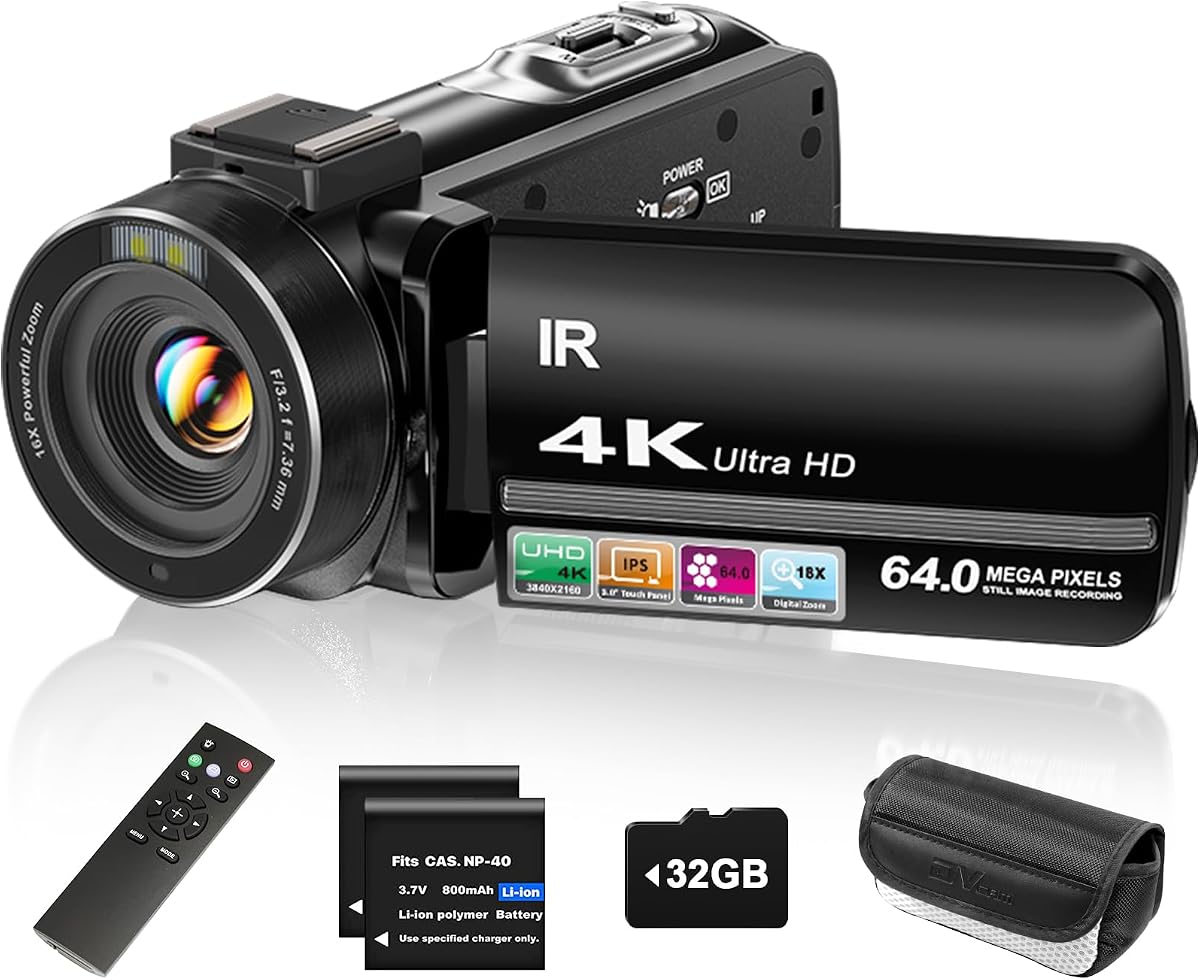
The ZYDIIE 4K Camcorder has a 4.4 rating and offers a broad set of conventional video features that can also support a stop motion workflow. It records 4K Ultra HD video, captures 64MP photos, and includes an 18x digital zoom, a rotating 3-inch touchscreen, a wireless remote, two batteries, and a 32GB memory card.
We may earn a commission when you buy through this link, at no additional cost to you.
For animation, the rotating display is useful because it allows the camera to sit at different heights or angles while the creator checks composition. The pause function can also help when staging a scene, although a dedicated animation application remains necessary for reliable frame capture and playback. Face detection, continuous shooting, time-lapse, and slow motion add options for supplemental footage and testing movement before a full animation build.
The main drawback is that this is a general-purpose camcorder rather than a stop motion system. The supplied information does not describe a dedicated manual-focus mechanism, direct frame-grabbing workflow, or animation-specific software. Digital zoom can also crop the image rather than reproduce the detail of an optical lens, so it should not be confused with a true high-resolution close-up capability.
The ZYDIIE is a sensible choice for a creator who wants one camera for animation, demonstrations, vlogs, interviews, and family videos. Its screen, bundled storage, spare battery, and remote can make it especially convenient for mobile production. For dedicated stop motion work, pair it with animation software capable of importing still images or controlling frame capture, and verify focus behavior at miniature distances before committing to a large project.
The 270-degree touchscreen can turn toward the animator when the camera is positioned above, beside, or below the set. This makes it easier to align the frame with the subject without repeatedly moving the camera between shots.
With 4K recording, 64MP photos, infrared night vision, webcam support, and two batteries, the camcorder can handle conventional content duties as well as stop motion. That versatility appeals to creators who want one device for several kinds of projects.
We may earn a commission when you buy through this link, at no additional cost to you.
The Canon EOS R6 Mark II body with Stop Motion Animation Firmware earns a 4.1 rating and is the most advanced dedicated option here. Its 24.2MP full-frame CMOS sensor, DIGIC X processor, wide ISO range, and ability to increase Live View resolution to 1920×1280 when connected to compatible animation software make it a strong foundation for polished stop motion production.
We may earn a commission when you buy through this link, at no additional cost to you.
Animation-specific functionality is the main attraction. Compatible software support, higher-resolution Live View, aperture lock, and focus position memory help maintain visual consistency between frames. At the same time, continuous shooting of up to 12fps with the mechanical shutter and up to 40fps with the electronic silent shutter provides useful ways to photograph incremental movements or capture a subject's motion as reference footage.
The trade-offs are substantial in terms of complexity and investment. This is a mirrorless camera body, so the buyer may need a compatible lens, suitable support hardware, storage, and animation software. Its advanced autofocus and high-speed burst systems can be more than a beginner requires, and a conventional camera workflow does not provide the same immediate guidance as a dedicated stop motion kit.
This model makes sense for a serious hobbyist, educational studio, or commercial creator who wants maximum image quality and manual control. It is a particularly compelling choice when the animator already understands framing, exposure, lighting, and stop motion software. For the most complete package, the related Canon bundle in this guide adds memory and a carrying solution, though the underlying body remains the important component.
Aperture lock and focus position memory are particularly valuable when the camera remains fixed and only the subject changes. These controls help prevent small automatic adjustments from introducing visual variation between frames.
The full-frame sensor and broad ISO range provide a strong foundation for miniature work under controlled lighting. They also give creators room to produce supporting footage, time-lapse sequences, and behind-the-scenes material without switching to a second camera.
We may earn a commission when you buy through this link, at no additional cost to you.
The FlyFrost 8K Camcorder carries a 4.3 rating and emphasizes resolution, mobile connectivity, and flexible shooting. It records video up to 8K at 15fps, captures 88MP images, and includes a 3-inch rotating touchscreen, 18x digital zoom, infrared night vision, WiFi, a remote control, two batteries, a lens hood, and a folding stabilizer.
We may earn a commission when you buy through this link, at no additional cost to you.
For stop motion, the rotating screen makes it easier to monitor the set from unconventional camera positions, while the WiFi app can transfer images and video to an Android or iOS device. A tripod interface and external microphone support may also be useful for a fixed animation stage. The high-resolution still-image capability could give creators more source detail when a suitable frame-capture application is used.
However, high headline resolution does not automatically translate into better animation. The maximum 8K mode is limited to 15fps, and the product is designed primarily for conventional video, live streaming, and vlogging. There is no supplied indication of dedicated animation firmware, frame-by-frame triggering, or included animation software. The external stabilizer is intended for handheld movement, which is less relevant when the camera is locked to a support.
This camcorder suits a creator who values a large touchscreen, wireless transfer, and high-resolution capture across multiple projects. It can work for stop motion if paired with suitable software and a stable mount, but buyers should first verify the focus distance and controls needed for miniature subjects. For an animation-first experience, a dedicated kit offers a more transparent path.
The WiFi app allows compatible phones and tablets to view, browse, transfer, and remotely control the camera. This can reduce cable handling when reviewing a take or moving files from the set to a mobile editing workflow.
The lens hood, folding stabilizer, external microphone support, remote control, and two batteries create a broader accessory package than many entry-level camcorders. These extras remain helpful even though the animation camera will usually remain stationary.
We may earn a commission when you buy through this link, at no additional cost to you.
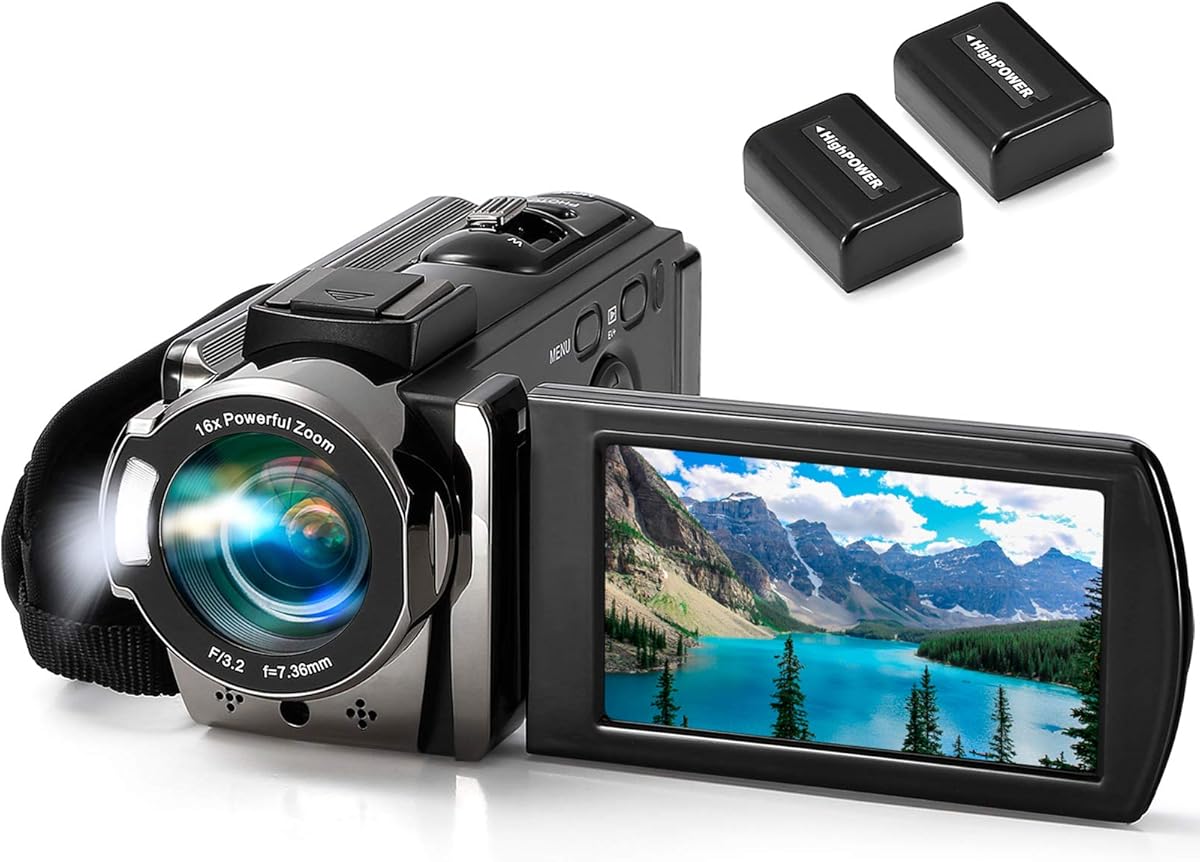
The kimire Full HD Camcorder has a 4.1 rating and provides a familiar, approachable camcorder experience. It records 1080p video at 15fps, captures 24MP JPEG images, and includes a 3-inch LCD that rotates through 270 degrees. A 16x digital zoom, anti-shake feature, face capture, pause function, self-timer, fill light, and time-lapse mode round out the basic feature set.
We may earn a commission when you buy through this link, at no additional cost to you.
The pause function is the most relevant specification for a stop motion creator using conventional video software. It allows a recording to be paused and continued without starting a separate file, which can make rough frame-based sequences easier to assemble. The rotating LCD is also helpful when the camera is placed at an elevated or low angle, while the included batteries reduce the need for immediate extra purchases.
The camera does not include animation-specific software, and the listed SD/SDHC storage is not supplied. Its 1080p recording is limited to 15fps, which provides less temporal detail than many modern alternatives. Features such as beauty mode, face capture, and digital zoom are aimed at general-purpose recording and do not necessarily improve control over small animation subjects.
The kimire is most appropriate for a beginner who already has access to stop motion software, values an easy-to-understand interface, and wants a camcorder that can handle family videos as well as simple animation. Its included cables and batteries make basic operation convenient. Keep the camera on a fixed support, use controlled lighting, and test minimum focus distance before building a detailed set.
The pause function allows a creator to hold a sequence, reposition a figure, and continue the same recording. Although dedicated animation software remains preferable, this feature can support simple tabletop experiments.
Automatic face capture, anti-shake, a self-timer, and a rotating LCD make the camera approachable outside animation. Two NP-FV5 batteries and recording while charging are useful for sessions that extend beyond a short demonstration.
We may earn a commission when you buy through this link, at no additional cost to you.
The DJI Osmo Pocket 3 Creator Combo has a 4.5 rating, the highest numerical rating among the listed products with an available score. Its one-inch CMOS sensor, 4K recording at up to 120fps, two-inch rotating touchscreen, and three-axis mechanical stabilization make it an unusually capable compact camera for ordinary video, reference footage, and mobile animation experiments.
We may earn a commission when you buy through this link, at no additional cost to you.
The large sensor can provide a more useful balance of detail, dynamic range, and low-light performance than many small generic camcorders. Fast 4K capture is helpful for motion studies, while the rotating screen simplifies filming from different orientations. D-Log M, 10-bit color, ActiveTrack 6.0, and external microphone compatibility broaden the package for professional video workflows. The Creator Combo includes the camera, a DJI Mic 2 transmitter, battery handle, mini tripod, and related accessories.
Stop motion remains an unofficial use rather than an advertised specialty. The gimbal is designed to compensate for handheld movement, while animation usually benefits from a rigidly fixed camera. The product also does not include dedicated stop motion software or describe the exact frame capture process. Its compact size can also make precise adjustment more difficult than with a larger camera body.
The Osmo Pocket 3 is best for a creator who wants a highly portable camera that can move between live-action and animation work. Its image quality and stabilization are strong, but the camera is not a complete turnkey stop motion solution. Consider it when flexibility, portability, and high-quality reference footage matter more than built-in animation controls.
The one-inch sensor and mechanical three-axis stabilization give the Pocket 3 capabilities beyond a basic novelty camcorder. Those qualities make it valuable for documenting sets, creating demonstrations, and capturing smooth motion that can guide an animation.
The Creator Combo adds a battery handle, mini tripod, and wireless audio transmitter. These additions expand the camera's usefulness for interviews, behind-the-scenes recording, and short-form content surrounding a stop motion production.
We may earn a commission when you buy through this link, at no additional cost to you.
This Canon EOS R6 Mark II bundle is the premium pick in the guide. It combines the 24.2MP full-frame mirrorless camera, Stop Motion Animation Firmware, a 64GB UHS-II memory card, and a sling backpack. The camera also supports 4K60 10-bit internal recording, Canon Log 3, external 6K ProRes RAW, Dual Pixel CMOS AF II, and five-axis image stabilization.
We may earn a commission when you buy through this link, at no additional cost to you.
Its animation features include FHD Live View resolution, aperture lock, and focus position memory. Those controls support repeatable exposure and focus settings, which are fundamental when moving a puppet by tiny increments. The high-resolution sensor, low-light performance, rich color reproduction, and dynamic range also offer considerable latitude for polished miniature work under carefully managed lighting.
This listing does not provide a numerical customer rating, so it should be judged on its specifications and included components rather than assigned a score based on missing review data. The bundle is also substantially more complex than a beginner kit. A lens, suitable stand, controlled lighting setup, and compatible animation software may still be required, and a full-frame camera may be more than a small clay or LEGO project needs.
The bundle is best suited to an experienced animator, production team, or educational facility that values image quality and repeatable camera settings over simplicity. The included UHS-II card and backpack make it more practical for field or classroom use, while the stop motion firmware directly supports the intended workflow. For a professional-grade stop motion pipeline, this is the most complete premium package presented.
Aperture lock and focus position memory help maintain consistent framing across a sequence. When every change on set should come from the subject rather than the camera, these dedicated controls can be more valuable than additional autofocus features.
The 64GB UHS-II card supports the storage demands of high-resolution capture, and the included sling backpack simplifies transport. The package therefore goes beyond the camera body without requiring an entirely separate accessory purchase.
We may earn a commission when you buy through this link, at no additional cost to you.
The 4K Digital Camera with Macro and Wide Angle Lens has a 4 rating and targets creators who want a small point-and-shoot camera for several kinds of visual work. It captures 48MP still photographs and 4K video, uses a 3-inch rotating screen, and includes a two-in-one macro and wide-angle lens. Autofocus, object tracking, flash, time-lapse, slow motion, and a self-timer are also listed.
We may earn a commission when you buy through this link, at no additional cost to you.
The included macro attachment gives it a useful advantage for miniature subjects, while the wide-angle option can show more of a tabletop set. A 52mm lens interface provides room for compatible filters and other 52mm accessories. Recording while charging and support for memory cards up to 128GB make it possible to run longer sessions without waiting for a battery swap.
The product is still a general-purpose digital camera rather than a dedicated animation system. No stop motion software is mentioned, and the 16x digital zoom should not be mistaken for optical magnification. The camera also requires a separate SD card for storage. For a professional set, the small body and limited manual controls may not provide the same consistency as a mirrorless camera with animation firmware.
This camera is a good option for beginners who want to experiment with animation and also need close-up photography, webcam functionality, and conventional video. It is particularly attractive when the set contains small objects that benefit from the macro lens. Pair it with compatible frame-capture software and mount it rigidly for the most consistent results.
The macro lens can help a creator fill more of the frame with a miniature figure or clay model. It also supports tabletop experiments in which fine details need to remain visible.
Webcam mode, 4K video, high-resolution photos, and interchangeable lens attachments make the camera useful beyond animation. That breadth is helpful for creators who want to document their process or produce supporting content.
We may earn a commission when you buy through this link, at no additional cost to you.
The Complete HD Stop Motion Animation Kit has a 4 rating and presents a traditional all-in-one approach. It includes a full HD 1920×1080 camera with an upgraded easy focus ring, Stopmotion Explosion Animator software, a book of instructions, and access to free online tutorials. The camera's low-profile shape is practical for photographing small sets from close range.
We may earn a commission when you buy through this link, at no additional cost to you.
The manual focus ring gives animators more control than a basic fixed-focus webcam, while the included software removes the need to locate a separate capture program. The book and tutorials demonstrate how to animate LEGO, toys, modeling clay, action figures, and custom armatures. That teaching focus makes the kit useful for classrooms, homeschool programs, libraries, and after-school groups.
Its age is apparent in the listed compatibility with Windows 7, 8, and 10 and OS X 7.1 or later. Buyers using a more recent operating system should confirm driver and software availability before buying. Native 1080p is less detailed than modern 4K options, and the listed package does not mention extra lights, a stand, or other production accessories that may still be needed.
This kit makes sense when structured instruction matters as much as hardware. It is a straightforward choice for children, teachers, and first-time animators who want a camera, software, and learning materials that work together. Experienced creators who need greater resolution, interchangeable lenses, or advanced exposure control may prefer to build their own system around a more capable camera.
The included book and free tutorials cover multiple figure types and common construction methods. This makes the kit more than a camera-and-software bundle for classrooms and families learning together.
A compact camera profile can sit near a tabletop set without towering over the scene. Combined with the manual focus ring, it supports deliberate close-up framing for small subjects.
We may earn a commission when you buy through this link, at no additional cost to you.
The USB 2.0 HD Pro Webcam has a 4 rating and represents the simplest way to experiment with stop motion on a computer. It outputs a full HD 1920×1080 image, includes an internal noise-canceling microphone, and uses a flexible stand for positioning over a desk or miniature set.
We may earn a commission when you buy through this link, at no additional cost to you.
The manually adjustable focus lens is the most important feature for animation. Once the camera is aimed at a small subject, the focus ring can be set for that specific distance instead of relying entirely on automatic behavior. The integrated microphone can also be selected as a USB audio source for recording, though a dedicated microphone would usually produce clearer narration.
The webcam is limited compared with the dedicated kits and mirrorless cameras in this guide. It has no supplied stop motion software, its USB 2.0 interface is dated, and the listed operating system support includes older Windows and macOS versions. The flexible stand also permits more movement than a locked-down animation mount, which can introduce accidental framing changes.
This webcam is best for a first experiment, a classroom demonstration, or a creator who already owns stop motion software and needs a simple capture device. Secure it in a fixed position after adjusting focus, use diffuse lighting, and verify that current software recognizes the camera. It is a practical budget prototype, but a dedicated stop motion kit offers a much smoother path for sustained production.
Twisting the focus ring lets an animator set the lens specifically for a small figure or clay model. That control is more useful for stop motion than many of the webcam convenience features found on generic models.
The USB design keeps the setup simple: connect the camera, select it in animation or recording software, and begin capturing. A flexible stand helps position the lens, though an additional clamp may improve repeatability.
We may earn a commission when you buy through this link, at no additional cost to you.
A useful stop motion camera should make frame capture predictable, keep focus stable, and integrate cleanly with an animation workflow. The right choice depends on your experience, set size, software, and the level of image quality you need.
Stop motion cameras spend most of their time pointed at the same small subject, so focus should remain constant while the puppet or model changes position. A manual focus lens offers predictable results and prevents an autofocus system from hunting when a hand enters the frame. It also allows the camera to be focused precisely at the subject's minimum distance. Dedicated kits such as the HUE Animation Studio Pro and Complete HD Stop Motion Animation Kit emphasize manual focus, while several general camcorders do not clearly specify their close-focus behavior.
Prioritize a manual focus ring, clear minimum focus distance, and a camera body that can be locked in place. Test the actual subject distance before purchasing whenever possible.
A camera can capture excellent images and still be inconvenient for animation if it cannot communicate with compatible frame-grabbing software. Dedicated kits often include software designed to transfer frames, control exposure, and assemble sequences, while conventional camcorders may require separate software and may not offer reliable still-frame triggering. Cameras with official stop motion firmware provide a more transparent connection with supported animation applications.
Check whether the animation program supports the camera directly, or whether frames must be imported from a memory card. Also verify the computer operating system requirements before buying older software bundles.
Every frame should differ only because the subject moved, not because the camera changed brightness or shifted focus. Aperture lock, focus position memory, manual exposure, and an electronic screen that clearly shows the set can help maintain visual continuity. On a basic camcorder, the animator may need to avoid automatic modes entirely or adjust settings between every capture.
Choose controls that lock after setup and remain visible during capture. Consistent framing and exposure are generally more important than convenience features such as face detection or beauty modes.
A 1080p camera can produce attractive animation when the set is well lit and the camera is close to the subject. Higher-resolution options provide more visible detail and more flexibility for cropping, but headline specifications alone do not reveal autofocus behavior, dynamic range, or low-light performance. A 4K or 8K mode with a low frame rate is also not automatically better for animation than a stable 1080p workflow.
Consider the final display size, lighting conditions, and editing workflow. For professional scenes or large displays, the Canon EOS R6 Mark II's full-frame sensor and high-resolution Live View offer greater latitude.
Animation sets are often viewed from above, beside, or slightly below the subject. A rotating LCD or touchscreen lets the creator check composition without moving the camera and potentially changing the angle between frames. This is especially useful with clay figures, LEGO builds, and tabletop sets that cannot be reached easily from the camera's normal position.
A larger, flexible screen is valuable, but it should complement a stable mount. Once the composition is finalized, lock the camera and avoid touching its position during the shoot.
Small sets require even illumination, controlled shadows, and minimal flicker. The HUE Animation Studio Pro includes built-in LED lights, which can simplify a first setup, while other cameras may benefit from separate diffuse lighting. A low-noise microphone improves narration and sound effects, although it does not directly affect image consistency.
Look for a built-in light, microphone, or external audio input if you want an all-in-one recording solution. Even with built-in LEDs, test the setup because miniature props can create harsh reflections and deep shadows.
Stop motion shoots can consume considerable storage as every frame becomes an image. A bundled memory card is convenient, while support for higher-capacity cards provides more room for extended projects. Two batteries and recording while charging are useful for long sessions, and USB or WiFi transfer can speed up file management when the camera supports it.
Check whether the storage card is included and what capacity the camera supports. For a professional camera, high-speed UHS-II storage may be worthwhile, while a simple webcam may only require modest space for short sequences.
A stop motion camera is valuable only if it remains in exactly the same position throughout a shot. Small vibrations, sagging stands, and accidental bumps can spoil the sequence. Compact bodies are easy to position but may be less stable, while larger mirrorless cameras pair well with a solid tripod or geared head. Webcams often need a separate clamp or mount to prevent movement.
Use a rigid support, mark the camera position, and tighten every adjustment before the first frame. A wide base and a camera centered over the set reduce the chance that a small touch shifts the composition.
Begin by placing the camera on a rigid tripod or stand at the same height and distance you want for the finished scene. Focus manually on the main subject, lock exposure and focus where possible, and take a test frame before moving any props. Confirm that the animation software recognizes the camera or that captured images transfer correctly to the editing computer.
Build the scene in small increments and move each subject by a controlled amount. Avoid touching the camera, changing the light, or rotating the support between frames. Periodically return to a neutral reference position to check alignment. Use software features such as onion skin, live view, or frame playback when available, but do not rely on digital zoom or aggressive cropping to simulate a closer physical camera position.
After filming, save the original sequence and work from copies. Dust the lens with a soft microfiber cloth, keep the camera away from moisture and extreme heat, and store batteries separately when they are not needed. Clean the mount and tightening points regularly, update the camera and animation software when appropriate, and back up completed projects to more than one location.
No, but a camera that stays fixed, holds focus, and works with frame-capture software is much easier to use than a generic alternative. A dedicated stop motion camera is the simplest option for beginners, while a mirrorless camera with animation firmware offers more control for advanced work. Many conventional camcorders can also be used if the software supports their still-image transfer.
Manual focus is generally preferable because the camera normally remains pointed at the same distance throughout a shot. It prevents autofocus from shifting when a puppet or hand moves near the lens. The HUE Animation Studio Pro, Complete HD Stop Motion Animation Kit, and USB webcam all feature manual focus controls, which is a meaningful advantage for animation.
Not necessarily. A well-focused 1080p camera can look excellent on a phone, television, or web platform, especially with controlled lighting. Higher resolution becomes more useful for large displays, detailed miniature work, cropping, and professional delivery. The important comparison is usable image detail and consistency, not merely the resolution printed on the box.
Yes, a webcam can work as a basic stop motion capture device when its focus can be adjusted and it remains securely mounted. A 1080p model with manual focus and a flexible stand can handle simple tabletop sequences. For frequent work, a camera with a larger sensor, better screen articulation, and dedicated animation controls will usually be easier to manage.
You need software that can capture or import individual frames and then assemble them at a chosen frame rate. Some products include compatible animation software, such as the HUE Animation Studio Pro and Complete HD Stop Motion Animation Kit. Other cameras require separate software that supports direct camera control or importing numbered image files.
It depends on the camera and scene. Electronic shutter can produce silent operation and rapid bursts, which helps capture incremental movement, but some cameras may show effects or reduced performance under certain lighting. Test the shutter mode at the intended frame rate before filming. The Canon EOS R6 Mark II supports both mechanical and electronic continuous shooting options.
Use a solid tripod, clamp, or weighted stand, then tighten every joint before filming. Mark the camera's position and avoid touching it while adjusting the set. A camera that has shifted by even a small amount can make the background jump between frames, while a puppet or clay figure may move more naturally against a stable composition.
They benefit from soft, even illumination that does not flicker between frames. Built-in LED lights can be useful for a beginner, but separate diffused lights often provide better coverage and control. Keep all light sources and camera settings unchanged during a shot, and test exposure at the darkest and brightest parts of the set.
The HUE Animation Studio Pro is the most approachable complete package for beginners and educators because it combines a manual-focus 1080p camera, built-in lighting, animation software, and learning resources. For creators who want greater image quality and professional controls, the Canon EOS R6 Mark II with Stop Motion Animation Firmware is the strongest dedicated performance choice, while the bundle version adds high-speed storage and a carrying bag.
Before buying, prioritize the workflow you need rather than the largest headline specification. Manual focus, stable framing, exposure locking, compatible software, and dependable storage matter more than 4K, 8K, facial detection, or a high digital zoom factor. Newcomers should also consider a complete kit, while experienced animators may already own software and benefit from a more capable mirrorless body.
Retailer configurations, availability, and prices change, so check the current product listing before ordering. Confirm the exact camera, included accessories, operating system compatibility, focus range, and software requirements. Those checks will help ensure that the selected camera fits both your creative ambitions and your practical production setup.