
Lenovo Business Laptop 15.6
4.6Editor score
Linux Mint preinstalled
16GB DDR4 memory
15.6-inch Full HD display
Linux laptops combine efficient open-source software with hardware designed to work smoothly with Linux distributions. A strong model should balance processor performance, memory, storage, display quality, connectivity, battery capability, and reliable Linux compatibility. The right choice depends on whether you need a portable daily system, a development workstation, or a rugged computer for demanding field work.
We compared all ten models using their supplied specifications, including operating system, processor, memory, storage, display, ports, keyboard, chassis, and specialty features. The list covers Linux Mint, Ubuntu, and vanilla Linux systems in business, ultraportable, touchscreen, rugged, and high-performance formats. Ratings are included only where an available numeric rating was supplied.
Each review explains who a laptop suits, what makes it stand out, and where its compromises may matter. Our top three recognize a balanced everyday option, a refined business ultraportable, and a premium performance machine. Product details and availability can change, so readers should verify current specifications and prices with the seller before purchasing.
4.6Editor score

4.0Editor score

5.0Editor score
As an Amazon Associate we earn from qualifying purchases.
This side-by-side comparison highlights the major differences in operating system, processor, memory, storage, display, portability, connectivity, and specialized hardware across all ten Linux laptops.


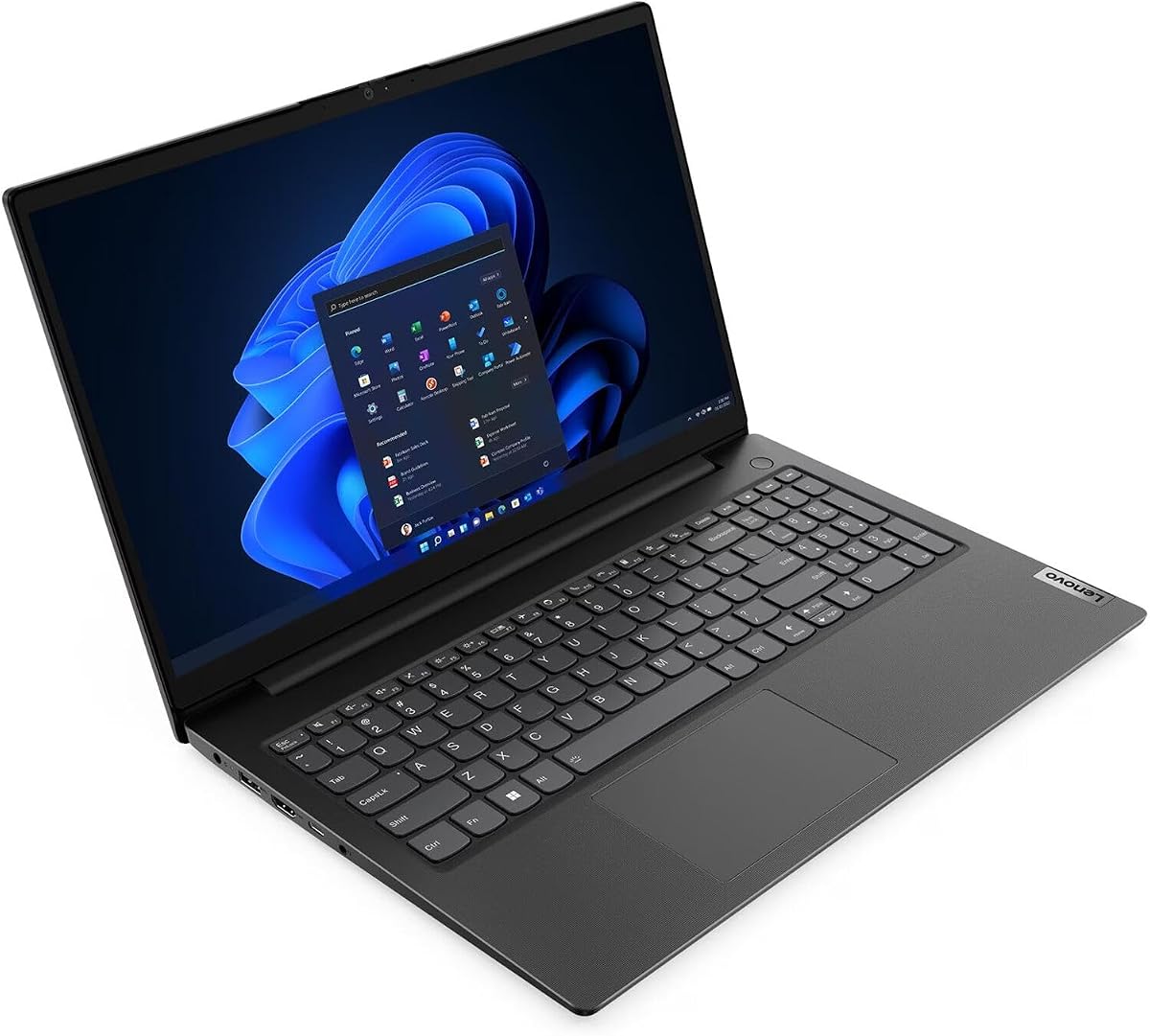
This Lenovo business laptop offers one of the most practical combinations of hardware and preinstalled Linux in the roundup. It runs Linux Mint Cinnamon on a 12th-generation Intel Core i5-1335U processor with 12 threads, 16GB of DDR4 memory, and a 256GB SSD. Its supplied 4.6 rating also makes it one of the strongest customer-rated options included here, providing a useful signal for a general-purpose Linux system.
We may earn a commission when you buy through this link, at no additional cost to you.
The 15.6-inch Full HD non-touch display has an anti-glare finish, making it suitable for offices, classrooms, and extended work sessions where reflections can be distracting. A full keyboard with number pad appeals to people who regularly enter figures. Connectivity is also better than on many minimalist ultraportables, with two USB 3.0 ports, a USB 3.1 Type-C port, HDMI, a card reader, a combined audio connection, and a Kensington lock slot.
The main limitations are the compact 256GB SSD and reliance on Intel UHD 620 integrated graphics. The storage figure is adequate for Linux and a focused collection of applications, but it may feel restrictive with large development repositories, media libraries, virtual machines, or extensive local models. Integrated graphics are fine for office work, browsing, video, and general Linux use, though they are not intended for demanding modern games or professional 3D workloads.
This is a strong recommendation for students, office users, developers, and anyone transitioning to Linux who wants a familiar full-size business design without specialized premium hardware. The 16GB memory, current processor, Full HD screen, and preinstalled Mint make it easier to get productive immediately. It is our Best Budget selection because it balances useful everyday specifications without introducing a specialized niche.
Linux Mint provides a familiar graphical interface while retaining access to the broader Linux software ecosystem. Having it preinstalled can reduce setup time for users who are comfortable with standard computers but do not want the uncertainty of installing an operating system themselves.
The mix of legacy-friendly and modern connections gives this laptop an advantage in offices and classrooms. USB-A accessories remain supported, while USB-C and HDMI simplify the use of contemporary displays, storage, and peripherals.
We may earn a commission when you buy through this link, at no additional cost to you.
This IdeaPad Slim 3 configuration combines Ubuntu Linux with a Ryzen 7 5825U processor, a 15.6-inch Full HD touchscreen, 16GB of memory, and a generous 1TB SSD. It is especially appealing to users who want a capable general-purpose Linux laptop without immediately moving to a premium workstation. The supplied 4.0 rating indicates a positive but not exceptional customer reception.
We may earn a commission when you buy through this link, at no additional cost to you.
The Ryzen 7 processor provides eight cores and sixteen threads and can boost to as high as 4.5 GHz according to the supplied specifications. That configuration is well suited to browsing, office applications, code editing, light photo work, and multitasking. The 1TB drive removes the immediate storage pressure experienced by many smaller configurations. A touchscreen also makes the system more flexible for drawing, annotation, navigation, and casual media consumption.
The package adds a stylus pen, a 256GB portable SSD, and a five-in-one docking station, giving users useful ways to expand storage and connect accessories. That generosity does create a trade-off: some buyers may not need every included item, and the external accessories can reduce portability. Radeon integrated graphics support mainstream tasks but are not intended to replace a dedicated gaming or rendering GPU.
This model fits creative students, mobile workers, and Linux users who value storage, touch input, and bundled peripherals. It is less compelling for buyers seeking a bare-bones chassis or high-end gaming performance. Even so, the large SSD, capable eight-core processor, and thoughtfully assembled accessory package make it one of the most complete options in the roundup for everyday productivity and light creative work.
A 1TB internal SSD gives applications, documents, source code, and media plenty of room, while the additional portable SSD provides a way to separate projects or maintain a secondary data store. The included hub can reduce cable clutter when working at a desk.
The touchscreen and supplied stylus offer a more interactive workflow than a standard laptop panel. They can be particularly convenient for note-taking, interface navigation, sketching, and marking up images.
We may earn a commission when you buy through this link, at no additional cost to you.
This IdeaPad Slim 3 is a straightforward Ubuntu Linux laptop centered on an AMD Ryzen 7 5825U processor and a 15.6-inch Full HD touchscreen. The processor supplies eight cores and sixteen threads with boost speeds up to 4.5 GHz, a useful level of performance for multitasking, development, browsing, and media. No numeric customer rating was supplied for this listing, so the evaluation rests on the stated hardware rather than a rating claim.
We may earn a commission when you buy through this link, at no additional cost to you.
The display has an 88% screen-to-body ratio and TÜV Low Blue Light certification, making it appealing for extended study or work periods. The listed connectivity includes two USB-A ports, one USB-C port, HDMI, an SD card reader, and a headphone and microphone combination connection. A privacy shutter is also included for the built-in webcam, a useful privacy feature in shared environments.
One important limitation is that the supplied data does not state this particular configuration's memory capacity or storage type. Because both can materially affect Linux performance and usable capacity, buyers should verify those details carefully. The system also uses integrated Radeon graphics, which are suitable for normal graphics workloads but not demanding 3D projects or modern gaming.
This laptop is a good match for Ubuntu users seeking a capable processor, a touch-enabled display, and a modern portable design without specialized workstation hardware. It may appeal to students, office workers, and developers who prefer Ubuntu's straightforward desktop. Confirm the final memory and storage configuration before buying, and choose it when a Ryzen 7 processor and touchscreen are the features that matter most.
Ubuntu is a familiar and widely supported Linux starting point with access to a large application catalog. Its preinstallation makes the IdeaPad appealing to users who prioritize a clean system and open-source workflows over proprietary operating-system conventions.
Eight cores and sixteen threads allow the system to divide work among browser tabs, office applications, background services, and development tools. That capability is particularly useful under Linux, where users commonly run several services and virtual environments at once.
We may earn a commission when you buy through this link, at no additional cost to you.
The Panasonic Toughbook CF-31 is built for a fundamentally different environment from conventional business laptops. It is a renewed 13.1-inch rugged model with a magnesium alloy chassis, integrated carry handle, MIL-STD-810G certification, and IP65 protection. Its 3.9 rating reflects the realities of a specialist industrial computer, but the hardware target is clear: reliable operation in harsh, mobile, and demanding conditions.
We may earn a commission when you buy through this link, at no additional cost to you.
The 1200-nit CircuLumin touchscreen is designed for direct sunlight, making the display unusually practical for outdoor field work. Integrated 4G LTE Multi-Carrier Mobile Broadband provides connectivity away from conventional Wi-Fi networks. The native RS-232 serial port can connect directly to industrial machinery, CNCs, and automotive diagnostic equipment, avoiding some of the uncertainty associated with universal adapters.
Its Intel Core i5-5300U, 8GB of memory, and 256GB SSD are considerably older and less powerful than the processors in the other new computers in this guide. The backlit keyboard improves operation in low-light environments, but 8GB of RAM limits demanding multitasking. As a renewed listing, physical and cosmetic condition should also be confirmed with the seller.
Field technicians, engineers, warehouse teams, and other mobile professionals should give this Toughbook priority when durability and specialized connectivity matter more than processor freshness. It is not the right choice for gaming, content creation, or a long-lived general-purpose purchase. For harsh work sites, remote diagnostics, and industrial equipment, however, its rugged design makes it a specialist standout.
The magnesium chassis, drop certification, IP65 protection, and carry handle focus on survival and mobility. These features matter when a computer must withstand rain, vibration, impacts, dust exposure, and frequent transport between work sites.
Native serial connectivity is especially valuable for legacy industrial and diagnostic equipment. The combination of 4G LTE, HDMI, and USB 3.0 also provides broader options for field communications and data transfer.
We may earn a commission when you buy through this link, at no additional cost to you.
The ThinkPad L14 Gen 5 combines business hardware with a vanilla Linux system and several modern connectivity features. Its Ryzen 5 PRO 7535U has six cores and twelve threads, while 16GB of DDR5-5600 memory and a 256GB PCIe SSD provide a capable, efficient foundation. No numeric customer rating was supplied, so its appeal is best assessed through the specification set and intended business role.
We may earn a commission when you buy through this link, at no additional cost to you.
The 14-inch WUXGA IPS display uses a 1920-by-1200 resolution, 16:10 aspect ratio, anti-glare finish, and 300-nit brightness. That format provides more vertical workspace than a conventional 16:9 screen, useful for documents, code, and web work. The backlit keyboard and fingerprint reader support everyday productivity and secure access, while Qualcomm Wi-Fi 6E and Bluetooth 5.3 provide modern wireless standards.
The port selection is particularly good for a business notebook: RJ45 for wired networking, HDMI 2.1, USB-A, two USB 3.2 Gen 1 ports, a USB-C 3.2 Gen 2 port, and a USB4-capable USB-C port. One unusual detail is that the machine originally includes a French keyboard, with English keyboard stickers and application tools provided. Users who type extensively may find the stickers less satisfying than a natively localized English layout.
This ThinkPad is a compelling option for organizations and technically experienced professionals who want Linux without a desktop-specific customization layer. It works particularly well for office productivity, networking, programming, and secure remote workflows. The vanilla system offers greater control, but buyers should ensure their required applications and peripheral drivers are available before making the switch.
RJ45, HDMI 2.1, USB4, and multiple USB-A and USB-C connections reduce dependence on docks and adapters. This makes the L14 appealing for offices, hybrid workspaces, and technicians who regularly connect to varied equipment.
Vanilla Linux provides a comparatively unmodified foundation for administrators, developers, and users who prefer to control their own configuration. It also allows the system to be shaped around a specific professional workflow rather than a general consumer environment.
We may earn a commission when you buy through this link, at no additional cost to you.
The Thinkbook 13s stands out as a polished Linux ultraportable, and its supplied 5.0 rating is the highest numeric rating in this group. It combines a 13.3-inch Full HD IPS anti-glare display, an aluminum body, a backlit keyboard, and Linux Mint Cinnamon. At 2.95 pounds and 16 millimeters thick, the stated design emphasizes easy transport without abandoning business features.
We may earn a commission when you buy through this link, at no additional cost to you.
Its Intel Core i7-8565U is a four-core, eight-thread processor capable of reaching 4.6 GHz, supported by 16GB of DDR4 RAM and a 256GB PCIe NVMe SSD. The configuration is appropriate for office productivity, research, communication, coding, and media. Wi-Fi and Bluetooth 5.0, dual USB 3.1 ports, a USB-C Gen 2 port, HDMI, and an audio jack cover common accessory needs.
Security and convenience features include a ThinkShutter camera privacy mechanism, a Trusted Platform Module 2.0 chip, a 720p webcam, and dual-array noise-cancelling microphones. Dolby Audio with Harman speakers improves the multimedia experience. The drawbacks are the age of the processor and a limited 256GB SSD, which could become restrictive for larger local projects despite the excellent chassis and display.
This is our Editor's Choice and a particularly strong recommendation for mobile professionals, students, and Linux users who value a refined physical design. The combination of portability, a full HD matte display, a comfortable backlit keyboard, and strong privacy hardware makes it more refined than many business Linux alternatives. Buyers who need cutting-edge processing should compare newer systems, while those prioritizing an elegant ultraportable may find this configuration particularly satisfying.
The stated weight and thickness make the Thinkbook 13s well suited to commuting, travel, and frequent movement between workspaces. Its full aluminum body also gives it a more premium feel than typical plastic business notebooks.
The ThinkShutter physically blocks the camera when privacy is required, while the TPM 2.0 chip supports hardware-assisted security. These details are particularly reassuring in a portable computer intended for offices, campuses, and shared spaces.
We may earn a commission when you buy through this link, at no additional cost to you.
This Lenovo business laptop is defined by unusually generous memory and a large hard drive. It pairs an Intel Core i7-1065G7 processor with 20GB of DDR4 memory and a 1TB mechanical hard disk drive. Linux Mint Cinnamon is preinstalled, and the full-size keyboard includes a number pad. The supplied rating of 3.6 is the lowest among the numerically rated products, so buyers should evaluate the configuration and seller terms carefully.
We may earn a commission when you buy through this link, at no additional cost to you.
The four-core, eight-thread processor can reach 3.9 GHz and is suitable for productivity, browsing, communications, and light development work. A 720p webcam, microphone, stereo speakers, Wi-Fi, and Bluetooth provide standard everyday conveniences. Fast charging is useful for users who move between locations, while the hard drive offers abundant room for documents, archives, and media.
The largest compromise is the mechanical storage. Compared with an SSD, a hard disk drive is slower at booting, launching applications, and transferring large files, and it may react more slowly when running virtual machines or development environments. The 15.6-inch HD display also has a lower resolution than the Full HD alternatives in this guide, which may be noticeable for text-heavy work.
This model is best for users who prioritize memory capacity and inexpensive bulk storage over responsiveness. It can suit students, home offices, and Linux users building a large local library, provided they understand that an SSD would improve everyday responsiveness. The 20GB RAM remains valuable for browsers and multitasking, but the older platform and hard-drive design make this less compelling for intensive development.
Twenty gigabytes of RAM provides comfortable headroom for many browser tabs, office applications, and background Linux services. It is especially helpful when users upgrade from systems constrained to eight or sixteen gigabytes.
The one-terabyte hard drive is useful for large archives, but it does not deliver the quick application loading and file transfer speed of an SSD. Linux can run well from this storage type, though users should account for slower boot and launch times.
We may earn a commission when you buy through this link, at no additional cost to you.
This Thinkbook 13s configuration upgrades the portable platform with 32GB of DDR4 memory, a 1TB NVMe SSD, and an HDR display. Linux Mint 19.3 Cinnamon is preinstalled, making the machine attractive to users who want a polished, ready-to-use Linux environment with substantial memory and fast storage. No numeric customer rating was supplied for this exact listing, so the assessment is based on the stated configuration.
We may earn a commission when you buy through this link, at no additional cost to you.
The 13.3-inch Full HD IPS anti-glare display supports Dolby Vision HDR at 300 nits, offering a useful improvement for high-contrast media and creative viewing. Dolby Audio with Harman speakers, a six-row backlit keyboard, and the aluminum Mineral Gray body create a polished multimedia and working environment. At 2.95 pounds and 16 millimeters thick, the laptop remains highly portable.
The 32GB of RAM is the defining feature, offering substantial capacity for large development projects, many browser sessions, virtual machines, and local AI or data workflows. The one-terabyte NVMe drive combines that capacity with quick response, while the integrated fingerprint reader and TPM 2.0 improve security. The i7-8565U processor and UHD 620 graphics are dated, however, and may limit intensive rendering or modern gaming.
This is a strong choice for developers and professionals who need generous RAM and storage in a compact machine. It is less attractive for buyers seeking the newest processor or dedicated graphics, but the supplied memory and storage provide a more future-tolerant foundation for Linux workloads. Verify the desired Linux Mint release and application compatibility before purchasing, especially for specialized software.
Thirty-two gigabytes allows users to run more browsers, containers, virtual machines, and development tools concurrently. It is especially useful for software engineering, data processing, and creative applications that benefit from additional working memory.
The HDR-certified display, 300-nit brightness, and Dolby Audio pairing create a more engaging experience for video and general media use. Its anti-glare treatment still makes it suitable for offices and prolonged reading.
We may earn a commission when you buy through this link, at no additional cost to you.
This Thinkbook 13s fills the middle ground between a compact daily notebook and a high-memory workstation. It combines an Intel Core i7-8565U processor, 16GB of DDR4 memory, and a 1TB PCIe NVMe SSD in a lightweight aluminum body. The 4.0 rating indicates generally positive customer feedback, while the Linux Mint installation gives users a ready-made desktop for work and study.
We may earn a commission when you buy through this link, at no additional cost to you.
Its 13.3-inch Full HD IPS anti-glare display is sharp enough for documents, browsing, communication, and code, while the backlit six-row keyboard supports comfortable typing in varied lighting. Dual USB 3.1 ports, one always-on according to the specifications, a USB-C Gen 2 port, HDMI, and an audio connection provide useful peripheral support. Wi-Fi and Bluetooth 5.0 are also included.
The older Intel Core i7 platform is the primary limitation. It remains competent for standard productivity, development, and browsing, but it does not match the efficiency or multi-core capabilities of newer processors in the roundup. Intel UHD Graphics also limits high-end gaming, professional 3D work, and demanding GPU-accelerated tasks. The 16GB of RAM is adequate for most users, though the 32GB sibling better serves memory-intensive workloads.
This laptop is a sensible recommendation for mobile professionals and Linux users who want a capable one-terabyte SSD without moving to a large 16-inch chassis. It balances portability, storage, display quality, and business security effectively. Those who need modern processing or heavier graphics should look elsewhere, but for office-based Linux work, it remains a polished and conveniently compact option.
The 13.3-inch form factor keeps the display compact while the six-row backlit keyboard preserves a productive layout. That balance is useful for commuters who still want a comfortable keyboard and a large enough workspace for multiple documents.
The one-terabyte NVMe drive provides both capacity and quicker response than a mechanical hard drive. USB-C, HDMI, and multiple USB-A ports make it easier to connect to a wider variety of equipment.
We may earn a commission when you buy through this link, at no additional cost to you.
The NIMO 16 is the roundup's most specialized and ambitious Linux machine. It combines the 16-core AMD Ryzen Max+ 395 processor, Radeon 8060S graphics with 40 RDNA 3.5 compute units, 128GB of LPDDR5X memory, and a 4TB SSD. Its supplied 5.0 rating matches the highest numeric score in the list, while the preinstalled Linux environment directly targets developers, AI users, and technical enthusiasts.
We may earn a commission when you buy through this link, at no additional cost to you.
The 256-bit memory bus and 8000MT/s bandwidth support demanding workflows such as running Docker containers, virtual machines, large IDE projects, local language models, and 3D applications. The stated 126 TOPS total compute and ability to fine-tune 70-billion-parameter models locally make it especially relevant to users working with proprietary data who prefer keeping workloads on-device.
The 16-inch QHD+ display has a 16:10 aspect ratio, 500-nit brightness, 100% sRGB coverage, and a 165Hz refresh rate. A triple-fan, five-heat-pipe cooling system is designed to sustain the processor's 154-watt performance. Dual USB4 ports and HDMI 2.1 support high-speed storage, external displays, and eGPU connections, while the 99Wh battery and four-zone RGB keyboard round out the workstation-like design.
This is the Best Premium choice for developers, data scientists, creators, and advanced Linux enthusiasts who need maximum local compute. It is not the sensible option for ordinary browsing, coursework, or light office use, and its size and power demands reduce everyday portability. Buyers should verify Linux driver support for every specialized application, but for large local workloads, this configuration has few peers in the list.
The 128GB LPDDR5X pool is the standout resource, allowing very large models, datasets, and concurrent development environments to remain resident locally. That capacity supports privacy-sensitive experimentation without relying on a constant cloud connection.
The sharp 165Hz QHD+ panel has enough color coverage and brightness for detailed creative work, while the multi-fan thermal design is intended to manage sustained processor load. The high-refresh screen also benefits interactive Linux applications and games.
We may earn a commission when you buy through this link, at no additional cost to you.
Choosing a Linux laptop means balancing operating-system fit, processor capability, memory, storage, screen quality, connectivity, portability, and budget. The most important factors depend on whether the computer is intended for daily productivity, development, field work, media, or intensive local computing.
The processor determines how comfortably Linux handles browser sessions, office applications, compilers, containers, virtual machines, and simultaneous background services. Modern options such as the Ryzen 7 5825U, Ryzen 5 PRO 7535U, and Ryzen Max+ 395 provide increasingly capable core counts, while the Intel Core i5-1335U balances efficiency with modern performance. Older Core i7 and i5 systems remain suitable for conventional work, but they provide less headroom for demanding parallel workloads.
Memory matters because Linux users often run more services and background processes than a casual buyer might expect. Sixteen gigabytes is a sound general-purpose amount, twenty gigabytes provides additional room in the Lenovo hard-drive model, and thirty-two gigabytes is useful for heavier development or creative tasks. The NIMO's 128GB serves a very different purpose: enabling very large local AI models and a high number of simultaneous workloads.
An SSD is strongly preferable because it improves boot time, application launching, file transfers, and the feel of switching between open projects. A 256GB SSD can be adequate for a focused installation, while 1TB and 4TB configurations offer more freedom. The included 1TB mechanical hard drive provides bulk capacity but responds slowly, making it a compromise for users who value both storage and responsiveness.
Screen size should be matched to mobility. A 13.3-inch Full HD IPS panel is easy to carry and suitable for focused work, while a 15.6-inch model offers a larger workspace and often a number pad. The 14-inch WUXGA ThinkPad uses a productive 16:10 ratio, the 16-inch NIMO display adds QHD+ resolution and a 165Hz refresh rate, and the Toughbook prioritizes extreme sunlight visibility over conventional sharpness.
Linux Mint provides a polished, familiar interface and is an accessible choice for desktop users. Ubuntu is widely supported and attractive to developers seeking a direct and conventional Linux environment. Vanilla Linux offers maximum control, while preinstalled industrial or AI systems can suit specialist workflows. Before buying, check whether the applications, Wi-Fi adapter, fingerprint reader, graphics driver, and other hardware functions you need work with the included distribution.
A portable notebook should be comfortable to carry and sturdy enough for daily use. The Thinkbook 13s models offer an aluminum body, a stated weight of 2.95 pounds, and a thickness of 16 millimeters, making them strong travel companions. The IdeaPad Slim 3 balances portability with a larger display, while the Toughbook deliberately adds bulk and a carry handle to withstand severe environments. The NIMO's larger screen and advanced cooling system prioritize power over minimalism.
USB-A, USB-C, HDMI, card readers, audio connections, and Ethernet can determine how easily a laptop works with existing equipment. Newer standards such as USB4, Wi-Fi 6E, and Bluetooth 5.3 are useful for compatible accessories. Specialized hardware should match the job: native RS-232 and 4G LTE serve field diagnostics, while a fingerprint reader, TPM, and physical camera shutter support privacy and security.
Most general-purpose Linux users can comfortably use integrated graphics, and the Radeon and Intel options here support browsing, office applications, media, and lighter creative work. Modern gaming, professional rendering, 3D design, and local AI can require substantially more graphics capability. The NIMO's Radeon 8060S and 128GB unified memory make it the clear option for advanced local workloads, but its specifications and physical design are unnecessary for routine tasks.
Start by updating the installed operating system and all bundled software. Linux distributions and hardware drivers continue to improve after purchase, so regular updates can improve compatibility, security, power management, and application stability. Connect to a trusted network, complete the distribution's update process, and restart when requested. Then confirm that the display, audio, webcam, keyboard, touchpad, card reader, and wireless adapter all behave as expected.
Use your Linux laptop on a stable, clean surface and avoid blocking its vents. For portable models, a padded sleeve or protective case can reduce damage from impacts, while the Toughbook's rugged design is intended for harsher handling. Keep liquids away from openings, and do not leave the computer in direct heat or extreme cold. A 99Wh battery should also be managed according to the manufacturer's guidance and protected from prolonged heat exposure.
Back up important files regularly to external storage or a trusted backup service. Linux systems can still lose data through accidental deletion, failed updates, or hardware problems, and no single storage device should be treated as the only copy. Use sensible power-saving settings, adjust brightness, and enable sleep or screen locking for daily use. For Linux Mint, Ubuntu, or vanilla Linux installations, keep software sources limited to trusted repositories and review permission requests before installing system-level changes.
Linux Mint is often more approachable because its interface resembles a familiar Windows-style desktop while still offering access to Linux tools and software repositories. Ubuntu provides a widely supported environment with extensive documentation and strong compatibility with development platforms. The better choice depends on your preferred desktop workflow, hardware, and required applications, so compare both before making a final decision.
Sixteen gigabytes is a comfortable minimum for modern browsing, office productivity, and typical development tasks. Thirty-two gigabytes is preferable for large software projects, many browser tabs, virtual machines, and containers. The 128GB configuration in this guide targets specialized AI and high-performance workloads rather than ordinary desktop use.
Yes. An SSD usually makes Linux feel much faster during startup, application loading, updates, and file transfers. The mechanical hard drive in one reviewed Lenovo model offers substantial capacity, but it introduces slower response than the SSD-equipped alternatives. If everyday responsiveness matters, an SSD should be treated as a priority.
Linux can support many games and creative applications, but compatibility varies by title, driver, and distribution. Integrated graphics are adequate for browser-based and casual gaming, while advanced 3D rendering and modern games may need stronger hardware and careful driver selection. The Radeon 8060S NIMO is the strongest graphics option listed for more demanding workloads.
Preinstallation does not guarantee universal peripheral compatibility. Wi-Fi, Bluetooth, graphics, fingerprint readers, webcams, and specialized ports may rely on drivers that need updating or configuration. Check the manufacturer's Linux support and the device's hardware identifiers before purchase, especially for unusual tools, serial adapters, or professional peripherals.
A rugged model is usually unnecessary for standard indoor use and may involve greater bulk, older specifications, or renewed condition. It becomes valuable when the computer regularly faces drops, dust, rain, vibration, sunlight, or industrial equipment. Field technicians, engineers, and logistics workers are more likely to benefit from those specialized protections.
A 13-inch model is easier to carry and works well for travel and focused productivity. A 16-inch screen offers a larger workspace and is better suited to high-resolution media, advanced rendering, and extensive multi-window work. The larger display also generally means a bulkier chassis, so mobility should be weighed against screen comfort and performance.
Confirm the exact processor, wireless chipset, graphics hardware, storage controller, and any fingerprint reader against Linux driver support. Then check whether your essential applications have native Linux versions or reliable alternatives. For a preinstalled machine, ask the seller which distribution and kernel version are installed and whether the included accessories require additional configuration.
The Lenovo Business 15.6 with Linux Mint is the most balanced everyday choice, combining a capable Core i5 processor, 16GB of memory, a Full HD display, and practical connectivity. The Lenovo Thinkbook 13s stands out as a refined portable option, while the NIMO 16 represents the premium extreme with flagship processing, Radeon 8060S graphics, 128GB of memory, and an advanced high-refresh display.
The right comparison depends on priorities. Choose an IdeaPad for an eight-core Ryzen processor, a touchscreen, or bundled accessories; a ThinkPad L14 for business connectivity and a vanilla Linux environment; a Thinkbook for polished mobility; and the Toughbook for rugged field use. Users who need to run local AI models, large virtualized workloads, or advanced 3D applications will find the NIMO's exceptional specifications compelling.
Before purchasing, verify the exact configuration, Linux hardware compatibility, required application support, and current seller details. Pricing and availability can change, and the included system versions may also evolve. Use the comparison to prioritize processor, memory, storage, display, and connectivity, then check the latest listing information before choosing the model that best fits your Linux workflow.

